✅ 引言
在 Web 开发中,HTTP 协议是无状态的,这意味着每次请求之间没有关联。为了实现用户登录、购物车、权限控制等功能,服务器需要一种机制来“记住”用户。Session(会话) 就是解决这一问题的核心技术之一。
本文将深入讲解:
- 什么是 Session?
- Session 的工作原理
- 在 Java Web 和 Spring Boot 中如何使用 Session
- 使用 Session 的最佳实践与常见注意事项
- 安全风险与应对策略
并提供完整的 Java + Spring Boot 示例代码,帮助你全面掌握 Session 的使用。
📌 一、什么是 Session?
1.1 基本定义
Session(会话)是服务器端用于保存用户状态的一种机制。当用户访问服务器时,服务器为其创建一个唯一的会话(Session),并在内存或存储中保存该用户的相关信息(如登录状态、用户ID等)。
每个 Session 都有一个唯一的 Session ID,通常通过 Cookie 发送给客户端,后续请求中客户端携带该 ID,服务器据此识别用户。想象 Session 就像超市给你的会员卡,第一次访问时服务器给你生成一张唯一的 “会员卡”(Session ID),以后每次访问你都出示这张卡,服务器就能通过卡片识别你的身份和之前的操作记录。
1.2 工作流程图解
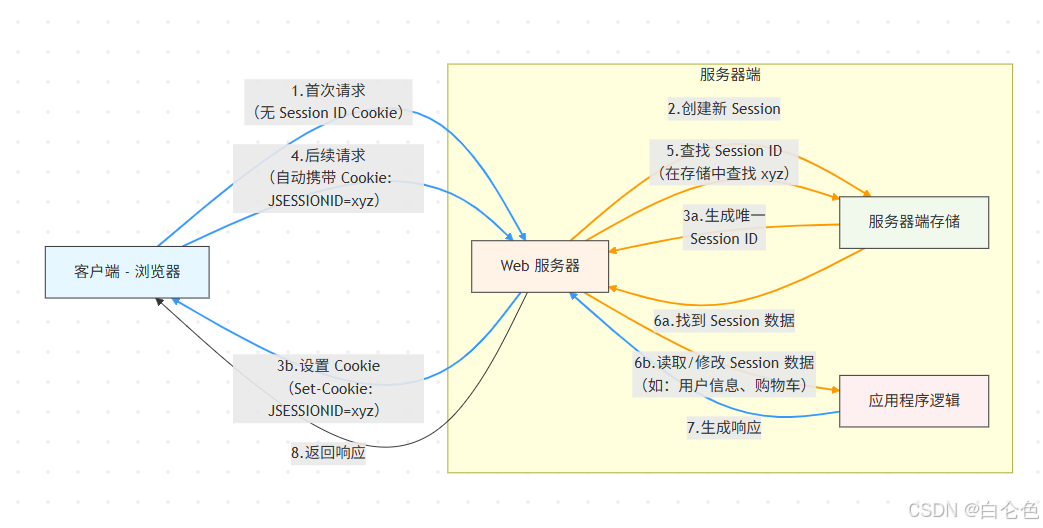
1.3 Session 的工作原理
Session的工作流程可以分为四个阶段:
📌 二、Session 的使用场景
- 用户登录状态保持
- 购物车信息存储
- 表单防重复提交
- 一次性验证码(如短信验证码)
- 权限控制与访问记录
📌 三、Java Web 中使用 Session(原生 Servlet)
3.1 获取或创建 Session
@WebServlet("/login")
public class LoginServlet extends HttpServlet {
@Override
protected void doPost(HttpServletRequest req, HttpServletResponse resp) {
String username = req.getParameter("username");
// 获取或创建 Session
HttpSession session = req.getSession();
// 存储用户信息
session.setAttribute("username", username);
session.setAttribute("loginTime", new Date());
resp.getWriter().println("登录成功,欢迎 " + username);
}
}
3.2 读取 Session 数据
@WebServlet("/profile")
public class ProfileServlet extends HttpServlet {
@Override
protected void doGet(HttpServletRequest req, HttpServletResponse resp) {
HttpSession session = req.getSession(false); // 不自动创建
if (session != null && session.getAttribute("username") != null) {
String username = (String) session.getAttribute("username");
Date loginTime = (Date) session.getAttribute("loginTime");
resp.getWriter().println("用户:" + username + ",登录时间:" + loginTime);
} else {
resp.setStatus(401);
resp.getWriter().println("请先登录");
}
}
}
3.3 注销 Session
@WebServlet("/logout")
public class LogoutServlet extends HttpServlet {
@Override
protected void doGet(HttpServletRequest req, HttpServletResponse resp) {
HttpSession session = req.getSession(false);
if (session != null) {
session.invalidate(); // 销毁 Session
}
resp.getWriter().println("已退出登录");
}
}
📌 四、Spring Boot 中使用 Session
4.1 启用 Session 支持(默认已开启)
@RestController
public class UserController {
@PostMapping("/login")
public String login(@RequestParam String username, HttpServletRequest request) {
HttpSession session = request.getSession();
session.setAttribute("username", username);
return "登录成功,用户:" + username;
}
@GetMapping("/info")
public String getUserInfo(HttpServletRequest request) {
HttpSession session = request.getSession(false);
if (session != null && session.getAttribute("username") != null) {
return "当前用户:" + session.getAttribute("username");
}
return "未登录";
}
@GetMapping("/logout")
public String logout(HttpServletRequest request) {
HttpSession session = request.getSession(false);
if (session != null) {
session.invalidate();
}
return "已退出";
}
}
4.2 使用 @SessionAttribute 注解(更优雅)
@Controller
@SessionAttributes("user")
public class SessionController {
@PostMapping("/login")
public String login(@RequestParam String username, Model model) {
model.addAttribute("user", new User(username));
return "redirect:/dashboard";
}
@GetMapping("/dashboard")
public String dashboard(@SessionAttribute("user") User user, Model model) {
model.addAttribute("user", user);
return "dashboard";
}
}
📌 五、Session 的注意事项与最佳实践
5.1 安全性问题
| Session 劫持 | 使用 HTTPS、设置 Secure 和 HttpOnly Cookie |
| Session 固定攻击 | 登录成功后调用 session.invalidate() 并创建新 Session |
| Session 泄露 | 敏感信息不要存入 Session(如密码) |
设置安全的 Cookie 属性:
// 在 Spring Boot 中配置
server.servlet.session.cookie.http–only=true
server.servlet.session.cookie.secure=true
server.servlet.session.cookie.same–site=strict
5.2 性能与可扩展性
- 内存占用:Session 默认存储在服务器内存中,大量用户会消耗内存。
- 集群部署问题:多台服务器时,Session 无法共享。
解决方案:
- 使用 Redis 存储 Session(推荐)
- 使用 Spring Session + Redis
<!– pom.xml –>
<dependency>
<groupId>org.springframework.session</groupId>
<artifactId>spring-session-data-redis</artifactId>
</dependency>
# application.yml
spring:
session:
store-type: redis
redis:
host: localhost
port: 6379
5.3 Session 过期时间
# application.yml
server:
servlet:
session:
timeout: 30m # 30分钟
或在代码中设置:
session.setMaxInactiveInterval(1800); // 秒
✅ 总结
| Session 本质 | 服务器端状态保持机制 |
| 核心原理 | 通过 Session ID 识别用户 |
| 优点 | 简单易用、数据安全(不暴露给客户端) |
| 缺点 | 占用服务器资源、集群部署需共享 |
| 最佳实践 | 使用 Redis 存储、设置合理过期时间、防止 Session 劫持 |
| 替代方案 | JWT(无状态认证) |
📚 推荐
- MDN – HTTP Cookies
- OWASP Session Management Cheat Sheet
- Spring Session 官方文档