在智慧园区、安防监控、地理信息可视化等场景中,电子围栏是核心的空间管控组件。传统的 2D 电子围栏缺乏空间立体感,而基于 Cesium 的 3D 动态立体墙,不仅能清晰划分地理边界,还能通过瀑布滚动高亮动效提升视觉警示性,让空间管控更直观、更具科技感。
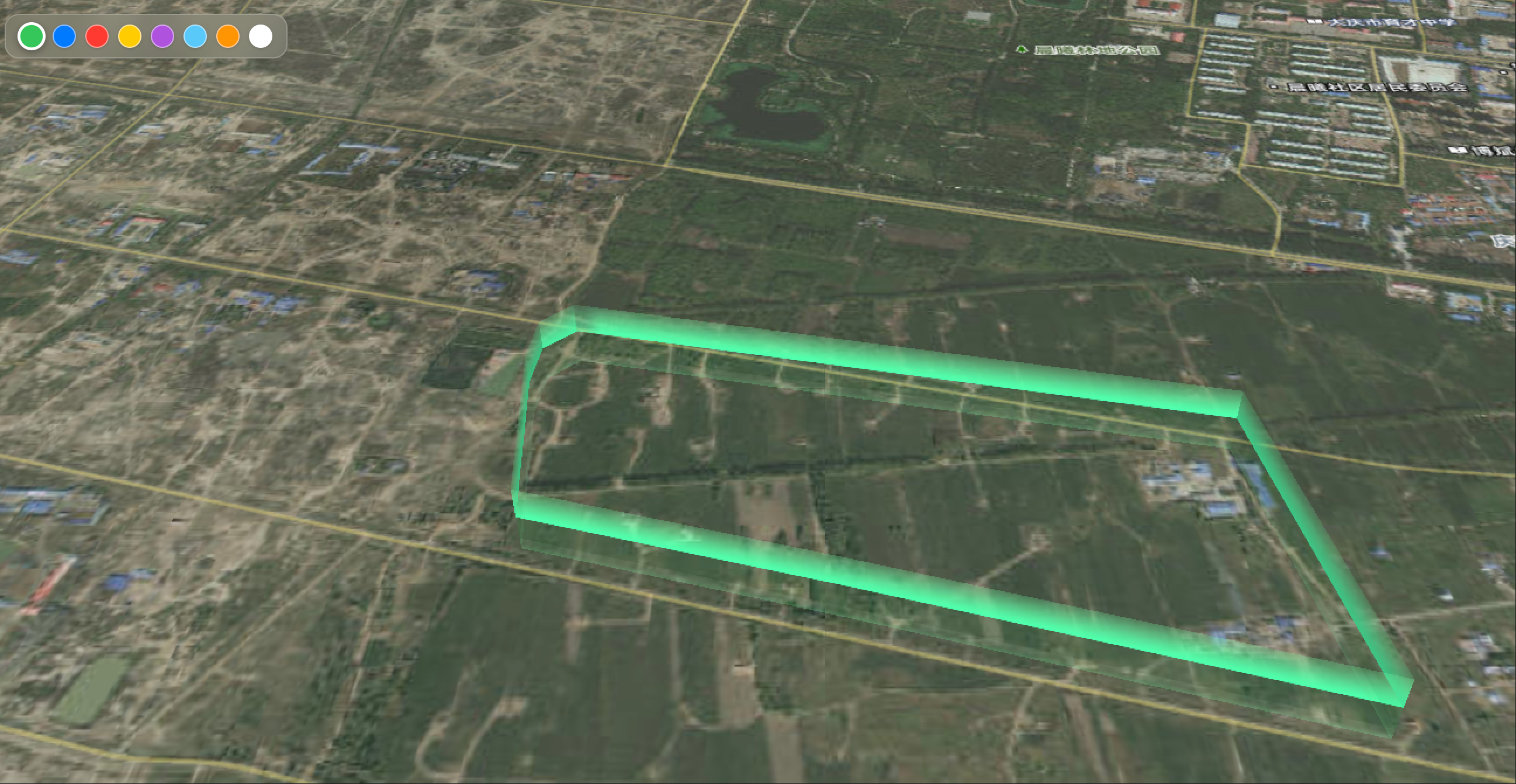
视频效果
本文将基于 Vue3 + Cesium,一步步实现 3D 动态立体墙电子围栏,核心包含立体墙体构建、瀑布滚动着色器动画、颜色切换交互、天地图底图融合等功能,打造一个可直接复用的可视化组件。
一、场景需求与核心技术栈
1. 核心需求
2. 核心技术栈
- 前端框架:Vue3(<script setup> 语法糖)
- 3D 可视化引擎:Cesium
- 底图服务:天地图 WMTS 地图服务
- 核心技术:Cesium Wall 实体、自定义 GLSL 着色器、材质属性动态更新
- 资源准备:墙体纹理图片(wall.png,用于实现瀑布滚动渐变效果)
二、前期准备(极简版)
三、核心代码实现(关键片段)
1. 页面核心模板
页面包含颜色选择器(毛玻璃风格)和 Cesium 3D 容器,结构简洁,兼顾交互性与可视化效果:
vue
<template>
<div class=\”app-container\”>
<!– 毛玻璃风格颜色选择器 –>
<div class=\”color-picker\”>
<div class=\”color-options\”>
<button
v-for=\”color in colorOptions\”
:key=\”color.name\”
:class=\”[\’color-btn\’, { active: selectedColor.name === color.name }]\”
:style=\”{ backgroundColor: color.hex }\”
@click=\”changeWallColor(color)\”
:title=\”color.name\”
></button>
</div>
</div>
<!– Cesium 3D容器(必须设置宽高) –>
<div ref=\”cesiumContainer\” class=\”cesium-container\”></div>
</div>
</template>
2. 核心配置抽离(可快速修改参数)
将墙体高度、动画时长、着色器参数集中配置,无需改动核心业务逻辑,即可快速调整效果:
javascript
运行
import { ref, onMounted, onUnmounted } from \’vue\’;
import { TD_MAP_KEY } from \’../config.js\’;
import wallImage from \’../assets/wall.png\’;
// 核心配置(集中管理,一键修改效果)
const WALL_CONFIG = {
// 墙体高度配置
minimumHeight: 0, // 墙体底部高度(贴地)
maximumHeight: 100, // 墙体顶部高度(立体高度)
// 材质动画配置
duration: 2500, // 瀑布滚动动画持续时间(毫秒)
// 着色器参数(控制滚动效果)
shader: {
count: 4.0, // 渐变带数量
freely: \’vertical\’, // 滚动方向:vertical(上下)/ standard(左右)
direction: \’-\’, // 滚动方向:+(正向)/ -(反向)
linewidth: 0.25, // 渐变带粗细(适配wall.png)
emissionIntensity: 0.4 // 泛光强度(避免颜色过亮刺眼)
},
// 墙体外观
opacity: 0.99, // 透明度(保留渐变层次感)
defaultColor: Cesium.Color.WHITE // 默认颜色(保留纹理渐变效果)
};
// 状态变量与常量定义
const cesiumContainer = ref(null);
let viewer = null; // Cesium Viewer实例
let currentOutlineEntity = null; // 动态墙实体
let dynamicWallMaterial = null; // 动态墙材质实例
// 电子围栏坐标数据(地理经纬度)
const wallCoordinates = [
[124.85494820221486, 46.39299841890931],
[124.85437527250163, 46.39261809453681],
[124.85428434562529, 46.39191211509367],
[124.85461466531423, 46.38942666842337],
[124.85990628674652, 46.38835990509117],
[124.86775724975378, 46.386695439234074],
[124.8668195015688, 46.391185293475424]
];
// 颜色选项(适配不同场景)
const colorOptions = [
{ name: \’绿色\’, hex: \’#34c759\’, cesiumColor: new Cesium.Color(0.2, 0.78, 0.35, 1.0) },
{ name: \’蓝色\’, hex: \’#007aff\’, cesiumColor: new Cesium.Color(0, 0.48, 1.0, 1.0) },
{ name: \’红色\’, hex: \’#ff3b30\’, cesiumColor: new Cesium.Color(1.0, 0.23, 0.19, 1.0) },
{ name: \’黄色\’, hex: \’#ffcc00\’, cesiumColor: new Cesium.Color(1.0, 0.8, 0, 1.0) },
{ name: \’紫色\’, hex: \’#af52de\’, cesiumColor: new Cesium.Color(0.69, 0.32, 0.87, 1.0) },
];
const selectedColor = ref(colorOptions[0]);
3. 自定义 GLSL 着色器(实现瀑布滚动动效)
这是实现瀑布滚动高亮的核心,通过自定义 GLSL 着色器代码,控制纹理的采样与动画时间关联,实现垂直滚动效果:
javascript
运行
/**
* 带方向的墙体着色器(核心:瀑布滚动动效实现)
* @param {Object} options 配置参数
* @returns {string} GLSL着色器代码
*/
function getDirectionWallShader(options) {
if (!options || !options.get) {
return \’\’;
}
// 提取配置参数(默认值兜底)
const count = options.count || WALL_CONFIG.shader.count;
const freely = options.freely || WALL_CONFIG.shader.freely;
const direction = options.direction || WALL_CONFIG.shader.direction;
const linewidth = options.linewidth || WALL_CONFIG.shader.linewidth;
const emissionIntensity = options.emissionIntensity || WALL_CONFIG.shader.emissionIntensity;
let materialShader = `
czm_material czm_getMaterial(czm_materialInput materialInput) {
czm_material material = czm_getDefaultMaterial(materialInput);
vec2 st = materialInput.st;
`;
if (freely === \’vertical\’) {
// 垂直瀑布滚动(核心逻辑:纹理坐标与时间关联,实现流动效果)
materialShader += `
// 安全处理时间,避免初始帧闪烁
float safeTime = clamp(time, 0.0, 1.0);
// 纹理采样:关联时间实现滚动,fract保证循环无间断
vec4 colorImage = texture(image, vec2(fract(st.s), fract(float(${count})*st.t*${linewidth} ${direction} safeTime)));
colorImage.a = max(colorImage.a, 0.1); // alpha兜底,避免透明闪烁
`;
} else {
// 水平滚动(可扩展)
materialShader += `
float safeTime = clamp(time, 0.0, 1.0);
vec4 colorImage = texture(image, vec2(fract(float(${count})*st.s*${linewidth} ${direction} safeTime), fract(st.t)));
colorImage.a = max(colorImage.a, 0.1);
`;
}
// 颜色混合与泛光效果(自定义颜色 + 纹理渐变)
materialShader += `
vec4 fragColor;
// 70%自定义颜色 + 30%纹理颜色,兼顾场景需求与渐变效果
vec3 finalColor = mix(colorImage.rgb, color.rgb, 0.7);
fragColor.rgb = finalColor;
fragColor.a = colorImage.a * ${WALL_CONFIG.opacity};
fragColor = czm_gammaCorrect(fragColor);
// 配置材质属性,实现高亮泛光
material.diffuse = finalColor;
material.alpha = fragColor.a;
material.emission = finalColor * ${emissionIntensity};
return material;
}
`;
return materialShader;
}
4. 动态墙材质属性类(适配 Cesium 生命周期)
自定义DynamicWallMaterialProperty类,实现 Cesium 材质的动态更新,关联动画时间与场景渲染,保证动效流畅:
javascript
运行
/**
* 动态墙材质属性类(适配Cesium材质生命周期)
* @param {Object} options 配置参数
*/
function DynamicWallMateria