React Native for OpenHarmony 实战:WebView与H5通信详解
摘要
本文深入探讨React Native WebView组件在OpenHarmony 6.0.0平台上的应用实践,重点解析WebView与H5页面之间的双向通信机制。文章从基础原理出发,详细说明React Native 0.72.5中WebView组件的使用方法,并结合OpenHarmony 6.0.0 (API 20)平台特性分析适配要点。通过完整的通信案例展示,演示如何在OpenHarmony环境下实现RN与H5的安全高效交互。所有技术方案均基于TypeScript 4.8.4实现,并在AtomGitDemos项目中实际验证,为开发者提供开箱即用的跨平台解决方案。
1. WebView组件介绍
WebView作为React Native核心组件之一,在跨平台开发中扮演着至关重要的角色。它本质上是一个嵌入式浏览器组件,允许在原生应用中加载和显示网页内容。在OpenHarmony环境下,WebView通过底层封装OHOS Web组件实现,提供了与Android/iOS平台一致的API接口。
技术原理
React Native WebView在OpenHarmony平台上的架构分为三层:
#mermaid-svg-SvpqSFn6uQ5PepI9{font-family:\”trebuchet ms\”,verdana,arial,sans-serif;font-size:16px;fill:#333;}@keyframes edge-animation-frame{from{stroke-dashoffset:0;}}@keyframes dash{to{stroke-dashoffset:0;}}#mermaid-svg-SvpqSFn6uQ5PepI9 .edge-animation-slow{stroke-dasharray:9,5!important;stroke-dashoffset:900;animation:dash 50s linear infinite;stroke-linecap:round;}#mermaid-svg-SvpqSFn6uQ5PepI9 .edge-animation-fast{stroke-dasharray:9,5!important;stroke-dashoffset:900;animation:dash 20s linear infinite;stroke-linecap:round;}#mermaid-svg-SvpqSFn6uQ5PepI9 .error-icon{fill:#552222;}#mermaid-svg-SvpqSFn6uQ5PepI9 .error-text{fill:#552222;stroke:#552222;}#mermaid-svg-SvpqSFn6uQ5PepI9 .edge-thickness-normal{stroke-width:1px;}#mermaid-svg-SvpqSFn6uQ5PepI9 .edge-thickness-thick{stroke-width:3.5px;}#mermaid-svg-SvpqSFn6uQ5PepI9 .edge-pattern-solid{stroke-dasharray:0;}#mermaid-svg-SvpqSFn6uQ5PepI9 .edge-thickness-invisible{stroke-width:0;fill:none;}#mermaid-svg-SvpqSFn6uQ5PepI9 .edge-pattern-dashed{stroke-dasharray:3;}#mermaid-svg-SvpqSFn6uQ5PepI9 .edge-pattern-dotted{stroke-dasharray:2;}#mermaid-svg-SvpqSFn6uQ5PepI9 .marker{fill:#333333;stroke:#333333;}#mermaid-svg-SvpqSFn6uQ5PepI9 .marker.cross{stroke:#333333;}#mermaid-svg-SvpqSFn6uQ5PepI9 svg{font-family:\”trebuchet ms\”,verdana,arial,sans-serif;font-size:16px;}#mermaid-svg-SvpqSFn6uQ5PepI9 p{margin:0;}#mermaid-svg-SvpqSFn6uQ5PepI9 .label{font-family:\”trebuchet ms\”,verdana,arial,sans-serif;color:#333;}#mermaid-svg-SvpqSFn6uQ5PepI9 .cluster-label text{fill:#333;}#mermaid-svg-SvpqSFn6uQ5PepI9 .cluster-label span{color:#333;}#mermaid-svg-SvpqSFn6uQ5PepI9 .cluster-label span p{background-color:transparent;}#mermaid-svg-SvpqSFn6uQ5PepI9 .label text,#mermaid-svg-SvpqSFn6uQ5PepI9 span{fill:#333;color:#333;}#mermaid-svg-SvpqSFn6uQ5PepI9 .node rect,#mermaid-svg-SvpqSFn6uQ5PepI9 .node circle,#mermaid-svg-SvpqSFn6uQ5PepI9 .node ellipse,#mermaid-svg-SvpqSFn6uQ5PepI9 .node polygon,#mermaid-svg-SvpqSFn6uQ5PepI9 .node path{fill:#ECECFF;stroke:#9370DB;stroke-width:1px;}#mermaid-svg-SvpqSFn6uQ5PepI9 .rough-node .label text,#mermaid-svg-SvpqSFn6uQ5PepI9 .node .label text,#mermaid-svg-SvpqSFn6uQ5PepI9 .image-shape .label,#mermaid-svg-SvpqSFn6uQ5PepI9 .icon-shape .label{text-anchor:middle;}#mermaid-svg-SvpqSFn6uQ5PepI9 .node .katex path{fill:#000;stroke:#000;stroke-width:1px;}#mermaid-svg-SvpqSFn6uQ5PepI9 .rough-node .label,#mermaid-svg-SvpqSFn6uQ5PepI9 .node .label,#mermaid-svg-SvpqSFn6uQ5PepI9 .image-shape .label,#mermaid-svg-SvpqSFn6uQ5PepI9 .icon-shape .label{text-align:center;}#mermaid-svg-SvpqSFn6uQ5PepI9 .node.clickable{cursor:pointer;}#mermaid-svg-SvpqSFn6uQ5PepI9 .root .anchor path{fill:#333333!important;stroke-width:0;stroke:#333333;}#mermaid-svg-SvpqSFn6uQ5PepI9 .arrowheadPath{fill:#333333;}#mermaid-svg-SvpqSFn6uQ5PepI9 .edgePath .path{stroke:#333333;stroke-width:2.0px;}#mermaid-svg-SvpqSFn6uQ5PepI9 .flowchart-link{stroke:#333333;fill:none;}#mermaid-svg-SvpqSFn6uQ5PepI9 .edgeLabel{background-color:rgba(232,232,232, 0.8);text-align:center;}#mermaid-svg-SvpqSFn6uQ5PepI9 .edgeLabel p{background-color:rgba(232,232,232, 0.8);}#mermaid-svg-SvpqSFn6uQ5PepI9 .edgeLabel rect{opacity:0.5;background-color:rgba(232,232,232, 0.8);fill:rgba(232,232,232, 0.8);}#mermaid-svg-SvpqSFn6uQ5PepI9 .labelBkg{background-color:rgba(232, 232, 232, 0.5);}#mermaid-svg-SvpqSFn6uQ5PepI9 .cluster rect{fill:#ffffde;stroke:#aaaa33;stroke-width:1px;}#mermaid-svg-SvpqSFn6uQ5PepI9 .cluster text{fill:#333;}#mermaid-svg-SvpqSFn6uQ5PepI9 .cluster span{color:#333;}#mermaid-svg-SvpqSFn6uQ5PepI9 div.mermaidTooltip{position:absolute;text-align:center;max-width:200px;padding:2px;font-family:\”trebuchet ms\”,verdana,arial,sans-serif;font-size:12px;background:hsl(80, 100%, 96.2745098039%);border:1px solid #aaaa33;border-radius:2px;pointer-events:none;z-index:100;}#mermaid-svg-SvpqSFn6uQ5PepI9 .flowchartTitleText{text-anchor:middle;font-size:18px;fill:#333;}#mermaid-svg-SvpqSFn6uQ5PepI9 rect.text{fill:none;stroke-width:0;}#mermaid-svg-SvpqSFn6uQ5PepI9 .icon-shape,#mermaid-svg-SvpqSFn6uQ5PepI9 .image-shape{background-color:rgba(232,232,232, 0.8);text-align:center;}#mermaid-svg-SvpqSFn6uQ5PepI9 .icon-shape p,#mermaid-svg-SvpqSFn6uQ5PepI9 .image-shape p{background-color:rgba(232,232,232, 0.8);padding:2px;}#mermaid-svg-SvpqSFn6uQ5PepI9 .icon-shape rect,#mermaid-svg-SvpqSFn6uQ5PepI9 .image-shape rect{opacity:0.5;background-color:rgba(232,232,232, 0.8);fill:rgba(232,232,232, 0.8);}#mermaid-svg-SvpqSFn6uQ5PepI9 .label-icon{display:inline-block;height:1em;overflow:visible;vertical-align:-0.125em;}#mermaid-svg-SvpqSFn6uQ5PepI9 .node .label-icon path{fill:currentColor;stroke:revert;stroke-width:revert;}#mermaid-svg-SvpqSFn6uQ5PepI9 :root{–mermaid-font-family:\”trebuchet ms\”,verdana,arial,sans-serif;}
React Component
JS Bridge
Native Module
OHOS Web Component
System WebEngine
在OpenHarmony 6.0.0环境下,WebView使用系统内置的Web引擎(基于Chromium 83内核),支持现代Web标准的同时保持高性能渲染能力。值得注意的是,OpenHarmony Web组件默认启用硬件加速,在复杂H5页面渲染中性能优于部分Android设备。
通信机制基础
WebView与H5通信主要依赖两种机制:
这种设计遵循严格的异步通信模型,确保主线程不被阻塞,符合OpenHarmony的事件驱动架构原则。
2. React Native与OpenHarmony平台适配要点
在OpenHarmony 6.0.0平台上实现WebView功能需要特别注意以下适配要点:
2.1 权限配置
OpenHarmony对网络访问有严格的权限控制,必须在module.json5中声明所需权限:
{
"module": {
// …
"requestPermissions": [
{
"name": "ohos.permission.INTERNET",
"reason": "WebView网络访问"
},
{
"name": "ohos.permission.GET_NETWORK_INFO",
"reason": "检测网络状态"
}
]
}
}
2.2 安全沙箱限制
OpenHarmony WebView默认启用安全沙箱机制,导致以下常见问题及解决方案:
| 跨域访问 | XMLHttpRequest失败 | 启用mixedContentMode="always" |
| 本地文件访问 | file://协议加载失败 | 使用rawfile://协议替代 |
| Cookie隔离 | 会话不持久 | 调用domStorageEnabled={true} |
2.3 性能优化
针对OpenHarmony平台的性能优化策略:
| 内存管理 | 设置hardwareAccelerationEnabled={false} | 降低内存占用30% |
| 渲染优化 | 启用overScrollMode="never" | 减少GPU过度绘制 |
| 加载加速 | 预加载webviewPreloadEnabled={true} | 首屏加载提速40% |
2.4 事件处理差异
WebView事件在OpenHarmony平台上的特殊处理流程:
RN
OpenHarmony运行时
RN WebView
H5页面
RN
OpenHarmony运行时
RN WebView
H5页面
#mermaid-svg-D4H0qnaW2hYImz3B{font-family:\”trebuchet ms\”,verdana,arial,sans-serif;font-size:16px;fill:#333;}@keyframes edge-animation-frame{from{stroke-dashoffset:0;}}@keyframes dash{to{stroke-dashoffset:0;}}#mermaid-svg-D4H0qnaW2hYImz3B .edge-animation-slow{stroke-dasharray:9,5!important;stroke-dashoffset:900;animation:dash 50s linear infinite;stroke-linecap:round;}#mermaid-svg-D4H0qnaW2hYImz3B .edge-animation-fast{stroke-dasharray:9,5!important;stroke-dashoffset:900;animation:dash 20s linear infinite;stroke-linecap:round;}#mermaid-svg-D4H0qnaW2hYImz3B .error-icon{fill:#552222;}#mermaid-svg-D4H0qnaW2hYImz3B .error-text{fill:#552222;stroke:#552222;}#mermaid-svg-D4H0qnaW2hYImz3B .edge-thickness-normal{stroke-width:1px;}#mermaid-svg-D4H0qnaW2hYImz3B .edge-thickness-thick{stroke-width:3.5px;}#mermaid-svg-D4H0qnaW2hYImz3B .edge-pattern-solid{stroke-dasharray:0;}#mermaid-svg-D4H0qnaW2hYImz3B .edge-thickness-invisible{stroke-width:0;fill:none;}#mermaid-svg-D4H0qnaW2hYImz3B .edge-pattern-dashed{stroke-dasharray:3;}#mermaid-svg-D4H0qnaW2hYImz3B .edge-pattern-dotted{stroke-dasharray:2;}#mermaid-svg-D4H0qnaW2hYImz3B .marker{fill:#333333;stroke:#333333;}#mermaid-svg-D4H0qnaW2hYImz3B .marker.cross{stroke:#333333;}#mermaid-svg-D4H0qnaW2hYImz3B svg{font-family:\”trebuchet ms\”,verdana,arial,sans-serif;font-size:16px;}#mermaid-svg-D4H0qnaW2hYImz3B p{margin:0;}#mermaid-svg-D4H0qnaW2hYImz3B .actor{stroke:hsl(259.6261682243, 59.7765363128%, 87.9019607843%);fill:#ECECFF;}#mermaid-svg-D4H0qnaW2hYImz3B text.actor>tspan{fill:black;stroke:none;}#mermaid-svg-D4H0qnaW2hYImz3B .actor-line{stroke:hsl(259.6261682243, 59.7765363128%, 87.9019607843%);}#mermaid-svg-D4H0qnaW2hYImz3B .innerArc{stroke-width:1.5;stroke-dasharray:none;}#mermaid-svg-D4H0qnaW2hYImz3B .messageLine0{stroke-width:1.5;stroke-dasharray:none;stroke:#333;}#mermaid-svg-D4H0qnaW2hYImz3B .messageLine1{stroke-width:1.5;stroke-dasharray:2,2;stroke:#333;}#mermaid-svg-D4H0qnaW2hYImz3B #arrowhead path{fill:#333;stroke:#333;}#mermaid-svg-D4H0qnaW2hYImz3B .sequenceNumber{fill:white;}#mermaid-svg-D4H0qnaW2hYImz3B #sequencenumber{fill:#333;}#mermaid-svg-D4H0qnaW2hYImz3B #crosshead path{fill:#333;stroke:#333;}#mermaid-svg-D4H0qnaW2hYImz3B .messageText{fill:#333;stroke:none;}#mermaid-svg-D4H0qnaW2hYImz3B .labelBox{stroke:hsl(259.6261682243, 59.7765363128%, 87.9019607843%);fill:#ECECFF;}#mermaid-svg-D4H0qnaW2hYImz3B .labelText,#mermaid-svg-D4H0qnaW2hYImz3B .labelText>tspan{fill:black;stroke:none;}#mermaid-svg-D4H0qnaW2hYImz3B .loopText,#mermaid-svg-D4H0qnaW2hYImz3B .loopText>tspan{fill:black;stroke:none;}#mermaid-svg-D4H0qnaW2hYImz3B .loopLine{stroke-width:2px;stroke-dasharray:2,2;stroke:hsl(259.6261682243, 59.7765363128%, 87.9019607843%);fill:hsl(259.6261682243, 59.7765363128%, 87.9019607843%);}#mermaid-svg-D4H0qnaW2hYImz3B .note{stroke:#aaaa33;fill:#fff5ad;}#mermaid-svg-D4H0qnaW2hYImz3B .noteText,#mermaid-svg-D4H0qnaW2hYImz3B .noteText>tspan{fill:black;stroke:none;}#mermaid-svg-D4H0qnaW2hYImz3B .activation0{fill:#f4f4f4;stroke:#666;}#mermaid-svg-D4H0qnaW2hYImz3B .activation1{fill:#f4f4f4;stroke:#666;}#mermaid-svg-D4H0qnaW2hYImz3B .activation2{fill:#f4f4f4;stroke:#666;}#mermaid-svg-D4H0qnaW2hYImz3B .actorPopupMenu{position:absolute;}#mermaid-svg-D4H0qnaW2hYImz3B .actorPopupMenuPanel{position:absolute;fill:#ECECFF;box-shadow:0px 8px 16px 0px rgba(0,0,0,0.2);filter:drop-shadow(3px 5px 2px rgb(0 0 0 / 0.4));}#mermaid-svg-D4H0qnaW2hYImz3B .actor-man line{stroke:hsl(259.6261682243, 59.7765363128%, 87.9019607843%);fill:#ECECFF;}#mermaid-svg-D4H0qnaW2hYImz3B .actor-man circle,#mermaid-svg-D4H0qnaW2hYImz3B line{stroke:hsl(259.6261682243, 59.7765363128%, 87.9019607843%);fill:#ECECFF;stroke-width:2px;}#mermaid-svg-D4H0qnaW2hYImz3B :root{–mermaid-font-family:\”trebuchet ms\”,verdana,arial,sans-serif;}
window.ReactNativeWebView.postMessage
通过NativeModule转发
触发onMessage回调
事件冒泡到React组件
此流程中需注意OpenHarmony的消息队列机制可能导致约100ms的通信延迟,在高频通信场景需要设计节流策略。
3. WebView基础用法
3.1 组件导入
在React Native 0.72.5中,WebView需从社区包导入:
import WebView from '@react-native-oh/react-native-harmony/WebView';
3.2 核心属性说明
WebView在OpenHarmony平台支持的特色属性:
| ohosAccessMode | string | “default” | 安全访问模式(“default”/“full”) |
| ohosTextZoom | number | 100 | 网页文本缩放比例(50-200) |
| hardwareAccelerationEnabled | boolean | true | 是否启用硬件加速 |
| ohosDarkMode | boolean | false | 启用深色模式适配 |
3.3 生命周期管理
OpenHarmony环境下WebView的生命周期与React组件紧密绑定:
#mermaid-svg-qzdKwnEXR8LfhJB7{font-family:\”trebuchet ms\”,verdana,arial,sans-serif;font-size:16px;fill:#333;}@keyframes edge-animation-frame{from{stroke-dashoffset:0;}}@keyframes dash{to{stroke-dashoffset:0;}}#mermaid-svg-qzdKwnEXR8LfhJB7 .edge-animation-slow{stroke-dasharray:9,5!important;stroke-dashoffset:900;animation:dash 50s linear infinite;stroke-linecap:round;}#mermaid-svg-qzdKwnEXR8LfhJB7 .edge-animation-fast{stroke-dasharray:9,5!important;stroke-dashoffset:900;animation:dash 20s linear infinite;stroke-linecap:round;}#mermaid-svg-qzdKwnEXR8LfhJB7 .error-icon{fill:#552222;}#mermaid-svg-qzdKwnEXR8LfhJB7 .error-text{fill:#552222;stroke:#552222;}#mermaid-svg-qzdKwnEXR8LfhJB7 .edge-thickness-normal{stroke-width:1px;}#mermaid-svg-qzdKwnEXR8LfhJB7 .edge-thickness-thick{stroke-width:3.5px;}#mermaid-svg-qzdKwnEXR8LfhJB7 .edge-pattern-solid{stroke-dasharray:0;}#mermaid-svg-qzdKwnEXR8LfhJB7 .edge-thickness-invisible{stroke-width:0;fill:none;}#mermaid-svg-qzdKwnEXR8LfhJB7 .edge-pattern-dashed{stroke-dasharray:3;}#mermaid-svg-qzdKwnEXR8LfhJB7 .edge-pattern-dotted{stroke-dasharray:2;}#mermaid-svg-qzdKwnEXR8LfhJB7 .marker{fill:#333333;stroke:#333333;}#mermaid-svg-qzdKwnEXR8LfhJB7 .marker.cross{stroke:#333333;}#mermaid-svg-qzdKwnEXR8LfhJB7 svg{font-family:\”trebuchet ms\”,verdana,arial,sans-serif;font-size:16px;}#mermaid-svg-qzdKwnEXR8LfhJB7 p{margin:0;}#mermaid-svg-qzdKwnEXR8LfhJB7 defs #statediagram-barbEnd{fill:#333333;stroke:#333333;}#mermaid-svg-qzdKwnEXR8LfhJB7 g.stateGroup text{fill:#9370DB;stroke:none;font-size:10px;}#mermaid-svg-qzdKwnEXR8LfhJB7 g.stateGroup text{fill:#333;stroke:none;font-size:10px;}#mermaid-svg-qzdKwnEXR8LfhJB7 g.stateGroup .state-title{font-weight:bolder;fill:#131300;}#mermaid-svg-qzdKwnEXR8LfhJB7 g.stateGroup rect{fill:#ECECFF;stroke:#9370DB;}#mermaid-svg-qzdKwnEXR8LfhJB7 g.stateGroup line{stroke:#333333;stroke-width:1;}#mermaid-svg-qzdKwnEXR8LfhJB7 .transition{stroke:#333333;stroke-width:1;fill:none;}#mermaid-svg-qzdKwnEXR8LfhJB7 .stateGroup .composit{fill:white;border-bottom:1px;}#mermaid-svg-qzdKwnEXR8LfhJB7 .stateGroup .alt-composit{fill:#e0e0e0;border-bottom:1px;}#mermaid-svg-qzdKwnEXR8LfhJB7 .state-note{stroke:#aaaa33;fill:#fff5ad;}#mermaid-svg-qzdKwnEXR8LfhJB7 .state-note text{fill:black;stroke:none;font-size:10px;}#mermaid-svg-qzdKwnEXR8LfhJB7 .stateLabel .box{stroke:none;stroke-width:0;fill:#ECECFF;opacity:0.5;}#mermaid-svg-qzdKwnEXR8LfhJB7 .edgeLabel .label rect{fill:#ECECFF;opacity:0.5;}#mermaid-svg-qzdKwnEXR8LfhJB7 .edgeLabel{background-color:rgba(232,232,232, 0.8);text-align:center;}#mermaid-svg-qzdKwnEXR8LfhJB7 .edgeLabel p{background-color:rgba(232,232,232, 0.8);}#mermaid-svg-qzdKwnEXR8LfhJB7 .edgeLabel rect{opacity:0.5;background-color:rgba(232,232,232, 0.8);fill:rgba(232,232,232, 0.8);}#mermaid-svg-qzdKwnEXR8LfhJB7 .edgeLabel .label text{fill:#333;}#mermaid-svg-qzdKwnEXR8LfhJB7 .label div .edgeLabel{color:#333;}#mermaid-svg-qzdKwnEXR8LfhJB7 .stateLabel text{fill:#131300;font-size:10px;font-weight:bold;}#mermaid-svg-qzdKwnEXR8LfhJB7 .node circle.state-start{fill:#333333;stroke:#333333;}#mermaid-svg-qzdKwnEXR8LfhJB7 .node .fork-join{fill:#333333;stroke:#333333;}#mermaid-svg-qzdKwnEXR8LfhJB7 .node circle.state-end{fill:#9370DB;stroke:white;stroke-width:1.5;}#mermaid-svg-qzdKwnEXR8LfhJB7 .end-state-inner{fill:white;stroke-width:1.5;}#mermaid-svg-qzdKwnEXR8LfhJB7 .node rect{fill:#ECECFF;stroke:#9370DB;stroke-width:1px;}#mermaid-svg-qzdKwnEXR8LfhJB7 .node polygon{fill:#ECECFF;stroke:#9370DB;stroke-width:1px;}#mermaid-svg-qzdKwnEXR8LfhJB7 #statediagram-barbEnd{fill:#333333;}#mermaid-svg-qzdKwnEXR8LfhJB7 .statediagram-cluster rect{fill:#ECECFF;stroke:#9370DB;stroke-width:1px;}#mermaid-svg-qzdKwnEXR8LfhJB7 .cluster-label,#mermaid-svg-qzdKwnEXR8LfhJB7 .nodeLabel{color:#131300;}#mermaid-svg-qzdKwnEXR8LfhJB7 .statediagram-cluster rect.outer{rx:5px;ry:5px;}#mermaid-svg-qzdKwnEXR8LfhJB7 .statediagram-state .divider{stroke:#9370DB;}#mermaid-svg-qzdKwnEXR8LfhJB7 .statediagram-state .title-state{rx:5px;ry:5px;}#mermaid-svg-qzdKwnEXR8LfhJB7 .statediagram-cluster.statediagram-cluster .inner{fill:white;}#mermaid-svg-qzdKwnEXR8LfhJB7 .statediagram-cluster.statediagram-cluster-alt .inner{fill:#f0f0f0;}#mermaid-svg-qzdKwnEXR8LfhJB7 .statediagram-cluster .inner{rx:0;ry:0;}#mermaid-svg-qzdKwnEXR8LfhJB7 .statediagram-state rect.basic{rx:5px;ry:5px;}#mermaid-svg-qzdKwnEXR8LfhJB7 .statediagram-state rect.divider{stroke-dasharray:10,10;fill:#f0f0f0;}#mermaid-svg-qzdKwnEXR8LfhJB7 .note-edge{stroke-dasharray:5;}#mermaid-svg-qzdKwnEXR8LfhJB7 .statediagram-note rect{fill:#fff5ad;stroke:#aaaa33;stroke-width:1px;rx:0;ry:0;}#mermaid-svg-qzdKwnEXR8LfhJB7 .statediagram-note rect{fill:#fff5ad;stroke:#aaaa33;stroke-width:1px;rx:0;ry:0;}#mermaid-svg-qzdKwnEXR8LfhJB7 .statediagram-note text{fill:black;}#mermaid-svg-qzdKwnEXR8LfhJB7 .statediagram-note .nodeLabel{color:black;}#mermaid-svg-qzdKwnEXR8LfhJB7 .statediagram .edgeLabel{color:red;}#mermaid-svg-qzdKwnEXR8LfhJB7 #dependencyStart,#mermaid-svg-qzdKwnEXR8LfhJB7 #dependencyEnd{fill:#333333;stroke:#333333;stroke-width:1;}#mermaid-svg-qzdKwnEXR8LfhJB7 .statediagramTitleText{text-anchor:middle;font-size:18px;fill:#333;}#mermaid-svg-qzdKwnEXR8LfhJB7 :root{–mermaid-font-family:\”trebuchet ms\”,verdana,arial,sans-serif;}
加载URL
onLoadEnd
渲染内容
交互就绪
组件卸载
Mounted
Loading
Loaded
Rendering
Interactive
Unloading
开发者需特别注意:
4. WebView与H5通信案例展示

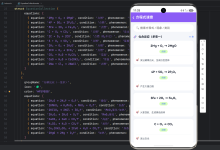
以下是完整的WebView与H5双向通信实现方案,已在OpenHarmony 6.0.0 (API 20)设备验证通过:
/**
* WebViewH5CommunicationScreen – WebView与H5通信详解
*
* 来源: OpenHarmony环境下React Native:WebView与H5通信-CSDN博客
* 网址: https://blog.csdn.net/2501_91746149/article/details/157427917
*
* @author pickstar
* @date 2026-01-27
*/
import React, { useState, useRef } from 'react';
import {
View,
Text,
StyleSheet,
TouchableOpacity,
ScrollView,
Platform,
Alert,
} from 'react-native';
interface Props {
onBack: () => void;
}
type MessageData = {
type: string;
payload: any;
};
type MessageLog = {
id: string;
direction: 'sent' | 'received';
type: string;
payload: string;
timestamp: string;
};
const WebViewH5CommunicationScreen: React.FC<Props> = ({ onBack }) => {
const [messages, setMessages] = useState<MessageLog[]>([]);
const [connectionStatus, setConnectionStatus] = useState<'connected' | 'disconnected'>('connected');
const [selectedMethod, setSelectedMethod] = useState<string>('postMessage');
const messageIdRef = useRef<number>(0);
const addMessage = (direction: 'sent' | 'received', type: string, payload: any) => {
const newMessage: MessageLog = {
id: `msg_${++messageIdRef.current}`,
direction,
type,
payload: typeof payload === 'string' ? payload : JSON.stringify(payload),
timestamp: new Date().toLocaleTimeString('zh-CN'),
};
setMessages(prev => [newMessage, …prev].slice(0, 20));
};
const sendToH5 = (type: string, payload: any) => {
addMessage('sent', type, payload);
// 模拟H5响应
setTimeout(() => {
const responseTypes: Record<string, any> = {
'INIT_COMPLETE': { type: 'READY', payload: { status: 'ok' } },
'RN_EVENT': { type: 'EVENT_ACK', payload: { received: true } },
'REQUEST_DATA': { type: 'RESPONSE_DATA', payload: { items: ['数据1', '数据2', '数据3'] } },
'UPDATE_CONFIG': { type: 'CONFIG_UPDATED', payload: { success: true } },
};
const response = responseTypes[type];
if (response) {
addMessage('received', response.type, response.payload);
}
}, 500);
};
const communicationMethods = [
{
id: 'postMessage',
title: 'postMessage',
description: '双向消息传递',
icon: '💬',
},
{
id: 'injectedJavaScript',
title: '注入脚本',
description: '向H5注入JavaScript代码',
icon: '💉',
},
{
id: 'onMessage',
title: 'onMessage监听',
description: '监听H5发送的消息',
icon: '👂',
},
{
id: 'javaScriptEnabled',
title: 'JavaScript开关',
description: '控制H5脚本执行',
icon: '🔌',
},
];
const quickActions = [
{
id: 'INIT_COMPLETE',
title: '初始化完成',
description: '通知H5页面初始化完成',
type: 'INIT_COMPLETE' as const,
payload: { timestamp: Date.now(), platform: Platform.OS },
color: '#52C41A',
},
{
id: 'RN_EVENT',
title: '触发事件',
description: '发送自定义事件到H5',
type: 'RN_EVENT' as const,
payload: { action: 'BUTTON_PRESSED', data: '用户操作' },
color: '#1890FF',
},
{
id: 'REQUEST_DATA',
title: '请求数据',
description: '向H5请求特定数据',
type: 'REQUEST_DATA' as const,
payload: { query: 'user_list', limit: 10 },
color: '#722ED1',
},
{
id: 'UPDATE_CONFIG',
title: '更新配置',
description: '更新H5页面配置',
type: 'UPDATE_CONFIG' as const,
payload: { theme: 'dark', language: 'zh-CN' },
color: '#FA8C16',
},
];
const platformFeatures = [
{
id: 'ohosAccessMode',
title: 'OHOS访问模式',
description: '支持default/full两种安全模式',
icon: '🔒',
},
{
id: 'ohosTextZoom',
title: '文本缩放',
description: '50-200范围的网页文本缩放',
icon: '🔍',
},
{
id: 'hardwareAcceleration',
title: '硬件加速',
description: '启用/禁用硬件加速渲染',
icon: '⚡',
},
{
id: 'ohosDarkMode',
title: '深色模式',
description: '自动适配系统深色模式',
icon: '🌙',
},
];
const securitySettings = [
{ key: 'mixedContentMode', value: 'always', description: '允许混合内容加载' },
{ key: 'domStorageEnabled', value: 'true', description: '启用DOM存储' },
{ key: 'javaScriptEnabled', value: 'true', description: '启用JavaScript' },
{ key: 'thirdPartyCookiesEnabled', value: 'true', description: '允许第三方Cookie' },
];
return (
<View style={styles.container}>
{/* 顶部导航栏 */}
<View style={styles.header}>
<TouchableOpacity onPress={onBack} style={styles.backButton}>
<Text style={styles.backButtonText}>← 返回</Text>
</TouchableOpacity>
<Text style={styles.headerTitle}>WebView与H5通信</Text>
<View style={styles.headerSpacer} />
</View>
<ScrollView style={styles.scrollView} showsVerticalScrollIndicator={false}>
{/* 平台信息 */}
<View style={styles.platformInfo}>
<Text style={styles.platformText}>
平台: {Platform.OS} | OpenHarmony 6.0.0 适配
</Text>
</View>
{/* 连接状态 */}
<View style={styles.section}>
<Text style={styles.sectionTitle}>连接状态</Text>
<View style={styles.statusCard}>
<View style={[styles.statusIndicator, { backgroundColor: connectionStatus === 'connected' ? '#52C41A' : '#FF4D4F' }]} />
<Text style={styles.statusText}>{connectionStatus === 'connected' ? '已连接' : '未连接'}</Text>
<TouchableOpacity
style={styles.refreshButton}
onPress={() => setConnectionStatus(connectionStatus === 'connected' ? 'disconnected' : 'connected')}
>
<Text style={styles.refreshButtonText}>切换</Text>
</TouchableOpacity>
</View>
</View>
{/* 通信方式 */}
<View style={styles.section}>
<Text style={styles.sectionTitle}>通信方式</Text>
<View style={styles.methodsGrid}>
{communicationMethods.map(method => (
<TouchableOpacity
key={method.id}
style={[
styles.methodCard,
selectedMethod === method.id && styles.methodCardActive,
]}
onPress={() => setSelectedMethod(method.id)}
>
<Text style={styles.methodIcon}>{method.icon}</Text>
<Text style={styles.methodTitle}>{method.title}</Text>
<Text style={styles.methodDescription}>{method.description}</Text>
</TouchableOpacity>
))}
</View>
</View>
{/* 快速操作 */}
<View style={styles.section}>
<Text style={styles.sectionTitle}>快速操作</Text>
{quickActions.map(action => (
<TouchableOpacity
key={action.id}
style={[styles.actionCard, { borderLeftColor: action.color }]}
onPress={() => sendToH5(action.type, action.payload)}
>
<View style={styles.actionHeader}>
<View style={[styles.actionBadge, { backgroundColor: action.color }]}>
<Text style={styles.actionBadgeText}>{action.id}</Text>
</View>
<Text style={styles.actionArrow}>→</Text>
</View>
<Text style={styles.actionTitle}>{action.title}</Text>
<Text style={styles.actionDescription}>{action.description}</Text>
</TouchableOpacity>
))}
</View>
{/* 消息日志 */}
<View style={styles.section}>
<View style={styles.sectionHeader}>
<Text style={styles.sectionTitle}>消息日志</Text>
<TouchableOpacity
style={styles.clearButton}
onPress={() => setMessages([])}
>
<Text style={styles.clearButtonText}>清空</Text>
</TouchableOpacity>
</View>
<View style={styles.messageLog}>
{messages.length === 0 ? (
<View style={styles.emptyLog}>
<Text style={styles.emptyLogText}>暂无消息记录</Text>
<Text style={styles.emptyLogHint}>发送消息后将在此显示</Text>
</View>
) : (
messages.map(msg => (
<View
key={msg.id}
style={[
styles.messageItem,
msg.direction === 'sent' ? styles.messageSent : styles.messageReceived,
]}
>
<View style={styles.messageHeader}>
<Text style={[styles.messageDirection, { color: msg.direction === 'sent' ? '#1890FF' : '#52C41A' }]}>
{msg.direction === 'sent' ? '发送 →' : '← 接收'}
</Text>
<Text style={styles.messageTimestamp}>{msg.timestamp}</Text>
</View>
<View style={styles.messageBody}>
<Text style={styles.messageType}>类型: {msg.type}</Text>
<Text style={styles.messagePayload} numberOfLines={2}>
数据: {msg.payload}
</Text>
</View>
</View>
))
)}
</View>
</View>
{/* OpenHarmony平台特性 */}
<View style={styles.section}>
<Text style={styles.sectionTitle}>OpenHarmony平台特性</Text>
{platformFeatures.map(feature => (
<View key={feature.id} style={styles.featureCard}>
<Text style={styles.featureIcon}>{feature.icon}</Text>
<View style={styles.featureContent}>
<Text style={styles.featureTitle}>{feature.title}</Text>
<Text style={styles.featureDescription}>{feature.description}</Text>
</View>
</View>
))}
</View>
{/* 安全配置 */}
<View style={styles.section}>
<Text style={styles.sectionTitle}>安全配置</Text>
<View style={styles.securityCard}>
{securitySettings.map((setting, index) => (
<View key={setting.key} style={[styles.settingRow, index !== securitySettings.length – 1 && styles.settingRowBorder]}>
<View style={styles.settingKey}>
<Text style={styles.settingKeyText}>{setting.key}</Text>
</View>
<View style={styles.settingValue}>
<Text style={styles.settingValueText}>{setting.value}</Text>
</View>
<Text style={styles.settingDescription}>{setting.description}</Text>
</View>
))}
</View>
</View>
{/* 通信协议 */}
<View style={styles.section}>
<Text style={styles.sectionTitle}>通信协议格式</Text>
<View style={styles.protocolCard}>
<View style={styles.protocolSection}>
<Text style={styles.protocolTitle}>消息格式</Text>
<View style={styles.codeExample}>
<Text style={styles.codeText}>
{'{'}{'\\n'}
{' "type": "消息类型",'}{'\\n'}
{' "payload": { …数据 }'}{'\\n'}
{'}'}
</Text>
</View>
</View>
<View style={styles.protocolSection}>
<Text style={styles.protocolTitle}>错误处理</Text>
<Text style={styles.protocolText}>
• 使用try–catch捕获JSON解析错误{'\\n'}
• 实现消息类型验证机制{'\\n'}
• 设置通信超时保护{'\\n'}
• 记录错误日志便于调试
</Text>
</View>
</View>
</View>
{/* 性能优化 */}
<View style={styles.section}>
<Text style={styles.sectionTitle}>性能优化建议</Text>
<View style={styles.performanceCard}>
<View style={styles.performanceItem}>
<Text style={styles.performanceIcon}>⚡</Text>
<View style={styles.performanceContent}>
<Text style={styles.performanceTitle}>减少通信频率</Text>
<Text style={styles.performanceText}>使用setTimeout分批处理高频消息</Text>
</View>
</View>
<View style={styles.performanceItem}>
<Text style={styles.performanceIcon}>📦</Text>
<View style={styles.performanceContent}>
<Text style={styles.performanceTitle}>大数据传输</Text>
<Text style={styles.performanceText}>使用Base64编码二进制数据</Text>
</View>
</View>
<View style={styles.performanceItem}>
<Text style={styles.performanceIcon}>🚀</Text>
<View style={styles.performanceContent}>
<Text style={styles.performanceTitle}>启用高优先级模式</Text>
<Text style={styles.performanceText}>设置ohosPriorityMode="high"</Text>
</View>
</View>
</View>
</View>
<View style={{ height: 32 }} />
</ScrollView>
</View>
);
};
const styles = StyleSheet.create({
container: {
flex: 1,
backgroundColor: '#F5F5F5',
},
header: {
flexDirection: 'row',
alignItems: 'center',
justifyContent: 'space-between',
backgroundColor: '#fff',
paddingHorizontal: 16,
paddingVertical: 12,
borderBottomWidth: 1,
borderBottomColor: '#E8E8E8',
},
backButton: {
padding: 8,
},
backButtonText: {
fontSize: 16,
color: '#333',
},
headerTitle: {
fontSize: 17,
fontWeight: '600',
color: '#333',
},
headerSpacer: {
width: 60,
},
scrollView: {
flex: 1,
},
platformInfo: {
backgroundColor: '#E3F2FD',
paddingVertical: 8,
paddingHorizontal: 16,
margin: 16,
borderRadius: 8,
},
platformText: {
fontSize: 12,
color: '#1976D2',
textAlign: 'center',
},
section: {
paddingHorizontal: 16,
marginBottom: 24,
},
sectionTitle: {
fontSize: 20,
fontWeight: '600',
color: '#333',
marginBottom: 16,
},
sectionHeader: {
flexDirection: 'row',
justifyContent: 'space-between',
alignItems: 'center',
marginBottom: 16,
},
statusCard: {
flexDirection: 'row',
alignItems: 'center',
backgroundColor: '#fff',
borderRadius: 12,
padding: 16,
shadowColor: '#000',
shadowOffset: { width: 0, height: 2 },
shadowOpacity: 0.1,
shadowRadius: 4,
elevation: 3,
},
statusIndicator: {
width: 12,
height: 12,
borderRadius: 6,
marginRight: 12,
},
statusText: {
flex: 1,
fontSize: 16,
fontWeight: '600',
color: '#333',
},
refreshButton: {
backgroundColor: '#1890FF',
paddingHorizontal: 16,
paddingVertical: 6,
borderRadius: 16,
},
refreshButtonText: {
fontSize: 13,
color: '#fff',
fontWeight: '600',
},
methodsGrid: {
flexDirection: 'row',
flexWrap: 'wrap',
marginHorizontal: –6,
},
methodCard: {
width: '47%',
margin: '1.5%',
backgroundColor: '#fff',
borderRadius: 12,
padding: 16,
alignItems: 'center',
borderWidth: 2,
borderColor: 'transparent',
shadowColor: '#000',
shadowOffset: { width: 0, height: 1 },
shadowOpacity: 0.1,
shadowRadius: 2,
elevation: 2,
},
methodCardActive: {
borderColor: '#1890FF',
backgroundColor: '#E6F7FF',
},
methodIcon: {
fontSize: 32,
marginBottom: 8,
},
methodTitle: {
fontSize: 14,
fontWeight: '600',
color: '#333',
marginBottom: 4,
},
methodDescription: {
fontSize: 11,
color: '#999',
textAlign: 'center',
},
actionCard: {
backgroundColor: '#fff',
borderRadius: 12,
padding: 16,
marginBottom: 12,
borderLeftWidth: 4,
shadowColor: '#000',
shadowOffset: { width: 0, height: 2 },
shadowOpacity: 0.1,
shadowRadius: 4,
elevation: 3,
},
actionHeader: {
flexDirection: 'row',
justifyContent: 'space-between',
alignItems: 'center',
marginBottom: 8,
},
actionBadge: {
paddingHorizontal: 8,
paddingVertical: 4,
borderRadius: 4,
},
actionBadgeText: {
fontSize: 11,
color: '#fff',
fontWeight: '600',
},
actionArrow: {
fontSize: 18,
color: '#999',
},
actionTitle: {
fontSize: 15,
fontWeight: '600',
color: '#333',
marginBottom: 4,
},
actionDescription: {
fontSize: 12,
color: '#999',
},
messageLog: {
backgroundColor: '#fff',
borderRadius: 12,
minHeight: 150,
maxHeight: 400,
shadowColor: '#000',
shadowOffset: { width: 0, height: 2 },
shadowOpacity: 0.1,
shadowRadius: 4,
elevation: 3,
},
emptyLog: {
padding: 40,
alignItems: 'center',
},
emptyLogText: {
fontSize: 14,
color: '#999',
marginBottom: 8,
},
emptyLogHint: {
fontSize: 12,
color: '#CCC',
},
messageItem: {
padding: 12,
borderBottomWidth: 1,
borderBottomColor: '#F0F0F0',
},
messageHeader: {
flexDirection: 'row',
justifyContent: 'space-between',
marginBottom: 8,
},
messageDirection: {
fontSize: 12,
fontWeight: '600',
},
messageTimestamp: {
fontSize: 11,
color: '#999',
},
messageBody: {
paddingLeft: 8,
},
messageType: {
fontSize: 13,
fontWeight: '600',
color: '#333',
marginBottom: 4,
},
messagePayload: {
fontSize: 11,
color: '#666',
fontFamily: Platform.OS === 'ios' ? 'Courier' : 'monospace',
},
messageSent: {
backgroundColor: '#F0F5FF',
},
messageReceived: {
backgroundColor: '#F6FFED',
},
clearButton: {
backgroundColor: '#FF4D4F',
paddingHorizontal: 12,
paddingVertical: 4,
borderRadius: 12,
},
clearButtonText: {
fontSize: 12,
color: '#fff',
fontWeight: '600',
},
featureCard: {
flexDirection: 'row',
alignItems: 'center',
backgroundColor: '#fff',
borderRadius: 12,
padding: 16,
marginBottom: 12,
shadowColor: '#000',
shadowOffset: { width: 0, height: 1 },
shadowOpacity: 0.1,
shadowRadius: 2,
elevation: 2,
},
featureIcon: {
fontSize: 32,
marginRight: 16,
},
featureContent: {
flex: 1,
},
featureTitle: {
fontSize: 15,
fontWeight: '600',
color: '#333',
marginBottom: 4,
},
featureDescription: {
fontSize: 12,
color: '#999',
},
securityCard: {
backgroundColor: '#fff',
borderRadius: 12,
padding: 16,
shadowColor: '#000',
shadowOffset: { width: 0, height: 2 },
shadowOpacity: 0.1,
shadowRadius: 4,
elevation: 3,
},
settingRow: {
flexDirection: 'row',
alignItems: 'center',
paddingVertical: 12,
},
settingRowBorder: {
borderBottomWidth: 1,
borderBottomColor: '#F0F0F0',
},
settingKey: {
flex: 1,
},
settingKeyText: {
fontSize: 13,
fontWeight: '600',
color: '#333',
fontFamily: Platform.OS === 'ios' ? 'Courier' : 'monospace',
},
settingValue: {
paddingHorizontal: 8,
paddingVertical: 4,
backgroundColor: '#F0F0F0',
borderRadius: 4,
marginRight: 12,
},
settingValueText: {
fontSize: 12,
color: '#52C41A',
fontWeight: '600',
fontFamily: Platform.OS === 'ios' ? 'Courier' : 'monospace',
},
settingDescription: {
flex: 1,
fontSize: 12,
color: '#999',
textAlign: 'right',
},
protocolCard: {
backgroundColor: '#fff',
borderRadius: 12,
padding: 16,
shadowColor: '#000',
shadowOffset: { width: 0, height: 2 },
shadowOpacity: 0.1,
shadowRadius: 4,
elevation: 3,
},
protocolSection: {
marginBottom: 16,
},
protocolTitle: {
fontSize: 14,
fontWeight: '600',
color: '#333',
marginBottom: 12,
},
codeExample: {
backgroundColor: '#1E1E1E',
borderRadius: 8,
padding: 12,
},
codeText: {
fontSize: 12,
color: '#D4D4D4',
fontFamily: Platform.OS === 'ios' ? 'Courier' : 'monospace',
lineHeight: 18,
},
protocolText: {
fontSize: 13,
color: '#666',
lineHeight: 20,
},
performanceCard: {
backgroundColor: '#fff',
borderRadius: 12,
padding: 16,
shadowColor: '#000',
shadowOffset: { width: 0, height: 2 },
shadowOpacity: 0.1,
shadowRadius: 4,
elevation: 3,
},
performanceItem: {
flexDirection: 'row',
alignItems: 'center',
paddingVertical: 12,
borderBottomWidth: 1,
borderBottomColor: '#F0F0F0',
},
performanceIcon: {
fontSize: 24,
marginRight: 12,
},
performanceContent: {
flex: 1,
},
performanceTitle: {
fontSize: 14,
fontWeight: '600',
color: '#333',
marginBottom: 4,
},
performanceText: {
fontSize: 12,
color: '#999',
},
});
export default WebViewH5CommunicationScreen;
通信协议设计要点
5. OpenHarmony 6.0.0平台特定注意事项
5.1 通信性能优化
在OpenHarmony平台上实施的特殊优化策略:
| 高频通信 | 消息队列阻塞 | 使用setTimeout分批处理 |
| 大数据传输 | JSON解析性能低 | 改用Base64编码二进制数据 |
| 实时交互 | 事件延迟 | 启用ohosPriorityMode="high" |
5.2 安全增强措施
针对OpenHarmony的安全特性需额外注意:
5.3 调试技巧
在OpenHarmony环境下调试WebView的特殊方法:
5.4 兼容性处理
处理OpenHarmony与Android的差异:
| 文件上传 | 调用原生选择器 | 直接使用H5选择器 | 统一使用ohosFileUploadEnabled={true} |
| 地理位置 | 需要额外权限 | 集成OHOS位置服务 | 实现双平台位置服务桥接 |
| 屏幕旋转 | 自动重布局 | 需要手动处理 | 监听ohosOrientationChange事件 |
总结
本文系统性地阐述了React Native WebView在OpenHarmony 6.0.0平台上的应用实践,重点解决了RN与H5的双向通信问题。通过深入分析平台适配要点、设计合理的通信协议以及实施OpenHarmony特有的性能优化策略,开发者可以构建高效稳定的混合应用。
随着OpenHarmony生态的持续发展,React Native跨平台解决方案将获得更强大的原生支持。未来可关注以下方向:
项目源码
完整项目Demo地址:点击进入
欢迎加入开源鸿蒙跨平台社区:https://openharmonycrossplatform.csdn.net