Clawdbot 深度技术解析:构建去中心化的个人 AI 网关
1. 整体介绍
1.1 项目概览与定位
Clawdbot 是一个开源项目,其核心是一个本地优先、自托管的 AI 助手网关系统。项目代码库位于 clawdbot/clawdbot,通过分析 package.json 和源码结构可知,这是一个使用 TypeScript 构建的 Node.js 应用程序,采用现代 JavaScript 工具链(pnpm、TypeScript、Vitest)。项目设计理念鲜明:将 AI 助手的能力从云端中心化服务中剥离,下沉到用户个人可控的设备上运行,实现数据主权、隐私保护和低延迟响应。
1.2 核心功能与解决方案
核心价值主张:解决用户对云端 AI 服务的三大顾虑——数据隐私、服务依赖性与交互割裂。
面临的问题与目标人群:
- 问题:
- 隐私泄露风险:敏感对话数据上传至第三方服务器。
- 服务不可控:受限于服务商的策略、定价与可用性。
- 交互碎片化:AI 助手能力分散在各个独立的 App 或网页中,无法统一管理。
- 目标人群:注重隐私的技术爱好者、开发者、希望将 AI 深度集成到个性化工作流中的进阶用户。
传统的解决方式与 Clawdbot 的创新:
- 传统方式:用户依赖 ChatGPT、Claude 等服务的 Web 界面或官方 API,数据流经服务商,且交互环境受限。
- Clawdbot 方式:
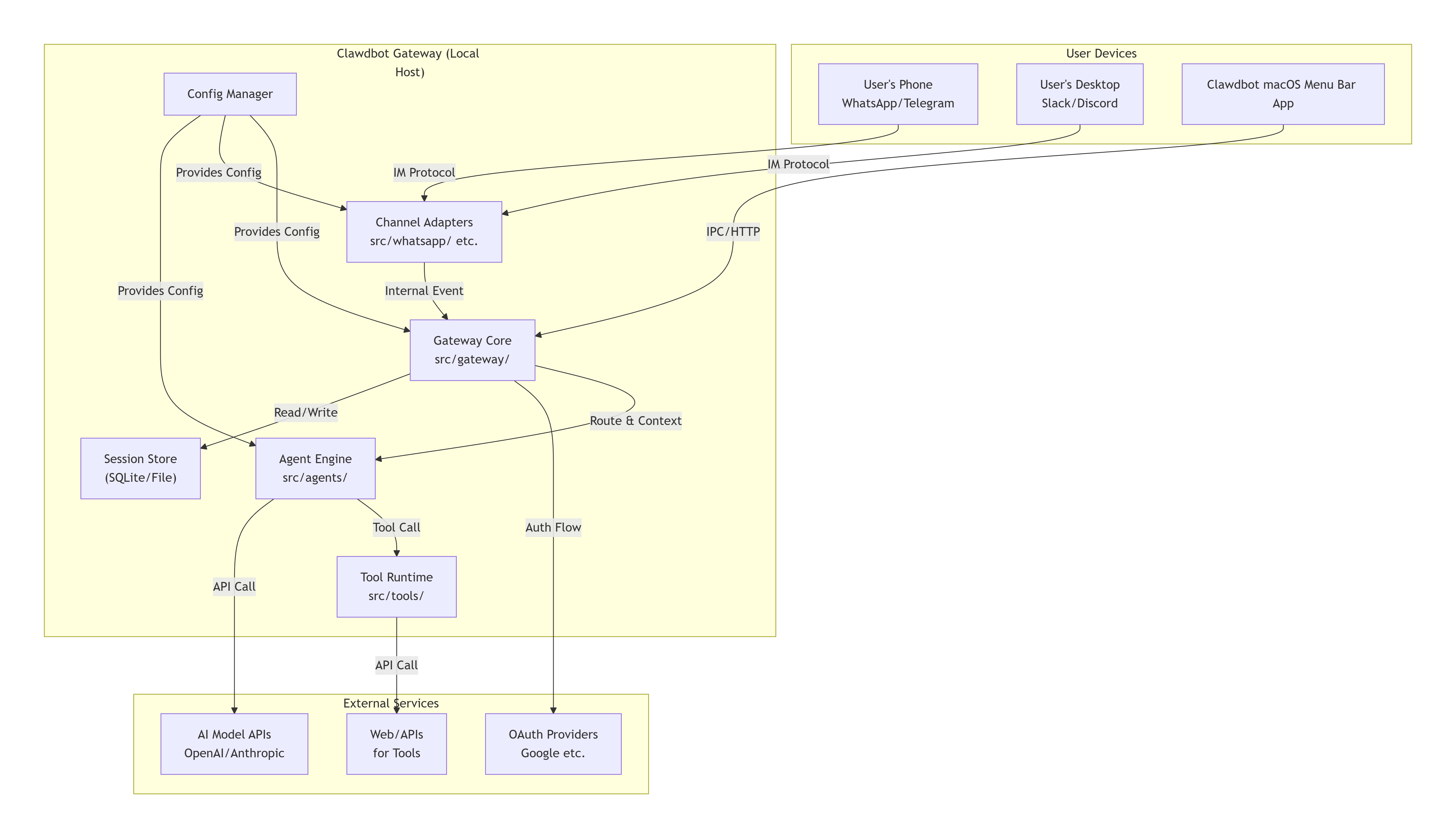
- 本地网关:核心逻辑 (Gateway) 在用户设备(PC、服务器、Raspberry Pi)上运行,构成“控制平面”。所有消息路由、工具调用、会话管理首先发生在本地。
- 协议适配器:为 WhatsApp (@whiskeysockets/baileys)、Telegram (grammy)、Slack (@slack/bolt)、Discord 等平台编写适配层,将不同协议统一为内部事件。
- 统一智能体接口:无论来自哪个平台的消息,最终都路由到统一的 AI 智能体 (Agent) 处理,智能体可以调用本地工具、访问网络或使用配置的云模型(如 OpenAI, Anthropic)。
- 优点:
- 数据可控:对话上下文、个人配置、访问令牌等存储于本地。
- 服务稳定:网关服务不受服务商界面变动影响,可配置多个模型后备。
- 体验统一:一个 AI 助手分身可同时服务多个通讯平台。
商业价值预估逻辑:
- 代码与工程成本:项目结构复杂,涉及多协议适配、事件驱动架构、插件系统、移动端集成等。若从零开发,一个成熟团队需要至少 12-18 人月的密集投入。估算开发成本约为 $300,000 – $500,000。
- 覆盖问题空间效益:它解决的是一个集成与自动化问题,而非创造新的 AI 能力。其价值在于将已有的 AI 模型能力(OpenAI/Anthropic)与用户已有的通讯工具(WhatsApp/Slack)无缝连接,创造了“1+1>2”的效用。对于个体用户,价值在于隐私和定制化;对于企业,可作为内部知识助手的安全部署方案原型。市场规模属于“开发者工具”与“效率工具”的交集,潜在用户量在数百万级别。
2. 详细功能拆解
2.1 核心功能模块
从 package.json 的 files 字段和源码目录可清晰划分模块:
2.2 产品-技术联动视角
- “多智能体”功能:技术上通过 src/sessions/session-store.ts 中的 SessionEntry 和路由逻辑实现。每个会话 (sessionKey) 可以绑定到不同的 agentId,从而关联不同的工作空间 (workspaceDir) 和模型配置,实现角色隔离。
- “配对”安全策略:在 src/sessions/ 中实现配对码生成与验证逻辑,只有经本地确认的会话才能被智能体处理。这解决了自托管机器人可能被任意用户滥用的安全问题。
- “模型后备”机制:由 src/agents/model-fallback.js 和 agentCommand 函数中的 runWithModelFallback 逻辑实现。当主模型认证失败或不可用时,自动切换到备选模型,提升了系统鲁棒性。
3. 技术难点挖掘
4. 详细设计图
4.1 系统架构图 (C4 Model – Container Diagram)
4.2 核心消息处理序列图
AI Model (Cloud)ToolAgent EngineSession ManagerRouterGateway CoreChannel (e.g., WhatsApp)AI Model (Cloud)ToolAgent EngineSession ManagerRouterGateway CoreChannel (e.g., WhatsApp)#mermaid-svg-5NrPSAQNAkRCIEWT{font-family:\”trebuchet ms\”,verdana,arial,sans-serif;font-size:16px;fill:#333;}@keyframes edge-animation-frame{from{stroke-dashoffset:0;}}@keyframes dash{to{stroke-dashoffset:0;}}#mermaid-svg-5NrPSAQNAkRCIEWT .edge-animation-slow{stroke-dasharray:9,5!important;stroke-dashoffset:900;animation:dash 50s linear infinite;stroke-linecap:round;}#mermaid-svg-5NrPSAQNAkRCIEWT .edge-animation-fast{stroke-dasharray:9,5!important;stroke-dashoffset:900;animation:dash 20s linear infinite;stroke-linecap:round;}#mermaid-svg-5NrPSAQNAkRCIEWT .error-icon{fill:#552222;}#mermaid-svg-5NrPSAQNAkRCIEWT .error-text{fill:#552222;stroke:#552222;}#mermaid-svg-5NrPSAQNAkRCIEWT .edge-thickness-normal{stroke-width:1px;}#mermaid-svg-5NrPSAQNAkRCIEWT .edge-thickness-thick{stroke-width:3.5px;}#mermaid-svg-5NrPSAQNAkRCIEWT .edge-pattern-solid{stroke-dasharray:0;}#mermaid-svg-5NrPSAQNAkRCIEWT .edge-thickness-invisible{stroke-width:0;fill:none;}#mermaid-svg-5NrPSAQNAkRCIEWT .edge-pattern-dashed{stroke-dasharray:3;}#mermaid-svg-5NrPSAQNAkRCIEWT .edge-pattern-dotted{stroke-dasharray:2;}#mermaid-svg-5NrPSAQNAkRCIEWT .marker{fill:#333333;stroke:#333333;}#mermaid-svg-5NrPSAQNAkRCIEWT .marker.cross{stroke:#333333;}#mermaid-svg-5NrPSAQNAkRCIEWT svg{font-family:\”trebuchet ms\”,verdana,arial,sans-serif;font-size:16px;}#mermaid-svg-5NrPSAQNAkRCIEWT p{margin:0;}#mermaid-svg-5NrPSAQNAkRCIEWT .actor{stroke:hsl(259.6261682243, 59.7765363128%, 87.9019607843%);fill:#ECECFF;}#mermaid-svg-5NrPSAQNAkRCIEWT text.actor>tspan{fill:black;stroke:none;}#mermaid-svg-5NrPSAQNAkRCIEWT .actor-line{stroke:hsl(259.6261682243, 59.7765363128%, 87.9019607843%);}#mermaid-svg-5NrPSAQNAkRCIEWT .innerArc{stroke-width:1.5;stroke-dasharray:none;}#mermaid-svg-5NrPSAQNAkRCIEWT .messageLine0{stroke-width:1.5;stroke-dasharray:none;stroke:#333;}#mermaid-svg-5NrPSAQNAkRCIEWT .messageLine1{stroke-width:1.5;stroke-dasharray:2,2;stroke:#333;}#mermaid-svg-5NrPSAQNAkRCIEWT #arrowhead path{fill:#333;stroke:#333;}#mermaid-svg-5NrPSAQNAkRCIEWT .sequenceNumber{fill:white;}#mermaid-svg-5NrPSAQNAkRCIEWT #sequencenumber{fill:#333;}#mermaid-svg-5NrPSAQNAkRCIEWT #crosshead path{fill:#333;stroke:#333;}#mermaid-svg-5NrPSAQNAkRCIEWT .messageText{fill:#333;stroke:none;}#mermaid-svg-5NrPSAQNAkRCIEWT .labelBox{stroke:hsl(259.6261682243, 59.7765363128%, 87.9019607843%);fill:#ECECFF;}#mermaid-svg-5NrPSAQNAkRCIEWT .labelText,#mermaid-svg-5NrPSAQNAkRCIEWT .labelText>tspan{fill:black;stroke:none;}#mermaid-svg-5NrPSAQNAkRCIEWT .loopText,#mermaid-svg-5NrPSAQNAkRCIEWT .loopText>tspan{fill:black;stroke:none;}#mermaid-svg-5NrPSAQNAkRCIEWT .loopLine{stroke-width:2px;stroke-dasharray:2,2;stroke:hsl(259.6261682243, 59.7765363128%, 87.9019607843%);fill:hsl(259.6261682243, 59.7765363128%, 87.9019607843%);}#mermaid-svg-5NrPSAQNAkRCIEWT .note{stroke:#aaaa33;fill:#fff5ad;}#mermaid-svg-5NrPSAQNAkRCIEWT .noteText,#mermaid-svg-5NrPSAQNAkRCIEWT .noteText>tspan{fill:black;stroke:none;}#mermaid-svg-5NrPSAQNAkRCIEWT .activation0{fill:#f4f4f4;stroke:#666;}#mermaid-svg-5NrPSAQNAkRCIEWT .activation1{fill:#f4f4f4;stroke:#666;}#mermaid-svg-5NrPSAQNAkRCIEWT .activation2{fill:#f4f4f4;stroke:#666;}#mermaid-svg-5NrPSAQNAkRCIEWT .actorPopupMenu{position:absolute;}#mermaid-svg-5NrPSAQNAkRCIEWT .actorPopupMenuPanel{position:absolute;fill:#ECECFF;box-shadow:0px 8px 16px 0px rgba(0,0,0,0.2);filter:drop-shadow(3px 5px 2px rgb(0 0 0 / 0.4));}#mermaid-svg-5NrPSAQNAkRCIEWT .actor-man line{stroke:hsl(259.6261682243, 59.7765363128%, 87.9019607843%);fill:#ECECFF;}#mermaid-svg-5NrPSAQNAkRCIEWT .actor-man circle,#mermaid-svg-5NrPSAQNAkRCIEWT line{stroke:hsl(259.6261682243, 59.7765363128%, 87.9019607843%);fill:#ECECFF;stroke-width:2px;}#mermaid-svg-5NrPSAQNAkRCIEWT :root{–mermaid-font-family:\”trebuchet ms\”,verdana,arial,sans-serif;}alt[需要调用工具]收到新消息 (原始协议格式)解码,标准化为内部 Message 事件路由消息 (基于 to/sessionKey/agentId)获取或创建 SessionEntry交付消息及完整会话上下文构建提示词, 决定是否思考/调用工具executeTool(toolCallId, params)执行(如查询、API调用)返回工具执行结果调用模型 API (携带最终提示)返回模型响应更新会话历史与用量提交回复消息编码为协议格式并发送
4.3 核心类关系图 (简化的领域模型)
#mermaid-svg-elBoYIzYVnedZ7FL{font-family:\”trebuchet ms\”,verdana,arial,sans-serif;font-size:16px;fill:#333;}@keyframes edge-animation-frame{from{stroke-dashoffset:0;}}@keyframes dash{to{stroke-dashoffset:0;}}#mermaid-svg-elBoYIzYVnedZ7FL .edge-animation-slow{stroke-dasharray:9,5!important;stroke-dashoffset:900;animation:dash 50s linear infinite;stroke-linecap:round;}#mermaid-svg-elBoYIzYVnedZ7FL .edge-animation-fast{stroke-dasharray:9,5!important;stroke-dashoffset:900;animation:dash 20s linear infinite;stroke-linecap:round;}#mermaid-svg-elBoYIzYVnedZ7FL .error-icon{fill:#552222;}#mermaid-svg-elBoYIzYVnedZ7FL .error-text{fill:#552222;stroke:#552222;}#mermaid-svg-elBoYIzYVnedZ7FL .edge-thickness-normal{stroke-width:1px;}#mermaid-svg-elBoYIzYVnedZ7FL .edge-thickness-thick{stroke-width:3.5px;}#mermaid-svg-elBoYIzYVnedZ7FL .edge-pattern-solid{stroke-dasharray:0;}#mermaid-svg-elBoYIzYVnedZ7FL .edge-thickness-invisible{stroke-width:0;fill:none;}#mermaid-svg-elBoYIzYVnedZ7FL .edge-pattern-dashed{stroke-dasharray:3;}#mermaid-svg-elBoYIzYVnedZ7FL .edge-pattern-dotted{stroke-dasharray:2;}#mermaid-svg-elBoYIzYVnedZ7FL .marker{fill:#333333;stroke:#333333;}#mermaid-svg-elBoYIzYVnedZ7FL .marker.cross{stroke:#333333;}#mermaid-svg-elBoYIzYVnedZ7FL svg{font-family:\”trebuchet ms\”,verdana,arial,sans-serif;font-size:16px;}#mermaid-svg-elBoYIzYVnedZ7FL p{margin:0;}#mermaid-svg-elBoYIzYVnedZ7FL g.classGroup text{fill:#9370DB;stroke:none;font-family:\”trebuchet ms\”,verdana,arial,sans-serif;font-size:10px;}#mermaid-svg-elBoYIzYVnedZ7FL g.classGroup text .title{font-weight:bolder;}#mermaid-svg-elBoYIzYVnedZ7FL .nodeLabel,#mermaid-svg-elBoYIzYVnedZ7FL .edgeLabel{color:#131300;}#mermaid-svg-elBoYIzYVnedZ7FL .edgeLabel .label rect{fill:#ECECFF;}#mermaid-svg-elBoYIzYVnedZ7FL .label text{fill:#131300;}#mermaid-svg-elBoYIzYVnedZ7FL .labelBkg{background:#ECECFF;}#mermaid-svg-elBoYIzYVnedZ7FL .edgeLabel .label span{background:#ECECFF;}#mermaid-svg-elBoYIzYVnedZ7FL .classTitle{font-weight:bolder;}#mermaid-svg-elBoYIzYVnedZ7FL .node rect,#mermaid-svg-elBoYIzYVnedZ7FL .node circle,#mermaid-svg-elBoYIzYVnedZ7FL .node ellipse,#mermaid-svg-elBoYIzYVnedZ7FL .node polygon,#mermaid-svg-elBoYIzYVnedZ7FL .node path{fill:#ECECFF;stroke:#9370DB;stroke-width:1px;}#mermaid-svg-elBoYIzYVnedZ7FL .divider{stroke:#9370DB;stroke-width:1;}#mermaid-svg-elBoYIzYVnedZ7FL g.clickable{cursor:pointer;}#mermaid-svg-elBoYIzYVnedZ7FL g.classGroup rect{fill:#ECECFF;stroke:#9370DB;}#mermaid-svg-elBoYIzYVnedZ7FL g.classGroup line{stroke:#9370DB;stroke-width:1;}#mermaid-svg-elBoYIzYVnedZ7FL .classLabel .box{stroke:none;stroke-width:0;fill:#ECECFF;opacity:0.5;}#mermaid-svg-elBoYIzYVnedZ7FL .classLabel .label{fill:#9370DB;font-size:10px;}#mermaid-svg-elBoYIzYVnedZ7FL .relation{stroke:#333333;stroke-width:1;fill:none;}#mermaid-svg-elBoYIzYVnedZ7FL .dashed-line{stroke-dasharray:3;}#mermaid-svg-elBoYIzYVnedZ7FL .dotted-line{stroke-dasharray:1 2;}#mermaid-svg-elBoYIzYVnedZ7FL #compositionStart,#mermaid-svg-elBoYIzYVnedZ7FL .composition{fill:#333333!important;stroke:#333333!important;stroke-width:1;}#mermaid-svg-elBoYIzYVnedZ7FL #compositionEnd,#mermaid-svg-elBoYIzYVnedZ7FL .composition{fill:#333333!important;stroke:#333333!important;stroke-width:1;}#mermaid-svg-elBoYIzYVnedZ7FL #dependencyStart,#mermaid-svg-elBoYIzYVnedZ7FL .dependency{fill:#333333!important;stroke:#333333!important;stroke-width:1;}#mermaid-svg-elBoYIzYVnedZ7FL #dependencyStart,#mermaid-svg-elBoYIzYVnedZ7FL .dependency{fill:#333333!important;stroke:#333333!important;stroke-width:1;}#mermaid-svg-elBoYIzYVnedZ7FL #extensionStart,#mermaid-svg-elBoYIzYVnedZ7FL .extension{fill:transparent!important;stroke:#333333!important;stroke-width:1;}#mermaid-svg-elBoYIzYVnedZ7FL #extensionEnd,#mermaid-svg-elBoYIzYVnedZ7FL .extension{fill:transparent!important;stroke:#333333!important;stroke-width:1;}#mermaid-svg-elBoYIzYVnedZ7FL #aggregationStart,#mermaid-svg-elBoYIzYVnedZ7FL .aggregation{fill:transparent!important;stroke:#333333!important;stroke-width:1;}#mermaid-svg-elBoYIzYVnedZ7FL #aggregationEnd,#mermaid-svg-elBoYIzYVnedZ7FL .aggregation{fill:transparent!important;stroke:#333333!important;stroke-width:1;}#mermaid-svg-elBoYIzYVnedZ7FL #lollipopStart,#mermaid-svg-elBoYIzYVnedZ7FL .lollipop{fill:#ECECFF!important;stroke:#333333!important;stroke-width:1;}#mermaid-svg-elBoYIzYVnedZ7FL #lollipopEnd,#mermaid-svg-elBoYIzYVnedZ7FL .lollipop{fill:#ECECFF!important;stroke:#333333!important;stroke-width:1;}#mermaid-svg-elBoYIzYVnedZ7FL .edgeTerminals{font-size:11px;line-height:initial;}#mermaid-svg-elBoYIzYVnedZ7FL .classTitleText{text-anchor:middle;font-size:18px;fill:#333;}#mermaid-svg-elBoYIzYVnedZ7FL .label-icon{display:inline-block;height:1em;overflow:visible;vertical-align:-0.125em;}#mermaid-svg-elBoYIzYVnedZ7FL .node .label-icon path{fill:currentColor;stroke:revert;stroke-width:revert;}#mermaid-svg-elBoYIzYVnedZ7FL :root{–mermaid-font-family:\”trebuchet ms\”,verdana,arial,sans-serif;}
聚合
组合
依赖
依赖
聚合
实现
实现
Gateway
-channels: Map<string, Channel>
-router: Router
+start()
+handleIncomingEvent()
«interface»
Channel
+connect()
+sendMessage()
+onMessage(callback)
WhatsAppChannel
-client: BaileysClient
+connect()
Router
-rules: RoutingRule[]
+route(message) : : SessionKey
SessionManager
-store: SessionStore
+getOrCreateEntry(key) : : SessionEntry
+updateEntry(key, update)
SessionEntry
+sessionId: string
+sessionKey: string
+agentId?: string
+contextTokens: number
+skillsSnapshot?: object
AgentEngine
-modelProvider: ModelProvider
-toolRegistry: ToolRegistry
+process(sessionEntry, message) : : Promise<Response>
«interface»
Tool
+execute(params) : : Promise<Result>
ZalouserTool
+execute(params)
5. 核心函数解析
5.1 智能体命令入口:agentCommand
这是整个系统最核心的流程控制函数,位于 src/agents/agent.ts。它协调了从接收消息到交付响应的完整生命周期。
// 代码基于 src/agents/agent.ts 简化与注释
export async function agentCommand(
opts: AgentCommandOpts, // 包含消息、接收者、会话ID、模型参数等
runtime: RuntimeEnv = defaultRuntime,
deps: CliDeps = createDefaultDeps(),
) {
// 1. 输入验证与基础准备
const body = (opts.message ?? "").trim();
if (!body) throw new Error("Message (–message) is required");
// … 验证 to, sessionId, agentId 至少有一个
const cfg = loadConfig(); // 加载用户配置
const sessionResolution = resolveSession({ cfg, …opts }); // 关键:解析出当前会话
const {
sessionId,
sessionKey,
sessionEntry,
sessionStore,
storePath,
isNewSession,
} = sessionResolution;
const runId = opts.runId?.trim() || sessionId; // 用于跟踪本次运行的唯一ID
try {
// 2. 检查发送策略(如DM配对是否通过)
if (opts.deliver === true) {
const sendPolicy = resolveSendPolicy({ cfg, entry: sessionEntry, sessionKey, … });
if (sendPolicy === "deny") throw new Error("send blocked by session policy");
}
// 3. 确定思考层级和详细级别(用户输入 > 会话存储 > 全局默认)
let resolvedThinkLevel = /* 计算逻辑 */;
const resolvedVerboseLevel = /* 计算逻辑 */;
// 4. 注册运行时上下文,用于事件发射和日志关联
if (sessionKey) {
registerAgentRunContext(runId, { sessionKey, verboseLevel: resolvedVerboseLevel });
}
// 5. 构建或获取技能快照(用于给AI提供上下文)
const skillsSnapshot = isNewSession || !sessionEntry?.skillsSnapshot
? buildWorkspaceSkillSnapshot(workspaceDir, …)
: sessionEntry?.skillsSnapshot;
// 6. 模型选择与后备逻辑
const { provider: defaultProvider, model: defaultModel } = resolveConfiguredModelRef({ cfg });
let provider = defaultProvider;
let model = defaultModel;
// 处理会话级别的模型覆盖 (sessionEntry.modelOverride)
// 处理模型允许列表 (cfg.agents.defaults.models)
// 加载模型目录以验证可用性
// 7. 核心执行:运行嵌入式PI智能体或CLI智能体
const result = await runWithModelFallback({
cfg,
provider,
model,
run: async (providerOverride, modelOverride) => {
if (isCliProvider(providerOverride, cfg)) {
// 模式:调用本地命令行AI工具(如`llm`命令)
return runCliAgent({ sessionId, prompt: body, provider: providerOverride, … });
} else {
// 模式:调用云API或本地模型库(主要路径)
return runEmbeddedPiAgent({
sessionId,
sessionKey,
prompt: body,
provider: providerOverride,
model: modelOverride,
thinkLevel: resolvedThinkLevel, // 控制AI的“思考”深度
skillsSnapshot, // 注入可用技能信息
streamParams: opts.streamParams, // 支持流式响应
onAgentEvent: (evt) => { /* 发射生命周期事件 */ },
});
}
},
});
// 8. 更新会话存储(记录使用的模型、token消耗等)
if (sessionStore && sessionKey) {
await updateSessionStoreAfterAgentRun({
cfg,
sessionId,
sessionKey,
storePath,
sessionStore,
defaultProvider: provider,
defaultModel: model,
result, // 包含用量元数据
});
}
// 9. 交付结果(根据opts.deliver决定是打印到CLI还是发送回消息渠道)
const payloads = result.payloads ?? [];
return await deliverAgentCommandResult({ cfg, deps, runtime, opts, sessionEntry, result, payloads });
} finally {
// 10. 清理运行时上下文
clearAgentRunContext(runId);
}
}
关键设计解析:
- 依赖注入:函数接收 runtime 和 deps 参数,便于测试和环境隔离。
- 统一的会话抽象:resolveSession 函数将 to (E.164号码)、sessionId、sessionKey、agentId 等多种标识符统一解析为内部的 sessionKey 和 SessionEntry,这是实现多平台路由的基础。
- 模型后备机制:runWithModelFallback 封装了重试逻辑,是系统可靠性的关键。
- 事件驱动架构:通过 onAgentEvent 回调发射细粒度事件(思考开始、工具调用、流式输出块),使得外部(如UI、日志)可以实时观察智能体运行状态。
- 资源生命周期管理:使用 try…finally 确保 runContext 被清理,避免内存泄漏。
5.2 工具执行示例:executeZalouserTool
展示了如何将外部命令行工具(zca,一个 Zalo 客户端)安全地封装成 AI 可调用的函数。
// 代码基于 src/tools/tool.ts 简化
export async function executeZalouserTool(_toolCallId: string, params: ToolParams): Promise<ToolResult> {
try {
switch (params.action) {
case "send": {
// 1. 参数校验
if (!params.threadId || !params.message) {
throw new Error("threadId and message required for send action");
}
// 2. 构造安全的命令行参数
const args = ["msg", "send", params.threadId, params.message];
if (params.isGroup) args.push("-g");
// 3. 调用外部二进制,不直接拼接字符串,避免注入
const result = await runZca(args, { profile: params.profile });
// 4. 处理结果,统一格式返回
if (!result.ok) {
throw new Error(result.stderr || "Failed to send message");
}
return {
content: [{ type: "text", text: JSON.stringify({ success: true, output: result.stdout }, null, 2) }],
details: { success: true, output: result.stdout }
};
}
// … 处理其他 action (image, link, friends…)
}
} catch (err) {
// 5. 统一的错误处理,将异常转化为AI可理解的格式
return {
content: [{ type: "text", text: JSON.stringify({ error: err.message }, null, 2) }],
details: { error: err.message }
};
}
}
6. 同类技术对比与总结
与云端助手(ChatGPT/Claude)对比:
- 优势:数据本地化、多平台统一入口、可深度定制和扩展、运行成本可控(仅支付模型API费用)。
- 劣势:用户需自行维护服务器、配置复杂度高、初始设置有技术门槛。
与单一平台机器人框架(如Botpress、GrammY)对比:
- 优势:真正的跨平台统一架构,一个智能体实例服务所有渠道;本地优先的设计哲学更注重隐私和控制权。
- 劣势:项目更年轻,社区和插件生态可能不如成熟框架丰富。
技术选型与架构评价:
Clawdbot 选择 TypeScript/Node.js 生态,利用了其强大的异步I/O处理能力和丰富的 npm 包(各类 IM SDK),适合事件驱动、高I/O的网关类应用。其架构清晰,模块化程度高,通过 Plugin SDK 预留了良好的扩展性。然而,将复杂状态管理于文件系统和内存中,在向多实例、高可用性部署演进时可能面临挑战。
结论:
Clawdbot 代表了一种重要的技术方向:将大型AI模型的“智能”与个人计算设备的“控制”相结合。它不是一个面向普通用户的“产品”,而是一个面向开发者和技术爱好者的“强大平台”。其代码体现了对复杂性问题(多协议、状态管理、扩展性)的深刻思考与工程化解法,为构建隐私友好、用户可控的下一代个人AI基础设施提供了极具价值的参考实现。