docker run hello-world时超时告警
跟着官方文档进行docker安装时,测试docker是否运行成功执行docker run hello-world时,结果和别人的不一样
正常情况: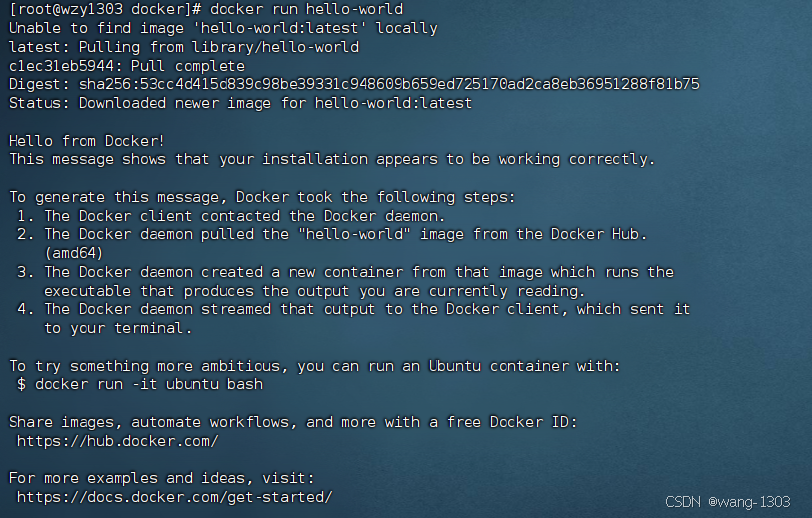
我们的:

Unable to find image 'hello-world:latest' locally
latest: Pulling from library/hello-world
c1ec31eb5944: Retrying in 10 seconds
docker: error pulling image configuration: download failed after attempts=6: dial tcp 128.242.245.93:443: connect: connection refused.
See 'docker run –help'.
原因:就是我们的镜像源不行,需要更换镜像源
但是我们就算知道原因,去找度娘会发现大部分都是说更换阿里的镜像源,但是我们尝试之后并没有作用
常规方案没作用
#针对Docker客户端版本大于 1.10.0 的用户
#您可以通过修改daemon配置文件/etc/docker/daemon.json来使用加速器
sudo mkdir -p /etc/docker
sudo tee /etc/docker/daemon.json <<-'EOF'
{
"registry-mirrors": ["https://5nkcn10r.mirror.aliyuncs.com"]
}
EOF
sudo systemctl daemon-reload
sudo systemctl restart docker
2.1、解决方案
配置加速地址:设置registry mirror
sudo mkdir -p /etc/docker
sudo tee /etc/docker/daemon.json <<-'EOF'
{
"registry-mirrors": [
"https://do.nark.eu.org",
"https://dc.j8.work",
"https://docker.m.daocloud.io",
"https://dockerproxy.com",
"https://docker.mirrors.ustc.edu.cn",
"https://docker.nju.edu.cn"
]
}
EOF
sudo systemctl daemon-reload
sudo systemctl restart docker
systemctl status docker
重启完docker之后检查registry mirror刚刚配置的加速地址是否成功
[root@wzy1303 docker]# docker info
Client: Docker Engine – Community
Version: 26.1.4
Context: default
Debug Mode: false
Plugins:
buildx: Docker Buildx (Docker Inc.)
Version: v0.14.1
Path: /usr/libexec/docker/cli-plugins/docker-buildx
compose: Docker Compose (Docker Inc.)
Version: v2.27.1
Path: /usr/libexec/docker/cli-plugins/docker-compose
Server:
Containers: 1
Running: 0
Paused: 0
Stopped: 1
Images: 1
Server Version: 26.1.4
Storage Driver: overlay2
Backing Filesystem: xfs
Supports d_type: true
Using metacopy: false
Native Overlay Diff: true
userxattr: false
Logging Driver: json-file
Cgroup Driver: cgroupfs
Cgroup Version: 1
Plugins:
Volume: local
Network: bridge host ipvlan macvlan null overlay
Log: awslogs fluentd gcplogs gelf journald json-file local splunk syslog
Swarm: inactive
Runtimes: io.containerd.runc.v2 runc
Default Runtime: runc
Init Binary: docker-init
containerd version: d2d58213f83a351ca8f528a95fbd145f5654e957
runc version: v1.1.12-0-g51d5e94
init version: de40ad0
Security Options:
seccomp
Profile: builtin
Kernel Version: 3.10.0-1160.119.1.el7.x86_64
Operating System: CentOS Linux 7 (Core)
OSType: linux
Architecture: x86_64
CPUs: 8
Total Memory: 2.761GiB
Name: wzy1303
ID: 74efae68-ef43-45a9-b547-ffa2c3805423
Docker Root Dir: /var/lib/docker
Debug Mode: false
Username: inkling1303
Experimental: false
Insecure Registries:
127.0.0.0/8
Registry Mirrors:
https://do.nark.eu.org/
https://dc.j8.work/
https://docker.m.daocloud.io/
https://dockerproxy.com/
https://docker.mirrors.ustc.edu.cn/
https://docker.nju.edu.cn/
Live Restore Enabled: false
可以看到我们已经配置成功: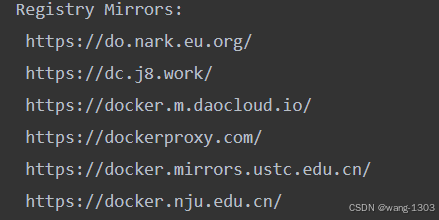
运行docker run hello-world,成功运行
[root@wzy1303 docker]# docker run hello-world
Unable to find image 'hello-world:latest' locally
latest: Pulling from library/hello-world
c1ec31eb5944: Pull complete
Digest: sha256:53cc4d415d839c98be39331c948609b659ed725170ad2ca8eb36951288f81b75
Status: Downloaded newer image for hello-world:latest
Hello from Docker!
This message shows that your installation appears to be working correctly.
To generate this message, Docker took the following steps:
1. The Docker client contacted the Docker daemon.
2. The Docker daemon pulled the "hello-world" image from the Docker Hub.
(amd64)
3. The Docker daemon created a new container from that image which runs the
executable that produces the output you are currently reading.
4. The Docker daemon streamed that output to the Docker client, which sent it
to your terminal.
To try something more ambitious, you can run an Ubuntu container with:
$ docker run -it ubuntu bash
Share images, automate workflows, and more with a free Docker ID:
https://hub.docker.com/
For more examples and ideas, visit:
https://docs.docker.com/get-started/
#查看是否成功拉取hello-world镜像
[root@wzy1303 docker]# docker images
REPOSITORY TAG IMAGE ID CREATED SIZE
hello-world latest d2c94e258dcb 15 months ago 13.3kB
[root@wzy1303 docker]# docker images -a
REPOSITORY TAG IMAGE ID CREATED SIZE
hello-world latest d2c94e258dcb 15 months ago 13.3kB
[root@wzy1303 docker]# docker images -aq
d2c94e258dcb