前面介绍了很多的技术栈,今天就尝试的把这些技术栈结合起来,尝试着去完成一个小案例。
准备工作
项目的开发过程中,肯定要有准备工作,比如需求文档的拟定,接口文档的拟定,这些都是在项目开展之前要完成的事情。
需求文档的拟定:一般是产品经理根据自身产品需求来拟定的文档,开发人员需严格遵循开发文档进行开发,在开发过程中需与产品经理沟通,确定产品开发过程是符合预期的
接口文档的拟定:是建立在需求文档的基础上进行开发写作的,其主要是由后端人员来拟定,主要是用于前后端之间进行交互的。
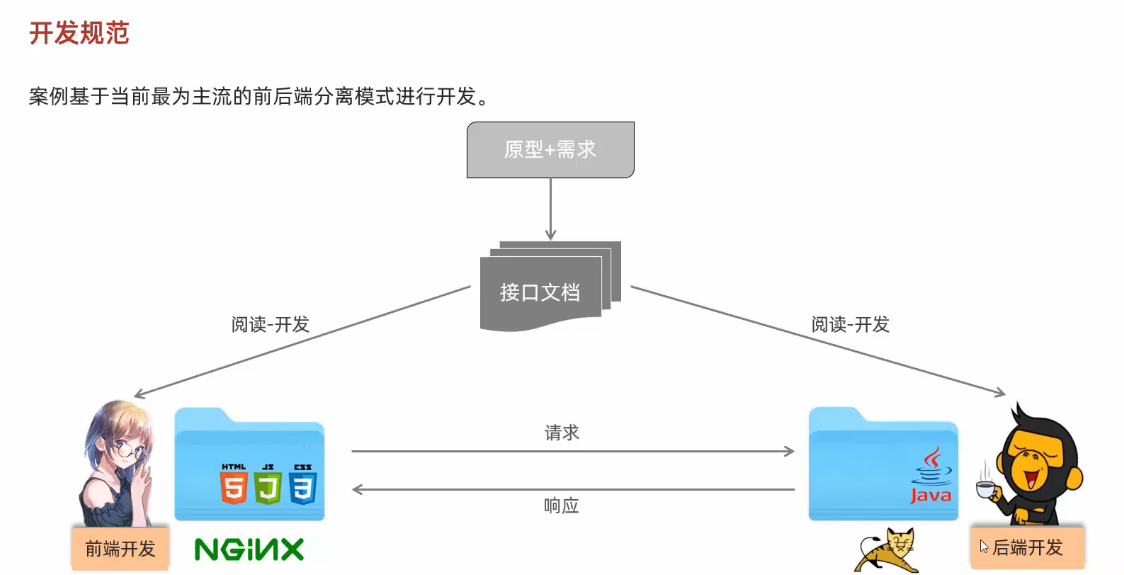
项目环境的搭建:
介绍一下工作流程:
项目结构:
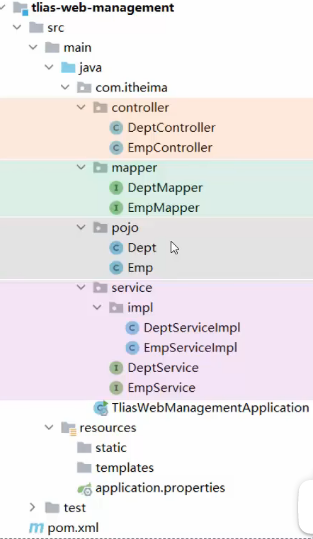
根据上述流程,需要准备的环境:
【该案例是结合后端开发的三层架构进行开发的】
那什么是开发过程中的三层架构呢,具体可以参考这篇文章:
https://blog.csdn.net/2403_87933448/article/details/156834576?fromshare=blogdetail&sharetype=blogdetail&sharerId=156834576&sharerefer=PC&sharesource=2403_87933448&sharefrom=from_link
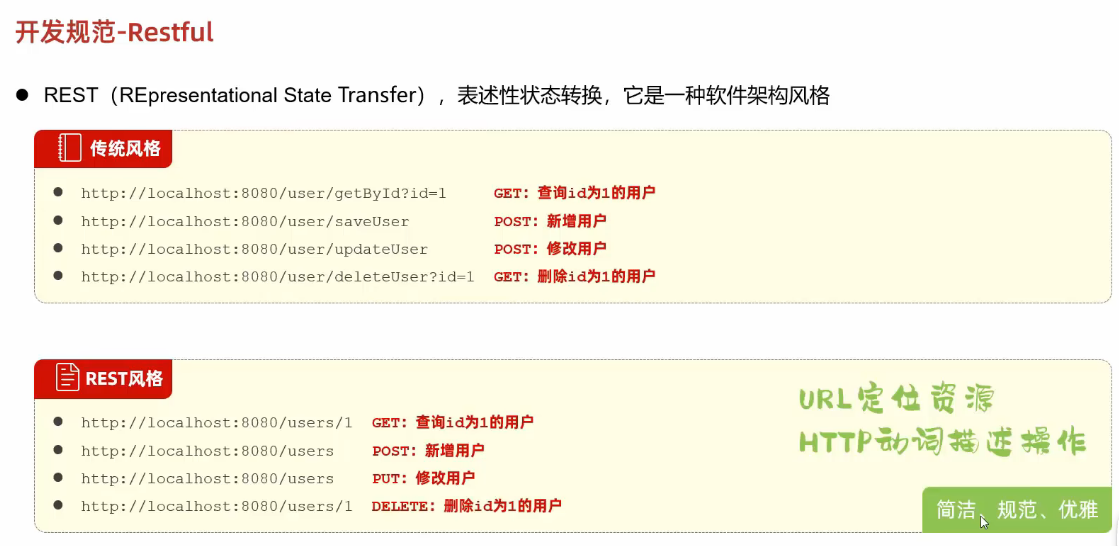
在开发过程中,一般是采用rest风格进行开发
在一般的开发过程中,通常是根据程序员个人的偏好来进行了各种url的访问方式,但是这种方式不利于后续服务器的维护和团队的沟通交流
因此一般是采用rest风格的url,进行前后端之间的交流,同时也规范了get,post,put,delete的适用范围以及定下了相关的规范!

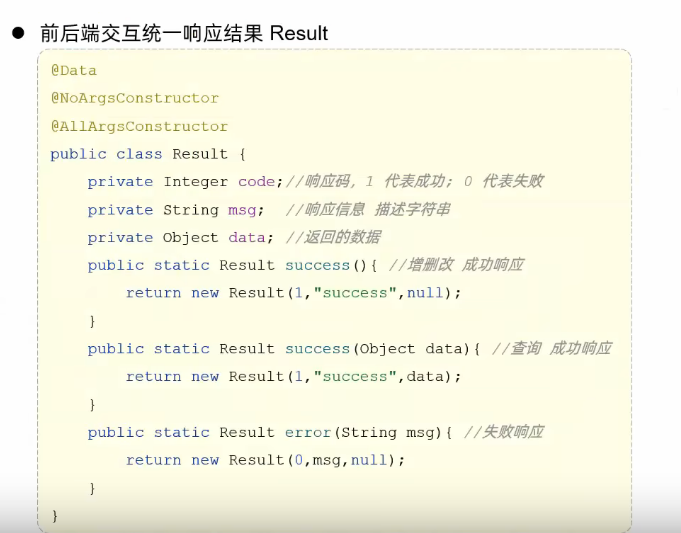
同时也需要有统一的响应结果
上面的准备工作完成之后,那么我们就要准备接下来的开发功能了
部门管理
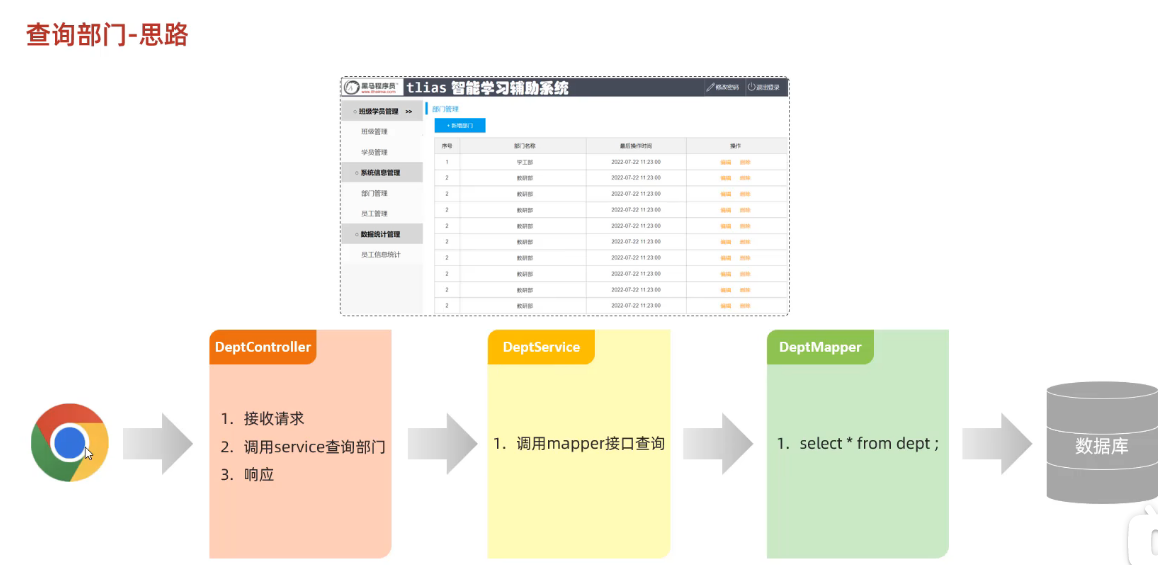
查询部门
系统工作流程:
备注:
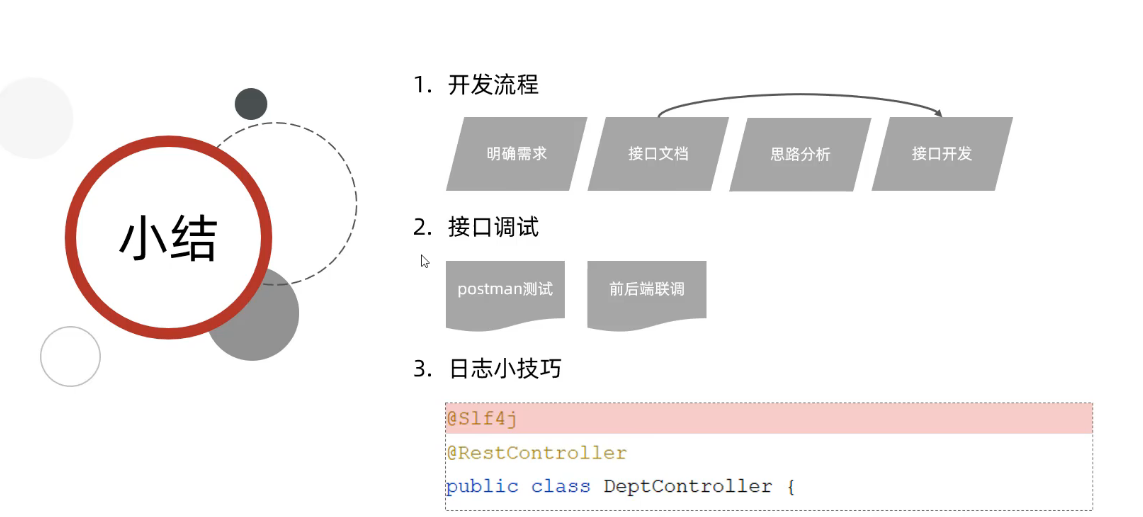
1.日志的输出方式
在开发的过程中,我们一般不使用system.out.println来输出日志
一般是采用下面固定格式来进行日志的输出展示 log.info()
或者直接调用注解 @Slf4j即可

2.responsebody
因为我们在controller层中调用了@RestController注解,在注解中包括了responsebody的注解
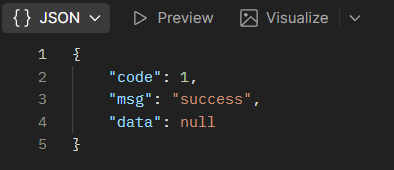
responsebody这个注解的主要作用是将返回的值以JSON格式进行输出。
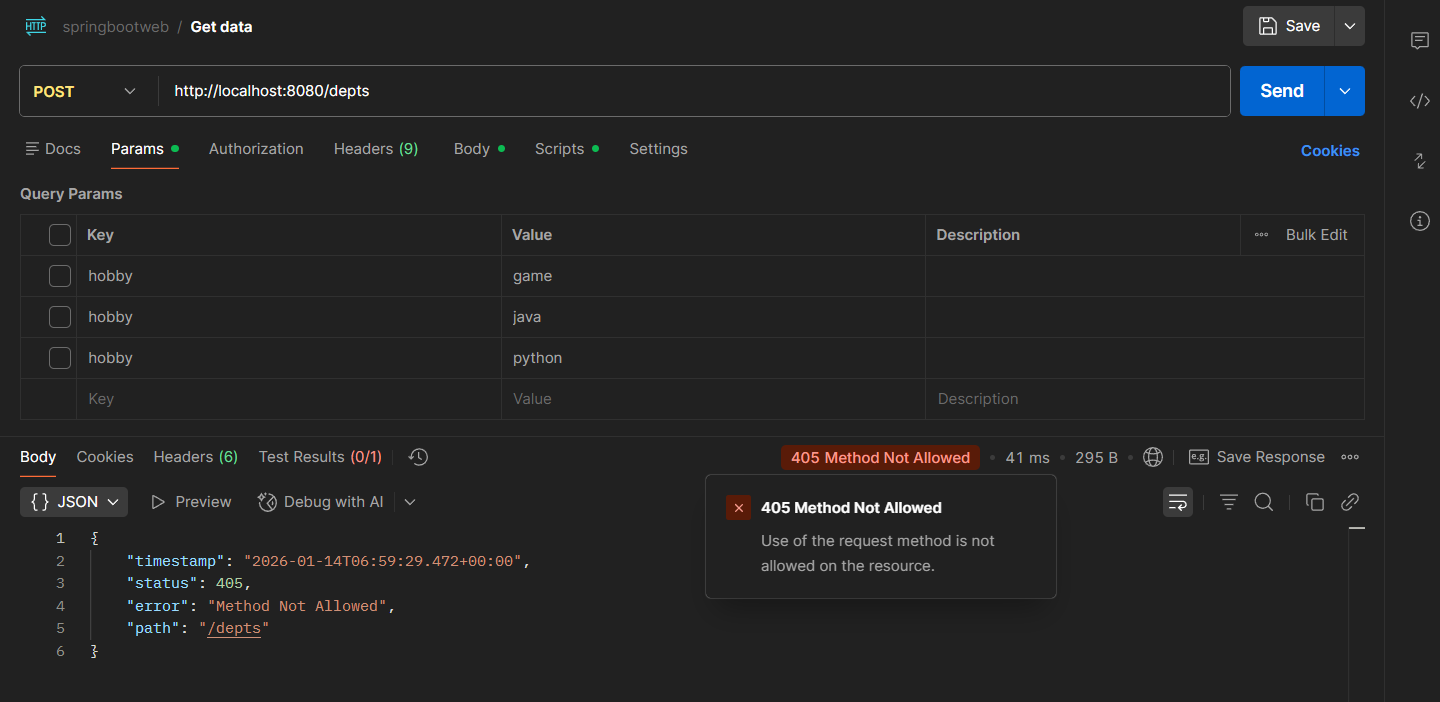
3.限制数据的请求方式,比如我限制了数据的请求方式为get
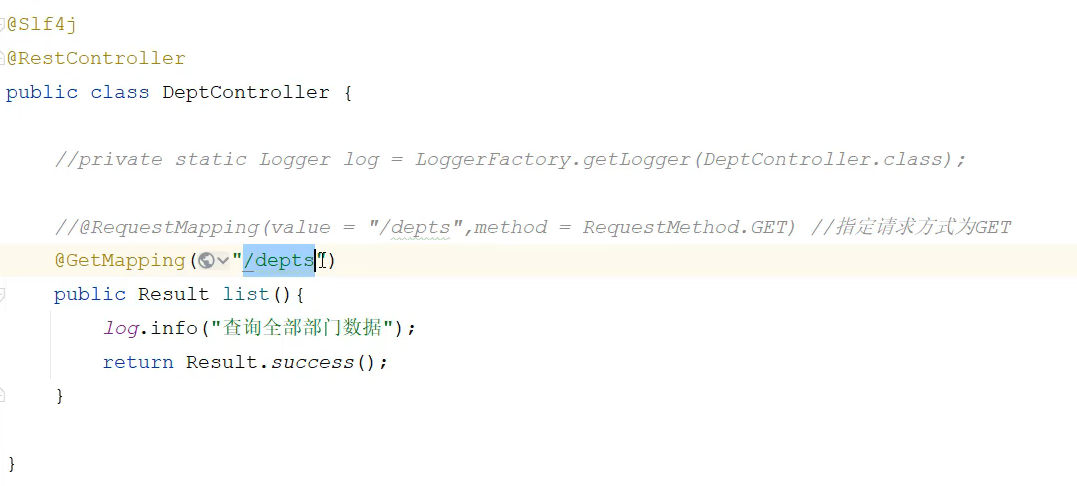
因此不能使用post进行请求
代码书写的过程:
严格按照上述系统的工作流程来进行书写
import com.itheima.pojo.Dept;
import com.itheima.pojo.Result;
import com.itheima.service.DeptService;
import lombok.extern.slf4j.Slf4j;
import org.springframework.beans.factory.annotation.Autowired;
import org.springframework.web.bind.annotation.RequestMapping;
import org.springframework.web.bind.annotation.RequestMethod;
import org.springframework.web.bind.annotation.RestController;
import java.util.List;
/**
* 部门管理Controller
*/
@Slf4j
@RestController
public class DeptController {
@Autowired
private DeptService deptService;
@RequestMapping(value = "/depts",method = RequestMethod.GET)
public Result list(){
log.info("查询全部部门的数据");
List<Dept> deptList=deptService.list();
return Result.success(deptList);
}
}
public class DeptServiceImpl implements DeptService {
@Autowired
private DeptMapper deptMapper;
@Override
public List<Dept> list() {
return deptMapper.list();
}
}
public interface DeptMapper {
/*
* 查询全部的部门数据
* */
@Select("select * from dept")
List<Dept> list();
}
前后端联调
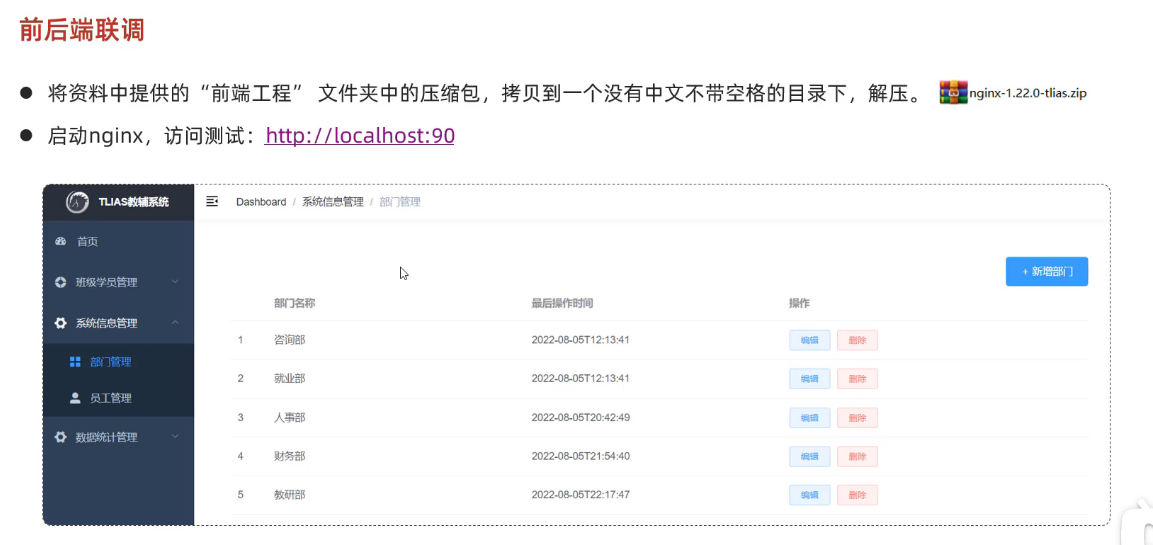
根据准备好的前端程序,跳转到指定的页面进行相对应的调试工作
可以打开开发工具查看 前端页面发起的请求,以及后端给前端对应的响应。
删除部门
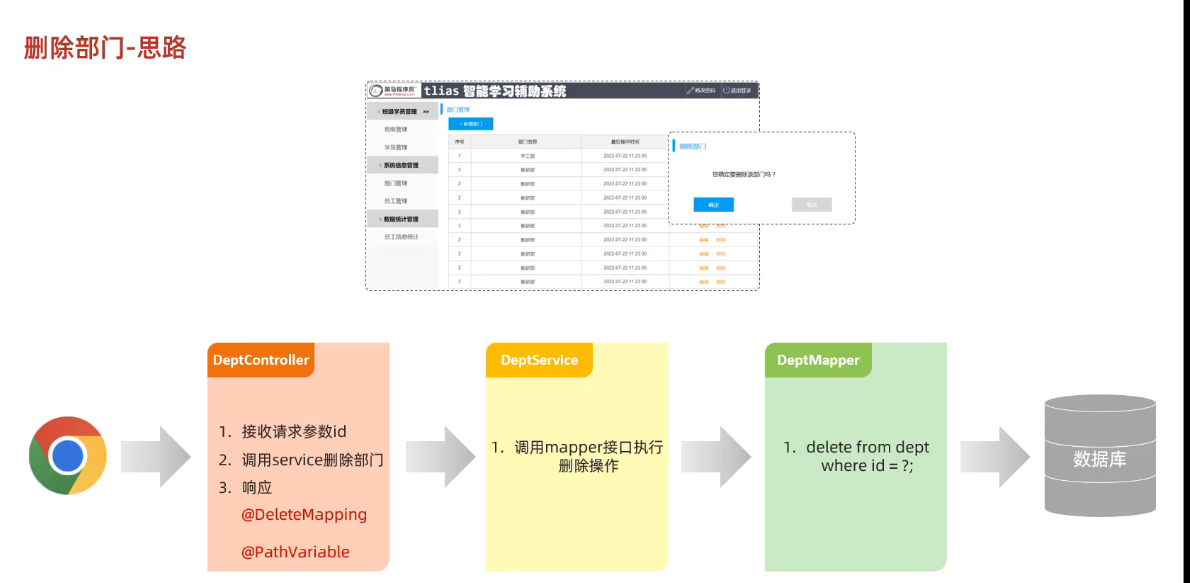
根据id去删除部门
删除部门的思路:
其本质上是和前面的查询部门是差不多的,工作的基本流程是建立在三层架构上的
public Result delete(@PathVariable Integer id){
log.info("删除了的部门的id为:{}",id);
deptService.delete(id);
return Result.success();
public void delete(Integer id) {
deptMapper.deleteById(id);
}
void deleteById(Integer id);
新增部门
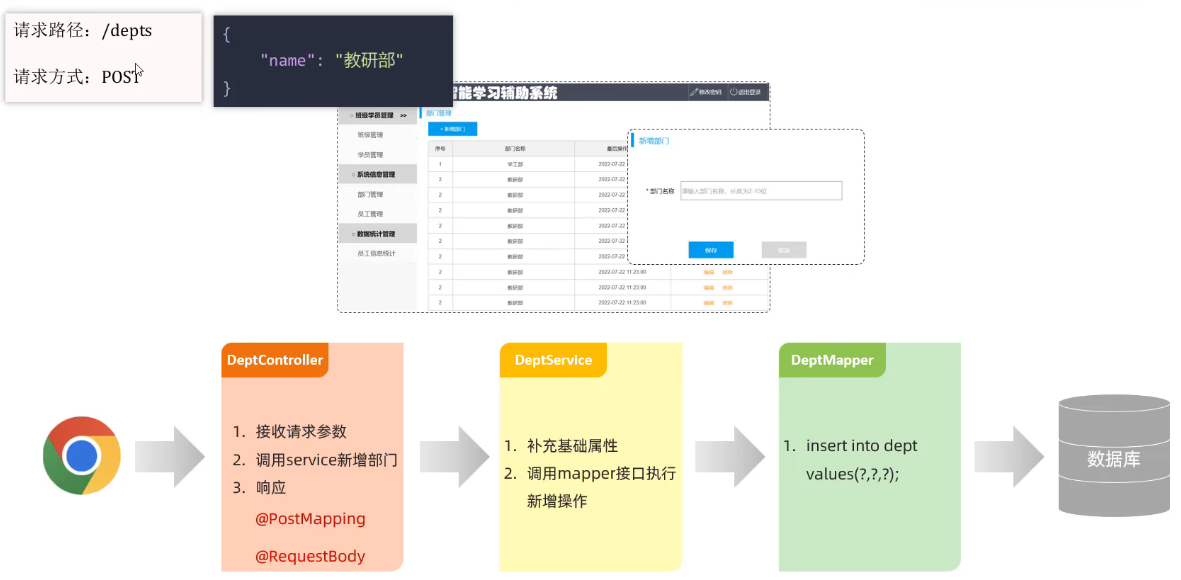
工作流程及其代码:
public Result add(@RequestBody Dept dept){
log.info("新增部门:{}",dept);
deptService.add(dept);
return Result.success();
}
public void add(Dept dept) {
dept.setCreateTime(LocalDateTime.now());
dept.setUpdateTime(LocalDateTime.now());
deptMapper.add(dept);
}
void add(Dept dept);
备注:【增加】
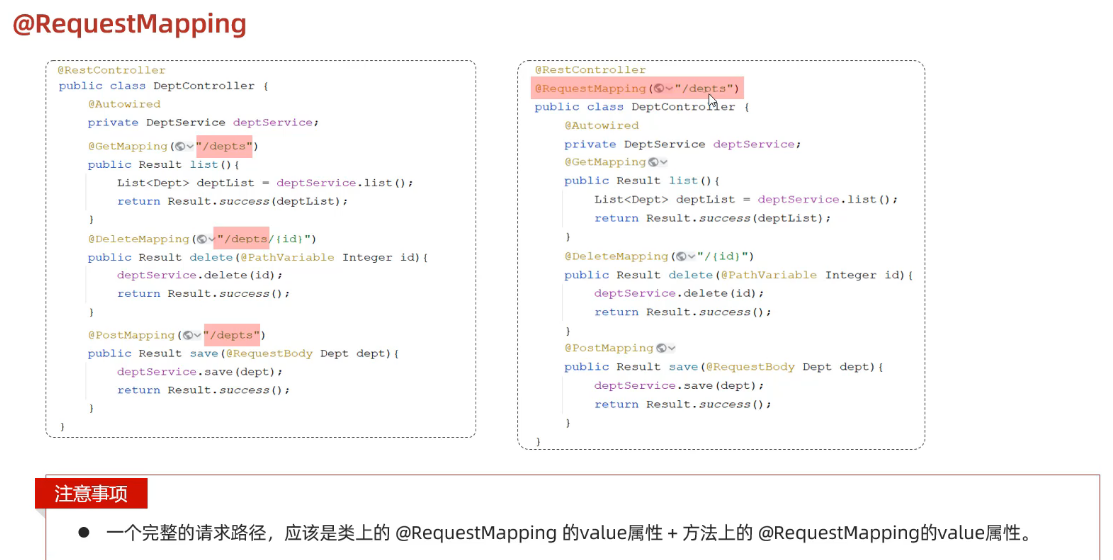
可以考虑将对应的格式进行进一步的简化操作:
员工管理:
分页查询:
一般查询【无条件查询】:
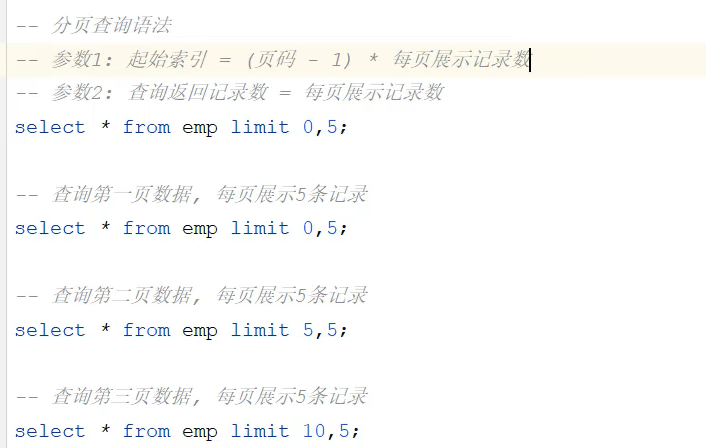
首先是对 分页查询语句 的回顾
根据业务需求进行分析
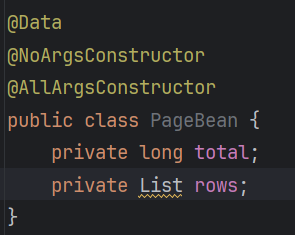
发现我们需要返回两条信息给前端交互页面,但是我们一般都是一次返回一条信息,因此在这里可以考虑使用一个类对需要响应的数据进行接收,然后再将这个类返回给前端服务器
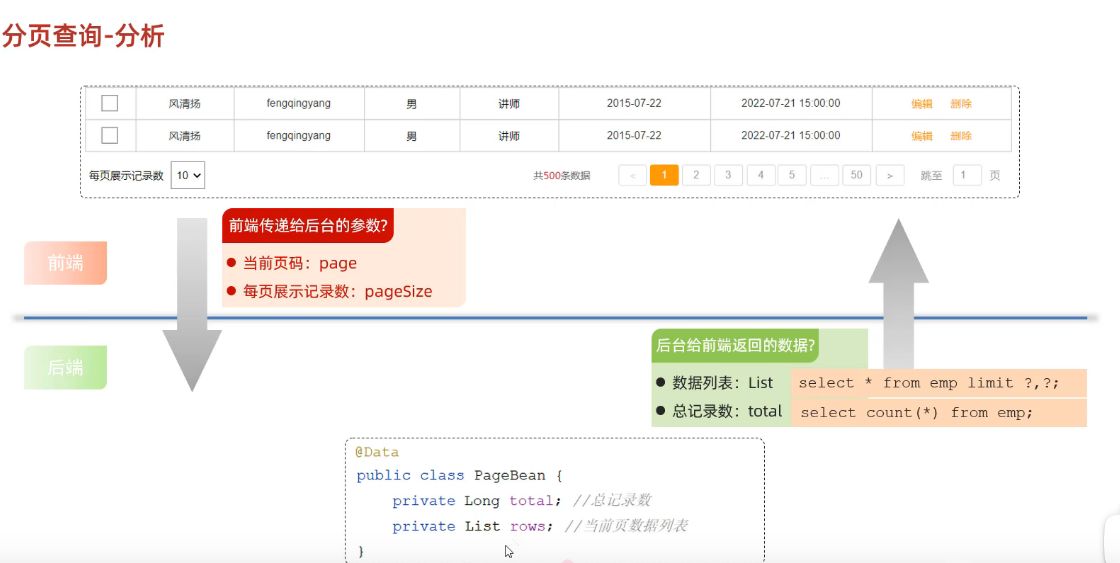
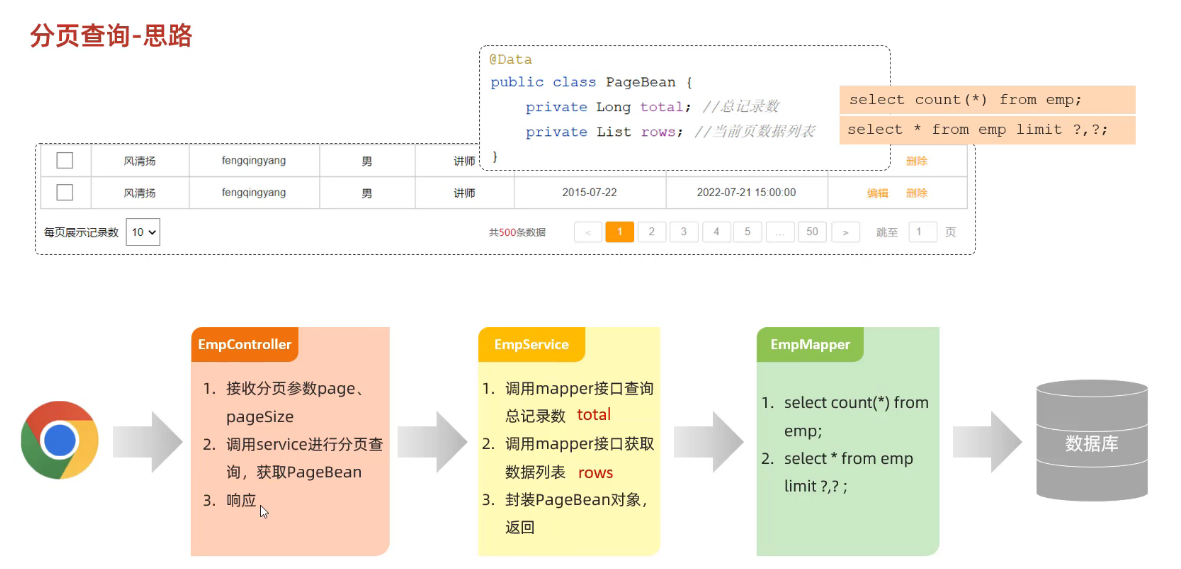
备注:
属性名的命名需要与接口文档保持一致。
如果传入的参数是空且业务需求中有要求传递一个默认值,则考虑引入@requestparam注解,有几个参数,就需要引入几个这样的注解

工作流程+代码:
@RestController
public class EmpController {
@Autowired
private EmpService empService;
@GetMapping("/emps")
public Result page(@RequestParam(defaultValue = "1") Integer page,
@RequestParam(defaultValue = "10") Integer pageSize){
PageBean pageBean=empService.page(page,pageSize);
log.info("页码:{},{}",page,pageSize);
return Result.success(pageBean);
}
}
public class EmpServiceImpl implements EmpService {
@Autowired
private EmpMapper empMapper;
@Override
public PageBean page(Integer page, Integer pageSize) {
Integer count =empMapper.count();
Integer start=(page-1)*pageSize;
List<Emp> empList=empMapper.page(start,pageSize);
PageBean pageBean=new PageBean(count,empList);
return pageBean;
}
}
接着是写service层调用到的方法,需要编写对应的SQL语句去实现对应的功能。注意如果是有很多条数据,可以考虑使用集合将数据进行打包再将其进行返回操作
public interface EmpMapper {
@Select("select count(*) from emp")
Integer count();
@Select("select * from emp limit #{start},#{pageSize}")
public List<Emp> page(Integer start,Integer pageSize);
}
最后肯定是将数据打包返回到前端界面进行展示了

pagehelper插件


条件查询:
需要用到动态sql
思路

用到的代码
controller
@Slf4j
@RestController
public class EmpController {
@Autowired
private EmpService empService;
@GetMapping("/emps")
public Result page(
@RequestParam(defaultValue = "1") Integer page,
@RequestParam(defaultValue = "10") Integer pageSize,
String name,
Short gender,
@DateTimeFormat(pattern="yyyy-MM-dd") LocalDate begin,
@DateTimeFormat(pattern="yyyy-MM-dd") LocalDate end){
// 补充:打印接收的所有参数,确认是否收到前端传入的值
log.info("接收的分页参数:page={}, pageSize={}", page, pageSize);
log.info("接收的筛选参数:name={}, gender={}, begin={}, end={}", name, gender, begin, end);
PageBean pageBean=empService.page(page,pageSize,name,gender,begin,end);
log.info("分页查询结果已封装,总记录数={}", pageBean.getTotal());
return Result.success(pageBean);
}
}
service
@Service
public class EmpServiceImpl implements EmpService {
@Autowired
private EmpMapper empMapper;
@Override
public PageBean page(Integer page, Integer pageSize,String name, Short gender, LocalDate begin, LocalDate end) {
Integer count =empMapper.count(name, gender, begin, end);
Integer start=(page-1)*pageSize;
List<Emp> empList=empMapper.page(start,pageSize,name,gender,begin,end);
PageBean pageBean=new PageBean(count,empList);
return pageBean;
}
}
mapper
@Mapper
public interface EmpMapper {
// 统计方法:所有参数添加@Param注解,与XML中的参数名对应
Integer count(
@Param("name") String name,
@Param("gender") Short gender,
@Param("begin") LocalDate begin,
@Param("end") LocalDate end
);
// 分页方法:所有参数添加@Param注解,与XML中的参数名对应
List<Emp> page(
@Param("start") Integer start,
@Param("pageSize") Integer pageSize,
@Param("name") String name,
@Param("gender") Short gender,
@Param("begin") LocalDate begin,
@Param("end") LocalDate end
);
}
xml文件
<?xml version="1.0" encoding="UTF-8" ?>
<!DOCTYPE mapper
PUBLIC "-//mybatis.org//DTD Mapper 3.0//EN"
"http://mybatis.org/dtd/mybatis-3-mapper.dtd">
<mapper namespace="com.itheima.mapper.EmpMapper">
<!– 1. 条件查询:统计符合条件的总记录数(对应mapper的count方法) –>
<select id="count" resultType="java.lang.Integer">
select count(*)
from emp
<where>
<!– 完善:非null 且 非空字符串 –>
<if test="name != null and name != ''">
name like concat('%', #{name}, '%')
</if>
<if test="gender != null">
and gender = #{gender}
</if>
<if test="begin != null and end != null">
and entrydate between #{begin} and #{end}
</if>
</where>
</select>
<!– 2. 条件查询:分页查询员工数据(对应mapper的page方法) –>
<select id="page" resultType="com.itheima.pojo.Emp">
select *
from emp
<where>
<!– 完善:非null 且 非空字符串 –>
<if test="name != null and name != ''">
name like concat('%', #{name}, '%')
</if>
<if test="gender != null">
and gender = #{gender}
</if>
<if test="begin != null and end != null">
and entrydate between #{begin} and #{end}
</if>
</where>
order by update_time desc
limit #{start}, #{pageSize} <!– 分页参数:起始索引、每页条数 –>
</select>
</mapper>


![基于Vue的青少年足球夏令营管理系统[Vue]-计算机毕业设计源码+LW文档-171主机测评](https://www.171host.com/wp-content/uploads/2026/10/20261031080405-6ae5a0f50fda4-220x150.jpg)
![基于Vue的青少年足球夏令营管理系统[Vue]-计算机毕业设计源码+LW文档-171主机测评](https://www.171host.com/wp-content/uploads/2026/10/20261031064433-6ae58e518eb81-220x150.jpg)
![基于Vue的企业劳务派遣人员管理系统[Vue]-计算机毕业设计源码+LW文档-171主机测评](https://www.171host.com/wp-content/uploads/2026/10/20261030202223-6ae4fc7f2d624-220x150.jpg)