欢迎加入开源鸿蒙跨平台社区
一、三方库核心价值与适用场景
1.1 本实战用到的两个库
| curved_navigation_bar | 提供弧形凸起、带动画的底部导航栏,比系统默认 TabBar 更有辨识度 | 需要 3~5 个主 Tab、希望底部栏有强视觉差异的 App(如节日/品牌主题) |
| font_awesome_flutter | 提供 2000+ 矢量图标,风格统一,无需切图 | 需要丰富图标且希望与 Material/Cupertino 区分;多端图标一致 |
1.2 整体流程概览
#mermaid-svg-F2DpgqRHbseimMha{font-family:\”trebuchet ms\”,verdana,arial,sans-serif;font-size:16px;fill:#333;}@keyframes edge-animation-frame{from{stroke-dashoffset:0;}}@keyframes dash{to{stroke-dashoffset:0;}}#mermaid-svg-F2DpgqRHbseimMha .edge-animation-slow{stroke-dasharray:9,5!important;stroke-dashoffset:900;animation:dash 50s linear infinite;stroke-linecap:round;}#mermaid-svg-F2DpgqRHbseimMha .edge-animation-fast{stroke-dasharray:9,5!important;stroke-dashoffset:900;animation:dash 20s linear infinite;stroke-linecap:round;}#mermaid-svg-F2DpgqRHbseimMha .error-icon{fill:#552222;}#mermaid-svg-F2DpgqRHbseimMha .error-text{fill:#552222;stroke:#552222;}#mermaid-svg-F2DpgqRHbseimMha .edge-thickness-normal{stroke-width:1px;}#mermaid-svg-F2DpgqRHbseimMha .edge-thickness-thick{stroke-width:3.5px;}#mermaid-svg-F2DpgqRHbseimMha .edge-pattern-solid{stroke-dasharray:0;}#mermaid-svg-F2DpgqRHbseimMha .edge-thickness-invisible{stroke-width:0;fill:none;}#mermaid-svg-F2DpgqRHbseimMha .edge-pattern-dashed{stroke-dasharray:3;}#mermaid-svg-F2DpgqRHbseimMha .edge-pattern-dotted{stroke-dasharray:2;}#mermaid-svg-F2DpgqRHbseimMha .marker{fill:#333333;stroke:#333333;}#mermaid-svg-F2DpgqRHbseimMha .marker.cross{stroke:#333333;}#mermaid-svg-F2DpgqRHbseimMha svg{font-family:\”trebuchet ms\”,verdana,arial,sans-serif;font-size:16px;}#mermaid-svg-F2DpgqRHbseimMha p{margin:0;}#mermaid-svg-F2DpgqRHbseimMha .label{font-family:\”trebuchet ms\”,verdana,arial,sans-serif;color:#333;}#mermaid-svg-F2DpgqRHbseimMha .cluster-label text{fill:#333;}#mermaid-svg-F2DpgqRHbseimMha .cluster-label span{color:#333;}#mermaid-svg-F2DpgqRHbseimMha .cluster-label span p{background-color:transparent;}#mermaid-svg-F2DpgqRHbseimMha .label text,#mermaid-svg-F2DpgqRHbseimMha span{fill:#333;color:#333;}#mermaid-svg-F2DpgqRHbseimMha .node rect,#mermaid-svg-F2DpgqRHbseimMha .node circle,#mermaid-svg-F2DpgqRHbseimMha .node ellipse,#mermaid-svg-F2DpgqRHbseimMha .node polygon,#mermaid-svg-F2DpgqRHbseimMha .node path{fill:#ECECFF;stroke:#9370DB;stroke-width:1px;}#mermaid-svg-F2DpgqRHbseimMha .rough-node .label text,#mermaid-svg-F2DpgqRHbseimMha .node .label text,#mermaid-svg-F2DpgqRHbseimMha .image-shape .label,#mermaid-svg-F2DpgqRHbseimMha .icon-shape .label{text-anchor:middle;}#mermaid-svg-F2DpgqRHbseimMha .node .katex path{fill:#000;stroke:#000;stroke-width:1px;}#mermaid-svg-F2DpgqRHbseimMha .rough-node .label,#mermaid-svg-F2DpgqRHbseimMha .node .label,#mermaid-svg-F2DpgqRHbseimMha .image-shape .label,#mermaid-svg-F2DpgqRHbseimMha .icon-shape .label{text-align:center;}#mermaid-svg-F2DpgqRHbseimMha .node.clickable{cursor:pointer;}#mermaid-svg-F2DpgqRHbseimMha .root .anchor path{fill:#333333!important;stroke-width:0;stroke:#333333;}#mermaid-svg-F2DpgqRHbseimMha .arrowheadPath{fill:#333333;}#mermaid-svg-F2DpgqRHbseimMha .edgePath .path{stroke:#333333;stroke-width:2.0px;}#mermaid-svg-F2DpgqRHbseimMha .flowchart-link{stroke:#333333;fill:none;}#mermaid-svg-F2DpgqRHbseimMha .edgeLabel{background-color:rgba(232,232,232, 0.8);text-align:center;}#mermaid-svg-F2DpgqRHbseimMha .edgeLabel p{background-color:rgba(232,232,232, 0.8);}#mermaid-svg-F2DpgqRHbseimMha .edgeLabel rect{opacity:0.5;background-color:rgba(232,232,232, 0.8);fill:rgba(232,232,232, 0.8);}#mermaid-svg-F2DpgqRHbseimMha .labelBkg{background-color:rgba(232, 232, 232, 0.5);}#mermaid-svg-F2DpgqRHbseimMha .cluster rect{fill:#ffffde;stroke:#aaaa33;stroke-width:1px;}#mermaid-svg-F2DpgqRHbseimMha .cluster text{fill:#333;}#mermaid-svg-F2DpgqRHbseimMha .cluster span{color:#333;}#mermaid-svg-F2DpgqRHbseimMha div.mermaidTooltip{position:absolute;text-align:center;max-width:200px;padding:2px;font-family:\”trebuchet ms\”,verdana,arial,sans-serif;font-size:12px;background:hsl(80, 100%, 96.2745098039%);border:1px solid #aaaa33;border-radius:2px;pointer-events:none;z-index:100;}#mermaid-svg-F2DpgqRHbseimMha .flowchartTitleText{text-anchor:middle;font-size:18px;fill:#333;}#mermaid-svg-F2DpgqRHbseimMha rect.text{fill:none;stroke-width:0;}#mermaid-svg-F2DpgqRHbseimMha .icon-shape,#mermaid-svg-F2DpgqRHbseimMha .image-shape{background-color:rgba(232,232,232, 0.8);text-align:center;}#mermaid-svg-F2DpgqRHbseimMha .icon-shape p,#mermaid-svg-F2DpgqRHbseimMha .image-shape p{background-color:rgba(232,232,232, 0.8);padding:2px;}#mermaid-svg-F2DpgqRHbseimMha .icon-shape rect,#mermaid-svg-F2DpgqRHbseimMha .image-shape rect{opacity:0.5;background-color:rgba(232,232,232, 0.8);fill:rgba(232,232,232, 0.8);}#mermaid-svg-F2DpgqRHbseimMha .label-icon{display:inline-block;height:1em;overflow:visible;vertical-align:-0.125em;}#mermaid-svg-F2DpgqRHbseimMha .node .label-icon path{fill:currentColor;stroke:revert;stroke-width:revert;}#mermaid-svg-F2DpgqRHbseimMha :root{–mermaid-font-family:\”trebuchet ms\”,verdana,arial,sans-serif;}
📦 选型
🔧 环境与多端适配
📥 集成与初始化
🧩 高级封装
📤 鸿蒙打包与真机
二、环境适配
2.1 支持的 Flutter 版本
| curved_navigation_bar ^1.0.6 | Dart 2.12+ | Flutter 3.x + Dart 3.x ✅ |
| font_awesome_flutter ^10.12.0 | 无特殊要求 | Flutter 3.35+(含鸿蒙 canary)✅ |
2.2 多端适配情况
#mermaid-svg-A8u21xmXEJRAGiIb{font-family:\”trebuchet ms\”,verdana,arial,sans-serif;font-size:16px;fill:#333;}@keyframes edge-animation-frame{from{stroke-dashoffset:0;}}@keyframes dash{to{stroke-dashoffset:0;}}#mermaid-svg-A8u21xmXEJRAGiIb .edge-animation-slow{stroke-dasharray:9,5!important;stroke-dashoffset:900;animation:dash 50s linear infinite;stroke-linecap:round;}#mermaid-svg-A8u21xmXEJRAGiIb .edge-animation-fast{stroke-dasharray:9,5!important;stroke-dashoffset:900;animation:dash 20s linear infinite;stroke-linecap:round;}#mermaid-svg-A8u21xmXEJRAGiIb .error-icon{fill:#552222;}#mermaid-svg-A8u21xmXEJRAGiIb .error-text{fill:#552222;stroke:#552222;}#mermaid-svg-A8u21xmXEJRAGiIb .edge-thickness-normal{stroke-width:1px;}#mermaid-svg-A8u21xmXEJRAGiIb .edge-thickness-thick{stroke-width:3.5px;}#mermaid-svg-A8u21xmXEJRAGiIb .edge-pattern-solid{stroke-dasharray:0;}#mermaid-svg-A8u21xmXEJRAGiIb .edge-thickness-invisible{stroke-width:0;fill:none;}#mermaid-svg-A8u21xmXEJRAGiIb .edge-pattern-dashed{stroke-dasharray:3;}#mermaid-svg-A8u21xmXEJRAGiIb .edge-pattern-dotted{stroke-dasharray:2;}#mermaid-svg-A8u21xmXEJRAGiIb .marker{fill:#333333;stroke:#333333;}#mermaid-svg-A8u21xmXEJRAGiIb .marker.cross{stroke:#333333;}#mermaid-svg-A8u21xmXEJRAGiIb svg{font-family:\”trebuchet ms\”,verdana,arial,sans-serif;font-size:16px;}#mermaid-svg-A8u21xmXEJRAGiIb p{margin:0;}#mermaid-svg-A8u21xmXEJRAGiIb .label{font-family:\”trebuchet ms\”,verdana,arial,sans-serif;color:#333;}#mermaid-svg-A8u21xmXEJRAGiIb .cluster-label text{fill:#333;}#mermaid-svg-A8u21xmXEJRAGiIb .cluster-label span{color:#333;}#mermaid-svg-A8u21xmXEJRAGiIb .cluster-label span p{background-color:transparent;}#mermaid-svg-A8u21xmXEJRAGiIb .label text,#mermaid-svg-A8u21xmXEJRAGiIb span{fill:#333;color:#333;}#mermaid-svg-A8u21xmXEJRAGiIb .node rect,#mermaid-svg-A8u21xmXEJRAGiIb .node circle,#mermaid-svg-A8u21xmXEJRAGiIb .node ellipse,#mermaid-svg-A8u21xmXEJRAGiIb .node polygon,#mermaid-svg-A8u21xmXEJRAGiIb .node path{fill:#ECECFF;stroke:#9370DB;stroke-width:1px;}#mermaid-svg-A8u21xmXEJRAGiIb .rough-node .label text,#mermaid-svg-A8u21xmXEJRAGiIb .node .label text,#mermaid-svg-A8u21xmXEJRAGiIb .image-shape .label,#mermaid-svg-A8u21xmXEJRAGiIb .icon-shape .label{text-anchor:middle;}#mermaid-svg-A8u21xmXEJRAGiIb .node .katex path{fill:#000;stroke:#000;stroke-width:1px;}#mermaid-svg-A8u21xmXEJRAGiIb .rough-node .label,#mermaid-svg-A8u21xmXEJRAGiIb .node .label,#mermaid-svg-A8u21xmXEJRAGiIb .image-shape .label,#mermaid-svg-A8u21xmXEJRAGiIb .icon-shape .label{text-align:center;}#mermaid-svg-A8u21xmXEJRAGiIb .node.clickable{cursor:pointer;}#mermaid-svg-A8u21xmXEJRAGiIb .root .anchor path{fill:#333333!important;stroke-width:0;stroke:#333333;}#mermaid-svg-A8u21xmXEJRAGiIb .arrowheadPath{fill:#333333;}#mermaid-svg-A8u21xmXEJRAGiIb .edgePath .path{stroke:#333333;stroke-width:2.0px;}#mermaid-svg-A8u21xmXEJRAGiIb .flowchart-link{stroke:#333333;fill:none;}#mermaid-svg-A8u21xmXEJRAGiIb .edgeLabel{background-color:rgba(232,232,232, 0.8);text-align:center;}#mermaid-svg-A8u21xmXEJRAGiIb .edgeLabel p{background-color:rgba(232,232,232, 0.8);}#mermaid-svg-A8u21xmXEJRAGiIb .edgeLabel rect{opacity:0.5;background-color:rgba(232,232,232, 0.8);fill:rgba(232,232,232, 0.8);}#mermaid-svg-A8u21xmXEJRAGiIb .labelBkg{background-color:rgba(232, 232, 232, 0.5);}#mermaid-svg-A8u21xmXEJRAGiIb .cluster rect{fill:#ffffde;stroke:#aaaa33;stroke-width:1px;}#mermaid-svg-A8u21xmXEJRAGiIb .cluster text{fill:#333;}#mermaid-svg-A8u21xmXEJRAGiIb .cluster span{color:#333;}#mermaid-svg-A8u21xmXEJRAGiIb div.mermaidTooltip{position:absolute;text-align:center;max-width:200px;padding:2px;font-family:\”trebuchet ms\”,verdana,arial,sans-serif;font-size:12px;background:hsl(80, 100%, 96.2745098039%);border:1px solid #aaaa33;border-radius:2px;pointer-events:none;z-index:100;}#mermaid-svg-A8u21xmXEJRAGiIb .flowchartTitleText{text-anchor:middle;font-size:18px;fill:#333;}#mermaid-svg-A8u21xmXEJRAGiIb rect.text{fill:none;stroke-width:0;}#mermaid-svg-A8u21xmXEJRAGiIb .icon-shape,#mermaid-svg-A8u21xmXEJRAGiIb .image-shape{background-color:rgba(232,232,232, 0.8);text-align:center;}#mermaid-svg-A8u21xmXEJRAGiIb .icon-shape p,#mermaid-svg-A8u21xmXEJRAGiIb .image-shape p{background-color:rgba(232,232,232, 0.8);padding:2px;}#mermaid-svg-A8u21xmXEJRAGiIb .icon-shape rect,#mermaid-svg-A8u21xmXEJRAGiIb .image-shape rect{opacity:0.5;background-color:rgba(232,232,232, 0.8);fill:rgba(232,232,232, 0.8);}#mermaid-svg-A8u21xmXEJRAGiIb .label-icon{display:inline-block;height:1em;overflow:visible;vertical-align:-0.125em;}#mermaid-svg-A8u21xmXEJRAGiIb .node .label-icon path{fill:currentColor;stroke:revert;stroke-width:revert;}#mermaid-svg-A8u21xmXEJRAGiIb :root{–mermaid-font-family:\”trebuchet ms\”,verdana,arial,sans-serif;}
支持平台
Android
iOS
HarmonyOS / OpenHarmony
Web / Windows 等
- curved_navigation_bar:纯 Flutter 绘制,Android / iOS / 鸿蒙 / Web / 桌面均可使用,无需平台通道。
- font_awesome_flutter:字体资源随包体下发,鸿蒙端与 Android/iOS 行为一致。
- 鸿蒙注意点:需使用支持Flutter for OpenHarmony最新适配分支版本,且完成鸿蒙工程配置与签名后再打包 HAP。
三、集成步骤
3.1 第一步:pubspec.yaml 配置
在项目根目录的 pubspec.yaml 的 dependencies: 下增加两行。 为什么用 ^1.0.6 / ^10.12.0:^ 表示兼容该主版本下的次版本更新,既保证可用又便于后续安全升级。
Flutter 端代码(项目根目录 pubspec.yaml 片段):
dependencies:
flutter:
sdk: flutter
cupertino_icons: ^1.0.8
curved_navigation_bar: ^1.0.6 # 弧形底部导航
font_awesome_flutter: ^10.12.0 # 图标库,与导航栏搭配使用
3.2 第二步:依赖安装
在项目根目录执行:
flutter pub get
看到 Got dependencies! 即表示成功。为什么必须执行:Flutter 不会自动把 pubspec.yaml 的变更同步到 .dart_tool/package_config.json,不执行则 import 会报「Target of URI doesn’t exist」。
3.3 第三步:基础初始化(无额外初始化)
这两个库不需要在 main() 或 runApp 前做类似 WidgetsFlutterBinding.ensureInitialized() 之外的初始化,直接在使用页面 import 即可。
Flutter 端代码(在需要使用的 dart 文件顶部):
import 'package:curved_navigation_bar/curved_navigation_bar.dart';
import 'package:font_awesome_flutter/font_awesome_flutter.dart';
3.4 第四步:核心 API 调用示例
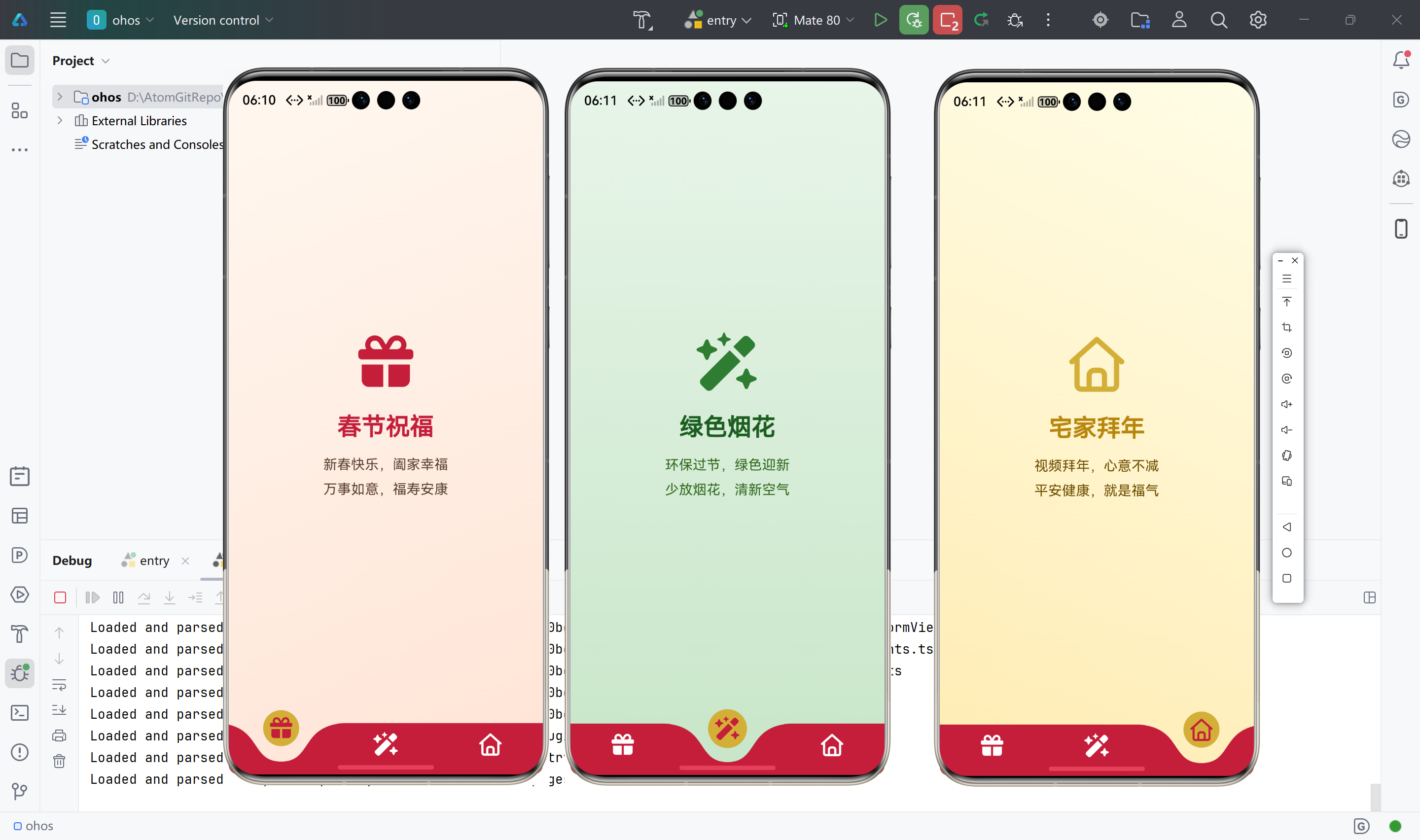
下面为项目中 lib/main.dart 的完整实现:带 3 个 Tab(春节祝福、绿色烟花、宅家拜年)的弧形底部栏,每 Tab 对应独立页面。 为什么用 IndexedStack:保留各 Tab 页面状态,避免每次切换重建;若希望每次进入都刷新,可改为按 index 只 build 当前页。 为什么用 late final List<_TabItem> _tabs:列表内包含 Widget(如 _BlessingPage()),不是 const,故不能用 const List,用 late final 只初始化一次。
Flutter 端代码(与项目 lib/main.dart 一致):
import 'package:curved_navigation_bar/curved_navigation_bar.dart';
import 'package:flutter/material.dart';
import 'package:font_awesome_flutter/font_awesome_flutter.dart';
void main() {
runApp(const MyApp());
}
class MyApp extends StatelessWidget {
const MyApp({super.key});
Widget build(BuildContext context) {
return MaterialApp(
title: '新春祝福',
debugShowCheckedModeBanner: false,
theme: ThemeData(
colorScheme: ColorScheme.fromSeed(
seedColor: const Color(0xFFC41E3A),
brightness: Brightness.light,
primary: const Color(0xFFC41E3A),
secondary: const Color(0xFFD4AF37),
),
useMaterial3: true,
),
home: const MainNavigationPage(),
);
}
}
class MainNavigationPage extends StatefulWidget {
const MainNavigationPage({super.key});
State<MainNavigationPage> createState() => _MainNavigationPageState();
}
class _MainNavigationPageState extends State<MainNavigationPage> {
int _currentIndex = 0;
late final List<_TabItem> _tabs = [
_TabItem(
label: '春节祝福',
icon: FontAwesomeIcons.gift,
page: _BlessingPage(),
),
_TabItem(
label: '绿色烟花',
icon: FontAwesomeIcons.wandMagicSparkles,
page: _FireworkPage(),
),
_TabItem(
label: '宅家拜年',
icon: FontAwesomeIcons.house,
page: _HomeGreetingPage(),
),
];
Widget build(BuildContext context) {
return Scaffold(
extendBody: true,
body: IndexedStack(
index: _currentIndex,
children: _tabs.map((e) => e.page).toList(),
),
bottomNavigationBar: CurvedNavigationBar(
index: _currentIndex,
height: 60,
backgroundColor: Colors.transparent,
color: const Color(0xFFC41E3A),
buttonBackgroundColor: const Color(0xFFD4AF37),
animationCurve: Curves.easeInOutCubic,
animationDuration: const Duration(milliseconds: 400),
onTap: (index) => setState(() => _currentIndex = index),
items: _tabs
.map(
(tab) => Padding(
padding: const EdgeInsets.symmetric(vertical: 8),
child: FaIcon(
tab.icon,
color: _currentIndex == _tabs.indexOf(tab)
? const Color(0xFFC41E3A)
: Colors.white,
size: 26,
),
),
)
.toList(),
),
);
}
}
class _TabItem {
final String label;
final IconData icon;
final Widget page;
const _TabItem({
required this.label,
required this.icon,
required this.page,
});
}
class _BlessingPage extends StatelessWidget {
Widget build(BuildContext context) {
return Container(
decoration: const BoxDecoration(
gradient: LinearGradient(
begin: Alignment.topLeft,
end: Alignment.bottomRight,
colors: [
Color(0xFFFFF8F0),
Color(0xFFFFE4D6),
],
),
),
child: SafeArea(
child: Center(
child: Column(
mainAxisAlignment: MainAxisAlignment.center,
children: [
FaIcon(
FontAwesomeIcons.gift,
size: 64,
color: Theme.of(context).colorScheme.primary,
),
const SizedBox(height: 24),
Text(
'春节祝福',
style: Theme.of(context).textTheme.headlineMedium?.copyWith(
fontWeight: FontWeight.bold,
color: const Color(0xFFC41E3A),
),
),
const SizedBox(height: 12),
Padding(
padding: const EdgeInsets.symmetric(horizontal: 32),
child: Text(
'新春快乐,阖家幸福\\n万事如意,福寿安康',
textAlign: TextAlign.center,
style: Theme.of(context).textTheme.titleMedium?.copyWith(
color: const Color(0xFF5C4033),
height: 1.8,
),
),
),
],
),
),
),
);
}
}
class _FireworkPage extends StatelessWidget {
Widget build(BuildContext context) {
return Container(
decoration: const BoxDecoration(
gradient: LinearGradient(
begin: Alignment.topCenter,
end: Alignment.bottomCenter,
colors: [
Color(0xFFE8F5E9),
Color(0xFFC8E6C9),
],
),
),
child: SafeArea(
child: Center(
child: Column(
mainAxisAlignment: MainAxisAlignment.center,
children: [
FaIcon(
FontAwesomeIcons.wandMagicSparkles,
size: 64,
color: const Color(0xFF2E7D32),
),
const SizedBox(height: 24),
Text(
'绿色烟花',
style: Theme.of(context).textTheme.headlineMedium?.copyWith(
fontWeight: FontWeight.bold,
color: const Color(0xFF1B5E20),
),
),
const SizedBox(height: 12),
Padding(
padding: const EdgeInsets.symmetric(horizontal: 32),
child: Text(
'环保过节,绿色迎新\\n少放烟花,清新空气',
textAlign: TextAlign.center,
style: Theme.of(context).textTheme.titleMedium?.copyWith(
color: const Color(0xFF33691E),
height: 1.8,
),
),
),
],
),
),
),
);
}
}
class _HomeGreetingPage extends StatelessWidget {
Widget build(BuildContext context) {
return Container(
decoration: const BoxDecoration(
gradient: LinearGradient(
begin: Alignment.topRight,
end: Alignment.bottomLeft,
colors: [
Color(0xFFFFFDE7),
Color(0xFFFFECB3),
],
),
),
child: SafeArea(
child: Center(
child: Column(
mainAxisAlignment: MainAxisAlignment.center,
children: [
FaIcon(
FontAwesomeIcons.house,
size: 64,
color: Theme.of(context).colorScheme.secondary,
),
const SizedBox(height: 24),
Text(
'宅家拜年',
style: Theme.of(context).textTheme.headlineMedium?.copyWith(
fontWeight: FontWeight.bold,
color: const Color(0xFFB8860B),
),
),
const SizedBox(height: 12),
Padding(
padding: const EdgeInsets.symmetric(horizontal: 32),
child: Text(
'视频拜年,心意不减\\n平安健康,就是福气',
textAlign: TextAlign.center,
style: Theme.of(context).textTheme.titleMedium?.copyWith(
color: const Color(0xFF6D4C00),
height: 1.8,
),
),
),
],
),
),
),
);
}
}
四、高级封装
4.1 为什么要封装
#mermaid-svg-5ALzO5iWjhJUeSuk{font-family:\”trebuchet ms\”,verdana,arial,sans-serif;font-size:16px;fill:#333;}@keyframes edge-animation-frame{from{stroke-dashoffset:0;}}@keyframes dash{to{stroke-dashoffset:0;}}#mermaid-svg-5ALzO5iWjhJUeSuk .edge-animation-slow{stroke-dasharray:9,5!important;stroke-dashoffset:900;animation:dash 50s linear infinite;stroke-linecap:round;}#mermaid-svg-5ALzO5iWjhJUeSuk .edge-animation-fast{stroke-dasharray:9,5!important;stroke-dashoffset:900;animation:dash 20s linear infinite;stroke-linecap:round;}#mermaid-svg-5ALzO5iWjhJUeSuk .error-icon{fill:#552222;}#mermaid-svg-5ALzO5iWjhJUeSuk .error-text{fill:#552222;stroke:#552222;}#mermaid-svg-5ALzO5iWjhJUeSuk .edge-thickness-normal{stroke-width:1px;}#mermaid-svg-5ALzO5iWjhJUeSuk .edge-thickness-thick{stroke-width:3.5px;}#mermaid-svg-5ALzO5iWjhJUeSuk .edge-pattern-solid{stroke-dasharray:0;}#mermaid-svg-5ALzO5iWjhJUeSuk .edge-thickness-invisible{stroke-width:0;fill:none;}#mermaid-svg-5ALzO5iWjhJUeSuk .edge-pattern-dashed{stroke-dasharray:3;}#mermaid-svg-5ALzO5iWjhJUeSuk .edge-pattern-dotted{stroke-dasharray:2;}#mermaid-svg-5ALzO5iWjhJUeSuk .marker{fill:#333333;stroke:#333333;}#mermaid-svg-5ALzO5iWjhJUeSuk .marker.cross{stroke:#333333;}#mermaid-svg-5ALzO5iWjhJUeSuk svg{font-family:\”trebuchet ms\”,verdana,arial,sans-serif;font-size:16px;}#mermaid-svg-5ALzO5iWjhJUeSuk p{margin:0;}#mermaid-svg-5ALzO5iWjhJUeSuk .label{font-family:\”trebuchet ms\”,verdana,arial,sans-serif;color:#333;}#mermaid-svg-5ALzO5iWjhJUeSuk .cluster-label text{fill:#333;}#mermaid-svg-5ALzO5iWjhJUeSuk .cluster-label span{color:#333;}#mermaid-svg-5ALzO5iWjhJUeSuk .cluster-label span p{background-color:transparent;}#mermaid-svg-5ALzO5iWjhJUeSuk .label text,#mermaid-svg-5ALzO5iWjhJUeSuk span{fill:#333;color:#333;}#mermaid-svg-5ALzO5iWjhJUeSuk .node rect,#mermaid-svg-5ALzO5iWjhJUeSuk .node circle,#mermaid-svg-5ALzO5iWjhJUeSuk .node ellipse,#mermaid-svg-5ALzO5iWjhJUeSuk .node polygon,#mermaid-svg-5ALzO5iWjhJUeSuk .node path{fill:#ECECFF;stroke:#9370DB;stroke-width:1px;}#mermaid-svg-5ALzO5iWjhJUeSuk .rough-node .label text,#mermaid-svg-5ALzO5iWjhJUeSuk .node .label text,#mermaid-svg-5ALzO5iWjhJUeSuk .image-shape .label,#mermaid-svg-5ALzO5iWjhJUeSuk .icon-shape .label{text-anchor:middle;}#mermaid-svg-5ALzO5iWjhJUeSuk .node .katex path{fill:#000;stroke:#000;stroke-width:1px;}#mermaid-svg-5ALzO5iWjhJUeSuk .rough-node .label,#mermaid-svg-5ALzO5iWjhJUeSuk .node .label,#mermaid-svg-5ALzO5iWjhJUeSuk .image-shape .label,#mermaid-svg-5ALzO5iWjhJUeSuk .icon-shape .label{text-align:center;}#mermaid-svg-5ALzO5iWjhJUeSuk .node.clickable{cursor:pointer;}#mermaid-svg-5ALzO5iWjhJUeSuk .root .anchor path{fill:#333333!important;stroke-width:0;stroke:#333333;}#mermaid-svg-5ALzO5iWjhJUeSuk .arrowheadPath{fill:#333333;}#mermaid-svg-5ALzO5iWjhJUeSuk .edgePath .path{stroke:#333333;stroke-width:2.0px;}#mermaid-svg-5ALzO5iWjhJUeSuk .flowchart-link{stroke:#333333;fill:none;}#mermaid-svg-5ALzO5iWjhJUeSuk .edgeLabel{background-color:rgba(232,232,232, 0.8);text-align:center;}#mermaid-svg-5ALzO5iWjhJUeSuk .edgeLabel p{background-color:rgba(232,232,232, 0.8);}#mermaid-svg-5ALzO5iWjhJUeSuk .edgeLabel rect{opacity:0.5;background-color:rgba(232,232,232, 0.8);fill:rgba(232,232,232, 0.8);}#mermaid-svg-5ALzO5iWjhJUeSuk .labelBkg{background-color:rgba(232, 232, 232, 0.5);}#mermaid-svg-5ALzO5iWjhJUeSuk .cluster rect{fill:#ffffde;stroke:#aaaa33;stroke-width:1px;}#mermaid-svg-5ALzO5iWjhJUeSuk .cluster text{fill:#333;}#mermaid-svg-5ALzO5iWjhJUeSuk .cluster span{color:#333;}#mermaid-svg-5ALzO5iWjhJUeSuk div.mermaidTooltip{position:absolute;text-align:center;max-width:200px;padding:2px;font-family:\”trebuchet ms\”,verdana,arial,sans-serif;font-size:12px;background:hsl(80, 100%, 96.2745098039%);border:1px solid #aaaa33;border-radius:2px;pointer-events:none;z-index:100;}#mermaid-svg-5ALzO5iWjhJUeSuk .flowchartTitleText{text-anchor:middle;font-size:18px;fill:#333;}#mermaid-svg-5ALzO5iWjhJUeSuk rect.text{fill:none;stroke-width:0;}#mermaid-svg-5ALzO5iWjhJUeSuk .icon-shape,#mermaid-svg-5ALzO5iWjhJUeSuk .image-shape{background-color:rgba(232,232,232, 0.8);text-align:center;}#mermaid-svg-5ALzO5iWjhJUeSuk .icon-shape p,#mermaid-svg-5ALzO5iWjhJUeSuk .image-shape p{background-color:rgba(232,232,232, 0.8);padding:2px;}#mermaid-svg-5ALzO5iWjhJUeSuk .icon-shape rect,#mermaid-svg-5ALzO5iWjhJUeSuk .image-shape rect{opacity:0.5;background-color:rgba(232,232,232, 0.8);fill:rgba(232,232,232, 0.8);}#mermaid-svg-5ALzO5iWjhJUeSuk .label-icon{display:inline-block;height:1em;overflow:visible;vertical-align:-0.125em;}#mermaid-svg-5ALzO5iWjhJUeSuk .node .label-icon path{fill:currentColor;stroke:revert;stroke-width:revert;}#mermaid-svg-5ALzO5iWjhJUeSuk :root{–mermaid-font-family:\”trebuchet ms\”,verdana,arial,sans-serif;}
多处使用同一套底部栏
统一主题与行为
减少重复 index/onTap 逻辑
封装成 Widget + 统一入口
易维护、换库只改一处
- 多个入口(如首页、某模块)需要同一套底部栏时,避免复制粘贴。
- 主题(颜色、高度、动画)集中管理,换肤或多端微调只改一处。
- 使用「统一调用入口」后,业务侧只关心「传哪些 Tab」,不关心内部实现。
4.2 封装结构
#mermaid-svg-8BfJM76x6IsJpjHA{font-family:\”trebuchet ms\”,verdana,arial,sans-serif;font-size:16px;fill:#333;}@keyframes edge-animation-frame{from{stroke-dashoffset:0;}}@keyframes dash{to{stroke-dashoffset:0;}}#mermaid-svg-8BfJM76x6IsJpjHA .edge-animation-slow{stroke-dasharray:9,5!important;stroke-dashoffset:900;animation:dash 50s linear infinite;stroke-linecap:round;}#mermaid-svg-8BfJM76x6IsJpjHA .edge-animation-fast{stroke-dasharray:9,5!important;stroke-dashoffset:900;animation:dash 20s linear infinite;stroke-linecap:round;}#mermaid-svg-8BfJM76x6IsJpjHA .error-icon{fill:#552222;}#mermaid-svg-8BfJM76x6IsJpjHA .error-text{fill:#552222;stroke:#552222;}#mermaid-svg-8BfJM76x6IsJpjHA .edge-thickness-normal{stroke-width:1px;}#mermaid-svg-8BfJM76x6IsJpjHA .edge-thickness-thick{stroke-width:3.5px;}#mermaid-svg-8BfJM76x6IsJpjHA .edge-pattern-solid{stroke-dasharray:0;}#mermaid-svg-8BfJM76x6IsJpjHA .edge-thickness-invisible{stroke-width:0;fill:none;}#mermaid-svg-8BfJM76x6IsJpjHA .edge-pattern-dashed{stroke-dasharray:3;}#mermaid-svg-8BfJM76x6IsJpjHA .edge-pattern-dotted{stroke-dasharray:2;}#mermaid-svg-8BfJM76x6IsJpjHA .marker{fill:#333333;stroke:#333333;}#mermaid-svg-8BfJM76x6IsJpjHA .marker.cross{stroke:#333333;}#mermaid-svg-8BfJM76x6IsJpjHA svg{font-family:\”trebuchet ms\”,verdana,arial,sans-serif;font-size:16px;}#mermaid-svg-8BfJM76x6IsJpjHA p{margin:0;}#mermaid-svg-8BfJM76x6IsJpjHA .label{font-family:\”trebuchet ms\”,verdana,arial,sans-serif;color:#333;}#mermaid-svg-8BfJM76x6IsJpjHA .cluster-label text{fill:#333;}#mermaid-svg-8BfJM76x6IsJpjHA .cluster-label span{color:#333;}#mermaid-svg-8BfJM76x6IsJpjHA .cluster-label span p{background-color:transparent;}#mermaid-svg-8BfJM76x6IsJpjHA .label text,#mermaid-svg-8BfJM76x6IsJpjHA span{fill:#333;color:#333;}#mermaid-svg-8BfJM76x6IsJpjHA .node rect,#mermaid-svg-8BfJM76x6IsJpjHA .node circle,#mermaid-svg-8BfJM76x6IsJpjHA .node ellipse,#mermaid-svg-8BfJM76x6IsJpjHA .node polygon,#mermaid-svg-8BfJM76x6IsJpjHA .node path{fill:#ECECFF;stroke:#9370DB;stroke-width:1px;}#mermaid-svg-8BfJM76x6IsJpjHA .rough-node .label text,#mermaid-svg-8BfJM76x6IsJpjHA .node .label text,#mermaid-svg-8BfJM76x6IsJpjHA .image-shape .label,#mermaid-svg-8BfJM76x6IsJpjHA .icon-shape .label{text-anchor:middle;}#mermaid-svg-8BfJM76x6IsJpjHA .node .katex path{fill:#000;stroke:#000;stroke-width:1px;}#mermaid-svg-8BfJM76x6IsJpjHA .rough-node .label,#mermaid-svg-8BfJM76x6IsJpjHA .node .label,#mermaid-svg-8BfJM76x6IsJpjHA .image-shape .label,#mermaid-svg-8BfJM76x6IsJpjHA .icon-shape .label{text-align:center;}#mermaid-svg-8BfJM76x6IsJpjHA .node.clickable{cursor:pointer;}#mermaid-svg-8BfJM76x6IsJpjHA .root .anchor path{fill:#333333!important;stroke-width:0;stroke:#333333;}#mermaid-svg-8BfJM76x6IsJpjHA .arrowheadPath{fill:#333333;}#mermaid-svg-8BfJM76x6IsJpjHA .edgePath .path{stroke:#333333;stroke-width:2.0px;}#mermaid-svg-8BfJM76x6IsJpjHA .flowchart-link{stroke:#333333;fill:none;}#mermaid-svg-8BfJM76x6IsJpjHA .edgeLabel{background-color:rgba(232,232,232, 0.8);text-align:center;}#mermaid-svg-8BfJM76x6IsJpjHA .edgeLabel p{background-color:rgba(232,232,232, 0.8);}#mermaid-svg-8BfJM76x6IsJpjHA .edgeLabel rect{opacity:0.5;background-color:rgba(232,232,232, 0.8);fill:rgba(232,232,232, 0.8);}#mermaid-svg-8BfJM76x6IsJpjHA .labelBkg{background-color:rgba(232, 232, 232, 0.5);}#mermaid-svg-8BfJM76x6IsJpjHA .cluster rect{fill:#ffffde;stroke:#aaaa33;stroke-width:1px;}#mermaid-svg-8BfJM76x6IsJpjHA .cluster text{fill:#333;}#mermaid-svg-8BfJM76x6IsJpjHA .cluster span{color:#333;}#mermaid-svg-8BfJM76x6IsJpjHA div.mermaidTooltip{position:absolute;text-align:center;max-width:200px;padding:2px;font-family:\”trebuchet ms\”,verdana,arial,sans-serif;font-size:12px;background:hsl(80, 100%, 96.2745098039%);border:1px solid #aaaa33;border-radius:2px;pointer-events:none;z-index:100;}#mermaid-svg-8BfJM76x6IsJpjHA .flowchartTitleText{text-anchor:middle;font-size:18px;fill:#333;}#mermaid-svg-8BfJM76x6IsJpjHA rect.text{fill:none;stroke-width:0;}#mermaid-svg-8BfJM76x6IsJpjHA .icon-shape,#mermaid-svg-8BfJM76x6IsJpjHA .image-shape{background-color:rgba(232,232,232, 0.8);text-align:center;}#mermaid-svg-8BfJM76x6IsJpjHA .icon-shape p,#mermaid-svg-8BfJM76x6IsJpjHA .image-shape p{background-color:rgba(232,232,232, 0.8);padding:2px;}#mermaid-svg-8BfJM76x6IsJpjHA .icon-shape rect,#mermaid-svg-8BfJM76x6IsJpjHA .image-shape rect{opacity:0.5;background-color:rgba(232,232,232, 0.8);fill:rgba(232,232,232, 0.8);}#mermaid-svg-8BfJM76x6IsJpjHA .label-icon{display:inline-block;height:1em;overflow:visible;vertical-align:-0.125em;}#mermaid-svg-8BfJM76x6IsJpjHA .node .label-icon path{fill:currentColor;stroke:revert;stroke-width:revert;}#mermaid-svg-8BfJM76x6IsJpjHA :root{–mermaid-font-family:\”trebuchet ms\”,verdana,arial,sans-serif;}
统一入口
组件层
配置层
CurvedTabItem
CurvedBarTheme
AppCurvedBottomBar
CurvedBottomBarConfig
- CurvedTabItem:单个 Tab 的配置(label、icon、page)。
- CurvedBarTheme:导航栏颜色、高度、动画等。
- AppCurvedBottomBar:内部使用 CurvedNavigationBar + FaIcon,根据 items 和 theme 渲染。
- CurvedBottomBarConfig:单例风格统一入口,提供默认主题和 build() 方法。
4.3 可复用封装代码
4.3.1 数据与主题类(lib/widgets/curved_bottom_bar.dart 内)
Flutter 端代码:
import 'package:curved_navigation_bar/curved_navigation_bar.dart';
import 'package:flutter/material.dart';
import 'package:font_awesome_flutter/font_awesome_flutter.dart';
/// 📦 单个选项卡配置(用于二次封装)
class CurvedTabItem {
final String label;
final IconData icon;
final Widget page;
const CurvedTabItem({
required this.label,
required this.icon,
required this.page,
});
}
/// 🎨 弧形底部导航栏主题配置
class CurvedBarTheme {
final Color barColor;
final Color buttonBackgroundColor;
final Color selectedIconColor;
final Color unselectedIconColor;
final double height;
final Duration animationDuration;
final Curve animationCurve;
const CurvedBarTheme({
this.barColor = const Color(0xFFC41E3A),
this.buttonBackgroundColor = const Color(0xFFD4AF37),
this.selectedIconColor = const Color(0xFFC41E3A),
this.unselectedIconColor = Colors.white,
this.height = 60,
this.animationDuration = const Duration(milliseconds: 400),
this.animationCurve = Curves.easeInOutCubic,
});
}
4.3.2 组件类(同上文件内,接在 CurvedBarTheme 后)
Flutter 端代码:
/// 🧩 二次封装:带 Font Awesome 图标的弧形底部导航栏
///
/// 将 [CurvedNavigationBar] 与 [FaIcon] 结合,统一管理选项卡与页面切换。
class AppCurvedBottomBar extends StatefulWidget {
final List<CurvedTabItem> items;
final CurvedBarTheme? theme;
const AppCurvedBottomBar({
super.key,
required this.items,
this.theme,
});
State<AppCurvedBottomBar> createState() => _AppCurvedBottomBarState();
}
class _AppCurvedBottomBarState extends State<AppCurvedBottomBar> {
int _currentIndex = 0;
late CurvedBarTheme _theme;
void initState() {
super.initState();
_theme = widget.theme ?? const CurvedBarTheme();
}
void didUpdateWidget(covariant AppCurvedBottomBar oldWidget) {
super.didUpdateWidget(oldWidget);
if (widget.theme != null) _theme = widget.theme!;
}
Widget build(BuildContext context) {
return Scaffold(
extendBody: true,
body: IndexedStack(
index: _currentIndex,
children: widget.items.map((e) => e.page).toList(),
),
bottomNavigationBar: CurvedNavigationBar(
index: _currentIndex,
height: _theme.height,
backgroundColor: Colors.transparent,
color: _theme.barColor,
buttonBackgroundColor: _theme.buttonBackgroundColor,
animationCurve: _theme.animationCurve,
animationDuration: _theme.animationDuration,
onTap: (index) => setState(() => _currentIndex = index),
items: widget.items
.asMap()
.entries
.map(
(entry) => Padding(
padding: const EdgeInsets.symmetric(vertical: 8),
child: FaIcon(
entry.value.icon,
color: _currentIndex == entry.key
? _theme.selectedIconColor
: _theme.unselectedIconColor,
size: 26,
),
),
)
.toList(),
),
);
}
}
4.3.3 统一调用入口(单例风格,lib/widgets/curved_bottom_bar_config.dart)
为什么用单例:全局只有一份「默认主题 + 构建方法」,避免多处写死颜色或高度,鸿蒙/Android/iOS 可共用,后续若要按平台区分主题只需改这一处。
Flutter 端代码:
import 'package:flutter/material.dart';
import 'package:font_awesome_flutter/font_awesome_flutter.dart';
import 'curved_bottom_bar.dart';
/// 🎯 统一调用入口:提供默认主题与快捷构建方法,避免各处散落配置。
///
/// 使用单例风格集中管理「默认主题 + 创建底部栏」,便于全局换肤与多端一致体验。
class CurvedBottomBarConfig {
CurvedBottomBarConfig._();
static final CurvedBottomBarConfig _instance = CurvedBottomBarConfig._();
/// 单例入口,保证全局唯一配置源。
static CurvedBottomBarConfig get instance => _instance;
/// 默认主题(鸿蒙/Android/iOS 共用一套,也可按 Platform 分支)。
static CurvedBarTheme get defaultTheme => const CurvedBarTheme(
barColor: Color(0xFFC41E3A),
buttonBackgroundColor: Color(0xFFD4AF37),
selectedIconColor: Color(0xFFC41E3A),
unselectedIconColor: Colors.white,
height: 60,
animationDuration: Duration(milliseconds: 400),
animationCurve: Curves.easeInOutCubic,
);
/// 统一创建底部导航页:传入选项卡列表,可选覆盖主题。
/// 为什么这么做:业务侧只需关心「有哪些 tab」,样式走统一入口,便于维护与多端一致。
static Widget build({
required List<CurvedTabItem> items,
CurvedBarTheme? theme,
}) {
return AppCurvedBottomBar(
items: items,
theme: theme ?? defaultTheme,
);
}
/// 示例:预置春节主题的选项卡配置(仅作参考,实际页面由调用方传入)。
static List<CurvedTabItem> sampleItems({
required Widget blessingPage,
required Widget fireworkPage,
required Widget homePage,
}) {
return [
CurvedTabItem(
label: '春节祝福',
icon: FontAwesomeIcons.gift,
page: blessingPage,
),
CurvedTabItem(
label: '绿色烟花',
icon: FontAwesomeIcons.wandMagicSparkles,
page: fireworkPage,
),
CurvedTabItem(
label: '宅家拜年',
icon: FontAwesomeIcons.house,
page: homePage,
),
];
}
}
4.3.4 业务侧使用统一入口
本项目 lib/main.dart 当前采用「直接使用 CurvedNavigationBar」方式(见上文 3.4)。若改用封装入口,可如下使用;页面需为可对外引用的 Widget(如将 _BlessingPage 改为 BlessingPage 并放到单独文件,或直接传入本文件内定义的页面实例)。
Flutter 端代码:
// 在 main.dart 或首页
import 'package:font_awesome_flutter/font_awesome_flutter.dart';
import 'package:spark_bless/widgets/curved_bottom_bar.dart';
import 'package:spark_bless/widgets/curved_bottom_bar_config.dart';
// 方式一:用统一入口构建,不传 theme 即用默认主题
home: CurvedBottomBarConfig.build(
items: CurvedBottomBarConfig.sampleItems(
blessingPage: BlessingPage(),
fireworkPage: FireworkPage(),
homePage: HomeGreetingPage(),
),
),
// 方式二:自定义 items + 自定义主题
home: CurvedBottomBarConfig.build(
items: [
CurvedTabItem(label: '春节祝福', icon: FontAwesomeIcons.gift, page: BlessingPage()),
CurvedTabItem(label: '绿色烟花', icon: FontAwesomeIcons.wandMagicSparkles, page: FireworkPage()),
CurvedTabItem(label: '宅家拜年', icon: FontAwesomeIcons.house, page: HomeGreetingPage()),
],
theme: CurvedBarTheme(
barColor: Colors.deepPurple,
buttonBackgroundColor: Colors.amber,
height: 65,
),
),
五、工程优化
5.1 体积优化
- font_awesome_flutter:包内带字体文件,会增大体积。若只需少量图标,可考虑按需裁剪或换用仅含常用图标的包(若有);当前版本暂无官方 tree-shake 图标方案,可关注后续更新。
- 鸿蒙 HAP:使用 flutter build hap –release 并开启混淆(如 –obfuscate)可减小体积;同时检查是否引入未使用的 native 插件。
5.2 性能优化
- IndexedStack:会一次性 build 所有子页,若 Tab 较多或单页很重,可改为按 _currentIndex 只 build 当前页,牺牲「保留状态」换内存与首帧时间。
- CurvedNavigationBar:动画时长不宜过长(建议 300~500ms),避免低端机卡顿。
- 主题:颜色与尺寸尽量通过 CurvedBarTheme 统一设置,避免在 onTap 或 build 里重复创建 Color/Duration 对象。
六、高频问题
6.1 集成报错
| Target of URI doesn't exist: 'package:curved_navigation_bar/…' | 依赖未拉取或 IDE 未刷新 | 执行 flutter pub get;必要时 Flutter: Restart Analysis Server |
| Invalid constant value / isn't a const constructor | 在 const 列表中放了 Widget 等非常量 | 将 const List<…> 改为 late final List<…> _tabs = […]; 或去掉 const |
| Member not found: 'houseChimneyHeart' | 当前 font_awesome_flutter 版本无该图标 | 改用 FontAwesomeIcons.house 等已存在的图标名 |
6.2 API 使用误区
- index 与 onTap 不同步:务必用「单一数据源」——一个 _currentIndex,既传给 CurvedNavigationBar 的 index,又在 onTap 里 setState 更新,否则会出现选中与页面错位。
- IndexedStack 的 children 顺序:必须与 items 一一对应且顺序一致,否则点击第 N 个 tab 会显示错误的页面。
- extendBody: true:建议设为 true,否则底部易留白或与导航栏割裂;若页面内容需要避开安全区,用 SafeArea 包裹 body 内容。
6.3 性能问题
- 若切换 Tab 时明显卡顿:检查当前 Tab 页是否在 build 里做了重计算或大列表无懒加载;可先改为「只 build 当前页」验证是否与 IndexedStack 有关。
- 若首屏白屏时间长:检查是否在首页同步做了大量初始化;可把非必要初始化延后或放到 isolate。