文章目录
- 前言
-
- 本文相关链接
- 介绍
- 一、静态算法
-
- 1.static-rr:基于权重的轮询调度算法
- 2.first
- 二、动态算法
-
- 1.roundrobin基于权重的轮询动态调度算法,
- 2.leastconn最少连接算法
- 三、其他算法(混合算法)
-
- 1.source (源ip哈希算法)
-
- 1.1.map-base取模法
- 1.2.一致性hash
- 2.uri
- 3.url_param
- 4.hdr
- 四、 算法总结
- 五、算法使用场景
- 本文相关链接
前言
本文相关链接
- 如果你想更多了解haproxy基础知识点和配置,请点击:《深度解析HAProxy七层代理:原理、配置与最佳实践》
- 如果你想深入探讨haproxy的高级功能和用法,请移步:HAProxy高级功能全解析
介绍
HAProxy 的负载均衡算法是其核心特性之一,决定了如何将客户端请求分发给后端服务器。HAProxy 支持多种算法,适用于不同场景。
HAProxy通过固定参数 balance 指明对后端服务器的调度算法 balance参数可以配置在listen或backend选项中。 HAProxy的调度算法分为静态和动态调度算法
有些算法可以根据参数在静态和动态算法中相互转换。
一、静态算法
按照事先定义好的规则调度,不关心后端服务器的负载情况,连接数量,响应数独等,并且无法实时修改权重(只能为0或者1),只能靠重启haproxy服务生效,不能使用socat工具热更新。
1.static-rr:基于权重的轮询调度算法
适用于需要固定权重比例且不考虑健康状态的场景。
- 不支持服务端慢启动
- 后端主机数量没有限制,算法类似于lvs中的wrr
- 慢启动是指在服务器刚启动时,不会一下给他上压力,而是先给一部分访问,当稳定之后再给一部分
配置:
[root@haproxy ~] vim /etc/haproxy/haproxy.cfg
listen webcluster
bind 192.168.65.65:80
mode http
balance static-rr
server haha 192.168.65.100:80 check inter 3s fall 3 rise 5 weight 1
server hehe 192.168.65.200:80 check inter 3s fall 3 rise 5 weight 1
2.first
按服务器在配置中的顺序分配,选择第一个可用的服务器,直到其连接数达到上限,再使用下一个。
特点:简单但可能导致负载不均。
- 根据服务器在列表中的位置,自上而下进行调度
- 其只会当第一台服务器的连接数达到上限,新请求才会分配给下一台服务
- 其会忽略服务器的权重设置
- 不支持用socat进行动态修改权重,可以设置0和1,可以设置其它值但无效
配置:
[root@haproxy ~] vim /etc/haproxy/haproxy.cfg
listen webcluster
bind 192.168.65.65:80
mode http
balance first
#设置最大并发为 3方便测试
server haha 192.168.65.100:80 maxconn 3 check inter 3s fall 3 rise 5
server hehe 192.168.65.200:80 check inter 3s fall 3 rise 5
#在两台主机上分别执行此循环,可以观察是否被调度到200
while true;do curl 192.168.65.65 ;done
二、动态算法
- 基于后端服务器状态进行调度适当调整,
- 新请求将优先调度至当前负载较低的服务器
- 权重可以在haproxy运行时动态调整无需重启
1.roundrobin基于权重的轮询动态调度算法,
配置如下:
[root@haproxy ~] vim /etc/haproxy/haproxy.cfg
#添加
listen webcluster
bind 192.168.65.65:80
mode http
balance roundrobin
server haha 192.168.65.100:80 weight 1 check inter 3s fall 3 rise 5
server hehe 192.168.65.200:80 weight 1 check inter 3s fall 3 rise 5
✗
#测试
01/02/2026 20:09.05 /home/mobaxterm for i in {1..6} ;do curl 192.168.65.65;done
RS1 – 192.168.159.100
RS2 – 192.168.159.200
RS1 – 192.168.159.100
RS2 – 192.168.159.200
RS1 – 192.168.159.100
RS2 – 192.168.159.200
socat动态调整权值
[root@haproxy ~] echo "set weight webcluster/haha 2" | socat stdio /var/lib/haproxy/stats
[root@haproxy ~] echo "get weight webcluster/haha " | socat stdio /var/lib/haproxy/stats
2 (initial 1)
#测试
01/02/2026 20:10.10 /home/mobaxterm for i in {1..6} ;do curl 192.168.65.65;done
RS1 – 192.168.159.100
RS2 – 192.168.159.200
RS1 – 192.168.159.100
RS1 – 192.168.159.100
RS2 – 192.168.159.200
RS1 – 192.168.159.100
2.leastconn最少连接算法
支持权重的运行时调整和慢启动,即:根据当前连接最少的后端服务器而非权重进行优先调度(新客户端连接) 比较适合长连接的场景使用,比如:MySQL等场景。
配置如下:
[root@haproxy ~] vim /etc/haproxy/haproxy.cfg
listen webcluster
bind 192.168.65.65:80
mode http
balance leastconn
server haha 192.168.65.100:80 weight 1 check inter 3s fall 3 rise 5
server hehe 192.168.65.200:80 weight 1 check inter 3s fall 3 rise 5
测试:
#刚开始连接数都一样
01/02/2026 20:40.36 /home/mobaxterm for i in {1..6} ;do curl 192.168.65.65;done
RS2 – 192.168.159.200
RS1 – 192.168.159.100
RS2 – 192.168.159.200
RS1 – 192.168.159.100
RS2 – 192.168.159.200
RS1 – 192.168.159.100
#在一台客户端上下载httpd-tools压力测试工具
#模拟多个客户端对目标服务器发起持续的访问
for i in {1..5}; do ab -n 100 -c 1 -t 30 "http://192.168.65.65/index.html" ; sleep 1; done
#在另一台客户端上测试,可以观察到连接数少的响应比连接数多的多
01/02/2026 20:37.13 /home/mobaxterm for i in {1..6} ;do curl 192.168.65.65;done
RS2 – 192.168.159.200
RS2 – 192.168.159.200
RS2 – 192.168.159.200
RS2 – 192.168.159.200
RS1 – 192.168.159.100
RS2 – 192.168.159.200
三、其他算法(混合算法)
其他算法既可以作为静态算法,又可以通过选项成为动态算法
1.source (源ip哈希算法)
基于客户端的ip地址进行哈希计算的负载均衡算法,确保统一客户端的请求总是被分配到同一台后端服务器
缺点 :
- 移动网络、DHCP、VPN等场景下,客户端IP会频繁变化
同一用户的请求可能分配到不同服务器,导致会话丢失
- 企业或家庭路由器使用NAT,多个用户共享同一公网IP
所有请求被分配到同一服务器,负载不均衡
- P分布可能不均匀(某些IP段用户多),热点IP导致特定服务器过载
配置:
[root@haproxy ~] vim /etc/haproxy/haproxy.cfg
listen webcluster
bind 192.168.65.65:80
mode http
balance source
server haha 192.168.65.100:80 weight 1 check inter 3s fall 3 rise 5
server hehe 192.168.65.200:80 weight 1 check inter 3s fall 3 rise 5
#测试
[root@webserver ~] for i in {1..6};do curl 192.168.65.65;done RS1 – 192.168.159.100
RS1 – 192.168.159.100
RS1 – 192.168.159.100
RS1 – 192.168.159.100
RS1 – 192.168.159.100
RS1 – 192.168.159.100
01/02/2026 21:00.46 /home/mobaxterm for i in {1..6} ;do curl 192.168.65.65;done
RS2 – 192.168.159.200
RS2 – 192.168.159.200
RS2 – 192.168.159.200
RS2 – 192.168.159.200
RS2 – 192.168.159.200
RS2 – 192.168.159.200
从结果可知,两台客户端的剩余连接都被调度到同一台服务器
1.1.map-base取模法
map-based:取模法,对source地址进行hash计算,再基于服务器总权重的取模,最终结果决定将此请求转发至对应的后端服务器。 此方法是静态的,即不支持在线调整权重,不支持慢启动,可实现对后端服务器均衡调度
缺点是当服务器的总权重发生变化时,即有服务器上线或下线,都会因总权重发生变化而导致调度结果整体改变
比如当源hash值时1000,1005,1100,三台服务器a b c的权重均为1,
即abc的调度标签分别会被设定为 0 1 2(1000%3=1,1005%3=0,1100%3=2)
1000 —– > nodeb
1005 ——> nodea
1100 ——> nodec
如果a下线后,权重数量发生变化
1000%2=0,1005%2=1,1100%2=0
三台客户端都被调度到的主机都发生变化,这样会导致会话丢失 配置示例:
[root@haproxy ~] vim /etc/haproxy/haproxy.cfg
listen webcluster
bind 192.168.65.65:80
mode http
balance source
server haha 192.168.65.100:80 weight 1 check inter 3s fall 3 rise 5
server hehe 192.168.65.200:80 weight 1 check inter 3s fall 3 rise 5
#不支持动态调整权重
[root@haproxy ~] echo "set weight webcluster/haha 2" | socat stdio /var/lib/haproxy/stats
Backend is using a static LB algorithm and only accepts weights '0%' and '100%'.
#只能动态上线或者下线服务
[root@haproxy ~] echo "set weight webcluster/haha 0" | socat stdio /var/lib/haproxy/stats
[root@haproxy ~] echo "get weight webcluster/haha " | socat stdio /var/lib/haproxy/stats
0 (initial 1)
[root@haproxy ~] echo "set weight webcluster/haha 1" | socat stdio /var/lib/haproxy/stats
[root@haproxy ~] echo "get weight webcluster/haha " | socat stdio /var/lib/haproxy/stats
1 (initial 1)
1.2.一致性hash
一致性哈希,当服务器的总权重发生变化时,对调度结果影响是局部的,不会引起大的变动。 该hash算法是动态的,支持使用 socat等工具进行在线权重调整,支持慢启动
理想状态如图:
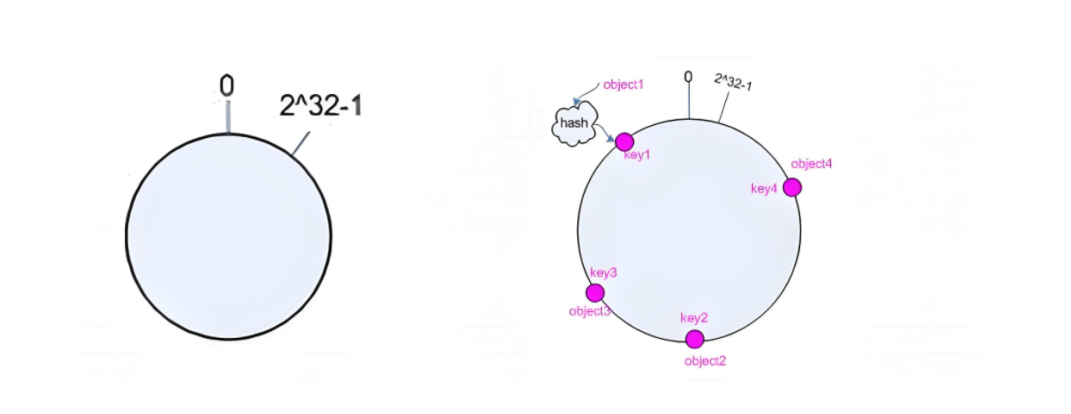
- 后端服务器哈希环点key-Server=hash(后端服务器虚拟ip)%(2^32)
- 客户机哈希环点key1=hash(client_ip)%(2^32) 得到的值在[0—2^32]之间,
- 将key-Server和key1都放在hash环上,将用户请求调度到离key1最近的keyA对应的后端服务器
哈希环偏斜
哈希环偏斜是指在使用一致性哈希算法时,节点(服务器)或数据在哈希环上的分布不均匀现象。理想情况下,所有节点应该均匀分布在环上,每个节点负责相等的哈希空间段,但实际上由于多种原因,节点可能聚集在某些区域,导致负载分布不均。
增加虚拟服务器IP数量,比如:一个后端服务器根据权重为1生成1000个虚拟IP,再hash。而后端服务器权 重为2则生成2000的虚拟IP,再bash,最终在hash环上生成3000个节点,从而解决hash环偏斜问题
后端服务器的调度方式 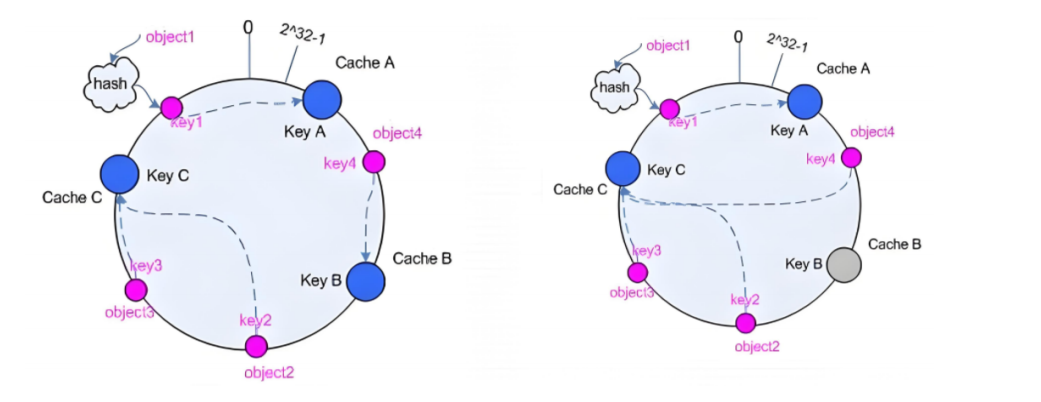 通过哈希计算后得到服务器哈希环点和客户端哈希环点在哈希环上的分布。顺时针查找,将客户端请求调度到距离客户端环点最近的服务器上
配置如下:
listen webcluster
bind 192.168.65.65:80
mode http
balance source
hash-type consistent
server haha 192.168.65.100:80 weight 1 check inter 3s fall 3 rise 5
server hehe 192.168.65.200:80 weight 1 check inter 3s fall 3 rise 5
2.uri
基于对用户请求的URI的左半部分或整个uri做hash,再将hash结果对总权重进行取模后根据最终结果将请求转发到后端指定服务器 适用于后端是缓存服务器场景
默认是静态算法,也可以通过hash-type指定map-based和consistent,来定义使用取模法还是一致性hash
URI完整结构
<scheme>://<user>:<password>@<host>:<port>/<path>;<params>?<query>#<frag>
左半部分: /<path>;<params>
整个uri: /<path>;<params>?<query>#<frag>
 uri取模法配置:
[root@haproxy ~] vim /etc/haproxy/haproxy.cfg
listen webcluster
bind 192.168.65.65:80
mode http
balance uri
server haha 192.168.65.100:80 weight 1 check inter 3s fall 3 rise 5
server hehe 192.168.65.200:80 weight 1 check inter 3s fall 3 rise 5
uri一致性hash配置:
[root@haproxy ~] vim /etc/haproxy/haproxy.cfg
listen webcluster
bind 192.168.65.65:80
mode http
balance uri
hash-type consistent
server haha 192.168.65.100:80 weight 1 check inter 3s fall 3 rise 5
server hehe 192.168.65.200:80 weight 1 check inter 3s fall 3 rise 5
为两台服务器配置不同的访问网页
[root@RS1 ~] echo RS1-192.168.65.159.100-index1.html > /usr/share/nginx/html/index1.html
[root@RS1 ~] echo RS1-192.168.65.159.100-index2.html > /usr/share/nginx/html/index2.html
[root@RS1 ~] echo RS1-192.168.65.159.100-index3.html > /usr/share/nginx/html/index3.html
[root@RS2 ~] echo RS1-192.168.65.159.200-index1.html > /usr/share/nginx/html/index4.html
[root@RS2 ~] echo RS1-192.168.65.159.200-index2.html > /usr/share/nginx/html/index4.html
[root@RS2 ~] echo RS1-192.168.65.159.200-index4.html > /usr/share/nginx/html/index4.html
测试 访问不同的uri,确认可以将用户同样的请求转发至相同的服务器
/home/mobaxterm curl 192.168.65.65/index4.html
RS1-192.168.65.159.200-index4.html
✓
/home/mobaxterm curl 192.168.65.65/index3.html
RS1-192.168.65.159.100-index3.html
✓
/home/mobaxterm curl 192.168.65.65/index2.html
RS2 – 192.168.159.200
/home/mobaxterm curl 192.168.65.65/index.html
RS2 – 192.168.159.200
3.url_param
url_param对用户请求的url中的 params 部分中的一个参数key对应的value值作hash计算,并由服务器总权重相除以后派发至某挑出的服务器,后端搜索同一个数据会被调度到同一个服务器,多用与电商 通常用于追踪用户,以确保来自同一个用户的请求始终发往同一个real server。 如果无没key,将按roundrobin算法
#假设:
url = http://www.whw.com/foo/test/index.php?key=value
#则:
host = "www.whw.com"
url_param = "key=value"
url_param取模法配置:
[root@haproxy ~] vim /etc/haproxy/haproxy.cfg
listen webcluster
bind 192.168.65.65:80
mode http
balance url_param name,userid #支持对多个url_param hash
server haha 192.168.65.100:80 weight 1 check inter 3s fall 3 rise 5
server hehe 192.168.65.200:80 weight 1 check inter 3s fall 3 rise 5
url_param一致性hash配置:
[root@haproxy ~] vim /etc/haproxy/haproxy.cfg
listen webcluster
bind 192.168.65.65:80
mode http
balance url_param name,userid #支持对多个url_param hash
server haha 192.168.65.100:80 weight 1 check inter 3s fall 3 rise 5
server hehe 192.168.65.200:80 weight 1 check inter 3s fall 3 rise 5
访问测试:
[root@webserver nginx-1.28.1] curl 192.168.65.65/index2.html?name=haha
RS1-192.168.65.159.100-index2.html
[root@webserver nginx-1.28.1] curl 192.168.65.65/index2.html?name=haha
RS1-192.168.65.159.100-index2.html
[root@webserver nginx-1.28.1] curl 192.168.65.65/index1.html?userid=whw
RS2 – 192.168.159.200
[root@webserver nginx-1.28.1] curl 192.168.65.65/index1.html?userid=whw
RS2 – 192.168.159.200
4.hdr
针对用户每个http头部(header)请求中的指定信息做hash,
此处由 name 指定的http首部将会被取出并做hash计算,
然后由服务器总权重取模以后派发至某挑出的服务器,如果无有效值,则会使用默认的轮询调度。
hdr取模法配置:
[root@haproxy ~] vim /etc/haproxy/haproxy.c
listen webcluster
bind 192.168.65.65:80
mode http
balance hdr(User-Agent)
server haha 192.168.65.100:80 weight 1 check inter 3s fall 3 rise 5
server hehe 192.168.65.200:80 weight 1 check inter 3s fall 3 rise 5
hdr一致性hash配置:
[root@haproxy ~] vim /etc/haproxy/haproxy.cfg
listen webcluster
bind 192.168.65.65:80
mode http
balance hdr(User-Agent)
server haha 192.168.65.100:80 weight 1 check inter 3s fall 3 rise 5
server hehe 192.168.65.200:80 weight 1 check inter 3s fall 3 rise 5
访问测试:
[root@webserver nginx-1.28.1] curl -vA "firefox" 192.168.65.65
* Trying 192.168.65.65:80...
* Connected to 192.168.65.65 (192.168.65.65) port 80 (#0)
> GET / HTTP/1.1
> Host: 192.168.65.65
> User-Agent: firefox
> Accept: */*
>
* Mark bundle as not supporting multiuse
< HTTP/1.1 200 OK
< server: nginx/1.20.1
< date: Mon, 02 Feb 2026 14:52:37 GMT
< content-type: text/html
< content-length: 22
< last-modified: Tue, 20 Jan 2026 06:20:48 GMT
< etag: "696f1ec0-16"
< accept-ranges: bytes
<
RS1 – 192.168.159.100
* Connection #0 to host 192.168.65.65 left intact
[root@webserver nginx-1.28.1] curl -vA "qq" 192.168.65.65
* Trying 192.168.65.65:80...
* Connected to 192.168.65.65 (192.168.65.65) port 80 (#0)
> GET / HTTP/1.1
> Host: 192.168.65.65
> User-Agent: qq
> Accept: */*
>
* Mark bundle as not supporting multiuse
< HTTP/1.1 200 OK
< server: nginx/1.20.1
< date: Mon, 02 Feb 2026 14:52:41 GMT
< content-type: text/html
< content-length: 22
< last-modified: Tue, 20 Jan 2026 06:20:48 GMT
< etag: "696f1ec0-16"
< accept-ranges: bytes
<
RS1 – 192.168.159.100
* Connection #0 to host 192.168.65.65 left intact
四、 算法总结
#静态
static-rr———>tcp/http
first————->tcp/http
#动态
roundrobin——–>tcp/http
leastconn———>tcp/http
#以下静态和动态取决于hash_type是否consistent
source————>tcp/http
Uri—————>http
url_param———>http
hdr—————>http
五、算法使用场景
first #使用较少 static-rr #做了session共享的web集群 roundrobin leastconn #数据库 source
#基于客户端公网IP的会话保持 Uri—————>http #缓存服务器,CDN服务商,蓝汛、百度、阿里云、腾讯 url_param———>http #可以实现session保持 hdr #基于客户端请求报文头部做下一步处理
本文相关链接
- 如果你想更多了解haproxy基础知识点和配置,请点击:《深度解析HAProxy七层代理:原理、配置与最佳实践》
- 如果你想深入探讨haproxy的高级功能和用法,请移步:HAProxy高级功能全解析