curl -fsSL https://openclaw.bot/install.sh | bash
~/.openclaw/openclaw.json
~/Library/LaunchAgents/ai.openclaw.gateway.plist
<key>EnvironmentVariables</key>
<dict>
<key>HOME</key>
<string>/Users/edy</string>
<key>PATH</key>
<string>/opt/homebrew/bin:/usr/local/bin:/usr/bin:/bin</string>
<key>OPENCLAW_GATEWAY_PORT</key>
<string>18789</string>
<key>OPENCLAW_GATEWAY_TOKEN</key>
<string>37d53ca4ac139dc0ad47bafad9ce7fd2d19d49f6d832c3f9</string>
<key>OPENCLAW_LAUNCHD_LABEL</key>
<string>ai.openclaw.gateway</string>
<key>OPENCLAW_SYSTEMD_UNIT</key>
<string>openclaw-gateway.service</string>
<key>OPENCLAW_SERVICE_MARKER</key>
<string>openclaw</string>
<key>OPENCLAW_SERVICE_KIND</key>
<string>gateway</string>
<key>OPENCLAW_SERVICE_VERSION</key>
<string>2026.1.30</string>
<key>TELEGRAM_BOT_TOKEN</key>
<string>7582215195:AAGuoMinYoc7jAnWsRRVZGQQFtfb7w25YTw</string>
<key>HTTP_PROXY</key>
<string>http://127.0.0.1:7890</string>
<key>HTTPS_PROXY</key>
<string>http://127.0.0.1:7890</string>
<key>ALL_PROXY</key>
<string></string>
<key>NO_PROXY</key>
<string>127.0.0.1,localhost,::1</string>
<key>OPENCLAW_LOG_LEVEL</key>
<string>debug</string>
</dict>
launchctl unload ~/Library/LaunchAgents/ai.openclaw.gateway.plist
launchctl load ~/Library/LaunchAgents/ai.openclaw.gateway.plist
4.查看日志
tailf ~/.openclaw/logs/gateway.log
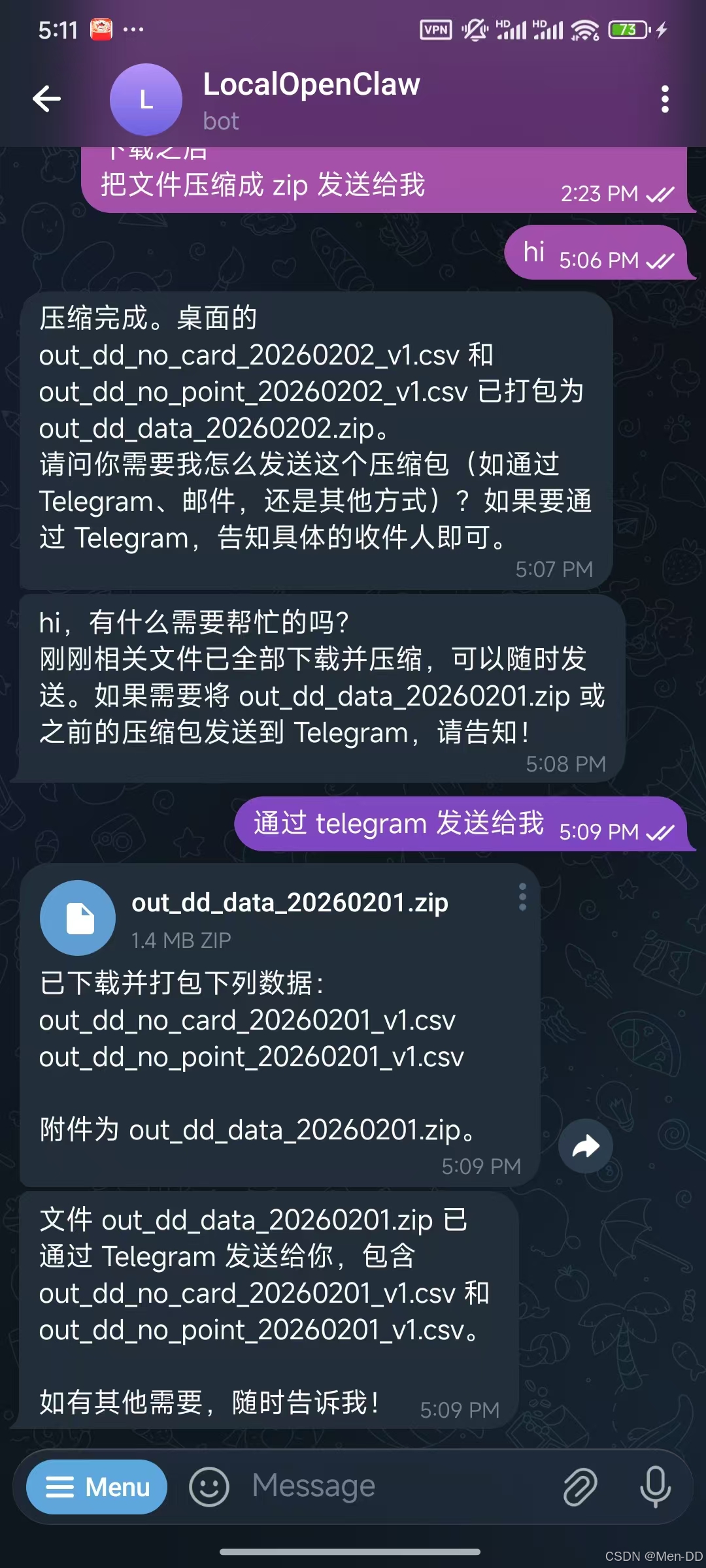
帮我执行下面,把数据下载到桌面
scp work@xxxxxx:/home/work/prod/baili-task/tmp/out_dd_no_point_20260202_v1.csv ./
scp work@xxxxxx:/home/work/prod/baili-task/tmp/out_dd_no_card_20260202_v1.csv ./
把文件压缩成 zip 通过Telegram发送给我
➜ openclaw curl -fsSL https://openclaw.bot/install.sh | bash
🦞 OpenClaw Installer
Your config is valid, your assumptions are not.
✓ Detected: macos
✓ Homebrew already installed
✓ Node.js v24.3.0 found
✓ Git already installed
→ Installing OpenClaw 2026.1.30…
✓ OpenClaw installed
🦞 OpenClaw installed successfully (2026.1.30)!
Ahh nice, I like it here. Got any snacks?
Starting setup…
🦞 OpenClaw 2026.1.30 (76b5208) — I can run local, remote, or purely on vibes—results may vary with DNS.
▄▄▄▄▄▄▄▄▄▄▄▄▄▄▄▄▄▄▄▄▄▄▄▄▄▄▄▄▄▄▄▄▄▄▄▄▄▄▄▄▄▄▄▄▄▄▄▄▄▄▄▄
██░▄▄▄░██░▄▄░██░▄▄▄██░▀██░██░▄▄▀██░████░▄▄▀██░███░██
██░███░██░▀▀░██░▄▄▄██░█░█░██░█████░████░▀▀░██░█░█░██
██░▀▀▀░██░█████░▀▀▀██░██▄░██░▀▀▄██░▀▀░█░██░██▄▀▄▀▄██
▀▀▀▀▀▀▀▀▀▀▀▀▀▀▀▀▀▀▀▀▀▀▀▀▀▀▀▀▀▀▀▀▀▀▀▀▀▀▀▀▀▀▀▀▀▀▀▀▀▀▀▀
🦞 OPENCLAW 🦞
┌ OpenClaw onboarding
│
◇ Security ──────────────────────────────────────────────────────────────────────────────╮
│ │
│ Security warning — please read. │
│ │
│ OpenClaw is a hobby project and still in beta. Expect sharp edges. │
│ This bot can read files and run actions if tools are enabled. │
│ A bad prompt can trick it into doing unsafe things. │
│ │
│ If you’re not comfortable with basic security and access control, don’t run OpenClaw. │
│ Ask someone experienced to help before enabling tools or exposing it to the internet. │
│ │
│ Recommended baseline: │
│ – Pairing/allowlists + mention gating. │
│ – Sandbox + least-privilege tools. │
│ – Keep secrets out of the agent’s reachable filesystem. │
│ – Use the strongest available model for any bot with tools or untrusted inboxes. │
│ │
│ Run regularly: │
│ openclaw security audit –deep │
│ openclaw security audit –fix │
│ │
│ Must read: https://docs.openclaw.ai/gateway/security │
│ │
├─────────────────────────────────────────────────────────────────────────────────────────╯
│
◇ I understand this is powerful and inherently risky. Continue?
│ Yes
│
◇ Onboarding mode
│ QuickStart
│
◇ QuickStart ─────────────────────────╮
│ │
│ Gateway port: 18789 │
│ Gateway bind: Loopback (127.0.0.1) │
│ Gateway auth: Token (default) │
│ Tailscale exposure: Off │
│ Direct to chat channels. │
│ │
├──────────────────────────────────────╯
│
◇ Model/auth provider
│ OpenAI
│
◇ OpenAI auth method
│ OpenAI API key
│
◇ Enter OpenAI API key
│ 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
│
◇ OpenAI API key ───────────────────────────────────────────────────────────────╮
│ │
│ Saved OPENAI_API_KEY to /Users/edy/.openclaw/.env for launchd compatibility. │
│ │
├────────────────────────────────────────────────────────────────────────────────╯
│
◇ Default model
│ openai/gpt-4.1
│
◇ Channel status ────────────────────────────╮
│ │
│ Telegram: not configured │
│ WhatsApp: not configured │
│ Discord: not configured │
│ Google Chat: not configured │
│ Slack: not configured │
│ Signal: not configured │
│ iMessage: not configured │
│ Google Chat: install plugin to enable │
│ Nostr: install plugin to enable │
│ Microsoft Teams: install plugin to enable │
│ Mattermost: install plugin to enable │
│ Nextcloud Talk: install plugin to enable │
│ Matrix: install plugin to enable │
│ BlueBubbles: install plugin to enable │
│ LINE: install plugin to enable │
│ Zalo: install plugin to enable │
│ Zalo Personal: install plugin to enable │
│ Tlon: install plugin to enable │
│ │
├─────────────────────────────────────────────╯
│
◇ How channels work ─────────────────────────────────────────────────────────────────────╮
│ │
│ DM security: default is pairing; unknown DMs get a pairing code. │
│ Approve with: openclaw pairing approve <channel> <code> │
│ Public DMs require dmPolicy="open" + allowFrom=["*"]. │
│ Multi-user DMs: set session.dmScope="per-channel-peer" (or "per-account-channel-peer" │
│ for multi-account channels) to isolate sessions. │
│ Docs: start/pairing │
│ │
│ Telegram: simplest way to get started — register a bot with @BotFather and get going. │
│ WhatsApp: works with your own number; recommend a separate phone + eSIM. │
│ Discord: very well supported right now. │
│ Google Chat: Google Workspace Chat app with HTTP webhook. │
│ Slack: supported (Socket Mode). │
│ Signal: signal-cli linked device; more setup (David Reagans: "Hop on Discord."). │
│ iMessage: this is still a work in progress. │
│ Nostr: Decentralized protocol; encrypted DMs via NIP-04. │
│ Microsoft Teams: Bot Framework; enterprise support. │
│ Mattermost: self-hosted Slack-style chat; install the plugin to enable. │
│ Nextcloud Talk: Self-hosted chat via Nextcloud Talk webhook bots. │
│ Matrix: open protocol; install the plugin to enable. │
│ BlueBubbles: iMessage via the BlueBubbles mac app + REST API. │
│ LINE: LINE Messaging API bot for Japan/Taiwan/Thailand markets. │
│ Zalo: Vietnam-focused messaging platform with Bot API. │
│ Zalo Personal: Zalo personal account via QR code login. │
│ Tlon: decentralized messaging on Urbit; install the plugin to enable. │
│ │
├─────────────────────────────────────────────────────────────────────────────────────────╯
│
◇ Select channel (QuickStart)
│ Telegram (Bot API)
│
◇ Telegram bot token ───────────────────────────────────────────────────────────────────╮
│ │
│ 1) Open Telegram and chat with @BotFather │
│ 2) Run /newbot (or /mybots) │
│ 3) Copy the token (looks like 123456:ABC…) │
│ Tip: you can also set TELEGRAM_BOT_TOKEN in your env. │
│ Docs: https://docs.openclaw.ai/telegram │
│ Website: https://openclaw.ai │
│ │
├────────────────────────────────────────────────────────────────────────────────────────╯
│
◇ Enter Telegram bot token
│ 7582215195:AAGuoMinYoc7jAnWsRRVZGQQFtfb7w25YTw
│
◇ Selected channels ──────────────────────────────────────────────────────────────────────╮
│ │
│ Telegram — simplest way to get started — register a bot with @BotFather and get going. │
│ https://docs.openclaw.ai/channels/telegr │
│ am │
│ https://openclaw.ai │
│ │
├──────────────────────────────────────────────────────────────────────────────────────────╯
Updated ~/.openclaw/openclaw.json
Workspace OK: ~/.openclaw/workspace
Sessions OK: ~/.openclaw/agents/main/sessions
│
◇ Skills status ────────────╮
│ │
│ Eligible: 8 │
│ Missing requirements: 41 │
│ Blocked by allowlist: 0 │
│ │
├────────────────────────────╯
│
◇ Configure skills now? (recommended)
│ Yes
│
◇ Preferred node manager for skill installs
│ npm
│
◇ Install missing skill dependencies
│ Skip for now
│
◇ Set GOOGLE_PLACES_API_KEY for goplaces?
│ No
│
◇ Set GOOGLE_PLACES_API_KEY for local-places?
│ No
│
◇ Set GEMINI_API_KEY for nano-banana-pro?
│ No
│
◇ Set NOTION_API_KEY for notion?
│ No
│
◇ Set ELEVENLABS_API_KEY for sag?
│ No
│
◇ Hooks ──────────────────────────────────────────────────────────╮
│ │
│ Hooks let you automate actions when agent commands are issued. │
│ Example: Save session context to memory when you issue /new. │
│ │
│ Learn more: https://docs.openclaw.ai/hooks │
│ │
├──────────────────────────────────────────────────────────────────╯
│
◇ Enable hooks?
│ Skip for now
│
◇ Gateway service runtime ────────────────────────────────────────────╮
│ │
│ QuickStart uses Node for the Gateway service (stable + supported). │
│ │
├──────────────────────────────────────────────────────────────────────╯
│
◓ Installing Gateway service…..
Installed LaunchAgent: /Users/edy/Library/LaunchAgents/ai.openclaw.gateway.plist
Logs: /Users/edy/.openclaw/logs/gateway.log
◇ Gateway service installed.
│
◇
Telegram: failed (unknown) – This operation was aborted
Agents: main (default)
Heartbeat interval: 30m (main)
Session store (main): /Users/edy/.openclaw/agents/main/sessions/sessions.json (0 entries)
Missing Control UI assets. Build them with `pnpm ui:build` (auto-installs UI deps).
│
◇ Optional apps ────────────────────────╮
│ │
│ Add nodes for extra features: │
│ – macOS app (system + notifications) │
│ – iOS app (camera/canvas) │
│ – Android app (camera/canvas) │
│ │
├────────────────────────────────────────╯
│
◇ Control UI ─────────────────────────────────────────────────────────────────────╮
│ │
│ Web UI: http://127.0.0.1:18789/ │
│ Web UI (with token): │
│ http://127.0.0.1:18789/?token=37d53ca4ac139dc0ad47bafad9ce7fd2d19d49f6d832c3f9 │
│ Gateway WS: ws://127.0.0.1:18789 │
│ Gateway: reachable │
│ Docs: https://docs.openclaw.ai/web/control-ui │
│ │
├──────────────────────────────────────────────────────────────────────────────────╯
│
◇ Start TUI (best option!) ─────────────────────────────────╮
│ │
│ This is the defining action that makes your agent you. │
│ Please take your time. │
│ The more you tell it, the better the experience will be. │
│ We will send: "Wake up, my friend!" │
│ │
├────────────────────────────────────────────────────────────╯
│
◇ Token ────────────────────────────────────────────────────────────────────────────────╮
│ │
│ Gateway token: shared auth for the Gateway + Control UI. │
│ Stored in: ~/.openclaw/openclaw.json (gateway.auth.token) or OPENCLAW_GATEWAY_TOKEN. │
│ Web UI stores a copy in this browser's localStorage (openclaw.control.settings.v1). │
│ Get the tokenized link anytime: openclaw dashboard –no-open │
│ │
├────────────────────────────────────────────────────────────────────────────────────────╯
│
◇ How do you want to hatch your bot?
│ Hatch in TUI (recommended)
openclaw tui – ws://127.0.0.1:18789 – agent main – session main
session agent:main:main
Wake up, my friend!
⠙ moseying… • 0s | gateway connected
agent main | session main | openai/gpt-4.1 | tokens ?/1.0m
──────────────────────────────────────────────────────────────────────────────────────────────────────────────────────────────────────────────────────────────────────────────────────────────────────────────────────
│
◇ Web UI ─────────────────────────────────────────────────────────────────────────╮──────────────────────────────────────────────────────────────────────────────────────────────────────────────────────────────────
│ │
│ Web UI seeded in the background. Open later with: openclaw dashboard –no-open │
│ │
├──────────────────────────────────────────────────────────────────────────────────╯
│
◇ Workspace backup ────────────────────────────────────────╮
│ │
│ Back up your agent workspace. │
│ Docs: https://docs.openclaw.ai/concepts/agent-workspace │
│ │
├───────────────────────────────────────────────────────────╯
│
◇ Security ──────────────────────────────────────────────────────╮
│ │
│ Running agents on your computer is risky — harden your setup: │
│ https://docs.openclaw.ai/security │
│ │
├─────────────────────────────────────────────────────────────────╯
│
◇ Web search (optional) ─────────────────────────────────────────────────────────────────╮
│ │
│ If you want your agent to be able to search the web, you’ll need an API key. │
│ │
│ OpenClaw uses Brave Search for the `web_search` tool. Without a Brave Search API key, │
│ web search won’t work. │
│ │
│ Set it up interactively: │
│ – Run: openclaw configure –section web │
│ – Enable web_search and paste your Brave Search API key │
│ │
│ Alternative: set BRAVE_API_KEY in the Gateway environment (no config changes). │
│ Docs: https://docs.openclaw.ai/tools/web │
│ │
├─────────────────────────────────────────────────────────────────────────────────────────╯
│
◇ What now ─────────────────────────────────────────────────────────────╮
│ │
│ What now: https://openclaw.ai/showcase ("What People Are Building"). │
│ │
├────────────────────────────────────────────────────────────────────────╯
│
└ Onboarding complete. Web UI seeded in the background; open it anytime with the tokenized link above.
Request timed out.
gateway reconnected | idle
agent main | session main (openclaw-tui) | openai/gpt-4.1 | tokens 0/1.0m (0%)
──────────────────────────────────────────────────────────────────────────────────────────────────────────────────────────────────────────────────────────────────────────────────────────────────────────────────────
gateway disconnected: closed | idle
➜ openclaw