ps.本文中的第八条包含讲解所用到的可复制粘贴直接用的完整代码。
一、先忘掉已知编码“模式”,想一个真实问题
假设现在要写一个人员列表页:
- 上面有搜索框(姓名、账号、手机号)
- 中间一个表格(数据 + 分页)
- 每一行有:编辑、分配角色、改密码、删除
- 点编辑/改密码/分配角色会弹出对话框
如果全写在一个 .vue 文件里,会怎样?
- <template> 还好,主要是布局
- <script> 里会堆满:搜索表单数据、表格数据、分页、好几个弹窗的显示/隐藏、每个按钮的点击函数、每个弹窗的确认/关闭……
一个文件动不动就 500 行、几十个变量和函数,改一处要翻半天,也不好复用。
所以我们要解决的是两件事:
这种「逻辑从页面里抽出去、按功能组织、可复用」的写法,在 Vue 3 里就对应两样东西:
- 组合式 API:用 ref、reactive、onMounted 等写逻辑的方式
- 组合式函数(Composables) – 音标:/kəm’pəuzəblz/:把一段逻辑封装成一个“以 use 开头的函数”,在页面里调一下就能用
下面分步讲。
二、第一步:认识“组合式 API”(在页面里写逻辑)
以前 Vue 2 常见的是「选项式 API」:一个组件里分好几块 —— data、methods、mounted 等,逻辑按“类型”分,而不是按“功能”分。
Vue 3 的组合式 API 换了一种思路:在 setup(或 <script setup>)里,像写普通 JS 一样,用变量和函数把“和某块功能相关的所有东西”写在一起。
例如“搜索”这一块功能,可以这样写在一起:
// 和“搜索”相关的都放一起
const searchForm = reactive({ userName: '', userAccount: '' })
const handleSearch = () => { /* 调用接口、刷新列表 */ }
const handleReset = () => { searchForm.userName = ''; … }
“分页”又是一块:
const pagination = reactive({ currentPage: 1, pageSize: 10, total: 0 })
const handleSizeChange = (val) => { … }
const handleCurrentChange = (val) => { … }
这样写,同一个功能的数据和函数挨在一起,读起来是“一块一块”的,而不是 data 一堆、methods 又一堆。这就是“组合式”的意思:按逻辑块组合,而不是按选项类型分。
用到的两个基础工具要知道:
- ref(值):存“一个会变的值”,用的时候要 .value;在模板里可以省略 .value
- reactive(对象):存“一组会变的属性”,用的时候直接 .属性名 就行
到这里,你只需要记住:在 <script setup> 里用 ref/reactive + 函数,把同一块功能的逻辑写在一起,这就是“组合式 API”的用法。
三、第二步:逻辑太多时,把“一整块”搬出去
当这一页的逻辑越来越多(搜索、表格、分页、编辑弹窗、改密码弹窗、角色弹窗……),<script setup> 里会变得很长。下一步很自然:把“一整块逻辑”原样搬到一个单独的 .ts 文件里。
做法就三步:
例如:
// usePersonnelList.ts
import { ref, reactive } from 'vue'
export function usePersonnelList() {
const searchForm = reactive({ userName: '', userAccount: '' })
const tableData = reactive([])
const handleSearch = () => { … }
const handleReset = () => { … }
// … 其他状态和方法
return {
searchForm,
tableData,
handleSearch,
handleReset,
// 页面要用啥就 return 啥
}
}
页面里就只做一件事:调用这个函数,把 return 出来的东西拿来用:
<script setup>
import { usePersonnelList } from './composables/usePersonnelList'
const {
searchForm,
tableData,
handleSearch,
handleReset,
} = usePersonnelList()
</script>
<template>
<!— 用 searchForm、tableData,绑定 handleSearch、handleReset —>
</template>
这种“以 use 开头、封装一块有状态逻辑、return 给组件用”的函数,官方名字就叫「组合式函数」(Composable,英文文档里会看到这个词)。
当前看到的「编码模式」核心就是:页面只负责布局和调用 useXxx(),具体逻辑都在 useXxx 里。
可能有的同学看到 状态 这个词的时候不能理解,不能理解的同学我想应该同样也想不明白vuex或pinia为什么叫状态管理而不叫变量管理或者常量管理或者容器管理。可以理解的同学可直接看下一步,接下来的小内容则是给不能理解的同学补补课。
讲解:首先状态和变量一样,都是存储数据的容器。区别在于状态和 UI 是 “双向绑定” 的,变量不一定。普通 JS 变量(比如 let a = 1)改了就是改了,页面不会有任何反应;但 Vue 的状态(比如 const a = ref(1))改 a.value = 2 时,页面里用到 a 的地方会自动更新 —— 这是 “状态” 最核心的特征:状态是 “活的”,和 UI 联动。
简单粗暴:
- 所以不理解的同学可以简单粗暴的将状态理解为可以引动UI变化的变量就是状态。
新手同学理解到这里就可以了,至于状态更精准的理解感兴趣的同学可以自行搜索学习。
不用过多的纠结,可以理解这个简单粗暴的定义就足够你看懂后面的讲解了。
四、用一句话串起来
- 组合式 API:在 script 里用 ref/reactive + 函数,按“功能块”写逻辑。
- 组合式函数:把某一整块逻辑搬进 useXxx(),页面里 const { … } = useXxx() 拿来用。
所以:
“组合式 API”是说“怎么写逻辑”;“组合式函数”是说“把写好的逻辑封装成 useXxx,方便复用和组织”。
当前人员模块的写法,就是:用组合式 API 在 usePersonnelList 里写逻辑,在 index.vue 里只调用 usePersonnelList(),这就是官方主推的这种模式。
五、和当前示例对上号
现在的结构可以这样理解:
| index.vue 里只有 template + 一个 usePersonnelList() | 页面只负责“长什么样”和“用哪一块逻辑” |
| composables/usePersonnelList.ts | 人员列表这一页的“所有逻辑”都在这一个函数里 |
| components/PersonnelSearchForm.vue 等 | 把表格、弹窗拆成小组件,只负责展示和发事件 |
| types.ts | 把共用的类型(Personnel、Role、表单类型等)集中放,方便复用和改 |
数据流可以简单理解成:
这样就实现了:逻辑在 useXxx,页面和组件只做“接线”。
六、什么时候用、怎么用(实用口诀)
- 一个页面逻辑很多 → 先在同一文件里用组合式 API 按“功能块”写;还觉得乱,再抽成 useXxx
- 多个页面要用同一套逻辑 → 直接写成 useXxx,在不同页面里 const { … } = useXxx() 即可
- 命名:这类函数统一用 use 开头,如 usePersonnelList、useMouse、useFetch
- 文件放哪:和当前功能强相关的就放当前模块下,例如 personnel/composables/usePersonnelList.ts;全项目都要用的可以放 src/composables/ 之类
七、小结(真正从 0 到 1 的路线)
八、示例完整结构说明及代码
想看看实际运行起来什么样的同学也可自行新建一个vue3+ts的项目,复制粘贴代码到编辑器中运行起来看看。我在写这个示例代码时候所创建的项目环境:
- node版本20.19.0
- 使用到Element Plus组件库
我在配置代码的时候会习惯性的配置组件的自动引入,所以在代码中无需再手动引入使用到的组件,没有配置过自动引入的同学不要忘记自己补上组件的引入哦。如果在创建项目复制示例代码遇到环境问题的情况下可尝试通过对比我的开发环境解决问题,希望可以有所帮助。
src/views/personnel/
├── index.vue # 页面入口:标题、搜索、表格、分页、弹窗挂载
├── types.ts # 类型定义(如 PersonnelSearchForm、PersonnelEditForm、Role 等)
├── composables/
│ └── usePersonnelList.ts # 列表逻辑:搜索、分页、增删改、分配角色、改密等
└── components/
├── PersonnelSearchForm.vue # 顶部搜索栏(用户名称 / 帐号 / 电话)
├── PersonnelEditDialog.vue # 新增/编辑用户弹窗
├── PersonnelPasswordDialog.vue # 修改密码弹窗
└── PersonnelRoleAssignDialog.vue # 分配角色弹窗
| index.vue | 主页面,引入搜索表单、表格、分页和三个弹窗,并承接 usePersonnelList 的状态与方法。 |
| types.ts | 定义该模块用到的 TS 类型/接口。 |
| usePersonnelList.ts | 组合式函数:搜索表单、表格数据、分页、弹窗显隐、请求与事件处理(搜索/重置/增删改/分配角色/改密等)。 |
| PersonnelSearchForm.vue | 仅负责搜索表单 UI 与「搜索 / 重置」事件。 |
| PersonnelEditDialog.vue | 新增/编辑用户的表单弹窗。 |
| PersonnelPasswordDialog.vue | 修改密码的单表单项弹窗。 |
| PersonnelRoleAssignDialog.vue | 角色多选表格弹窗,用于分配角色。 |
数据与业务集中在 usePersonnelList.ts,页面与组件主要负责布局和调用该 composable。
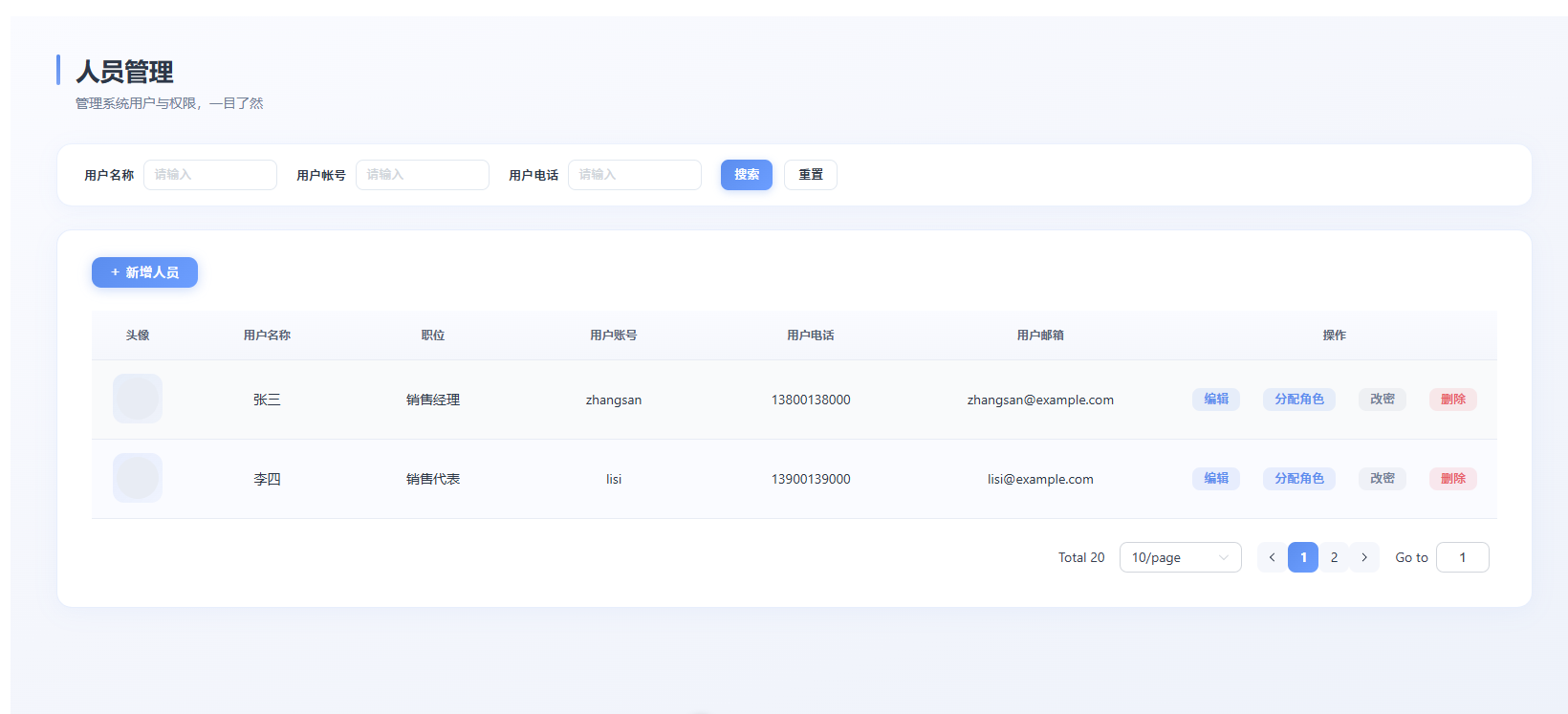
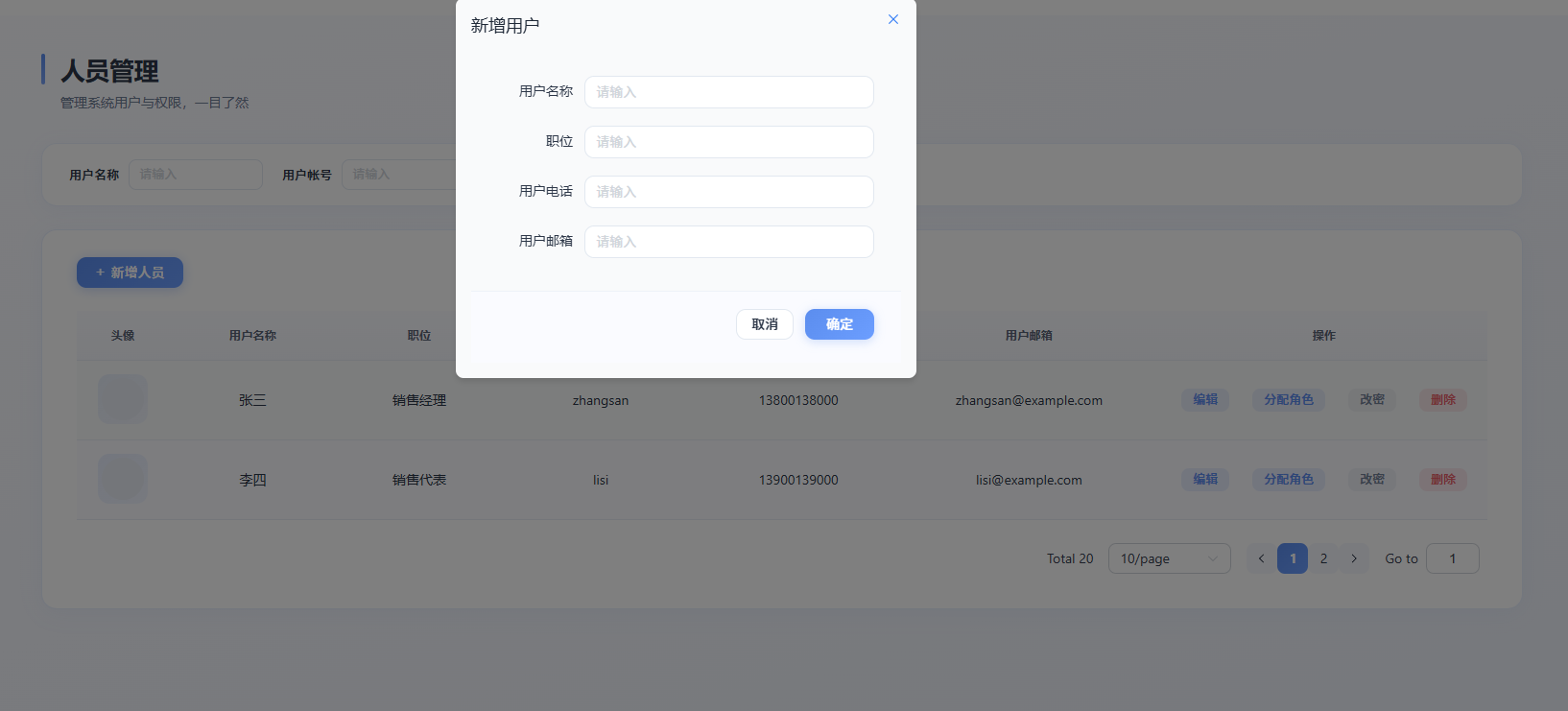
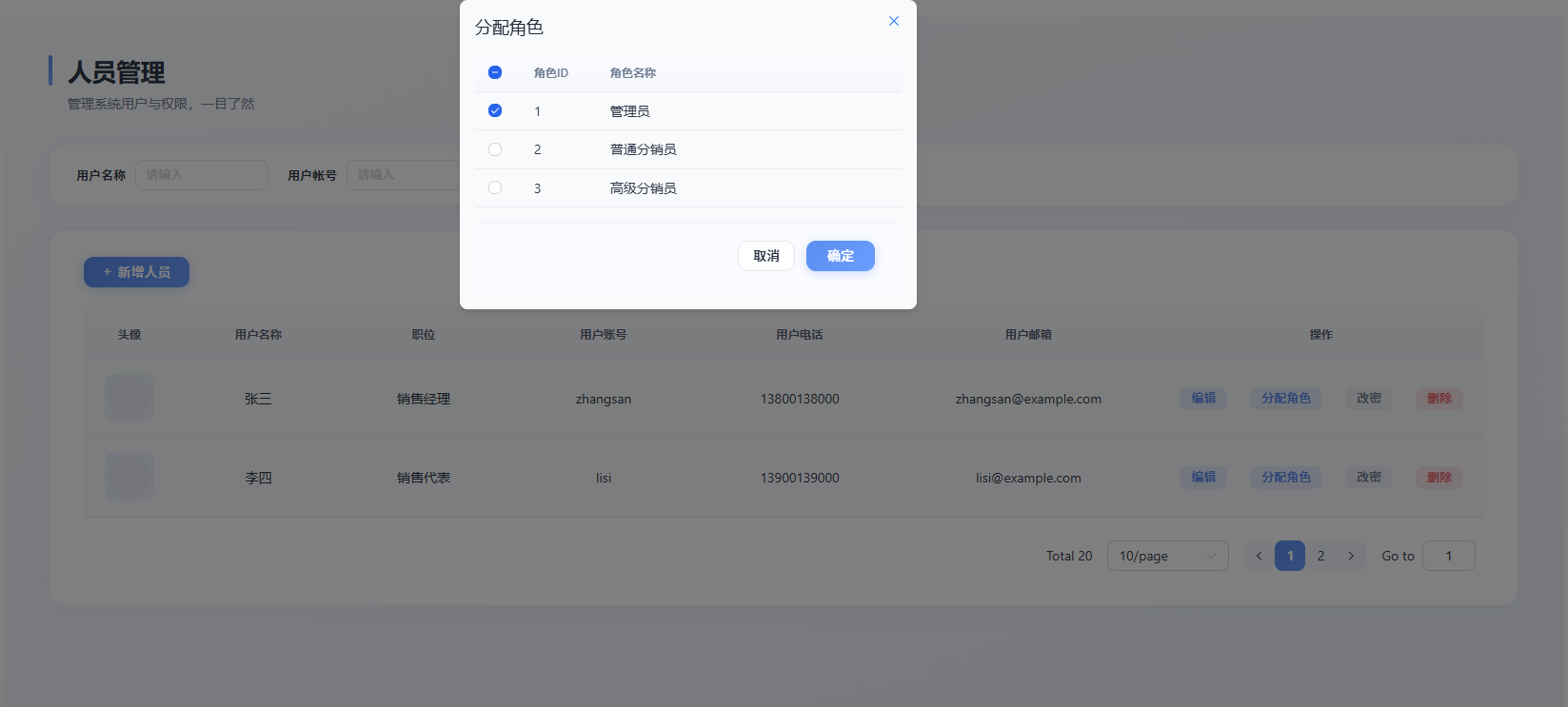
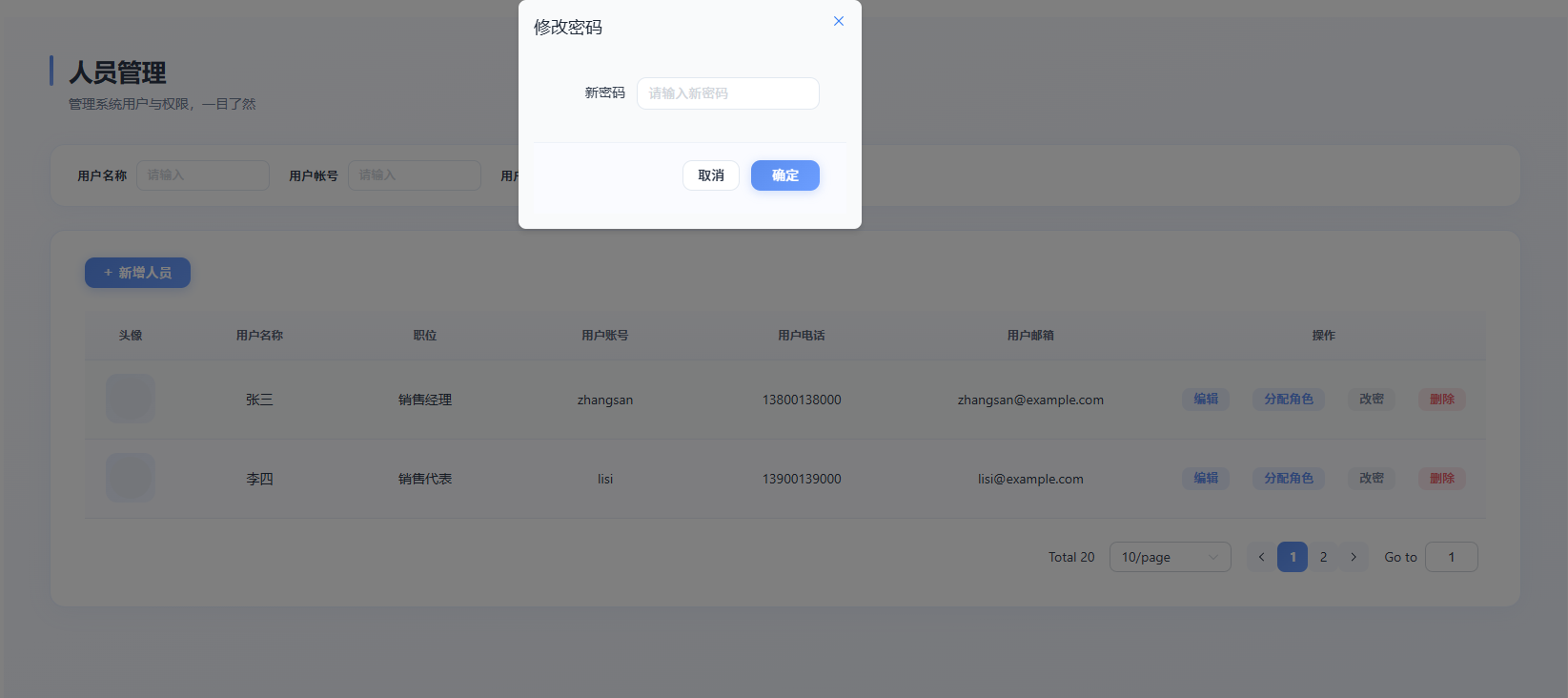
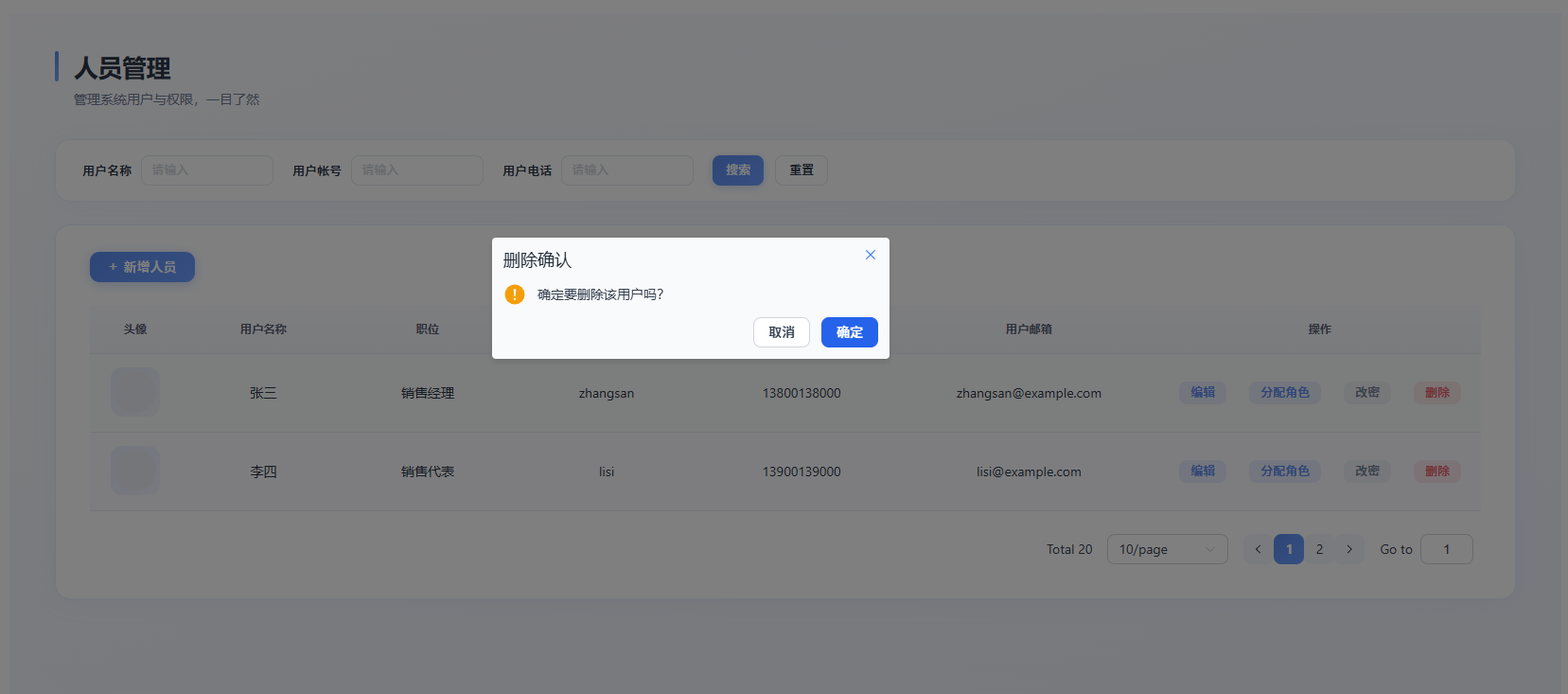
下面代码与前面章节一一对应:第二节的「按功能块写」体现在 usePersonnelList.ts 里搜索、分页、弹窗等逻辑块;第三节的「搬进 useXxx、return 给页面用」就是 usePersonnelList() 和其 return;第四节的数据流对应 index.vue 里解构 usePersonnelList() 并绑到模板和子组件。阅读时可按「概念 → 对应文件」对照看。
index.vue
<template>
<div class="personnel-management">
<!— 页面标题 —>
<div class="page-header">
<div class="page-header-inner">
<span class="page-title-accent" />
<div>
<h1 class="page-title">人员管理</h1>
<p class="page-desc">管理系统用户与权限,一目了然</p>
</div>
</div>
</div>
<!— 搜索表单 —>
<PersonnelSearchForm
:search–form="searchForm"
@search="handleSearch"
@reset="handleReset"
/>
<!— 数据表格 —>
<div class="table-section">
<div class="table-toolbar">
<el–button type="primary" class="btn-add" @click="handleAdd">
<span class="btn-add-icon">+</span>
新增人员
</el–button>
</div>
<el–table
:data="tableData"
class="personnel-table"
style="width: 100%"
:row–key="(row) => row.id"
:header–cell–style="headerCellStyle"
:row–class–name="tableRowClassName"
>
<el–table–column label="头像" width="96" align="center">
<template #default="{ row }">
<div class="avatar-wrap">
<el–avatar :src="row.avatar" :size="44" class="user-avatar" />
</div>
</template>
</el–table–column>
<el–table–column prop="userName" label="用户名称" align="center" min–width="100" />
<el–table–column prop="position" label="职位" align="center" min–width="100" />
<el–table–column prop="userAccount" label="用户账号" align="center" min–width="120" />
<el–table–column prop="userPhone" label="用户电话" align="center" min–width="120" />
<el–table–column prop="userEmail" label="用户邮箱" align="center" min–width="160" />
<el–table–column label="操作" width="340" fixed="right" align="center">
<template #default="{ row }">
<div class="table-actions">
<el–button class="action-btn action-btn–primary" size="small" @click="handleEdit(row)">
编辑
</el–button>
<el–button class="action-btn action-btn–primary" size="small" @click="handleAssignRole(row)">
分配角色
</el–button>
<el–button class="action-btn" size="small" @click="handleChangePassword(row)">
改密
</el–button>
<el–button class="action-btn action-btn–danger" size="small" @click="handleDelete(row)">
删除
</el–button>
</div>
</template>
</el–table–column>
</el–table>
<!— 分页 —>
<div class="pagination-wrap">
<el–pagination
:current–page="pagination.currentPage"
:page–sizes="[10, 20, 50, 100]"
:page–size="pagination.pageSize"
:total="pagination.total"
layout="total, sizes, prev, pager, next, jumper"
@size–change="handleSizeChange"
@current–change="handleCurrentChange"
/>
</div>
</div>
<!— 编辑对话框 —>
<PersonnelEditDialog
v–model:visible="editDialogVisible"
:form="editForm"
@confirm="confirmEdit"
/>
<!— 修改密码对话框 —>
<PersonnelPasswordDialog
v–model:visible="passwordDialogVisible"
@confirm="confirmPasswordChange"
@close="closePasswordDialog"
/>
<!— 分配角色对话框 —>
<PersonnelRoleAssignDialog
:visible="roleDialogVisible"
:roles="roles"
:initial–selected–ids="
currentRoleAssignUserId ? getInitialRoleIds(currentRoleAssignUserId) : []
"
@update:visible="setRoleDialogVisible"
@confirm="confirmAssignRole"
@close="() => setRoleDialogVisible(false)"
/>
</div>
</template>
<script lang="ts" setup>
import { usePersonnelList } from './composables/usePersonnelList'
import PersonnelSearchForm from './components/PersonnelSearchForm.vue'
import PersonnelEditDialog from './components/PersonnelEditDialog.vue'
import PersonnelPasswordDialog from './components/PersonnelPasswordDialog.vue'
import PersonnelRoleAssignDialog from './components/PersonnelRoleAssignDialog.vue'
defineOptions({
name: 'PersonnelIndex',
})
const {
searchForm,
tableData,
pagination,
roles,
editForm,
editDialogVisible,
passwordDialogVisible,
roleDialogVisible,
currentRoleAssignUserId,
getInitialRoleIds,
handleSearch,
handleReset,
handleSizeChange,
handleCurrentChange,
handleAdd,
handleEdit,
confirmEdit,
handleChangePassword,
confirmPasswordChange,
handleDelete,
handleAssignRole,
confirmAssignRole,
setRoleDialogVisible,
closePasswordDialog,
} = usePersonnelList()
const headerCellStyle = {
background: 'transparent',
color: '#5a6576',
fontWeight: 600,
fontSize: '12px',
}
const tableRowClassName = ({ rowIndex }: { rowIndex: number }) =>
rowIndex % 2 === 1 ? 'row-stripe' : ''
</script>
<style scoped lang="scss">
$primary: #5b8dee;
$primary–hover: #6c9eff;
$primary–soft: rgba(91, 141, 238, 0.12);
$text: #2d3748;
$text–light: #718096;
$border: rgba(91, 141, 238, 0.15);
$danger: #e85d6a;
$danger–soft: rgba(232, 93, 106, 0.12);
.personnel–management {
padding: 40px 48px 56px;
min–height: 100%;
background: linear–gradient(160deg, #fafbff 0%, #f4f6fc 50%, #eef2fa 100%);
font–family: –apple–system, BlinkMacSystemFont, 'Segoe UI', 'PingFang SC', 'Hiragino Sans GB', 'Microsoft YaHei', sans–serif;
}
.page–header {
margin–bottom: 32px;
.page–header–inner {
display: flex;
align–items: flex–start;
gap: 16px;
}
.page–title–accent {
width: 4px;
height: 32px;
border–radius: 4px;
background: linear–gradient(180deg, $primary 0%, #7ba3f5 100%);
flex–shrink: 0;
}
.page–title {
margin: 0;
font–size: 26px;
font–weight: 600;
color: $text;
letter–spacing: –0.02em;
line–height: 1.3;
}
.page–desc {
margin: 6px 0 0;
font–size: 14px;
color: $text–light;
font–weight: 400;
}
}
.table–section {
background: #fff;
border–radius: 16px;
overflow: hidden;
padding: 28px 36px 36px;
box–shadow: 0 4px 24px rgba(91, 141, 238, 0.06), 0 1px 0 rgba(255, 255, 255, 0.8) inset;
border: 1px solid $border;
transition: box–shadow 0.25s ease;
&:hover {
box–shadow: 0 8px 32px rgba(91, 141, 238, 0.08), 0 1px 0 rgba(255, 255, 255, 0.8) inset;
}
}
.table–toolbar {
margin–bottom: 24px;
.btn–add {
font–weight: 500;
font–size: 14px;
border–radius: 10px;
padding: 10px 20px;
background: linear–gradient(135deg, $primary 0%, #6c9eff 100%);
border: none;
color: #fff;
box–shadow: 0 2px 12px rgba(91, 141, 238, 0.35);
transition: all 0.25s ease;
&:hover {
background: linear–gradient(135deg, $primary–hover 0%, #7ba8ff 100%);
box–shadow: 0 4px 16px rgba(91, 141, 238, 0.4);
transform: translateY(–1px);
}
}
.btn–add–icon {
margin–right: 6px;
font–size: 16px;
font–weight: 300;
opacity: 0.95;
}
}
.personnel–table {
—el–table–border–color: #e8ecf4;
—el–table–header–bg–color: transparent;
font–size: 14px;
:deep(.el–table__header th) {
background: linear–gradient(180deg, #fafbff 0%, #f5f7fc 100%) !important;
color: $text–light;
font–weight: 600;
font–size: 12px;
letter–spacing: 0.03em;
padding: 14px 0;
}
:deep(.el–table__body td) {
color: $text;
font–size: 14px;
padding: 14px 0;
transition: background 0.2s ease;
}
:deep(.el–table__row:hover td) {
background: #f8faff !important;
}
:deep(.row–stripe td) {
background: #fafbff !important;
}
:deep(.el–table__row.row–stripe:hover td) {
background: #f8faff !important;
}
.avatar–wrap {
display: inline–flex;
align–items: center;
justify–content: center;
width: 52px;
height: 52px;
border–radius: 12px;
background: linear–gradient(135deg, $primary–soft 0%, rgba(124, 163, 245, 0.08) 100%);
}
.user–avatar {
border: none;
background: #e8ecf4;
}
}
.table–actions {
display: flex;
align–items: center;
justify–content: center;
flex–wrap: wrap;
gap: 6px 12px;
.action–btn {
padding: 6px 12px;
font–size: 13px;
border–radius: 8px;
font–weight: 500;
border: none;
transition: all 0.2s ease;
&—primary {
color: $primary;
background: $primary–soft;
&:hover {
background: rgba(91, 141, 238, 0.2);
color: $primary–hover;
}
}
&—danger {
color: $danger;
background: $danger–soft;
&:hover {
background: rgba(232, 93, 106, 0.2);
color: darken($danger, 4%);
}
}
&:not(.action–btn—primary):not(.action–btn—danger) {
color: $text–light;
background: rgba(113, 128, 150, 0.08);
&:hover {
background: rgba(113, 128, 150, 0.15);
color: $text;
}
}
}
}
.pagination–wrap {
margin–top: 24px;
display: flex;
justify–content: flex–end;
:deep(.el–pagination) {
font–size: 14px;
font–weight: 400;
color: $text;
.el–pager li {
border–radius: 8px;
min–width: 32px;
height: 32px;
line–height: 32px;
background: #f5f7fc;
color: $text;
transition: all 0.2s ease;
&:hover {
background: $primary–soft;
color: $primary;
}
&.is–active {
background: linear–gradient(135deg, $primary 0%, $primary–hover 100%);
color: #fff;
}
}
.btn–prev, .btn–next {
border–radius: 8px;
background: #f5f7fc;
color: $text;
min–width: 32px;
height: 32px;
&:hover:not(:disabled) {
background: $primary–soft;
color: $primary;
}
}
}
}
</style>
types.ts
/** 人员信息 */
export interface Personnel {
id: number
avatar: string
userName: string
position: string
userAccount: string
userPhone: string
userEmail: string
}
/** 角色信息 */
export interface Role {
id: number
name: string
}
/** 搜索表单 */
export interface PersonnelSearchForm {
userName: string
userAccount: string
userPhone: string
}
/** 编辑表单 */
export interface PersonnelEditForm {
id: number | null
userName: string
position: string
userPhone: string
userEmail: string
}
/** 分页参数 */
export interface PaginationState {
currentPage: number
pageSize: number
total: number
}
usePersonnelList.ts
import { reactive, ref } from 'vue'
import { ElMessage, ElMessageBox } from 'element-plus'
import type {
Personnel,
Role,
PersonnelSearchForm,
PersonnelEditForm,
PaginationState,
} from '../types'
/** 模拟数据 – 后续接入 API 时替换 */
const MOCK_PERSONNEL: Personnel[] = [
{
id: 1,
avatar:
'https://cube.elemecdn.com/3/7c/3ea6beec6434a5aaaca3b9b973136830a4afe1266d2b9a3af511687b91.png',
userName: '张三',
position: '销售经理',
userAccount: 'zhangsan',
userPhone: '13800138000',
userEmail: 'zhangsan@example.com',
},
{
id: 2,
avatar:
'https://cube.elemecdn.com/3/7c/3ea6beec6434a5aaaca3b9b973136830a4afe1266d2b9a3af511687b91.png',
userName: '李四',
position: '销售代表',
userAccount: 'lisi',
userPhone: '13900139000',
userEmail: 'lisi@example.com',
},
]
const MOCK_ROLES: Role[] = [
{ id: 1, name: '管理员' },
{ id: 2, name: '普通分销员' },
{ id: 3, name: '高级分销员' },
]
/** 模拟用户已有角色映射 */
const MOCK_USER_ROLES: Record<number, number[]> = {
1: [1],
2: [2],
}
export function usePersonnelList() {
const searchForm = reactive<PersonnelSearchForm>({
userName: '',
userAccount: '',
userPhone: '',
})
const tableData = reactive<Personnel[]>([…MOCK_PERSONNEL])
const pagination = reactive<PaginationState>({
currentPage: 1,
pageSize: 10,
total: 20,
})
const roles = reactive<Role[]>([…MOCK_ROLES])
const editDialogVisible = ref(false)
const passwordDialogVisible = ref(false)
const roleDialogVisible = ref(false)
const editForm = reactive<PersonnelEditForm>({
id: null,
userName: '',
position: '',
userPhone: '',
userEmail: '',
})
const currentPasswordUserId = ref<number | null>(null)
const currentRoleAssignUserId = ref<number | null>(null)
const handleSearch = () => {
ElMessage.success('搜索功能执行')
// TODO: 接入 API 后调用接口
}
const handleReset = () => {
searchForm.userName = ''
searchForm.userAccount = ''
searchForm.userPhone = ''
}
const handleSizeChange = (val: number) => {
pagination.pageSize = val
// TODO: 接入 API 后调用接口
}
const handleCurrentChange = (val: number) => {
pagination.currentPage = val
// TODO: 接入 API 后调用接口
}
const handleAdd = () => {
editForm.id = null
editForm.userName = ''
editForm.position = ''
editForm.userPhone = ''
editForm.userEmail = ''
editDialogVisible.value = true
}
const handleEdit = (row: Personnel) => {
editForm.id = row.id
editForm.userName = row.userName
editForm.position = row.position
editForm.userPhone = row.userPhone
editForm.userEmail = row.userEmail
editDialogVisible.value = true
}
const confirmEdit = () => {
const isEdit = editForm.id !== null
if (isEdit) {
ElMessage.success('编辑成功')
// TODO: 接入 API 后调用编辑接口并刷新列表
} else {
ElMessage.success('新增成功')
// TODO: 接入 API 后调用新增接口并刷新列表
}
editDialogVisible.value = false
}
const handleChangePassword = (row: Personnel) => {
currentPasswordUserId.value = row.id
passwordDialogVisible.value = true
}
const confirmPasswordChange = (newPassword: string) => {
ElMessage.success('密码修改成功')
passwordDialogVisible.value = false
currentPasswordUserId.value = null
}
const handleDelete = (row: Personnel) => {
ElMessageBox.confirm('确定要删除该用户吗?', '删除确认', {
confirmButtonText: '确定',
cancelButtonText: '取消',
type: 'warning',
})
.then(() => {
ElMessage.success('删除成功')
// TODO: 接入 API 后调用接口并刷新列表
})
.catch(() => {
ElMessage.info('已取消删除')
})
}
const getInitialRoleIds = (userId: number): number[] => {
return MOCK_USER_ROLES[userId] ?? []
}
const handleAssignRole = (row: Personnel) => {
currentRoleAssignUserId.value = row.id
roleDialogVisible.value = true
}
const confirmAssignRole = (selectedIds: number[]) => {
if (selectedIds.length === 0) {
ElMessage.error('请至少选择一个角色')
return false
}
const roleNames = selectedIds
.map((id) => roles.find((r) => r.id === id)?.name)
.filter(Boolean)
.join(', ')
ElMessage.success(`已为用户分配角色: ${roleNames}`)
roleDialogVisible.value = false
currentRoleAssignUserId.value = null
return true
}
const setRoleDialogVisible = (visible: boolean) => {
roleDialogVisible.value = visible
if (!visible) currentRoleAssignUserId.value = null
}
const setPasswordDialogVisible = (visible: boolean) => {
passwordDialogVisible.value = visible
if (!visible) currentPasswordUserId.value = null
}
const closePasswordDialog = () => {
passwordDialogVisible.value = false
currentPasswordUserId.value = null
}
return {
searchForm,
tableData,
pagination,
roles,
editForm,
editDialogVisible,
passwordDialogVisible,
roleDialogVisible,
currentPasswordUserId,
currentRoleAssignUserId,
getInitialRoleIds,
handleSearch,
handleReset,
handleSizeChange,
handleCurrentChange,
handleAdd,
handleEdit,
confirmEdit,
handleChangePassword,
confirmPasswordChange,
handleDelete,
handleAssignRole,
confirmAssignRole,
setRoleDialogVisible,
setPasswordDialogVisible,
closePasswordDialog,
}
}
PersonnelSearchForm.vue
<template>
<div class="search-card">
<el–form :inline="true" :model="searchForm" class="search-form">
<el–form–item label="用户名称" prop="userName">
<el–input
v–model="searchForm.userName"
placeholder="请输入"
clearable
size="small"
class="search-input"
/>
</el–form–item>
<el–form–item label="用户帐号" prop="userAccount">
<el–input
v–model="searchForm.userAccount"
placeholder="请输入"
clearable
size="small"
class="search-input"
/>
</el–form–item>
<el–form–item label="用户电话" prop="userPhone">
<el–input
v–model="searchForm.userPhone"
placeholder="请输入"
clearable
size="small"
class="search-input"
/>
</el–form–item>
<el–form–item class="form-actions">
<el–button type="primary" size="small" @click="emit('search')">搜索</el–button>
<el–button size="small" @click="emit('reset')">重置</el–button>
</el–form–item>
</el–form>
</div>
</template>
<script lang="ts" setup>
import type { PersonnelSearchForm } from '../types'
defineOptions({
name: 'PersonnelSearchForm',
})
defineProps<{
searchForm: PersonnelSearchForm
}>()
const emit = defineEmits<{
search: []
reset: []
}>()
</script>
<style scoped lang="scss">
$primary: #5b8dee;
$primary–hover: #6c9eff;
$text: #2d3748;
$text–light: #718096;
$border: rgba(91, 141, 238, 0.2);
.search–card {
background: #fff;
border–radius: 16px;
padding: 16px 28px;
margin–bottom: 24px;
box–shadow: 0 4px 20px rgba(91, 141, 238, 0.06), 0 1px 0 rgba(255, 255, 255, 0.8) inset;
border: 1px solid rgba(91, 141, 238, 0.12);
font–family: –apple–system, BlinkMacSystemFont, 'Segoe UI', 'PingFang SC', sans–serif;
transition: box–shadow 0.25s ease;
&:hover {
box–shadow: 0 6px 28px rgba(91, 141, 238, 0.08), 0 1px 0 rgba(255, 255, 255, 0.8) inset;
}
}
.search–form {
margin: 0;
display: flex;
flex–wrap: wrap;
align–items: center;
gap: 0 20px;
:deep(.el–form–item) {
margin–bottom: 0;
margin–right: 0;
display: inline–flex;
align–items: center;
}
:deep(.el–form–item__label) {
color: $text;
font–weight: 500;
font–size: 13px;
line–height: 32px;
height: auto;
padding–right: 10px;
display: inline–flex;
align–items: center;
}
:deep(.el–form–item__content) {
display: inline–flex;
align–items: center;
line–height: 32px;
}
:deep(.el–input__wrapper) {
border–radius: 8px;
border: 1px solid #e2e8f0;
box–shadow: none;
font–size: 13px;
padding: 0 10px;
min–height: 32px;
transition: all 0.2s ease;
&:hover {
border–color: #c5d0e0;
}
&.is–focus {
border–color: $primary;
box–shadow: 0 0 0 2px rgba(91, 141, 238, 0.18);
}
}
:deep(.el–input__inner) {
height: 30px;
line–height: 30px;
}
.search–input {
width: 140px;
}
.form–actions {
margin–right: 0;
:deep(.el–button) {
height: 32px;
padding: 0 14px;
font–size: 13px;
border–radius: 8px;
}
:deep(.el–button—primary) {
background: linear–gradient(135deg, $primary 0%, $primary–hover 100%);
border: none;
font–weight: 500;
box–shadow: 0 2px 8px rgba(91, 141, 238, 0.3);
transition: all 0.25s ease;
&:hover {
box–shadow: 0 4px 12px rgba(91, 141, 238, 0.4);
transform: translateY(–1px);
}
}
:deep(.el–button:not(.el–button—primary)) {
color: $text;
border: 1px solid #e2e8f0;
background: #fff;
transition: all 0.2s ease;
&:hover {
border–color: $primary;
color: $primary;
background: rgba(91, 141, 238, 0.06);
}
}
}
}
</style>
PersonnelEditDialog.vue
<template>
<el–dialog
v–model="visible"
:title="isEdit ? '编辑用户' : '新增用户'"
width="480px"
class="personnel-dialog"
destroy–on–close
@close="emit('update:visible', false)"
>
<el–form :model="form" label–width="90px" class="dialog-form">
<el–form–item label="用户名称">
<el–input v–model="form.userName" placeholder="请输入" />
</el–form–item>
<el–form–item label="职位">
<el–input v–model="form.position" placeholder="请输入" />
</el–form–item>
<el–form–item label="用户电话">
<el–input v–model="form.userPhone" placeholder="请输入" />
</el–form–item>
<el–form–item label="用户邮箱">
<el–input v–model="form.userEmail" placeholder="请输入" />
</el–form–item>
</el–form>
<template #footer>
<div class="dialog-footer">
<el–button @click="emit('update:visible', false)">取消</el–button>
<el–button type="primary" @click="emit('confirm')">确定</el–button>
</div>
</template>
</el–dialog>
</template>
<script lang="ts" setup>
import { computed } from 'vue'
import type { PersonnelEditForm } from '../types'
defineOptions({
name: 'PersonnelEditDialog',
})
const props = defineProps<{
visible: boolean
form: PersonnelEditForm
}>()
const emit = defineEmits<{
'update:visible': [value: boolean]
confirm: []
}>()
const visible = computed({
get: () => props.visible,
set: (val) => emit('update:visible', val),
})
const isEdit = computed(() => props.form.id !== null)
</script>
<style scoped lang="scss">
$primary: #5b8dee;
$primary–hover: #6c9eff;
$text: #2d3748;
$text–light: #718096;
.personnel–dialog :deep(.el–dialog) {
border–radius: 16px;
overflow: hidden;
box–shadow: 0 24px 48px rgba(45, 55, 72, 0.12), 0 8px 24px rgba(91, 141, 238, 0.08);
border: 1px solid rgba(91, 141, 238, 0.12);
font–family: –apple–system, BlinkMacSystemFont, 'Segoe UI', 'PingFang SC', sans–serif;
}
.personnel–dialog :deep(.el–dialog__header) {
padding: 24px 28px 20px;
border–bottom: 1px solid #eef2f8;
background: linear–gradient(180deg, #fafbff 0%, #fff 100%);
.el–dialog__title {
font–size: 18px;
font–weight: 600;
color: $text;
letter–spacing: –0.01em;
}
.el–dialog__headerbtn .el–dialog__close {
color: $text–light;
font–size: 18px;
&:hover {
color: $text;
}
}
}
.dialog–form {
padding: 24px 28px 0;
:deep(.el–form–item__label) {
color: $text;
font–size: 14px;
font–weight: 500;
}
:deep(.el–input__wrapper) {
border–radius: 10px;
border: 1px solid #e2e8f0;
box–shadow: none;
font–size: 14px;
transition: all 0.2s ease;
&.is–focus {
border–color: $primary;
box–shadow: 0 0 0 3px rgba(91, 141, 238, 0.18);
}
}
}
.dialog–footer {
padding: 18px 28px 24px;
border–top: 1px solid #eef2f8;
background: #fafbff;
:deep(.el–button—primary) {
background: linear–gradient(135deg, $primary 0%, $primary–hover 100%);
border: none;
border–radius: 10px;
padding: 9px 22px;
font–size: 14px;
font–weight: 500;
box–shadow: 0 2px 10px rgba(91, 141, 238, 0.3);
transition: all 0.25s ease;
&:hover {
box–shadow: 0 4px 14px rgba(91, 141, 238, 0.4);
transform: translateY(–1px);
}
}
:deep(.el–button:not(.el–button—primary)) {
border–radius: 10px;
color: $text;
border: 1px solid #e2e8f0;
font–size: 14px;
background: #fff;
&:hover {
border–color: $primary;
color: $primary;
background: rgba(91, 141, 238, 0.06);
}
}
}
</style>
PersonnelPasswordDialog.vue
<template>
<el–dialog
v–model="visible"
title="修改密码"
width="360px"
class="personnel-dialog"
destroy–on–close
@close="handleClose"
>
<el–form :model="form" label–width="80px" class="dialog-form">
<el–form–item label="新密码">
<el–input
v–model="form.newPassword"
type="password"
placeholder="请输入新密码"
show–password
/>
</el–form–item>
</el–form>
<template #footer>
<div class="dialog-footer">
<el–button @click="handleClose">取消</el–button>
<el–button type="primary" @click="handleConfirm">确定</el–button>
</div>
</template>
</el–dialog>
</template>
<script lang="ts" setup>
import { computed, ref, watch } from 'vue'
defineOptions({
name: 'PersonnelPasswordDialog',
})
const props = defineProps<{
visible: boolean
}>()
const emit = defineEmits<{
'update:visible': [value: boolean]
confirm: [newPassword: string]
close: []
}>()
const visible = computed({
get: () => props.visible,
set: (val) => emit('update:visible', val),
})
const form = ref({
newPassword: '',
})
const handleClose = () => {
form.value.newPassword = ''
emit('update:visible', false)
emit('close')
}
const handleConfirm = () => {
emit('confirm', form.value.newPassword)
form.value.newPassword = ''
emit('update:visible', false)
}
watch(
() => props.visible,
(val) => {
if (!val) {
form.value.newPassword = ''
}
}
)
</script>
<style scoped lang="scss">
$primary: #5b8dee;
$primary–hover: #6c9eff;
$text: #2d3748;
$text–light: #718096;
.personnel–dialog :deep(.el–dialog) {
border–radius: 16px;
overflow: hidden;
box–shadow: 0 24px 48px rgba(45, 55, 72, 0.12), 0 8px 24px rgba(91, 141, 238, 0.08);
border: 1px solid rgba(91, 141, 238, 0.12);
font–family: –apple–system, BlinkMacSystemFont, 'Segoe UI', 'PingFang SC', sans–serif;
}
.personnel–dialog :deep(.el–dialog__header) {
padding: 24px 28px 20px;
border–bottom: 1px solid #eef2f8;
background: linear–gradient(180deg, #fafbff 0%, #fff 100%);
.el–dialog__title {
font–size: 18px;
font–weight: 600;
color: $text;
letter–spacing: –0.01em;
}
}
.dialog–form {
padding: 24px 28px 0;
:deep(.el–input__wrapper) {
border–radius: 10px;
border: 1px solid #e2e8f0;
box–shadow: none;
font–size: 14px;
transition: all 0.2s ease;
&.is–focus {
border–color: $primary;
box–shadow: 0 0 0 3px rgba(91, 141, 238, 0.18);
}
}
}
.dialog–footer {
padding: 18px 28px 24px;
border–top: 1px solid #eef2f8;
background: #fafbff;
:deep(.el–button—primary) {
background: linear–gradient(135deg, $primary 0%, $primary–hover 100%);
border: none;
border–radius: 10px;
padding: 9px 22px;
font–size: 14px;
font–weight: 500;
box–shadow: 0 2px 10px rgba(91, 141, 238, 0.3);
transition: all 0.25s ease;
&:hover {
box–shadow: 0 4px 14px rgba(91, 141, 238, 0.4);
transform: translateY(–1px);
}
}
:deep(.el–button:not(.el–button—primary)) {
border–radius: 10px;
color: $text;
border: 1px solid #e2e8f0;
font–size: 14px;
background: #fff;
&:hover {
border–color: $primary;
color: $primary;
background: rgba(91, 141, 238, 0.06);
}
}
}
</style>
PersonnelRoleAssignDialog.vue
<template>
<el–dialog
v–model="visible"
title="分配角色"
width="480px"
class="personnel-dialog role-dialog"
destroy–on–close
@open="handleOpen"
@close="handleClose"
>
<el–table
ref="tableRef"
:data="roles"
class="role-table"
style="width: 100%"
:row–key="(row) => row.id"
@selection–change="handleSelectionChange"
>
<el–table–column type="selection" width="50" />
<el–table–column prop="id" label="角色ID" width="80" />
<el–table–column prop="name" label="角色名称" />
</el–table>
<template #footer>
<div class="dialog-footer">
<el–button @click="handleClose">取消</el–button>
<el–button type="primary" @click="handleConfirm">确定</el–button>
</div>
</template>
</el–dialog>
</template>
<script lang="ts" setup>
import { computed, ref, watch } from 'vue'
import type { ElTable } from 'element-plus'
import type { Role } from '../types'
defineOptions({
name: 'PersonnelRoleAssignDialog',
})
const props = defineProps<{
visible: boolean
roles: Role[]
initialSelectedIds: number[]
}>()
const emit = defineEmits<{
'update:visible': [value: boolean]
confirm: [selectedIds: number[]]
close: []
}>()
const visible = computed({
get: () => props.visible,
set: (val) => emit('update:visible', val),
})
const tableRef = ref<InstanceType<typeof ElTable>>()
const selectedIds = ref<number[]>([])
const handleSelectionChange = (selection: Role[]) => {
selectedIds.value = selection.map((r) => r.id)
}
const handleOpen = () => {
selectedIds.value = […props.initialSelectedIds]
setTableSelection()
}
const setTableSelection = () => {
if (!tableRef.value || !props.roles.length) return
tableRef.value.clearSelection()
props.roles.forEach((role) => {
if (props.initialSelectedIds.includes(role.id)) {
tableRef.value?.toggleRowSelection(role, true)
}
})
}
watch(
() => [props.visible, props.roles],
() => {
if (props.visible) {
selectedIds.value = […props.initialSelectedIds]
// 延迟确保表格已渲染
setTimeout(setTableSelection, 0)
}
},
{ flush: 'post' }
)
const handleConfirm = () => {
emit('confirm', selectedIds.value)
// 关闭由父级 confirmAssignRole 成功时控制
}
const handleClose = () => {
emit('update:visible', false)
emit('close')
}
</script>
<style scoped lang="scss">
$primary: #5b8dee;
$primary–hover: #6c9eff;
$text: #2d3748;
$text–light: #718096;
.personnel–dialog :deep(.el–dialog) {
border–radius: 16px;
overflow: hidden;
box–shadow: 0 24px 48px rgba(45, 55, 72, 0.12), 0 8px 24px rgba(91, 141, 238, 0.08);
border: 1px solid rgba(91, 141, 238, 0.12);
font–family: –apple–system, BlinkMacSystemFont, 'Segoe UI', 'PingFang SC', sans–serif;
}
.personnel–dialog :deep(.el–dialog__header) {
padding: 24px 28px 20px;
border–bottom: 1px solid #eef2f8;
background: linear–gradient(180deg, #fafbff 0%, #fff 100%);
.el–dialog__title {
font–size: 18px;
font–weight: 600;
color: $text;
letter–spacing: –0.01em;
}
}
.role–dialog :deep(.el–dialog__body) {
padding: 20px 28px;
}
.role–table {
—el–table–border–color: #e8ecf4;
font–size: 14px;
:deep(.el–table__header th) {
background: linear–gradient(180deg, #fafbff 0%, #f5f7fc 100%) !important;
color: $text–light;
font–weight: 600;
font–size: 12px;
}
:deep(.el–table__body td) {
color: $text;
}
:deep(.el–table__row:hover td) {
background: #f8faff !important;
}
}
.dialog–footer {
padding: 18px 28px 24px;
border–top: 1px solid #eef2f8;
background: #fafbff;
:deep(.el–button—primary) {
background: linear–gradient(135deg, $primary 0%, $primary–hover 100%);
border: none;
border–radius: 10px;
padding: 9px 22px;
font–size: 14px;
font–weight: 500;
box–shadow: 0 2px 10px rgba(91, 141, 238, 0.3);
transition: all 0.25s ease;
&:hover {
box–shadow: 0 4px 14px rgba(91, 141, 238, 0.4);
transform: translateY(–1px);
}
}
:deep(.el–button:not(.el–button—primary)) {
border–radius: 10px;
color: $text;
border: 1px solid #e2e8f0;
font–size: 14px;
background: #fff;
&:hover {
border–color: $primary;
color: $primary;
background: rgba(91, 141, 238, 0.06);
}
}
}
</style>
以上就是本次的学习分享,欢迎大家在评论区讨论指正,与大家共勉。
我是 Eugene,你的电子学友。
如果文章对你有帮助,别忘了点赞、收藏、加关注,你的认可是我持续输出的最大动力~。