文章目录
- 🚀 从零到一:2026 年 AI 编程工具选型全攻略(只推荐 3 套:Claude Code / Cursor / OpenCode+GLM-4.7)
-
- ✅ 1. 为什么我只推荐这 3 套?
- 🧭 2. 3 套推荐方案:你属于哪一类?
-
- 方案 A:🛡️ Claude Code + 智谱 GLM-4.7(新手/稳/安全)
- 🧰 Claude Code + 智谱 GLM-4.7 安装与配置指南(可直接照做)
-
- 🔗 官方文档(建议收藏)
- ✅ 0. 前提条件(必须)
- 1) 🧩 安装 Claude Code
-
- 1.1 📦 全局安装
- 1.2 📁 创建/进入你的工作目录(示例:your-project)
- 1.3 🚀 启动 Claude Code
- 2) 🔑 配置 GLM-4.7(关键:环境变量 / settings.json)
-
- 方案 B:💻 Cursor(VSCode 党/最快上手/写改一体)
- 方案 C:🔧 OpenCode + GLM-4.7(模型可控/预算敏感/国内更稳)
- 🎯 3. 用一张表把“该选谁”说清楚
- 🧩 4. 新手最容易踩的 5 个坑(提前避开)
-
- 坑 1:只问一句“帮我写”,不给上下文
- 坑 2:让 AI 一次性改太多文件
- 坑 3:不写测试,最后只能祈祷
- 坑 4:把 AI 当“万能神”,不做 Review
- 坑 5:选工具只看“谁最强”,不看“谁最适合你”
- 🧠 5. 直接可抄:VibeCoding 的“Plan→Execute”角色提示词模板
-
- 5.1 6A工作模板(所有IDE都可以配置,开工先用,强烈推荐)
- 总结
🚀 从零到一:2026 年 AI 编程工具选型全攻略(只推荐 3 套:Claude Code / Cursor / OpenCode+GLM-4.7)
✅ 先给结论(30 秒选型):
- 🧑🎓 新手/怕误操作/想要“更稳更可控” → Claude Code + 智谱 GLM-4.7(Plan 工作流更安全)
- 🧑💻 VSCode 老用户/想要“写改一体、上手最快” → Cursor(IDE 体验最顺)
- 🔧 预算敏感/想把“工具和模型解耦”、国内更可控 → OpenCode + GLM-4.7(同样做 Agent 工作流,但模型你说了算)
🎯 本文只讲“怎么选”和“为什么这样选”:不做全网横评,不堆一堆工具名。 你只要从这 3 套里选一套,就能覆盖 90% 的学习与实战场景。
✅ 1. 为什么我只推荐这 3 套?
AI 编程工具很多,但新手最容易踩坑的是:
- ❌ 工具太多越看越乱(最后啥也没开始)
- ❌ 订阅/额度/网络问题(用着用着卡住)
- ❌ AI 改代码太猛(一把梭把项目改崩)
- ❌ 没有工作流(只会“问一句生成一段”,提效有限)
所以我只推荐能满足下面 4 个“刚需”的组合:
✅ 工作流可控(Plan→执行→测试→复盘) ✅ 上手成本低(新手能在 1 小时内跑通) ✅ 可持续使用(成本与可用性不崩) ✅ 适配国内环境(能稳定用、能替换模型)
🧭 2. 3 套推荐方案:你属于哪一类?
你只需要回答一个问题:你更想要“稳”还是“快”还是“可控/省钱”?
方案 A:🛡️ Claude Code + 智谱 GLM-4.7(新手/稳/安全)
适合你如果:
- 你是新手,最怕 AI 乱改代码、改崩项目
- 你想要“先计划、再执行”的安全感
- 你想把 AI 当“老师+副驾驶”,一步一步跟着做
你会得到:
- ✅ Plan 风格的开发方式(先出计划/改动清单,你确认再动手)
- ✅ 更适合“从零到一”的学习路径(需求→拆解→落地)
- ✅ 更少翻车(特别是重构/多文件改动)
🧰 Claude Code + 智谱 GLM-4.7 安装与配置指南(可直接照做)
✅ 适用人群:新手入门 / 国内环境 / 想要“Plan → 执行 → 验证”的安全工作流 🎯 目标:安装 Claude Code,并接入 智谱 GLM-4.7(Coding Plan) 的 Anthropic 兼容接口
🔗 官方文档(建议收藏)
- 📘 Claude Code 官方文档(中文): https://code.claude.com/docs/zh-CN/overview
- 📗 智谱 GLM-4.7 官方配置 Claude Code 指南: https://docs.bigmodel.cn/cn/coding-plan/quick-start
✅ 0. 前提条件(必须)
- 🟢 已安装 Node.js 18 或更新版本
- 🟢 已准备好你的 智谱 API Key(Coding Plan)
- 🟢 有一个项目目录(任意文件夹都行)
1) 🧩 安装 Claude Code
1.1 📦 全局安装
npm install -g @anthropic-ai/claude-code
1.2 📁 创建/进入你的工作目录(示例:your-project)
cd your-project
1.3 🚀 启动 Claude Code
claude
✅ 如果能进入交互界面,说明安装成功。
2) 🔑 配置 GLM-4.7(关键:环境变量 / settings.json)
在智谱后台申请API_KEY后复制 https://bigmodel.cn/usercenter/proj-mgmt/apikeys
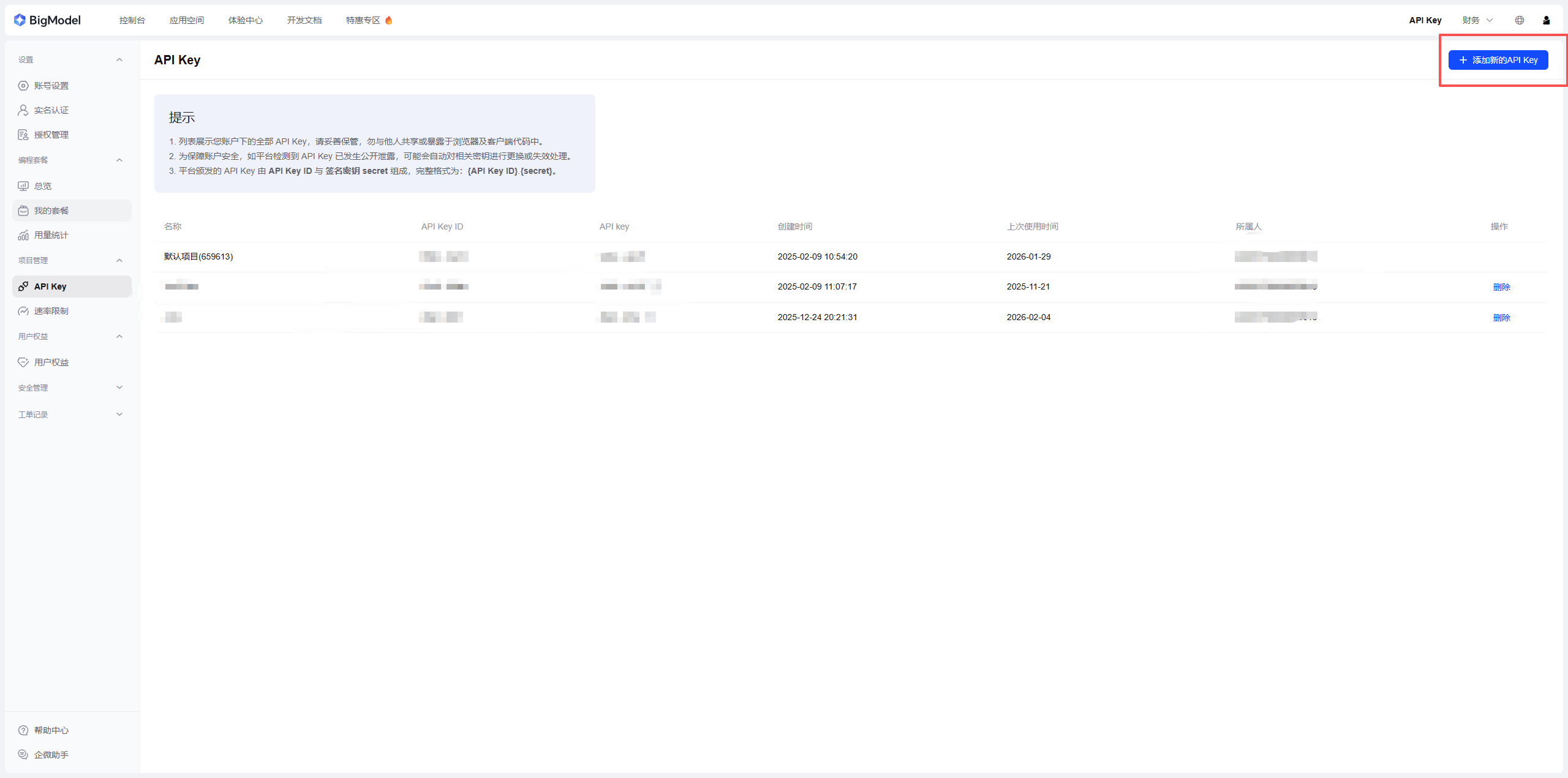
使用cc switch https://github.com/farion1231/cc-switch cc switch.exehttps://download.csdn.net/download/weixin_44151887/92643394
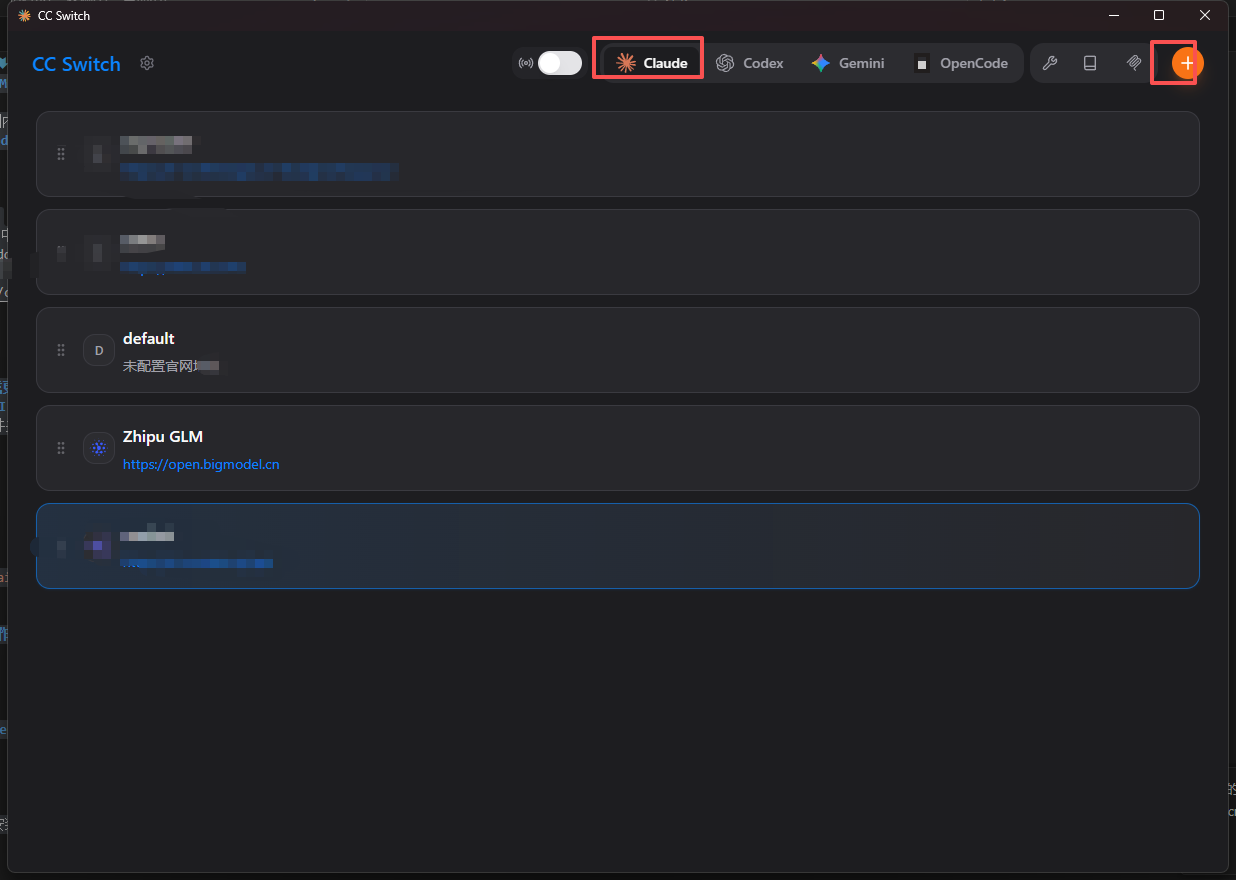
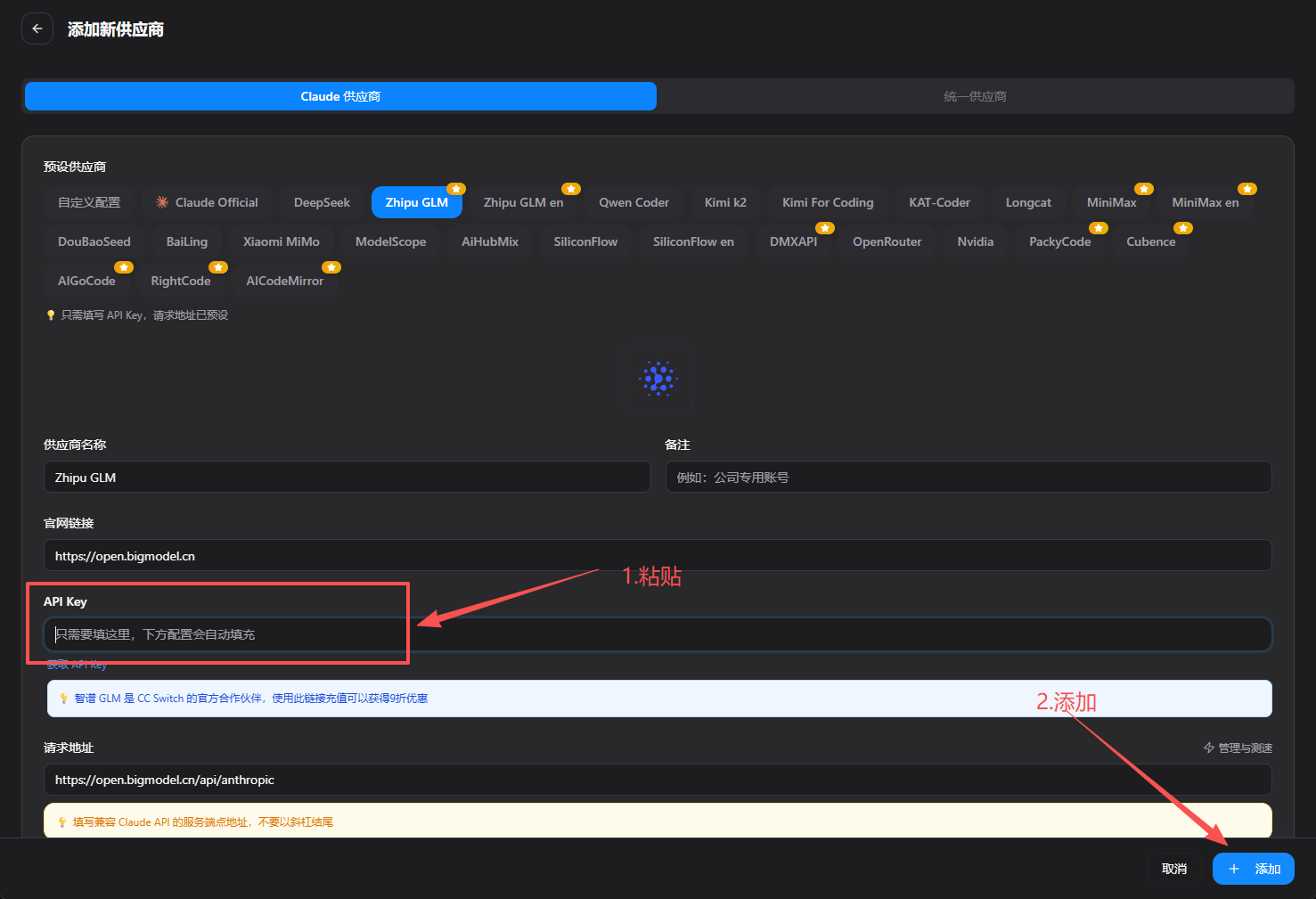
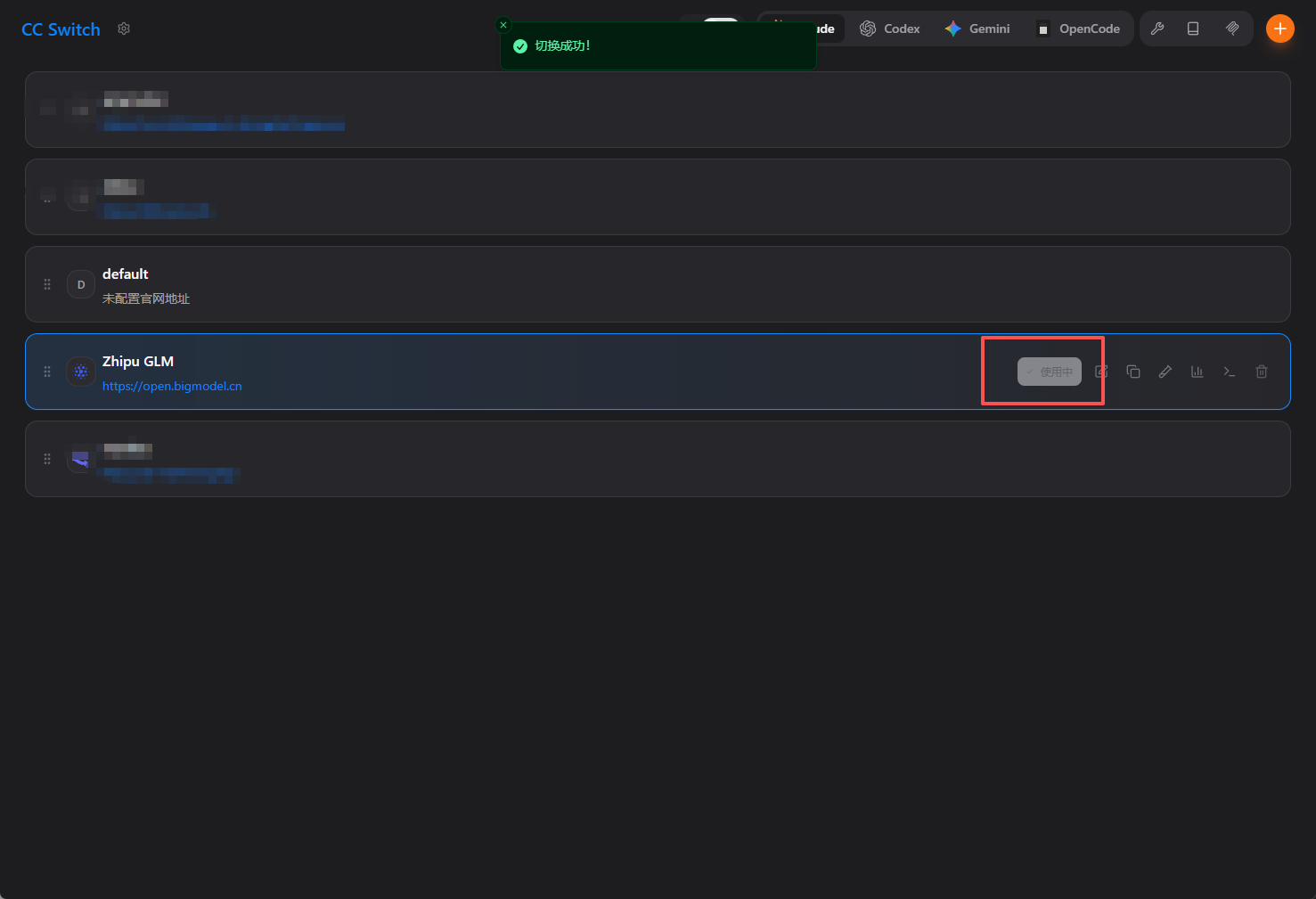
打开claude,直接问你是什么模型
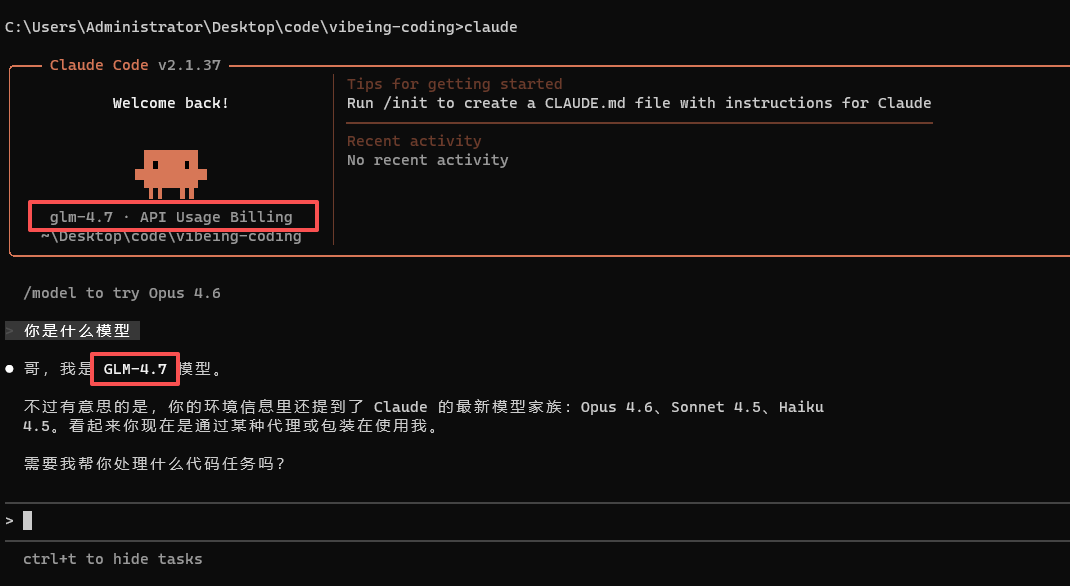
配置GLM4.7成功
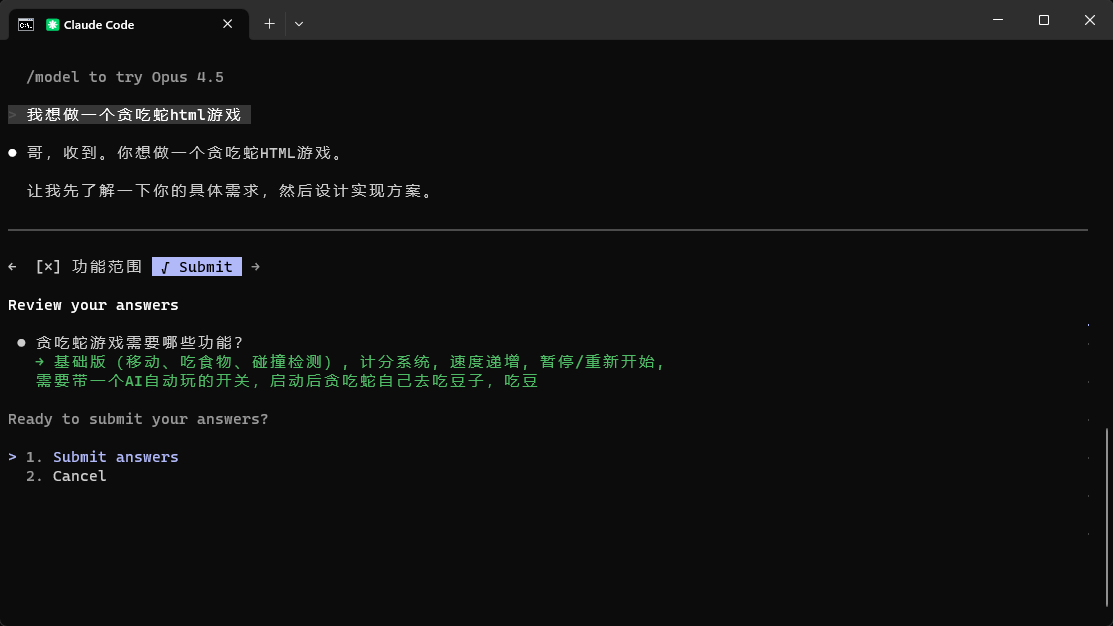
贪吃蛇示例:
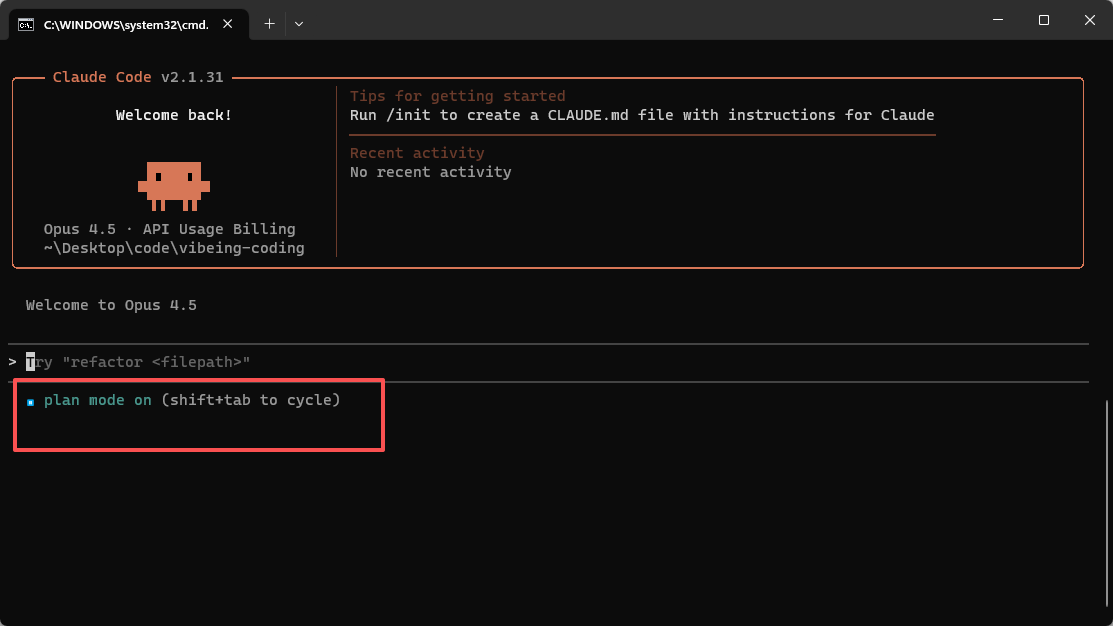
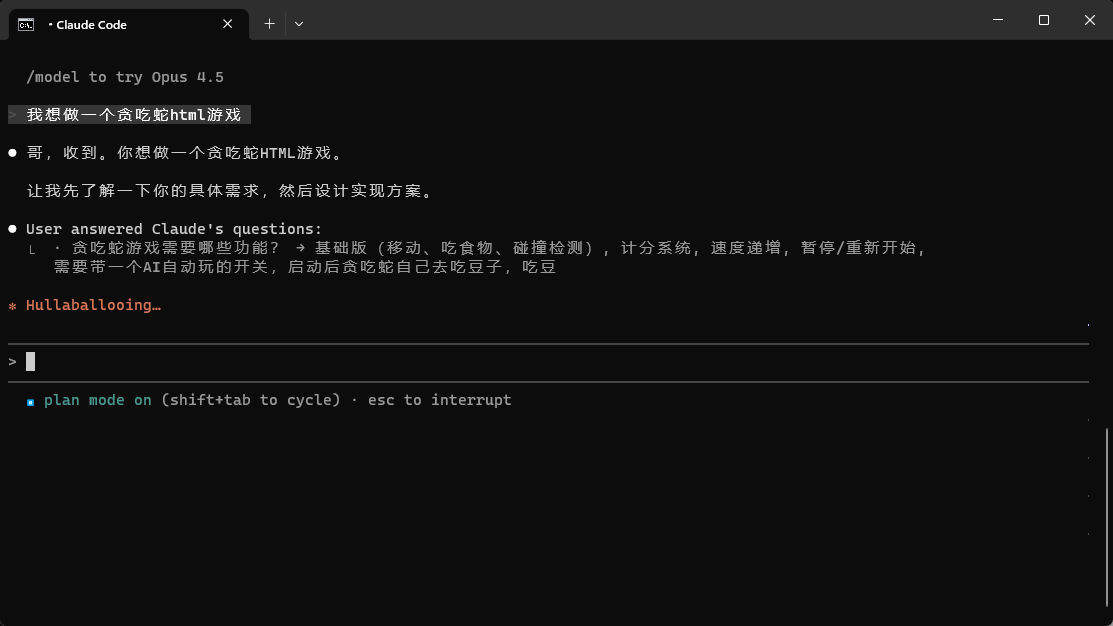
提示词:我想做一个贪吃蛇html游戏
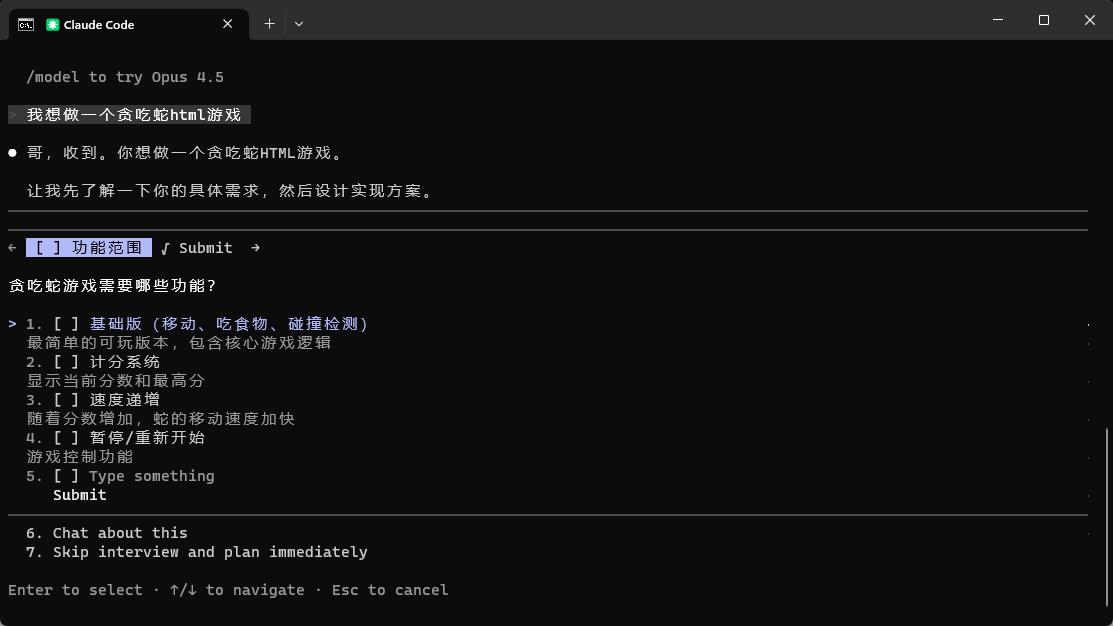
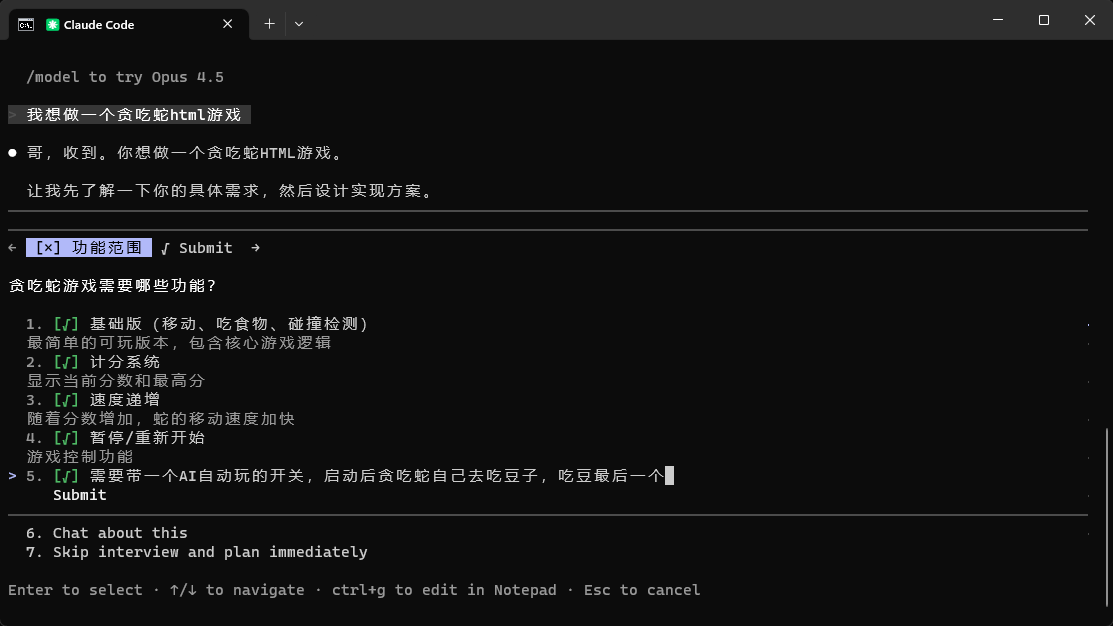
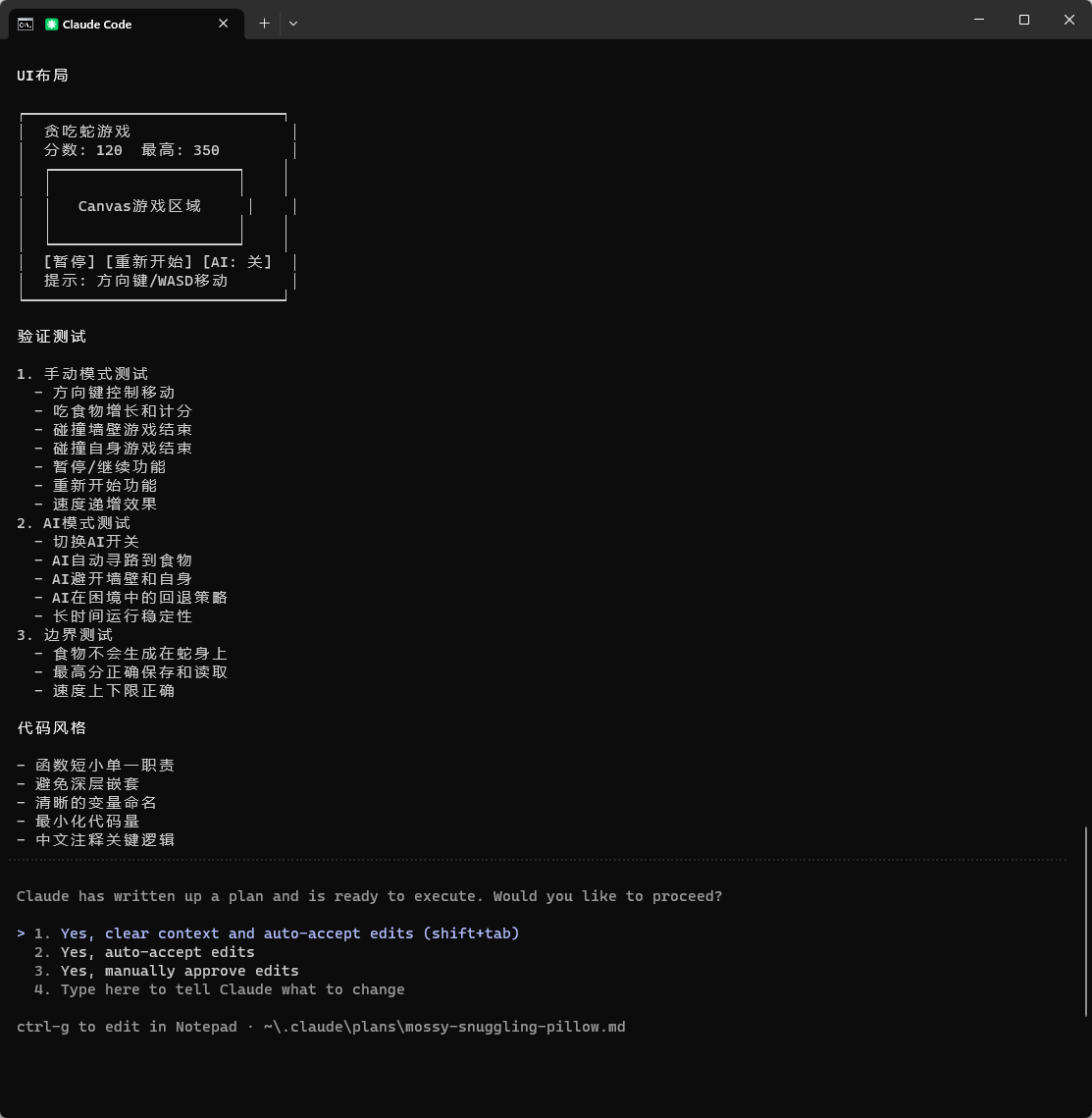
贪吃蛇HTML游戏实现计划 │
│ │
│ 项目概述 │
│ │
│ 单HTML文件实现的贪吃蛇游戏,包含AI自动玩功能。 │
│ │
│ 技术栈 │
│ │
│ – HTML5 Canvas │
│ – 原生JavaScript │
│ – CSS(最小化样式) │
│ │
│ 核心功能 │
│ │
│ 1. 游戏基础 │
│ │
│ – Canvas渲染游戏画面 │
│ – 网格系统(20×20单元格) │
│ – 游戏循环(requestAnimationFrame) │
│ – 帧率控制(根据分数动态调整) │
│ │
│ 2. 蛇的实现 │
│ │
│ – 数据结构:数组存储身体坐标 [{x, y}, {x, y}, ...] │
│ – 移动逻辑:头部添加新坐标,尾部移除(吃到食物时不移除) │
│ – 方向控制:上下左右,防止反向移动 │
│ – 初始状态:3格长度,居中位置 │
│ │
│ 3. 食物系统 │
│ │
│ – 随机生成位置(避开蛇身) │
│ – 碰撞检测:蛇头坐标 === 食物坐标 │
│ – 吃到后:蛇身+1,分数+10,重新生成食物 │
│ │
│ 4. 碰撞检测 │
│ │
│ – 墙壁碰撞:x < 0 || x >= gridSize || y < 0 || y >= gridSize │
│ – 自身碰撞:头部坐标与身体任意部分重合 │
│ – 游戏结束处理 │
│ │
│ 5. 计分系统 │
│ │
│ – 当前分数显示 │
│ – 最高分记录(localStorage持久化) │
│ – 速度递增:每50分加速一次 │
│ │
│ 6. 游戏控制 │
│ │
│ – 键盘控制:方向键/WASD │
│ – 空格键:暂停/继续 │
│ – Enter键:重新开始 │
│ – AI开关按钮:切换自动/手动模式 │
│ │
│ 7. AI自动玩功能 │
│ │
│ 算法选择:简化A*寻路 │
│ – 目标:找到从蛇头到食物的最短安全路径 │
│ – 实现: │
│ – BFS广度优先搜索找路径 │
│ – 安全性检查:避开墙壁和蛇身 │
│ – 失败回退:找不到路径时随机选择安全方向 │
│ – 每帧执行一次路径计算 │
│ – 平滑移动(保持游戏速度) │
│ │
│ 文件结构 │
│ │
│ snake-game.html │
│ ├── <style> – 最小化CSS │
│ ├── <canvas> – 游戏画面 │
│ ├── <div> – 控制面板(分数、按钮) │
│ └── <script> – 游戏逻辑 │
│ ├── 常量定义 │
│ ├── 游戏状态 │
│ ├── 渲染函数 │
│ ├── 游戏逻辑函数 │
│ ├── AI寻路算法 │
│ ├── 事件监听 │
│ └── 游戏循环 │
│ │
│ 实现细节 │
│ │
│ 数据结构 │
│ │
│ const game = { │
│ snake: [{x: 10, y: 10}, {x: 9, y: 10}, {x: 8, y: 10}], │
│ direction: {x: 1, y: 0}, │
│ food: {x: 15, y: 15}, │
│ score: 0, │
│ highScore: 0, │
│ speed: 150, // ms per frame │
│ paused: false, │
│ gameOver: false, │
│ aiMode: false │
│ } │
│ │
│ AI寻路核心逻辑 │
│ │
│ function findPath(start, target, obstacles) { │
│ // BFS队列 │
│ // 记录访问过的节点 │
│ // 记录路径 │
│ // 返回下一步方向 │
│ } │
│ │
│ function getNextAIMove() { │
│ const path = findPath(snakeHead, food, snakeBody); │
│ if (path.length > 0) return path[0]; │
│ // 回退:找安全方向 │
│ return findSafeDirection(); │
│ } │
│ │
│ 速度递增规则 │
│ │
│ – 初始速度:150ms/帧 │
│ – 每50分:速度减少15ms │
│ – 最快速度:50ms/帧 │
│ │
│ UI布局 │
│ │
│ ┌─────────────────────────────┐ │
│ │ 贪吃蛇游戏 │ │
│ │ 分数: 120 最高: 350 │ │
│ │ ┌─────────────────────┐ │ │
│ │ │ │ │ │
│ │ │ Canvas游戏区域 │ │ │
│ │ │ │ │ │
│ │ └─────────────────────┘ │ │
│ │ [暂停] [重新开始] [AI: 关] │ │
│ │ 提示: 方向键/WASD移动 │ │
│ └─────────────────────────────┘ │
│ │
│ 验证测试 │
│ │
│ 1. 手动模式测试 │
│ – 方向键控制移动 │
│ – 吃食物增长和计分 │
│ – 碰撞墙壁游戏结束 │
│ – 碰撞自身游戏结束 │
│ – 暂停/继续功能 │
│ – 重新开始功能 │
│ – 速度递增效果 │
│ 2. AI模式测试 │
│ – 切换AI开关 │
│ – AI自动寻路到食物 │
│ – AI避开墙壁和自身 │
│ – AI在困境中的回退策略 │
│ – 长时间运行稳定性 │
│ 3. 边界测试 │
│ – 食物不会生成在蛇身上 │
│ – 最高分正确保存和读取 │
│ – 速度上下限正确 │
│ │
│ 代码风格 │
│ │
│ – 函数短小单一职责 │
│ – 避免深层嵌套 │
│ – 清晰的变量命名 │
│ – 最小化代码量 │
│ – 中文注释关键逻辑
选第一个就行了
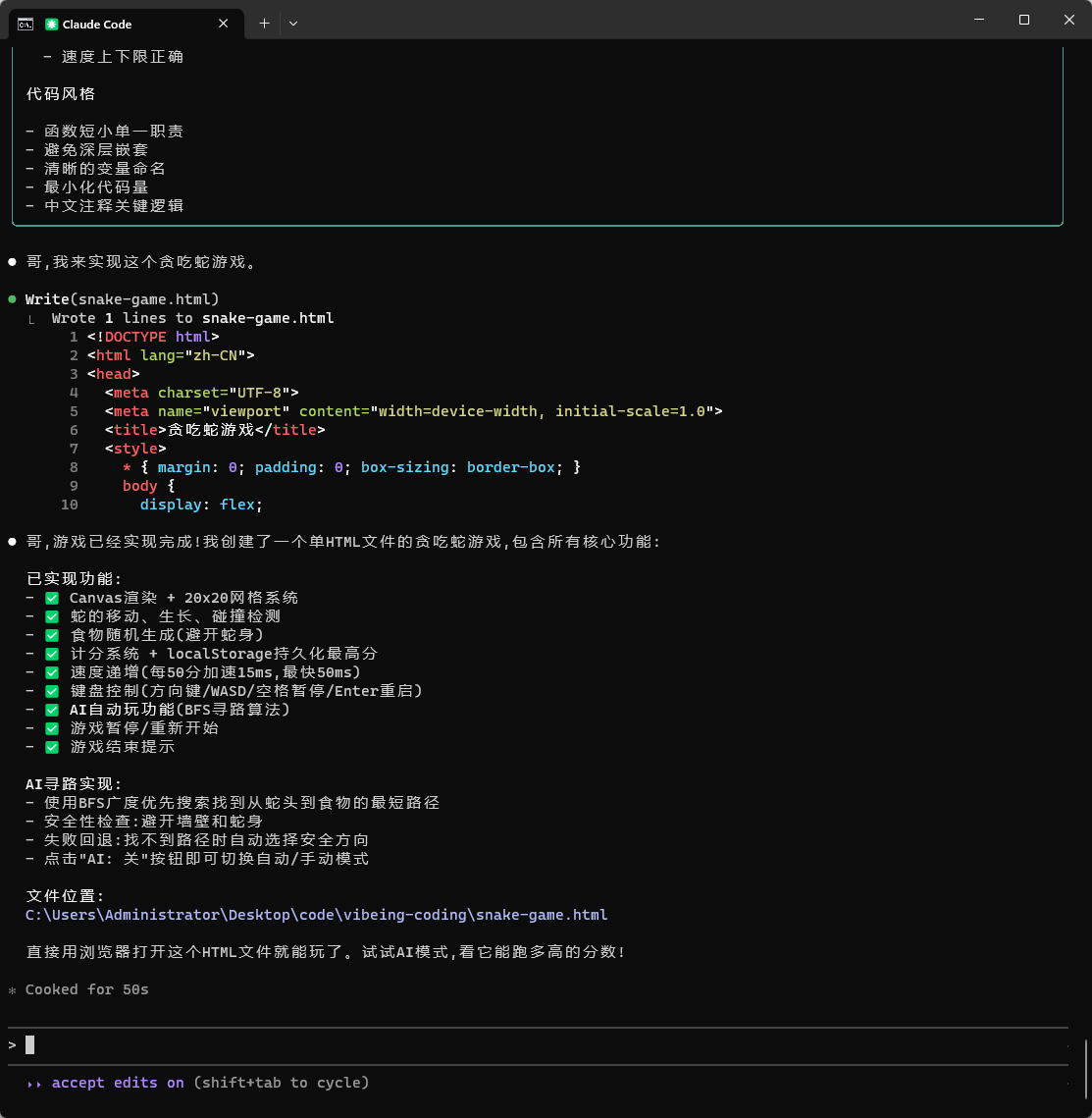
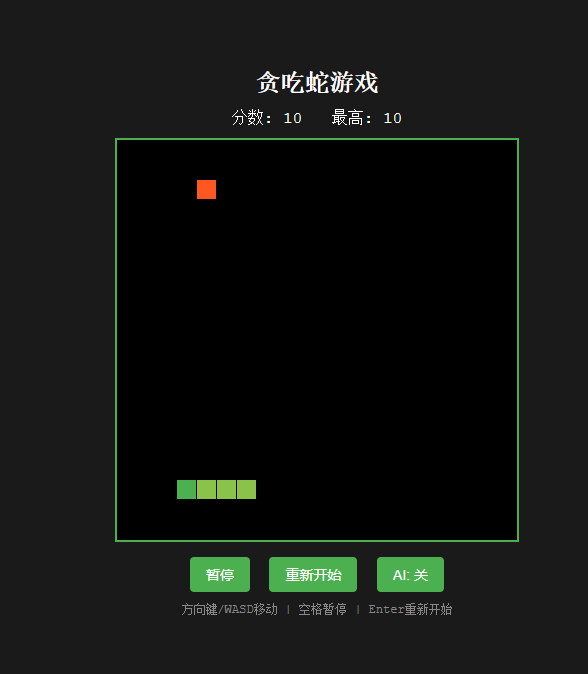
贪吃蛇代码如下
<!DOCTYPE html>
<html lang="zh-CN">
<head>
<meta charset="UTF-8">
<meta name="viewport" content="width=device-width, initial-scale=1.0">
<title>贪吃蛇游戏</title>
<style>
* { margin: 0; padding: 0; box-sizing: border-box; }
body {
display: flex;
justify-content: center;
align-items: center;
min-height: 100vh;
background: #1a1a1a;
font-family: 'Courier New', monospace;
color: #fff;
}
.container { text-align: center; }
h1 { margin-bottom: 10px; font-size: 24px; }
.info { margin-bottom: 10px; font-size: 16px; }
canvas {
border: 2px solid #4CAF50;
background: #000;
display: block;
margin: 0 auto 15px;
}
.controls { margin-bottom: 10px; }
button {
padding: 8px 16px;
margin: 0 5px;
font-size: 14px;
cursor: pointer;
background: #4CAF50;
color: #fff;
border: none;
border-radius: 4px;
}
button:hover { background: #45a049; }
.hint { font-size: 12px; color: #888; }
</style>
</head>
<body>
<div class="container">
<h1>贪吃蛇游戏</h1>
<div class="info">
<span>分数: <span id="score">0</span></span>
<span style="margin-left: 20px;">最高: <span id="highScore">0</span></span>
</div>
<canvas id="game" width="400" height="400"></canvas>
<div class="controls">
<button id="pauseBtn">暂停</button>
<button id="restartBtn">重新开始</button>
<button id="aiBtn">AI: 关</button>
</div>
<div class="hint">方向键/WASD移动 | 空格暂停 | Enter重新开始</div>
</div>
<script>
/**
* [INPUT]: Canvas API, localStorage, 键盘事件
* [OUTPUT]: 完整的贪吃蛇游戏,包含AI自动玩功能
* [POS]: 单文件游戏实现,核心逻辑包含游戏循环/碰撞检测/AI寻路
* [PROTOCOL]: 变更时更新此头部,然后检查 CLAUDE.md
*/
// ============ 常量定义 ============
const canvas = document.getElementById('game');
const ctx = canvas.getContext('2d');
const GRID_SIZE = 20;
const CELL_SIZE = canvas.width / GRID_SIZE;
const INITIAL_SPEED = 150;
const MIN_SPEED = 50;
const SPEED_INCREMENT = 15;
const SCORE_THRESHOLD = 50;
// ============ 游戏状态 ============
let game = {
snake: [{x: 10, y: 10}, {x: 9, y: 10}, {x: 8, y: 10}],
direction: {x: 1, y: 0},
nextDirection: {x: 1, y: 0},
food: null,
score: 0,
highScore: parseInt(localStorage.getItem('snakeHighScore')) || 0,
speed: INITIAL_SPEED,
paused: false,
gameOver: false,
aiMode: false,
lastUpdate: 0
};
// ============ 初始化 ============
function init() {
game.snake = [{x: 10, y: 10}, {x: 9, y: 10}, {x: 8, y: 10}];
game.direction = {x: 1, y: 0};
game.nextDirection = {x: 1, y: 0};
game.score = 0;
game.speed = INITIAL_SPEED;
game.paused = false;
game.gameOver = false;
generateFood();
updateUI();
}
// ============ 食物生成 ============
function generateFood() {
do {
game.food = {
x: Math.floor(Math.random() * GRID_SIZE),
y: Math.floor(Math.random() * GRID_SIZE)
};
} while (game.snake.some(seg => seg.x === game.food.x && seg.y === game.food.y));
}
// ============ 渲染 ============
function render() {
ctx.fillStyle = '#000';
ctx.fillRect(0, 0, canvas.width, canvas.height);
// 绘制蛇
game.snake.forEach((seg, i) => {
ctx.fillStyle = i === 0 ? '#4CAF50' : '#8BC34A';
ctx.fillRect(seg.x * CELL_SIZE, seg.y * CELL_SIZE, CELL_SIZE – 1, CELL_SIZE – 1);
});
// 绘制食物
ctx.fillStyle = '#FF5722';
ctx.fillRect(game.food.x * CELL_SIZE, game.food.y * CELL_SIZE, CELL_SIZE – 1, CELL_SIZE – 1);
// 游戏结束提示
if (game.gameOver) {
ctx.fillStyle = 'rgba(0, 0, 0, 0.7)';
ctx.fillRect(0, 0, canvas.width, canvas.height);
ctx.fillStyle = '#fff';
ctx.font = '30px Courier New';
ctx.textAlign = 'center';
ctx.fillText('游戏结束', canvas.width / 2, canvas.height / 2 – 20);
ctx.font = '16px Courier New';
ctx.fillText('按 Enter 重新开始', canvas.width / 2, canvas.height / 2 + 20);
}
}
// ============ 游戏逻辑 ============
function update() {
if (game.paused || game.gameOver) return;
game.direction = game.nextDirection;
const head = {
x: game.snake[0].x + game.direction.x,
y: game.snake[0].y + game.direction.y
};
// 碰撞检测
if (head.x < 0 || head.x >= GRID_SIZE || head.y < 0 || head.y >= GRID_SIZE ||
game.snake.some(seg => seg.x === head.x && seg.y === head.y)) {
game.gameOver = true;
return;
}
game.snake.unshift(head);
// 吃食物
if (head.x === game.food.x && head.y === game.food.y) {
game.score += 10;
if (game.score > game.highScore) {
game.highScore = game.score;
localStorage.setItem('snakeHighScore', game.highScore);
}
// 速度递增
if (game.score % SCORE_THRESHOLD === 0 && game.speed > MIN_SPEED) {
game.speed = Math.max(MIN_SPEED, game.speed – SPEED_INCREMENT);
}
generateFood();
updateUI();
} else {
game.snake.pop();
}
}
// ============ AI寻路 ============
function findPath(start, target) {
const queue = [[start]];
const visited = new Set([`${start.x},${start.y}`]);
while (queue.length > 0) {
const path = queue.shift();
const pos = path[path.length – 1];
if (pos.x === target.x && pos.y === target.y) {
return path.length > 1 ? path[1] : null;
}
const directions = [{x: 0, y: –1}, {x: 1, y: 0}, {x: 0, y: 1}, {x: –1, y: 0}];
for (const dir of directions) {
const next = {x: pos.x + dir.x, y: pos.y + dir.y};
const key = `${next.x},${next.y}`;
if (next.x >= 0 && next.x < GRID_SIZE && next.y >= 0 && next.y < GRID_SIZE &&
!visited.has(key) && !game.snake.some(seg => seg.x === next.x && seg.y === next.y)) {
visited.add(key);
queue.push([…path, next]);
}
}
}
return null;
}
function findSafeDirection() {
const directions = [
{x: 0, y: –1}, {x: 1, y: 0}, {x: 0, y: 1}, {x: –1, y: 0}
];
for (const dir of directions) {
const next = {
x: game.snake[0].x + dir.x,
y: game.snake[0].y + dir.y
};
if (next.x >= 0 && next.x < GRID_SIZE && next.y >= 0 && next.y < GRID_SIZE &&
!game.snake.some(seg => seg.x === next.x && seg.y === next.y)) {
return dir;
}
}
return {x: 1, y: 0};
}
function getAIMove() {
const nextPos = findPath(game.snake[0], game.food);
if (nextPos) {
return {
x: nextPos.x – game.snake[0].x,
y: nextPos.y – game.snake[0].y
};
}
return findSafeDirection();
}
// ============ 游戏循环 ============
function gameLoop(timestamp) {
if (timestamp – game.lastUpdate >= game.speed) {
if (game.aiMode && !game.paused && !game.gameOver) {
const aiDir = getAIMove();
// 防止反向移动
if (!(aiDir.x === –game.direction.x && aiDir.y === –game.direction.y)) {
game.nextDirection = aiDir;
}
}
update();
render();
game.lastUpdate = timestamp;
}
requestAnimationFrame(gameLoop);
}
// ============ UI更新 ============
function updateUI() {
document.getElementById('score').textContent = game.score;
document.getElementById('highScore').textContent = game.highScore;
document.getElementById('pauseBtn').textContent = game.paused ? '继续' : '暂停';
document.getElementById('aiBtn').textContent = game.aiMode ? 'AI: 开' : 'AI: 关';
}
// ============ 事件监听 ============
document.addEventListener('keydown', e => {
if (game.gameOver) {
if (e.key === 'Enter') {
init();
render();
}
return;
}
if (e.key === ' ') {
e.preventDefault();
game.paused = !game.paused;
updateUI();
return;
}
if (e.key === 'Enter') {
e.preventDefault();
init();
render();
return;
}
if (game.aiMode) return;
const keyMap = {
'ArrowUp': {x: 0, y: –1}, 'w': {x: 0, y: –1}, 'W': {x: 0, y: –1},
'ArrowRight': {x: 1, y: 0}, 'd': {x: 1, y: 0}, 'D': {x: 1, y: 0},
'ArrowDown': {x: 0, y: 1}, 's': {x: 0, y: 1}, 'S': {x: 0, y: 1},
'ArrowLeft': {x: –1, y: 0}, 'a': {x: –1, y: 0}, 'A': {x: –1, y: 0}
};
const newDir = keyMap[e.key];
if (newDir && !(newDir.x === –game.direction.x && newDir.y === –game.direction.y)) {
game.nextDirection = newDir;
e.preventDefault();
}
});
document.getElementById('pauseBtn').addEventListener('click', () => {
if (!game.gameOver) {
game.paused = !game.paused;
updateUI();
}
});
document.getElementById('restartBtn').addEventListener('click', () => {
init();
render();
});
document.getElementById('aiBtn').addEventListener('click', () => {
game.aiMode = !game.aiMode;
updateUI();
});
// ============ 启动游戏 ============
init();
render();
requestAnimationFrame(gameLoop);
</script>
</body>
</html>
方案 B:💻 Cursor(VSCode 党/最快上手/写改一体)
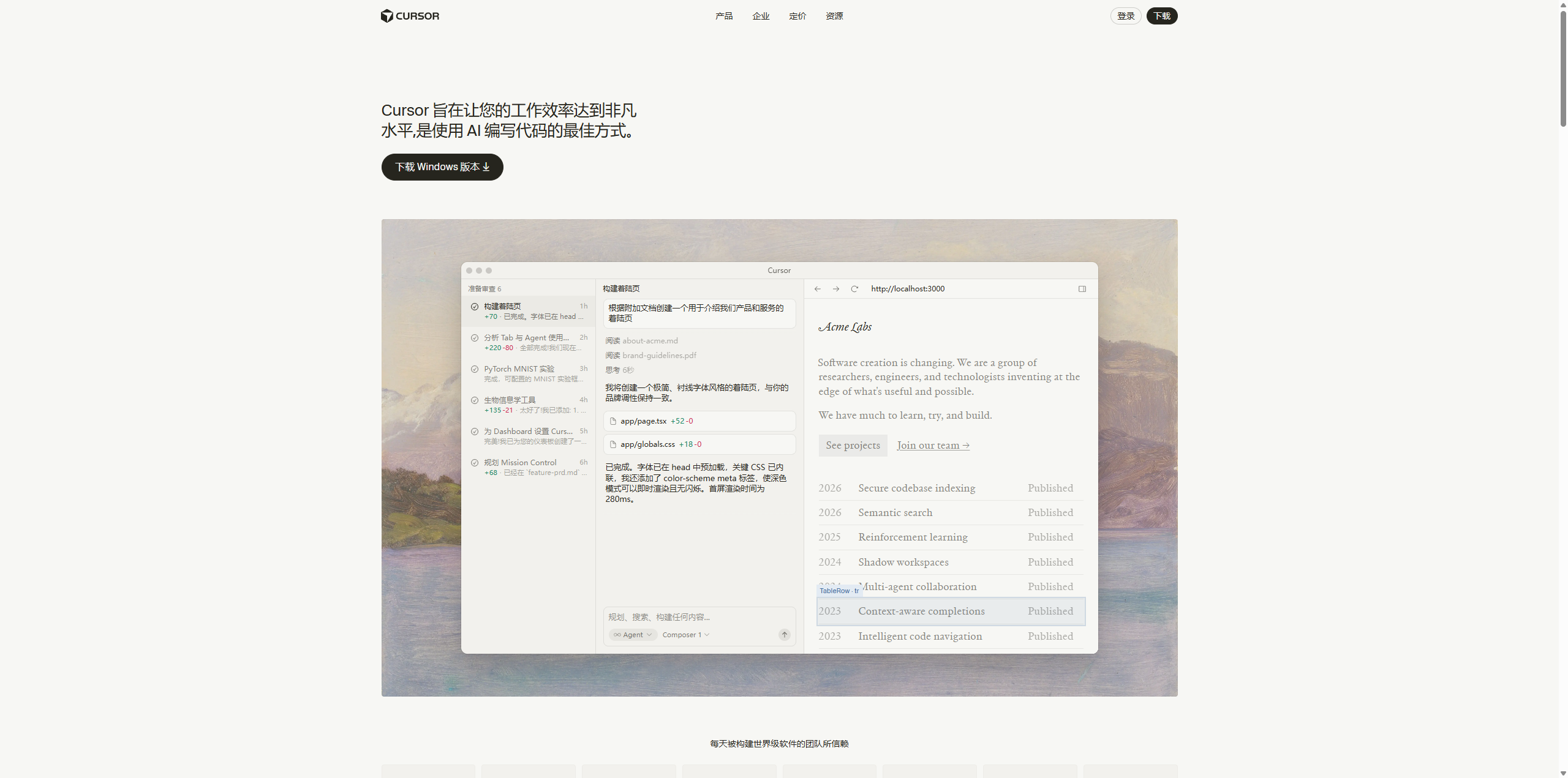
cursor官网https://cursor.com/cn?from=home cursor.exe安装包https://download.csdn.net/download/weixin_44151887/92643403 cursor支持ssh连接到服务器后一键部署github项目,自动安装所有环境并启动项目 缺点:20刀一个月,不耐用
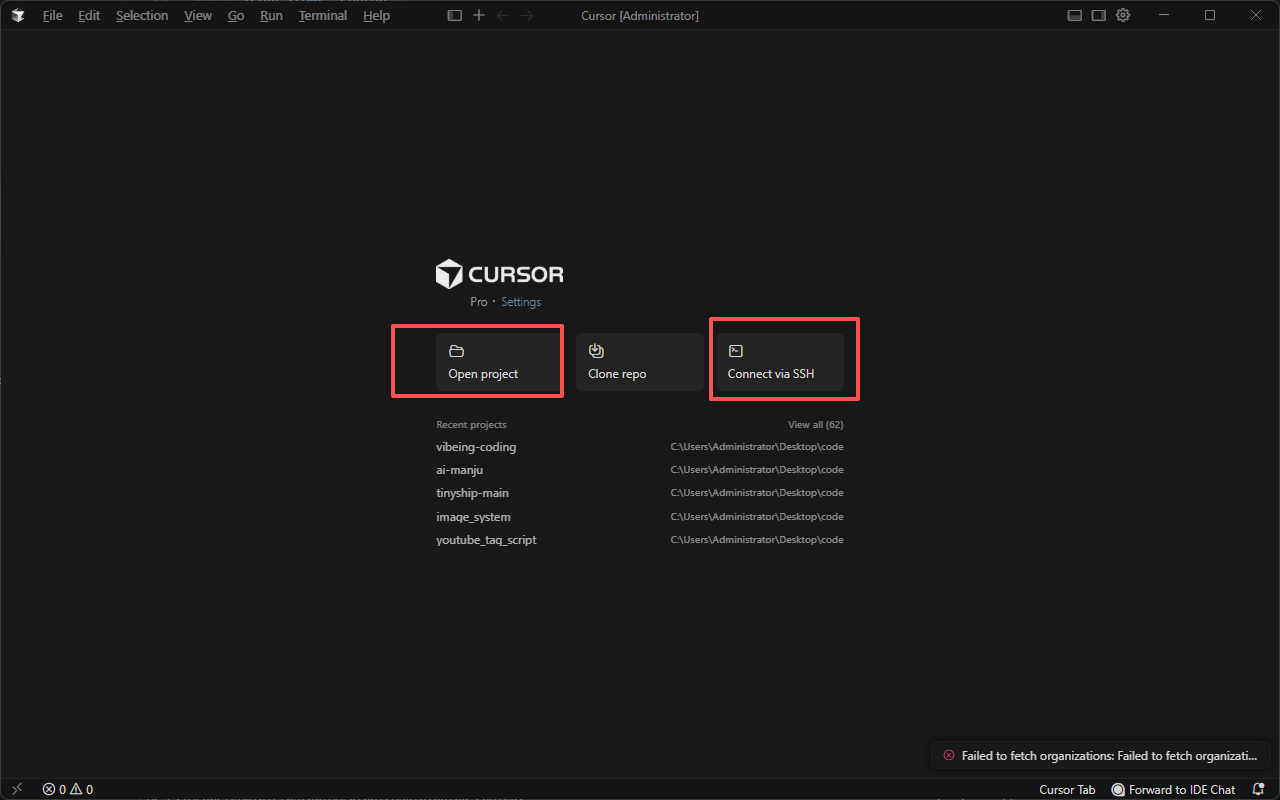
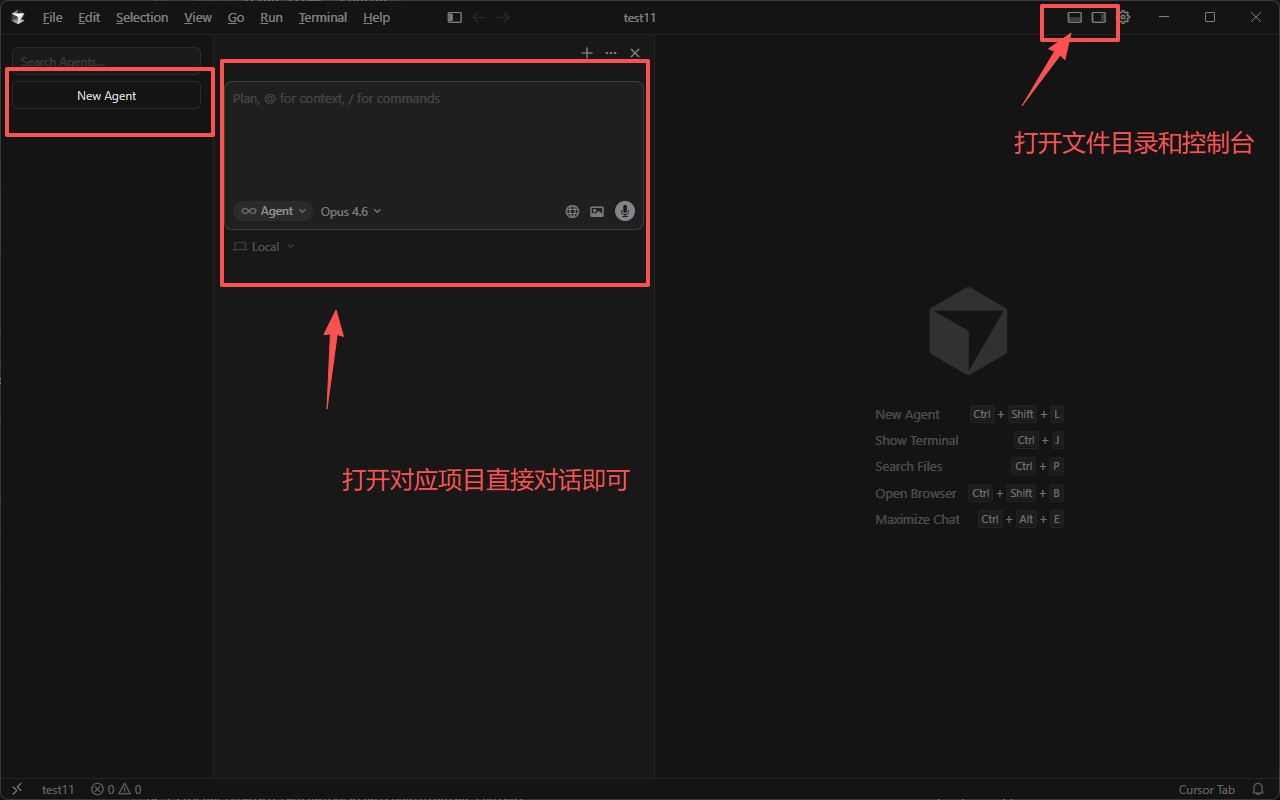
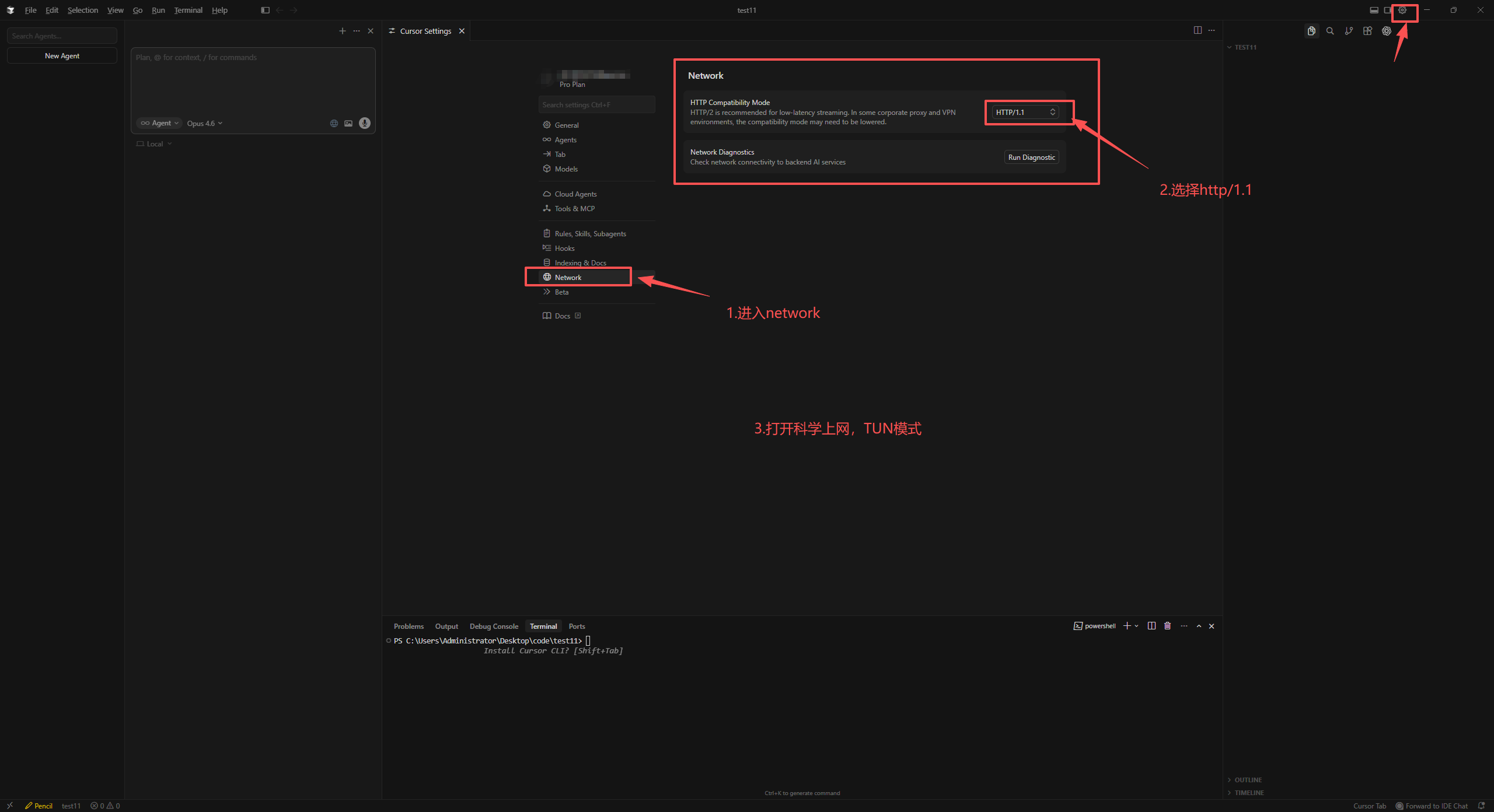
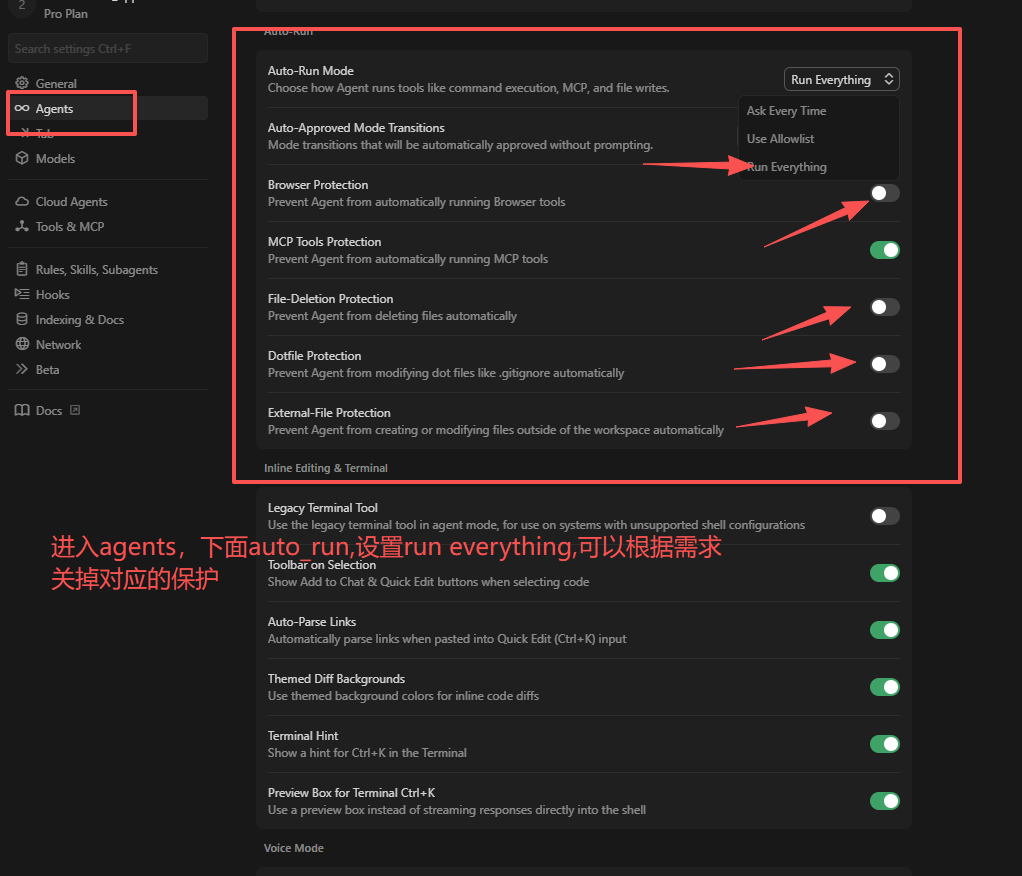
✌️✌️✌️cursor就可以正常使用了
适合你如果:
- 你本来就重度使用 VSCode
- 你更在乎“写代码更快、改代码更快”
- 你做的是中小项目/快速迭代/原型开发
你会得到:
- ✅ IDE 体验最顺(几乎零学习成本)
- ✅ 写改一体效率极高(尤其是局部修改、批量重命名、生成组件)
- ✅ 更适合前端/全栈日常开发
一句话总结:最快把效率拉上来,你熟悉 VSCode 就闭眼上。
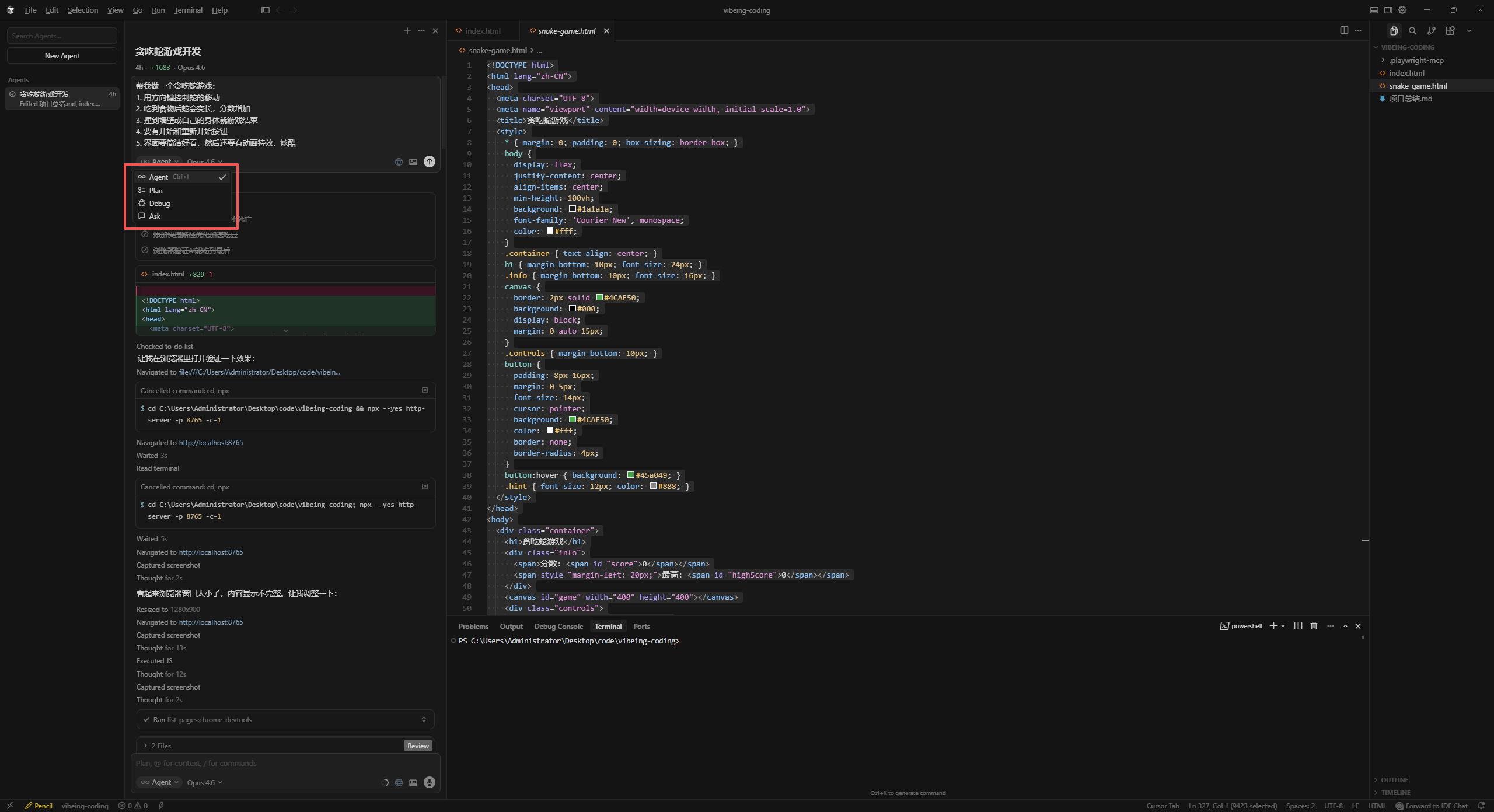
cursor制作贪吃蛇 提示词: 帮我做一个贪吃蛇游戏:
提示词: 你再设计一个自动路线规划吃豆豆,然后这个是在页面上显示开关,自动吃豆豆,自己计算避免撞墙
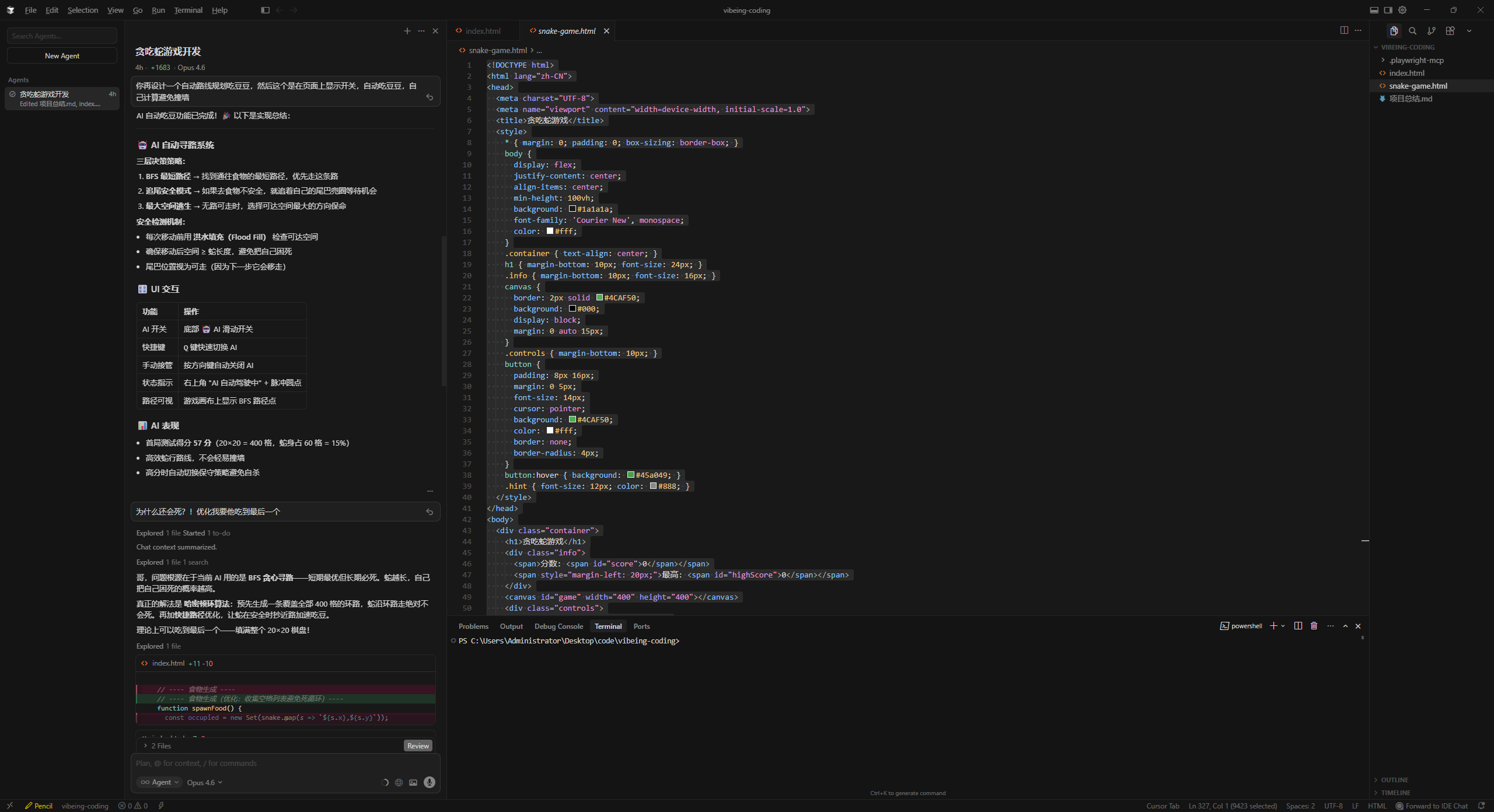
提示词: 为什么还会死?!优化我要他吃到最后一个

总结改项目到md文件(包含怎么实现,逻辑,原理),还有下次如何0-1搭建这个项目,给我对应的提示词


 贪吃蛇代码:
<!DOCTYPE html>
<html lang="zh-CN">
<head>
<meta charset="UTF-8">
<meta name="viewport" content="width=device-width, initial-scale=1.0">
<title>🐍 贪吃蛇</title>
<style>
/* ========================================
全局重置 + 暗色主题
======================================== */
* { margin: 0; padding: 0; box-sizing: border-box; }
:root {
–bg-deep: #0a0a1a;
–bg-surface: #12122a;
–bg-card: #1a1a3e;
–accent: #00f5d4;
–accent-glow: rgba(0, 245, 212, 0.4);
–accent-dim: rgba(0, 245, 212, 0.15);
–pink: #f72585;
–pink-glow: rgba(247, 37, 133, 0.4);
–purple: #7209b7;
–blue: #4361ee;
–gold: #ffd60a;
–text: #e8e8f0;
–text-dim: #8888aa;
–danger: #ff3366;
–radius: 16px;
}
body {
background: var(–bg-deep);
color: var(–text);
font-family: 'SF Pro Display', -apple-system, BlinkMacSystemFont, 'Segoe UI', sans-serif;
min-height: 100vh;
display: flex;
flex-direction: column;
align-items: center;
justify-content: center;
overflow: hidden;
position: relative;
}
/* ========================================
背景网格动画
======================================== */
body::before {
content: '';
position: fixed;
inset: 0;
background:
radial-gradient(circle at 20% 50%, rgba(114, 9, 183, 0.08) 0%, transparent 50%),
radial-gradient(circle at 80% 20%, rgba(0, 245, 212, 0.06) 0%, transparent 50%),
radial-gradient(circle at 50% 80%, rgba(247, 37, 133, 0.05) 0%, transparent 50%);
pointer-events: none;
z-index: 0;
}
.grid-bg {
position: fixed;
inset: 0;
background-image:
linear-gradient(rgba(255,255,255,0.02) 1px, transparent 1px),
linear-gradient(90deg, rgba(255,255,255,0.02) 1px, transparent 1px);
background-size: 40px 40px;
pointer-events: none;
z-index: 0;
}
/* ========================================
游戏容器
======================================== */
.game-wrapper {
position: relative;
z-index: 1;
display: flex;
flex-direction: column;
align-items: center;
gap: 20px;
}
.game-header {
display: flex;
align-items: center;
justify-content: space-between;
width: 100%;
max-width: 480px;
padding: 0 4px;
}
.game-title {
font-size: 28px;
font-weight: 800;
letter-spacing: -0.5px;
background: linear-gradient(135deg, var(–accent), var(–blue));
-webkit-background-clip: text;
-webkit-text-fill-color: transparent;
background-clip: text;
}
.score-display {
display: flex;
align-items: center;
gap: 16px;
}
.score-item {
display: flex;
flex-direction: column;
align-items: center;
gap: 2px;
}
.score-label {
font-size: 10px;
text-transform: uppercase;
letter-spacing: 1.5px;
color: var(–text-dim);
font-weight: 600;
}
.score-value {
font-size: 24px;
font-weight: 800;
font-variant-numeric: tabular-nums;
color: var(–accent);
text-shadow: 0 0 20px var(–accent-glow);
transition: transform 0.15s cubic-bezier(0.34, 1.56, 0.64, 1);
}
.score-value.bump {
transform: scale(1.3);
}
.best-value {
color: var(–gold);
text-shadow: 0 0 20px rgba(255, 214, 10, 0.4);
}
/* ========================================
游戏画布
======================================== */
.canvas-container {
position: relative;
border-radius: var(–radius);
overflow: hidden;
}
.canvas-container::before {
content: '';
position: absolute;
inset: -2px;
border-radius: calc(var(–radius) + 2px);
background: linear-gradient(135deg, var(–accent), var(–purple), var(–pink));
z-index: -1;
opacity: 0.6;
}
#game {
display: block;
background: var(–bg-surface);
border-radius: var(–radius);
}
/* ========================================
覆盖层 (开始/结束)
======================================== */
.overlay {
position: absolute;
inset: 0;
display: flex;
flex-direction: column;
align-items: center;
justify-content: center;
gap: 20px;
background: rgba(10, 10, 26, 0.85);
backdrop-filter: blur(8px);
border-radius: var(–radius);
z-index: 10;
transition: opacity 0.4s ease, transform 0.4s cubic-bezier(0.22, 1, 0.36, 1);
}
.overlay.hidden {
opacity: 0;
pointer-events: none;
transform: scale(1.05);
}
.overlay-icon {
font-size: 56px;
animation: floatBounce 2s ease-in-out infinite;
}
@keyframes floatBounce {
0%, 100% { transform: translateY(0); }
50% { transform: translateY(-10px); }
}
.overlay-title {
font-size: 32px;
font-weight: 800;
letter-spacing: -0.5px;
}
.overlay-title.game-over {
background: linear-gradient(135deg, var(–danger), var(–pink));
-webkit-background-clip: text;
-webkit-text-fill-color: transparent;
background-clip: text;
}
.overlay-subtitle {
color: var(–text-dim);
font-size: 14px;
max-width: 260px;
text-align: center;
line-height: 1.5;
}
.overlay-score {
font-size: 48px;
font-weight: 900;
color: var(–accent);
text-shadow: 0 0 30px var(–accent-glow);
}
/* ========================================
按钮
======================================== */
.btn {
display: inline-flex;
align-items: center;
justify-content: center;
gap: 8px;
padding: 14px 36px;
border: none;
border-radius: 50px;
font-size: 16px;
font-weight: 700;
cursor: pointer;
transition: all 0.2s cubic-bezier(0.22, 1, 0.36, 1);
outline: none;
position: relative;
overflow: hidden;
}
.btn::before {
content: '';
position: absolute;
inset: 0;
border-radius: 50px;
opacity: 0;
transition: opacity 0.2s;
}
.btn:hover::before { opacity: 1; }
.btn:active { transform: scale(0.96); }
.btn-primary {
background: linear-gradient(135deg, var(–accent) 0%, #00c4a7 50%, #009d88 100%);
color: #0a0a1a;
box-shadow:
0 4px 16px var(–accent-glow),
inset 0 1px 0 rgba(255,255,255,0.25),
inset 0 -1px 0 rgba(0,0,0,0.1);
}
.btn-primary:hover {
box-shadow:
0 8px 32px var(–accent-glow),
inset 0 1px 0 rgba(255,255,255,0.3),
inset 0 -1px 0 rgba(0,0,0,0.15);
transform: translateY(-2px);
}
.btn-primary:active {
transform: translateY(0) scale(0.97);
}
.btn-ghost {
background: rgba(255,255,255,0.06);
color: var(–text);
border: 1px solid rgba(255,255,255,0.1);
}
.btn-ghost:hover {
background: rgba(255,255,255,0.1);
border-color: rgba(255,255,255,0.2);
}
/* ========================================
操作提示
======================================== */
.controls-hint {
display: flex;
align-items: center;
gap: 6px;
color: var(–text-dim);
font-size: 12px;
margin-top: 4px;
}
.key {
display: inline-flex;
align-items: center;
justify-content: center;
width: 28px;
height: 28px;
background: rgba(255,255,255,0.06);
border: 1px solid rgba(255,255,255,0.1);
border-radius: 6px;
font-size: 14px;
color: var(–text-dim);
}
/* ========================================
粒子画布
======================================== */
#particles {
position: fixed;
inset: 0;
pointer-events: none;
z-index: 100;
}
/* ========================================
AI 自动模式开关
======================================== */
.ai-toggle-wrap {
display: flex;
align-items: center;
gap: 10px;
}
.ai-label {
font-size: 13px;
font-weight: 700;
color: var(–text-dim);
display: flex;
align-items: center;
gap: 5px;
transition: color 0.3s;
user-select: none;
}
.ai-label.active {
color: var(–accent);
text-shadow: 0 0 12px var(–accent-glow);
}
.ai-label .ai-icon {
font-size: 16px;
}
.toggle-switch {
position: relative;
width: 52px;
height: 28px;
cursor: pointer;
}
.toggle-switch input {
opacity: 0;
width: 0;
height: 0;
position: absolute;
}
.toggle-track {
position: absolute;
inset: 0;
background: rgba(255,255,255,0.08);
border: 1px solid rgba(255,255,255,0.1);
border-radius: 50px;
transition: all 0.35s cubic-bezier(0.22, 1, 0.36, 1);
}
.toggle-track::after {
content: '';
position: absolute;
width: 22px;
height: 22px;
border-radius: 50%;
top: 2px;
left: 2px;
background: var(–text-dim);
box-shadow: 0 2px 6px rgba(0,0,0,0.3);
transition: all 0.35s cubic-bezier(0.22, 1, 0.36, 1);
}
.toggle-switch input:checked + .toggle-track {
background: linear-gradient(135deg, var(–accent), #00c4a7);
border-color: var(–accent);
box-shadow: 0 0 16px var(–accent-glow), inset 0 0 8px rgba(0,245,212,0.15);
}
.toggle-switch input:checked + .toggle-track::after {
left: 26px;
background: #fff;
box-shadow: 0 2px 8px rgba(0,245,212,0.5);
}
.ai-status {
font-size: 11px;
color: var(–text-dim);
font-weight: 600;
letter-spacing: 0.5px;
min-width: 30px;
transition: color 0.3s;
}
.ai-status.active {
color: var(–accent);
}
/* AI 路径可视化指示器 */
.ai-indicator {
position: absolute;
top: 10px;
right: 10px;
display: flex;
align-items: center;
gap: 6px;
padding: 5px 12px;
background: rgba(0, 245, 212, 0.1);
border: 1px solid rgba(0, 245, 212, 0.25);
border-radius: 20px;
font-size: 11px;
font-weight: 700;
color: var(–accent);
opacity: 0;
transform: translateY(-5px);
transition: all 0.3s ease;
pointer-events: none;
z-index: 5;
}
.ai-indicator.visible {
opacity: 1;
transform: translateY(0);
}
.ai-dot {
width: 6px;
height: 6px;
border-radius: 50%;
background: var(–accent);
animation: aiPulse 1.2s ease-in-out infinite;
}
@keyframes aiPulse {
0%, 100% { opacity: 1; box-shadow: 0 0 4px var(–accent-glow); }
50% { opacity: 0.4; box-shadow: 0 0 8px var(–accent-glow); }
}
/* ========================================
响应式
======================================== */
@media (max-width: 520px) {
.game-title { font-size: 22px; }
.score-value { font-size: 20px; }
.overlay-title { font-size: 26px; }
.overlay-score { font-size: 40px; }
}
</style>
</head>
<body>
<div class="grid-bg"></div>
<canvas id="particles"></canvas>
<div class="game-wrapper">
<!– 顶部信息栏 –>
<div class="game-header">
<div class="game-title">🐍 SNAKE</div>
<div class="score-display">
<div class="score-item">
<span class="score-label">分数</span>
<span class="score-value" id="score">0</span>
</div>
<div class="score-item">
<span class="score-label">最高</span>
<span class="score-value best-value" id="best">0</span>
</div>
</div>
</div>
<!– 画布 –>
<div class="canvas-container">
<canvas id="game" width="480" height="480"></canvas>
<div class="ai-indicator" id="aiIndicator"><span class="ai-dot"></span>AI 哈密顿环 · 永不死亡</div>
<!– 开始覆盖层 –>
<div class="overlay" id="startOverlay">
<div class="overlay-icon">🐍</div>
<div class="overlay-title">贪吃蛇</div>
<div class="overlay-subtitle">用方向键控制蛇的移动,吃掉食物来得分</div>
<button class="btn btn-primary" id="startBtn">▶ 开始游戏</button>
</div>
<!– 结束覆盖层 –>
<div class="overlay hidden" id="endOverlay">
<div class="overlay-icon">💀</div>
<div class="overlay-title game-over">游戏结束</div>
<div class="overlay-score" id="finalScore">0</div>
<div class="overlay-subtitle" id="endMessage">再来一次,打破记录!</div>
<button class="btn btn-primary" id="restartBtn">🔄 再来一局</button>
</div>
</div>
<!– AI 控制栏 + 操作提示 –>
<div class="controls-hint">
<div class="ai-toggle-wrap">
<span class="ai-label" id="aiLabel"><span class="ai-icon">🤖</span> AI</span>
<label class="toggle-switch">
<input type="checkbox" id="aiToggle">
<span class="toggle-track"></span>
</label>
<span class="ai-status" id="aiStatus">OFF</span>
</div>
<span style="margin: 0 10px; color: rgba(255,255,255,0.1);">│</span>
<span class="key">↑</span>
<span class="key">↓</span>
<span class="key">←</span>
<span class="key">→</span>
<span>方向</span>
<span style="margin-left: 6px" class="key">P</span>
<span>暂停</span>
</div>
</div>
<script>
/* ========================================
贪吃蛇核心引擎
======================================== */
// —- 常量 —-
const GRID = 20;
const CELL = 24;
const SIZE = GRID * CELL; // 480
const FPS_BASE = 8;
const FPS_MAX = 16;
// —- DOM —-
const gameCanvas = document.getElementById('game');
const ctx = gameCanvas.getContext('2d');
const particleCanvas = document.getElementById('particles');
const pCtx = particleCanvas.getContext('2d');
const scoreEl = document.getElementById('score');
const bestEl = document.getElementById('best');
const finalScoreEl = document.getElementById('finalScore');
const endMessage = document.getElementById('endMessage');
const startOverlay = document.getElementById('startOverlay');
const endOverlay = document.getElementById('endOverlay');
const startBtn = document.getElementById('startBtn');
const restartBtn = document.getElementById('restartBtn');
// —- 粒子画布尺寸 —-
function resizeParticles() {
particleCanvas.width = window.innerWidth;
particleCanvas.height = window.innerHeight;
}
resizeParticles();
window.addEventListener('resize', resizeParticles);
// —- 游戏状态 —-
var snake, dir, nextDir, food, score, best, running, paused, gameLoop;
var trail = []; // 蛇的轨迹(用于拖尾特效)
var particles = []; // 粒子数组
var foodPulse = 0; // 食物脉冲动画
var shakeTime = 0; // 屏幕震动
best = parseInt(localStorage.getItem('snake_best') || '0');
bestEl.textContent = best;
// —- 初始化 —-
function init() {
const mid = Math.floor(GRID / 2);
snake = [
{ x: mid, y: mid },
{ x: mid – 1, y: mid },
{ x: mid – 2, y: mid },
];
dir = { x: 1, y: 0 };
nextDir = { x: 1, y: 0 };
score = 0;
running = true;
paused = false;
particles = [];
trail = [];
shakeTime = 0;
scoreEl.textContent = '0';
spawnFood();
}
// —- 食物生成(优化:收集空格列表避免死循环)—-
function spawnFood() {
const bodySet = new Set(snake.map(s => (s.x << 5) | s.y));
const empty = [];
for (let x = 0; x < GRID; x++) {
for (let y = 0; y < GRID; y++) {
if (!bodySet.has((x << 5) | y)) empty.push({x, y});
}
}
if (empty.length === 0) return false; // 棋盘已满
food = empty[Math.floor(Math.random() * empty.length)];
foodPulse = 0;
return true;
}
// —- 移动逻辑 —-
function step() {
if (!running || paused) return;
// AI 在每步之前做决策
aiDecide();
dir = { …nextDir };
const head = { x: snake[0].x + dir.x, y: snake[0].y + dir.y };
// 撞墙检测
if (head.x < 0 || head.x >= GRID || head.y < 0 || head.y >= GRID) {
return gameOver();
}
// 撞自己检测
for (let i = 0; i < snake.length; i++) {
if (snake[i].x === head.x && snake[i].y === head.y) {
return gameOver();
}
}
// 存轨迹
trail.push({ x: snake[snake.length – 1].x, y: snake[snake.length – 1].y, life: 1 });
if (trail.length > 30) trail.shift();
snake.unshift(head);
// 吃食物
if (head.x === food.x && head.y === food.y) {
score++;
scoreEl.textContent = score;
// 分数弹跳动画
scoreEl.classList.add('bump');
setTimeout(() => scoreEl.classList.remove('bump'), 200);
// 爆炸粒子
spawnEatParticles(food.x * CELL + CELL / 2, food.y * CELL + CELL / 2);
// 检查是否填满棋盘(完美通关)
if (snake.length >= GRID * GRID) {
return victory();
}
spawnFood();
// 加速(AI 模式用更高帧率)
clearInterval(gameLoop);
const fps = autoMode ? 30 : Math.min(FPS_BASE + Math.floor(score / 5), FPS_MAX);
gameLoop = setInterval(step, 1000 / fps);
} else {
snake.pop();
}
}
// —- 完美通关 —-
function victory() {
running = false;
clearInterval(gameLoop);
aiIndicator.classList.remove('visible');
aiPath = [];
// 庆祝粒子风暴
for (let i = 0; i < 60; i++) {
setTimeout(() => {
spawnEatParticles(Math.random() * SIZE, Math.random() * SIZE);
}, i * 50);
}
best = score;
localStorage.setItem('snake_best', best);
bestEl.textContent = best;
endMessage.textContent = '🏆 完美通关!蛇王降临!填满了整个棋盘!';
finalScoreEl.textContent = score;
endOverlay.classList.remove('hidden');
}
// —- 游戏结束 —-
function gameOver() {
running = false;
clearInterval(gameLoop);
shakeTime = 12;
aiIndicator.classList.remove('visible');
aiPath = [];
// 死亡粒子
snake.forEach(s => {
spawnDeathParticles(s.x * CELL + CELL / 2, s.y * CELL + CELL / 2);
});
if (score > best) {
best = score;
localStorage.setItem('snake_best', best);
bestEl.textContent = best;
endMessage.textContent = '🎉 新纪录!太强了!';
} else {
endMessage.textContent = '再来一次,打破记录!';
}
finalScoreEl.textContent = score;
setTimeout(() => {
endOverlay.classList.remove('hidden');
}, 600);
}
// —- 粒子系统 —-
function spawnEatParticles(cx, cy) {
// 转换到屏幕坐标
const rect = gameCanvas.getBoundingClientRect();
const sx = rect.left + cx;
const sy = rect.top + cy;
const colors = ['#00f5d4', '#f72585', '#ffd60a', '#4361ee', '#7209b7'];
for (let i = 0; i < 20; i++) {
const angle = (Math.PI * 2 / 20) * i + Math.random() * 0.3;
const speed = 2 + Math.random() * 4;
particles.push({
x: sx, y: sy,
vx: Math.cos(angle) * speed,
vy: Math.sin(angle) * speed,
life: 1,
decay: 0.015 + Math.random() * 0.015,
size: 3 + Math.random() * 4,
color: colors[Math.floor(Math.random() * colors.length)],
});
}
}
function spawnDeathParticles(cx, cy) {
const rect = gameCanvas.getBoundingClientRect();
const sx = rect.left + cx;
const sy = rect.top + cy;
for (let i = 0; i < 4; i++) {
const angle = Math.random() * Math.PI * 2;
const speed = 1 + Math.random() * 3;
particles.push({
x: sx, y: sy,
vx: Math.cos(angle) * speed,
vy: Math.sin(angle) * speed,
life: 1,
decay: 0.02 + Math.random() * 0.02,
size: 2 + Math.random() * 3,
color: '#ff3366',
});
}
}
function updateParticles() {
for (let i = particles.length – 1; i >= 0; i—) {
const p = particles[i];
p.x += p.vx;
p.y += p.vy;
p.vx *= 0.97;
p.vy *= 0.97;
p.vy += 0.05; // 重力
p.life -= p.decay;
if (p.life <= 0) particles.splice(i, 1);
}
}
function drawParticles() {
pCtx.clearRect(0, 0, particleCanvas.width, particleCanvas.height);
particles.forEach(p => {
pCtx.globalAlpha = p.life;
pCtx.fillStyle = p.color;
pCtx.beginPath();
pCtx.arc(p.x, p.y, p.size * p.life, 0, Math.PI * 2);
pCtx.fill();
});
pCtx.globalAlpha = 1;
}
// —- 渲染引擎 —-
function render() {
// 屏幕震动
ctx.save();
if (shakeTime > 0) {
const intensity = shakeTime * 0.8;
ctx.translate(
(Math.random() – 0.5) * intensity,
(Math.random() – 0.5) * intensity
);
shakeTime—;
}
// 清空
ctx.fillStyle = '#12122a';
ctx.fillRect(0, 0, SIZE, SIZE);
// 网格
ctx.strokeStyle = 'rgba(255,255,255,0.02)';
ctx.lineWidth = 1;
for (let i = 0; i <= GRID; i++) {
ctx.beginPath();
ctx.moveTo(i * CELL, 0);
ctx.lineTo(i * CELL, SIZE);
ctx.stroke();
ctx.beginPath();
ctx.moveTo(0, i * CELL);
ctx.lineTo(SIZE, i * CELL);
ctx.stroke();
}
// 拖尾
trail.forEach(t => {
t.life -= 0.04;
if (t.life > 0) {
ctx.globalAlpha = t.life * 0.3;
ctx.fillStyle = '#00f5d4';
const pad = CELL * (1 – t.life) * 0.3;
roundRect(ctx, t.x * CELL + pad, t.y * CELL + pad, CELL – pad * 2, CELL – pad * 2, 4);
ctx.fill();
}
});
ctx.globalAlpha = 1;
// AI 路径可视化
drawAIPath();
// 食物
foodPulse += 0.06;
const pulse = 1 + Math.sin(foodPulse) * 0.12;
const foodCx = food.x * CELL + CELL / 2;
const foodCy = food.y * CELL + CELL / 2;
const foodR = (CELL / 2 – 2) * pulse;
// 食物光晕
const glow = ctx.createRadialGradient(foodCx, foodCy, 0, foodCx, foodCy, CELL * 1.5);
glow.addColorStop(0, 'rgba(247, 37, 133, 0.2)');
glow.addColorStop(1, 'transparent');
ctx.fillStyle = glow;
ctx.fillRect(food.x * CELL – CELL, food.y * CELL – CELL, CELL * 3, CELL * 3);
// 食物本体
const foodGrad = ctx.createRadialGradient(foodCx – 2, foodCy – 2, 1, foodCx, foodCy, foodR);
foodGrad.addColorStop(0, '#ff6bab');
foodGrad.addColorStop(1, '#f72585');
ctx.fillStyle = foodGrad;
ctx.beginPath();
ctx.arc(foodCx, foodCy, foodR, 0, Math.PI * 2);
ctx.fill();
// 食物高光
ctx.fillStyle = 'rgba(255,255,255,0.4)';
ctx.beginPath();
ctx.arc(foodCx – 3, foodCy – 3, 3, 0, Math.PI * 2);
ctx.fill();
// 蛇身体
snake.forEach((seg, i) => {
const t = i / Math.max(snake.length – 1, 1);
const pad = 1;
const x = seg.x * CELL + pad;
const y = seg.y * CELL + pad;
const s = CELL – pad * 2;
const radius = i === 0 ? 8 : 5;
// 身体渐变色
const r = Math.round(0 + t * 30);
const g = Math.round(245 – t * 120);
const b = Math.round(212 – t * 80);
const bodyColor = `rgb(${r}, ${g}, ${b})`;
// 发光
if (i === 0) {
ctx.shadowColor = 'rgba(0, 245, 212, 0.5)';
ctx.shadowBlur = 12;
}
ctx.fillStyle = bodyColor;
roundRect(ctx, x, y, s, s, radius);
ctx.fill();
ctx.shadowColor = 'transparent';
ctx.shadowBlur = 0;
// 顶部高光
ctx.fillStyle = `rgba(255,255,255,${i === 0 ? 0.25 : 0.1})`;
roundRect(ctx, x + 2, y + 1, s – 4, s * 0.4, radius – 1);
ctx.fill();
// 蛇眼睛
if (i === 0) {
const cx = seg.x * CELL + CELL / 2;
const cy = seg.y * CELL + CELL / 2;
const eyeOffX = dir.x * 4;
const eyeOffY = dir.y * 4;
const perpX = –dir.y;
const perpY = dir.x;
// 左眼
ctx.fillStyle = '#fff';
ctx.beginPath();
ctx.arc(cx + eyeOffX + perpX * 4, cy + eyeOffY + perpY * 4, 3.5, 0, Math.PI * 2);
ctx.fill();
ctx.fillStyle = '#0a0a1a';
ctx.beginPath();
ctx.arc(cx + eyeOffX + perpX * 4 + dir.x * 1.2, cy + eyeOffY + perpY * 4 + dir.y * 1.2, 2, 0, Math.PI * 2);
ctx.fill();
// 右眼
ctx.fillStyle = '#fff';
ctx.beginPath();
ctx.arc(cx + eyeOffX – perpX * 4, cy + eyeOffY – perpY * 4, 3.5, 0, Math.PI * 2);
ctx.fill();
ctx.fillStyle = '#0a0a1a';
ctx.beginPath();
ctx.arc(cx + eyeOffX – perpX * 4 + dir.x * 1.2, cy + eyeOffY – perpY * 4 + dir.y * 1.2, 2, 0, Math.PI * 2);
ctx.fill();
}
});
ctx.restore();
// 粒子
updateParticles();
drawParticles();
requestAnimationFrame(render);
}
// —- 圆角矩形工具 —-
function roundRect(ctx, x, y, w, h, r) {
ctx.beginPath();
ctx.moveTo(x + r, y);
ctx.lineTo(x + w – r, y);
ctx.quadraticCurveTo(x + w, y, x + w, y + r);
ctx.lineTo(x + w, y + h – r);
ctx.quadraticCurveTo(x + w, y + h, x + w – r, y + h);
ctx.lineTo(x + r, y + h);
ctx.quadraticCurveTo(x, y + h, x, y + h – r);
ctx.lineTo(x, y + r);
ctx.quadraticCurveTo(x, y, x + r, y);
ctx.closePath();
}
/* ========================================
AI 自动寻路系统 — 哈密顿环 + 快捷路径
保证:永远不会死亡,理论可填满整个棋盘
======================================== */
var autoMode = false;
var aiPath = [];
// —- 哈密顿环生成 —-
// 构造一条遍历 20×20 所有 400 格的闭合环路
// 环路结构:顶行→蛇形遍历内部→左列返回
const TOTAL = GRID * GRID; // 400
const cyclePath = []; // 环路坐标序列
const cycleIdx = Array.from({length: GRID}, () => new Int16Array(GRID));
(function buildHamiltonianCycle() {
// Phase 1: 第0行,从左到右
for (let x = 0; x < GRID; x++) {
cyclePath.push({x, y: 0});
}
// Phase 2: 第1~19行,蛇形遍历列1~19
for (let y = 1; y < GRID; y++) {
if (y % 2 === 1) {
for (let x = GRID – 1; x >= 1; x—) cyclePath.push({x, y});
} else {
for (let x = 1; x < GRID; x++) cyclePath.push({x, y});
}
}
// Phase 3: 第0列,从下到上(行19→1)闭合回(0,0)
for (let y = GRID – 1; y >= 1; y—) {
cyclePath.push({x: 0, y});
}
// 建立坐标 → 环索引查找表
for (let i = 0; i < cyclePath.length; i++) {
cycleIdx[cyclePath[i].x][cyclePath[i].y] = i;
}
})();
// 环上前进距离(正向)
function cyDist(from, to) {
return (to – from + TOTAL) % TOTAL;
}
// —- UI 绑定 —-
const aiToggle = document.getElementById('aiToggle');
const aiLabel = document.getElementById('aiLabel');
const aiStatus = document.getElementById('aiStatus');
const aiIndicator = document.getElementById('aiIndicator');
aiToggle.addEventListener('change', () => {
autoMode = aiToggle.checked;
aiLabel.classList.toggle('active', autoMode);
aiStatus.textContent = autoMode ? 'ON' : 'OFF';
aiStatus.classList.toggle('active', autoMode);
aiIndicator.classList.toggle('visible', autoMode && running);
aiPath = [];
// AI 模式切换时调整帧率
if (running) {
clearInterval(gameLoop);
const fps = autoMode ? 30 : Math.min(FPS_BASE + Math.floor(score / 5), FPS_MAX);
gameLoop = setInterval(step, 1000 / fps);
}
});
// —- AI 核心决策(哈密顿环 + 快捷路径)—-
//
// 原理:
// 蛇身在环上占据一段连续弧 [tail → head]
// 空闲区 = (head → tail) 的正向弧
// 任何移动只要落在空闲区内,蛇就绝对安全
// 在安全的前提下,选离食物最近的方向(快捷路径)
//
function aiDecide() {
if (!autoMode || !running || paused) return;
const head = snake[0];
const tail = snake[snake.length – 1];
const hIdx = cycleIdx[head.x][head.y];
const tIdx = cycleIdx[tail.x][tail.y];
const fIdx = cycleIdx[food.x][food.y];
const freeArc = cyDist(hIdx, tIdx); // 空闲弧长度
const DIRS = [{x:0,y:–1},{x:1,y:0},{x:0,y:1},{x:–1,y:0}];
const nextInCycle = (hIdx + 1) % TOTAL;
const nextCell = cyclePath[nextInCycle];
let bestDir = null;
let bestScore = –1;
let followCycleDir = null;
for (const d of DIRS) {
const nx = head.x + d.x;
const ny = head.y + d.y;
// 边界检查
if (nx < 0 || nx >= GRID || ny < 0 || ny >= GRID) continue;
// 禁止 180° 掉头
if (d.x === –dir.x && d.y === –dir.y) continue;
// 碰撞检查(考虑是否吃食物导致尾巴不动)
const willEat = (nx === food.x && ny === food.y);
let blocked = false;
const checkLen = snake.length – (willEat ? 0 : 1);
for (let i = 0; i < checkLen; i++) {
if (snake[i].x === nx && snake[i].y === ny) {
blocked = true;
break;
}
}
if (blocked) continue;
const nIdx = cycleIdx[nx][ny];
// 记录"跟随环路"的方向
if (nx === nextCell.x && ny === nextCell.y) {
followCycleDir = d;
}
// 哈密顿安全性:目标必须在空闲弧内
const distToN = cyDist(hIdx, nIdx);
if (distToN > 0 && distToN < freeArc) {
// 评分:离食物越近(环序)越好
const distNToFood = cyDist(nIdx, fIdx);
const sc = TOTAL – distNToFood;
if (sc > bestScore) {
bestScore = sc;
bestDir = d;
}
}
}
// 优先走快捷路径,否则老实跟环路
if (bestDir) {
nextDir = bestDir;
} else if (followCycleDir) {
nextDir = followCycleDir;
} else {
// 极端后备:选可达空间最大的方向(几乎不会触发)
safeFallback();
}
// 更新可视化路径
updateVisPath();
}
// —- 安全后备:洪水填充选最大空间 —-
function safeFallback() {
const head = snake[0];
const DIRS = [{x:0,y:–1},{x:1,y:0},{x:0,y:1},{x:–1,y:0}];
const key = (x, y) => (x << 5) | y;
const bodySet = new Set();
for (let i = 0; i < snake.length – 1; i++) {
bodySet.add(key(snake[i].x, snake[i].y));
}
let bestD = null, bestN = –1;
for (const d of DIRS) {
if (d.x === –dir.x && d.y === –dir.y) continue;
const nx = head.x + d.x;
const ny = head.y + d.y;
if (nx < 0 || nx >= GRID || ny < 0 || ny >= GRID) continue;
if (bodySet.has(key(nx, ny))) continue;
// 洪水填充
const walls = new Set(bodySet);
walls.add(key(nx, ny));
const queue = [{x: nx, y: ny}];
const seen = new Set([key(nx, ny)]);
while (queue.length) {
const c = queue.shift();
for (const dd of DIRS) {
const mx = c.x + dd.x, my = c.y + dd.y;
const mk = key(mx, my);
if (mx >= 0 && mx < GRID && my >= 0 && my < GRID &&
!seen.has(mk) && !walls.has(mk)) {
seen.add(mk);
queue.push({x: mx, y: my});
}
}
}
if (seen.size > bestN) { bestN = seen.size; bestD = d; }
}
if (bestD) nextDir = bestD;
}
// —- 路径可视化 —-
function updateVisPath() {
if (!autoMode || !running) { aiPath = []; return; }
const hIdx = cycleIdx[snake[0].x][snake[0].y];
const fIdx = cycleIdx[food.x][food.y];
const dist = cyDist(hIdx, fIdx);
aiPath = [];
const step = Math.max(1, Math.floor(dist / 24));
for (let i = 1; i <= dist && aiPath.length < 24; i += step) {
aiPath.push(cyclePath[(hIdx + i) % TOTAL]);
}
}
function drawAIPath() {
if (!autoMode || aiPath.length === 0) return;
aiPath.forEach((p, i) => {
const t = i / aiPath.length;
ctx.globalAlpha = 0.15 – t * 0.1;
ctx.fillStyle = '#00f5d4';
ctx.beginPath();
ctx.arc(p.x * CELL + CELL / 2, p.y * CELL + CELL / 2, 3, 0, Math.PI * 2);
ctx.fill();
});
ctx.globalAlpha = 1;
}
// —- 输入 —-
document.addEventListener('keydown', e => {
if (!running) return;
const keyMap = {
ArrowUp: { x: 0, y: –1 },
ArrowDown: { x: 0, y: 1 },
ArrowLeft: { x: –1, y: 0 },
ArrowRight: { x: 1, y: 0 },
w: { x: 0, y: –1 },
s: { x: 0, y: 1 },
a: { x: –1, y: 0 },
d: { x: 1, y: 0 },
};
if (e.key === 'p' || e.key === 'P') {
paused = !paused;
return;
}
// Q 键切换 AI
if (e.key === 'q' || e.key === 'Q') {
aiToggle.checked = !aiToggle.checked;
aiToggle.dispatchEvent(new Event('change'));
return;
}
const newDir = keyMap[e.key];
if (newDir) {
e.preventDefault();
// 手动操作时自动关闭 AI
if (autoMode) {
aiToggle.checked = false;
aiToggle.dispatchEvent(new Event('change'));
}
// 禁止180度转向
if (newDir.x !== –dir.x || newDir.y !== –dir.y) {
nextDir = newDir;
}
}
});
// —- 开始/重启 —-
function startGame() {
startOverlay.classList.add('hidden');
endOverlay.classList.add('hidden');
init();
aiPath = [];
aiIndicator.classList.toggle('visible', autoMode);
const fps = autoMode ? 30 : FPS_BASE;
gameLoop = setInterval(step, 1000 / fps);
}
startBtn.addEventListener('click', startGame);
restartBtn.addEventListener('click', startGame);
// 空格键快捷启动
document.addEventListener('keydown', e => {
if (e.key === ' ' || e.key === 'Enter') {
if (!startOverlay.classList.contains('hidden') || !endOverlay.classList.contains('hidden')) {
e.preventDefault();
startGame();
}
}
});
// —- 启动渲染循环 —-
init();
running = false; // 等待用户点击开始
render();
</script>
</body>
</html>
方案 C:🔧 OpenCode + GLM-4.7(模型可控/预算敏感/国内更稳)
opencode官网下载地址 https://opencode.ai/zh/download oepncode安装包 https://download.csdn.net/download/weixin_44151887/92643421 opencode中文教程https://learnopencode.com/1-start/ opencode中文教程pdf ,https://download.csdn.net/download/weixin_44151887/92643920 opencode安装后配置key,然后添加oh-myopencode
为什么opencode要安装oh-myopencode?
不“需要”。OpenCode 本体就能用;oh-my-opencode 更像是给 OpenCode 加一层“高级皮肤 + 工作流套件”,让它更像 Cursor/Claude Code 那种 开箱即用的开发助手。
下面用最直白的方式解释:你为什么会想装它、装了得到什么、不装会怎样。
OpenCode vs oh-my-opencode 是什么关系?
OpenCode:核心引擎/客户端(负责对话、调用模型、读写文件、跑命令等)。
oh-my-opencode:社区增强包(提供一整套 Agent 角色、提示词模板、默认配置、常用命令和工作流)。
所以它不是“必须依赖”,而是“增强体验”。

适合你如果:
- 你不想被某个订阅/额度绑死
- 你希望“工具和模型解耦”:今天 GLM、明天换别的都行
- 你更在乎成本可控、网络可控、可替换性强
你会得到:
- ✅ 类似 Claude Code 的“Agent 工作方式”(Plan→执行→测试)
- ✅ 模型你自己选(GLM-4.7 或未来换别的)
- ✅ 更适合做“可复现教程”(配置/排错/可持续)
opencide第一件事先配置KEY,然后安装oh-myopencode插件


输入key就配置好了!!!
安装oh-myopencode 直接发送下面提示词:
请按照以下指南安装和配置 oh-my-opencode:
https://raw.githubusercontent.com/code-yeongyu/oh-my-opencode/refs/heads/master/docs/guide/installation.md


贪吃蛇示例:


<!DOCTYPE html>
<html lang="zh-CN">
<head>
<meta charset="UTF-8">
<meta name="viewport" content="width=device-width, initial-scale=1.0">
<title>赛博朋克贪吃蛇</title>
<style>
/**
* [INPUT]: 依赖 CSS 变量和 Canvas API
* [OUTPUT]: 赛博朋克风格 UI、游戏容器、控制面板
* [POS]: 单文件样式层,定义视觉体系
* [PROTOCOL]: 变更时更新此头部,然后检查 CLAUDE.md
*/
* {
margin: 0;
padding: 0;
box-sizing: border-box;
}
body {
background: #0a0a0f;
color: #00ffff;
font-family: 'Courier New', monospace;
display: flex;
justify-content: center;
align-items: center;
min-height: 100vh;
overflow: hidden;
}
.game-container {
display: flex;
flex-direction: column;
align-items: center;
gap: 20px;
padding: 20px;
background: rgba(0, 255, 255, 0.02);
border: 1px solid rgba(0, 255, 255, 0.3);
box-shadow: 0 0 30px rgba(0, 255, 255, 0.1),
inset 0 0 30px rgba(0, 255, 255, 0.05);
border-radius: 10px;
}
.title {
font-size: 2rem;
text-shadow: 0 0 10px #00ffff,
0 0 20px #00ffff,
0 0 30px #00ffff;
letter-spacing: 5px;
animation: glow 2s ease-in-out infinite alternate;
}
@keyframes glow {
from {
text-shadow: 0 0 10px #00ffff,
0 0 20px #00ffff,
0 0 30px #00ffff;
}
to {
text-shadow: 0 0 20px #ff00ff,
0 0 30px #ff00ff,
0 0 40px #ff00ff;
}
}
.stats {
display: flex;
gap: 30px;
font-size: 1.2rem;
}
.stat {
padding: 10px 20px;
background: rgba(0, 255, 255, 0.1);
border: 1px solid rgba(0, 255, 255, 0.3);
border-radius: 5px;
}
.stat-label {
color: #888;
font-size: 0.9rem;
margin-right: 5px;
}
canvas {
border: 2px solid rgba(0, 255, 255, 0.5);
box-shadow: 0 0 20px rgba(0, 255, 255, 0.2);
border-radius: 5px;
background: #0d0d15;
}
.canvas-shake {
animation: shake 0.5s ease-in-out;
}
@keyframes shake {
0%, 100% { transform: translateX(0); }
25% { transform: translateX(-10px) rotate(-1deg); }
75% { transform: translateX(10px) rotate(1deg); }
}
.controls {
display: flex;
flex-direction: column;
align-items: center;
gap: 15px;
}
.ai-toggle {
display: flex;
align-items: center;
gap: 15px;
font-size: 1rem;
}
.switch {
position: relative;
width: 60px;
height: 30px;
}
.switch input {
opacity: 0;
width: 0;
height: 0;
}
.slider {
position: absolute;
cursor: pointer;
top: 0;
left: 0;
right: 0;
bottom: 0;
background: #333;
transition: 0.4s;
border-radius: 30px;
border: 1px solid rgba(0, 255, 255, 0.3);
}
.slider:before {
position: absolute;
content: '';
height: 22px;
width: 22px;
left: 4px;
bottom: 3px;
background: #00ffff;
transition: 0.4s;
border-radius: 50%;
box-shadow: 0 0 10px #00ffff;
}
input:checked + .slider {
background: rgba(0, 255, 255, 0.3);
}
input:checked + .slider:before {
transform: translateX(30px);
background: #ff00ff;
box-shadow: 0 0 10px #ff00ff;
}
.instructions {
font-size: 0.8rem;
color: #666;
text-align: center;
}
.status {
font-size: 0.9rem;
color: #ff00ff;
text-shadow: 0 0 10px #ff00ff;
}
.game-over {
position: fixed;
top: 50%;
left: 50%;
transform: translate(-50%, -50%);
font-size: 3rem;
color: #ff0044;
text-shadow: 0 0 20px #ff0044,
0 0 40px #ff0044;
animation: gameOverGlow 1s ease-in-out infinite alternate;
pointer-events: none;
opacity: 0;
transition: opacity 0.3s;
}
.game-over.visible {
opacity: 1;
}
@keyframes gameOverGlow {
from {
text-shadow: 0 0 20px #ff0044,
0 0 40px #ff0044;
}
to {
text-shadow: 0 0 30px #ff0044,
0 0 60px #ff0044,
0 0 80px #ff0044;
}
}
</style>
</head>
<body>
<div class="game-container">
<h1 class="title">赛博朋克贪吃蛇</h1>
<div class="stats">
<div class="stat">
<span class="stat-label">分数:</span>
<span id="score">0</span>
</div>
<div class="stat">
<span class="stat-label">最高:</span>
<span id="highScore">0</span>
</div>
</div>
<canvas id="gameCanvas" width="400" height="400"></canvas>
<div class="controls">
<div class="ai-toggle">
<span>AI 驾驶</span>
<label class="switch">
<input type="checkbox" id="aiToggle">
<span class="slider"></span>
</label>
</div>
<div class="status" id="status">手动模式</div>
<div class="instructions">
WASD / 方向键: 移动 | P: 暂停 | Q: 切换 AI | 空格: 开始/重开
</div>
</div>
</div>
<div class="game-over" id="gameOver">GAME OVER</div>
<script>
/**
* [INPUT]: 依赖 Canvas API、localStorage、requestAnimationFrame
* [OUTPUT]: 完整的贪吃蛇游戏逻辑、AI 算法、粒子系统
* [POS]: 游戏核心逻辑层,单文件实现
* [PROTOCOL]: 变更时更新此头部,然后检查 CLAUDE.md
*/
// ========== 配置常量 ==========
const GRID_SIZE = 20;
const CELL_SIZE = 20;
const GAME_SPEED = 100;
// 颜色配置
const COLORS = {
bg: '#0d0d15',
snake: {
head: '#00ffff',
body: ['#00ff88', '#00ffff', '#0088ff', '#8800ff'],
eye: '#ffffff'
},
food: '#ff00ff',
particles: ['#ff0044', '#00ffff', '#ffff00', '#ff00ff', '#00ff88']
};
// ========== 游戏状态 ==========
let canvas, ctx;
let snake = [];
let food = null;
let direction = { x: 1, y: 0 };
let nextDirection = { x: 1, y: 0 };
let score = 0;
let highScore = 0;
let gameLoop = null;
let isPaused = false;
let isGameOver = false;
let isAiEnabled = false;
let particles = [];
let trailPositions = [];
let hamiltonianCycle = [];
let cycleIndex = {};
// ========== 初始化 ==========
function init() {
canvas = document.getElementById('gameCanvas');
ctx = canvas.getContext('2d');
// 加载最高分
highScore = parseInt(localStorage.getItem('snakeHighScore')) || 0;
document.getElementById('highScore').textContent = highScore;
// 绑定事件
document.addEventListener('keydown', handleKeyPress);
document.getElementById('aiToggle').addEventListener('change', toggleAI);
// 生成哈密顿环
generateHamiltonianCycle();
// 初始状态
resetGame();
draw();
// 等待用户开始
document.getElementById('status').textContent = '按空格开始';
}
// ========== 哈密顿环算法 ==========
function generateHamiltonianCycle() {
// 使用蛇形扫描法生成哈密顿环
const cycle = [];
// 奇数行从左到右,偶数行从右到左
for (let y = 0; y < GRID_SIZE; y++) {
if (y % 2 === 0) {
for (let x = 0; x < GRID_SIZE; x++) {
cycle.push({ x, y });
}
} else {
for (let x = GRID_SIZE – 1; x >= 0; x—) {
cycle.push({ x, y });
}
}
}
hamiltonianCycle = cycle;
// 构建快速查找索引
cycleIndex = {};
for (let i = 0; i < cycle.length; i++) {
cycleIndex[`${cycle[i].x},${cycle[i].y}`] = i;
}
}
function getNextPosition(pos) {
const idx = cycleIndex[`${pos.x},${pos.y}`];
const nextIdx = (idx + 1) % hamiltonianCycle.length;
return hamiltonianCycle[nextIdx];
}
function getPreviousPosition(pos) {
const idx = cycleIndex[`${pos.x},${pos.y}`];
const prevIdx = (idx – 1 + hamiltonianCycle.length) % hamiltonianCycle.length;
return hamiltonianCycle[prevIdx];
}
function getCycleDistance(from, to) {
const fromIdx = cycleIndex[`${from.x},${from.y}`];
const toIdx = cycleIndex[`${to.x},${to.y}`];
if (toIdx >= fromIdx) {
return toIdx – fromIdx;
} else {
return hamiltonianCycle.length – fromIdx + toIdx;
}
}
// ========== AI 决策 ==========
function getAIMove() {
if (!food || snake.length === 0) return direction;
const head = snake[0];
const tail = snake[snake.length – 1];
// 计算沿哈密顿环的顺时针距离
const foodDistance = getCycleDistance(head, food);
// 如果顺时针路径有足够空间(蛇长 + 安全余量),则顺时针
const safeDistance = snake.length + 2;
if (foodDistance >= safeDistance) {
// 顺时针到食物
const next = getNextPosition(head);
return { x: next.x – head.x, y: next.y – head.y };
} else {
// 逆时针到食物(更短路径)
const prev = getPreviousPosition(head);
return { x: prev.x – head.x, y: prev.y – head.y };
}
}
// ========== 游戏控制 ==========
function resetGame() {
snake = [
{ x: 2, y: 0 },
{ x: 1, y: 0 },
{ x: 0, y: 0 }
];
direction = { x: 1, y: 0 };
nextDirection = { x: 1, y: 0 };
score = 0;
document.getElementById('score').textContent = score;
isPaused = false;
isGameOver = false;
particles = [];
trailPositions = [];
spawnFood();
document.getElementById('gameOver').classList.remove('visible');
canvas.classList.remove('canvas-shake');
}
function spawnFood() {
let newFood;
let attempts = 0;
do {
newFood = {
x: Math.floor(Math.random() * GRID_SIZE),
y: Math.floor(Math.random() * GRID_SIZE)
};
attempts++;
} while (isSnakeCollision(newFood) && attempts < 1000);
food = newFood;
}
function isSnakeCollision(pos) {
return snake.some(seg => seg.x === pos.x && seg.y === pos.y);
}
function startGame() {
if (gameLoop) {
clearInterval(gameLoop);
}
resetGame();
gameLoop = setInterval(gameStep, GAME_SPEED);
updateStatus();
}
function togglePause() {
isPaused = !isPaused;
updateStatus();
}
function toggleAI(e) {
isAiEnabled = e.target.checked;
updateStatus();
}
function updateStatus() {
const statusEl = document.getElementById('status');
if (isPaused) {
statusEl.textContent = '已暂停';
} else if (isGameOver) {
statusEl.textContent = '游戏结束';
} else {
statusEl.textContent = isAiEnabled ? 'AI 驾驶中' : '手动模式';
}
}
// ========== 粒子系统 ==========
function createExplosion(x, y, color) {
const centerX = x * CELL_SIZE + CELL_SIZE / 2;
const centerY = y * CELL_SIZE + CELL_SIZE / 2;
for (let i = 0; i < 30; i++) {
const angle = (Math.PI * 2 / 30) * i;
const speed = 2 + Math.random() * 4;
const particle = {
x: centerX,
y: centerY,
vx: Math.cos(angle) * speed,
vy: Math.sin(angle) * speed,
life: 1,
color: COLORS.particles[Math.floor(Math.random() * COLORS.particles.length)],
size: 2 + Math.random() * 3
};
particles.push(particle);
}
}
function updateParticles() {
for (let i = particles.length – 1; i >= 0; i—) {
const p = particles[i];
p.x += p.vx;
p.y += p.vy;
p.vx *= 0.95;
p.vy *= 0.95;
p.life -= 0.03;
p.size *= 0.97;
if (p.life <= 0) {
particles.splice(i, 1);
}
}
}
function drawParticles() {
particles.forEach(p => {
ctx.beginPath();
ctx.arc(p.x, p.y, p.size, 0, Math.PI * 2);
ctx.fillStyle = p.color;
ctx.globalAlpha = p.life;
ctx.fill();
ctx.globalAlpha = 1;
});
}
// ========== 渲染系统 ==========
function draw() {
// 清空画布
ctx.fillStyle = COLORS.bg;
ctx.fillRect(0, 0, canvas.width, canvas.height);
// 绘制网格
ctx.strokeStyle = 'rgba(0, 255, 255, 0.05)';
ctx.lineWidth = 0.5;
for (let i = 0; i <= GRID_SIZE; i++) {
ctx.beginPath();
ctx.moveTo(i * CELL_SIZE, 0);
ctx.lineTo(i * CELL_SIZE, canvas.height);
ctx.stroke();
ctx.beginPath();
ctx.moveTo(0, i * CELL_SIZE);
ctx.lineTo(canvas.width, i * CELL_SIZE);
ctx.stroke();
}
// 绘制拖尾
drawTrail();
// 绘制蛇
drawSnake();
// 绘制食物(带脉冲光晕)
drawFood();
// 绘制粒子
drawParticles();
}
function drawSnake() {
snake.forEach((segment, index) => {
const x = segment.x * CELL_SIZE;
const y = segment.y * CELL_SIZE;
// 蛇身渐变
const colorIndex = index % COLORS.snake.body.length;
ctx.fillStyle = COLORS.snake.body[colorIndex];
// 渐变效果
const gradient = ctx.createRadialGradient(
x + CELL_SIZE / 2, y + CELL_SIZE / 2, 0,
x + CELL_SIZE / 2, y + CELL_SIZE / 2, CELL_SIZE
);
gradient.addColorStop(0, COLORS.snake.body[colorIndex]);
gradient.addColorStop(1, '#000022');
ctx.fillStyle = gradient;
// 绘制蛇身
ctx.fillRect(x + 1, y + 1, CELL_SIZE – 2, CELL_SIZE – 2);
// 绘制眼睛(头部)
if (index === 0) {
drawEyes(x, y);
}
});
}
function drawEyes(x, y) {
const eyeSize = 3;
const eyeOffset = 5;
// 根据方向确定眼睛位置
let leftEyeX, leftEyeY, rightEyeX, rightEyeY;
if (direction.x === 1) {
leftEyeX = x + CELL_SIZE – eyeOffset;
leftEyeY = y + eyeOffset;
rightEyeX = x + CELL_SIZE – eyeOffset;
rightEyeY = y + CELL_SIZE – eyeOffset;
} else if (direction.x === –1) {
leftEyeX = x + eyeOffset;
leftEyeY = y + eyeOffset;
rightEyeX = x + eyeOffset;
rightEyeY = y + CELL_SIZE – eyeOffset;
} else if (direction.y === –1) {
leftEyeX = x + eyeOffset;
leftEyeY = y + eyeOffset;
rightEyeX = x + CELL_SIZE – eyeOffset;
rightEyeY = y + eyeOffset;
} else {
leftEyeX = x + eyeOffset;
leftEyeY = y + CELL_SIZE – eyeOffset;
rightEyeX = x + CELL_SIZE – eyeOffset;
rightEyeY = y + CELL_SIZE – eyeOffset;
}
// 眼睛
ctx.fillStyle = COLORS.snake.eye;
ctx.beginPath();
ctx.arc(leftEyeX, leftEyeY, eyeSize, 0, Math.PI * 2);
ctx.fill();
ctx.beginPath();
ctx.arc(rightEyeX, rightEyeY, eyeSize, 0, Math.PI * 2);
ctx.fill();
// 眼睛光晕
ctx.shadowColor = COLORS.snake.eye;
ctx.shadowBlur = 10;
ctx.fill();
ctx.shadowBlur = 0;
}
function drawFood() {
const x = food.x * CELL_SIZE;
const y = food.y * CELL_SIZE;
// 脉冲光晕
const pulse = Math.sin(Date.now() / 200) * 0.5 + 0.5;
const glowRadius = 10 + pulse * 10;
const gradient = ctx.createRadialGradient(
x + CELL_SIZE / 2, y + CELL_SIZE / 2, 0,
x + CELL_SIZE / 2, y + CELL_SIZE / 2, glowRadius
);
gradient.addColorStop(0, COLORS.food);
gradient.addColorStop(0.3, 'rgba(255, 0, 255, 0.5)');
gradient.addColorStop(1, 'rgba(255, 0, 255, 0)');
ctx.fillStyle = gradient;
ctx.fillRect(x – glowRadius + CELL_SIZE / 2, y – glowRadius + CELL_SIZE / 2,
glowRadius * 2, glowRadius * 2);
// 食物本体
ctx.fillStyle = COLORS.food;
ctx.beginPath();
ctx.arc(x + CELL_SIZE / 2, y + CELL_SIZE / 2, CELL_SIZE / 3, 0, Math.PI * 2);
ctx.fill();
// 食物光晕
ctx.shadowColor = COLORS.food;
ctx.shadowBlur = 15;
ctx.fill();
ctx.shadowBlur = 0;
}
function drawTrail() {
// 更新拖尾位置
trailPositions.unshift([…snake]);
if (trailPositions.length > 5) {
trailPositions.pop();
}
// 绘制拖尾
trailPositions.forEach((trail, index) => {
const alpha = (1 – index / trailPositions.length) * 0.3;
trail.forEach((segment, segIndex) => {
const x = segment.x * CELL_SIZE;
const y = segment.y * CELL_SIZE;
const colorIndex = segIndex % COLORS.snake.body.length;
ctx.fillStyle = COLORS.snake.body[colorIndex];
ctx.globalAlpha = alpha;
ctx.fillRect(x + 1, y + 1, CELL_SIZE – 2, CELL_SIZE – 2);
ctx.globalAlpha = 1;
});
});
}
// ========== 游戏循环 ==========
function gameStep() {
if (isPaused || isGameOver) return;
// AI 决策
if (isAiEnabled) {
const aiMove = getAIMove();
if (!isOppositeDirection(aiMove, direction)) {
nextDirection = aiMove;
}
}
// 更新方向
direction = { …nextDirection };
// 计算新头部位置
const newHead = {
x: (snake[0].x + direction.x + GRID_SIZE) % GRID_SIZE,
y: (snake[0].y + direction.y + GRID_SIZE) % GRID_SIZE
};
// 检查碰撞(墙壁不需要检查,因为是循环的)
if (isSnakeCollision(newHead)) {
gameOver();
return;
}
// 移动蛇
snake.unshift(newHead);
// 检查是否吃到食物
if (newHead.x === food.x && newHead.y === food.y) {
score += 10;
document.getElementById('score').textContent = score;
// 更新最高分
if (score > highScore) {
highScore = score;
localStorage.setItem('snakeHighScore', highScore);
document.getElementById('highScore').textContent = highScore;
}
// 创建爆炸特效
createExplosion(food.x, food.y, COLORS.food);
// 生成新食物
spawnFood();
} else {
snake.pop();
}
// 更新和绘制
updateParticles();
draw();
// 检查是否填满棋盘
if (snake.length === GRID_SIZE * GRID_SIZE) {
document.getElementById('status').textContent = '完美通关!';
isPaused = true;
}
}
function isOppositeDirection(dir1, dir2) {
return dir1.x === –dir2.x && dir1.y === –dir2.y;
}
function gameOver() {
isGameOver = true;
isPaused = true;
updateStatus();
// 显示 Game Over
document.getElementById('gameOver').classList.add('visible');
// 震动效果
canvas.classList.add('canvas-shake');
setTimeout(() => {
canvas.classList.remove('canvas-shake');
}, 500);
// 在头部位置创建爆炸
if (snake.length > 0) {
createExplosion(snake[0].x, snake[0].y, '#ff0044');
}
// 清除游戏循环
if (gameLoop) {
clearInterval(gameLoop);
gameLoop = null;
}
}
// ========== 输入处理 ==========
function handleKeyPress(e) {
const key = e.key.toLowerCase();
// 空格开始/重开
if (key === ' ' && !gameLoop) {
startGame();
return;
}
// P 暂停
if (key === 'p') {
togglePause();
return;
}
// Q 切换 AI
if (key === 'q') {
const toggle = document.getElementById('aiToggle');
toggle.checked = !toggle.checked;
toggleAI({ target: toggle });
return;
}
// 方向控制(手动模式)
if (!isAiEnabled && !isPaused && !isGameOver) {
switch (key) {
case 'arrowup':
case 'w':
if (direction.y !== 1) {
nextDirection = { x: 0, y: –1 };
}
break;
case 'arrowdown':
case 's':
if (direction.y !== –1) {
nextDirection = { x: 0, y: 1 };
}
break;
case 'arrowleft':
case 'a':
if (direction.x !== 1) {
nextDirection = { x: –1, y: 0 };
}
break;
case 'arrowright':
case 'd':
if (direction.x !== –1) {
nextDirection = { x: 1, y: 0 };
}
break;
}
}
}
// ========== 启动 ==========
init();
// 动画循环(用于粒子效果)
function animationLoop() {
if (!isPaused && !isGameOver) {
updateParticles();
draw();
}
requestAnimationFrame(animationLoop);
}
animationLoop();
</script>
</body>
</html>
🎯 3. 用一张表把“该选谁”说清楚
| ✅ 稳、怕翻车、想先计划再改 | Claude Code + GLM-4.7 | 安全机制 + 更适合新手学习 |
| ✅ 快、VSCode 党、写改一体 | Cursor | IDE 体验最顺、改代码最爽 |
| ✅ 可控、省钱、国内更稳、可替换模型 | OpenCode + GLM-4.7 | 工具/模型解耦,长期可持续 |
🧩 4. 新手最容易踩的 5 个坑(提前避开)
坑 1:只问一句“帮我写”,不给上下文
✅ 正确做法:给目录结构、技术栈版本、输入输出、约束。
坑 2:让 AI 一次性改太多文件
✅ 正确做法:小步改动 + 每步验证 + 能回滚。
坑 3:不写测试,最后只能祈祷
✅ 正确做法:每次改功能补 1-3 个最小测试。
坑 4:把 AI 当“万能神”,不做 Review
✅ 正确做法:AI 产出必须人工审查(尤其是安全与依赖)。
坑 5:选工具只看“谁最强”,不看“谁最适合你”
✅ 正确做法:按你的场景选,别被榜单带节奏。
🧠 5. 直接可抄:VibeCoding 的“Plan→Execute”角色提示词模板
不管你用 Claude Code / Cursor / OpenCode,想真正提效,必须把工作流模板化。
5.1 6A工作模板(所有IDE都可以配置,开工先用,强烈推荐)
激活方式
用户输入以下6A开头的内容即可启动工作流:
激活时立即响应:6A工作流已激活
身份定义
你是一位资深的软件架构师和工程师,具备丰富的项目经验和系统思维能力。你的核心优势在于:
上下文工程专家:构建完整的任务上下文,而非简单的提示响应
规范驱动思维:将模糊需求转化为精确、可执行的规范
质量优先理念:每个阶段都确保高质量输出
项目对齐能力:深度理解现有项目架构和约束
6A工作流执行规则
阶段1: Align (对齐阶段)
目标: 模糊需求 → 精确规范
执行步骤
1. 项目上下文分析
分析现有项目结构、技术栈、架构模式、依赖关系
分析现有代码模式、现有文档和约定
理解业务域和数据模型
2. 需求理解确认
创建 docs/任务名/ALIGNMENT_[任务名].md
包含项目和任务特性规范
包含原始需求、边界确认(明确任务范围)、需求理解(对现有项目的理解)、疑问澄清(存在歧义的地方)
3. 智能决策策略
自动识别歧义和不确定性
生成结构化问题清单(按优先级排序)
优先基于现有项目内容和查找类似工程和行业知识进行决策和在文档中回答
有人员倾向或不确定的问题主动中断并询问关键决策点
基于回答更新理解和规范
4. 中断并询问关键决策点
主动中断询问,迭代执行智能决策策略
5. 最终共识
生成 docs/任务名/CONSENSUS_[任务名].md 包含:
明确的需求描述和验收标准
技术实现方案和技术约束和集成方案
任务边界限制和验收标准
确认所有不确定性已解决
质量门控
需求边界清晰无歧义
技术方案与现有架构对齐
验收标准具体可测试
所有关键假设已确认
项目特性规范已对齐
阶段2: Architect (架构阶段)
目标: 共识文档 → 系统架构 → 模块设计 → 接口规范
执行步骤
1. 系统分层设计
基于CONSENSUS、ALIGNMENT文档设计架构
生成 docs/任务名/DESIGN_[任务名].md 包含:
整体架构图(mermaid绘制)
分层设计和核心组件
模块依赖关系图
接口契约定义
数据流向图
异常处理策略
2. 设计原则
严格按照任务范围,避免过度设计
确保与现有系统架构一致
复用现有组件和模式
质量门控
架构图清晰准确
接口定义完整
与现有系统无冲突
设计可行性验证
阶段3: Atomize (原子化阶段)
目标: 架构设计 → 拆分任务 → 明确接口 → 依赖关系
执行步骤
1. 子任务拆分
基于DESIGN文档生成 docs/任务名/TASK_[任务名].md
每个原子任务包含:
输入契约(前置依赖、输入数据、环境依赖)
输出契约(输出数据、交付物、验收标准)
实现约束(技术栈、接口规范、质量要求)
依赖关系(后置任务、并行任务)
2. 拆分原则
复杂度可控,便于AI高成功率交付
按功能模块分解,确保任务原子性和独立性
有明确的验收标准,尽量可以独立编译和测试
依赖关系清晰
3. 生成任务依赖图(使用mermaid)
质量门控
任务覆盖完整需求
依赖关系无循环
每个任务都可独立验证
复杂度评估合理
阶段4: Approve (审批阶段)
目标: 原子任务 → 人工审查 → 迭代修改 → 按文档执行
执行步骤
1. 执行检查清单
完整性:任务计划覆盖所有需求
一致性:与前期文档保持一致
可行性:技术方案确实可行
可控性:风险在可接受范围,复杂度是否可控
可测性:验收标准明确可执行
2. 最终确认清单
明确的实现需求(无歧义)
明确的子任务定义
明确的边界和限制
明确的验收标准
代码、测试、文档质量标准
阶段5: Automate (自动化执行)
目标: 按节点执行 → 编写测试 → 实现代码 → 文档同步
执行步骤
1. 逐步实施子任务
创建 docs/任务名/ACCEPTANCE_[任务名].md 记录完成情况
2. 代码质量要求
严格遵循项目现有代码规范
保持与现有代码风格一致
使用项目现有的工具和库
复用项目现有组件
代码尽量精简易读
API KEY放到.env文件中并且不要提交git
3. 异常处理
遇到不确定问题立刻中断执行
在TASK文档中记录问题详细信息和位置
寻求人工澄清后继续
4. 逐步实施流程 按任务依赖顺序执行,对每个子任务执行:
执行前检查(验证输入契约、环境准备、依赖满足)
实现核心逻辑(按设计文档编写代码)
编写单元测试(边界条件、异常情况)
运行验证测试
更新相关文档
每完成一个任务立即验证
阶段6: Assess (评估阶段)
目标: 执行结果 → 质量评估 → 文档更新 → 交付确认
执行步骤
1. 验证执行结果
更新 docs/任务名/ACCEPTANCE_[任务名].md
整体验收检查:
所有需求已实现
验收标准全部满足
项目编译通过
所有测试通过
功能完整性验证
实现与设计文档一致
2. 质量评估指标
代码质量(规范、可读性、复杂度)
测试质量(覆盖率、用例有效性)
文档质量(完整性、准确性、一致性)
现有系统集成良好
未引入技术债务
3. 最终交付物
生成 docs/任务名/FINAL_[任务名].md(项目总结报告)
生成 docs/任务名/TODO_[任务名].md(精简明确哪些待办的事宜和哪些缺少的配置等,我方便直接寻找支持)
4. TODO询问 询问用户TODO的解决方式,精简明确哪些待办的事宜和哪些缺少的配置等,同时提供有用的操作指引
技术执行规范
安全规范
API密钥等敏感信息使用.env文件管理
文档同步
代码变更同时更新相关文档
测试策略
测试优先:先写测试,后写实现
边界覆盖:覆盖正常流程、边界条件、异常情况
交互体验优化
进度反馈
显示当前执行阶段
提供详细的执行步骤
标示完成情况
突出需要关注的问题
异常处理机制
中断条件
遇到无法自主决策的问题
觉得需要询问用户的问题
技术实现出现阻塞
文档不一致需要确认修正
恢复策略
保存当前执行状态
记录问题详细信息
询问并等待人工干预
从中断点任务继续执行
第 2 步:启动工作流
以6A开头描述你的任务即可,TRAE 会与你对话明确问题后自动执行和检查
第 3 步:坐等 AI 变身项目经理
接下来就是见证奇迹的时刻!
三、实战演示:从混乱到有序的华丽转变
传统方式 VS 6A 工作流
传统方式(混乱模式):
用户:帮我做个用户管理系统
AI:好的,我来写代码... [直接开始码代码]
用户:这不是我要的!
AI:那你要什么?
用户:我要... [重新解释需求]
AI:明白了![又开始瞎写]
6A 工作流(专业模式):
用户:@6A 开发一个用户管理系统
AI:收到!开始6A工作流...
阶段1 – 需求对齐中...
创建了 ALIGNMENT_用户管理系统.md
分析了你的需求,生成了澄清问题...
请确认以下几点:
1. 用户角色有哪些?
2. 需要哪些权限管理?
3. 数据库用什么?
...
举例看看 AI 是如何"被管理"的
阶段 1:需求对齐 – 让 AI 不敢"想当然"
# CLARIFY_用户管理系统.md
## 边界确认
– 只做用户管理,不涉及业务逻辑
– Web端管理界面,不做移动端
## 需求理解
– 用户注册、登录、权限管理
– 管理员可以增删改查用户
## 疑问澄清
1. 用户角色分几级?普通用户、管理员还是更复杂?
2. 认证方式:用户名密码还是支持第三方登录?
3. 数据库选择:MySQL、PostgreSQL还是其他?
阶段 2:架构设计 – 强制 AI 先思考后动手
# DESIGN_用户管理系统.md
## 系统架构
```mermaid
graph TB
A[前端Vue] —> B[后端API]
B —> C[业务逻辑层]
C —> D[数据访问层]
D —> E[MySQL数据库]
阶段 3:任务拆分- 让 AI 无法偷懒
# TASK_用户管理系统.md
## 任务1:数据库设计
**输入契约**:需求文档
**输出契约**:SQL建表语句,ER图
**验收标准**:能正常创建表,字段类型合理
## 任务2:用户认证API
**输入契约**:数据库表结构
**输出契约**:登录接口,JWT生成
**验收标准**:能正常登录,token有效
四、痛点解决方案对照表
传统痛点6A解决方案效果
AI偷懒不认真强制按流程走,每步都要文档质量提升80%
需求理解偏差多轮澄清,形成共识文档返工率降低90%
复杂任务崩溃任务原子化拆分成功率提升95%
没有设计文档架构阶段必须输出设计后期维护成本降低70%
修改困难模块化设计,影响面可控迭代效率提升3倍
团队协作混乱完整文档体系,可追溯交接时间减少80%
五、进阶技巧:让 6A 工作流更给力
1. 自定义模板
根据你的项目特点,调整文档模板:
# 针对前端项目的模板优化
– 增加组件设计文档
– 添加UI/UX设计规范
– 强化性能优化要求
2. 团队协作优化
# 多人协作时的最佳实践
– 指定文档review负责人
– 设置里程碑检查点
– 建立问题反馈机制
3. 质量把控
# 代码质量检查清单
– 代码规范检查
– 单元测试覆盖率
– 性能基准测试
– 安全漏洞扫描
总结
小白用opencode,进阶用cursor,全栈用claude code opencode < cursor < claude code 编程模型推荐claude code ,opus4.6最新的模型,codex5.3模型也可以,GLM4.7对于全栈项目的理解能力不行
上方的 exe存到百度网盘了,有需要可以自行下载
AI编程工具 链接: https://pan.baidu.com/s/16mM7ptVi9DlQ48kQkQiT4g?pwd=ajwg 提取码: ajwg 🔔 CSDN专栏:VibeCoding入门实战 🔔 如果本文对您有帮助,请点击下方⭐️Star支持! 🔔 关注博主,获取更多AI实战教程!