获取 Hugging Face Daily Papers 并用 AI 生成中文摘要
-
- 一、背景
- 二、效果图
- 三、设计思路
- 四、操作步骤
-
- 1、环境准备
- 2、 获取资讯,保存为 JSON
- 3、从 JSON 生成 HTML
- 五、运行与调试
- 六、总结与扩展
你是否希望每天自动获取 Hugging Face 上的最新 AI 论文,并快速得到一份简洁的中文摘要?本文将用 Python 获取 Hugging Face Daily Papers 页面,调用大语言模型生成中文摘要,最后生成一个带树形目录的 HTML 文件,方便随时阅读。
一、背景
Hugging Face 的 Daily Papers 每天更新人工智能领域的最新论文,是跟踪前沿技术的绝佳渠道。如果能自动获取这些论文,并用大模型生成中文摘要,再以清晰的界面呈现,就能大大提高信息获取效率。
本文的目标是:
- 每天自动从 Hugging Face Daily Papers 获取指定日期的论文列表
- 对每篇论文的摘要部分调用大模型生成中文摘要
- 将结果保存为结构化的 JSON 文件
- 从 JSON 生成一个 HTML 页面,左侧是日期和论文标题的树形目录,右侧显示论文摘要(Markdown 格式)
二、效果图
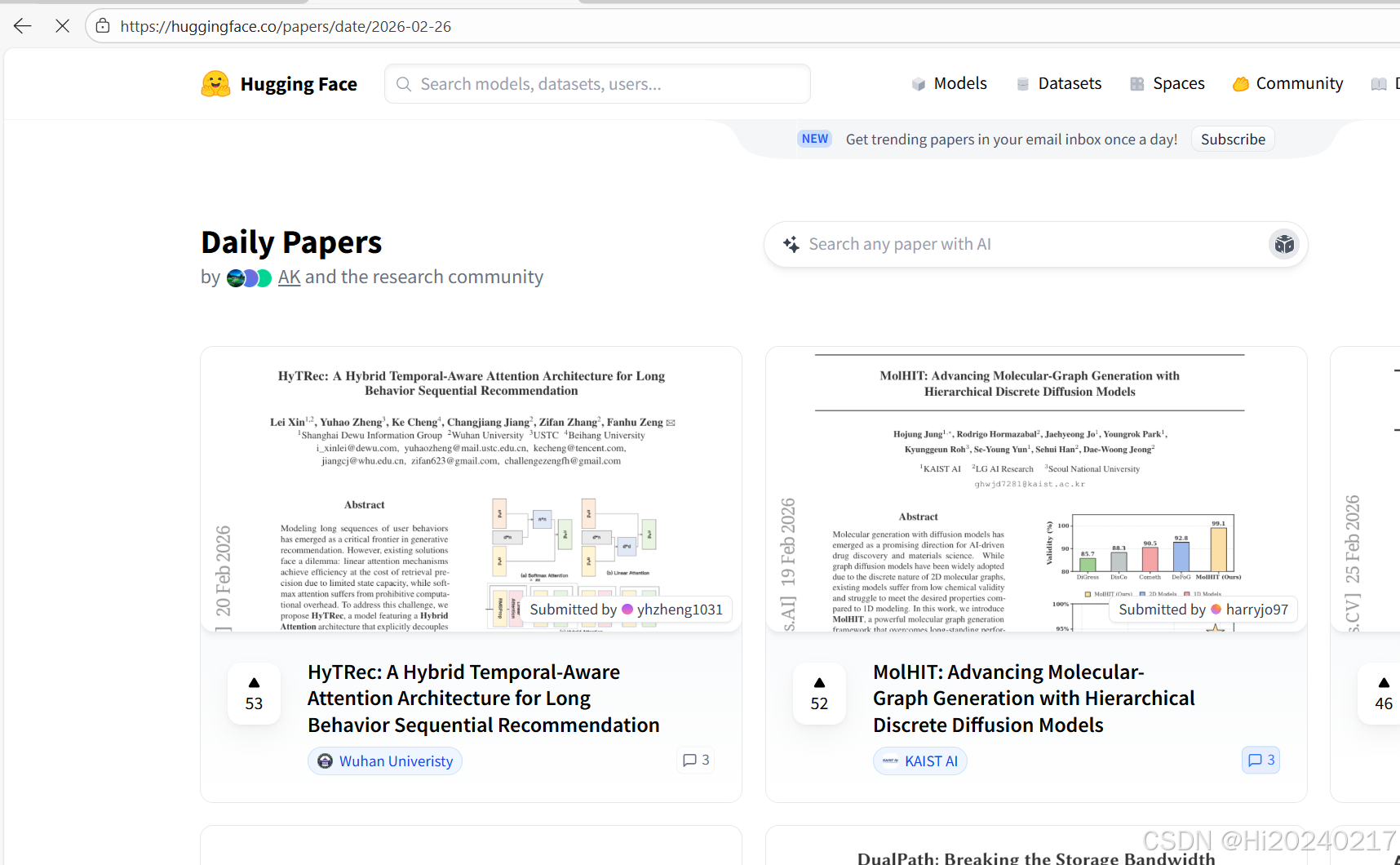
下面分别是 Hugging Face 原始页面和最终生成的 HTML 文件效果。

左侧按日期分组显示论文标题,点击标题右侧显示对应的中文摘要,并附有原文链接。
三、设计思路
整个系统分为三个模块:
这种分离设计让每个环节独立,便于调试和扩展。例如,你可以替换不同的模型,或者将生成的 HTML 部署到服务器上。
四、操作步骤
1、环境准备
你需要安装以下 Python 库:
pip install requests beautifulsoup4 openai
- requests:发送 HTTP 请求获取网页内容
- beautifulsoup4:解析 HTML,提取所需数据
- openai:调用大语言模型 API(兼容 OpenAI 格式)
另外,你需要一个大语言模型的 API 密钥。本文使用 火山引擎 的 API,它兼容 OpenAI 接口。你也可以使用其他提供兼容接口的服务
2、 获取资讯,保存为 JSON
import os
import requests
from bs4 import BeautifulSoup
import csv
from openai import OpenAI
from urllib.parse import urljoin
import time
import json
# ==================== 配置区域 ====================
# OpenAI API 密钥(建议从环境变量获取)
OPENAI_API_KEY = os.getenv("OPENAI_API_KEY")
# 输出 CSV 文件名
OUTPUT_JSON = "papers_summary.json"
# ==================================================
# 初始化 OpenAI 客户端
client = OpenAI(base_url="https://ark.cn-beijing.volces.com/api/v3",api_key=OPENAI_API_KEY)
def fetch_page(url):
"""获取网页内容"""
headers = {
'User-Agent': 'Mozilla/5.0 (Windows NT 10.0; Win64; x64) AppleWebKit/537.36 (KHTML, like Gecko) Chrome/91.0.4472.124 Safari/537.36'
}
try:
response = requests.get(url, headers=headers, timeout=10)
response.raise_for_status()
return response.text
except Exception as e:
print(f"获取页面失败: {e}")
return None
def extract_article_links(html, base_url):
"""提取所有 article 下的第一个 a 标签的 href 链接"""
soup = BeautifulSoup(html, 'html.parser')
articles = soup.find_all('article', class_='relative flex flex-col overflow-hidden rounded-xl border')
links = []
for article in articles:
a_tag = article.find('a', href=True)
if a_tag:
href = a_tag['href']
full_url = urljoin(base_url, href)
links.append(full_url)
return links
def extract_article_content(article_url):
"""从文章详情页提取标题和摘要文本(p.text-gray-600)"""
html = fetch_page(article_url)
if not html:
return None, None
soup = BeautifulSoup(html, 'html.parser')
# 提取标题:h1 包含 mb-2 text-2xl 类
title_tag = soup.find('h1', class_=lambda c: c and 'mb-2' in c and 'text-2xl' in c)
title = title_tag.get_text(strip=True) if title_tag else "无标题"
# 提取目标段落:p 包含 text-gray-600 类
p_tag = soup.find('p', class_='text-gray-600')
content_text = p_tag.get_text(strip=True) if p_tag else ""
return title, content_text
def generate_summary(text):
"""调用 OpenAI API 生成摘要"""
if not text:
return "无内容可摘要"
try:
response = client.chat.completions.create(
model="deepseek-v3-2-251201",#"doubao-seed-1-8-251228", # 或使用其他模型
messages=[
{"role": "system", "content": "你是一个专业的论文摘要助手。请用中文为以下文本生成摘要,并以公众号资讯的形式输出。"},
{"role": "user", "content": text}
],
temperature=0.5
)
summary = response.choices[0].message.content.strip()
return summary
except Exception as e:
print(f"OpenAI API 调用失败: {e}")
return "摘要生成失败"
def save_to_csv(data, filename):
with open(filename, "w") as outfile:
json.dump(data, outfile)
def main():
print("开始获取主页面…")
TARGET_URL = "https://huggingface.co/papers/date"
results = {}
for _data in ["2026-02-26","2026-02-27"]:
results[_data]=[]
main_html = fetch_page(f"{TARGET_URL}/{_data}")
if not main_html:
print("无法获取主页面,程序终止。")
continue
print("提取文章链接…")
article_links = extract_article_links(main_html, TARGET_URL)
print(f"找到 {len(article_links)} 篇文章链接")
for idx, link in enumerate(article_links, 1):
print(f"处理第 {idx} 篇文章: {link}")
title, content = extract_article_content(link)
if not content:
print(f" 未能提取文章内容,跳过。")
continue
print(title,link,content)
print(f" 生成摘要…")
summary = generate_summary(content)
print(summary)
results[_data].append({"title":title, "link":link, "markdown_content":summary})
# 避免请求过快,适当暂停
time.sleep(1)
if idx>3: # 调试
break
if results:
save_to_csv(results, OUTPUT_JSON)
print("全部完成!")
else:
print("没有成功处理任何文章。")
if __name__ == "__main__":
main()
3、从 JSON 生成 HTML
#!/usr/bin/env python3
"""
将特定格式的JSON转换为HTML,左侧树形目录,右侧Markdown预览,支持调整左侧栏宽度。
使用方法:直接运行生成 output.html,或提供JSON文件路径作为参数。
"""
import json
import html
import sys
from pathlib import Path
from typing import Dict, Any, List
# 默认示例数据(符合题目格式)
DEFAULT_JSON = """
{
"2026-02-27": [
{
"title": "Python 列表推导式",
"link": "https://docs.python.org/3/tutorial/datastructures.html",
"markdown_content": "# 列表推导式\\\\n\\\\n列表推导式提供了一种简洁的创建列表的方法。\\\\n\\\\n```python\\\\nsquares = [x**2 for x in range(10)]\\\\n```\\\\n\\\\n## 优点\\\\n- 简洁\\\\n- 可读性强\\\\n- 通常比循环更快"
},
{
"title": "Markdown 示例",
"link": "",
"markdown_content": "**粗体**、*斜体* 和 [链接](https://example.com)。\\\\n\\\\n- 项目1\\\\n- 项目2"
}
],
"2026-02-28": [
{
"title": "虚拟环境指南",
"link": "https://docs.python.org/3/library/venv.html",
"markdown_content": "# venv\\\\n\\\\n`venv` 是 Python 3.3+ 自带的虚拟环境模块。\\\\n\\\\n## 创建环境\\\\n```bash\\\\npython -m venv myenv\\\\n```"
},
{
"title": "PEP 8 风格指南",
"link": "https://peps.python.org/pep-0008/",
"markdown_content": "# PEP 8 – Python 代码风格指南\\\\n\\\\n## 缩进\\\\n每级缩进使用4个空格。\\\\n\\\\n## 命名约定\\\\n- 函数名:小写,单词间用下划线\\\\n- 类名:驼峰命名法"
}
]
}
"""
def build_sidebar_and_articles(data: Dict[str, List[Dict[str, Any]]]):
"""根据JSON数据生成侧边栏HTML字符串和文章列表"""
articles = []
sidebar_parts = ['<ul class="tree">']
# 按日期排序
for date in sorted(data.keys()):
items = data[date]
if not items:
continue # 跳过空日期
date_safe = html.escape(date)
sidebar_parts.append(f'<li class="date-item"><span class="date-label">{date_safe}</span><ul>')
for article in items:
title = article.get('title', '').strip()
display_title = html.escape(title) if title else '无标题'
link = article.get('link', '')
markdown = article.get('markdown_content', '')
# 记录文章索引
idx = len(articles)
articles.append({
'date': date,
'title': title,
'link': link,
'markdown_content': markdown
})
sidebar_parts.append(
f'<li class="article-item" data-index="{idx}" title="{html.escape(link)}">{display_title}</li>'
)
sidebar_parts.append('</ul></li>')
sidebar_parts.append('</ul>')
return '\\n'.join(sidebar_parts), articles
def generate_html(data: Dict[str, List[Dict[str, Any]]]) –> str:
"""生成完整的HTML页面"""
sidebar_html, articles = build_sidebar_and_articles(data)
articles_json = json.dumps(articles, ensure_ascii=False)
# HTML模板,使用 __SIDEBAR_HTML__ 和 __ARTICLES_JSON__ 作为占位符
html_template = """<!DOCTYPE html>
<html lang="en">
<head>
<meta charset="UTF-8">
<meta name="viewport" content="width=device-width, initial-scale=1.0">
<title>树形目录 + Markdown预览</title>
<style>
* { box-sizing: border-box; margin: 0; padding: 0; }
body { font-family: -apple-system, BlinkMacSystemFont, 'Segoe UI', Roboto, Helvetica, Arial, sans-serif; height: 100vh; overflow: hidden; background: #fff; }
.container { display: flex; height: 100vh; width: 100%; }
/* 左侧栏可调整宽度 */
.sidebar { width: 280px; min-width: 150px; max-width: 600px; resize: horizontal; overflow: auto; background: #f8f9fa; border-right: 1px solid #dee2e6; padding: 16px; }
.content { flex: 1; overflow-y: auto; padding: 24px; background: #ffffff; }
/* 树形样式 */
.tree { list-style: none; padding-left: 0; }
.tree ul { list-style: none; padding-left: 1.2em; margin: 4px 0; }
.date-item { margin-top: 8px; font-weight: 600; color: #495057; }
.date-label { font-size: 0.95rem; color: #1e7e34; cursor: default; }
.article-item { margin: 4px 0 4px 1em; padding: 4px 8px; font-weight: normal; font-size: 0.9rem; color: #0d6efd; border-radius: 4px; cursor: pointer; word-break: break-word; }
.article-item:hover { background-color: #e7f1ff; text-decoration: underline; }
.article-item.active { background-color: #cfe2ff; color: #0a58ca; font-weight: 500; border-left: 3px solid #0d6efd; }
/* 预览区样式 */
.preview-header { margin-bottom: 20px; border-bottom: 1px solid #eee; padding-bottom: 12px; }
.preview-title { font-size: 2rem; font-weight: 500; color: #1a1e24; margin-bottom: 8px; }
.preview-meta { color: #6c757d; font-size: 0.9rem; display: flex; align-items: center; gap: 16px; }
.preview-link { background: #e9ecef; padding: 4px 12px; border-radius: 20px; color: #0d6efd; text-decoration: none; font-size: 0.9rem; }
.preview-link:hover { background: #dee2e6; }
.markdown-body { font-size: 1rem; line-height: 1.6; color: #212529; }
.markdown-body h1 { font-size: 1.8rem; border-bottom: 1px solid #eaecef; padding-bottom: 0.3em; }
.markdown-body h2 { font-size: 1.5rem; border-bottom: 1px solid #eaecef; padding-bottom: 0.3em; }
.markdown-body code { background: #f6f8fa; padding: 0.2em 0.4em; border-radius: 3px; font-family: 'SF Mono', Monaco, 'Cascadia Code', Consolas, monospace; }
.markdown-body pre { background: #f6f8fa; padding: 16px; border-radius: 6px; overflow: auto; }
.markdown-body pre code { background: none; padding: 0; }
.markdown-body blockquote { border-left: 4px solid #dfe2e5; padding: 0 1em; color: #6a737d; }
.markdown-body ul, .markdown-body ol { padding-left: 2em; }
.empty-preview { color: #adb5bd; font-style: italic; text-align: center; margin-top: 40px; }
</style>
<!– 使用 marked 解析 Markdown –>
<script src="https://cdn.jsdelivr.net/npm/marked/marked.min.js"></script>
</head>
<body>
<div class="container">
<!– 左侧树形目录区域 –>
<div class="sidebar" id="sidebar">
__SIDEBAR_HTML__
</div>
<!– 右侧预览区域 –>
<div class="content" id="content">
<div class="preview-header">
<div class="preview-title" id="preview-title">请选择一篇文章</div>
<div class="preview-meta">
<span id="preview-date"></span>
<a id="preview-link" href="#" target="_blank" class="preview-link" style="display: none;">原文链接</a>
</div>
</div>
<div id="preview" class="markdown-body"></div>
</div>
</div>
<script>
// 注入文章数据(由 Python 生成)
var articles = __ARTICLES_JSON__;
function renderArticle(index) {
if (!articles || index < 0 || index >= articles.length) return;
var article = articles[index];
// 更新标题
document.getElementById('preview-title').textContent = article.title || '无标题';
// 更新日期
document.getElementById('preview-date').textContent = article.date || '';
// 更新链接
var linkEl = document.getElementById('preview-link');
if (article.link && article.link.trim() !== '') {
linkEl.href = article.link;
linkEl.style.display = 'inline-block';
} else {
linkEl.style.display = 'none';
}
// 渲染 markdown
var content = article.markdown_content || '*暂无内容*';
document.getElementById('preview').innerHTML = marked.parse(content);
// 高亮当前选中的文章
document.querySelectorAll('.article-item').forEach(function(el) {
el.classList.remove('active');
});
var selectedItem = document.querySelector('.article-item[data-index="' + index + '"]');
if (selectedItem) selectedItem.classList.add('active');
}
// 绑定点击事件到所有文章项
document.addEventListener('DOMContentLoaded', function() {
var items = document.querySelectorAll('.article-item');
items.forEach(function(item) {
item.addEventListener('click', function(e) {
var idx = this.getAttribute('data-index');
if (idx !== null) renderArticle(parseInt(idx, 10));
});
});
// 默认选中第一篇文章(如果有)
if (items.length > 0) {
var firstIdx = items[0].getAttribute('data-index');
renderArticle(parseInt(firstIdx, 10));
}
});
</script>
</body>
</html>
"""
# 替换占位符
return html_template.replace('__SIDEBAR_HTML__', sidebar_html).replace('__ARTICLES_JSON__', articles_json)
def load_json_from_file(path: Path) –> Dict:
"""从文件加载JSON"""
with open(path, 'r', encoding='utf-8') as f:
return json.load(f)
def main():
# 确定数据来源
if len(sys.argv) > 1:
# 从命令行参数指定的文件读取
json_path = Path(sys.argv[1])
if not json_path.exists():
print(f"错误:文件 {json_path} 不存在", file=sys.stderr)
sys.exit(1)
try:
data = load_json_from_file(json_path)
except Exception as e:
print(f"解析JSON文件失败:{e}", file=sys.stderr)
sys.exit(1)
else:
# 使用内置示例数据
try:
OUTPUT_JSON = "papers_summary.json"
with open(OUTPUT_JSON, 'r') as file:
data = json.load(file)
except json.JSONDecodeError:
print("内置JSON格式错误", file=sys.stderr)
data = json.loads(DEFAULT_JSON)
# 生成HTML
html_output = generate_html(data)
output_file = Path("output.html")
with open(output_file, "w", encoding="utf-8") as f:
f.write(html_output)
print(f"成功生成 {output_file.absolute()},请在浏览器中打开。")
if __name__ == "__main__":
main()
五、运行与调试
设置 API 密钥 在终端中设置环境变量:
export OPENAI_API_KEY="你的密钥"
或者在代码中直接赋值(不推荐)。
运行第一个脚本
python fetch_papers.py
等待执行完毕,得到 papers_summary.json。
运行第二个脚本
python generate_html.py
打开生成的 output.html 即可查看。
注意:
- 第一个脚本中的日期列表需要手动修改,你可以改成当天的日期,或者编写循环自动获取最近几天。
- API 调用会产生费用,请留意使用量。
- 如果 Hugging Face 页面结构发生变化,爬虫可能需要相应调整。
六、总结与扩展
本文用 Python 获取 Hugging Face Daily Papers,并利用大语言模型生成中文摘要,最后制作成一个 HTML 阅读器。这个流程可以轻松扩展到其他类似场景,比如 arXiv 论文更新、技术博客聚合等。
可能的改进方向:
- 将脚本部署到服务器,用 cron 定时运行,每天自动更新 HTML。
- 添加搜索功能,方便在大量摘要中查找关键词。
- 支持多模型对比摘要,或者让用户选择摘要风格。