进程创建
fork
fork是一个系统调用,我们通常调用它来创建子进程。当我们调用fork后,内核会完成以下操作:
- 分配新的内存块和内核数据结构给子进程;
- 将父进程的部分数据结构内容拷贝至子进程;
- 将子进程添加到系统进程列表中;
- 返回复制结果,由调度器决定后续执行顺序。
函数原型:
pid_t fork(void);
fork会将创建的子进程的pid返回给父进程,父进程可以通过pid对进程进行管理。同时fork会返回0给子进程,通过判断返回值我们就可以区分父进程和子进程。
当系统中内存紧缺或出现其它异常情况时,fork可能会创建子进程失败,创建失败,返回-1;父进程收到-1就会知道进程创建失败(一般情况下不会失败)。
写时拷贝机制(Copy-On-Write)
写时拷贝是最精细的内存管理,fork() 创建子进程后,父子进程共享相同的物理内存页,并将这些页标记为只读。当任一进程尝试写入时,触发缺页异常,内核为写入进程复制该页,将新的数据写入。写时拷贝有诸多优势:
减少创建时间:避免立即复制大量数据
减少内存浪费:只在实际需要时复制修改的部分
提高系统效率:支持快速进程创建
fork的常规用法
我们通常使用if-else结构,以返回值来判断父子进程来分配任务。
#include<stdio.h>
#include <unistd.h>
int main()
{
pid_t id = fork();
if(id == 0)
{
//子进程
}
else if(id > 0)
{
//父进程
}
else if(id == -1)
{
perror("fork");
}
return 0;
}
进程终止
创建子进程的目的是让其执行特定任务。关键在于如何判断任务是否完成?无论子进程是否完成任务,都必须将执行结果返回给父进程。
进程退出的三种场景
代码运行完毕,结果正确
程序从main函数开始执行。当程序正常运行至结束时会执行return 0语句,返回0值作为程序状态码。编译器在解析代码时,会将return 0转换为调用C标准库函数exit(0)。实际上,exit()函数在底层实际上封装了Linux系统调用_exit()。在使用这两个函数时需要特别注意:exit是C标准库函数,调用时会刷新缓冲区;而_exit是系统调用,不会执行缓冲区刷新操作。
如果函数调用exit会直接结束进程,不会执行后续代码,而函数调用return则不会。
#include <stdio.h>
#include <stdlib.h>
#include <unistd.h>
void cleanup() {
printf("执行清理工作…\\n");
}
void func_with_exit() {
printf("进入 func_with_exit()\\n");
atexit(cleanup); // 注册退出处理函数
printf("调用 exit(1)\\n");
exit(1); // 直接终止进程
printf("exit() 后的代码不会执行\\n");
}
void func_with_return() {
printf("进入 func_with_return()\\n");
atexit(cleanup);
printf("调用 return\\n");
return; // 返回 main 函数
printf("return 后的代码不会执行\\n");
}
int main() {
printf("=== main 开始 ===\\n\\n");
printf("测试1: 调用 func_with_exit()\\n");
func_with_exit();
// 这里永远不会执行
printf("\\n测试2: 调用 func_with_return()\\n");
func_with_return();
printf("\\n=== main 结束 ===\\n");
return 0;
}
执行结果:
xian@VM-8-17-ubuntu:~/lession18$ ./code
=== main 开始 ===
测试1: 调用 func_with_exit()
进入 func_with_exit()
调用 exit(1)
执行清理工作…
xian@VM-8-17-ubuntu:~/lession18$
调用exit之后进程直接结束,不会再执行后续代码!
代码运行完毕,结果错误
即使代码能够顺利运行,也可能产生错误的结果。例如,传递错误的参数时编译器不会报错,但最终计算结果却是错误的。
#include <stdio.h>
#include <stdlib.h> // 包含atoi、exit
int main(int argc, char *argv[]) {
// 1. 检查参数个数:需要传入2个数字,argc应为3(程序名+参数1+参数2)
if (argc != 3) {
printf("参数错误:请传入2个整数,示例:./div 10 2\\n");
exit(2); // 行业约定:2表示命令行参数错误
}
// 2. 转换参数为整数
int a = atoi(argv[1]);
int b = atoi(argv[2]);
// 3. 检查除数是否为0(结果错误的核心逻辑)
if (b == 0) {
printf("结果错误:除数不能为0,计算失败!\\n");
exit(1); // 行业约定:1表示通用业务逻辑错误
}
// 4. 计算并输出正确结果
printf("%d / %d = %d\\n", a, b, a / b);
exit(0); // 正常退出,结果正确
}
为什么要使用非零值表示错误?因为错误类型多样,程序退出时返回的退出码可以区分不同的错误情况。不同的退出码对应着程序运行中遇到的不同问题。如果不写返回值,退出码默认是int,int类型的数据方便计算机表示错误的类型,但是我们人类阅读起来不太方便,使用strerror可以将退出码转换为退出原因,方便我们阅读:
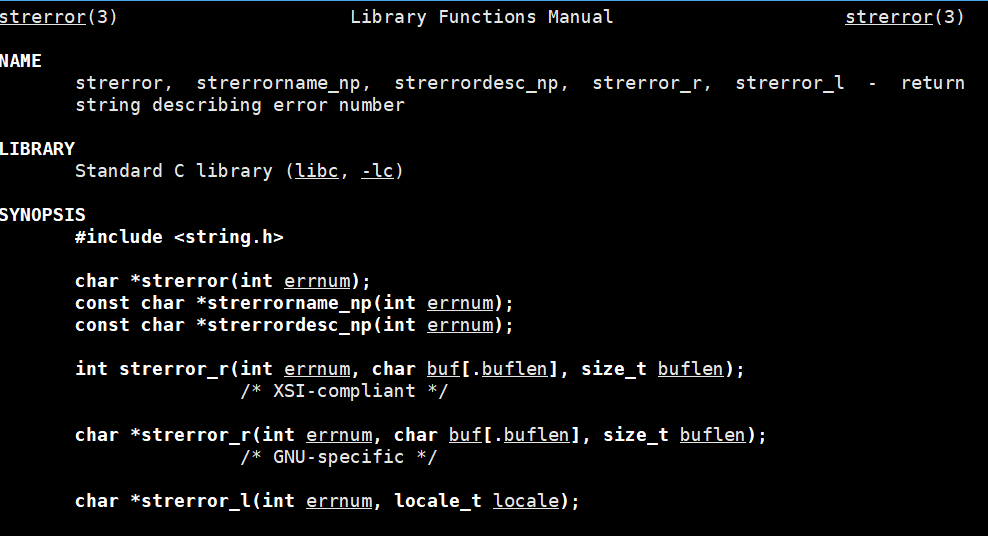
通过下面一段代码,我们来将退出码转化为退出原因,暂时设置200个:
#include <stdio.h>
#include <string.h>
int main()
{
int i = 0;
for (; i < 200; i++)
{
printf("%d->%s\\n", i, strerror(i));
}
return 0;
}
0->Success
1->Operation not permitted
2->No such file or directory
3->No such process
4->Interrupted system call
5->Input/output error
6->No such device or address
7->Argument list too long
8->Exec format error
9->Bad file descriptor
10->No child processes
11->Resource temporarily unavailable
12->Cannot allocate memory
13->Permission denied
14->Bad address
15->Block device required
16->Device or resource busy
17->File exists
18->Invalid cross-device link
19->No such device
20->Not a directory
21->Is a directory
22->Invalid argument
23->Too many open files in system
24->Too many open files
25->Inappropriate ioctl for device
26->Text file busy
27->File too large
28->No space left on device
29->Illegal seek
30->Read-only file system
31->Too many links
32->Broken pipe
33->Numerical argument out of domain
34->Numerical result out of range
35->Resource deadlock avoided
36->File name too long
37->No locks available
38->Function not implemented
39->Directory not empty
40->Too many levels of symbolic links
41->Unknown error 41
42->No message of desired type
43->Identifier removed
44->Channel number out of range
45->Level 2 not synchronized
46->Level 3 halted
47->Level 3 reset
48->Link number out of range
49->Protocol driver not attached
50->No CSI structure available
51->Level 2 halted
52->Invalid exchange
53->Invalid request descriptor
54->Exchange full
55->No anode
56->Invalid request code
57->Invalid slot
58->Unknown error 58
59->Bad font file format
60->Device not a stream
61->No data available
62->Timer expired
63->Out of streams resources
64->Machine is not on the network
65->Package not installed
66->Object is remote
67->Link has been severed
68->Advertise error
69->Srmount error
70->Communication error on send
71->Protocol error
72->Multihop attempted
73->RFS specific error
74->Bad message
75->Value too large for defined data type
76->Name not unique on network
77->File descriptor in bad state
78->Remote address changed
79->Can not access a needed shared library
80->Accessing a corrupted shared library
81->.lib section in a.out corrupted
82->Attempting to link in too many shared libraries
83->Cannot exec a shared library directly
84->Invalid or incomplete multibyte or wide character
85->Interrupted system call should be restarted
86->Streams pipe error
87->Too many users
88->Socket operation on non-socket
89->Destination address required
90->Message too long
91->Protocol wrong type for socket
92->Protocol not available
93->Protocol not supported
94->Socket type not supported
95->Operation not supported
96->Protocol family not supported
97->Address family not supported by protocol
98->Address already in use
99->Cannot assign requested address
100->Network is down
101->Network is unreachable
102->Network dropped connection on reset
103->Software caused connection abort
104->Connection reset by peer
105->No buffer space available
106->Transport endpoint is already connected
107->Transport endpoint is not connected
108->Cannot send after transport endpoint shutdown
109->Too many references: cannot splice
110->Connection timed out
111->Connection refused
112->Host is down
113->No route to host
114->Operation already in progress
115->Operation now in progress
116->Stale file handle
117->Structure needs cleaning
118->Not a XENIX named type file
119->No XENIX semaphores available
120->Is a named type file
121->Remote I/O error
122->Disk quota exceeded
123->No medium found
124->Wrong medium type
125->Operation canceled
126->Required key not available
127->Key has expired
128->Key has been revoked
129->Key was rejected by service
130->Owner died
131->State not recoverable
132->Operation not possible due to RF-kill
133->Memory page has hardware error
133以后的系统就没有定义了。
echo$?命令可以返回最近运行的一个进程的退出码:
collect2: error: ld returned 1 exit status
xian@VM-8-17-ubuntu:~/lession18$ echo $?
1
xian@VM-8-17-ubuntu:~/lession18$ echo $?
0
xian@VM-8-17-ubuntu:~/lession18$
当命令执行时,它本身就是一个进程。在查询返回值时,我们获取的是该命令(如echo)的退出状态。那么当进程结束后,它的退出码会存储在哪里呢?
从操作系统角度来看,进程=PCB+代码和数据。进程终止后,系统会释放其代码和数据资源,但会保留PCB等待父进程回收,退出码就保存在这个PCB中。
在实际编程中,我们可以通过以下方式设置退出码:
代码未运行完毕,异常中止
进程退出码用于向父进程传递子进程的终止状态。当进程异常终止时,由于代码未能完整执行,其退出码就失去了意义。这就像考试成绩:及格或不及格都代表有效结果,但作弊行为会使成绩变得毫无价值。进程异常终止是因为进程收到了异常信号!这个会在后续信号的章节讲到。
进程等待
为什么要等待
避免僵尸进程:子进程退出后,其 PCB 仍占用系统资源
防止内存泄漏:僵尸进程持续占用内存
获取执行结果:父进程需要知道子进程的执行状态
异常处理:检测子进程是否正常退出
总的来说就两点:
1.回收子进程资源
2.获取子进程的退出信息
是否要获取子进程的退出信息是可以选的,而子进程的资源则是一定要释放的。父进程可以不关心子进程的退出信息,就像我们和自己的同学说“苟富贵,勿相忘”,并不是真的要别人提携;我们可以不关心子进程的结果,父进程没有回收它的资源之前,子进程会一直保持僵尸状态。
子进程的资源一定是要释放的,如果不等待回收子进程的资源,会导致内核资源的泄漏。、
wait()与waitpid()
wait
wait()即是C语言实现的库函数,又是系统调用,是非选择性的等待,可以等待任意的子进程,谁在调用它之后第一个结束,就等待谁。
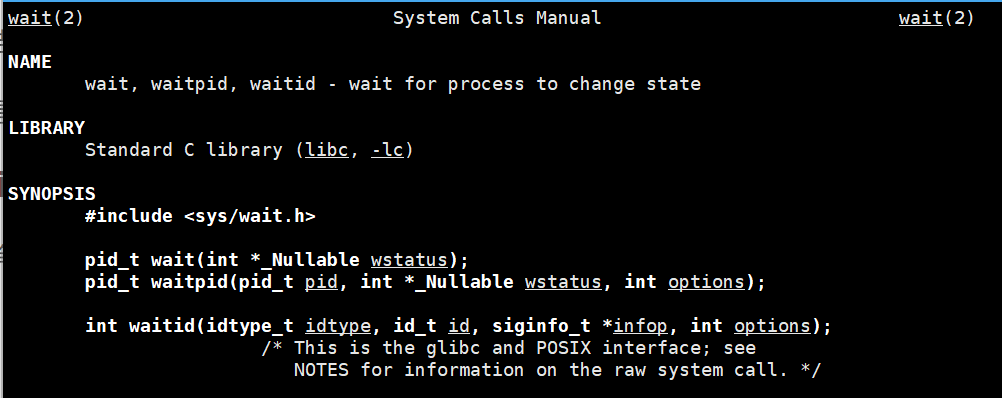
函数原型
pid_t wait(int *_Nullable wstatus);
wstatus是一个输出参数,用于存储进程的退出状态信息。若不需获取进程退出信息,可传入 NULL;若需获取退出状态,需定义一个 int 类型变量并传入其指针。wait 函数会以位图形式将进程退出状态写入该指针,可通过宏定义解析退出状态。wait 函数的返回值为所等待进程的 PID。
#include <stdio.h>
#include <stdlib.h>
#include <unistd.h>
#include <sys/wait.h>
int main() {
pid_t id = fork();
if(id == 0)
{
//子进程
int cnt =5;
while(cnt–)
{
printf("我是一个子进程:%d,我的父进程是%d\\n",getpid(),getppid());
sleep(1);
}
exit(0);
}
sleep(10);
pid_t sid = wait(NULL);
if(sid>0)
{
printf("我是父进程%d,我回收了子进程%d\\n",getpid(),sid);
}
return 0;
}
执行结果:
xian@VM-8-17-ubuntu:~/lession18$ ./code
我是一个子进程:538321,我的父进程是538320
我是一个子进程:538321,我的父进程是538320
我是一个子进程:538321,我的父进程是538320
我是一个子进程:538321,我的父进程是538320
我是一个子进程:538321,我的父进程是538320
我是父进程538320,我回收了子进程538321
xian@VM-8-17-ubuntu:~/lession18$
如果子进程不退出,父进程会一直阻塞在wait调用出。父进程sleep了十秒,在这十秒内,子进程运行完退出就变成了僵尸进程。十秒后,父进程回收子进程,子进程结束。僵尸状态下的进程,使用kill -9无法杀死。
waitpid
原型
pid_t waitpid(pid_t pid, int *_Nullable wstatus, int options);
与wait不同,waitpid用来等待回收指定的进程,也就是说要使用waitpid先得知道要回收的进程的pid;且可以通过设置options来选择是否阻塞进程。options传入0,为阻塞等待,如果不想阻塞则传入WNOHANG(wait no hang),如果是阻塞等待,等待成功pid_t返回子进程的pid,等待失败返回-1,如果是非阻塞等待,子进程还没完成,返回0,回收成功返回子进程pid。其实严格意义上也并不是要需要知道pid才能使用waitpid,第一个参数传入-1就可以实现非选择性等待。
#include <stdio.h>
#include <stdlib.h>
#include <unistd.h>
#include <sys/wait.h>
int main() {
pid_t id = fork();
if(id == 0)
{
//子进程
int cnt =5;
while(cnt–)
{
printf("我是一个子进程:%d,我的父进程是%d\\n",getpid(),getppid());
sleep(1);
}
exit(0);
}
// pid_t sid = wait(NULL);
// if(sid>0)
// {
// printf("我是父进程%d,我回收了子进程%d\\n",getpid(),sid);
// }
// return 0;
while(1)
{
pid_t sid = waitpid(id,NULL,WNOHANG);
if(sid == 0)
{
printf("子进程还没有结束,我可以进行其它工作\\n");
}
else{
printf("进程%d结束了,回收成功\\n",sid);
exit(0);
}
}
}
运行结果
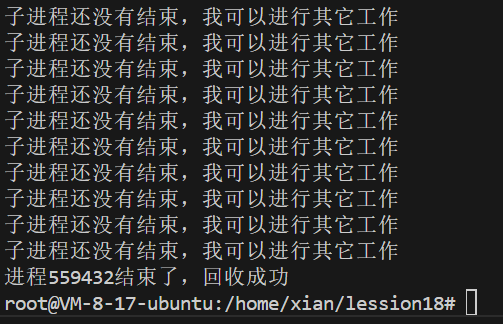
为什么在fork调用时,父进程需要获取子进程的PID呢?之前说的是父进程通过PID可以有效地管理子进程。那么,使用waitpid函数回收子进程正是进程管理的一个重要手段。
wstatus
进程的退出状态码并不是一个简单的整数,它使用了位图和宏的方式来储存和解释退出信息。
31 16 15 8 7 0
┌──────────────────┬──────────┬──────────┐
│ 未使用区域 │ 退出码 │ 终止信号 │
└──────────────────┴──────────┴──────────┘
16 bits 8 bits 8 bits
进程状态码解析:
一个整型32位,只有低16位才会用来储存推出信息,在这16位中:
低7位(0-6位):终止信号编号
- 0:表示进程正常终止
- 非0:表示进程被信号强制终止
第8位(7位):核心转储标志(core dump)
- 1:表示进程产生了核心转储文件
- 0:表示未产生核心转储文件
高8位(8-15位):退出状态码
- 仅适用于正常退出的情况
- 有效取值范围:0-255
怎么使用status?
1.手动使用
#include <stdio.h>
#include <sys/wait.h>
#include <unistd.h>
#include <stdlib.h>
void parse_status_manually(int status) {
printf("status 值(十进制): %d\\n", status);
printf("status 值(十六进制): 0x%08X\\n", status);
// 1. 检查是否正常退出(低7位全为0)
if ((status & 0x7F) == 0) {
printf("✓ 正常退出\\n");
// 获取退出码(第8-15位)
int exit_code = (status >> 8) & 0xFF;
printf(" 退出码: %d\\n", exit_code);
} else {
printf("✗ 被信号终止\\n");
// 获取信号编号(低7位)
int signal = status & 0x7F;
printf(" 信号编号: %d\\n", signal);
// 检查是否产生 core dump(第7位)
if (status & 0x80) {
printf(" 产生了 core dump\\n");
}
}
printf("—\\n");
}
int main() {
// 创建多个测试子进程
for (int i = 0; i < 4; i++) {
pid_t pid = fork();
if (pid == 0) {
switch (i) {
case 0:
// 正常退出,码为0
exit(0);
case 1:
// 正常退出,码为100
exit(100);
case 2:
// 除零错误(信号 SIGFPE = 8)
int a = 10 / 0;
return 0;
case 3:
// 段错误(信号 SIGSEGV = 11)
int *p = NULL;
*p = 42;
return 0;
}
} else {
int status;
waitpid(pid, &status, 0);
printf("子进程 %d: ", pid);
parse_status_manually(status);
}
}
return 0;
}
./code1
子进程 584144: status 值(十进制): 0
status 值(十六进制): 0x00000000
✓ 正常退出
退出码: 0
—
子进程 584145: status 值(十进制): 25600
status 值(十六进制): 0x00006400
✓ 正常退出
退出码: 100
—
子进程 584146: status 值(十进制): 136
status 值(十六进制): 0x00000088
✗ 被信号终止
信号编号: 8
产生了 core dump
—
子进程 584149: status 值(十进制): 139
status 值(十六进制): 0x0000008B
✗ 被信号终止
信号编号: 11
产生了 core dump
—
root@VM-8-17-ubuntu:/home/xian/lession18#
2.使用宏
// 检查是否正常退出
if (WIFEXITED(status)) {
// 获取退出码(0-255)
int exit_code = WEXITSTATUS(status);
}
// 检查是否被信号终止
if (WIFSIGNALED(status)) {
// 获取终止信号
int signal = WTERMSIG(status);
// 检查是否产生 core dump
if (WCOREDUMP(status)) {
printf("产生 core 文件\\n");
}
}
// 检查是否被信号暂停(作业控制)
if (WIFSTOPPED(status)) {
int signal = WSTOPSIG(status);
}
// 检查是否从暂停恢复
if (WIFCONTINUED(status)) {
// 子进程从暂停状态恢复运行
}
宏的定义
// glibc 中的定义(简化)
#define __WIFEXITED(status) (((status) & 0x7f) == 0)
#define __WEXITSTATUS(status) (((status) >> 8) & 0xff)
#define __WIFSIGNALED(status) (((signed char) (((status) & 0x7f) + 1) >> 1) > 0)
#define __WTERMSIG(status) ((status) & 0x7f)
#define __WIFSTOPPED(status) (((status) & 0xff) == 0x7f)
#define __WSTOPSIG(status) __WEXITSTATUS(status)
#define __WIFCONTINUED(status) ((status) == __W_CONTINUED)
var code = "e7acf3c9-f554-4623-8fbc-51289fdba755"