前言:本章文章主要讲了关于Vue3中的组合式API,比如setup,reactive,ref,computed,watch,生命周期函数,父子通信,模版引用,provide和inject;还介绍了关于Vue3.3的新特性相关知识。
【从零开始学Vue | 第十章】Vue3核心技术
-
- 一:组合式API – setup选项
- 二:组合式API – reactive和ref函数
- 三:组合式API – computed
- 四:组合式API – watch
- 五:组合式API – 生命周期函数
- 六:组合式API – 父子通信
- 七:组合式API – 模版引用
- 八:组合式API – provide和inject
- 九:Vue3.3新特性
一:组合式API – setup选项
setup选项的写法和执行机制:
1.执行机制:比beforeCreate还要早 2.setup函数中,获取不到this(this是undefined) 3.数据和函数,需要在setup最后return 才能在模版中应用
<script>
export default{
setup(){
console.log('setup执行了',this)
const message = 'hello vue3'
const logMessage = () => {
console.log(message)
}
return {
message,
logMessage
}
},
}
</script>
<template>
<div>{{ message }}</div>
<button @click="logMessage">按钮</button>
</template>
问题:每次return 很麻烦 解决:在script加入里面加入语法糖setup
<script setup>
const message = 'hello vue3'
const logMessage = () => {
console.log(message)
}
</script>
<template>
<div>{{ message }}</div>
<button @click="logMessage">按钮</button>
</template>
语法糖原理: (左边是我们写的代码,右边是底层原理) 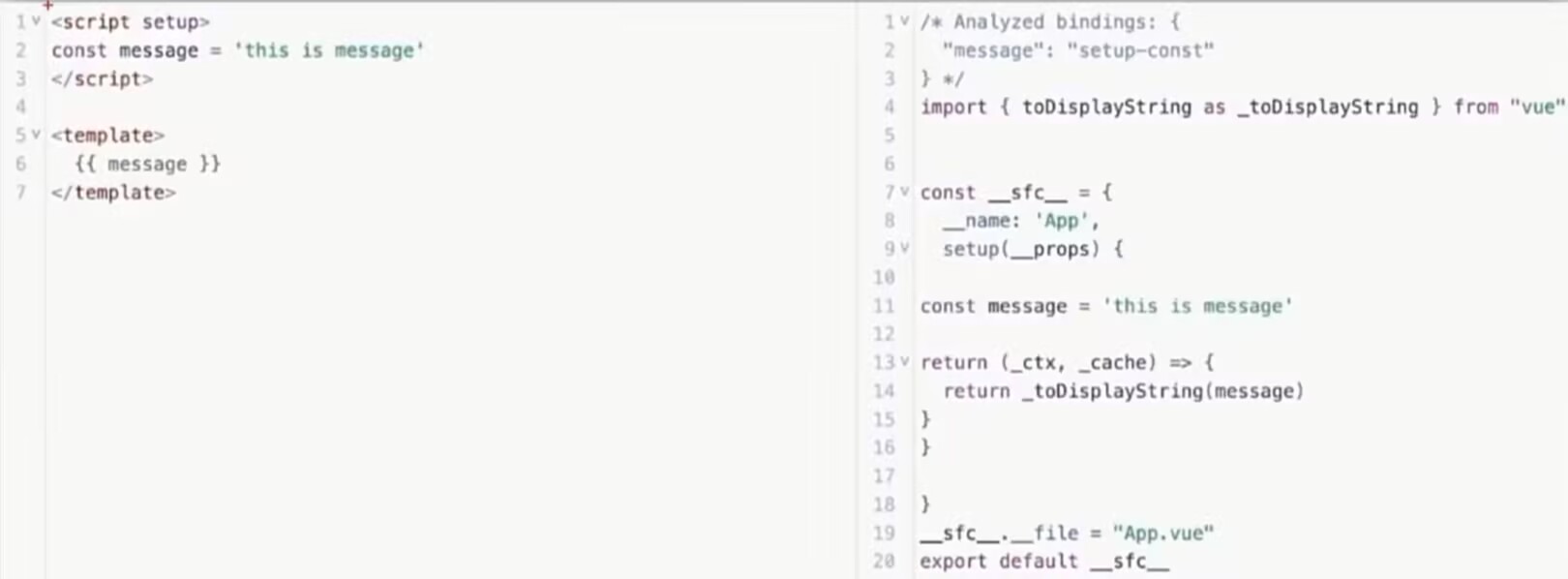
二:组合式API – reactive和ref函数
reactive() 作用:接受对象类型数据的参数传入并返回一个响应式的对象 核心步骤: 1.从vue包中导入reactive函数 2.在<script setup> 中执行reactive函数并传入类型为对象的初始值,并使用变量接受返回值
<script setup>
import {reactive} from 'vue'
const state = reactive({count:100})
const addState = () =>{
state.count++
}
</script>
<template>
<div>{{ state.count }}</div>
<button @click="addState">+1</button>
</template>
ref()
作用:接受简单类型或对象类型的数据传入并返回一个响应式的对象(能接入简单类型的原因:在原有传入数据的基础上,外包了一层对象,包成了复杂类型,之后再借助reactive实现响应式) 核心步骤: 1.从vue包中导入ref函数 2.在<script setup> 中执行ref函数并传入初始值,使用变量接受ref函数返回值 注意:在脚本中访问数据需要通过.value;在template中 .value不需要加
<script setup>
import {ref} from 'vue'
const state = ref(0)
console.log(state.value)
const addState = () =>{
state.value++
}
</script>
<template>
<div>{{ state }}</div>
<button @click="addState">+1</button>
</template>
三:组合式API – computed
computed计算属性函数 计算属性基本思想和vue2的完全一致,组合式API下的计算属性只是修改了写法 核心步骤: 1.导入computed函数 2.执行函数在回调参数中return基于响应式数据做计算的值,用变量接受
<script setup>
import { computed,ref } from 'vue';
const list = ref([1,2,3,4,5,6])
const cList = computed(() =>{
return list.value.filter(item => item > 2)
})
//定义修改数据的方法
const addFn = () => {
list.value.push(888)
}
</script>
<template>
<div>原始数据{{ list }}</div>
<div>修改后的数据{{ cList }}</div>
<button @click="addFn">修改数据</button>
</template>
注:1.计算属性中不应该有"副作用" 比如异步请求、修改dom 2.避免直接修改计算属性的值(计算属性应该是只读的,特殊情况可以配置get set)
四:组合式API – watch
watch函数 作用:监听一个或者多个数据的变化,数据变化时执行回调函数 两个额外参数:1.immediate(立即执行)2.deep(深度监听)
基础使用 – 监听单个数据 1.导入watch函数 2.执行watch函数传入要监听的响应式数据(ref)和回调函数
<script setup>
import {ref,watch} from 'vue'
const count = ref(0)
const nikename = ref('李四')
const Addcount = () =>{
count.value++
}
const Cnike =()=>{
nikename.value = '张三'
}
//1.监视单个数据的变化
// watch(ref对象,(newValue,oldValue) => {…})
watch(count,(newValue,oldValue) => {
console.log(newValue,oldValue)
})
</script>
<template>
<div>{{ count }}</div>
<button @click="Addcount">+1</button>
<div>{{ nikename }}</div>
<button @click="Cnike">修改名字</button>
<div>{{ userInfo }}</div>
<button @click="changeuser">修改</button>
</template>
基础使用 – 监听多个数据 说明:同时监听多个响应式数据的变化,不管哪个数据变换了都要执行
//2.监视多个数据的变化
//watch([ref对象1,ref对象2],(newArr,oldArr) => {…})
watch([count,nikename],(newArr,oldArr) => {
console.log(newArr,oldArr)
})
immediate 说明:在监听器创建时立即触发回调,响应式数据变化之后继续执行回调
//3.immediate立即执行
watch(count,(newValue,oldValue) => {
console.log(newValue,oldValue)
},{
immediate:true
})
deep 说明:deep深度监视,默认watch进行的是 浅层监视 const ref1 = ref(简单类型) 可以直接监视 const ref2 = ref(复杂类型) 监视不到复杂类型内部数据的变化
const userInfo = ref({
name:'张三',
age:18
})
const changeuser = () => {
userInfo.value.age++
}
watch(userInfo,(newArr) => {
console.log(newArr)
},{deep:true})
精确监听对象的某个属性
需求:在不开启deep的前提下,监听age的变话,只有age变化时才执行回调
watch(() => userInfo.value.age,(newValue,oldValue) => {
console.log(newValue,oldValue)
})
五:组合式API – 生命周期函数
右面组合式API对应的左面选项式API有着相同作用,比如setup对应beforeCreate/created。 左面的选项式AP作用详细请看往期文章从零开始学Vue | 第三章 注:组合式onBeforeUnmount,onUnmounted就对应着选项式API的beforeDestroy,destroyed 
<script setup>
import {onMounted } from 'vue'
// beforeCreate 和 created 的相关代码
// 都放在setup中执行
const getlist = () =>{
setTimeout(()=>{
console.log('OK')
},2000)
}
getlist()
// 写成函数可以调用多次,按照顺序执行
onMounted(()=>{
console.log('1')
})
onMounted(()=>{
console.log('2')
})
</script>
六:组合式API – 父子通信
1.父传子 基本思想:1.父组件给子组件绑定属性 2.子组件内部通过props选项接收
2.子传父 基本思想:1.父组件中给子组件标签通过@绑定事件 2.子组件内部通过emit方法触发事件
案例:
//子组件son-com.vue
<script setup>
// 注意:由于写了setup,所以无法直接配置props选项
// 所以:此处需要借助于“编译器宏” – defineProps函数接受子组件的数据
const props = defineProps({
car:String,
money:Number
})
const emit = defineEmits(['changeMoney'])
console.log(props.car)
const buy = () => {
emit('changeMoney',5)
}
</script>
<template>
<div class="son">我是子组件 – {{ car }} – {{ money }}
<button @click="buy">减钱</button>
</div>
</template>
<style scoped>
.son{
border:1px solid #000;
padding:30px
}
</style>
//父组件App.vue
<script setup>
import sonCom from '@/components/son-com.vue'
import {ref} from 'vue'
const money = ref(100)
const getMoney = ()=>{
money.value+=10
}
const changeFn = (newMoney)=> {
money.value = newMoney
}
</script>
<template>
<div>
<h3>父组件 – {{ money }}</h3>
<button @click="getMoney">加钱</button>
<!— 给子组件,添加属性的方式传值 —>
<sonCom @changeMoney="changeFn" car="车" :money="money"></sonCom>
</div>
</template>
defindProps原理: 当你写这个代码的时候
<script setup>
// 用 defineProps 声明 props
const props = defineProps({
title: String,
count: {
type: Number,
default: 0
}
})
</script>
Vue 编译器会把它编译成运行时等效代码(简化版):
// 编译器生成的代码(你看不到,但会实际运行)
import { defineComponent } from 'vue'
export default defineComponent({
// 把 defineProps 的内容转换成标准 props 配置
props: {
title: String,
count: {
type: Number,
default: 0
}
},
setup(props, ctx) {
// 把 props 暴露给 <script setup> 的作用域
return { props }
}
})
七:组合式API – 模版引用
概念:通过ref标识获取真实的dom对象或者组件实例对象。 知识扩展点:defineExpose() 默认情况下<script setup>语法糖组件内部的属性和方法是不开放给父组件访问的 可以通过defineExpose编译宏指定哪些属性和方法允许访问。
//App.vue组件
<script setup>
import TestCom from '@/components/test-com.vue'
import {onMounted, ref} from 'vue'
//模版引用(可以获取dom,也可以获取组件
//1.调用ref函数,生成一个ref对象
//2.通过ref标识,进行绑定
//3.通过ref对象.value即可访问到绑定的元素(必须渲染完成后,才能拿到)
const inp = ref(null)
onMounted(() => {
console.log(inp.value)
})
const getFn = () => {
inp.value.focus()
}
const testRef = ref(null)
const getCom = () => {
console.log(testRef.value)
}
</script>
<template>
<div>
<input ref="inp" type="text">
<button @click="getFn">点击让输入框聚焦</button>
<TestCom ref="testRef"></TestCom>
<button @click="getCom">获取组件</button>
</div>
</template>
//test-com组件
<script setup>
const count = 999
const hi = () => {
console.log('hi')
}
defineExpose({
count,
hi
})
</script>
<template>
<div>
我是用于测试的组件 – {{ count }}
</div>
</template>
八:组合式API – provide和inject
作用和场景: 顶部组件向任意的底层组件传递数据和方法,实现跨层组件通信
跨层传递普通数据 1.顶部组件通过provide函数提供数据 2.底部组件通过inject函数获取数据
//App.vue组件
<script setup>
import centerCom from './components/center-com.vue';
import { provide ,ref} from 'vue';
//跨层传递普通数据
provide('theme-color','pink')
const count = ref(999)
setTimeout(() => {
count.value = 888
},2000)
//跨层传递响应式数据
provide('count',count)
//跨层级传递函数,顶部组件向底部组件传递方法后,底部组件调用方法修改顶部组件中的数据
provide('changeCount', (newCount) => {
count.value = newCount
})
</script>
<template>
<div>我是顶层组件</div>
<centerCom></centerCom>
</template>
//center-com.vue组件
<script setup>
import BottomCom from './bottom-com.vue';
</script>
<template>
<div>我是中间组件</div>
<BottomCom></BottomCom>
</template>
//bottom-com.vue组件
<script setup>
import { inject } from 'vue';
const themeColor = inject('theme-color')
const count = inject('count')
const countClick = inject('changeCount')
const countFn = () => {
countClick(1000)
}
</script>
<template>
<div>我是底部组件 – {{ themeColor }} – {{ count }}</div>
<button @click="countFn">更新count</button>
</template>
九:Vue3.3新特性
1.defineProps 背景说明: 有<script setup>之前,如果要定义props,emits可以轻而易举地添加一个与 setup平级的属性。但是用了 <script setup>后,就没法这么干了 setup属性已经没有了,自然无法添加与其平级的属性。 为了解决这一问题,引入了 defineProps 与 defineEmits这两个宏。但这只解决了props与emits这两个属性。如果我们要定义组件的 name或其他自定义的属性,还是得回到最原始的用法—再添加一个普通的<script>标签。这样就会存在两个<script>标签。让人无法接受。
所以在Vue 3.3中新引入了 defineOptions宏。顾名思义,主要是用来定义 Options API的选项。可以用defineOptions定义任意的选项,props, emits, expose, slots 除外(因为这些可以使用 defineXXX 来做到)
<script setup>
defineOptions({
name:'RegisterIndex'
})
</script>
<template>
<div>我是注册项</div>
</template>
2.defineModel
在Vue3中,自定义组件上使用v- model,相当于传递一个modeIValue属性,同时触发 update:modelValue事件
<Child v–model="isVisble">
//相当于
<Child :modelValue="isVisible" @update:modelValue="isVisible=$event">
我们需要先定义props,再定义 emits。其中有许多重复的代码。如果需要修改此值,还需要手动调用 emit 函数。
//父组件
<script setup>
import MyInput from './components/my-input.vue';
import {ref} from 'vue'
const txt = ref('123456')
</script>
<template>
<MyInput v–model="txt"></MyInput>
{{ txt }}
</template>
//子组件
<script setup>
defineProps({
modelValue:String
})
const emit = defineEmits(['update:modelValue'])
</script>
<template>
<div>
<input
type="text"
:value="modelValue"
@input="e => emit('update:modelValue',e.target.value)"
>
</div>
</template>
此时我们就可以用到defindModel帮组我们简化代码: 用了defindModel后一行自动生成 modelValue prop 和 update:modelValue emit,可直接赋值,代码更简洁、少出错。
<script setup>
import { defineModel } from 'vue';
const modelValue = defineModel()
</script>
<template>
<div>
<input
type="text"
:value="modelValue"
@input="e => modelValue = e.target.value"
>
</div>
</template>
如果我的内容对你有帮助,请点赞,评论,收藏,创作不易。大家的支持就是我坚持下去的动力!

![基于Vue的企业劳务派遣人员管理系统[Vue]-计算机毕业设计源码+LW文档-171主机测评](https://www.171host.com/wp-content/uploads/2026/10/20261030202223-6ae4fc7f2d624-220x150.jpg)