📌 摘要
你是否还在为向 Claude 反复解释需求而抓狂?复杂项目卡壳时,AI 只能独自“硬扛”,缺乏专家协作与系统化流程。本文将为你介绍多智能体编排神器 oh-my-claudecode,它能让 Claude Code 从单一对话进化为拥有 32 个专业代理的“流水线工厂”。更重要的是,搭配 weelinking 中转服务,国内开发者可以零障碍直连 Claude,享受按量付费的低成本使用体验。文章从痛点分析、核心特性到实战案例(全栈应用开发、多 AI 协同验证)逐一拆解,并附上 weelinking 注册与配置指南。读完你就能亲手搭建一个自动分解任务、智能路由模型、自我验证修复的 AI 开发流水线,效率提升 50%,成本节省 30% 以上。
📋 目录
- 一、开发者之痛:Claude 协作的三大瓶颈
- 二、oh-my-claudecode 是什么?
- 2.1 核心定位
- 2.2 核心特性
- 2.3 三层架构
- 三、实战:全栈 Todo 应用开发
- 3.1 准备工作:通过 weelinking 连接 Claude
- 3.2 使用 Team 模式一键生成全栈应用
- 3.3 执行过程与成果展示
- 四、高级玩法:多 AI 协同验证(Codex + Gemini)
- 五、常见问题
- 六、配套资源
🔴 🔴 🔴 国内丝滑使用 Claude? 👉 本文全程使用 weelinking,按量付费,全系模型支持 👈
一、开发者之痛:Claude 协作的三大瓶颈
无论你用的是 Claude.ai 网页版,还是 Claude Code CLI,单一大模型的局限性总是让人头疼:
- 场景一:需求理解反复横跳 — 向 Claude 解释了 3 遍业务逻辑,它依然会在某个细节上出错。
- 场景二:复杂任务无人分担 — 项目卡在安全审查或测试环节,Claude 不会主动说“我需要安全专家的帮助”。
- 场景三:手动协调成本高 — 写完代码要生成测试、文档、做审查,需要在多个对话间来回切换,手动复制粘贴,极易遗漏。
这些问题归根结底,是因为单一 AI 缺乏多角色协作能力。直到 oh-my-claudecode 的出现,才真正让 Claude 拥有了“团队大脑”。
二、oh-my-claudecode 是什么?
2.1 核心定位
oh-my-claudecode 是 Claude Code 的多智能体编排插件,灵感来自 Oh My Zsh 对 Zsh 的增强理念——零配置、开箱即用,让工具变得更强大。
一句话概括:让 AI 编程从“手工作坊”进化到“流水线工厂”。
2.2 核心特性
| 32 个专业代理 | 架构师、测试工程师、安全审查员等 | 专家级协作 |
| Team 模式 | plan → prd → exec → verify → fix | 系统化流程 |
| 零配置 | 一键安装即用 | 降低使用门槛 |
| 智能路由 | Haiku/Opus 按需分配 | 节省成本 30-50% |
| 持久化执行 | 不达目的不罢休 | 确保任务完成 |
| 多 AI 支持 | Claude + Gemini + Codex | 跨模型协作 |
2.3 三层架构
oh-my-claudecode 采用三层架构,Claude 作为主控,通过编排层按需调用 Gemini(设计审查)和 Codex(代码审查):
┌─────────────────────────────────────────┐
│ 用户层 (User Layer) │
│ 输入自然语言需求,无需学习复杂命令 │
└─────────────────┬───────────────────────┘
│
┌─────────────────▼───────────────────────┐
│ 编排层 (Orchestration Layer) │
│ ┌────────────────────────────────────┐ │
│ │ • Team 模式协调器 │ │
│ │ • 任务分解引擎 │ │
│ │ • 智能路由决策 │ │
│ │ • 32 个专业代理调度 │ │
│ └────────────────────────────────────┘ │
└─────────────────┬───────────────────────┘
│
┌─────────────────▼───────────────────────┐
│ AI 层 (AI Layer) │
│ ┌──────┐ ┌──────┐ ┌──────┐ │
│ │Claude│ │Gemini│ │Codex │ │
│ │(主控)│ │(设计)│ │(审查)│ │
│ └──────┘ └──────┘ └──────┘ │
└─────────────────────────────────────────┘
三、实战:全栈 Todo 应用开发
3.1 准备工作:通过 weelinking 连接 Claude
在使用 oh-my-claudecode 之前,你需要一个稳定、低延迟的 Claude API 接入点。weelinking 中转服务 为国内开发者提供了免翻墙、按量付费的 Claude 全系列模型(Haiku / Sonnet / Opus)调用能力。
第一步:访问 weelinking 注册页面 完成注册,获取 API Key。
第二步:在本地配置 Claude Code CLI 使用 weelinking 的 API 端点:
# 设置环境变量(或写入 ~/.bashrc)
export ANTHROPIC_API_KEY="your-weelinking-api-key"
export ANTHROPIC_BASE_URL="https://api.weelinking.com/v1"
第三步:验证连接:
claude chat –message "Hello, Claude!"
如果返回正常响应,说明已成功通过 weelinking 连接到 Claude。
⚠️ 确保你的网络可以访问 weelinking 域名(通常国内直连无压力),无需额外代理。
3.2 使用 Team 模式一键生成全栈应用
现在我们来体验 oh-my-claudecode 的威力。假设你需要一个完整的 Todo 应用:
- 前端:React + TypeScript + Tailwind CSS
- 后端:Node.js + Express + TypeScript
- 数据库:MongoDB + Mongoose
- 功能:CRUD + JWT 认证 + 输入验证
- 质量:单元测试 + 集成测试 + API 文档
传统方式需要手动分阶段编写,而使用 oh-my-claudecode 只需一条命令:
/team 5:executor "build a full-stack Todo app with React frontend,
Node.js backend, MongoDB database, user authentication with JWT,
input validation, rate limiting, and comprehensive tests"
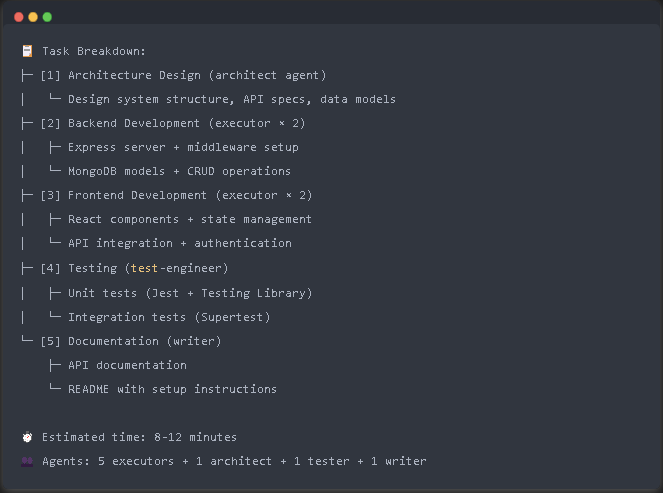
执行后,插件会自动:
3.3 执行过程与成果展示
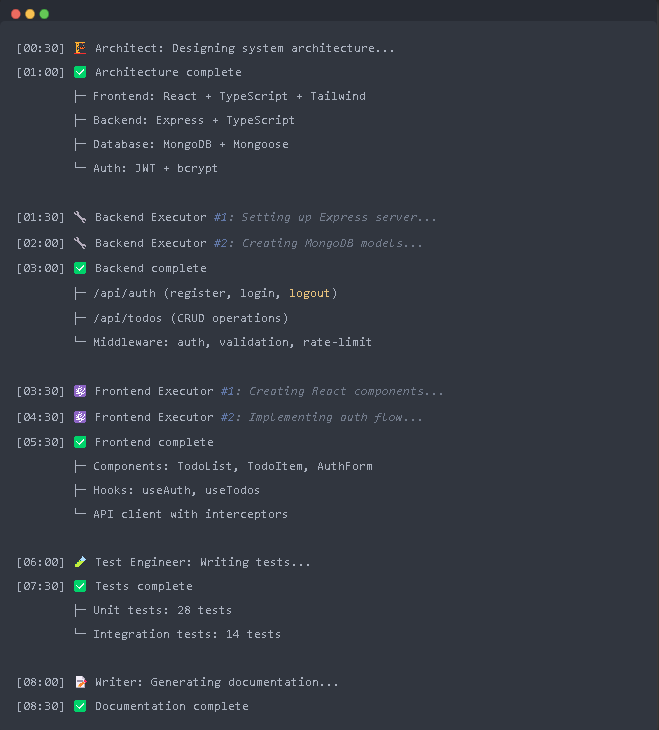
阶段 1:规划(30秒)
阶段 2:执行(8分钟)
[00:30] 🏗️ Architect: Designing system architecture…
[01:00] ✅ Architecture complete
[01:30] 🔧 Backend Executor #1: Setting up Express server…
[03:00] ✅ Backend complete
[03:30] ⚛️ Frontend Executor #1: Creating React components…
[05:30] ✅ Frontend complete
[06:00] 🧪 Test Engineer: Writing tests…
[07:30] ✅ Tests complete (42/42 passing)
[08:00] 📝 Writer: Generating documentation…
[08:30] ✅ Documentation complete
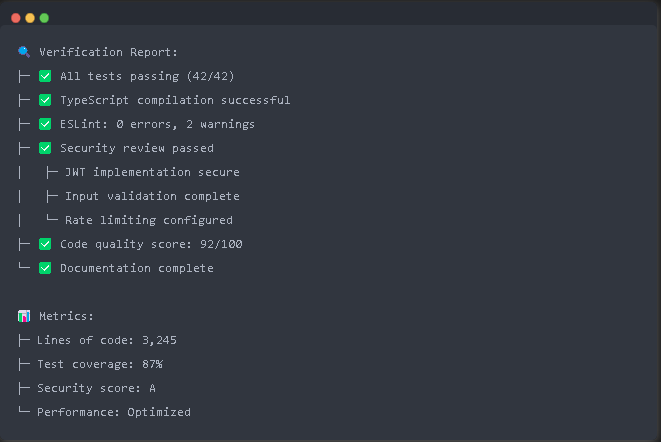
阶段 3:验证与修复(自动)
🔍 Verification Report:
├─ ✅ All tests passing (42/42)
├─ ✅ TypeScript compilation successful
├─ ✅ ESLint: 0 errors
├─ ✅ Security review passed
└─ ✅ Documentation complete
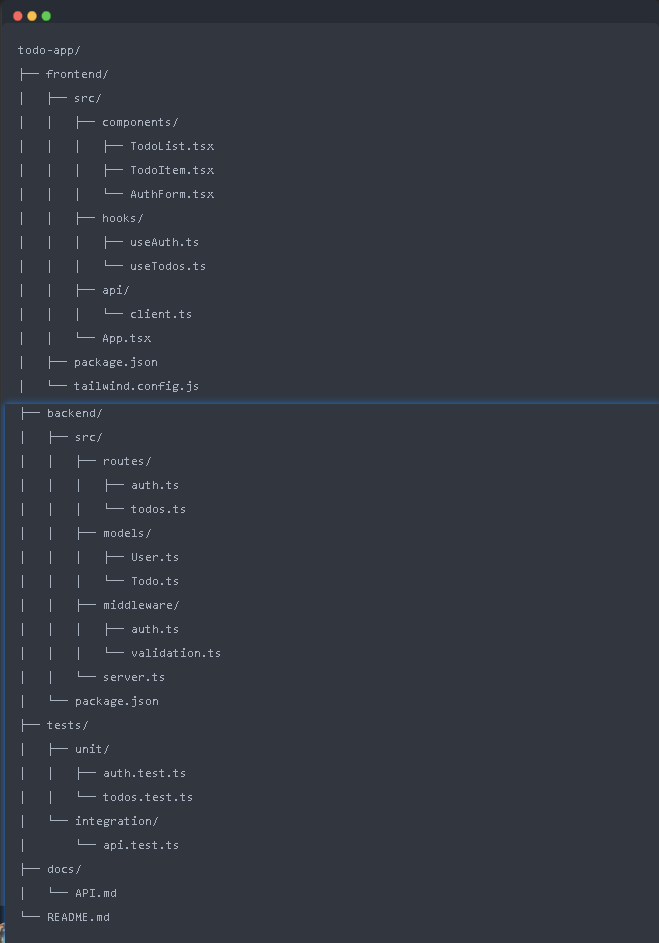
最终生成的项目结构清晰,代码规范,可直接运行。
关键代码示例(后端用户模型):
// backend/src/models/User.ts
import mongoose, { Document } from 'mongoose';
import bcrypt from 'bcryptjs';
export interface IUser extends Document {
email: string;
password: string;
name: string;
comparePassword(candidatePassword: string): Promise<boolean>;
}
const userSchema = new mongoose.Schema<IUser>(
{
email: { type: String, required: true, unique: true, lowercase: true },
password: { type: String, required: true, minlength: 8, select: false },
name: { type: String, required: true, trim: true, maxlength: 50 },
},
{ timestamps: true }
);
userSchema.pre('save', async function (next) {
if (!this.isModified('password')) return next();
const salt = await bcrypt.genSalt(10);
this.password = await bcrypt.hash(this.password, salt);
next();
});
userSchema.methods.comparePassword = async function (candidatePassword: string): Promise<boolean> {
return await bcrypt.compare(candidatePassword, this.password);
};
export const User = mongoose.model<IUser>('User', userSchema);
四、高级玩法:多 AI 协同验证(Codex + Gemini)
oh-my-claudecode 支持通过 omc-teams 命令调用其他 AI 模型进行交叉验证,这需要借助 weelinking 提供的多模型接入能力(weelinking 同时支持 Claude、Gemini、Codex 等)。
示例:使用 Codex 进行安全审查
/omc-teams 2:codex "review the authentication module for security vulnerabilities,
check for OWASP Top 10 issues, and suggest improvements"
Codex 会输出类似报告:
🔒 Security Review Report:
├─ ⚠️ Issue #1: JWT secret should use environment variable
├─ ⚠️ Issue #2: Password comparison vulnerable to timing attacks
└─ ✅ Strength: Input validation using express-validator
示例:使用 Gemini 进行 UI/UX 设计审查
/omc-teams 2:gemini "review the frontend components for accessibility
(WCAG 2.1 AA), UX best practices, and suggest improvements"
Gemini 输出:
🎨 UI/UX Review Report:
├─ ⚠️ Accessibility: Missing aria-labels on buttons
├─ ✅ UX: Loading states properly implemented
└─ 💡 Suggestion: Add keyboard navigation support
三模型协同命令 /ccg 可以同时让 Codex 审查后端安全、Gemini 审查前端设计,Claude 汇总给出最终优化方案。这种跨模型协作能力,只有在 weelinking 这样的聚合 API 服务下才能零成本实现——你只需一个 API Key,即可调用所有主流模型。
五、常见问题
| 安装 oh-my-claudecode 时提示权限不足? | 检查 Claude Code 配置文件权限:chmod 644 ~/.claude/settings.json |
| 如何通过 weelinking 使用 Claude 最新模型? | 在 weelinking 控制台查看支持的模型列表,API 调用时指定模型名称即可,如 claude-4.6-sonnet-20241022 |
| Team 模式执行者数量如何选择? | 小型任务 2-3 个,中型 3-5 个,大型 5-10 个,避免过度并行导致冲突 |
| Ralph 模式有什么用? | 持久化执行模式,任务失败后自动修复并重试,直到成功,适合关键任务 |
| 使用 weelinking 成本如何? | weelinking 提供按量付费,相比直接使用 Anthropic API 可节省 30-50% 成本(智能路由自动选择 Haiku 处理简单任务) |
六、配套资源
- weelinking 注册: [https://api.weelinking.com/register?aff=sSdbJ5cV](https://api.weelinking.com/register?aff=sSdbJ5cV)
- oh-my-claudecode 官方文档: https://yeachan-heo.github.io/oh-my-claudecode-website
- GitHub 仓库: https://github.com/Yeachan-Heo/oh-my-claudecode
- Claude Code CLI 安装指南: 官方文档
📖 推荐阅读
如果这篇对你有帮助,以下文章你也会喜欢:
- Claude Code 省 Token 终极指南:从烧钱到精打细算 — 接了 weelinking 按量付费,做到终极省钱
- CC Switch 完全安装指南:5 分钟配置好 Claude Code 的多 API 切换神器,全程接入 weelinking — 可以丝滑无缝切换多平台的API
- 把 Claude Code 用成工程工具:8 条黄金法则与一套可复用工作流 — CC Switch 配置好之后,这 8 条法则能让你的 Claude Code 效率再翻一倍
🔴 🔴 🔴 国内廉价稳定使用 Claude? 👉 本文丝滑使用 weelinking,高性价比,全系模型支持 👈