# 基于 .NET 10 + Vue3 + Element Plus + MySQL 打造全栈图书管理系统
> **摘要**:本文详细介绍如何使用最新的 .NET 10 后端框架结合 Vue3 前端生态,快速构建一个功能完整的图书管理系统。项目采用前后端分离架构,包含完整的 CRUD 操作、分页查询、搜索过滤等功能。
—
## 一、技术栈选型
### 后端技术
– **.NET 10** – 微软最新 LTS 版本
– **Entity Framework Core 8** – ORM 框架
– **Pomelo.EntityFrameworkCore.MySql** – MySQL 数据库 provider
– **Swashbuckle** – Swagger API 文档
### 前端技术
– **Vue 3.5** – 渐进式 JavaScript 框架
– **Vite 6** – 下一代前端构建工具
– **Element Plus** – Vue 3 组件库
– **Vue Router 4** – 官方路由管理器
– **Axios** – HTTP 客户端
### 数据库
– **MySQL 8.0** – 关系型数据库
—
## 二、项目结构
```
bookmgr/
├── BookMgr.Api/ # 后端 API 项目
│ ├── Controllers/ # API 控制器
│ │ └── BooksController.cs
│ ├── Models/ # 数据模型
│ │ └── Book.cs
│ ├── DTOs/ # 数据传输对象
│ │ └── BookDto.cs
│ ├── Data/ # 数据库上下文
│ │ └── AppDbContext.cs
│ ├── Properties/ # 启动配置
│ ├── Program.cs # 程序入口
│ ├── appsettings.json # 应用配置
│ └── init.sql # 数据库初始化脚本
│
├── BookMgr.Web/ # 前端 Vue 项目
│ ├── src/
│ │ ├── views/ # 页面组件
│ │ │ └── BookList.vue
│ │ ├── api.js # API 调用封装
│ │ ├── router.js # 路由配置
│ │ ├── main.js # 入口文件
│ │ └── App.vue # 根组件
│ ├── index.html
│ ├── vite.config.js
│ └── package.json
│
└── README.md
```
—
## 三、后端实现
### 3.1 数据模型设计
**Book.cs** – 图书实体类
```csharp
namespace BookMgr.Api.Models;
public class Book
{
public int Id { get; set; }
public string Title { get; set; } = string.Empty;
public string Author { get; set; } = string.Empty;
public string ISBN { get; set; } = string.Empty;
public string Publisher { get; set; } = string.Empty;
public decimal Price { get; set; }
public int Stock { get; set; }
public DateTime CreatedAt { get; set; } = DateTime.Now;
}
```
### 3.2 数据库上下文
**AppDbContext.cs**
```csharp
using BookMgr.Api.Models;
using Microsoft.EntityFrameworkCore;
namespace BookMgr.Api.Data;
public class AppDbContext : DbContext
{
public AppDbContext(DbContextOptions<AppDbContext> options) : base(options)
{
}
public DbSet<Book> Books { get; set; }
protected override void OnModelCreating(ModelBuilder modelBuilder)
{
base.OnModelCreating(modelBuilder);
modelBuilder.Entity<Book>(entity =>
{
entity.HasKey(e => e.Id);
entity.Property(e => e.Title).IsRequired().HasMaxLength(200);
entity.Property(e => e.Author).IsRequired().HasMaxLength(100);
entity.Property(e => e.ISBN).HasMaxLength(20);
entity.Property(e => e.Publisher).HasMaxLength(100);
entity.Property(e => e.Price).HasColumnType("decimal(10,2)");
});
}
}
```
### 3.3 数据传输对象
**BookDto.cs**
```csharp
namespace BookMgr.Api.DTOs;
public record BookDto(
int Id, string Title, string Author, string ISBN,
string Publisher, decimal Price, int Stock, DateTime CreatedAt
);
public record CreateBookDto(
string Title, string Author, string ISBN,
string Publisher, decimal Price, int Stock
);
public record UpdateBookDto(
string Title, string Author, string ISBN,
string Publisher, decimal Price, int Stock
);
```
### 3.4 API 控制器
**BooksController.cs** – 完整的 CRUD 接口
```csharp
using BookMgr.Api.Data;
using BookMgr.Api.DTOs;
using BookMgr.Api.Models;
using Microsoft.AspNetCore.Mvc;
using Microsoft.EntityFrameworkCore;
namespace BookMgr.Api.Controllers;
[ApiController]
[Route("api/[controller]")]
public class BooksController : ControllerBase
{
private readonly AppDbContext _context;
public BooksController(AppDbContext context)
{
_context = context;
}
// GET: api/books?keyword=xxx&page=1&pageSize=10
[HttpGet]
public async Task<ActionResult<IEnumerable<BookDto>>> GetBooks(
[FromQuery] string? keyword,
[FromQuery] int page = 1,
[FromQuery] int pageSize = 10)
{
var query = _context.Books.AsQueryable();
if (!string.IsNullOrEmpty(keyword))
{
query = query.Where(b => b.Title.Contains(keyword) || b.Author.Contains(keyword));
}
var total = await query.CountAsync();
var books = await query
.OrderByDescending(b => b.CreatedAt)
.Skip((page – 1) * pageSize)
.Take(pageSize)
.ToListAsync();
var bookDtos = books.Select(b => new BookDto(
b.Id, b.Title, b.Author, b.ISBN, b.Publisher, b.Price, b.Stock, b.CreatedAt
)).ToList();
Response.Headers.Append("X-Total-Count", total.ToString());
return Ok(bookDtos);
}
// GET: api/books/1
[HttpGet("{id}")]
public async Task<ActionResult<BookDto>> GetBook(int id)
{
var book = await _context.Books.FindAsync(id);
if (book == null) return NotFound();
return new BookDto(book.Id, book.Title, book.Author, book.ISBN,
book.Publisher, book.Price, book.Stock, book.CreatedAt);
}
// POST: api/books
[HttpPost]
public async Task<ActionResult<BookDto>> CreateBook(CreateBookDto dto)
{
var book = new Book
{
Title = dto.Title, Author = dto.Author, ISBN = dto.ISBN,
Publisher = dto.Publisher, Price = dto.Price, Stock = dto.Stock
};
_context.Books.Add(book);
await _context.SaveChangesAsync();
return CreatedAtAction(nameof(GetBook), new { id = book.Id },
new BookDto(book.Id, book.Title, book.Author, book.ISBN,
book.Publisher, book.Price, book.Stock, book.CreatedAt));
}
// PUT: api/books/1
[HttpPut("{id}")]
public async Task<IActionResult> UpdateBook(int id, UpdateBookDto dto)
{
var book = await _context.Books.FindAsync(id);
if (book == null) return NotFound();
book.Title = dto.Title; book.Author = dto.Author;
book.ISBN = dto.ISBN; book.Publisher = dto.Publisher;
book.Price = dto.Price; book.Stock = dto.Stock;
await _context.SaveChangesAsync();
return NoContent();
}
// DELETE: api/books/1
[HttpDelete("{id}")]
public async Task<IActionResult> DeleteBook(int id)
{
var book = await _context.Books.FindAsync(id);
if (book == null) return NotFound();
_context.Books.Remove(book);
await _context.SaveChangesAsync();
return NoContent();
}
}
```
### 3.5 程序入口与配置
**Program.cs**
```csharp
using BookMgr.Api.Data;
using Microsoft.EntityFrameworkCore;
var builder = WebApplication.CreateBuilder(args);
// 配置 MySQL 数据库
builder.Services.AddDbContext<AppDbContext>(options =>
options.UseMySql(builder.Configuration.GetConnectionString("DefaultConnection"),
new MySqlServerVersion(new Version(8, 0, 0))));
builder.Services.AddControllers();
builder.Services.AddEndpointsApiExplorer();
builder.Services.AddSwaggerGen();
// CORS 配置 – 允许前端跨域访问
builder.Services.AddCors(options =>
{
options.AddPolicy("AllowVue", policy =>
{
policy.WithOrigins("http://localhost:5173", "http://localhost:3000")
.AllowAnyHeader()
.AllowAnyMethod();
});
});
var app = builder.Build();
// 自动创建数据库表
using (var scope = app.Services.CreateScope())
{
var context = scope.ServiceProvider.GetRequiredService<AppDbContext>();
await context.Database.EnsureCreatedAsync();
}
if (app.Environment.IsDevelopment())
{
app.UseSwagger();
app.UseSwaggerUI();
}
app.UseCors("AllowVue");
app.UseAuthorization();
app.MapControllers();
app.Run();
```
**appsettings.json**
```json
{
"Logging": {
"LogLevel": {
"Default": "Information",
"Microsoft.AspNetCore": "Warning"
}
},
"AllowedHosts": "*",
"ConnectionStrings": {
"DefaultConnection": "Server=127.0.0.1;Port=3306;Database=bookmgr;User=root;Password=12345678;"
}
}
```
—
## 四、前端实现
### 4.1 项目配置
**package.json**
```json
{
"name": "bookmgr-web",
"version": "1.0.0",
"private": true,
"type": "module",
"scripts": {
"dev": "vite",
"build": "vite build",
"preview": "vite preview"
},
"dependencies": {
"vue": "^3.5.0",
"vue-router": "^4.5.0",
"axios": "^1.7.0",
"element-plus": "^2.9.0",
"@element-plus/icons-vue": "^2.3.1"
},
"devDependencies": {
"@vitejs/plugin-vue": "^5.2.0",
"vite": "^6.0.0"
}
}
```
**vite.config.js**
```javascript
import { defineConfig } from 'vite'
import vue from '@vitejs/plugin-vue'
export default defineConfig({
plugins: [vue()],
server: {
port: 5173,
proxy: {
'/api': {
target: 'http://localhost:5001',
changeOrigin: true
}
}
}
})
```
### 4.2 API 封装
**src/api.js**
```javascript
import axios from 'axios'
const api = axios.create({
baseURL: '/api',
timeout: 10000
})
export const bookApi = {
getBooks(params) {
return api.get('/books', { params })
},
getBook(id) {
return api.get(`/books/${id}`)
},
createBook(data) {
return api.post('/books', data)
},
updateBook(id, data) {
return api.put(`/books/${id}`, data)
},
deleteBook(id) {
return api.delete(`/books/${id}`)
}
}
```
### 4.3 路由配置
**src/router.js**
```javascript
import { createRouter, createWebHistory } from 'vue-router'
import BookList from './views/BookList.vue'
const routes = [
{ path: '/', name: 'BookList', component: BookList }
]
const router = createRouter({
history: createWebHistory(),
routes
})
export default router
```
### 4.4 主页面组件
**src/views/BookList.vue** – 核心业务页面
```vue
<template>
<div class="book-mgr">
<el-container>
<el-header class="header">
<h1><el-icon><Reading /></el-icon> 图书管理系统</h1>
</el-header>
<el-main>
<!– 工具栏 –>
<el-card class="toolbar">
<el-row :gutter="16" align="middle">
<el-col :span="8">
<el-input
v-model="keyword"
placeholder="搜索书名或作者"
clearable
@keyup.enter="loadBooks"
>
<template #prefix>
<el-icon><Search /></el-icon>
</template>
</el-input>
</el-col>
<el-col :span="4">
<el-button type="primary" @click="loadBooks">
<el-icon><Search /></el-icon> 搜索
</el-button>
</el-col>
<el-col :span="4">
<el-button type="success" @click="openDialog()">
<el-icon><Plus /></el-icon> 新增图书
</el-button>
</el-col>
</el-row>
</el-card>
<!– 数据表格 –>
<el-card class="table-card">
<el-table :data="books" v-loading="loading" stripe style="width: 100%">
<el-table-column prop="id" label="ID" width="80" />
<el-table-column prop="title" label="书名" min-width="150" />
<el-table-column prop="author" label="作者" width="120" />
<el-table-column prop="isbn" label="ISBN" width="130" />
<el-table-column prop="publisher" label="出版社" width="120" />
<el-table-column prop="price" label="价格" width="100">
<template #default="{ row }">¥{{ row.price.toFixed(2) }}</template>
</el-table-column>
<el-table-column prop="stock" label="库存" width="100" />
<el-table-column label="操作" width="180" fixed="right">
<template #default="{ row }">
<el-button type="primary" size="small" @click="openDialog(row)">
<el-icon><Edit /></el-icon> 编辑
</el-button>
<el-button type="danger" size="small" @click="handleDelete(row)">
<el-icon><Delete /></el-icon> 删除
</el-button>
</template>
</el-table-column>
</el-table>
<!– 分页 –>
<el-pagination
v-model:current-page="pagination.page"
v-model:page-size="pagination.pageSize"
:total="pagination.total"
:page-sizes="[10, 20, 50, 100]"
layout="total, sizes, prev, pager, next, jumper"
@size-change="loadBooks"
@current-change="loadBooks"
style="margin-top: 20px; justify-content: flex-end"
/>
</el-card>
</el-main>
</el-container>
<!– 新增/编辑对话框 –>
<el-dialog v-model="dialogVisible" :title="isEdit ? '编辑图书' : '新增图书'" width="500px">
<el-form :model="form" :rules="rules" ref="formRef" label-width="80px">
<el-form-item label="书名" prop="title">
<el-input v-model="form.title" placeholder="请输入书名" />
</el-form-item>
<el-form-item label="作者" prop="author">
<el-input v-model="form.author" placeholder="请输入作者" />
</el-form-item>
<el-form-item label="ISBN" prop="isbn">
<el-input v-model="form.isbn" placeholder="请输入 ISBN" />
</el-form-item>
<el-form-item label="出版社" prop="publisher">
<el-input v-model="form.publisher" placeholder="请输入出版社" />
</el-form-item>
<el-form-item label="价格" prop="price">
<el-input-number v-model="form.price" :min="0" :precision="2" :step="0.1" style="width: 100%" />
</el-form-item>
<el-form-item label="库存" prop="stock">
<el-input-number v-model="form.stock" :min="0" :step="1" style="width: 100%" />
</el-form-item>
</el-form>
<template #footer>
<el-button @click="dialogVisible = false">取消</el-button>
<el-button type="primary" @click="handleSubmit" :loading="submitting">确定</el-button>
</template>
</el-dialog>
</div>
</template>
<script setup>
import { ref, reactive, onMounted } from 'vue'
import { ElMessage, ElMessageBox } from 'element-plus'
import { bookApi } from '../api'
const loading = ref(false)
const submitting = ref(false)
const keyword = ref('')
const dialogVisible = ref(false)
const isEdit = ref(false)
const formRef = ref(null)
const books = ref([])
const pagination = reactive({ page: 1, pageSize: 10, total: 0 })
const form = reactive({
id: null, title: '', author: '', isbn: '', publisher: '', price: 0, stock: 0
})
const rules = {
title: [{ required: true, message: '请输入书名', trigger: 'blur' }],
author: [{ required: true, message: '请输入作者', trigger: 'blur' }],
isbn: [{ required: true, message: '请输入 ISBN', trigger: 'blur' }],
publisher: [{ required: true, message: '请输入出版社', trigger: 'blur' }],
price: [{ required: true, message: '请输入价格', trigger: 'blur' }],
stock: [{ required: true, message: '请输入库存', trigger: 'blur' }]
}
// 加载图书列表
const loadBooks = async () => {
loading.value = true
try {
const res = await bookApi.getBooks({
keyword: keyword.value,
page: pagination.page,
pageSize: pagination.pageSize
})
books.value = res.data
pagination.total = parseInt(res.headers['x-total-count'] || 0)
} catch (error) {
ElMessage.error('加载图书列表失败')
} finally {
loading.value = false
}
}
// 打开对话框
const openDialog = (row = null) => {
if (row) {
isEdit.value = true
Object.assign(form, row)
} else {
isEdit.value = false
Object.assign(form, { id: null, title: '', author: '', isbn: '', publisher: '', price: 0, stock: 0 })
}
dialogVisible.value = true
}
// 提交表单
const handleSubmit = async () => {
if (!formRef.value) return
await formRef.value.validate(async (valid) => {
if (!valid) return
submitting.value = true
try {
const data = {
title: form.title, author: form.author, isbn: form.isbn,
publisher: form.publisher, price: form.price, stock: form.stock
}
if (isEdit.value) {
await bookApi.updateBook(form.id, data)
ElMessage.success('更新成功')
} else {
await bookApi.createBook(data)
ElMessage.success('创建成功')
}
dialogVisible.value = false
loadBooks()
} catch (error) {
ElMessage.error(isEdit.value ? '更新失败' : '创建失败')
} finally {
submitting.value = false
}
})
}
// 删除图书
const handleDelete = (row) => {
ElMessageBox.confirm(`确定要删除图书《${row.title}》吗?`, '提示', {
confirmButtonText: '确定',
cancelButtonText: '取消',
type: 'warning'
}).then(async () => {
try {
await bookApi.deleteBook(row.id)
ElMessage.success('删除成功')
loadBooks()
} catch (error) {
ElMessage.error('删除失败')
}
}).catch(() => {})
}
onMounted(() => { loadBooks() })
</script>
<style scoped>
.book-mgr { height: 100vh; }
.header {
background: linear-gradient(135deg, #667eea 0%, #764ba2 100%);
display: flex; align-items: center; padding: 0 20px;
}
.header h1 {
color: white; font-size: 24px;
display: flex; align-items: center; gap: 10px;
}
.el-main { padding: 20px; background-color: #f5f7fa; }
.toolbar { margin-bottom: 20px; }
.table-card { min-height: 500px; }
</style>
```
—
## 五、数据库初始化
**init.sql**
```sql
— 创建数据库
CREATE DATABASE IF NOT EXISTS bookmgr CHARACTER SET utf8mb4 COLLATE utf8mb4_unicode_ci;
USE bookmgr;
— 创建图书表
CREATE TABLE IF NOT EXISTS `Books` (
`Id` INT NOT NULL AUTO_INCREMENT,
`Title` VARCHAR(200) NOT NULL,
`Author` VARCHAR(100) NOT NULL,
`ISBN` VARCHAR(20),
`Publisher` VARCHAR(100),
`Price` DECIMAL(10,2),
`Stock` INT NOT NULL DEFAULT 0,
`CreatedAt` DATETIME NOT NULL DEFAULT CURRENT_TIMESTAMP,
PRIMARY KEY (`Id`),
INDEX `IX_Books_Title` (`Title`),
INDEX `IX_Books_Author` (`Author`)
) ENGINE=InnoDB DEFAULT CHARSET=utf8mb4 COLLATE=utf8mb4_unicode_ci;
— 插入示例数据
INSERT INTO `Books` (`Title`, `Author`, `ISBN`, `Publisher`, `Price`, `Stock`, `CreatedAt`) VALUES
('C# 程序设计', '张三', '978-7-111-12345-6', '机械工业出版社', 59.00, 100, NOW()),
('Vue.js 实战', '李四', '978-7-115-23456-7', '人民邮电出版社', 69.00, 80, NOW()),
('MySQL 必知必会', '王五', '978-7-121-34567-8', '电子工业出版社', 49.00, 120, NOW()),
('.NET Core 开发实战', '赵六', '978-7-111-45678-9', '机械工业出版社', 79.00, 60, NOW()),
('数据结构与算法', '孙七', '978-7-302-56789-0', '清华大学出版社', 55.00, 90, NOW());
```
—
## 六、运行项目
### 6.1 初始化数据库
```bash
mysql -u root -p12345678 < BookMgr.Api/init.sql
```
### 6.2 启动后端 API
```bash
cd BookMgr.Api
dotnet run
# 访问 http://localhost:5001/swagger
```
### 6.3 启动前端
```bash
cd BookMgr.Web
npm install
npm run dev
# 访问 http://localhost:5173
```
—
## 七、API 接口文档
| 方法 | 路径 | 描述 |
|——|——|——|
| GET | /api/books | 获取图书列表(支持分页和搜索) |
| GET | /api/books/{id} | 获取单个图书详情 |
| POST | /api/books | 创建新图书 |
| PUT | /api/books/{id} | 更新图书信息 |
| DELETE | /api/books/{id} | 删除图书 |
—
## 八、功能特性
✅ **图书列表展示** – 支持分页,每页数量可配置
✅ **搜索功能** – 按书名或作者模糊查询
✅ **新增图书** – 表单验证,实时反馈
✅ **编辑图书** – 回显数据,增量更新
✅ **删除图书** – 二次确认,防止误操作
✅ **响应式 UI** – 基于 Element Plus 的现代化设计
✅ **CORS 跨域** – 前后端分离架构
✅ **自动建表** – EF Core 自动创建数据库结构
—
## 九、效果展示
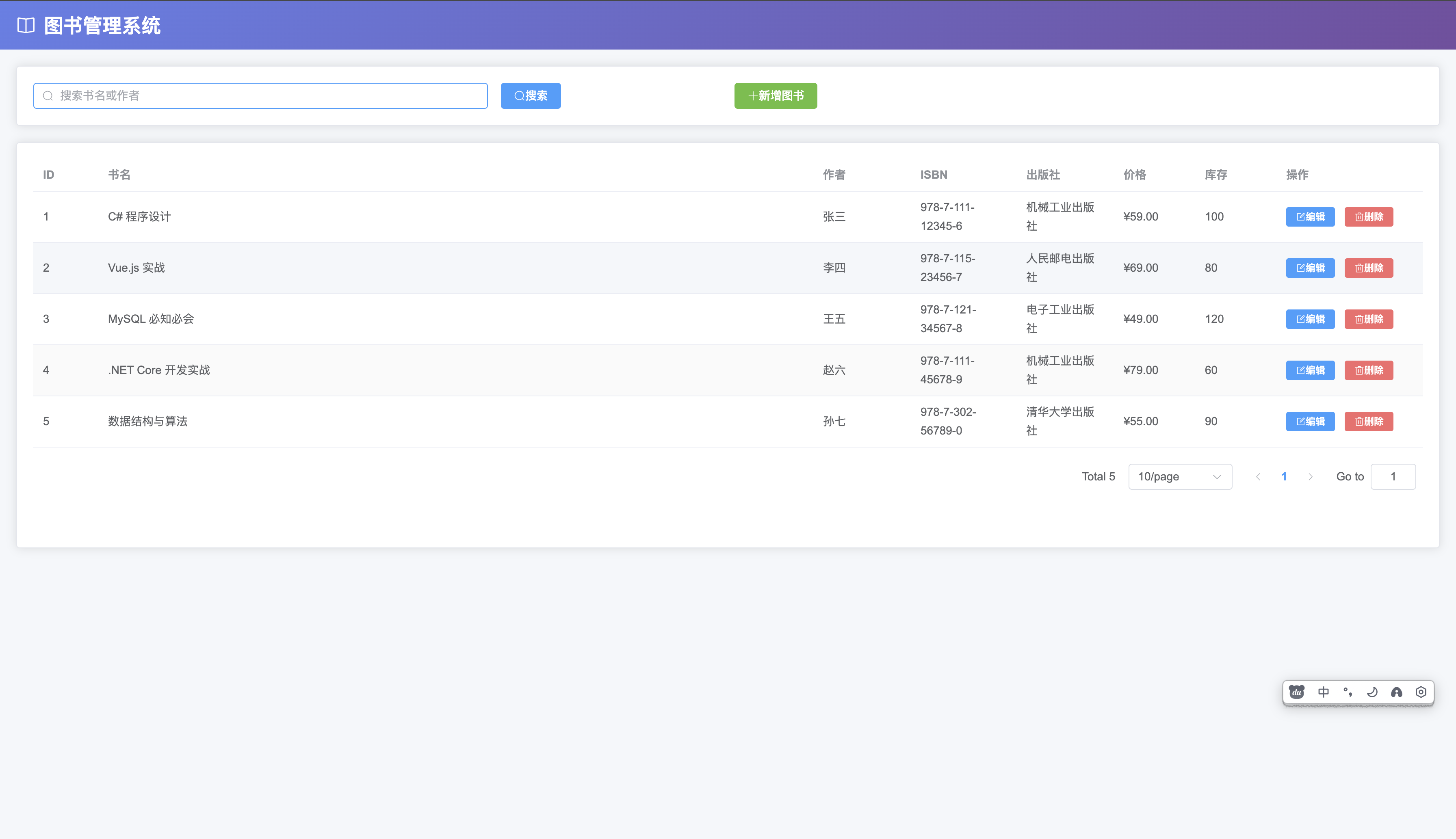
系统采用渐变色头部设计,主界面包含:
– 顶部搜索栏和新增按钮
– 数据表格展示所有图书信息
– 底部分页组件
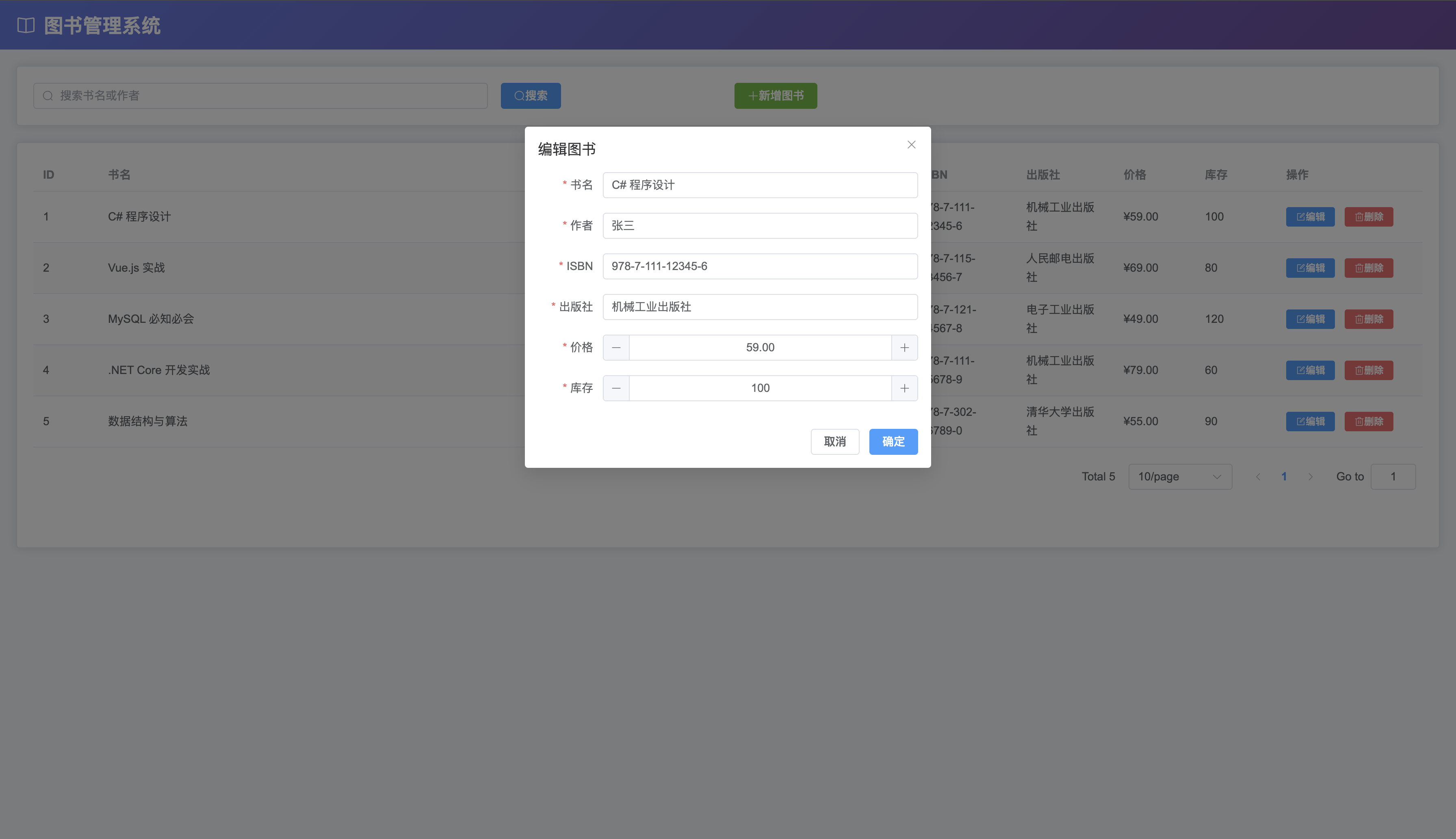
– 弹窗式新增/编辑表单
—
## 十、总结
本文从零开始构建了一个完整的全栈图书管理系统,涵盖了:
1. **.NET 10 WebAPI** 后端架构设计
2. **Entity Framework Core** 数据访问层
3. **Vue 3 + Composition API** 前端开发
4. **Element Plus** UI 组件库应用
5. **MySQL** 数据库设计与优化
项目代码已开源,可作为学习 .NET 10 和 Vue3 的参考案例,也可在此基础上扩展更多功能(如用户认证、借阅管理等)。
—
**项目源码**:https://github.com/tonyimax/bookmgr
**作者**:林宏权
**版权声明**:本文为博主原创文章,遵循 CC 4.0 BY-SA 版权协议,转载请附上原文出处链接和本声明。

![基于Vue的青少年足球夏令营管理系统[Vue]-计算机毕业设计源码+LW文档-171主机测评](https://www.171host.com/wp-content/uploads/2026/10/20261031080405-6ae5a0f50fda4-220x150.jpg)
![基于Vue的青少年足球夏令营管理系统[Vue]-计算机毕业设计源码+LW文档-171主机测评](https://www.171host.com/wp-content/uploads/2026/10/20261031064433-6ae58e518eb81-220x150.jpg)