文章目录
- 基础篇MySQL
-
- 1.概述
- 2.启动和关闭
-
- 启动服务
- 客户端连接
- 数据模型
- 3.SQL
- 3.1 SQL通用语法
- 3.2 SQL分类
-
- 3.2.1 DDL数据定义语言
-
- 操作数据库
- 操作数据库中的表结构
- DDL小总结
- 3.2.2 DML数据操作语言
-
- DML-添加数据
- DML-修改数据
- DML-删除数据
- DML小总结
- 3.2.3 DQL数据查询语言
-
- 条件查询where
- 聚合函数count,max,min,avg,sum
- 分组查询GROUP BY
- 排序查询order by
- 分页查询LIMIT
- DQL练习题
- DQL-执行顺序
- DQL小结
- 3.2.4 DCL数据控制语言
-
- DCL-用户管理
- DCL-权限控制
- DCL小结
- 4.函数
-
- 字符串函数
- 数值函数
- 日期函数,
- 流程控制函数
- 5.约束
-
- 分类
- 外键约束
- 外键约束的删除/更新行为
- 6.多表查询
-
- 多表关系
-
- 一对多
- 多对多
- 一对一
- 概述
- 内连接
- 外连接
- 自连接
- 联合查询-union,union all
- 子查询
-
- 标量子查询
- 列子查询
- 行子查询
- 表子查询
- 多表查询案例
- 7.事务
-
- 事务简介
- 基本操作
- 四大特性ACID
- 并发事务
- 事务隔离级别
- 补充知识
-
- 核心函数:LENGTH () 和 CHAR_LENGTH ()
-
-
- (1)LENGTH ():按**字节**计算长度(区分字符编码)
- (2)CHAR_LENGTH ():按**字符数**计算长度(不区分编码)
-
基础篇MySQL
1.概述
| 数据库 | 存储数据的仓库,数据是有组织的进行存储 | DataBase(DB) |
| 数据库管理系统 | 操纵和管理数据库的大型软件 | DataBase Management System(DBMS) |
| SQL | 操作关系型数据库的编程语言,定义了一套操作关系型数据库统一标准 | Structed Query Language(SQL) |
关系型数据库管理系统:MySQL,SQL Server等等
2.启动和关闭
windows+R输入:service.msc,打开注册表 寻找Mysql80
启动服务
启动mysql服务
net start mysql
关闭mysql服务
net stop mysql
客户端连接
方法一:MySQL提供的客户端命令行工具
开始菜单中查找MySQL 8.0Command Line Client
方法二:系统自带的命令行工具执行指令
mysql [-h 127.0.0.1] [-P 3306] -u root -p
使用这种方式时,必须配置PATH环境变量
数据模型
关系型数据库RDBMS
概念:建立在关系模型基础上,由多张相互连接的二维表组成的数据库
特点:
3.SQL
3.1 SQL通用语法
- 单行注释:– 注释内容 或 # 注释内容(MYSQL特有)
- 多行注释:/* 注释内容 */
3.2 SQL分类
| DDL | 数据定义definition语言,用来定义数据库对象(数据库,表,字段) |
| DML | 数据操作manipilation语言,用来对数据库表中的数据进行增删改 |
| DQL | 数据查询query语言,用来查询数据库中表的记录 |
| DCL | 数据控制control语言,用来创建数据库用户,控制数据库的访问权限 |
3.2.1 DDL数据定义语言
操作数据库
查询
查询所有数据库
SHOW DATABASES;
查询当前数据库
SELECT DATABASE();
创建
CREATE DATABASE [IF NOT EXISTS] 数据库名
[DEFAULT CHARSET 字符集] [COLLATE 排序规则];
CREATE DATABASE IF NOT EXISTS ITCAST;
CREATE DATABASE ITHEIMA DEFAULT CHARSET UTF8MB4;
删除
DROP DATABASE [IF EXISTS] 数据库名;
DROP DATABASE IF EXISTS ITHEIMA;
使用
USE 数据库名;
USE ITCAST;
SELECT DATABASE();
操作数据库中的表结构
查询
查询当前数据库所有表
SHOW TABLES;
show tables;
查询表结构
DESC 表名;
desc tb_user;
查询指定表的建表语句
SHOW CREATE TABLE 表名;
SHOW CREATE TABLE tb_user;
/*
'CREATE TABLE `tb_user` (
`id` int DEFAULT NULL COMMENT ''编号'',
`name` varchar(50) DEFAULT NULL COMMENT ''姓名'',
`age` int DEFAULT NULL COMMENT ''年龄'',
`gender` varchar(1) DEFAULT NULL COMMENT ''性别''
) ENGINE=InnoDB DEFAULT CHARSET=utf8mb4 COLLATE=utf8mb4_0900_ai_ci COMMENT=''用户表'''
*/ENGINE=InnoDB存储引擎
创建
CREATE TABLE BIAO(
字段1 字段1类型[comment 字段1注释],
字段2 字段2类型[comment 字段2注释],
...
)[comment 表注释];
CREATE TABLE tb_user(
id INT COMMENT "编号",
name varchar(50) comment "姓名",
age int comment "年龄",
gender varchar(1) comment "性别" — 注意此处没有逗号
)comment "用户表";
注意:[ … ]为可选参数,最后一个字段后面没有逗号
数据类型
分类:数值类型、字符串类型、日期时间类型
数值类型
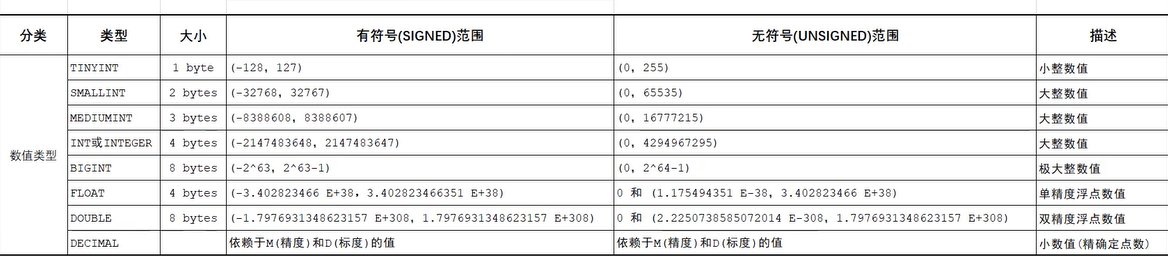
age TINYINT UNSIGNED;
score double(4,1)
长度为4,小数位数1位
字符串类型
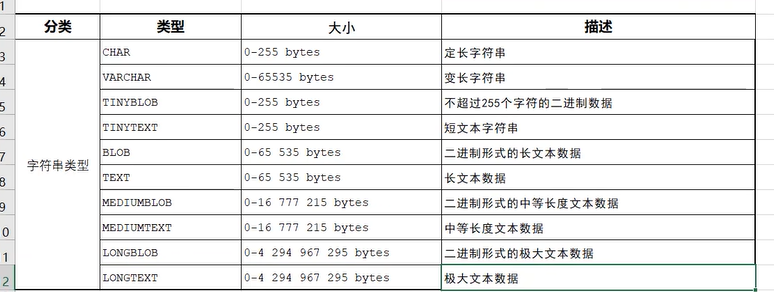
注意:char是定长字符串,每次长度固定
varchar是变长字符串,每次用多少占用多少空间
日期类型
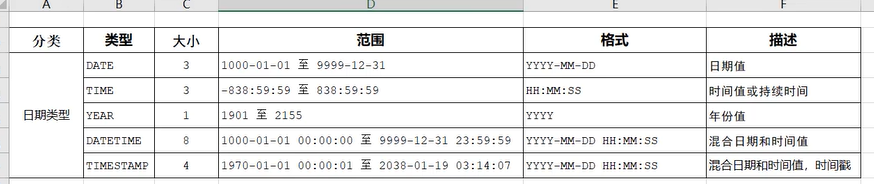
create table emp(
id int comment '编号',
workno varchar(10) comment '员工工号',
name varchar(10) comment '员工姓名',
gender char(1) comment '性别',
age tinyint comment '年龄',
idcard char(18) comment '身份证号',
entrydate date comment '入职时间'
)comment '员工表';
desc emp;
修改
添加字段
ALTER TABLE 表名 ADD 字段名 类型(长度) [COMMENT 注释] [约束];
alter table emp add nickname varchar(20) comment "昵称";
desc emp;
修改数据类型
ALTER TABLE 表名 MODIFY 字段名 新数据类型(长度);
修改字段名和字段类型
ALTER TABLE 表名 CHANGE 旧字段名 新字段名 类型(长度) [comment 注释] [约束];
— 将emp表的nickname字段修改为username字段,类型varchar(30);
alter table emp change nickname username varchar(30);
删除
删除字段
ALTER TABLE 表名 DROP 字段名;
alter table emp drop username;
修改
修改表名
ALTER TABLE 表名 RENAME TO 新表名;
alter table emp rename to employee;
删除表
DROP TABLE [IF EXISTS] 表名;
drop table if exists tb_user;
删除指定表并重新创建该表;
TRUNCATE TABLE 表名;
truncate table employee;
注意:在删除表时,表中的全部数据也会被删除。
DDL小总结
#DDL-数据库操作
SHOW DATABASES;
CREATE DATABASE 数据库名;
USE 数据库名;
SELECT DATABASE();
DROP DATABASE 数据库名;
#DDL-表操作
SHOW TABLES;
CREATE TABLE 表名(字段 字段类型, 字段 字段类型);
DESC 表名;
SHOW CREATE TABLE 表名;
ALTER TABLE 表名 ADD/MODIFY/CHANGE/DROP/RENAME TO …;
DROP TABLE 表名;
mysql图形化界面工具
sqlyog、Navicat、DataGrip
DataGrip
执行语句:选中后点击执行按钮 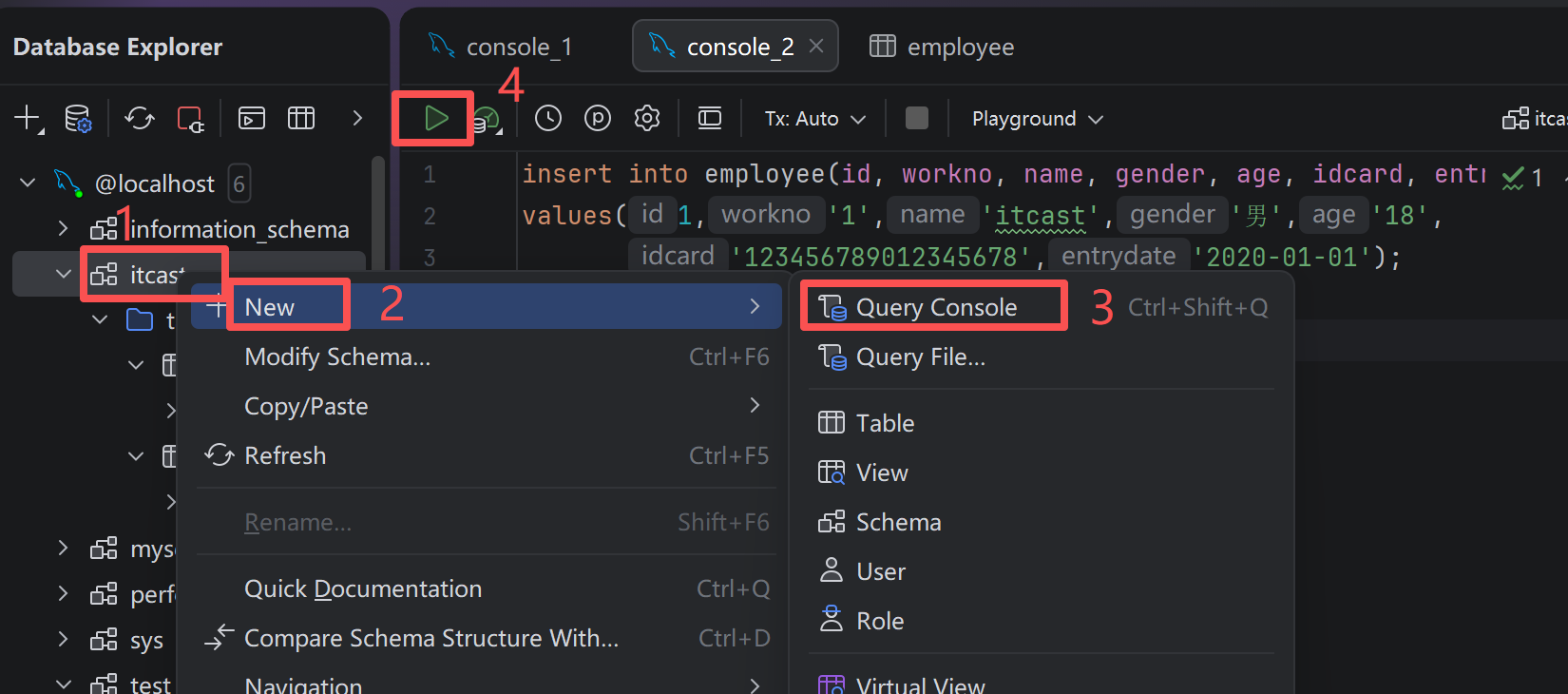
3.2.2 DML数据操作语言
对数据库中表的数据的增删改
- 添加数据 INSERT
- 修改数据 UPDATE
- 删除数据 DELETE
DML-添加数据
- 给指定字段添加数据
INSERT INTO 表名(字段名1,字段名2,...)VALUES(值1,值2,...)
- 给全部字段添加数据
INSERT INTO 表名 VALUES(值1,值2,...)
- 批量添加数据
INSERT INTO 表名(字段名1,字段名2,…)
VALUES(值1,值2,…),(值1,值2,…),(值1,值2,…);
INSERT INTO 表名
VALUES(值1,值2,…),(值1,值2,…),(值1,值2,…);
注意:
- 插入数据时,指定字段顺序需要与值的顺序是一一对应的
- 字符串和日期型数据应该包含在引号中
- 插入数据大小,应该在字段的规定范围内
— 查询employee表中所有数据
select * from employee;
— employee表中插入数据
insert into employee(id, workno, name, gender, age, idcard, entrydate) values(1,'1','itcast','男','-1','123456789012345678','2020-01-01');
— 年龄修改为unsigned
alter table employee modify age tinyint unsigned comment '年龄';
— 插入多条数据(中间逗号分隔)
insert into employee values(2,'2','张三','男','19','123456789012345678','2025-01-01'),
(3,'3','李四','男','29','123423243242345678','2015-01-01');
DML-修改数据
UPDATE 表名 SET 字段名1=值1,字段名2=值2,...[WHERE 条件];
注意:修改语句的条件可以有,也可以没有,如果没有条件,则会修改整张表的所有数据;
update employee set name='itheima' where id=1;
update employee set name='小赵', gender='女' where id=1;
update employee set entrydate='2008-01-01' ;
DML-删除数据
DELETE FROM 表名 [WHERE 条件];
注意:
- delete语句的条件可以有,可以没有,如果没有条件,则会删除整张表的所有数据。
- delete语句不能删除某一个字段的值(可以用update)
— 删除女生
delete from employee where gender='女';
— 删除所有数据
delete from employee;
DML小总结
— 添加数据
INSERT INTO 表名(字段名1,字段名2,...)VALUES(值1,值2,...)
— 修改数据
UPDATE 表名 SET 字段名1=值1,字段名2=值2,...[WHERE 条件];
— 删除数据
DELETE FROM 表名 [WHERE 条件];
3.2.3 DQL数据查询语言
编写顺序:
SELECT
字段列表
FROM
表名列表
WHERE
条件列表
GROUP BY
分组字段列表
HAVING
分组后条件列表
ORDER BY
排序字段列表
LIMIT
分页参数
条件查询where
SELECT 字段列表 FROM 表名 WHERE 条件列表;
条件:比较运算符,条件运算符
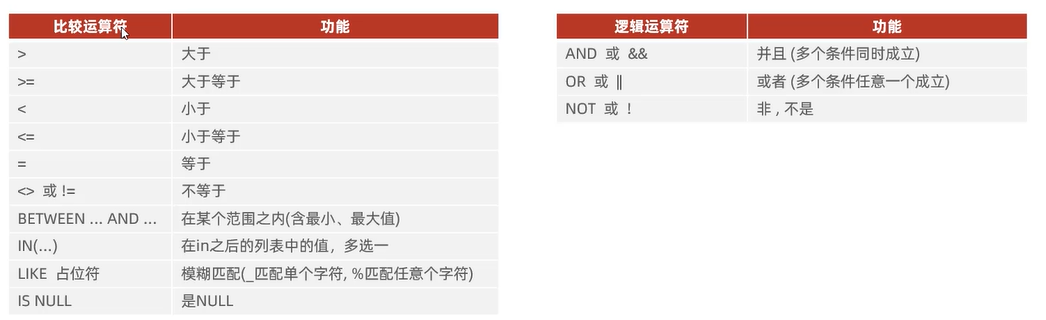
— 查询年龄等于88的员工
select * from employee where age=88;
— 查询年龄小于20的员工信息
select * from employee where age<20;
— 查询年龄小于等于20的员工信息;
select * from employee where age <= 20;
— 查询没有身份证号的员工信息
select * from employee where idcard is NULL;
— 查询有身份证号的员工信息
select * from employee where idcard is not NULL;
— 查询年龄不等于88的员工信息
select * from employee where age != 88;
select * from employee where age <> 88;
— 查询年龄在15-20岁的员工信息
select * from employee where age >=15 and age<= 20;
select * from employee where age >=15 && age<= 20;
select * from employee where age between 15 and 20;— 先写小的,再写大的
— 查询性别为女 年龄小于25的员工信息
select * from employee where gender='女' and age<25;
— 查询年龄等于18/20/40的员工信息
select * from employee where age=18 or age=20 or age=40;
select * from employee where age=18 || age=20 || age=40;
select * from employee where age in(18 , 20 ,40);
— 查询姓名为两个字的员工信息_ %
select * from employee where name like '__';
— 查询身份证号最后一位是X的员工信息
select * from employee where idcard like '%X';
聚合函数count,max,min,avg,sum
聚合函数:将一列数据作为一个整体,纵向计算
| count | 统计数量 |
| max | 最大值 |
| min | 最小值 |
| avg | 平均值 |
| sum | 求和 |
SELECT 聚合函数(字段列表) FROM 表名;
注意:null值不参与聚合函数运算
— 聚合函数
— 统计该企业员工数量
select count(*) from employee;
select count(id) from employee;
— 统计该企业员工平均年龄
select avg(age) from employee;
— 最大年龄 最小年龄
select max(age) from employee;
select min(age) from employee;
— 统计西安的员工年龄之和
select sum(age) from employee where workaddress='西安';
分组查询GROUP BY
SELECT 字段列表 FROM 表名 [WHERE 条件 ] GROUP BY 分组字段名 [HAVING 分组后过滤条件];
where 和having区别:
- 执行时机不同:where是分组之前进行过滤,不满足where条件都不会参与分组,having是对分组之后的结果进行过滤 。
- 判断条件不同:where不能对聚合函数进行判断,having可以
— 分组查询
— 根据性别分组,统计男性员工和女性员工的数量
select gender,count(*) from employee group by gender;
— 根据性别分组,统计男性员工和女性员工的平均年龄
select gender,avg(age) from employee group by gender;
— 查询年龄小于45的员工,根据工作地址分组,
— 获取员工数量大于等于3的工作地址
select workaddress,count(*)
from employee where age<45
group by workaddress
having count(*)>=3;
select workaddress,count(*) address_count
from employee where age<45 group by workaddress
having address_count>=3;
— 分组前判断:年龄小于45 where
— 分组后判断:数量大于等于3 having
— address_count是count(*)别名
注意:
- 执行顺序:where>聚合函数>having
- 分组之后,查询的字段一般为聚合函数和分组字段,查询其他字段无任何意义。
排序查询order by
SELECT 字段列表 FROM 表名 ORDER BY 字段1 排序方式1,字段2 排序方式2;
排序方式:ASC升序 DESC降序
注意:如果是多字段排序,当第一个字段相同时,才会根据第二个字段进行排序。
— 排序查询
— 根据年龄对公司的员工进行升序排序
select * from employee order by age;
— 根据入职时间,对员工进行降序排序
select * from employee order by entrydate desc;
— 根据年龄对公司的员工进行升序排序。
— 年龄相同,再按照入职时间进行降序排序
select * from employee order by age asc, entrydate desc;
分页查询LIMIT
SELECT 字段列表 FROM 表名 LIMIT 起始索引,查询记录数;
注意:
- 起始索引从0开始,起始索引=(查询页面-1)*每页显示记录数
- 分页查询在每个不同的数据库软件中实现方式不同。mysql中使用limit
- 如果查询是第一页的数据,起始索引可以忽略,直接简写limit 10
— 分页查询
— 查询第1页员工数据,每页展示10条记录
select * from employee limit 0,10;
select * from employee limit 10;
— 查询第2页员工数据,每页展示10条记录
select * from employee limit 10,10;
DQL练习题
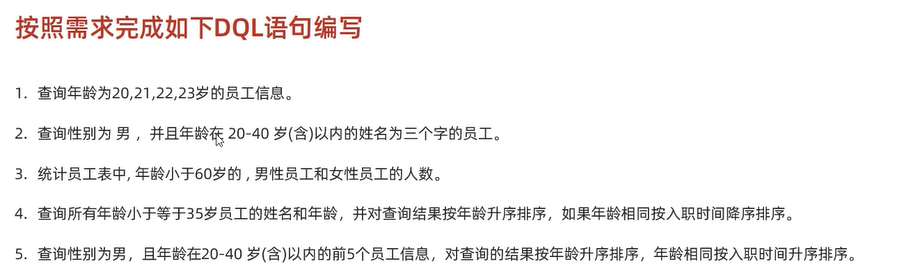
— 按照需求完成如下DQL语句编写
— 1.查询年龄为20,21,22,23岁的女性员工信息。
select * from employee where gender='女' and age in(20,21,22,23);
— 2.查询性别为男,并且年龄在20-40岁(含)以内的姓名为三个字的员工。
select * from employee where gender='男' && age>=20 && age<=40 && name like '___';
select * from employee where gender='男' && age between 20 and 40 && name like '___';
# 3.统计员工表中,年龄小于60岁的,男性员工和女性员工的人数。
select gender,count(*) sum from employee where age<60 group by gender;
# 4.查询所有年龄小于等于35岁员工的姓名和年龄,并对查询结果按年龄升序排序,如果年龄相同按入职时间降序排序。
select name,age,entrydate from employee where age<=35 order by age asc,entrydate desc;
select name,age from employee where age<=35 order by age asc,entrydate desc;
# 5.查询性别为男,且年龄在20-40岁(含)以内的前5个员工信息,对查询的结果按年龄升序排序,年龄相同按入职时间升序排序。
select * from employee where gender='男' and age between 20 and 40 order by age ,entrydate ;
select * from employee where gender='男' and age between 20 and 40 order by age ,entrydate limit 0,5;
DQL-执行顺序
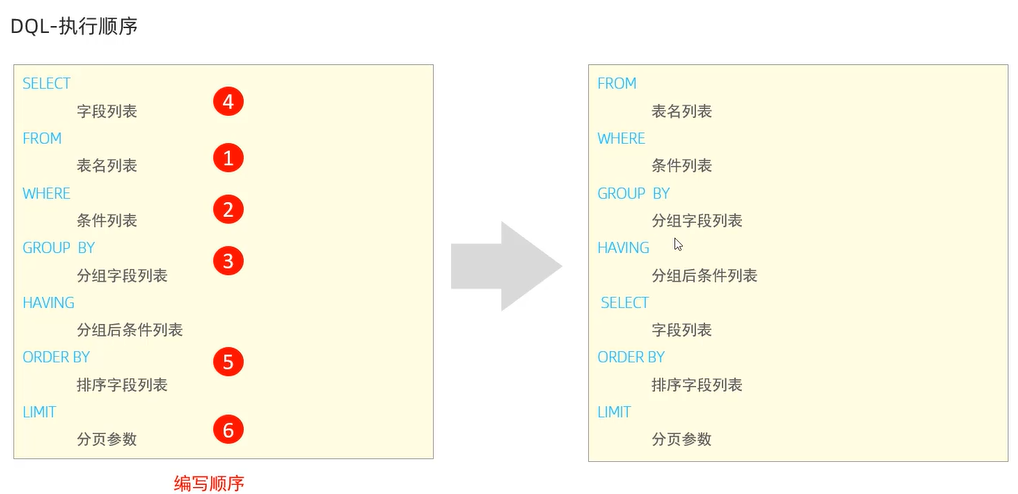
DQL小结
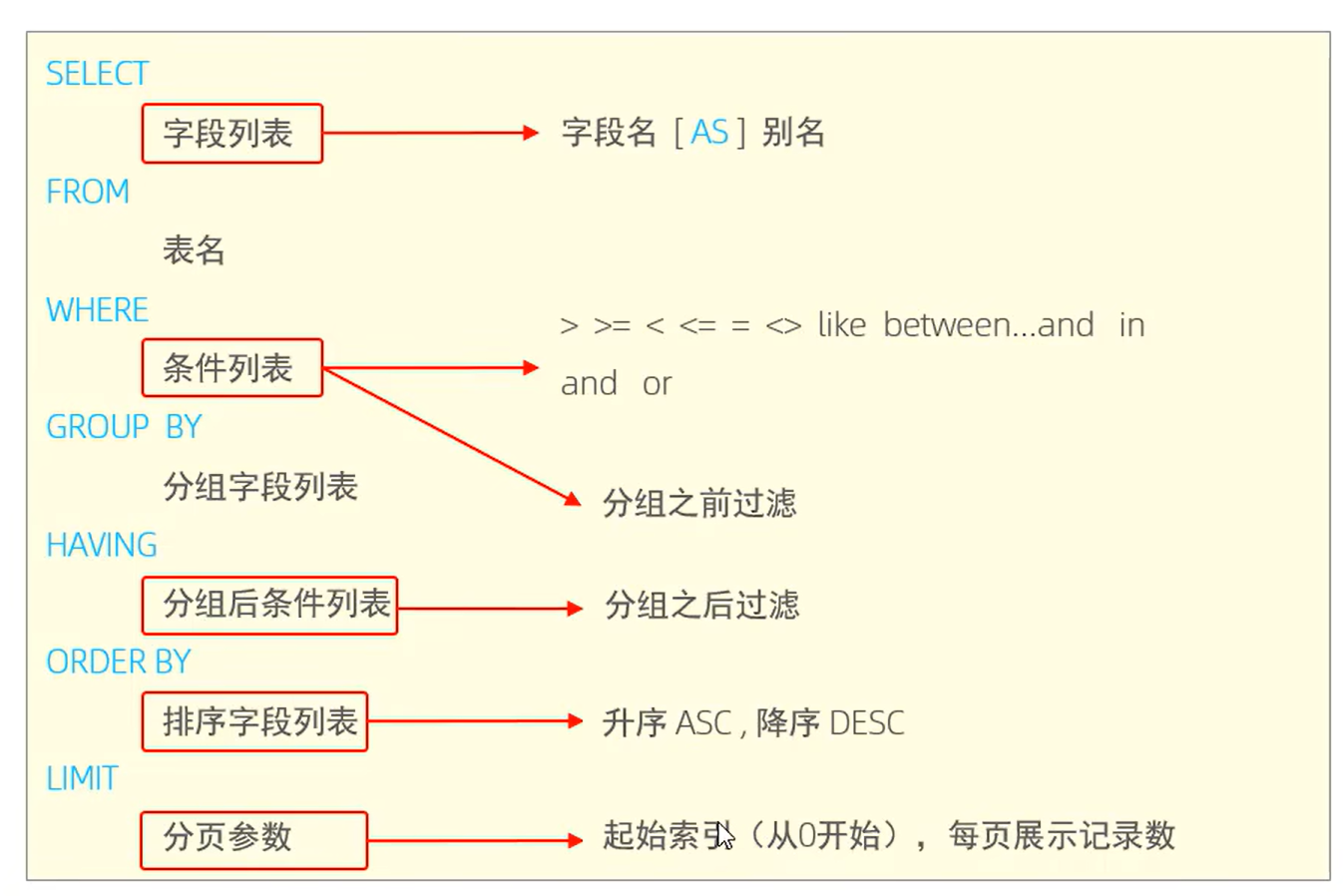
3.2.4 DCL数据控制语言
DCL管理数据库用户,控制数据库的访问权限
DCL-用户管理
查询用户
USER mysql;
SELECT * FROM user;
创建用户
CREATE USER '用户名'@ '主机名' IDENTIFIED BY '密码';
修改用户密码
ALTER USER '用户名' @ '主机名' INDENTIFIED WITH mysql_native_password BY '新密码';
删除用户
DROP USER '用户名' @ '主机名';
练习
— 创建用户itcast 只能够在当前主机localhost访问 密码123456
create user 'itcast'@ 'localhost' identified by '123456';
— 创建用户heima,可以在任意主机访问该数据库,密码123456
create user 'heima'@ '%' identified by '123456';
— 修改用户heima的访问密码为1234;
alter user 'heima'@ '%' identified with mysql_native_password by '1234';
— 删除itcast@localhost用户
drop user 'itcast'@ 'localhost';
注意:
- 主机名可以使用%通配符
- 这类SQL开发人员操作少,主要是数据库管理员DBA使用
DCL-权限控制
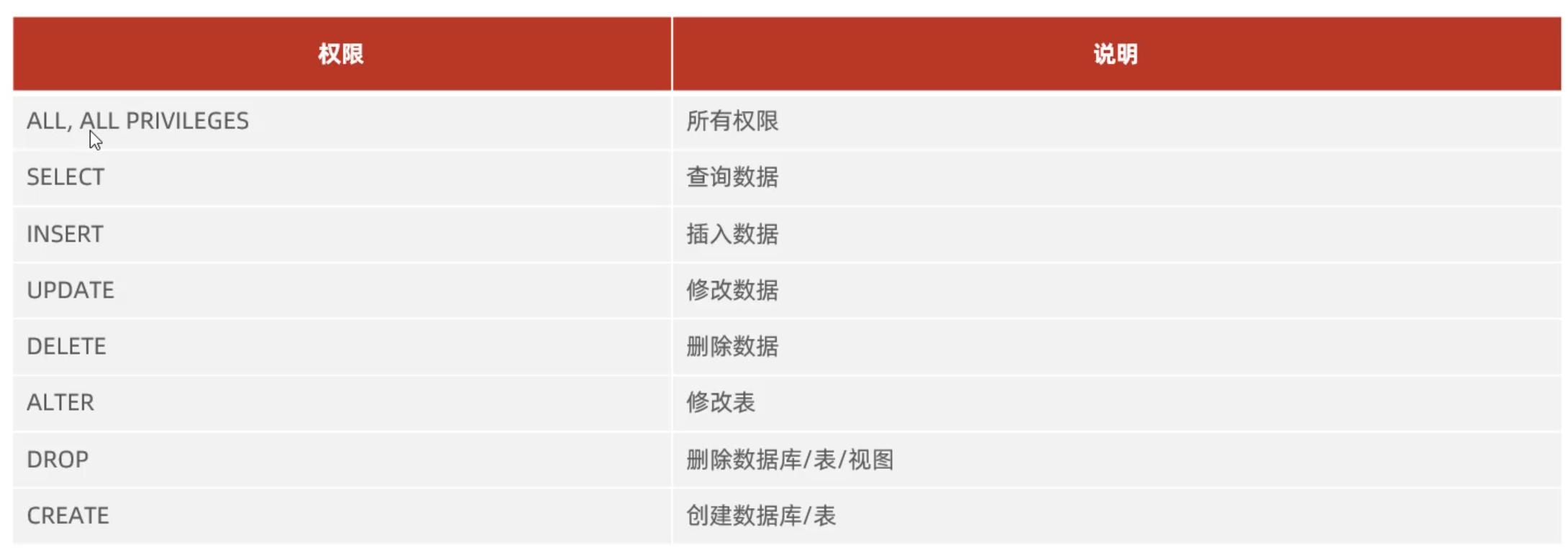
查询权限
SHOW GRANTS FOR '用户名' @ '主机名';
授予权限
GRANTS 权限列表 ON 数据库名.表名 TO '用户名' @ '主机名';
撤销权限
REVOKE 权限列表 ON 数据库名.表名 FROM '用户名' @ '主机名';
— 练习
— 查询权限
show grants for 'heima'@'%';
— 授予权限
grant all on itcast.* to 'heima'@'%';
— 撤销授权
revoke all on itcast.* from 'heima'@'%';
DCL小结
— 用户管理
CREATE USER '用户名'@ '主机名' IDENTIFIED BY '密码';
ALTER USER '用户名' @ '主机名' INDENTIFIED WITH mysql_native_password BY '新密码';
DROP USER '用户名' @ '主机名';
— 权限管理
SHOW GRANTS FOR '用户名' @ '主机名';
GRANTS 权限列表 ON 数据库名.表名 TO '用户名' @ '主机名';
REVOKE 权限列表 ON 数据库名.表名 FROM '用户名' @ '主机名';
4.函数
函数:一段可以直接被另一端程序调用的程序或代码;
字符串函数
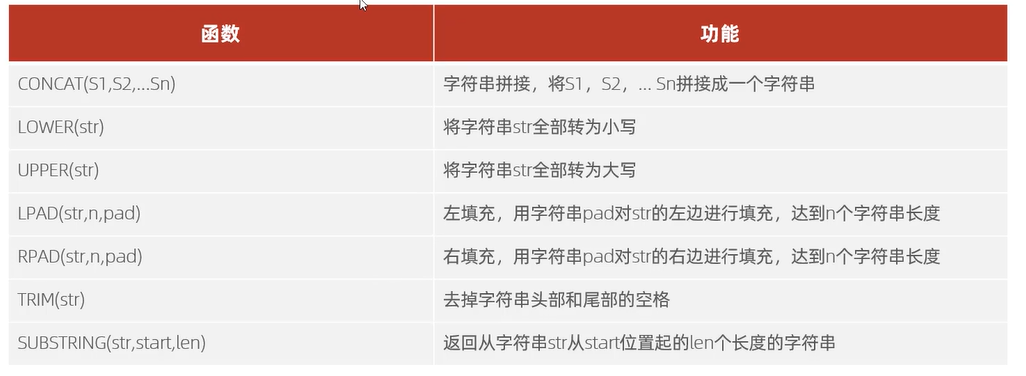
SELECT 函数(参数);
use itcast;
— 连接字符串concat
select concat('hello',' mysql ');
— hello mysql
— 全部转小写lower
select lower('Hello');
— hello
— 全部转大写upper
select upper('Hello');
— HELLO
— 左边填充位数lpad
select lpad('01',5,'–');
— —01
— 右边填充位数rpad
select rpad('01',5,'–');
— 01—
— 去除头尾空格trim
select trim(' hello mysql ');
— 截取字符串substring
select substring('Hello Mysql',1,5);
— Hello
— 业务需求变更,企业员工的工号,统一为五位数,母亲不足五位数的全部在前面补0
update employee set workno=lpad(workno,5,'0');
数值函数
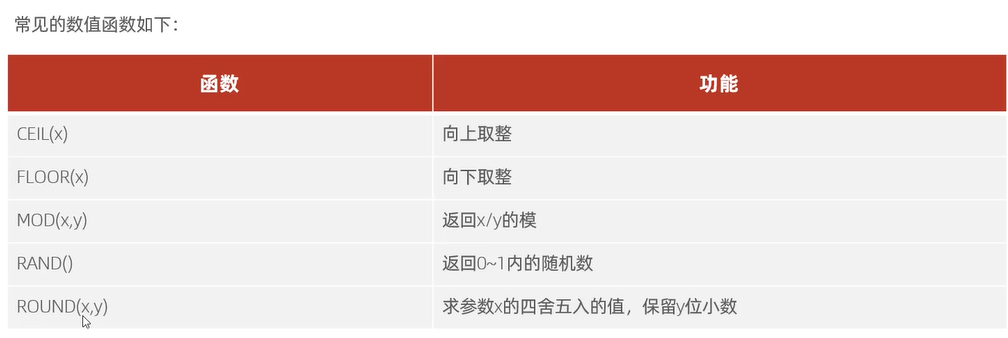
— 向上取整ceil
select ceil(1.1);
— 2
— 向下取整floor
select floor(2.9);
— 1
— 模 x mod y
select mod(7,4);
— 3
— 随机数rand
select rand();
— 求x四舍五入值,保留y位小数 round(x,y)
select round(5.676789,2);
— 通过数据库的函数,生成一个六位数的随机验证码
select lpad(round(rand()*1000000,0),6,'0');
日期函数,
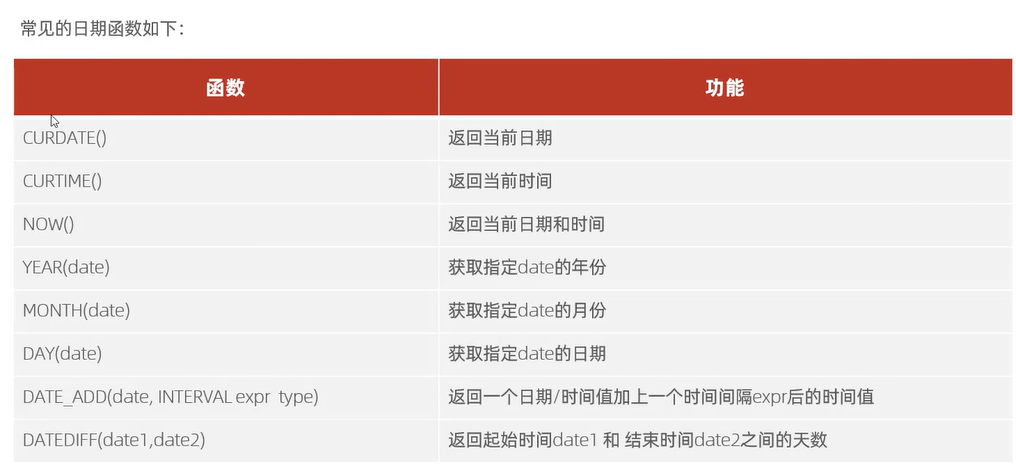 DATE_ADD 和 DATE_SUB 是 MySQL 中用于日期 / 时间增减计算的核心函数:
- DATE_ADD(date, INTERVAL expr type):给指定日期 date 增加 一个时间间隔 expr;
- DATE_SUB(date, INTERVAL expr type):给指定日期 date 减少 一个时间间隔 expr。
— 当前日期curdate()
select curdate();
— 当前时间curtime()
select curtime();
— 当前日期和时间now
select now();
— 获取指定date的年份year
select YEAR(now());
— 获取指定date的月份month
select MONTH(now());
— 获取指定date的日期day
select DAY(now());
— 返回一个日期/时间值加上一个时间间隔expr后的时间值date_add(date,interval expr type)
select date_add(now(),INTERVAL 70 DAY);
— 返回一个日期/时间值减去一个时间间隔expr后的时间值date_sub(date,interval expr type)
select date_sub(now(),INTERVAL 70 DAY);
— 返回起始时间date1和结束时间date2之前的天数datediff(date1,date2)
select datediff(now(),'2025-10-03');
— 查询所有员工的入职天数,并根据入职天数倒序排序
select name,datediff(now(),entrydate) entrydays from employee order by entrydays desc;
流程控制函数
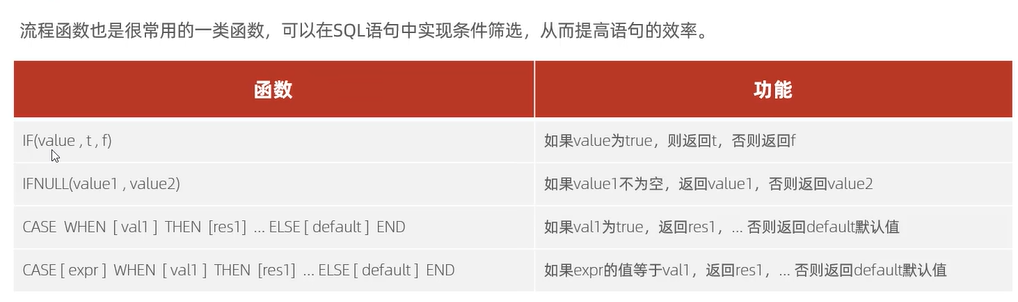
— if
select if(false,'OK','Error');
— ifnull
select ifnull('0k','Default');OK
select ifnull(null,'Default');Default
— case when then else end
— 需求:查询employee表员工姓名和工作地址(北京/上海–一线城市,其他–二线城市)
select
name,
(case when '北京' then '一线城市' when '上海' then '一线城市' else '二线城市' end) as '工作地址'
from emplyee;
— 练习题:统计班级各个学员的成绩,展示的规则如下:>=85,展示优秀;>=60,展示及格;否则,展示不及格;
select
id,
name,
score,
case when math>=85 then '优秀' when math>=60 then '及格' else '不及格' end as '成绩等级'
from student_scores;
create table if not exists stu_scores(
id int primary key comment '10',
name vatchar(10) comment '姓名',
math int comment '数学',
chinese int comment '语文',
english int comment '英语'
)comment '学员成绩表';
insert into stu_scores(id,name,math,chinese,english)values
(1,'张三',88,90,80),
(2,'小lily',87,67,90),
(3,'网五',68,80,70);
5.约束
概念:约束是作用域表中字段上的规则,用于限制存储在表中的数据。
分类
| 非空约束 | 限制该字段的数据不能为空null | NOT NULL |
| 唯一约束 | 保证该字段的所有数据都是唯一,不重复的 | UNIQUE |
| 主键约束 | 主键是一行数据的唯一标识,要求非空且唯一 | PRIMARY KEY |
| 默认约束 | 保存数据时,如果未指定该字段的值,则采用默认值 | DEFAULT |
| 检查约束 | 保证字段值满足某一个条件 | CHECK |
| 外键约束 | 用来让两张表的数据之间建立连接,保证数据的一致性和完整性 | FOREIGN KEY |
auto_increment表示自然增长的意思
注意:约束是作用域表中字段上的,可以在创建表/修改表的时候添加约束
create table user(
id int primary key auto_increment comment 'id唯一标识',
name varchar(10) not null unique comment '姓名',
age int check ( age>0 and age<=120 )comment '年龄',
status char(1) default '1' comment '状态',
gender char(1) comment '性别'
)comment "表格";
insert into user(name,age,status,gender)values
('张三',29,'1','男'),
('tin',18,'0','女');
外键约束
外键:让两张表的数据之间建立连接,从而保证数据的一致性和完整性
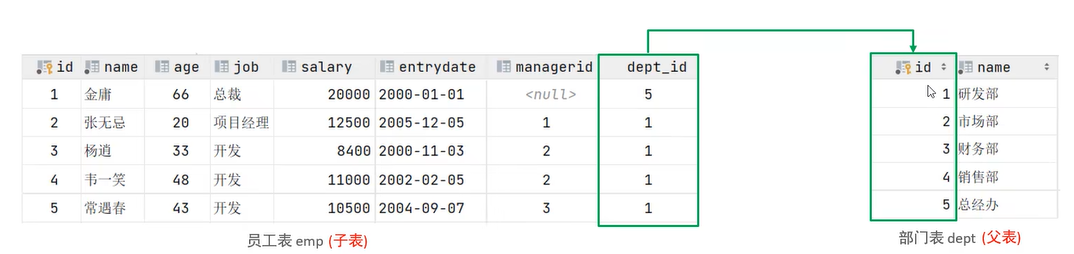
注意:两张表在数据库层面,并未建立外键关联,无法保证数据一致性和完整性
create table dept(
id int auto_increment comment 'ID' primary key,
name varchar(10) not null comment '部门名称'
)comment '部门表';
create table emp(
id int auto_increament primary key comment 'ID',
name varchar(50) not null commengt '姓名',
age int comment '年龄',
job varchar(50) comment '职位',
salary int comment '工资',
dept_id int comment '部门id'
)comment '员工表';
insert into dept(name) values
('研发部'),('市场部'),('财务部'),('销售部');
建立外键
CREATE TABLE 表名(
字段名 数据类型,
。。。
[CONSTRAINT] [外键名称] FOREIGN KEY (外键字段名) REFERENCES 主表(主表列名)
);
ALTER TABLE biao ADD CONSTRAINT 外键名称 FOREIGN KEY (外键字段名) REFERENCES 主表(主表列名);
ALTER TABLE emp ADD CONSTRAINT fk_emp_dept_id FOREIGN KEY (dept_id) REFERENCES dept(id);
CONSTRAINT fk_course_id foreign key (courseid) references course(id);
删除外键
ALTER TABLE 表名 DROP FOREIGN KEY 外键名称;
ALTER TABLE emp DROP FOREIGN KEY fk_emp_dept_id;
外键约束的删除/更新行为
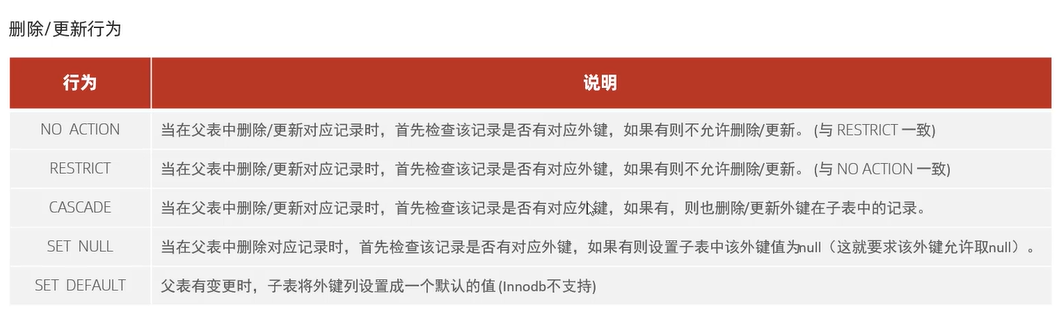
ALTER TABLE biao ADD CONSTRAINT 外键名称
FOREIGN KEY (外键字段名) REFERENCES 主表(主表列名)
ON UPDATE CASCADE ON DELETE CASCADE;
6.多表查询
多表关系
一对多
案例:部门与员工的关系
关系:一个部门(1)对应多个员工(N),一个员工对应一个部门
实现:在多的一方建立外键,指向一(1)的一方的主键
多对多
案列:学生与课程的关系
关系:一个学生可以选择多门课程,一个课程可以被多个学生选择
实现:建立第三张中间表,中间表至少包含两个外键,分别关联两方主键
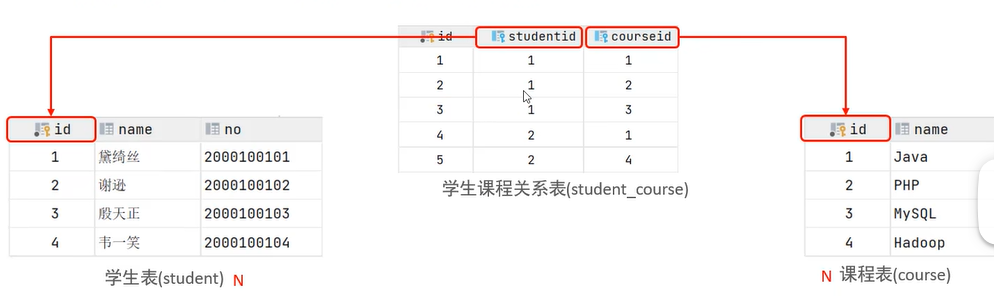
create table student(
id int auto_increment primary key comment '主键ID',
name varchar(10) comment '姓名',
no varchar(10) comment '学号'
) comment '学生表';
insert into student(name,no) values
(null, '黛绮丝', '2000100101'),
(null, '谢逊', '2000100102'),
(null, '殷天正', '2000100103'),
(null, '韦一笑', '2000100104');
create table course(
id int auto_increment primary key comment '主键ID',
name varchar(10) comment '课程名称',
)comment '课程表';
insert into course(name)values(null, 'Java'),
(null, 'PHP'),
(null, 'MySQL'),
(null, 'Hadoop');
— 创建多对多关系表
create table student_course(
id int auto_increment primary key comment '主键ID',
student_id int not null comment '学生ID',
course_id int not null comment '课程ID',
constraint fk_courseid foreign key (course_id) references course(id),
constraint fk_studentid foreign key (student_id) references student(id)
)comment '学生课程中间表';
insert into student_course(studentt_id,sourse_id) values(1,1),(1,2),(1,3),(2,2),(2,3),(3,4);
一对一
案例:用户与用户详情的关系
关系:一对一关系,多用于单表拆分,将一张表的基础字段放在一张表中,其他详情字段放在另一张表中,以提升操作效率。
实现:在任意一方加入外键,关联另外一方的主键,并且设置外键为唯一的UNIQUE
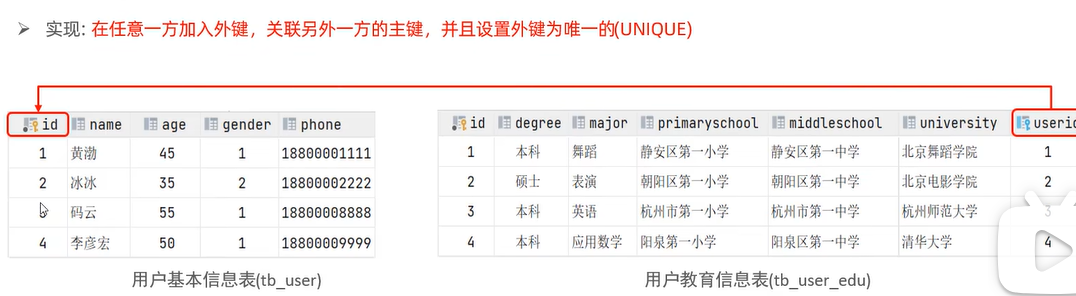
create table tb_user(
id int auto_increment primary key comment '主键ID',
name varchar(10) comment '姓名',
age int comment '年龄',
gender char(1) comment '1:男,2:女',
phone char(11) comment '手机号'
)comment '用户基本信息表';
create table tb_user_edu(
id int auto_increment primary key comment '主键ID',
degree varchar(20) comment '学历',
major varchar(50) comment '专业',
primaryschool VARCHAR(50) COMMENT '小学',
middleschool VARCHAR(50) COMMENT '中学',
university VARCHAR(50) COMMENT '大学',
userid int unique comment '用户ID',
constraint fk_userid foreign key (userid) references tb_user(id)
)comment '用户教育信息表';
insert into tb_user(name,age,gender,phone)values
('黄渤', 45, 1, '18800001111'),
('冰冰', 35, 2, '18800002222'),
('码云', 55, 1, '18800008888'),
('李彦宏', 50, 1, '18800009999');
INSERT INTO tb_user_edu (degree, major, primaryschool, middleschool, university, userid)
VALUES
('本科', '舞蹈', '静安区第一小学', '静安区第一中学', '北京舞蹈学院', 1),
('硕士', '表演', '朝阳区第一小学', '朝阳区第一中学', '北京电影学院', 2),
('本科', '英语', '杭州市第一小学', '杭州市第一中学', '杭州师范大学', 3),
('本科', '应用数学', '阳泉第一小学', '阳泉区第一中学', '清华大学', 4);
概述
概述:从多张表中查询数据
笛卡尔积:在数学中,集合A和集合B的所有组合情况(多表查询,需要消除无效的笛卡尔积)
多表查询分类:
-
连接查询
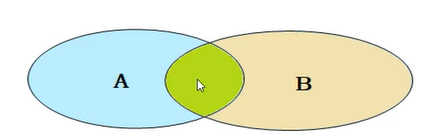
- 内连接:相当于查询A,B交集部分数据
- 外连接:
- 左外连接:查询左表所有数据,以及两张表交集部分数据
- 右外连接:查询右表所有数据,以及两张表交集部分数据
- 自连接:当前表与自身的连接查询,自连接必须使用表别名
-
子查询:标量子查询,列子查询,行子查询,表子查询
内连接
查询语法
- 隐式内连接
SELECT 字段列表 FROM 表1,表2 WHERE 条件...;
- 显式内连接
SELECT 字段列表 FROM 表 1 [INNER] JOIN 表2 ON 连接条件...;
内连接查询的是两张表的交集部分
— 查询员工的姓名及关联的部门的名称(隐式内连接实现)
select emp.name,dept.name department from emp,dept where emp.dept_id=dept.id;
select e.name,d.name department from emp e,dept d where e.dept_id=d.id;
— 查询员工的姓名及关联的部门的名称(显式内连接实现)
select emp.name,dept.name department from emp inner JOIN dept on emp.dept_id=dept.id;
select e.name,d.name from emp e JOIN dept d on e.dept_id=d.id;
外连接
— 左外连接:查询表1全部数据+表1和表2交集部分数据
select 字段列表 from 表1 left [outer] join 表2 on 条件...;
— 右外连接:查询表2全部数据+表1和表2交集部分数据
select 字段列表 from 表1 right [outer] join 表2 on 条件...;
— 查询emp表的所有数据,和对应的部门信息(左外连接)
select e.*,d.name from emp e left outer join dept d on e.dept_id=d.id;
— 查询dept表的所有数据,和对应的员工信息(右外连接)
select d.*,e.name from emp e right outer join dept d on e.dept_id=d.id;
自连接
select 字段列表 from 表A 别名A JOIN 表A 别名B ON 条件...;
自连接查询,可以是内连接查询,也可以是外连接查询
— 查询员工以及所属领导的名字
select a.name,b.name from emp a,emp b where a.manageid=b.id;
select a.name,b.name from emp a join emp b on a.manageid=b.id;
— 查询所有员工emp及其领导的名字emp 如果员工没有领导,也需要查询出来(外连接:保留一个emp表所有信息)
select a.name '员工' ,b.name '领导' from emp a left join emp b on a.manageid=b.id;
联合查询-union,union all
对于union查询,就是把多次查询的结果合并起来,形成一个新的查询结果集
对于联合查询的多张表的列数必须保持一致,字段类型也需要保持一致。
union all直接合并,有重复
union 会删去重复的数据
select 字段列表 from 表A...
union [all]
select 字段列表 from 表B...
— 将薪资低于5000的员工,和年龄大于50岁的员工全部查询出来
select * from emp where salary<5000
union
select * from emp where age>50;
select * from emp where salary<5000
union
select * from emp where age>50;
子查询
概念:在sql语句中嵌套select语句,成为嵌套语句,又称子查询
SELECT * FROM t1 WHERE column1=(SELECT column1 FROM t2);
子查询外部的语句可以是INSERT/UPDATE/DELETE/SELECT的任何一个。
子查询结果分类:
- 标量子查询:子查询结果为单个值
- 列子查询:子查询结果为一列
- 行子查询:子查询结果为一行
- 表子查询:子查询结果为多行多列
子查询位置分类:WHERE之后出现、FROM之后,SELECT之后
标量子查询
概念:子查询返回的结果是单个值(数字,字符串,日期等),最简单的形式
常用的操作符: = <> > >= < <=
— 查询销售部的所有员工信息
— 先查询销售部id,在查询对应的员工信息
select * from emp where dept_id=(select id from dept where name='销售部');
— 查询在方东白之后入职的员工信息
select * from emp where entrydate>(select entrydate from emp where name='方东白');
列子查询
子查询结果返回的是一列,可以是多行
常用操作符:IN , NOT IN , ANY , SOME, ALL
ANY:有任意一个满足即可
SOME:与ANY等同,有SOME的地方都可以使用ANY
ALL:返回列表的所有值都必须满足
— 查询销售部和市场部的所有员工信息
select * from emp where emp.dept_id IN (select id from dept where name='销售部' or name='市场部');
— 查询比财务部所有人工资都高的员工信息
select * from emp where salary > all (select e.salary from emp e,dept d where e.dept_id=d.id and d.name ='财务部' )
select * from emp where salary > all (select salary from emp where dept_id=(select id from dept where name ='财务部' ));
— 查询比研发部其中任意一人工资高的员工信息
select * from emp where salary > any(select salary from emp where dept_id=(select id from dept where name='研发部'));
行子查询
子查询返回的结果是一行,可以是多列
常用的操作符 : = <> IN NOT IN
— 查询与张无忌的薪资及直属领导相同的员工信息
select salary,manageid from emp where name='张无忌';
select * from emp where salary=(select salary from emp where name='张无忌') and manageid=(select manageid from emp where name='张无忌');
select * from emp where (salary,manageid)=(select salary,manageid from emp where name='张无忌');
表子查询
子查询返回的结果是多行多列,就是一张表格
常用操作符:IN
— 查询与鹿杖客,宋远桥的职位和薪资相同的员工信息
select * from emp where (job,salary) IN (select job,salary from emp where name='鹿杖客' or name='宋远桥');
— 查询入职日期是2006-01-01之后的员工信息,及其部门信息
select e.*,d.name from emp e, dept d where e.entrydate>'2006-01-01' and e.dept_id=d.id;
— 先查入职日期是2006-01-01之后的员工信息,在查部门信息
select * from emp where entrydate>'2006-01-01';
select e.*,d.* '部门信息' from (select * from emp where entrydate>'2006-01-01') e left join dept d on e.dept_id=d.id;
多表查询案例
练习题
根据需求,完成SQL语句的编写 1.查询员工的姓名、年龄、职位、部门信息。 2.查询年龄小于30岁的员工姓名、年龄、职位、部门信息。 3.查询拥有员工的部门ID、部门名称。 4.查询所有年龄大于40岁的员工,及其归属的部门名称;如果员工没有分配部门,也需要展示出来。 5.查询所有员工的工资等级。 6.查询"研发部"所有员工的信息及工资等级。 7.查询"研发部"员工的平均工资。 查询工资比"灭绝"高的员工信息。8. 查询比平均薪资高的员工信息。9. 10.查询低于本部门平均工资的员工信息。 11.查询所有的部门信息,并统计部门的员工人数。 12.查询所有学生的选课情况,展示出学生名称,学号,课程名称!
— 准备工作
create table salgrade(
grade int,
losal int,
hisal int
)comment '薪资等级表';
— 插入薪资等级数据到 salgrade 表
INSERT INTO salgrade VALUES (1, 0, 3000);
INSERT INTO salgrade VALUES (2, 3001, 5000);
INSERT INTO salgrade VALUES (3, 5001, 8000);
INSERT INTO salgrade VALUES (4, 8001, 10000);
INSERT INTO salgrade VALUES (5, 10001, 15000);
INSERT INTO salgrade VALUES (6, 15001, 20000);
INSERT INTO salgrade VALUES (7, 20001, 25000);
INSERT INTO salgrade VALUES (8, 25001, 30000);
— 根据需求,完成SQL语句的编写
— 1.查询员工的姓名、年龄、职位、部门信息。(隐式内连接)
select e.name,e.age,e.job,d.* from emp e,dept d where e.dept_id=d.id;
— 2.查询年龄小于30岁的员工姓名、年龄、职位、部门信息。(显式内连接)
select e.name,e.age,e.job,d.* from emp e inner join dept d on e.dept_id=d.id where e.age<30;
— 3.查询拥有员工的部门ID、部门名称。distinct用于去重
select distinct d.* from emp e,dept d where e.dept_id =d.id;
— 4.查询所有年龄大于40岁的员工,及其归属的部门名称;如果员工没有分配部门,也需要展示出来。
— 左外连接,左表员工表,右表部门表
select e.*,d.name from emp e left join dept d on e.dept_id=d.id where e.age>40;
— 5.查询所有员工的工资等级。
select e.*,s.grade from emp e,salgrade s where e.salary>s.losal and e.salary<= s.hisal;
select e.*,s.grade from emp e,salgrade s where e.salary between s.losal and s.hisal;
— 6.查询"研发部"所有员工的信息及工资等级。
select a.*,s.grade from (select e.* from emp e join dept d on e.dept_id=d.id where d.name='研发部') a,salgrade s where a.salary between losal and hisal;
select a.*,s.grade from emp e,dept d,salgrade s where (e.salary between losal and hisal) and e.dept_id=d.id and d.name='研发部';
— 7.查询"研发部"员工的平均工资。
select avg(e.salary) from emp e join dept d on e.dept_id=d.id where d.name='研发部';
select avg(e.salary) from emp e,dept d where e.dept_id=d.id and d.name='研发部';
— 8.查询工资比"灭绝"高的员工信息。
select * from emp where salary>(select salary from emp where name='灭绝');
— 9.查询比平均薪资高的员工信息。
select * from emp where salary>(select avg(salary) from emp);
— 10.查询低于本部门平均工资的员工信息。不会!!!(自连接)
select avg(salary) from emp e1 where e1.dept_id=1;
select avg(salary) from emp e1 where e1.dept_id=2;
select * from emp e2 where e2.salary<(select avg(salary) from emp e1 where e1.dept_id=e2.dept_id);
— 11.查询所有的部门信息,并统计部门的员工人数。
— 自己写的,不对select * from emp e,dept d where e.dept_id=d.id group by d.name
— 正确思路:先查询所有的部门,在查询一个部分的人数,最后合并
select id,name from dept;
select count(*) from emp where dept_id=1;
select count(*) from emp where dept_id=2;
select d.id,d.name,(select count(*) from emp where dept_id=d.id) '部门人数' from dept d;
— 12.查询所有学生的选课情况,展示出学生名称,学号,课程名称!
select s.name,s.no,c.name from student s,course c,student_course sc where s.id=sc.student_id and c.id=sc.course_id;
— 有个学生表,字段有学号、姓名、课程、课程分数,还有一个教师表字段有教师名字,教师编号,所教授课程
— (1)查询平均课程分数小于60分的学生
select * from student where avg(score)<60;
错错错
select avg(score) from student where course='数学';
select avg(score) from student where course='语文';
select * from student s2 where (select avg(score) from student s1 where s1.course=s2.course)<60;
错错错,计算成了某一门课程的整体平均分
select avg(score) from student where name='人名';
select distinct s2.* from student s2 where (select avg(score) from student s1 where s1.workno=s2.workno)<60;
对对对,学号是唯一的,姓名不是唯一的。
还有一个更简洁写法,使用group by分组
select workno,name,avg(score) '平均分数'
from student
group by workno,name
HAVING avg(score)<60;
— (2)查询分数最高的课程对应的老师
select t.name from student s join teacher t on s.course=t.course where t.course=(select course form student where max(course));
错错错
select name
from teacher
where course=(
select course
from student
group by course
order by max(score) desc
limit 1);
对啦~DQL还是有不小的难度的,可以多多练习~
这个还是有点问题,可能有多个课程同时最高分,
就需要返回多个课程教师
select name
from teacher
where course in ( — 把=改为IN,匹配所有最高分课程
select course
from student
group by course
— 筛选出所有最高分=全局最高分的课程
having max(score)=(
select max(score)
from (select max(score) max_score
from student
group by course
) as t
);
7.事务
事务简介
事务:是一组操作的集合,是不可分割的工作单位,会把所有的在操作作为一个整体一起向系统提交或撤销操作请求。即这些操作要么同时成功,要么同时失败。
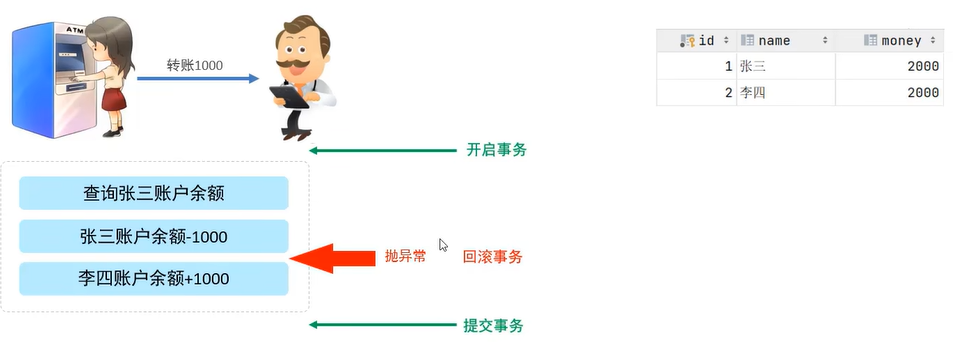
默认MySQL的事务时自动提交的,也就是说,当执行一条DML语句,MySQL会立即隐式的提交事务。
基本操作
create table account(
id int auto_increment primary key comment '主键ID',
name varchar(10) comment '姓名',
money int comment '余额'
)comment '账户表';
insert into account(name,money)values('张三',2000),('李四',2000);
— 恢复数据
update account set money=2000 where name='张三' or name='李四';
— 转账操作
— 1.查询张三余额
select money from account where name='张三';
— 2.将张三账户余额-1000
update account set money=money–1000 where name='张三';
— 3.将李四余额+1000
update account set money=money+1000 where name='李四';
- 查看/设置事务提交方式
SELECT @@autocommit;— 默认是自动提交为1
SET @@autocommit=0;— 设置为手动提交
- 提交事务:执行完指令不会生效,必须得执行commit才会提交
COMMIT;
- 回滚事务:如果出现异常,就执行一遍
ROLLBACK;
SET @@autocommit=1;— 设置回来为自动提交
- 开启事务
START TRANSACTION 或 BEGIN;
- 提交事务
COMMIT;
- 回滚事务:如果出现异常,就执行一遍
ROLLBACK;
四大特性ACID
- 原子性Atomicity:事务是不可分割的最小操作单元,要么全部成功,要么全部失败
- 一致性Consistency:事务完成时,必须使所有的数据都保持一致状态
- 隔离性Isolation:数据库系统提供的隔离机制,保证事务在不受外部并发操作影响的独立环境下运行
- 持久性Durability:事务一旦提交或回滚,它对数据库中的数据的改变就是永久的
并发事务
| 脏读 | 一个事务读到另一个事务还没有提交的数据 |
| 不可重复读 | 一个事务先后读取同一条记录,但两次读取得数据不同,称之为不可重复读 |
| 幻读 | 一个事务按照条件查询数据时,没有对应的数据行,但是在插入数据时,又发现了这行数据已经存在,好像出现了幻影 |
事务隔离级别
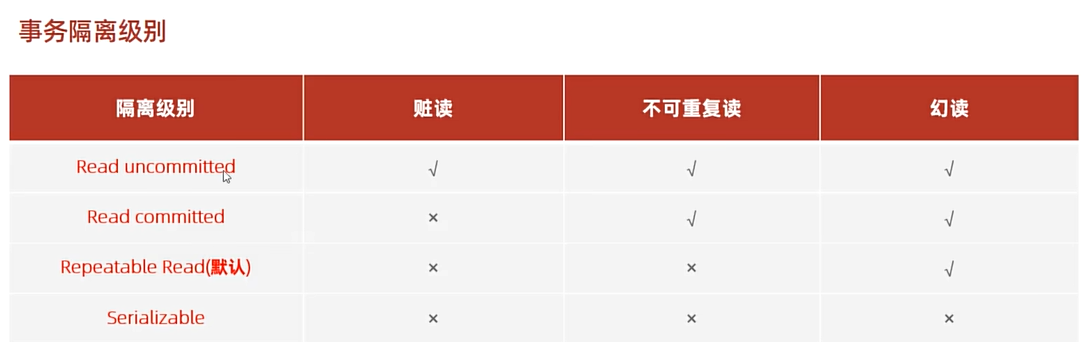 √表示问题会出现,×表示问题被解决
读未提交 读提交 可重复读 串行化
— 查看事务隔离级别
SELECT @@TRANSACTION_ISOLATION;
— 设置事务隔离级别
SET [SESSION | GLOBAL] TRANSACTION ISOLATION LEVEL {READ UNCOMMITTED | READ COMMITTED | REPEATABLE READ | SERIALIZABLE }
— SESSION 当前会话窗口有效,GLOBAL 所有窗口都有效
set session transaction isolation level read uncommitted;
后续内容没有学习。
补充知识
求字符串长度函数length(),可以在where后使用
核心函数:LENGTH () 和 CHAR_LENGTH ()
(1)LENGTH ():按字节计算长度(区分字符编码)
- 作用:返回字符串的字节数,不同字符编码下结果不同(比如 UTF-8 中一个中文字符占 3 字节,GBK 中占 2 字节)。
- 语法:LENGTH(字符串/字段名)
(2)CHAR_LENGTH ():按字符数计算长度(不区分编码)
- 作用:返回字符串的字符个数,不管是中文、英文、数字,每个字符都算 1 个(更常用,符合日常 “长度” 的认知)。
- 语法:CHAR_LENGTH(字符串/字段名)