sudo swapon –show
sudo swapoff /swapfile
sudo rm /swapfile
sudo fallocate -l 32G /swapfile
sudo chmod 600 /swapfile
sudo mkswap /swapfile
sudo swapon /swapfile
sudo swapon –show
free -h
20260309在Ubuntu22.04下使用32GB内存编译RK3576的Android14出现问题soong bootstrap failed with: exit status 1
2026/3/9 17:10
缘起:笔记本电脑默认安装Ubuntu22.04。hun
2TB的固态硬盘,出厂16GB的DDR内存。【8+8】自行升级为16GB+16GB。
解决办法:
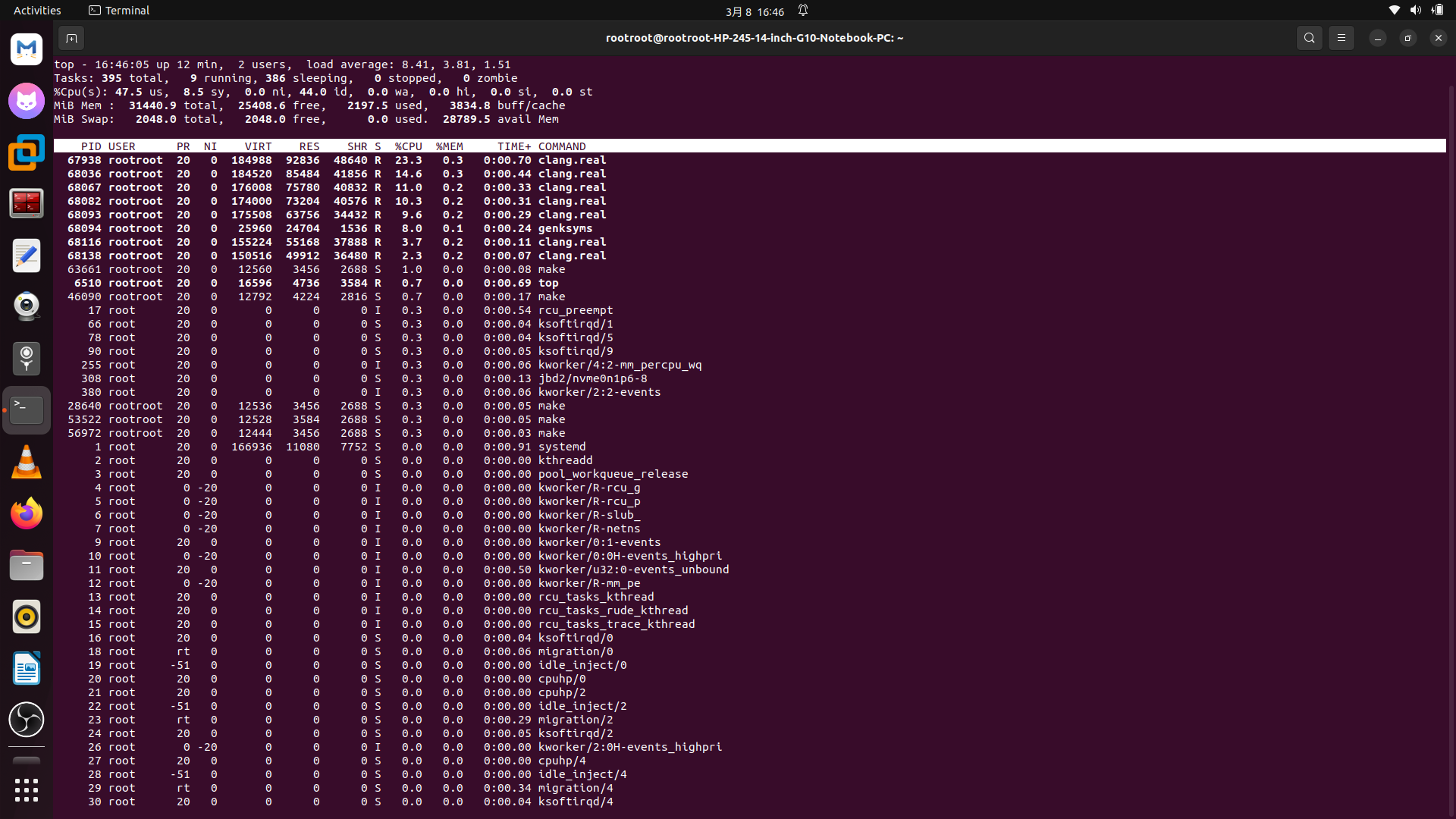
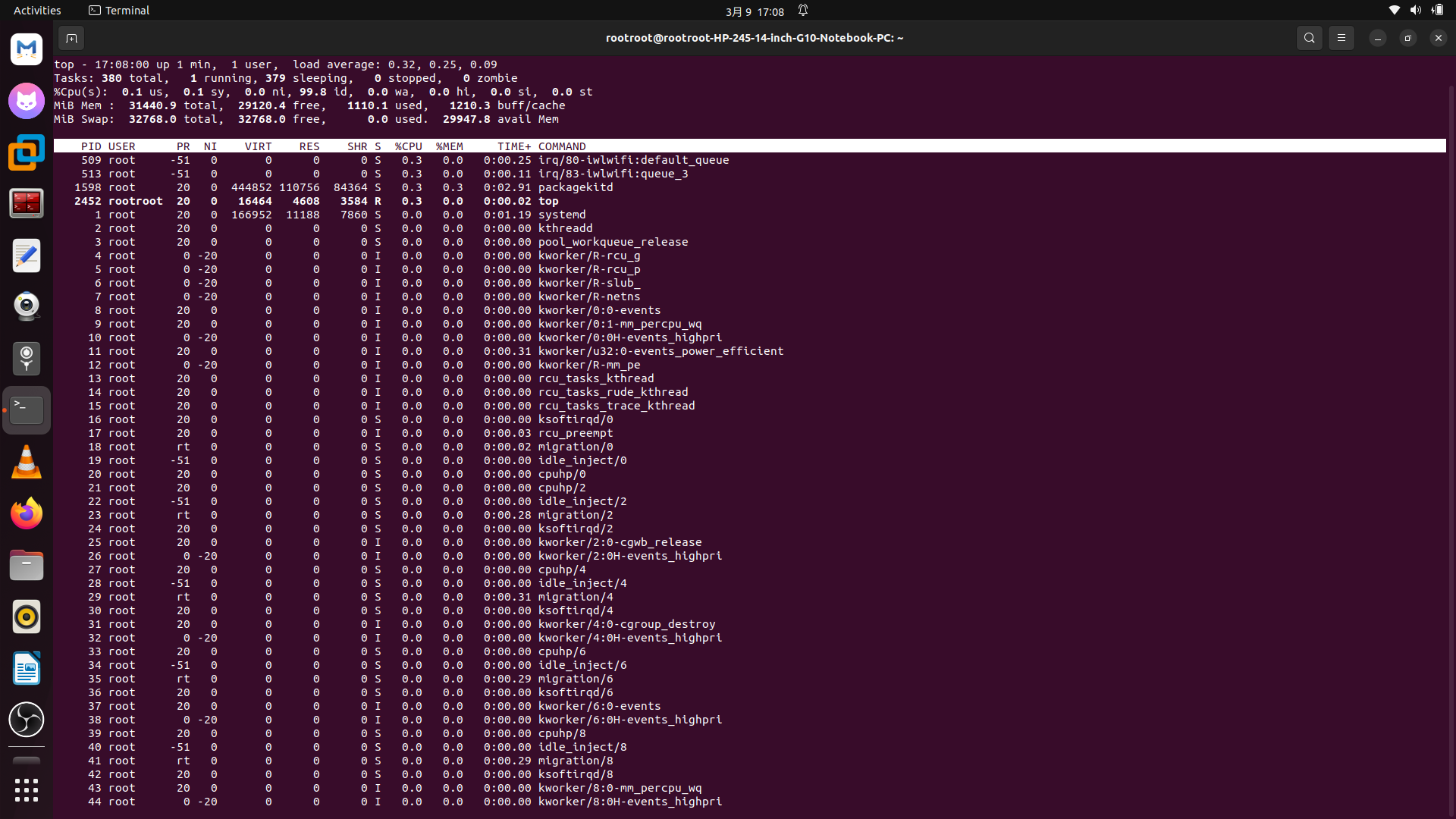
3、直接缓存不足。问DeepSeek,将默认2GB的swap交换分区更新为32GB的。
DeepSeek要求先关闭缓存swap交换分区,然后删除混存之后重建32GB的缓存swap文件即可!
rootroot@rootroot-HP-245-14-inch-G10-Notebook-PC:~/orig_RK3576+Android14$
rootroot@rootroot-HP-245-14-inch-G10-Notebook-PC:~/orig_RK3576+Android14$ source build/envsetup.sh
rootroot@rootroot-HP-245-14-inch-G10-Notebook-PC:~/orig_RK3576+Android14$ lunch
You're building on Linux
Lunch menu .. Here are the common combinations:
1. aosp_arm-eng
2. aosp_arm64-eng
3. aosp_x86-eng
4. aosp_x86_64-eng
5. rk3576_ebook-user
6. rk3576_ebook-userdebug
7. rk3576_u-user
8. rk3576_u-userdebug
Which would you like? [aosp_arm-eng]
Pick from common choices above (e.g. 13) or specify your own (e.g. aosp_barbet-eng): 8
Hint: next time you can simply run 'lunch rk3576_u-userdebug'
============================================
PLATFORM_VERSION_CODENAME=REL
PLATFORM_VERSION=14
PRODUCT_INCLUDE_TAGS=com.android.mainline
TARGET_PRODUCT=rk3576_u
TARGET_BUILD_VARIANT=userdebug
TARGET_ARCH=arm64
TARGET_ARCH_VARIANT=armv8-a
TARGET_CPU_VARIANT=generic
TARGET_2ND_ARCH=arm
TARGET_2ND_ARCH_VARIANT=armv8-a
TARGET_2ND_CPU_VARIANT=generic
HOST_OS=linux
HOST_OS_EXTRA=Linux-6.8.0-90-generic-x86_64-Ubuntu-22.04.5-LTS
HOST_CROSS_OS=windows
BUILD_ID=UQ1A.240205.004.B1
OUT_DIR=out
============================================
rootroot@rootroot-HP-245-14-inch-G10-Notebook-PC:~/orig_RK3576+Android14$ ll
total 168
drwx—— 36 rootroot rootroot 4096 3月 8 12:49 ./
drwxr-x— 33 rootroot rootroot 12288 3月 8 16:40 ../
-rwx—— 1 rootroot rootroot 1258 3月 8 11:44 1RK3576_Android14.0_SDK_RELEASE.tar.gz.md5sum.txt*
lrwxrwxrwx 1 rootroot rootroot 19 3月 8 12:44 Android.bp -> build/soong/root.bp
drwxrwxr-x 38 rootroot rootroot 4096 3月 8 12:44 art/
drwxrwxr-x 15 rootroot rootroot 4096 3月 8 12:44 bionic/
drwxrwxr-x 4 rootroot rootroot 4096 3月 8 12:44 bootable/
lrwxrwxrwx 1 rootroot rootroot 26 3月 8 12:44 bootstrap.bash -> build/soong/bootstrap.bash*
drwxrwxr-x 9 rootroot rootroot 4096 3月 8 12:44 build/
lrwxrwxrwx 1 rootroot rootroot 23 3月 8 12:44 BUILD -> build/bazel/bazel.BUILD
lrwxrwxrwx 1 rootroot rootroot 46 3月 8 12:44 build.sh -> device/rockchip/common/build/rockchip/build.sh*
lrwxrwxrwx 1 rootroot rootroot 33 3月 8 12:44 .classpath -> device/rockchip/common/.classpath*
lrwxrwxrwx 1 rootroot rootroot 46 3月 8 12:44 Copyright_Statement.pdf -> device/rockchip/common/Copyright_Statement.pdf*
drwxrwxr-x 14 rootroot rootroot 4096 3月 8 12:44 cts/
drwxrwxr-x 8 rootroot rootroot 4096 3月 8 12:44 dalvik/
drwxrwxr-x 5 rootroot rootroot 4096 3月 8 12:44 developers/
drwxrwxr-x 23 rootroot rootroot 4096 3月 8 12:44 development/
drwxrwxr-x 5 rootroot rootroot 4096 3月 8 12:44 device/
drwxrwxr-x 409 rootroot rootroot 12288 3月 8 12:44 external/
drwxrwxr-x 16 rootroot rootroot 4096 3月 8 12:45 frameworks/
drwxrwxr-x 20 rootroot rootroot 4096 3月 8 12:45 hardware/
lrwxrwxrwx 1 rootroot rootroot 33 3月 8 12:44 javaenv.sh -> device/rockchip/common/javaenv.sh
drwxrwxr-x 5 rootroot rootroot 4096 3月 8 12:45 kernel/
drwxrwxr-x 28 rootroot rootroot 4096 3月 8 12:57 kernel-6.1/
drwxrwxr-x 21 rootroot rootroot 4096 3月 8 12:45 libcore/
drwxrwxr-x 10 rootroot rootroot 4096 3月 8 12:45 libnativehelper/
drwxrwxr-x 10 rootroot rootroot 4096 3月 8 12:45 mkcombinedroot/
lrwxrwxrwx 1 rootroot rootroot 36 3月 8 12:44 mkimage_ab.sh -> device/rockchip/common/mkimage_ab.sh*
lrwxrwxrwx 1 rootroot rootroot 33 3月 8 12:44 mkimage.sh -> device/rockchip/common/mkimage.sh*
drwxrwxr-x 12 rootroot rootroot 4096 3月 8 16:43 out/
drwxrwxr-x 9 rootroot rootroot 4096 3月 8 12:45 packages/
drwxrwxr-x 6 rootroot rootroot 4096 3月 8 12:45 pdk/
drwxrwxr-x 11 rootroot rootroot 4096 3月 8 12:45 platform_testing/
drwxrwxr-x 32 rootroot rootroot 4096 3月 8 12:47 prebuilts/
drwxrwxr-x 7 rootroot rootroot 4096 7月 1 2024 .repo/
-r-xr-xr-x 1 rootroot rootroot 519 3月 8 12:45 restore_patches.sh*
drwxrwxr-x 10 rootroot rootroot 4096 3月 8 12:51 rkbin/
drwxrwxr-x 4 rootroot rootroot 4096 3月 8 12:44 RKDocs/
drwxrwxr-x 5 rootroot rootroot 4096 3月 8 12:47 rkst/
drwxrwxr-x 6 rootroot rootroot 4096 3月 8 12:44 RKTools/
drwxrwxr-x 21 rootroot rootroot 4096 3月 8 12:47 sdk/
drwxrwxr-x 48 rootroot rootroot 4096 3月 8 12:47 system/
drwxrwxr-x 12 rootroot rootroot 4096 3月 8 12:45 test/
drwxrwxr-x 4 rootroot rootroot 4096 3月 8 12:45 toolchain/
drwxrwxr-x 25 rootroot rootroot 4096 3月 8 12:45 tools/
drwxrwxr-x 28 rootroot rootroot 4096 3月 8 12:57 u-boot/
drwxrwxr-x 3 rootroot rootroot 4096 3月 8 12:45 vendor/
lrwxrwxrwx 1 rootroot rootroot 27 3月 8 12:44 WORKSPACE -> build/bazel/bazel.WORKSPACE
rootroot@rootroot-HP-245-14-inch-G10-Notebook-PC:~/orig_RK3576+Android14$ ./build.sh -UACKu
make: Leaving directory '/home/rootroot/orig_RK3576+Android14/kernel-6.1'
#### build completed successfully (21 seconds) ####
/home/rootroot/orig_RK3576+Android14
Build exteranl wifi driver ok!
Start build exteranl rvcam driver
make: Entering directory '/home/rootroot/orig_RK3576+Android14/kernel-6.1'
CLEAN /home/rootroot/orig_RK3576+Android14/hardware/rockchip/rvcam/drivers/Module.symvers
make: Leaving directory '/home/rootroot/orig_RK3576+Android14/kernel-6.1'
#### build completed successfully ####
/home/rootroot/orig_RK3576+Android14
make: Entering directory '/home/rootroot/orig_RK3576+Android14/kernel-6.1'
CC [M] /home/rootroot/orig_RK3576+Android14/hardware/rockchip/rvcam/drivers/vehicle-dummy/vehicle_dummy_hw.o
CC [M] /home/rootroot/orig_RK3576+Android14/hardware/rockchip/rvcam/drivers/vehicle-dummy/nanopb-c/pb_common.o
CC [M] /home/rootroot/orig_RK3576+Android14/hardware/rockchip/rvcam/drivers/vehicle-dummy/nanopb-c/pb_decode.o
CC [M] /home/rootroot/orig_RK3576+Android14/hardware/rockchip/rvcam/drivers/vehicle-dummy/nanopb-c/pb_encode.o
CC [M] /home/rootroot/orig_RK3576+Android14/hardware/rockchip/rvcam/drivers/vehicle-dummy/vehicle_core.o
CC [M] /home/rootroot/orig_RK3576+Android14/hardware/rockchip/rvcam/drivers/vehicle-dummy/vehicle_protocol_callback.o
CC [M] /home/rootroot/orig_RK3576+Android14/hardware/rockchip/rvcam/drivers/vehicle-dummy/vehiclehalproto.pb.o
LD [M] /home/rootroot/orig_RK3576+Android14/hardware/rockchip/rvcam/drivers/vehicle-dummy/vehicle-dummy-hw.o
LD [M] /home/rootroot/orig_RK3576+Android14/hardware/rockchip/rvcam/drivers/vehicle-dummy/vehicle-core.o
MODPOST /home/rootroot/orig_RK3576+Android14/hardware/rockchip/rvcam/drivers/Module.symvers
CC [M] /home/rootroot/orig_RK3576+Android14/hardware/rockchip/rvcam/drivers/vehicle-dummy/vehicle-core.mod.o
CC [M] /home/rootroot/orig_RK3576+Android14/hardware/rockchip/rvcam/drivers/vehicle-dummy/vehicle-dummy-hw.mod.o
LD [M] /home/rootroot/orig_RK3576+Android14/hardware/rockchip/rvcam/drivers/vehicle-dummy/vehicle-core.ko
LD [M] /home/rootroot/orig_RK3576+Android14/hardware/rockchip/rvcam/drivers/vehicle-dummy/vehicle-dummy-hw.ko
make: Leaving directory '/home/rootroot/orig_RK3576+Android14/kernel-6.1'
#### build completed successfully (2 seconds) ####
/home/rootroot/orig_RK3576+Android14
Build exteranl rvcam driver ok!
cp: cannot create regular file '/home/rootroot/orig_RK3576+Android14/out/target/product/rk3576_u/kernel': No such file or directory
package resoure.img with charger images
Pack ./tools/images/ & ../kernel-6.1/resource.img to resource.img …
Unpacking old image(../kernel-6.1/resource.img):
rk-kernel.dtb logo.bmp logo_kernel.bmp 3
Pack to resource.img successed!
Packed resources:
rk-kernel.dtb battery_1.bmp battery_2.bmp battery_3.bmp battery_4.bmp battery_5.bmp battery_fail.bmp logo.bmp logo_kernel.bmp battery_0.bmp 10
./resource.img with battery images is ready
/home/rootroot/orig_RK3576+Android14
start build android
============================================
PLATFORM_VERSION_CODENAME=REL
PLATFORM_VERSION=14
PRODUCT_INCLUDE_TAGS=com.android.mainline
TARGET_PRODUCT=rk3576_u
TARGET_BUILD_VARIANT=userdebug
TARGET_ARCH=arm64
TARGET_ARCH_VARIANT=armv8-a
TARGET_CPU_VARIANT=generic
TARGET_2ND_ARCH=arm
TARGET_2ND_ARCH_VARIANT=armv8-a
TARGET_2ND_CPU_VARIANT=generic
HOST_OS=linux
HOST_OS_EXTRA=Linux-6.8.0-90-generic-x86_64-Ubuntu-22.04.5-LTS
HOST_CROSS_OS=windows
BUILD_ID=UQ1A.240205.004.B1
OUT_DIR=out
============================================
16:50:42 Entire data directory removed.
16:50:42 Deleted images and staging directories.
#### build completed successfully (1 seconds) ####
============================================
PLATFORM_VERSION_CODENAME=REL
PLATFORM_VERSION=14
PRODUCT_INCLUDE_TAGS=com.android.mainline
TARGET_PRODUCT=rk3576_u
TARGET_BUILD_VARIANT=userdebug
TARGET_ARCH=arm64
TARGET_ARCH_VARIANT=armv8-a
TARGET_CPU_VARIANT=generic
TARGET_2ND_ARCH=arm
TARGET_2ND_ARCH_VARIANT=armv8-a
TARGET_2ND_CPU_VARIANT=generic
HOST_OS=linux
HOST_OS_EXTRA=Linux-6.8.0-90-generic-x86_64-Ubuntu-22.04.5-LTS
HOST_CROSS_OS=windows
BUILD_ID=UQ1A.240205.004.B1
OUT_DIR=out
============================================
[100% 1025/1025] analyzing Android.bp files and generating ninja file at out/soong/build.ninja
FAILED: out/soong/build.ninja
cd "$(dirname "out/host/linux-x86/bin/soong_build")" && BUILDER="$PWD/$(basename "out/host/linux-x86/bin/soong_build")" && cd / && env -i "$BUILDER" –top "$TOP" –soong_out "out/soong" –out "out" -o out/soong/build.ninja –bazel-mode –globListDir build –globFile out/soong/globs-build.ninja -t -l out/.module_paths/Android.bp.list –available_env out/soong/soong.environment.available –used_env out/soong/soong.environment.used.build Android.bp
audioflinger want to conditional Compile
devicefactory want to conditional Compile
hw_output_defaults want to conditional Compile
libaudioclient want to conditional Compile
libaudiohal want to conditional Compile
libeptz want to conditional Compile
libgralloc_priv want to conditional Compile
libmpimmz conditional Compile
libpq want to conditional Compile
librga want to conditional Compile
librkvt_win want to conditional Compile
librockx want to conditional Compile
pq_init want to conditional Compile
Rockchip conditional compile
rockit want to conditional Compile
cc_rockit_hw_service want to conditional Compile
tvinput want to conditional Compile
libpq enabled on RK3576
libpq enabled on RK3576
[hardware/rockchip/libgralloc/bifrost frameworks/native/include system/core/libsync system/core/libsync/include external/libdrm/include/drm] 34
platformVersion android "14"
libeptz disabled on RK3576
libeptz disabled on RK3576
libeptz disabled on RK3576
hw_output_defaults HwOutputDefaultsFactory
hw_output_defaults HwOutputDefaults
hw_output_defaults getCflags
BOARD_USES_HWC_PROXY_SERVICE ret:
hw_output_defaults getSharedLibs
0 -DRKAIQ_ENABLE_CAMGROUP
1 -DRKAIQ_ENABLE_FAKECAM
2 -DRKAIQ_HAVE_AWB_V32=1
3 -DRKAIQ_HAVE_AWB=1
4 -DRKAIQ_HAVE_GIC_V2=1
5 -DRKAIQ_HAVE_GIC=1
6 -DRKAIQ_HAVE_CAC_V11=1
7 -DRKAIQ_HAVE_CAC=1
8 -DRKAIQ_HAVE_CAC_V12=1
9 -DRKAIQ_HAVE_CAC=1
10 -DRKAIQ_HAVE_YNR_V24=1
11 -DRKAIQ_HAVE_YNR=1
12 -DRKAIQ_HAVE_CNR_V31=1
13 -DRKAIQ_HAVE_CNR=1
14 -DRKAIQ_HAVE_SHARP_V34=1
15 -DRKAIQ_HAVE_SHARP=1
16 -DRKAIQ_HAVE_BAYERTNR_V30=1
17 -DRKAIQ_HAVE_BAYERTNR=1
18 -DRKAIQ_HAVE_GAIN_V2=1
19 -DRKAIQ_HAVE_GAIN=1
20 -DRKAIQ_HAVE_BLC_V32=1
21 -DRKAIQ_HAVE_BLC=1
22 -DRKAIQ_HAVE_YUVME_V1=1
23 -DRKAIQ_HAVE_YUVME=1
24 -DRKAIQ_HAVE_PDAF=1
25 -DRKAIQ_HAVE_3DLUT_V1=1
26 -DRKAIQ_HAVE_3DLUT=1
27 -DRKAIQ_HAVE_CCM_V3=1
28 -DRKAIQ_HAVE_CCM=1
29 -DRKAIQ_HAVE_GAMMA_V11=1
30 -DRKAIQ_HAVE_GAMMA=1
31 -DRKAIQ_HAVE_MERGE_V12=1
32 -DRKAIQ_HAVE_MERGE=1
33 -DRKAIQ_HAVE_DRC_V20=1
34 -DRKAIQ_HAVE_DRC=1
35 -DRKAIQ_HAVE_DEHAZE_V14=1
36 -DRKAIQ_HAVE_DEHAZE=1
37 -DRKAIQ_HAVE_RGBIR_REMOSAIC_V10=1
38 -DRKAIQ_HAVE_RGBIR_REMOSAIC=1
39 -DRKAIQ_HAVE_WDR_V1=1
40 -DRKAIQ_HAVE_WDR=1
41 -DRKAIQ_HAVE_LDCH_V21=1
42 -DRKAIQ_HAVE_LDCH=1
43 -DRKAIQ_HAVE_CSM_V1=1
44 -DRKAIQ_HAVE_CSM=1
45 -DRKAIQ_HAVE_CGC_V1=1
46 -DRKAIQ_HAVE_CGC=1
47 -DRKAIQ_HAVE_AE_V1=1
48 -DRKAIQ_HAVE_AE=1
49 -DRKAIQ_HAVE_AFD_V2=1
50 -DRKAIQ_HAVE_AFD=1
51 -DRKAIQ_HAVE_DEBAYER_V3=1
52 -DRKAIQ_HAVE_DEBAYER=1
53 -DRKAIQ_HAVE_LSC_V3=1
54 -DRKAIQ_HAVE_LSC=1
55 -DRKAIQ_HAVE_DPCC_V2=1
56 -DRKAIQ_HAVE_DPCC=1
57 -DRKAIQ_HAVE_ACP_V10=1
58 -DRKAIQ_HAVE_ACP=1
59 -DRKAIQ_HAVE_AIE_V10=1
60 -DRKAIQ_HAVE_AIE=1
61 -DRKAIQ_HAVE_AF=1
62 -DRKAIQ_HAVE_AF_V33=1
cflags size: 63
>>>>>>>>>>>>>>>>>>>>> rk3576
platformVersion android "14"
tvinput_defaults pqInitDefaults
[] 34
pq_init_defaults pqInitDefaults
librockx disabled on RK3576
librockx disabled on RK3576
librockx disabled on RK3576
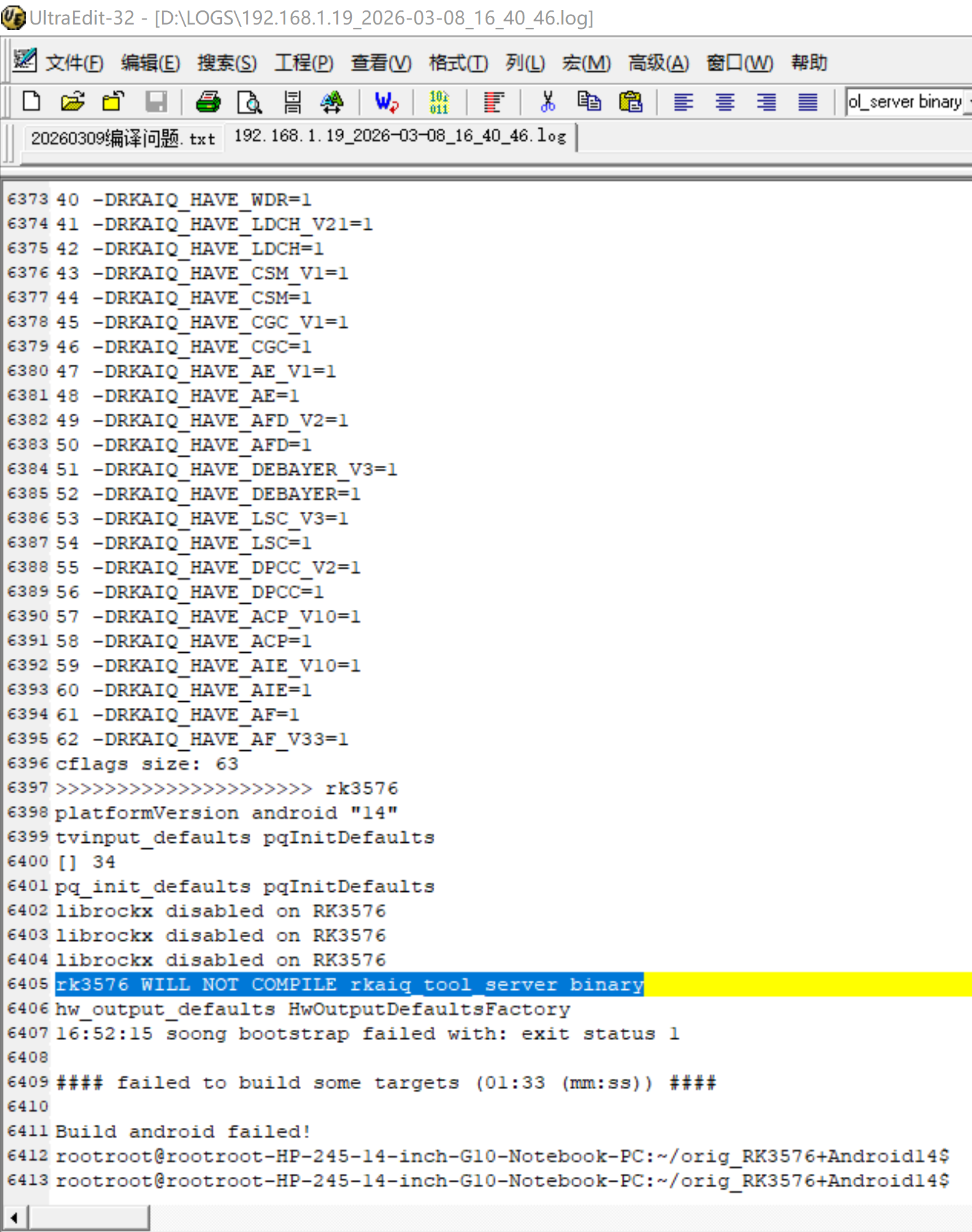
rk3576 WILL NOT COMPILE rkaiq_tool_server binary
hw_output_defaults HwOutputDefaultsFactory
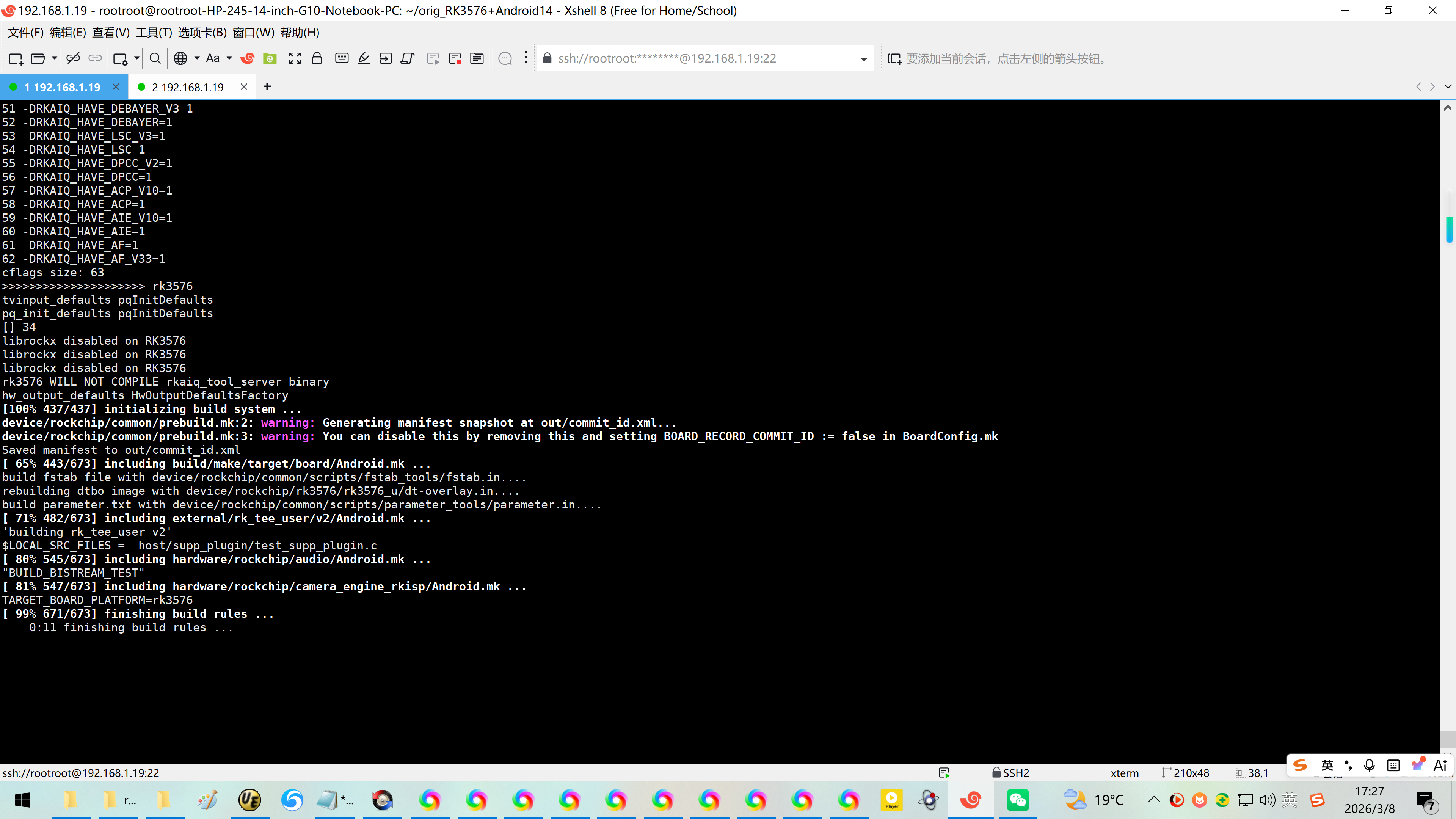
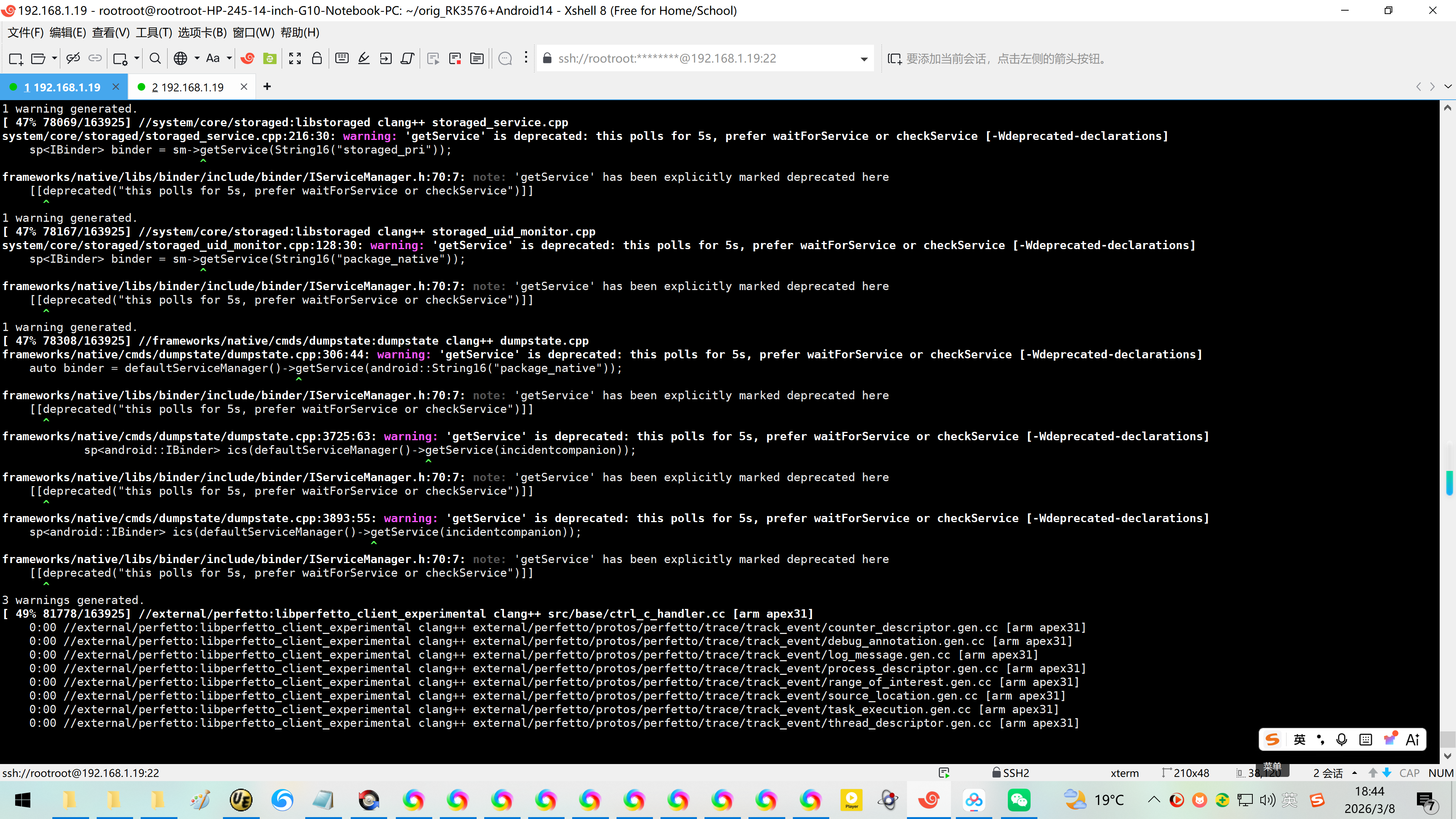
16:52:15 soong bootstrap failed with: exit status 1
#### failed to build some targets (01:33 (mm:ss)) ####
Build android failed!
rootroot@rootroot-HP-245-14-inch-G10-Notebook-PC:~/orig_RK3576+Android14$
rootroot@rootroot-HP-245-14-inch-G10-Notebook-PC:~/orig_RK3576+Android14$
1、出问题的几个方向:32GB内存低,编译Android14异常。
笔记本电脑升级大内存意义不大,最近内存几倍涨价了!不过公司也是使用32GB的内存!
2、根据出错信息,[] 34。尝试关闭34 -DRKAIQ_HAVE_DRC=1
问DeepSeek没有找到地方。
3、直接缓存不足。问DeepSeek,将默认2GB的swap交换分区更新为32GB的。
DeepSeek要求先关闭缓存swap交换分区,然后删除混存之后重建32GB的缓存swap文件即可!
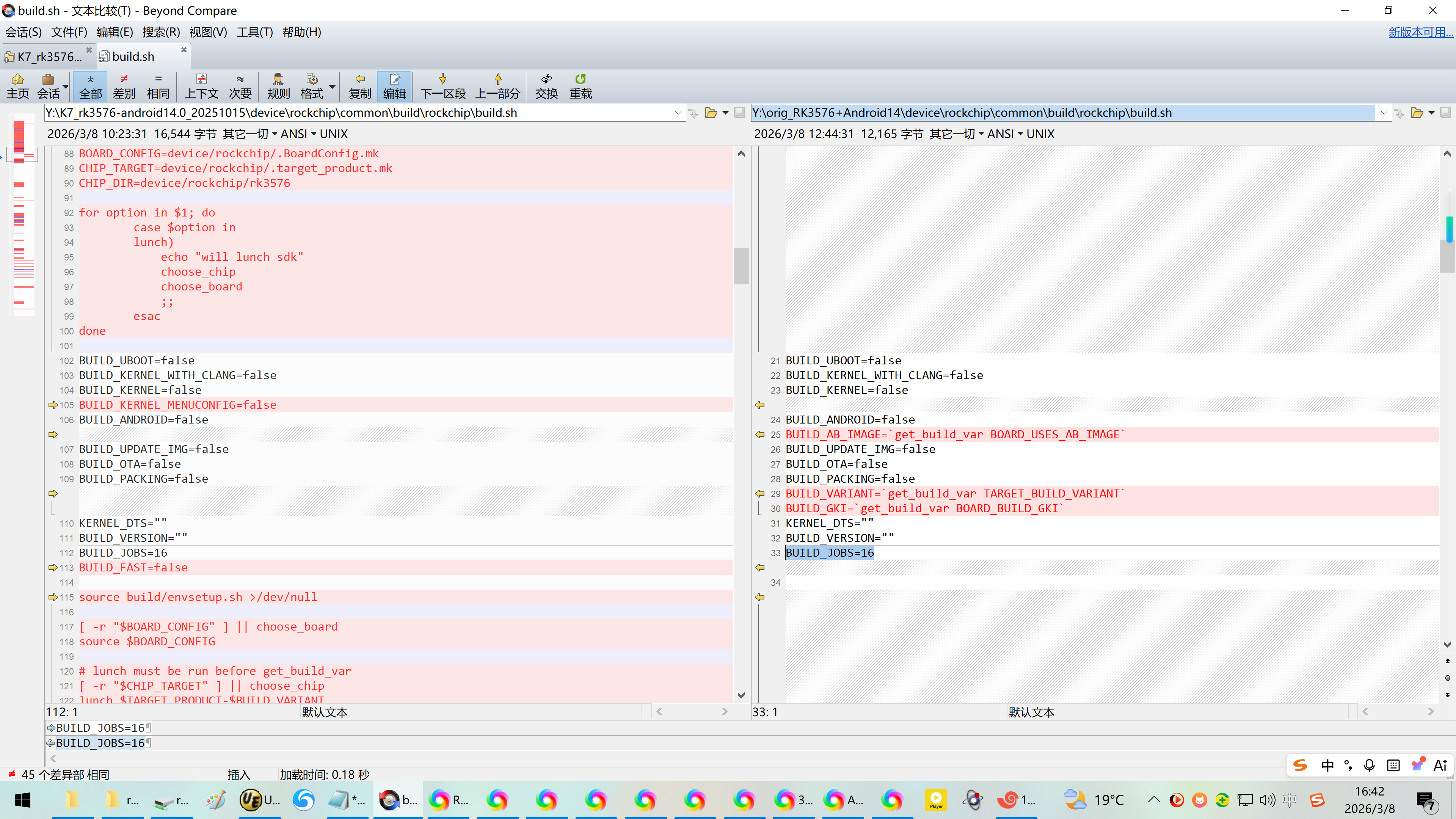
4、我电脑为AMD是8核心的,限制8线程编译也有可能有关系!
Y:\\orig_RK3576+Android14\\device\\rockchip\\common\\build\\rockchip\\build.sh
KERNEL_DTS=""
BUILD_VERSION=""
#BUILD_JOBS=16
BUILD_JOBS=8
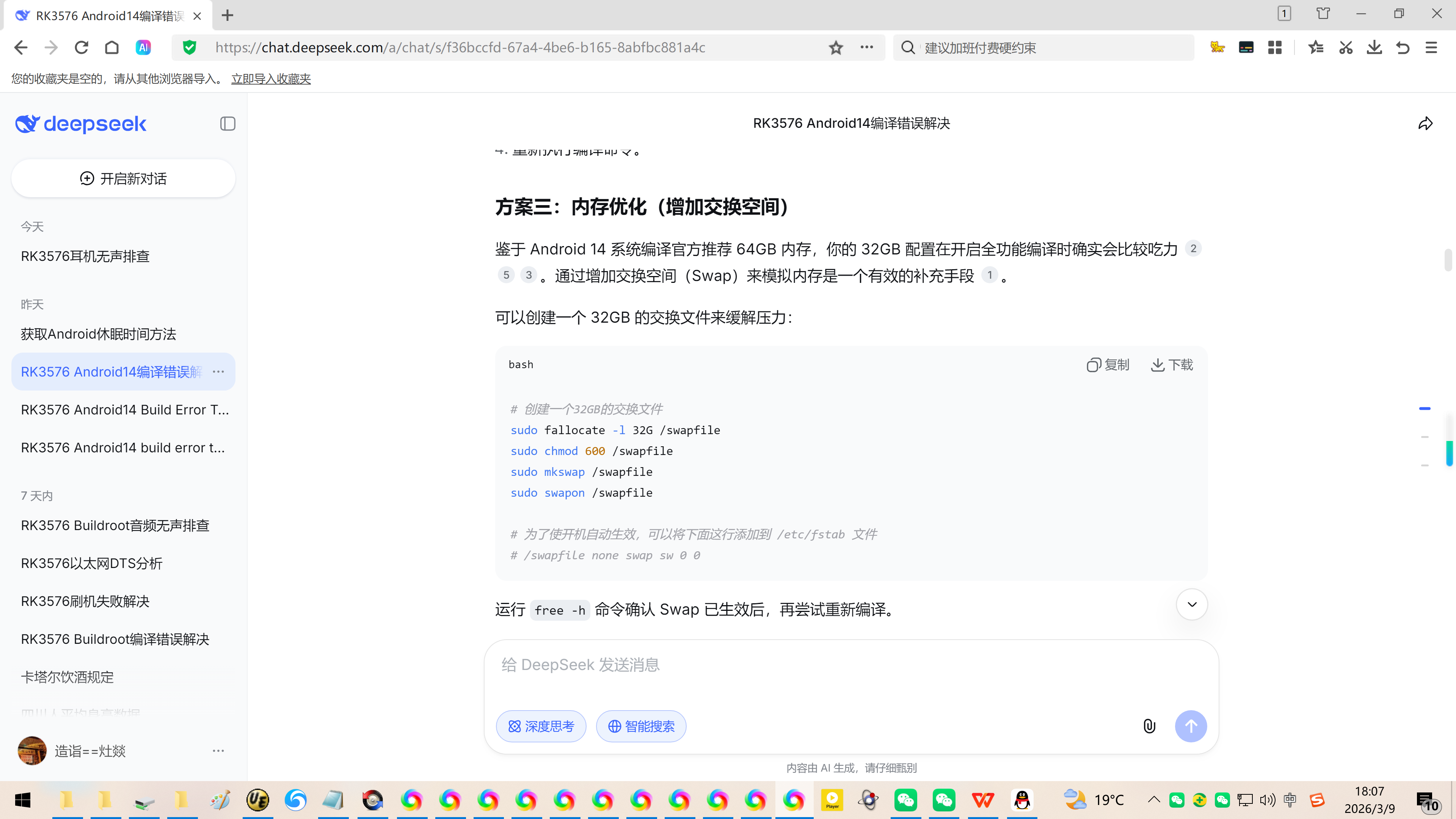
方案三:内存优化(增加交换空间)
鉴于 Android 14 系统编译官方推荐 64GB 内存,你的 32GB 配置在开启全功能编译时确实会比较吃力 。通过增加交换空间(Swap)来模拟内存是一个有效的补充手段 。
可以创建一个 32GB 的交换文件来缓解压力:
bash
# 创建一个32GB的交换文件
sudo fallocate -l 32G /swapfile
sudo chmod 600 /swapfile
sudo mkswap /swapfile
sudo swapon /swapfile
# 为了使开机自动生效,可以将下面这行添加到 /etc/fstab 文件
# /swapfile none swap sw 0 0
运行 free -h 命令确认 Swap 已生效后,再尝试重新编译。
【以这个为准!】
你目前有一个 2GB 的 swapfile,对于 Android 14 编译来说确实偏小。可以将其增大到 32GB(或你需要的任意大小)。下面是具体步骤,假设你的 swapfile 位于根目录 /swapfile(请根据实际路径调整)。
一、查看当前 swap 使用情况
首先确认 swap 是否正在使用:
bash
sudo swapon –show
如果输出显示 /swapfile 正在使用,且你希望安全地增大它,需要先关闭当前 swap。
二、关闭当前 swap
bash
sudo swapoff /swapfile
如果提示 swapoff failed: Cannot allocate memory,说明物理内存已用满,无法关闭。此时可以:
先释放一些内存(如关闭不必要的程序)
或者直接删除旧 swapfile 并立即创建新的(风险稍大,但通常可行)
三、删除旧 swapfile(可选)
如果确认 swap 已关闭,可以删除旧文件:
bash
sudo rm /swapfile
或者你也可以直接覆盖它(如果不需要保留原内容)。
四、创建新的更大的 swapfile
例如创建一个 32GB 的 swapfile:
bash
# 使用 fallocate(更快)
sudo fallocate -l 32G /swapfile
# 如果 fallocate 不支持,可以用 dd(较慢)
# sudo dd if=/dev/zero of=/swapfile bs=1M count=32768 status=progress
五、设置正确权限
bash
sudo chmod 600 /swapfile
六、格式化为 swap 格式
bash
sudo mkswap /swapfile
七、重新启用 swap
bash
sudo swapon /swapfile
八、验证
bash
sudo swapon –show
free -h
应该能看到新的 32GB swap 已生效。
九、永久生效(修改 /etc/fstab)
确保系统启动时自动挂载新的 swapfile。检查 /etc/fstab 中是否已有 /swapfile 的条目,如果没有或路径不对,请添加:
bash
echo '/swapfile none swap sw 0 0' | sudo tee -a /etc/fstab
如果已有旧条目,可以编辑 /etc/fstab 替换为正确路径。