先赞后看,养成习惯!!! ^ _ ^ ❤️ ❤️ ❤️ 码字不易,大家的支持就是我坚持下去的动力,点赞后不要忘记关注我哦
个人主页:伯明翰java 文章专栏:数据库 如有错误,请您指正批评 ^ _ ^
Update修改
语法;
UPDATE [LOW_PRIORITY] [IGNORE] table_reference
SET assignment [, assignment] ...
[WHERE where_condition]
[ORDER BY ...]
[LIMIT row_count]
- 对符合条件的结果进⾏列值更新 示例
mysql> select * from exam where name = '孙悟空';
+—-+——–+———+——+———+
| id | name | chinese | math | english |
+—-+——–+———+——+———+
| 2 | 孙悟空 | 87 | 78 | 77 |
+—-+——–+———+——+———+
1 row in set (0.00 sec)
#更新操作
mysql> update exam set math = 80 where name = '孙悟空';
Query OK, 1 row affected (0.01 sec)
Rows matched: 1 Changed: 1 Warnings: 0
#查看结果,数学成绩更新成功
mysql> select * from exam where name = '孙悟空';
+—-+——–+———+——+———+
| id | name | chinese | math | english |
+—-+——–+———+——+———+
| 2 | 孙悟空 | 87 | 80 | 77 |
+—-+——–+———+——+———+
1 row in set (0.00 sec)
Update注意事项
- 以原值的基础上做变更时,不能使⽤math+=30这样的语法
- 不加where条件时,会导致全表数据被列新,谨慎操作
Delete删除
语法
DELETE FROM tbl_name [WHERE where_condition] [ORDER BY ...] [LIMIT row_count]
示例 删除孙悟空同学的考试成绩
查看原始数据
mysql> select * from exam where name = '孙悟空';
+—-+——–+———+——+———+
| id | name | chinese | math | english |
+—-+——–+———+——+———+
| 2 | 孙悟空 | 174 | 80 | 77 |
+—-+——–+———+——+———+
1 row in set (0.00 sec)
#删除操作
mysql> delete from exam where name = '孙悟空';
Query OK, 1 row affected (0.01 sec)
#查看结果
mysql> select * from exam where name = '孙悟空';
Empty set (0.00 sec)
Delete注意事项
- 执⾏Delete时不加条件会删除整张表的数据,谨慎操作 #截断表 语法 TRUNCATE [TABLE] tbl_name ⽰例
#准备测试表
mysql> CREATE TABLE t_truncate (
id INT PRIMARY KEY AUTO_INCREMENT,
name VARCHAR(20)
);
Query OK, 0 rows affected (0.16 sec)
#插⼊测试数据
mysql> INSERT INTO t_truncate (name) VALUES ('A'), ('B'), ('C');
Query OK, 3 rows affected (1.05 sec)
Records: 3 Duplicates: 0 Warnings: 0
查看测试表
mysql> select * from t_truncate;
+—-+——+
| id | name |
+—-+——+
| 1 | D |
+—-+——+
1 row in set (0.00 sec)
#再次查看表结构,AUTO_INCREMENT=2
mysql> show create table t_truncate\\G
*************************** 1. row ***************************
Table: t_truncate
Create Table: CREATE TABLE `t_truncate` (
`id` int NOT NULL AUTO_INCREMENT,
`name` varchar(20) CHARACTER SET gbk DEFAULT NULL,
PRIMARY KEY (`id`)
) ENGINE=InnoDB AUTO_INCREMENT=2 DEFAULT CHARSET=utf8mb4
COLLATE=utf8mb4_0900_ai_ci
1 row in set (0.00 sec)
Truncate注意事项
- 只能对整表操作,不能像DELETE⼀样针对部分数据
- 不对数据操作所以⽐DELETE更快,TRUNCATE在删除数据的时候,不经过真正的事物,所以⽆法 回滚
- 会重置AUTO_INCREMENT项
聚合函数
常用聚合函数
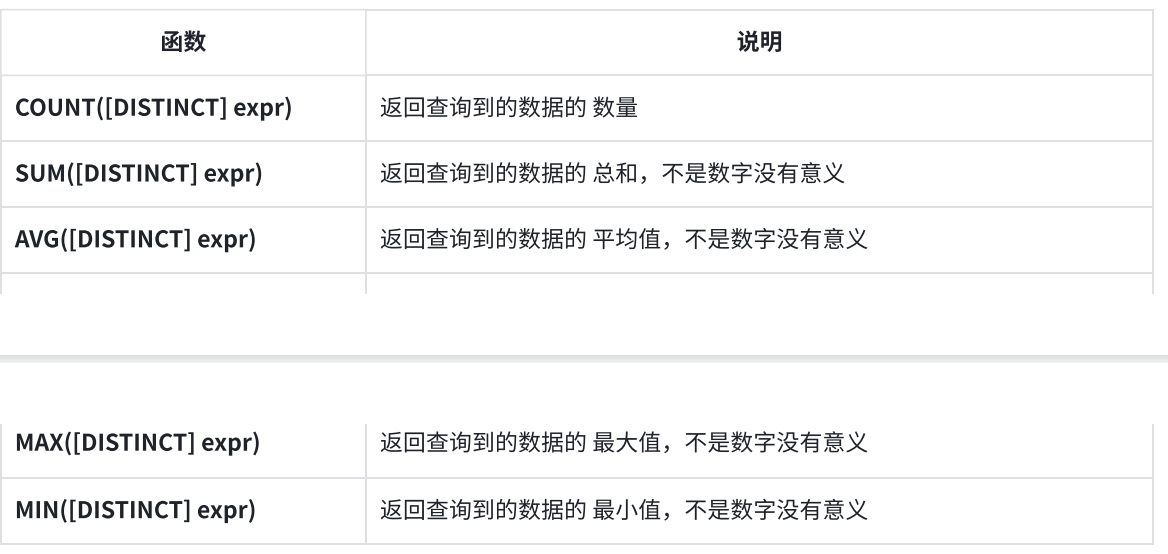
COUTN
统计exam表中有多少记录
使⽤ * 做统计
mysql> select count(*) from exam;
+———-+
| count(*) |
+———-+
| 7 |
+———-+
1 row in set (0.00 sec)
#使⽤常量做统计
mysql> select count(1) from exam;
+———-+
| count(1) |
+———-+
| 7 |
+———-+
1 row in set (0.00 sec)
SUM
统计所有学⽣数学成绩总分
mysql> select sum(math) from exam;
+———–+
| sum(math) |
+———–+
| 569 |
+———–+
1 row in set (0.01 sec)
AVG
统计英语成绩的平均分
NULL值不参与统计
mysql> select avg(english) from exam;
+————–+
| avg(english) |
+————–+
| 61 |
+————–+
1 row in set (0.00 sec)
MAX
查询英语最⾼分
mysql> select max(english) from exam;
+————–+
| max(english) |
+————–+
| 90 |
+————–+
1 row in set (0.00 sec)
MIN
查询>70分以上的数学最低分
mysql> select min(math) from exam where math > 70;
+———–+
| min(math) |
+———–+
| 73 |
+———–+
1 row in set (0.00 sec)
Groupby分组查询
GROUPBY⼦句的作⽤是通过⼀定的规则将⼀个数据集划分成若⼲个⼩的分组,然后针对若⼲个 分组进⾏数据处理,⽐如使⽤聚合函数对分组进⾏统计。 语法
SELECT {col_name | expr} ,... ,aggregate_function (aggregate_expr)
FROM table_references
GROUP BY {col_name | expr}, ...
[HAVING where_condition]
- col_name|expr:要查询的列或表达式,可以有多个,必须在 GROUP BY ⼦句中作为分组的依 据
- aggregate_function:聚合函数,⽐如COUNT(),SUM(),AVG(),MAX(),MIN()
- aggregate_expr:聚合函数传⼊的列或表达式,如果列或表达式不在 GOURP BY ⼦句中,必须 包含中聚合函数中 示例 备测试表及数据职员表emp,列分别为:id(编号),name(姓名),role(⻆⾊),salary(薪⽔)
drop table if exists emp;
create table emp (
id bigint primary key auto_increment,
name varchar(20) not null,
role varchar(20) not null,
salary decimal(10, 2) not null
);
insert into emp values (1, '⻢云', '⽼板', 1500000.00);
insert into emp values (2, '⻢化腾', '⽼板', 1800000.00);
insert into emp values (3, '鑫哥', '讲师', 10000.00);
insert into emp values (4, '博哥', '讲师', 12000.00);
insert into emp values (5, '平姐', '学管', 9000.00);
insert into emp values (6, '莹姐', '学管', 8000.00);
insert into emp values (7, '孙悟空', '游戏⻆⾊', 956.8);
insert into emp values (8, '猪悟能', '游戏⻆⾊', 700.5);
insert into emp values (9, '沙和尚', '游戏⻆⾊', 333.3);
select * from emp;
统计每个⻆⾊的⼈数
mysql> select role, count(*) from emp group by role;
+———-+———-+
| role | count(*) |
+———-+———-+
| ⽼板 | 2 |
| 讲师 | 2 |
| 学管 | 2 |
| 游戏⻆⾊ | 3 |
+———-+———-+
4 rows in set (0.00 sec)
having⼦句
使⽤GROUPBY对结果进⾏分组处理之后,对分组的结果进⾏过滤时,不能使⽤ WHERE ⼦句,⽽要 使⽤ HAVING ⼦句
- 显⽰平均⼯资低于1500的⻆⾊和它的平均⼯资
mysql> select role, avg(salary) from emp group by role having avg(salary) <
1500;
+———-+————-+
| role | avg(salary) |
+———-+————-+
| 游戏⻆⾊ | 663.533333 |
+———-+————-+
1 row in set (0.00 sec)
Having与Where的区别
- Having⽤于对分组结果的条件过滤
- Where⽤于对表中真实数据的条件过滤