文章目录
- 简介
- 安装
-
- Windows
- Linux
- 列出系统中的硬盘
- 查看硬盘基本信息
- 查看硬盘所有信息
- 检查硬盘健康状态
- 查看详细属性
- 硬盘自检
-
- 查看支持哪些测试
- 短自检
- 长自检
- 查看测试结果
- 后台自动监控
- 参考文献
简介
smartmontools 包含两个程序 smartctl 和 smartd,用于控制和监控存储系统:
- 检查硬盘(HDD/SSD)的健康状态
- 预测硬盘故障风险
- 执行硬盘自检(如短/长测试)
- 查看温度、通电时间、坏扇区等关键指标
SMART 指的是 Self-Monitoring, Analysis and Reporting Technology System
pySMART 是 smartctl 的 Python 封装,兼容 Linux 和 Windows
建议使用管理员权限运行
安装
pip install pySMART
Windows
下载 smartmontools 或从 releases 下载
Linux
apt-get install smartmontools
yum install smartmontools
列出系统中的硬盘
lsblk
NAME MAJ:MIN RM SIZE RO TYPE MOUNTPOINT
sda 8:0 0 256G 0 disk
sdb 8:16 0 256G 0 disk /
或
smartctl –scan
/dev/sda -d ata # /dev/sda, ATA device
/dev/sdb -d ata # /dev/sdb, ATA device
/dev/sdc -d nvme # /dev/sdc, NVMe device
/dev/sdd -d scsi # /dev/sdd, SCSI device
from pySMART import DeviceList
device_list = DeviceList()
devices = device_list.devices
print(devices)
# [<ATA device on /dev/sda mod:ST4000VX000-1F4168 sn:Z302B410>,
# <ATA device on /dev/sdb mod:ST8000NM0055-1RM112 sn:ZA1F6NQX>,
# <NVME device on /dev/sdc mod:Samsung SSD 970 EVO 500GB sn:S466NX0M733342K>]
查看硬盘基本信息
smartctl -i /dev/sda
=== START OF INFORMATION SECTION ===
Model Family: Seagate Surveillance # 硬盘系列
Device Model: ST4000VX000-1F4168 # 具体型号
Serial Number: Z302B410 # 序列号
LU WWN Device Id: 5 000c50 0793e2e21 # 逻辑单元全球名称
Firmware Version: CV12 # 固件版本号
User Capacity: 4,015,189,831,680 bytes [4.01 TB] # 可用容量
Sector Sizes: 512 bytes logical, 4096 bytes physical # 逻辑扇区大小512字节,物理扇区大小4096字节(4KB)
Rotation Rate: 5900 rpm # 转速
Form Factor: 3.5 inches # 外形规格
Device is: In smartctl database #
ATA Version is: ACS-2, ACS-3 T13/2161-D revision 3b # 支持的ATA标准版本
SATA Version is: SATA 3.1, 6.0 Gb/s (current: 6.0 Gb/s) # SATA接口版本及传输速率
Local Time is: Tue Jan 27 12:05:24 2026 # 系统本地时间
SMART support is: Available – device has SMART capability. # 具备SMART监测功能
SMART support is: Enabled # 已启用SMART功能
from pySMART import Device
device = Device('/dev/sda')
device.all_attributes()
# ID# ATTRIBUTE_NAME CUR WST THR TYPE UPDATED WHEN_FAIL RAW
# 1 Raw_Read_Error_Rate 113 92 6 Pre-fail Always – 55785344
# 3 Spin_Up_Time 091 91 0 Pre-fail Always – 0
# 4 Start_Stop_Count 037 37 20 Old_age Always – 65535
# 5 Reallocated_Sector_Ct 100 100 10 Pre-fail Always – 0
# 7 Seek_Error_Rate 088 60 30 Pre-fail Always – 713434302
# 9 Power_On_Hours 064 64 0 Old_age Always – 31980
# 10 Spin_Retry_Count 100 100 97 Pre-fail Always – 0
# 12 Power_Cycle_Count 087 37 20 Old_age Always – 13611
# 184 End-to-End_Error 100 100 99 Old_age Always – 0
# 187 Reported_Uncorrect 001 1 0 Old_age Always – 348
# 188 Command_Timeout 100 99 0 Old_age Always – 8590065666
# 189 High_Fly_Writes 100 100 0 Old_age Always – 0
# 190 Airflow_Temperature_Cel 064 45 45 Old_age Always In_the_past 36 (Min/Max 27/36)
# 191 G-Sense_Error_Rate 100 100 0 Old_age Always – 0
# 192 Power-Off_Retract_Count 029 29 0 Old_age Always – 143207
# 193 Load_Cycle_Count 024 24 0 Old_age Always – 152378
# 194 Temperature_Celsius 036 55 0 Old_age Always – 36 (0 12 0 0 0)
# 197 Current_Pending_Sector 100 100 0 Old_age Always – 96
# 198 Offline_Uncorrectable 100 100 0 Old_age Offline – 96
# 199 UDMA_CRC_Error_Count 200 200 0 Old_age Always – 0
查看硬盘所有信息
smartctl -a /dev/pd0
或
smartctl -a /dev/sda
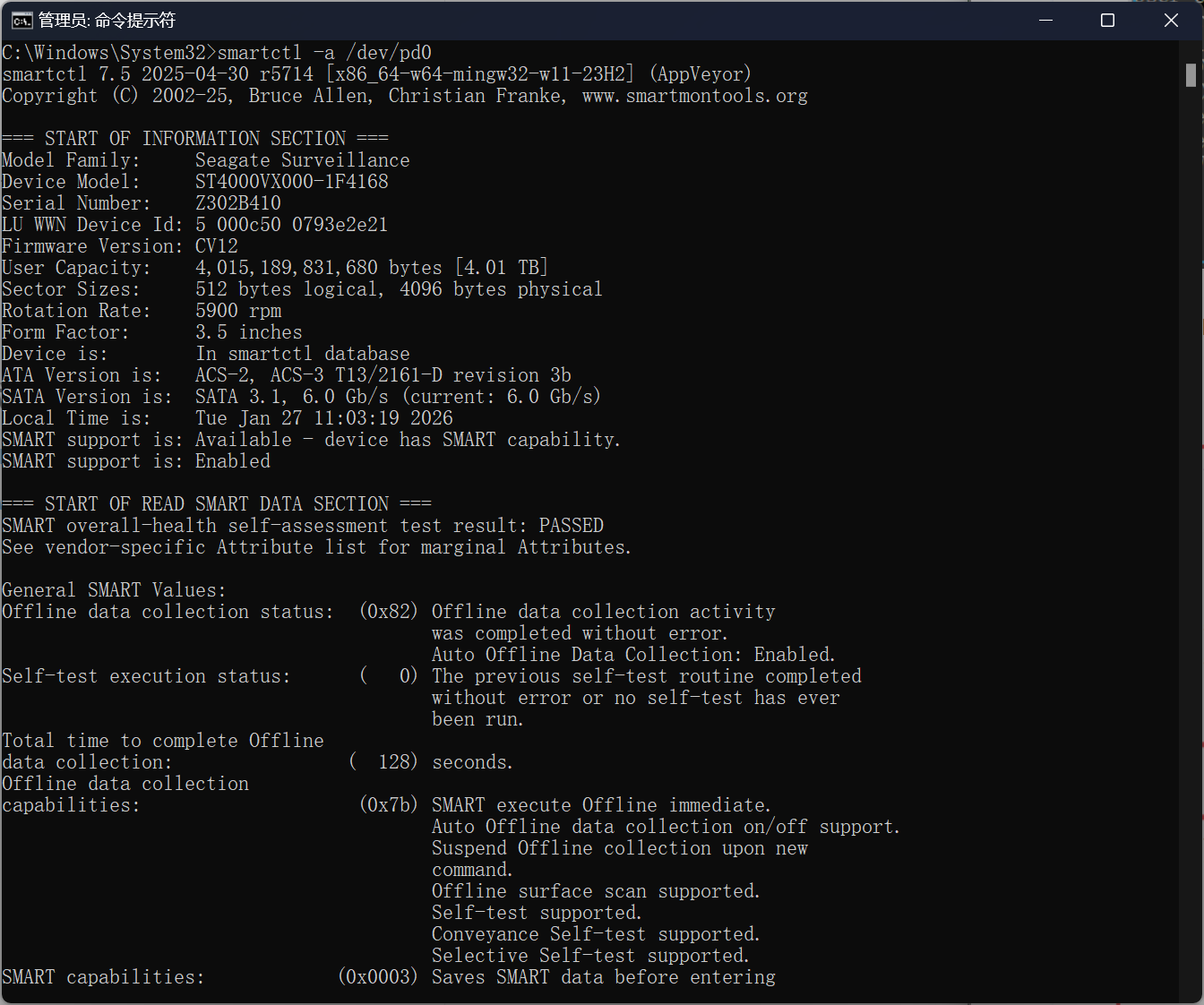
from pySMART import Device
sda = Device('/dev/sda')
print(sda)
# <ATA device on /dev/sda mod:ST4000VX000-1F4168 sn:Z302B410>
检查硬盘健康状态
smartctl -H /dev/sda
=== START OF READ SMART DATA SECTION ===
SMART overall-health self-assessment test result: PASSED
Please note the following marginal Attributes:
ID# ATTRIBUTE_NAME FLAG VALUE WORST THRESH TYPE UPDATED WHEN_FAILED RAW_VALUE
190 Airflow_Temperature_Cel 0x0022 063 045 045 Old_age Always In_the_past 37 (Min/Max 20/37)
查看详细属性
smartctl -A /dev/sda
=== START OF READ SMART DATA SECTION ===
SMART Attributes Data Structure revision number: 10
Vendor Specific SMART Attributes with Thresholds:
ID# ATTRIBUTE_NAME FLAG VALUE WORST THRESH TYPE UPDATED WHEN_FAILED RAW_VALUE
1 Raw_Read_Error_Rate 0x000f 108 092 006 Pre-fail Always – 16945048
3 Spin_Up_Time 0x0003 091 091 000 Pre-fail Always – 0
4 Start_Stop_Count 0x0032 037 037 020 Old_age Always – 65535
5 Reallocated_Sector_Ct 0x0033 100 100 010 Pre-fail Always – 0
7 Seek_Error_Rate 0x000f 088 060 030 Pre-fail Always – 713392046
9 Power_On_Hours 0x0032 064 064 000 Old_age Always – 31977
10 Spin_Retry_Count 0x0013 100 100 097 Pre-fail Always – 0
12 Power_Cycle_Count 0x0032 087 037 020 Old_age Always – 13610
184 End-to-End_Error 0x0032 100 100 099 Old_age Always – 0
187 Reported_Uncorrect 0x0032 001 001 000 Old_age Always – 348
188 Command_Timeout 0x0032 100 099 000 Old_age Always – 8590065666
189 High_Fly_Writes 0x003a 100 100 000 Old_age Always – 0
190 Airflow_Temperature_Cel 0x0022 063 045 045 Old_age Always In_the_past 37 (Min/Max 20/37)
191 G-Sense_Error_Rate 0x0032 100 100 000 Old_age Always – 0
192 Power-Off_Retract_Count 0x0032 029 029 000 Old_age Always – 143207
193 Load_Cycle_Count 0x0032 024 024 000 Old_age Always – 152355
194 Temperature_Celsius 0x0022 037 055 000 Old_age Always – 37 (0 12 0 0 0)
197 Current_Pending_Sector 0x0012 100 100 000 Old_age Always – 96
198 Offline_Uncorrectable 0x0010 100 100 000 Old_age Offline – 96
199 UDMA_CRC_Error_Count 0x003e 200 200 000 Old_age Always – 0
Reallocated_Sector_Ct(ID 5):坏道重映射数量 Current_Pending_Sector(ID 197):待处理坏扇区 Temperature(ID 194):温度是否过高
硬盘自检
查看支持哪些测试
smartctl -c /dev/sda
=== START OF READ SMART DATA SECTION ===
General SMART Values:
Offline data collection status: (0x82) Offline data collection activity
was completed without error.
Auto Offline Data Collection: Enabled.
Self-test execution status: ( 0) The previous self-test routine completed
without error or no self-test has ever
been run.
Total time to complete Offline
data collection: ( 128) seconds.
Offline data collection
capabilities: (0x7b) SMART execute Offline immediate.
Auto Offline data collection on/off support.
Suspend Offline collection upon new
command.
Offline surface scan supported.
Self-test supported.
Conveyance Self-test supported.
Selective Self-test supported.
SMART capabilities: (0x0003) Saves SMART data before entering
power-saving mode.
Supports SMART auto save timer.
Error logging capability: (0x01) Error logging supported.
General Purpose Logging supported.
Short self-test routine
recommended polling time: ( 1) minutes.
Extended self-test routine
recommended polling time: ( 527) minutes.
Conveyance self-test routine
recommended polling time: ( 2) minutes.
SCT capabilities: (0x10b9) SCT Status supported.
SCT Error Recovery Control supported.
SCT Feature Control supported.
SCT Data Table supported.
短自检
1-2 分钟
smartctl -t short /dev/sda
长自检
几十分钟到几小时
smartctl -t long /dev/sda
查看测试结果
smartctl -l selftest /dev/sda
=== START OF READ SMART DATA SECTION ===
SMART Self-test log structure revision number 1
Num Test_Description Status Remaining LifeTime(hours) LBA_of_first_error
# 1 Short offline Completed without error 00% 31977 –
后台自动监控
使用 smartd