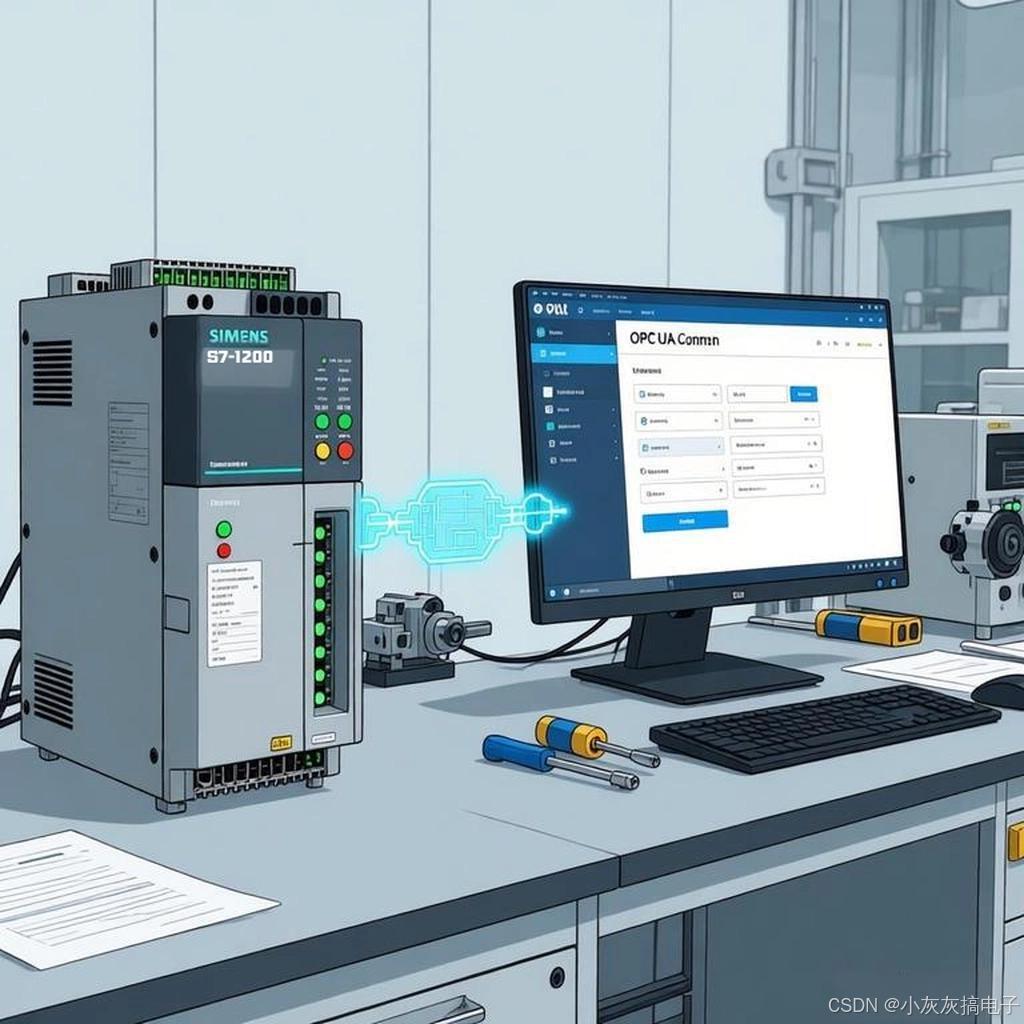
西门子1200与Qt使用OPC UA通信详细教程
- 一、效果展示
- 二、1200设置
-
- 1、新建工程
- 2、启动OPC UA服务器
- 3、设置OPC UA 运行许可证
- 4、S7-1200 OPC UA 服务器接口设置
- 5、S7-1200程序下载并在线赋值
- 三、QT源码分享
-
- 1、OPC通信库编译及安装
- 2、main.c
- 3、mainWindow.h
- 4、mainWindow.c
- 5、完整工程下载
- 四、OPC UA通信详解
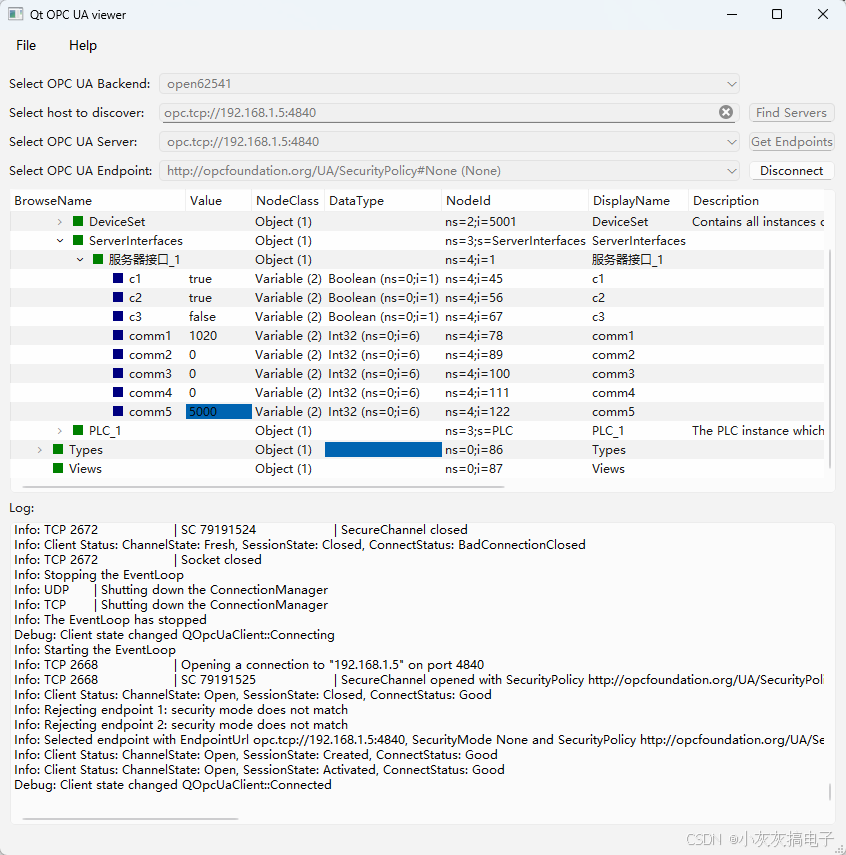
一、效果展示
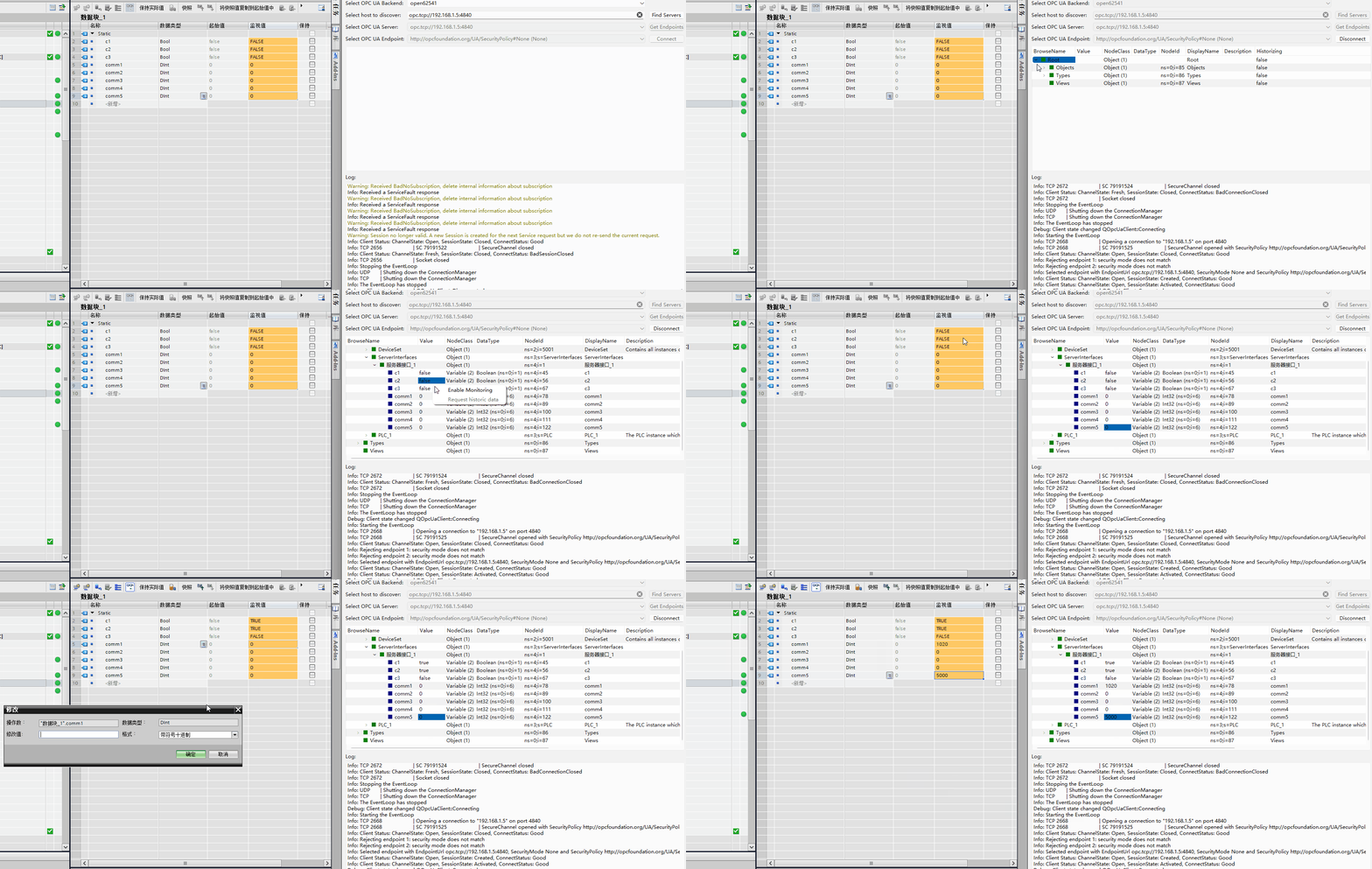
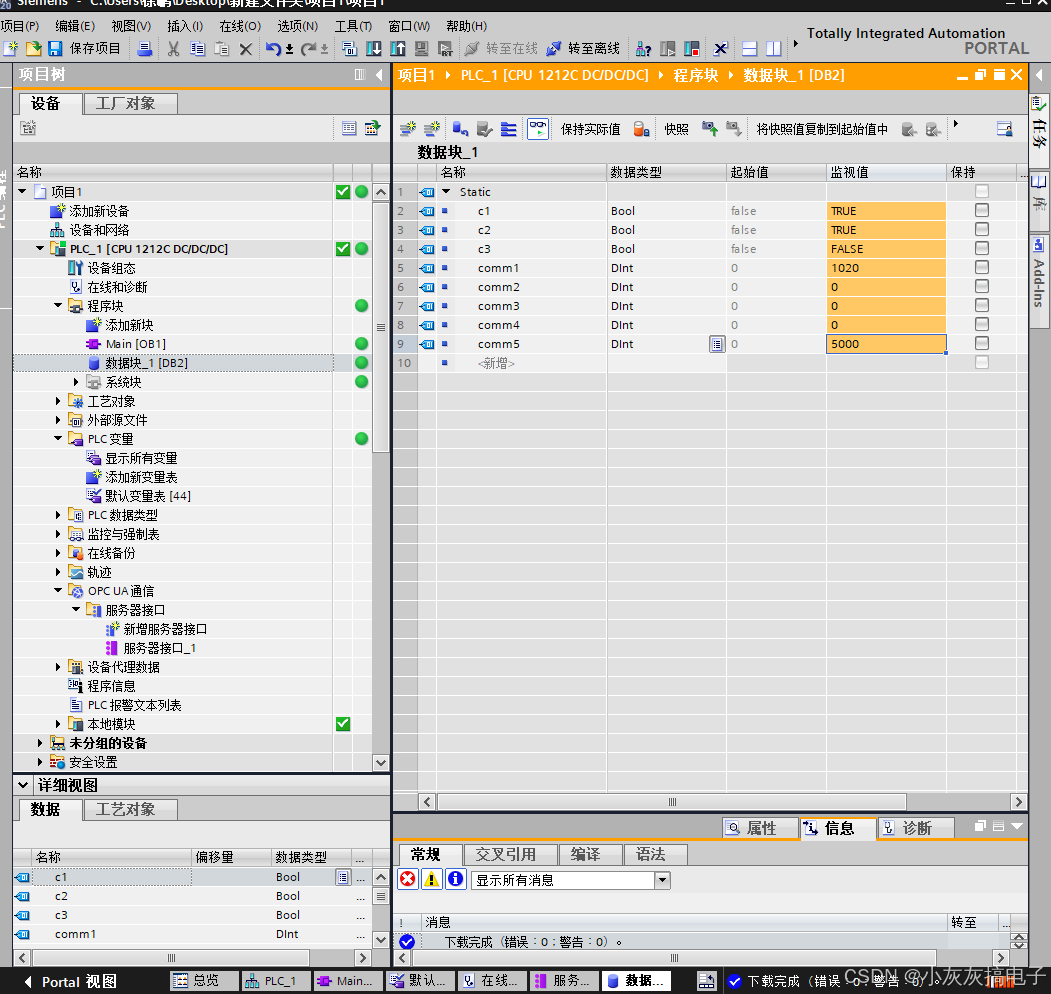
二、1200设置
1、新建工程
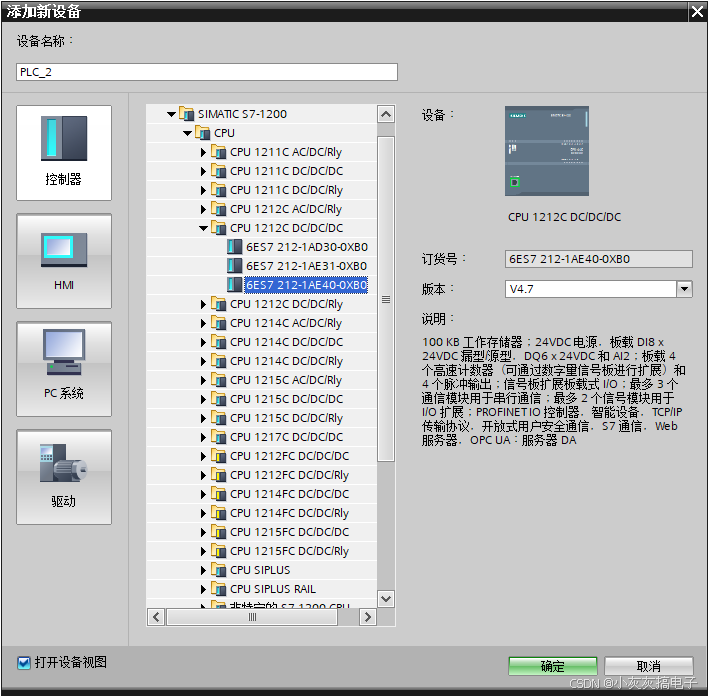 修改PLC IP地址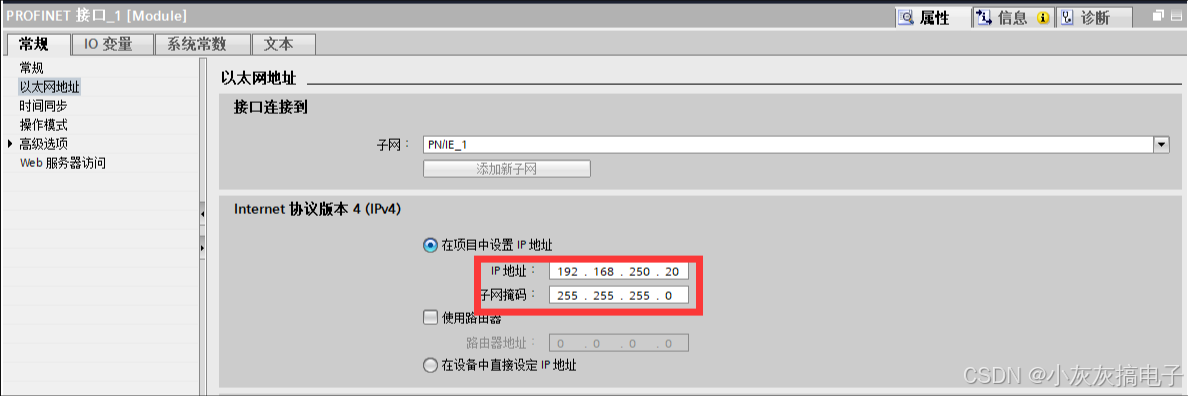
2、启动OPC UA服务器
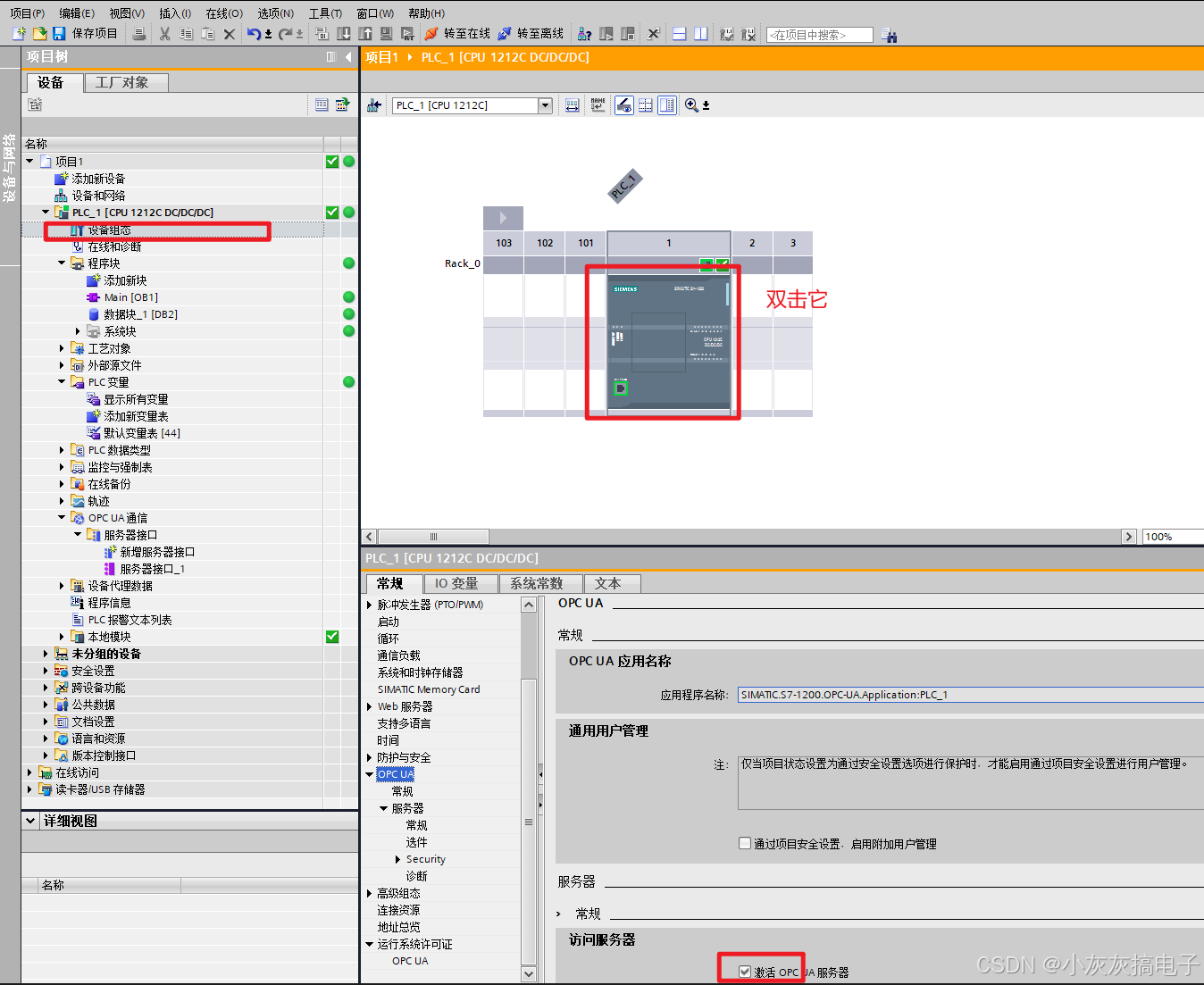
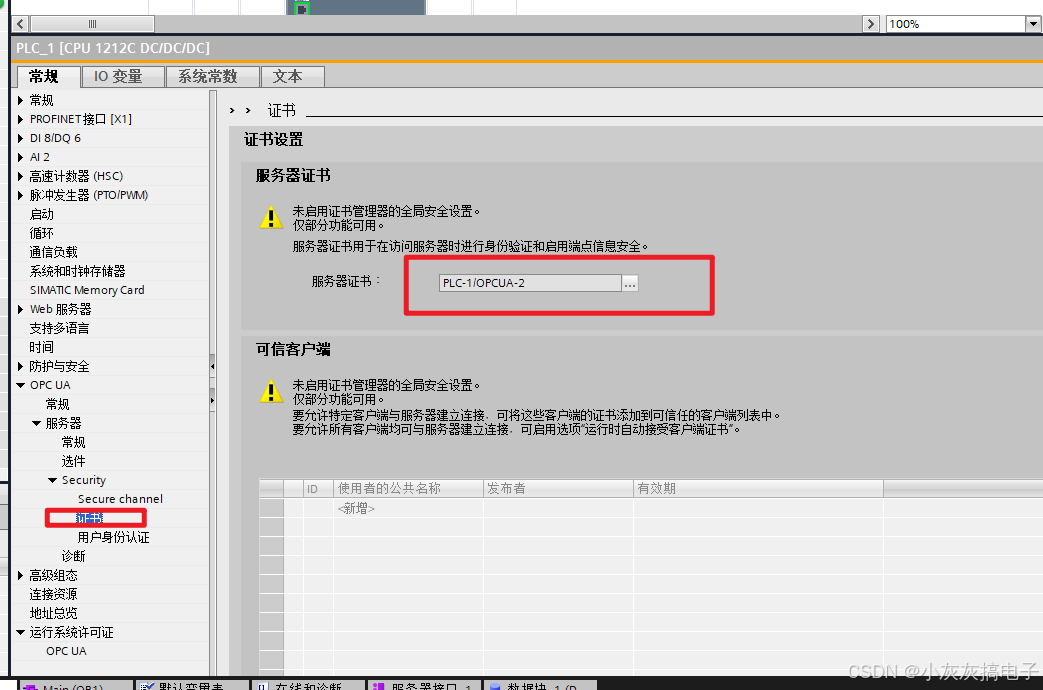
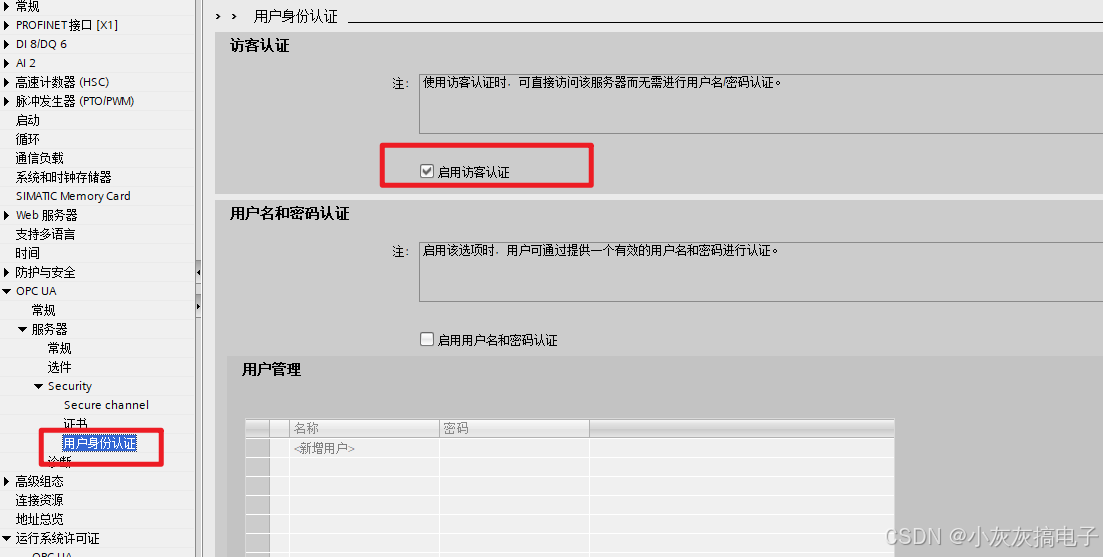
3、设置OPC UA 运行许可证
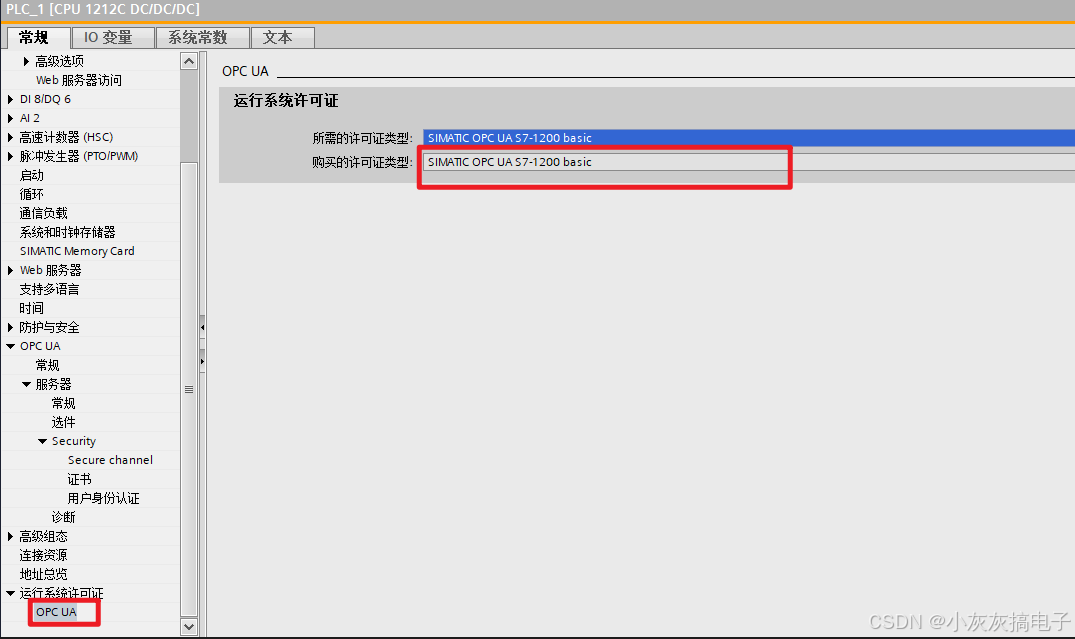
4、S7-1200 OPC UA 服务器接口设置
新建数据快 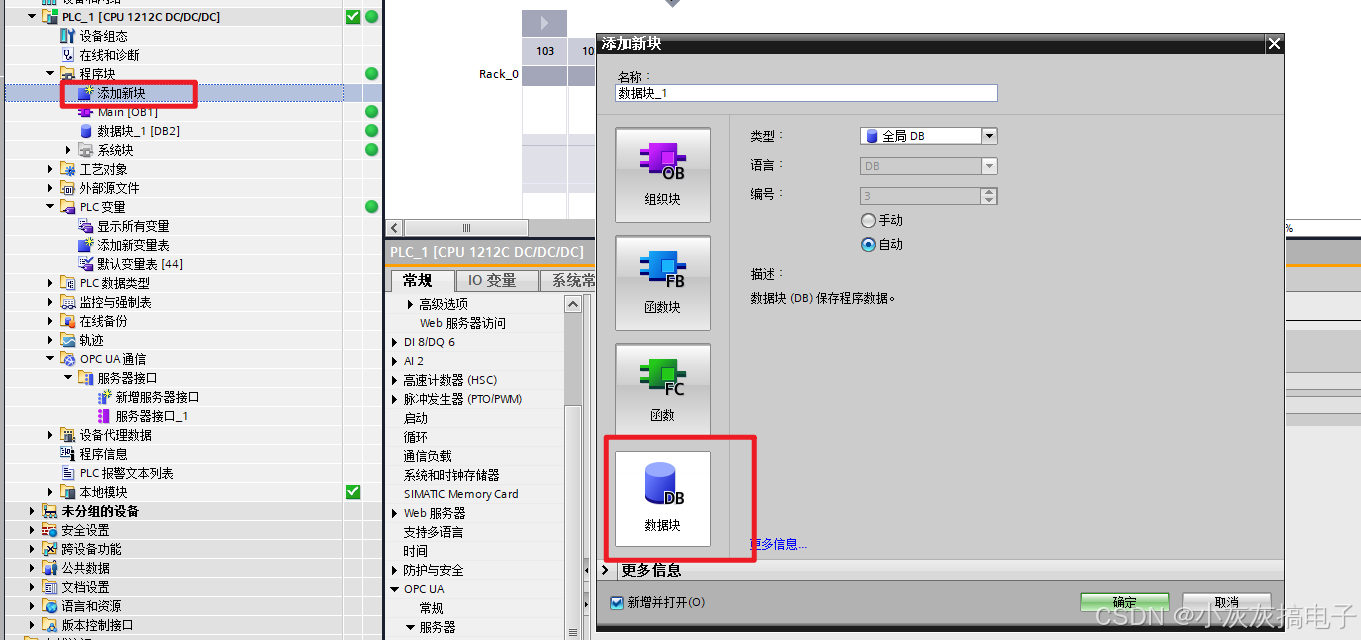 添加变量
添加变量 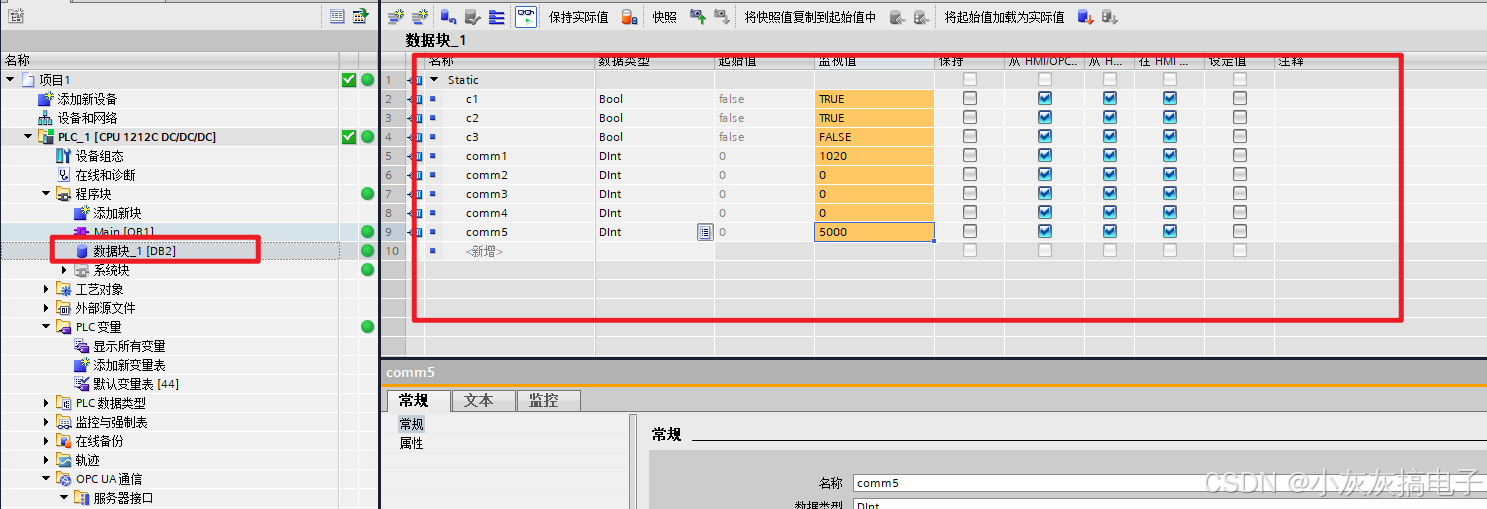 新增OPC UA 服务器接口
 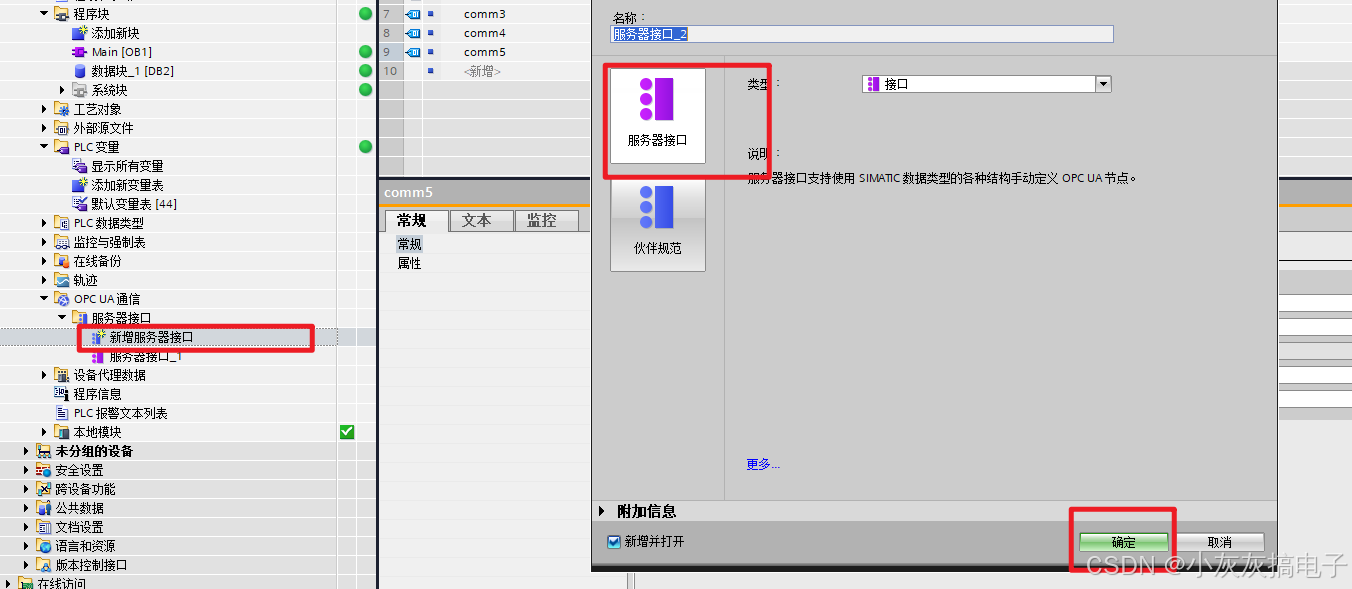 将变量拖入
将变量拖入 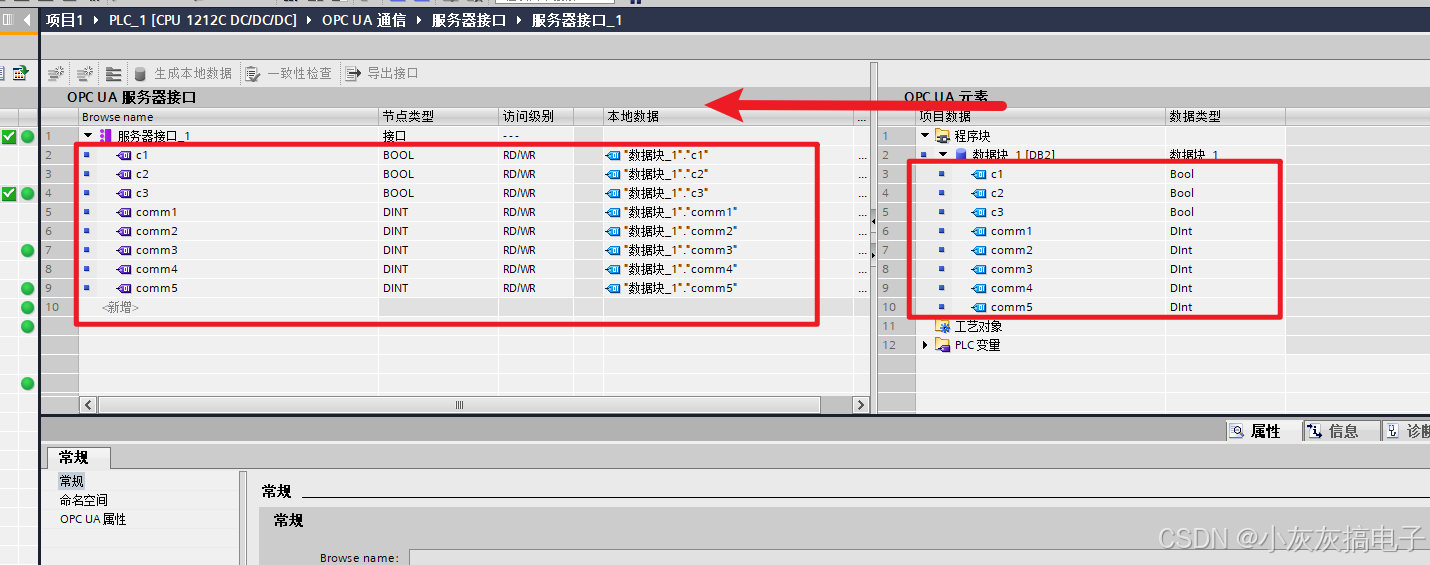
5、S7-1200程序下载并在线赋值
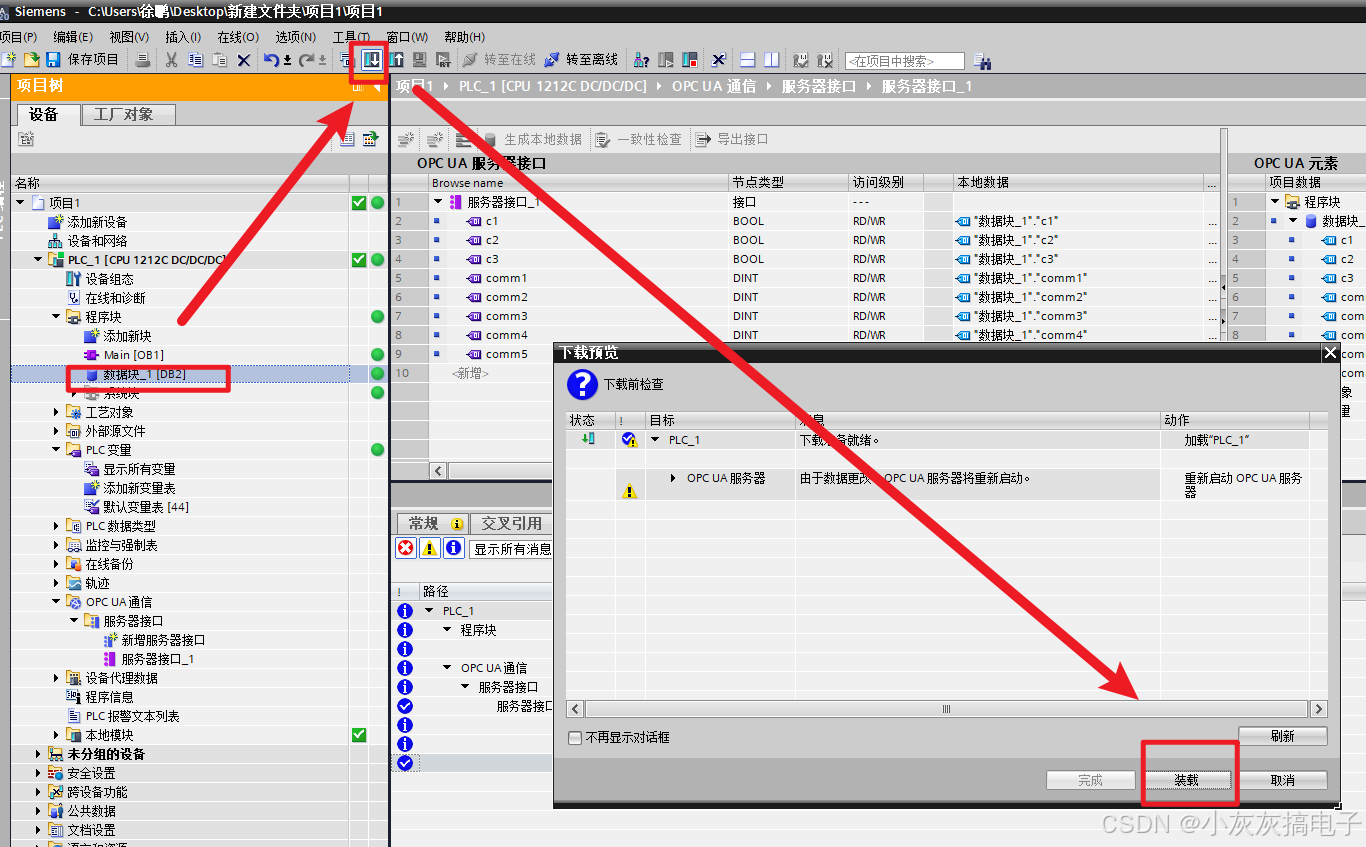
三、QT源码分享
1、OPC通信库编译及安装
参考我这篇博文:Qt6 编译安装OPC UA库详细教程
2、main.c
// Copyright (C) 2018 The Qt Company Ltd.
// SPDX-License-Identifier: LicenseRef-Qt-Commercial OR BSD-3-Clause
#include "mainwindow.h"
#include <QApplication>
#include <QCommandLineParser>
#include <QCommandLineOption>
using namespace Qt::Literals::StringLiterals;
int main(int argc, char **argv)
{
QApplication app(argc, argv);
QCoreApplication::setApplicationVersion(QLatin1StringView(QT_VERSION_STR));
QCoreApplication::setApplicationName("Qt OpcUa Viewer"_L1);
QCommandLineParser parser;
parser.addHelpOption();
parser.addVersionOption();
parser.addPositionalArgument("url"_L1, "The url to open."_L1);
parser.process(app);
const auto positionalArguments = parser.positionalArguments();
const auto initialUrl = positionalArguments.value(0, "opc.tcp://192.168.1.5:4840"_L1);
MainWindow mainWindow(initialUrl.trimmed());
mainWindow.setWindowTitle("Qt OPC UA viewer"_L1);
mainWindow.show();
return QCoreApplication::exec();
}
3、mainWindow.h
#ifndef MAINWINDOW_H
#define MAINWINDOW_H
#include <QOpcUaClient>
#include <QOpcUaHistoryData>
#include <QMainWindow>
class OpcUaModel;
QT_BEGIN_NAMESPACE
namespace Ui {
class MainWindow;
}
class QOpcUaGenericStructHandler;
class QOpcUaProvider;
QT_END_NAMESPACE
class MainWindow : public QMainWindow
{
Q_OBJECT
public:
explicit MainWindow(const QString &initialUrl, QWidget *parent = nullptr);
~MainWindow();
Q_INVOKABLE void log(const QString &text, const QString &context, const QColor &color);
void log(const QString &text, const QColor &color = Qt::black);
private slots:
void connectToServer();
void findServers();
void findServersComplete(const QList<QOpcUaApplicationDescription> &servers, QOpcUa::UaStatusCode statusCode);
void getEndpoints();
void getEndpointsComplete(const QList<QOpcUaEndpointDescription> &endpoints, QOpcUa::UaStatusCode statusCode);
void clientConnected();
void clientDisconnected();
void namespacesArrayUpdated(const QStringList &namespaceArray);
void handleGenericStructHandlerInitFinished(bool success);
void clientError(QOpcUaClient::ClientError);
void clientState(QOpcUaClient::ClientState);
void showErrorDialog(QOpcUaErrorState *errorState);
void openCustomContextMenu(const QPoint &point);
void toggleMonitoring();
void showHistorizing();
void handleReadHistoryDataFinished(QList<QOpcUaHistoryData> results, QOpcUa::UaStatusCode serviceResult);
private:
void createClient();
void updateUiState();
void setupPkiConfiguration();
private:
Ui::MainWindow *ui;
OpcUaModel *mOpcUaModel;
QOpcUaProvider *mOpcUaProvider;
QOpcUaClient *mOpcUaClient = nullptr;
QScopedPointer<QOpcUaGenericStructHandler> mGenericStructHandler;
QList<QOpcUaEndpointDescription> mEndpointList;
bool mClientConnected = false;
QOpcUaApplicationIdentity m_identity;
QOpcUaPkiConfiguration m_pkiConfig;
QOpcUaEndpointDescription m_endpoint; // current endpoint used to connect
QMenu *mContextMenu;
QAction *mContextMenuMonitoringAction;
QAction *mContextMenuHistorizingAction;
QScopedPointer<QOpcUaHistoryReadResponse> mHistoryReadResponse;
};
#endif // MAINWINDOW_H
4、mainWindow.c
// Copyright (C) 2018 The Qt Company Ltd.
// SPDX-License-Identifier: LicenseRef-Qt-Commercial OR BSD-3-Clause
#include "mainwindow.h"
#include "ui_mainwindow.h"
#include "certificatedialog.h"
#include "opcuamodel.h"
#include "treeitem.h"
#include <QOpcUaAuthenticationInformation>
#include <QOpcUaErrorState>
#include <QOpcUaGenericStructHandler>
#include <QOpcUaHistoryReadResponse>
#include <QOpcUaProvider>
#include <QApplication>
#include <QDir>
#include <QMessageBox>
#include <QStandardPaths>
using namespace Qt::Literals::StringLiterals;
static MainWindow *mainWindowGlobal = nullptr;
static QtMessageHandler oldMessageHandler = nullptr;
static void messageHandler(QtMsgType type, const QMessageLogContext &context, const QString &msg)
{
if (!mainWindowGlobal)
return;
QString message;
QColor color = Qt::black;
switch (type) {
case QtWarningMsg:
message = QObject::tr("Warning");
color = Qt::darkYellow;
break;
case QtCriticalMsg:
message = QObject::tr("Critical");
color = Qt::darkRed;
break;
case QtFatalMsg:
message = QObject::tr("Fatal");
color = Qt::darkRed;
break;
case QtInfoMsg:
message = QObject::tr("Info");
break;
case QtDebugMsg:
message = QObject::tr("Debug");
break;
}
message += ": "_L1;
message += msg;
const QString contextStr =
u" (%1:%2, %3)"_s.arg(context.file).arg(context.line).arg(context.function);
// Logging messages from backends are sent from different threads and need to be
// synchronized with the GUI thread.
QMetaObject::invokeMethod(mainWindowGlobal, "log", Qt::QueuedConnection,
Q_ARG(QString, message),
Q_ARG(QString, contextStr),
Q_ARG(QColor, color));
if (oldMessageHandler)
oldMessageHandler(type, context, msg);
}
MainWindow::MainWindow(const QString &initialUrl, QWidget *parent) : QMainWindow(parent)
, ui(new Ui::MainWindow)
, mOpcUaModel(new OpcUaModel(this))
, mOpcUaProvider(new QOpcUaProvider(this))
{
ui->setupUi(this);
ui->host->setText(initialUrl);
mainWindowGlobal = this;
connect(ui->quitAction, &QAction::triggered, this, &QWidget::close);
ui->quitAction->setShortcut(QKeySequence(Qt::CTRL | Qt::Key_Q));
connect(ui->aboutAction, &QAction::triggered, this, &QApplication::aboutQt);
ui->aboutAction->setShortcut(QKeySequence(QKeySequence::HelpContents));
updateUiState();
ui->opcUaPlugin->addItems(QOpcUaProvider::availableBackends());
ui->treeView->setModel(mOpcUaModel);
ui->treeView->header()->setSectionResizeMode(QHeaderView::ResizeToContents);
if (ui->opcUaPlugin->count() == 0) {
QMessageBox::critical(this, tr("No OPCUA plugins available"), tr("The list of available OPCUA plugins is empty. No connection possible."));
}
mContextMenu = new QMenu(ui->treeView);
mContextMenuMonitoringAction = mContextMenu->addAction(tr("Enable Monitoring"), this, &MainWindow::toggleMonitoring);
mContextMenuHistorizingAction = mContextMenu->addAction(tr("Request historic data"), this, &MainWindow::showHistorizing);
ui->treeView->setContextMenuPolicy(Qt::CustomContextMenu);
connect(ui->treeView, &QTreeView::customContextMenuRequested, this, &MainWindow::openCustomContextMenu);
connect(ui->findServersButton, &QPushButton::clicked, this, &MainWindow::findServers);
connect(ui->host, &QLineEdit::returnPressed, this->ui->findServersButton,
[this]() { this->ui->findServersButton->animateClick(); });
connect(ui->getEndpointsButton, &QPushButton::clicked, this, &MainWindow::getEndpoints);
connect(ui->connectButton, &QPushButton::clicked, this, &MainWindow::connectToServer);
oldMessageHandler = qInstallMessageHandler(&messageHandler);
setupPkiConfiguration();
//! [Application Identity]
m_identity = m_pkiConfig.applicationIdentity();
//! [Application Identity]
}
MainWindow::~MainWindow()
{
delete ui;
}
static bool copyDirRecursively(const QString &from, const QString &to)
{
const QDir srcDir(from);
const QDir targetDir(to);
if (!QDir().mkpath(to))
return false;
const QFileInfoList infos =
srcDir.entryInfoList(QDir::Dirs | QDir::Files | QDir::NoDotAndDotDot);
for (const QFileInfo &info : infos) {
const QString srcItemPath = info.absoluteFilePath();
const QString dstItemPath = targetDir.absoluteFilePath(info.fileName());
if (info.isDir()) {
if (!copyDirRecursively(srcItemPath, dstItemPath))
return false;
} else if (info.isFile()) {
if (!QFile::copy(srcItemPath, dstItemPath))
return false;
}
}
return true;
}
//! [PKI Configuration]
void MainWindow::setupPkiConfiguration()
{
const QDir pkidir =
QDir(QStandardPaths::writableLocation(QStandardPaths::AppLocalDataLocation) + "/pki");
if (!pkidir.exists() && !copyDirRecursively(":/pki", pkidir.path()))
qFatal("Could not set up directory %s!", qUtf8Printable(pkidir.path()));
m_pkiConfig.setClientCertificateFile(pkidir.absoluteFilePath("own/certs/opcuaviewer.der"));
m_pkiConfig.setPrivateKeyFile(pkidir.absoluteFilePath("own/private/opcuaviewer.pem"));
m_pkiConfig.setTrustListDirectory(pkidir.absoluteFilePath("trusted/certs"));
m_pkiConfig.setRevocationListDirectory(pkidir.absoluteFilePath("trusted/crl"));
m_pkiConfig.setIssuerListDirectory(pkidir.absoluteFilePath("issuers/certs"));
m_pkiConfig.setIssuerRevocationListDirectory(pkidir.absoluteFilePath("issuers/crl"));
const QStringList toCreate = { m_pkiConfig.issuerListDirectory(),
m_pkiConfig.issuerRevocationListDirectory() };
for (const QString &dir : toCreate) {
if (!QDir().mkpath(dir))
qFatal("Could not create directory %s!", qUtf8Printable(dir));
}
}
//! [PKI Configuration]
void MainWindow::createClient()
{
if (mOpcUaClient == nullptr) {
mOpcUaClient = mOpcUaProvider->createClient(ui->opcUaPlugin->currentText());
if (!mOpcUaClient) {
const QString message(tr("Connecting to the given sever failed. See the log for details."));
log(message, QString(), Qt::red);
QMessageBox::critical(this, tr("Failed to connect to server"), message);
return;
}
connect(mOpcUaClient, &QOpcUaClient::connectError, this, &MainWindow::showErrorDialog);
mOpcUaClient->setApplicationIdentity(m_identity);
mOpcUaClient->setPkiConfiguration(m_pkiConfig);
if (mOpcUaClient->supportedUserTokenTypes().contains(QOpcUaUserTokenPolicy::TokenType::Certificate)) {
QOpcUaAuthenticationInformation authInfo;
authInfo.setCertificateAuthentication();
mOpcUaClient->setAuthenticationInformation(authInfo);
}
connect(mOpcUaClient, &QOpcUaClient::connected, this, &MainWindow::clientConnected);
connect(mOpcUaClient, &QOpcUaClient::disconnected, this, &MainWindow::clientDisconnected);
connect(mOpcUaClient, &QOpcUaClient::errorChanged, this, &MainWindow::clientError);
connect(mOpcUaClient, &QOpcUaClient::stateChanged, this, &MainWindow::clientState);
connect(mOpcUaClient, &QOpcUaClient::endpointsRequestFinished, this, &MainWindow::getEndpointsComplete);
connect(mOpcUaClient, &QOpcUaClient::findServersFinished, this, &MainWindow::findServersComplete);
}
}
void MainWindow::findServers()
{
QStringList localeIds;
QStringList serverUris;
QUrl url(ui->host->text());
updateUiState();
createClient();
// set default port if missing
if (url.port() == –1) url.setPort(4840);
if (mOpcUaClient) {
mOpcUaClient->findServers(url, localeIds, serverUris);
qDebug() << "Discovering servers on " << url.toString();
}
}
void MainWindow::findServersComplete(const QList<QOpcUaApplicationDescription> &servers, QOpcUa::UaStatusCode statusCode)
{
if (isSuccessStatus(statusCode)) {
ui->servers->clear();
for (const auto &server : servers) {
const auto urls = server.discoveryUrls();
for (const auto &url : std::as_const(urls))
ui->servers->addItem(url);
}
}
updateUiState();
}
void MainWindow::getEndpoints()
{
ui->endpoints->clear();
updateUiState();
if (ui->servers->currentIndex() >= 0) {
const QString serverUrl = ui->servers->currentText();
createClient();
mOpcUaClient->requestEndpoints(serverUrl);
}
}
void MainWindow::getEndpointsComplete(const QList<QOpcUaEndpointDescription> &endpoints, QOpcUa::UaStatusCode statusCode)
{
if (isSuccessStatus(statusCode)) {
mEndpointList = endpoints;
int index = 0;
for (const auto &endpoint : endpoints) {
const QString mode = QVariant::fromValue(endpoint.securityMode()).toString();
const QString endpointName = u"%1 (%2)"_s.arg(endpoint.securityPolicy(), mode);
ui->endpoints->addItem(endpointName, index++);
}
}
updateUiState();
}
void MainWindow::connectToServer()
{
if (mClientConnected) {
mOpcUaClient->disconnectFromEndpoint();
return;
}
if (ui->endpoints->currentIndex() >= 0) {
m_endpoint = mEndpointList[ui->endpoints->currentIndex()];
createClient();
mOpcUaClient->connectToEndpoint(m_endpoint);
}
}
void MainWindow::clientConnected()
{
mClientConnected = true;
updateUiState();
connect(mOpcUaClient, &QOpcUaClient::namespaceArrayUpdated, this, &MainWindow::namespacesArrayUpdated);
mOpcUaClient->updateNamespaceArray();
}
void MainWindow::clientDisconnected()
{
mClientConnected = false;
mOpcUaClient->deleteLater();
mOpcUaClient = nullptr;
mOpcUaModel->setOpcUaClient(nullptr);
mOpcUaModel->setGenericStructHandler(nullptr);
updateUiState();
}
void MainWindow::namespacesArrayUpdated(const QStringList &namespaceArray)
{
if (namespaceArray.isEmpty()) {
qWarning() << "Failed to retrieve the namespaces array";
return;
}
disconnect(mOpcUaClient, &QOpcUaClient::namespaceArrayUpdated, this, &MainWindow::namespacesArrayUpdated);
mGenericStructHandler.reset(new QOpcUaGenericStructHandler(mOpcUaClient));
connect(mGenericStructHandler.get(), &QOpcUaGenericStructHandler::initializedChanged, this, &MainWindow::handleGenericStructHandlerInitFinished);
mGenericStructHandler->initialize();
}
void MainWindow::handleGenericStructHandlerInitFinished(bool success)
{
if (!success) {
qWarning() << "Failed to initialize generic struct handler, decoding of generic structs will be unavailable";
} else {
mOpcUaModel->setGenericStructHandler(mGenericStructHandler.get());
}
mOpcUaModel->setOpcUaClient(mOpcUaClient);
ui->treeView->header()->setSectionResizeMode(1 /* Value column*/, QHeaderView::Interactive);
}
void MainWindow::clientError(QOpcUaClient::ClientError error)
{
qDebug() << "Client error changed" << error;
}
void MainWindow::clientState(QOpcUaClient::ClientState state)
{
qDebug() << "Client state changed" << state;
}
void MainWindow::updateUiState()
{
// allow changing the backend only if it was not already created
ui->opcUaPlugin->setEnabled(mOpcUaClient == nullptr);
ui->connectButton->setText(mClientConnected ? tr("Disconnect") : tr("Connect"));
if (mClientConnected) {
ui->host->setEnabled(false);
ui->servers->setEnabled(false);
ui->endpoints->setEnabled(false);
ui->findServersButton->setEnabled(false);
ui->getEndpointsButton->setEnabled(false);
ui->connectButton->setEnabled(true);
} else {
ui->host->setEnabled(true);
ui->servers->setEnabled(ui->servers->count() > 0);
ui->endpoints->setEnabled(ui->endpoints->count() > 0);
ui->findServersButton->setDisabled(ui->host->text().isEmpty());
ui->getEndpointsButton->setEnabled(ui->servers->currentIndex() != –1);
ui->connectButton->setEnabled(ui->endpoints->currentIndex() != –1);
}
if (!mOpcUaClient) {
ui->servers->setEnabled(false);
ui->endpoints->setEnabled(false);
ui->getEndpointsButton->setEnabled(false);
ui->connectButton->setEnabled(false);
}
}
void MainWindow::log(const QString &text, const QString &context, const QColor &color)
{
auto cf = ui->log->currentCharFormat();
cf.setForeground(color);
ui->log->setCurrentCharFormat(cf);
ui->log->appendPlainText(text);
if (!context.isEmpty()) {
cf.setForeground(Qt::gray);
ui->log->setCurrentCharFormat(cf);
ui->log->insertPlainText(context);
}
}
void MainWindow::log(const QString &text, const QColor &color)
{
log(text, QString(), color);
}
void MainWindow::showErrorDialog(QOpcUaErrorState *errorState)
{
int result = 0;
const QString statuscode = QOpcUa::statusToString(errorState->errorCode());
QString msg = errorState->isClientSideError() ? tr("The client reported: ") : tr("The server reported: ");
switch (errorState->connectionStep()) {
case QOpcUaErrorState::ConnectionStep::Unknown:
break;
case QOpcUaErrorState::ConnectionStep::CertificateValidation: {
CertificateDialog dlg(this);
msg += tr("Server certificate validation failed with error 0x%1 (%2).\\nClick 'Abort' to abort the connect, or 'Ignore' to continue connecting.")
.arg(static_cast<ulong>(errorState->errorCode()), 8, 16, '0'_L1).arg(statuscode);
result = dlg.showCertificate(msg, m_endpoint.serverCertificate(), m_pkiConfig.trustListDirectory());
errorState->setIgnoreError(result == 1);
}
break;
case QOpcUaErrorState::ConnectionStep::OpenSecureChannel:
msg += tr("OpenSecureChannel failed with error 0x%1 (%2).").arg(errorState->errorCode(), 8, 16, '0'_L1).arg(statuscode);
QMessageBox::warning(this, tr("Connection Error"), msg);
break;
case QOpcUaErrorState::ConnectionStep::CreateSession:
msg += tr("CreateSession failed with error 0x%1 (%2).").arg(errorState->errorCode(), 8, 16, '0'_L1).arg(statuscode);
QMessageBox::warning(this, tr("Connection Error"), msg);
break;
case QOpcUaErrorState::ConnectionStep::ActivateSession:
msg += tr("ActivateSession failed with error 0x%1 (%2).").arg(errorState->errorCode(), 8, 16, '0'_L1).arg(statuscode);
QMessageBox::warning(this, tr("Connection Error"), msg);
break;
}
}
void MainWindow::openCustomContextMenu(const QPoint &point)
{
QModelIndex index = ui->treeView->indexAt(point);
// show the context menu only for the value column
if (index.isValid() && index.column() == 1) {
TreeItem* item = static_cast<TreeItem *>(index.internalPointer());
if (item) {
mContextMenuMonitoringAction->setData(index);
mContextMenuMonitoringAction->setEnabled(item->supportsMonitoring());
mContextMenuMonitoringAction->setText(item->monitoringEnabled() ? tr("Disable Monitoring") : tr("Enable Monitoring"));
mContextMenuHistorizingAction->setData(index);
QModelIndex isHistoricIndex = mOpcUaModel->index(index.row(), 7, index.parent());
mContextMenuHistorizingAction->setEnabled(mOpcUaModel->data(isHistoricIndex, Qt::DisplayRole).toString() == "true");
mContextMenu->exec(ui->treeView->viewport()->mapToGlobal(point));
}
}
}
void MainWindow::toggleMonitoring()
{
QModelIndex index = mContextMenuMonitoringAction->data().toModelIndex();
if (index.isValid()) {
TreeItem* item = static_cast<TreeItem *>(index.internalPointer());
if (item) {
item->setMonitoringEnabled(!item->monitoringEnabled());
}
}
}
void MainWindow::showHistorizing()
{
QModelIndex modelIndex = mContextMenuHistorizingAction->data().toModelIndex();
QModelIndex nodeIdIndex = mOpcUaModel->index(modelIndex.row(), 4, modelIndex.parent());
QString nodeId = mOpcUaModel->data(nodeIdIndex, Qt::DisplayRole).toString();
auto request = QOpcUaHistoryReadRawRequest(
{QOpcUaReadItem(nodeId)},
QDateTime::currentDateTime(),
QDateTime::currentDateTime().addDays(–2),
5,
false
);
mHistoryReadResponse.reset(mOpcUaClient->readHistoryData(request));
if (mHistoryReadResponse) {
QObject::connect(mHistoryReadResponse.get(), &QOpcUaHistoryReadResponse::readHistoryDataFinished,
this, &MainWindow::handleReadHistoryDataFinished);
QObject::connect(mHistoryReadResponse.get(), &QOpcUaHistoryReadResponse::stateChanged, this, [](QOpcUaHistoryReadResponse::State state) {
qDebug() << "History read state changed to" << state;
});
} else {
qWarning() << "Failed to request history data";
}
}
void MainWindow::handleReadHistoryDataFinished(QList<QOpcUaHistoryData> results, QOpcUa::UaStatusCode serviceResult)
{
if (serviceResult != QOpcUa::UaStatusCode::Good) {
qWarning() << "readHistoryData request finished with bad status code: " << serviceResult;
return;
}
for (int i = 0; i < results.count(); ++i) {
qInfo() << "NodeId:" << results.at(i).nodeId() << "; statusCode:" << results.at(i).statusCode() << "; returned values:" << results.at(i).count();
for (int j = 0; j < results.at(i).count(); ++j) {
qInfo() << j
<< "source timestamp:" << results.at(i).result()[j].sourceTimestamp()
<< "server timestamp:" << results.at(i).result()[j].serverTimestamp()
<< "value:" << results.at(i).result()[j].value();
}
}
}
5、完整工程下载
文章顶部下载
四、OPC UA通信详解
OPC UA(Open Platform Communications Unified Architecture)是一种现代的、平台无关的工业通信协议和数据交换标准。它旨在提供一种安全、可靠且高效的方式,让不同类型的设备和系统(如PLC、DCS、SCADA、MES、ERP、数据库、云端应用等)能够相互通信和共享数据,克服了传统OPC(基于COM/DCOM)的局限性。
以下是OPC UA通信的关键方面详解:
核心设计目标与优势
- 平台无关性: OPC UA不依赖于特定的操作系统(如Windows)或编程语言(如C++)。它可以在嵌入式设备、工业PC、服务器、云平台等各种环境中实现。
- 安全性: 内置强大的安全机制是其核心特性。这包括:
- 身份验证 (Authentication): 客户端和服务器使用证书(X.509)进行身份验证,确保通信双方身份真实。
- 授权 (Authorization): 定义用户权限,控制其对服务器上不同数据和功能的访问级别。
- 保密性 (Confidentiality): 使用加密算法(如AES)对传输的数据进行加密,防止窃听。
- 完整性 (Integrity): 使用签名机制(如RSA)确保数据在传输过程中未被篡改。
- 可用性 (Availability): 通过会话管理、超时处理等机制保障服务的稳定性。
- 可靠性: 提供可靠的数据传输机制(尤其是在传输层之上),确保消息的送达和顺序。
- 可扩展性: 协议设计灵活,能够适应从小型传感器到大型企业系统的各种规模应用。
- 信息模型: OPC UA的核心是其强大的、面向对象的信息建模能力。它定义了一个基础框架,允许定义复杂的数据结构、关系和语义信息,而不仅仅是原始数据点。这使得数据的含义(语义)能够被理解和传递。
通信架构 OPC UA采用客户端-服务器架构:
- 服务器 (Server): 作为数据源,暴露其内部的数据(如过程值、报警、历史数据等)和功能(如方法调用)。它维护一个包含所有可用数据和服务的“地址空间”。
- 客户端 (Client): 主动连接到一个或多个服务器,读取数据、写入数据、订阅数据变化、调用服务器上的方法、浏览服务器的地址空间等。
- 会话 (Session): 客户端与服务器建立连接后,会创建一个安全会话。会话管理通信上下文和安全凭证。
信息模型与地址空间
- 节点 (Node): 地址空间的基本构建块。每个节点代表一个实体,如变量、对象、方法等。
- 节点类 (NodeClass): 定义节点的类型及其包含的属性。主要节点类包括:
- 对象 (Object): 表示系统中的物理或逻辑实体(如一台电机、一个阀门组)。
- 变量 (Variable): 包含值(如温度、压力、状态)。分为数据变量(存储实际值)和属性(描述节点的元数据,如名称、描述)。
- 方法 (Method): 表示可在服务器上执行的功能。
- 对象类型 (ObjectType) / 变量类型 (VariableType): 定义对象或变量的模板。
- 引用类型 (ReferenceType): 定义节点之间的关系类型(如“组成”、“控制”)。
- 视图 (View): 提供地址空间的子集视图。
- 引用 (Reference): 连接节点,表示它们之间的关系(如一个对象节点包含一个变量节点)。
- 信息模型扩展: 行业组织(如MDIS、FDI)或供应商可以基于OPC UA基础模型定义特定领域的配套规范,为标准化的行业数据交换提供基础。
核心服务 OPC UA定义了一组服务(抽象接口),客户端通过这些服务与服务器交互:
- 发现服务 (Discovery): 查找网络上的服务器及其端点。
- 安全通道服务 (SecureChannel): 建立加密通信通道。
- 会话服务 (Session): 创建、激活、关闭会话。
- 浏览服务 (Browse): 导航地址空间,发现节点及其引用。
- 读取/写入服务 (Read/Write): 获取或设置变量的值或节点的属性。
- 订阅服务 (Subscription): 创建订阅。客户端可以指定一组感兴趣的监控项(MonitoredItems),服务器会在数据变化、事件发生或达到采样间隔时向客户端发送通知。这是实现高效数据更新的关键机制。
- 查询服务 (Query): 在地址空间中执行高级查询。
- 方法调用服务 (Call): 调用服务器上定义的方法。
传输协议与编码 OPC UA协议栈是分层的:
- 应用层: 定义了服务、信息模型和数据类型。这是协议的核心逻辑。
- 传输层: 定义了消息的编码方式和传输机制。
- 编码 (Encoding): 服务请求和响应可以以不同的格式编码:
- OPC UA 二进制 (UA Binary): 高效紧凑,适用于性能要求高的场景(最常见)。
- XML: 可读性好,适用于调试或需要人类可读的场景。
- JSON: 在某些Web或RESTful接口场景下使用。
- 传输 (Transport): 编码后的消息通过不同的底层协议传输:
- TCP (OPC UA原生): 最常用、最可靠的传输方式。
- HTTP(S) / WebSockets: 便于穿越防火墙,适用于Web应用集成。
- SOAP/XML: 兼容传统Web服务(较少使用)。
- 编码 (Encoding): 服务请求和响应可以以不同的格式编码:
- 安全层: 集成在协议栈中,处理加密、签名和证书管理。
实际应用
- 数据采集 (Data Acquisition): 从各种设备(PLC、传感器、仪表)实时采集过程数据。
- 监控与报警 (Monitoring & Alarming): 实时监控数据变化,接收报警和事件通知。
- 历史数据访问 (Historical Data Access): 查询和检索存储在服务器或历史数据库中的过去数据。
- 设备配置与参数管理: 读取设备参数,写入配置信息。
- 远程控制与操作: 调用设备或系统的方法(如启动、停止、设定值)。
- 系统间数据交换: 实现车间层(OT)与企业管理层(IT)的数据集成(如MES与SCADA, PLC与数据库)。
- 云端连接: 将现场数据安全可靠地传输到云端平台进行分析和处理。
- 互操作性: 不同供应商的设备通过遵循OPC UA标准或配套规范实现“即插即用”。
关键特点总结
- 统一架构: 整合了传统OPC的功能(DA, HDA, A&E)于单一架构。
- 安全第一: 内建端到端安全。
- 面向未来: 支持复杂信息建模、语义互操作。
- 跨平台: 可在任何操作系统上实现。
- 可扩展: 适应从小型嵌入式设备到企业级应用。
- 可靠高效: 支持发布/订阅模式,优化数据传输。
总结: OPC UA是现代工业自动化和物联网领域的关键通信标准。它通过强大的安全机制、平台无关性、灵活的信息模型和高效的通信服务,为不同来源、不同层级的系统和设备提供了安全、可靠、语义丰富的数据交换能力,是实现工业4.0、智能制造和物联网集成的基石技术。