1.目的
掌握Winform下基于Sdcb. PaddleOCR和OpenCvSharp实现图片文字的提取方法。
⒉编程软件
Visual Studio 2022
⒊界面设计
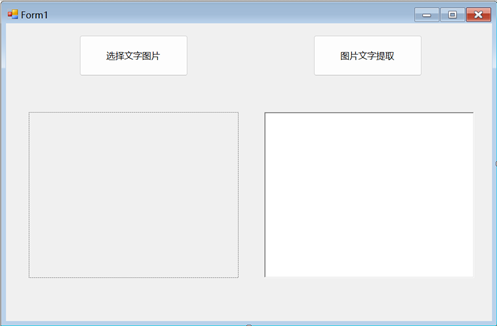
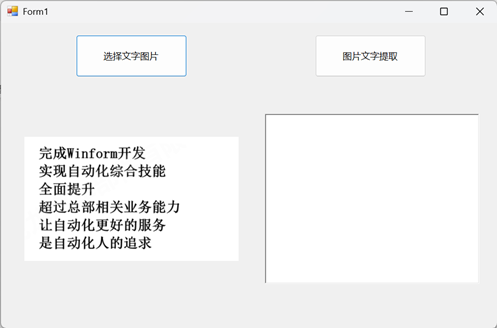
如下图设计了UI界面,包括使用Button、PictureBox和RichTextBox控件:
本案例以下图特定图片为案例进行文字提取:
⒋代码简述
⑴命名空间
using OpenCvSharp;
using Sdcb.PaddleInference;
using Sdcb.PaddleOCR;
using Sdcb.PaddleOCR.Models;
using Sdcb.PaddleOCR.Models.Local;
using System;
using System.Collections.Generic;
using System.ComponentModel;
using System.Data;
using System.Drawing;
using System.IO;
using System.Linq;
using System.Text;
using System.Threading.Tasks;
using System.Windows.Forms;
using Size = OpenCvSharp.Size;
namespace WinformGetTest
{
public partial class Form1 : Form
{
string selectedPicture;//图片公共变量
public Form1()
{
InitializeComponent();
}
…//内容代码
}
}
⑵“选择文字图片”代码
private void button1_Click(object sender, EventArgs e)//获取图片
{
OpenFileDialog openFileDialog = new OpenFileDialog();
openFileDialog.Filter = "Image Files(*.BMP;*.JPG;*.GIF;*.PNG)|*.BMP;*.JPG;*.GIF;*.PNG|All files (*.*)|*.*";
openFileDialog.FilterIndex = 1;
openFileDialog.Multiselect = false;
if (openFileDialog.ShowDialog() == DialogResult.OK)
{
selectedPicture = openFileDialog.FileName;
Image image = Image.FromFile(selectedPicture); // 使用Image类加载图片
pictureBox1.SizeMode = PictureBoxSizeMode.Zoom;// 让PictureBox完全显示图片
pictureBox1.Image = image;// 将图片显示在PictureBox中
}
else
{
MessageBox.Show("您本次没有选择任何图片!!!");
}
}
⑶“图片文字提取”代码
private void button2_Click(object sender, EventArgs e)//图片文字提取
{
this.richTextBox1.Clear();// 清空 richTextBox1 中的内容
FullOcrModel model = LocalFullModels.ChineseV3;// 设置使用的 OCR 模型为中文版模型(v3 版本)
using (PaddleOcrAll all = new PaddleOcrAll(model, PaddleDevice.Mkldnn())// 初始化 PaddleOCR 实例,使用 MKL-DNN 加速
{
AllowRotateDetection = true, // 允许检测并识别有角度的文字
Enable180Classification = true, // 允许识别旋转角度大于90度的文字
})
{
// 读取用户选择的图片文件
using (Mat src2 = Cv2.ImRead(selectedPicture))
using (Mat preprocessed = PreprocessImageForOcr(src2))
{
PaddleOcrResult result = all.Run(preprocessed);// 使用 OCR 对图片进行识别
string rawText = result.Text;
string correctedText = PostProcessOcrResult(rawText);// 后处理校正(使用返回值)
richTextBox1.Text = correctedText;// 将识别出的文本内容显示在 richTextBox1 中
}
}
}
private Mat PreprocessImageForOcr(Mat src)//图片处理
{
try
{
Mat processed = src.Clone();
// 1. 转换为灰度图
if (processed.Channels() == 3)
{
Cv2.CvtColor(processed, processed, ColorConversionCodes.BGR2GRAY);
}
// 2. 使用中值滤波,对文字边缘保护更好
Cv2.MedianBlur(processed, processed, 3);
// 3. 自适应二值化(比普通阈值化效果更好)
Cv2.AdaptiveThreshold(processed, processed, 255,
AdaptiveThresholdTypes.GaussianC,
ThresholdTypes.Binary, 15, 5);
// 4. 形态学操作去除噪点(先闭运算再开运算)
Mat kernel = Cv2.GetStructuringElement(MorphShapes.Rect, new Size(2, 2));
Cv2.MorphologyEx(processed, processed, MorphTypes.Close, kernel);
//Cv2.MorphologyEx(processed, processed, MorphTypes.Open, kernel);
// 5. 对比度增强
processed.ConvertTo(processed, -1, 1.1, 20);
return processed;
}
catch (Exception ex)
{
MessageBox.Show($"图像预处理错误: {ex.Message}");
return src.Clone();
}
}
private string PostProcessOcrResult(string rawText) // OCR结果后处理校正
{
var corrections = new Dictionary<string, string> // 常见错别字和语法错误校正
{
{ "兰动化综", "自动化综" },
};
string result = rawText;
foreach (var correction in corrections)
{
result = result.Replace(correction.Key, correction.Value);
}
return result;
}
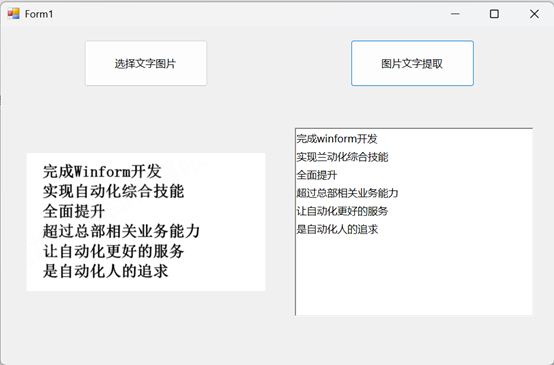
在进行图片处理时,参数调整对比优化:
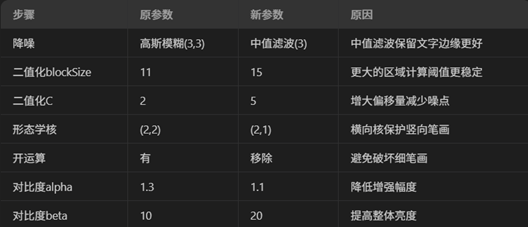
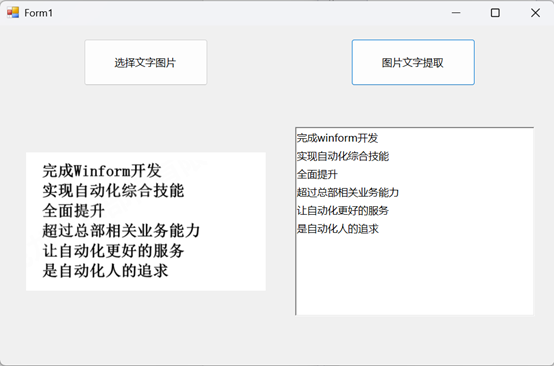
此外,对OCR结果后进行提取校正。
⒌测试
如下图,针对上述图片提取文字进行测试,分别为不校正和校正后的文字提取效果: