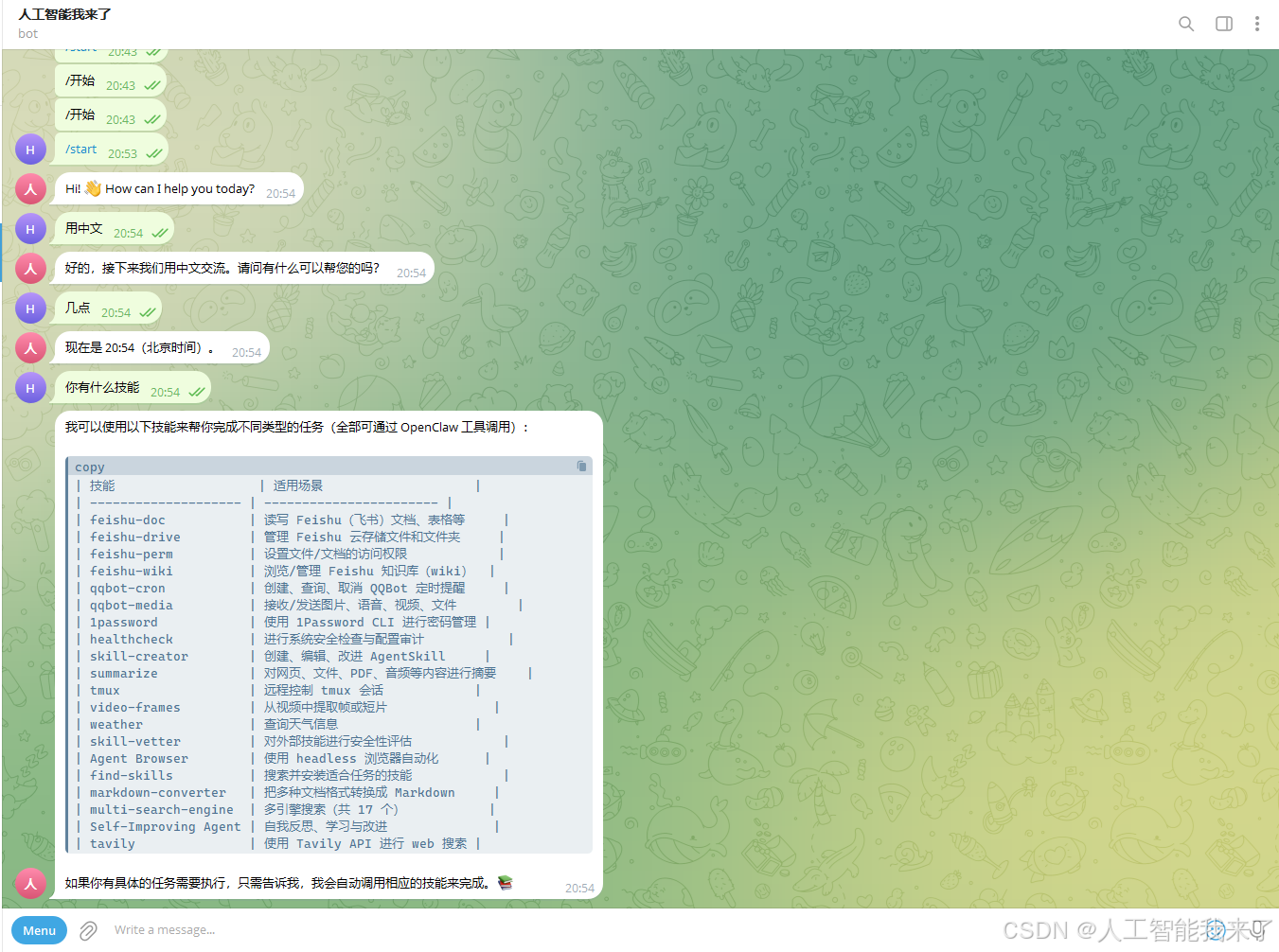
1.小龙虾突然出故障,对话没反应了,查看ollama日志发现是ollama出现不认显卡GPU问题
(base) gpu3090@DESKTOP-8IU6393:~/llama.cpp$ time=2026-03-12T21:04:04.146+08:00 level=INFO source=routes.go:1663 msg="server config" env="map[CUDA_VISIBLE_DEVICES:0 GGML_VK_VISIBLE_DEVICES: GPU_DEVICE_ORDINAL: HIP_VISIBLE_DEVICES: HSA_OVERRIDE_GFX_VERSION: HTTPS_PROXY:http://127.0.0.1:7897 HTTP_PROXY:http://127.0.0.1:7897 NO_PROXY:172.31.*,172.30.*,172.29.*,172.28.*,172.27.*,172.26.*,172.25.*,172.24.*,172.23.*,172.22.*,172.21.*,172.20.*,172.19.*,172.18.*,172.17.*,172.16.*,10.*,192.168.*,127.*,localhost,<local> OLLAMA_CONTEXT_LENGTH:32768 OLLAMA_DEBUG:INFO OLLAMA_EDITOR: OLLAMA_FLASH_ATTENTION:false OLLAMA_GPU_OVERHEAD:0 OLLAMA_HOST:http://0.0.0.0:12346 OLLAMA_KEEP_ALIVE:5m0s OLLAMA_KV_CACHE_TYPE: OLLAMA_LLM_LIBRARY: OLLAMA_LOAD_TIMEOUT:5m0s OLLAMA_MAX_LOADED_MODELS:0 OLLAMA_MAX_QUEUE:512 OLLAMA_MODELS:/home/gpu3090/.ollama/models OLLAMA_MULTIUSER_CACHE:false OLLAMA_NEW_ENGINE:false OLLAMA_NOHISTORY:false OLLAMA_NOPRUNE:false OLLAMA_NO_CLOUD:false OLLAMA_NUM_PARALLEL:1 OLLAMA_ORIGINS:[http://localhost https://localhost http://localhost:* https://localhost:* http://127.0.0.1 https://127.0.0.1 http://127.0.0.1:* https://127.0.0.1:* http://0.0.0.0 https://0.0.0.0 http://0.0.0.0:* https://0.0.0.0:* app://* file://* tauri://* vscode-webview://* vscode-file://*] OLLAMA_REMOTES:[ollama.com] OLLAMA_SCHED_SPREAD:false OLLAMA_VULKAN:false ROCR_VISIBLE_DEVICES: http_proxy:http://127.0.0.1:7897 https_proxy:http://127.0.0.1:7897 no_proxy:172.31.*,172.30.*,172.29.*,172.28.*,172.27.*,172.26.*,172.25.*,172.24.*,172.23.*,172.22.*,172.21.*,172.20.*,172.19.*,172.18.*,172.17.*,172.16.*,10.*,192.168.*,127.*,localhost
,<local>]"
time=2026-03-12T21:04:04.146+08:00 level=INFO source=routes.go:1665 msg="Ollama cloud disabled: false"
time=2026-03-12T21:04:04.172+08:00 level=INFO source=images.go:473 msg="total blobs: 5"
time=2026-03-12T21:04:04.187+08:00 level=INFO source=images.go:480 msg="total unused blobs removed: 0"
time=2026-03-12T21:04:04.208+08:00 level=INFO source=routes.go:1718 msg="Listening on [::]:12346 (version 0.16.3)"
time=2026-03-12T21:04:04.209+08:00 level=INFO source=runner.go:67 msg="discovering available GPUs…"
time=2026-03-12T21:04:04.209+08:00 level=WARN source=runner.go:485 msg="user overrode visible devices" CUDA_VISIBLE_DEVICES=0
time=2026-03-12T21:04:04.209+08:00 level=WARN source=runner.go:489 msg="if GPUs are not correctly discovered, unset and try again"
time=2026-03-12T21:04:04.211+08:00 level=INFO source=server.go:431 msg="starting runner" cmd="/usr/local/bin/ollama runner –ollama-engine –port 45679"
time=2026-03-12T21:04:04.269+08:00 level=INFO source=types.go:60 msg="inference compute" id=cpu library=cpu compute="" name=cpu description=cpu libdirs=ollama driver="" pci_id="" type="" total="62.7 GiB" available="59.9 GiB"
time=2026-03-12T21:04:04.269+08:00 level=INFO source=routes.go:1768 msg="vram-based default context" total_vram="0 B" default_num_ctx=4096
time=2026-03-12T21:04:21.135+08:00 level=INFO source=server.go:247 msg="enabling flash attention"
time=2026-03-12T21:04:21.136+08:00 level=INFO source=server.go:431 msg="starting runner" cmd="/usr/local/bin/ollama runner –ollama-engine –model /home/gpu3090/.ollama/models/blobs/sha256-e7b273f9636059a689e3ddcab3716e4f65abe0143ac978e46673ad0e52d09efb –port 46427"
time=2026-03-12T21:04:21.137+08:00 level=INFO source=sched.go:491 msg="system memory" total="62.7 GiB" free="60.9 GiB" free_swap="16.0 GiB"
time=2026-03-12T21:04:21.137+08:00 level=INFO source=server.go:757 msg="loading model" "model layers"=25 requested=-1
time=2026-03-12T21:04:21.154+08:00 level=INFO source=runner.go:1411 msg="starting ollama engine"
time=2026-03-12T21:04:22.096+08:00 level=INFO source=runner.go:1446 msg="Server listening on 127.0.0.1:46427"
time=2026-03-12T21:04:22.102+08:00 level=INFO source=runner.go:1284 msg=load request="{Operation:fit LoraPath:[] Parallel:1 BatchSize:512 FlashAttention:Enabled KvSize:32768 KvCacheType: NumThreads:12 GPULayers:[] MultiUserCache:false ProjectorPath: MainGPU:0 UseMmap:false}"
time=2026-03-12T21:04:22.235+08:00 level=INFO source=ggml.go:136 msg="" architecture=gptoss file_type=MXFP4 name="" description="" num_tensors=459 num_key_values=32
time=2026-03-12T21:04:22.235+08:00 level=INFO source=ggml.go:104 msg=system CPU.0.LLAMAFILE=1 compiler=cgo(gcc)
time=2026-03-12T21:04:22.328+08:00 level=INFO source=runner.go:1284 msg=load request="{Operation:alloc LoraPath:[] Parallel:1 BatchSize:512 FlashAttention:Enabled KvSize:32768 KvCacheType: NumThreads:12 GPULayers:[] MultiUserCache:false ProjectorPath: MainGPU:0 UseMmap:false}"
time=2026-03-12T21:04:23.489+08:00 level=INFO source=runner.go:1284 msg=load request="{Operation:commit LoraPath:[] Parallel:1 BatchSize:512 FlashAttention:Enabled KvSize:32768 KvCacheType: NumThreads:12 GPULayers:[] MultiUserCache:false ProjectorPath: MainGPU:0 UseMmap:false}"
time=2026-03-12T21:04:23.489+08:00 level=INFO source=ggml.go:482 msg="offloading 0 repeating layers to GPU"
time=2026-03-12T21:04:23.489+08:00 level=INFO source=ggml.go:486 msg="offloading output layer to CPU"
time=2026-03-12T21:04:23.489+08:00 level=INFO source=ggml.go:494 msg="offloaded 0/25 layers to GPU"
time=2026-03-12T21:04:23.490+08:00 level=INFO source=device.go:245 msg="model weights" device=CPU size="12.8 GiB"
time=2026-03-12T21:04:23.490+08:00 level=INFO source=device.go:256 msg="kv cache" device=CPU size="876.0 MiB"
time=2026-03-12T21:04:23.490+08:00 level=INFO source=device.go:267 msg="compute graph" device=CPU size="131.2 MiB"
time=2026-03-12T21:04:23.490+08:00 level=INFO source=device.go:272 msg="total memory" size="13.8 GiB"
time=2026-03-12T21:04:23.490+08:00 level=INFO source=sched.go:566 msg="loaded runners" count=1
time=2026-03-12T21:04:23.490+08:00 level=INFO source=server.go:1350 msg="waiting for llama runner to start responding"
time=2026-03-12T21:04:23.490+08:00 level=INFO source=server.go:1384 msg="waiting for server to become available" status="llm server loading model"
time=2026-03-12T21:04:51.632+08:00 level=INFO source=server.go:1388 msg="llama runner started in 29.58 seconds"
2.想在wsl的ollama里面进行处理,但处理了好几天没解决
太失败了,可能是ubuntu的知识不扎实,反正问了豆包,照做总是遇到各种奇怪的问题。
3.今天灵光一现,wsl不行,就试试win11系统的ollama行不行
发现这个ollama也不认gpu了,刚好试试通过解决这个问题是否可行。
4.解决方案
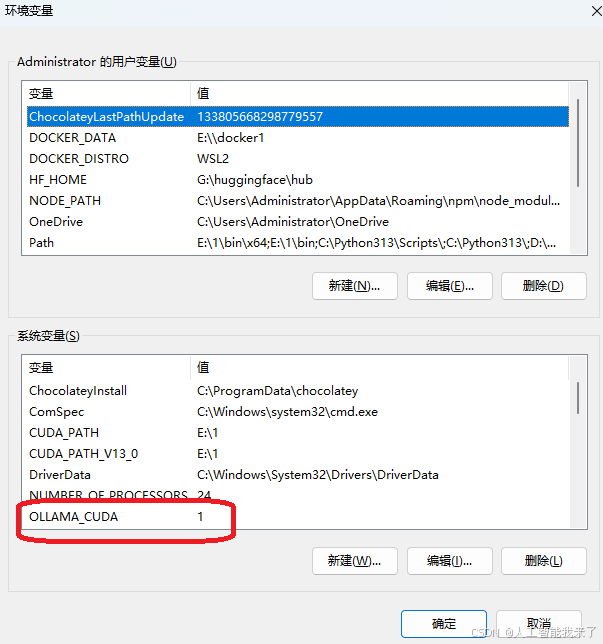
4.1 通过系统环境变量配置
◦ 变量名:OLLAMA_CUDA
◦ 变量值:1(1 = 启用 CUDA,0 = 禁用)
4.2 修改openclaw的ollama的配置
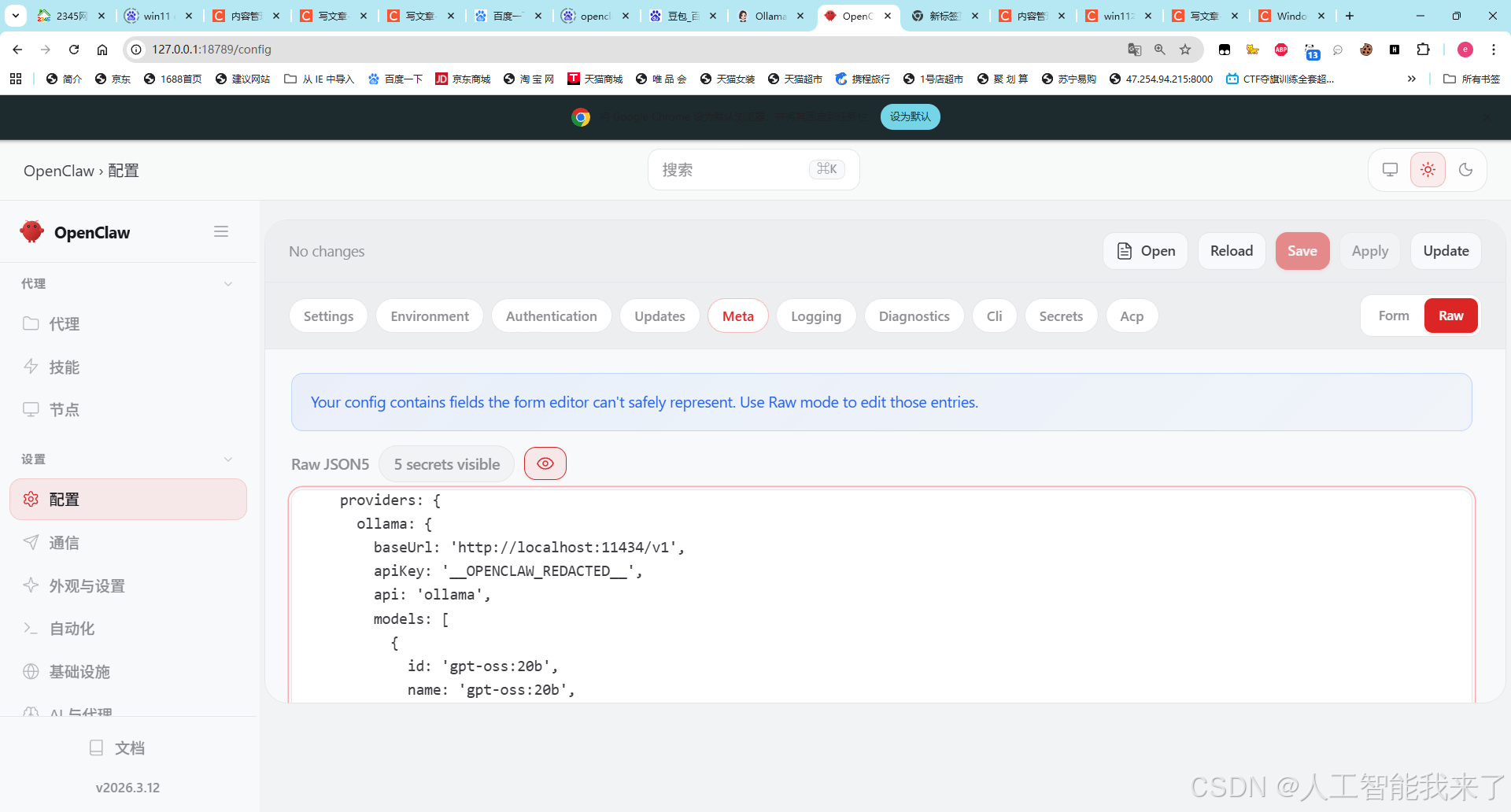
修改ollama端口到11434,这是windows11 ollama的端口
ollama: {
baseUrl: 'http://localhost:11434/v1',
5.测试恢复正常,问题完美解决
ollama serve
PS C:\\Users\\Administrator> ollama serve
time=2026-03-13T19:25:07.835+08:00 level=INFO source=routes.go:1658 msg="server config" env="map[CUDA_VISIBLE_DEVICES: GGML_VK_VISIBLE_DEVICES: GPU_DEVICE_ORDINAL: HIP_VISIBLE_DEVICES: HSA_OVERRIDE_GFX_VERSION: HTTPS_PROXY: HTTP_PROXY: NO_PROXY: OLLAMA_CONTEXT_LENGTH:0 OLLAMA_DEBUG:INFO OLLAMA_EDITOR: OLLAMA_FLASH_ATTENTION:false OLLAMA_GPU_OVERHEAD:0 OLLAMA_HOST:http://127.0.0.1:11434 OLLAMA_KEEP_ALIVE:5m0s OLLAMA_KV_CACHE_TYPE: OLLAMA_LLM_LIBRARY: OLLAMA_LOAD_TIMEOUT:5m0s OLLAMA_MAX_LOADED_MODELS:0 OLLAMA_MAX_QUEUE:512 OLLAMA_MODELS:E:\\\\AI\\\\Ollama OLLAMA_MULTIUSER_CACHE:false OLLAMA_NEW_ENGINE:false OLLAMA_NOHISTORY:false OLLAMA_NOPRUNE:false OLLAMA_NO_CLOUD:false OLLAMA_NUM_PARALLEL:1 OLLAMA_ORIGINS:[http://localhost https://localhost http://localhost:* https://localhost:* http://127.0.0.1 https://127.0.0.1 http://127.0.0.1:* https://127.0.0.1:* http://0.0.0.0 https://0.0.0.0 http://0.0.0.0:* https://0.0.0.0:* app://* file://* tauri://* vscode-webview://* vscode-file://*] OLLAMA_REMOTES:[ollama.com] OLLAMA_SCHED_SPREAD:false OLLAMA_VULKAN:false ROCR_VISIBLE_DEVICES:]"
time=2026-03-13T19:25:07.848+08:00 level=INFO source=routes.go:1660 msg="Ollama cloud disabled: false"
time=2026-03-13T19:25:07.849+08:00 level=INFO source=images.go:477 msg="total blobs: 5"
time=2026-03-13T19:25:07.849+08:00 level=INFO source=images.go:484 msg="total unused blobs removed: 0"
time=2026-03-13T19:25:07.849+08:00 level=INFO source=routes.go:1713 msg="Listening on 127.0.0.1:11434 (version 0.17.7)"
time=2026-03-13T19:25:07.851+08:00 level=INFO source=runner.go:67 msg="discovering available GPUs…"
time=2026-03-13T19:25:07.879+08:00 level=INFO source=server.go:430 msg="starting runner" cmd="C:\\\\Users\\\\Administrator\\\\AppData\\\\Local\\\\Programs\\\\Ollama\\\\ollama.exe runner –ollama-engine –port 3589"
time=2026-03-13T19:25:08.114+08:00 level=INFO source=server.go:430 msg="starting runner" cmd="C:\\\\Users\\\\Administrator\\\\AppData\\\\Local\\\\Programs\\\\Ollama\\\\ollama.exe runner –ollama-engine –port 3599"
time=2026-03-13T19:25:08.331+08:00 level=INFO source=server.go:430 msg="starting runner" cmd="C:\\\\Users\\\\Administrator\\\\AppData\\\\Local\\\\Programs\\\\Ollama\\\\ollama.exe runner –ollama-engine –port 3607"
time=2026-03-13T19:25:08.532+08:00 level=INFO source=runner.go:106 msg="experimental Vulkan support disabled. To enable, set OLLAMA_VULKAN=1"
time=2026-03-13T19:25:08.533+08:00 level=INFO source=server.go:430 msg="starting runner" cmd="C:\\\\Users\\\\Administrator\\\\AppData\\\\Local\\\\Programs\\\\Ollama\\\\ollama.exe runner –ollama-engine –port 3620"
time=2026-03-13T19:25:08.534+08:00 level=INFO source=server.go:430 msg="starting runner" cmd="C:\\\\Users\\\\Administrator\\\\AppData\\\\Local\\\\Programs\\\\Ollama\\\\ollama.exe runner –ollama-engine –port 3619"
time=2026-03-13T19:25:08.807+08:00 level=INFO source=types.go:42 msg="inference compute" id=GPU-67135303-3c02-f35c-3e58-dc2c1b4892fc filter_id="" library=CUDA compute=8.9 name=CUDA0 description="NVIDIA GeForce RTX 4090 D" libdirs=ollama,cuda_v13 driver=13.0 pci_id=0000:07:00.0 type=discrete total="24.0 GiB" available="22.4 GiB"
time=2026-03-13T19:25:08.807+08:00 level=INFO source=routes.go:1763 msg="vram-based default context" total_vram="24.0 GiB" default_num_ctx=32768
time=2026-03-13T19:28:59.539+08:00 level=INFO source=server.go:430 msg="starting runner" cmd="C:\\\\Users\\\\Administrator\\\\AppData\\\\Local\\\\Programs\\\\Ollama\\\\ollama.exe runner –ollama-engine –port 9644"
time=2026-03-13T19:28:59.775+08:00 level=INFO source=cpu_windows.go:148 msg=packages count=1
time=2026-03-13T19:28:59.775+08:00 level=INFO source=cpu_windows.go:195 msg="" package=0 cores=12 efficiency=0 threads=24
time=2026-03-13T19:28:59.892+08:00 level=INFO source=server.go:246 msg="enabling flash attention"
time=2026-03-13T19:28:59.893+08:00 level=INFO source=server.go:430 msg="starting runner" cmd="C:\\\\Users\\\\Administrator\\\\AppData\\\\Local\\\\Programs\\\\Ollama\\\\ollama.exe runner –ollama-engine –model E:\\\\AI\\\\Ollama\\\\blobs\\\\sha256-e7b273f9636059a689e3ddcab3716e4f65abe0143ac978e46673ad0e52d09efb –port 9653"
time=2026-03-13T19:28:59.929+08:00 level=INFO source=sched.go:489 msg="system memory" total="127.9 GiB" free="102.8 GiB" free_swap="106.5 GiB"
time=2026-03-13T19:28:59.929+08:00 level=INFO source=sched.go:496 msg="gpu memory" id=GPU-67135303-3c02-f35c-3e58-dc2c1b4892fc library=CUDA available="21.9 GiB" free="22.3 GiB" minimum="457.0 MiB" overhead="0 B"
time=2026-03-13T19:28:59.929+08:00 level=INFO source=server.go:757 msg="loading model" "model layers"=25 requested=-1
time=2026-03-13T19:28:59.978+08:00 level=INFO source=runner.go:1429 msg="starting ollama engine"
time=2026-03-13T19:28:59.990+08:00 level=INFO source=runner.go:1464 msg="Server listening on 127.0.0.1:9653"
time=2026-03-13T19:28:59.992+08:00 level=INFO source=runner.go:1302 msg=load request="{Operation:fit LoraPath:[] Parallel:1 BatchSize:512 FlashAttention:Enabled KvSize:32768 KvCacheType: NumThreads:12 GPULayers:25[ID:GPU-67135303-3c02-f35c-3e58-dc2c1b4892fc Layers:25(0..24)] MultiUserCache:false ProjectorPath: MainGPU:0 UseMmap:false}"
time=2026-03-13T19:29:00.038+08:00 level=INFO source=ggml.go:136 msg="" architecture=gptoss file_type=MXFP4 name="" description="" num_tensors=459 num_key_values=32
load_backend: loaded CPU backend from C:\\Users\\Administrator\\AppData\\Local\\Programs\\Ollama\\lib\\ollama\\ggml-cpu-haswell.dll
ggml_cuda_init: GGML_CUDA_FORCE_MMQ: no
ggml_cuda_init: GGML_CUDA_FORCE_CUBLAS: no
ggml_cuda_init: found 1 CUDA devices:
Device 0: NVIDIA GeForce RTX 4090 D, compute capability 8.9, VMM: yes, ID: GPU-67135303-3c02-f35c-3e58-dc2c1b4892fc
load_backend: loaded CUDA backend from C:\\Users\\Administrator\\AppData\\Local\\Programs\\Ollama\\lib\\ollama\\cuda_v13\\ggml-cuda.dll
time=2026-03-13T19:29:00.128+08:00 level=INFO source=ggml.go:104 msg=system CPU.0.SSE3=1 CPU.0.SSSE3=1 CPU.0.AVX=1 CPU.0.AVX2=1 CPU.0.F16C=1 CPU.0.FMA=1 CPU.0.BMI2=1 CPU.0.LLAMAFILE=1 CPU.1.LLAMAFILE=1 CUDA.0.ARCHS=750,800,860,870,890,900,1000,1030,1100,1200,1210 CUDA.0.USE_GRAPHS=1 CUDA.0.PEER_MAX_BATCH_SIZE=128 compiler=cgo(clang)
time=2026-03-13T19:29:00.528+08:00 level=INFO source=runner.go:1302 msg=load request="{Operation:alloc LoraPath:[] Parallel:1 BatchSize:512 FlashAttention:Enabled KvSize:32768 KvCacheType: NumThreads:12 GPULayers:25[ID:GPU-67135303-3c02-f35c-3e58-dc2c1b4892fc Layers:25(0..24)] MultiUserCache:false ProjectorPath: MainGPU:0 UseMmap:false}"
time=2026-03-13T19:29:00.880+08:00 level=INFO source=runner.go:1302 msg=load request="{Operation:commit LoraPath:[] Parallel:1 BatchSize:512 FlashAttention:Enabled KvSize:32768 KvCacheType: NumThreads:12 GPULayers:25[ID:GPU-67135303-3c02-f35c-3e58-dc2c1b4892fc Layers:25(0..24)] MultiUserCache:false ProjectorPath: MainGPU:0 UseMmap:false}"
time=2026-03-13T19:29:00.880+08:00 level=INFO source=device.go:240 msg="model weights" device=CUDA0 size="11.8 GiB"
time=2026-03-13T19:29:00.880+08:00 level=INFO source=device.go:245 msg="model weights" device=CPU size="1.1 GiB"
time=2026-03-13T19:29:00.880+08:00 level=INFO source=device.go:251 msg="kv cache" device=CUDA0 size="876.0 MiB"
time=2026-03-13T19:29:00.880+08:00 level=INFO source=ggml.go:482 msg="offloading 24 repeating layers to GPU"
time=2026-03-13T19:29:00.880+08:00 level=INFO source=ggml.go:489 msg="offloading output layer to GPU"
time=2026-03-13T19:29:00.880+08:00 level=INFO source=ggml.go:494 msg="offloaded 25/25 layers to GPU"
time=2026-03-13T19:29:00.880+08:00 level=INFO source=device.go:262 msg="compute graph" device=CUDA0 size="202.3 MiB"
time=2026-03-13T19:29:00.880+08:00 level=INFO source=device.go:267 msg="compute graph" device=CPU size="5.6 MiB"
time=2026-03-13T19:29:00.880+08:00 level=INFO source=device.go:272 msg="total memory" size="13.9 GiB"
time=2026-03-13T19:29:00.880+08:00 level=INFO source=sched.go:565 msg="loaded runners" count=1
time=2026-03-13T19:29:00.880+08:00 level=INFO source=server.go:1350 msg="waiting for llama runner to start responding"
time=2026-03-13T19:29:00.881+08:00 level=INFO source=server.go:1384 msg="waiting for server to become available" status="llm server loading model"
time=2026-03-13T19:29:03.637+08:00 level=INFO source=server.go:1388 msg="llama runner started in 3.71 seconds"
[GIN] 2026/03/13 – 19:30:26 | 200 | 8.5493529s | 127.0.0.1 | POST "/v1/chat/completions"
[GIN] 2026/03/13 – 19:30:51 | 200 | 4.4312032s | 127.0.0.1 | POST "/v1/chat/completions"
[GIN] 2026/03/13 – 19:33:43 | 200 | 4m43s | 127.0.0.1 | POST "/v1/chat/completions"
[GIN] 2026/03/13 – 19:38:36 | 200 | 4m51s | 127.0.0.1 | POST "/v1/chat/completions"
[GIN] 2026/03/13 – 19:43:33 | 200 | 4m56s | 127.0.0.1 | POST "/v1/chat/completions"
time=2026-03-13T19:43:33.811+08:00 level=INFO source=server.go:1568 msg="aborting completion request due to client closing the connection"
ggml_backend_cuda_device_get_memory device GPU-67135303-3c02-f35c-3e58-dc2c1b4892fc utilizing NVML memory reporting free: 9857929216 total: 25757220864
time=2026-03-13T19:44:12.982+08:00 level=INFO source=server.go:430 msg="starting runner" cmd="C:\\\\Users\\\\Administrator\\\\AppData\\\\Local\\\\Programs\\\\Ollama\\\\ollama.exe runner –ollama-engine –port 1835"
6.小龙虾立马复活了
6.1 QQ正常
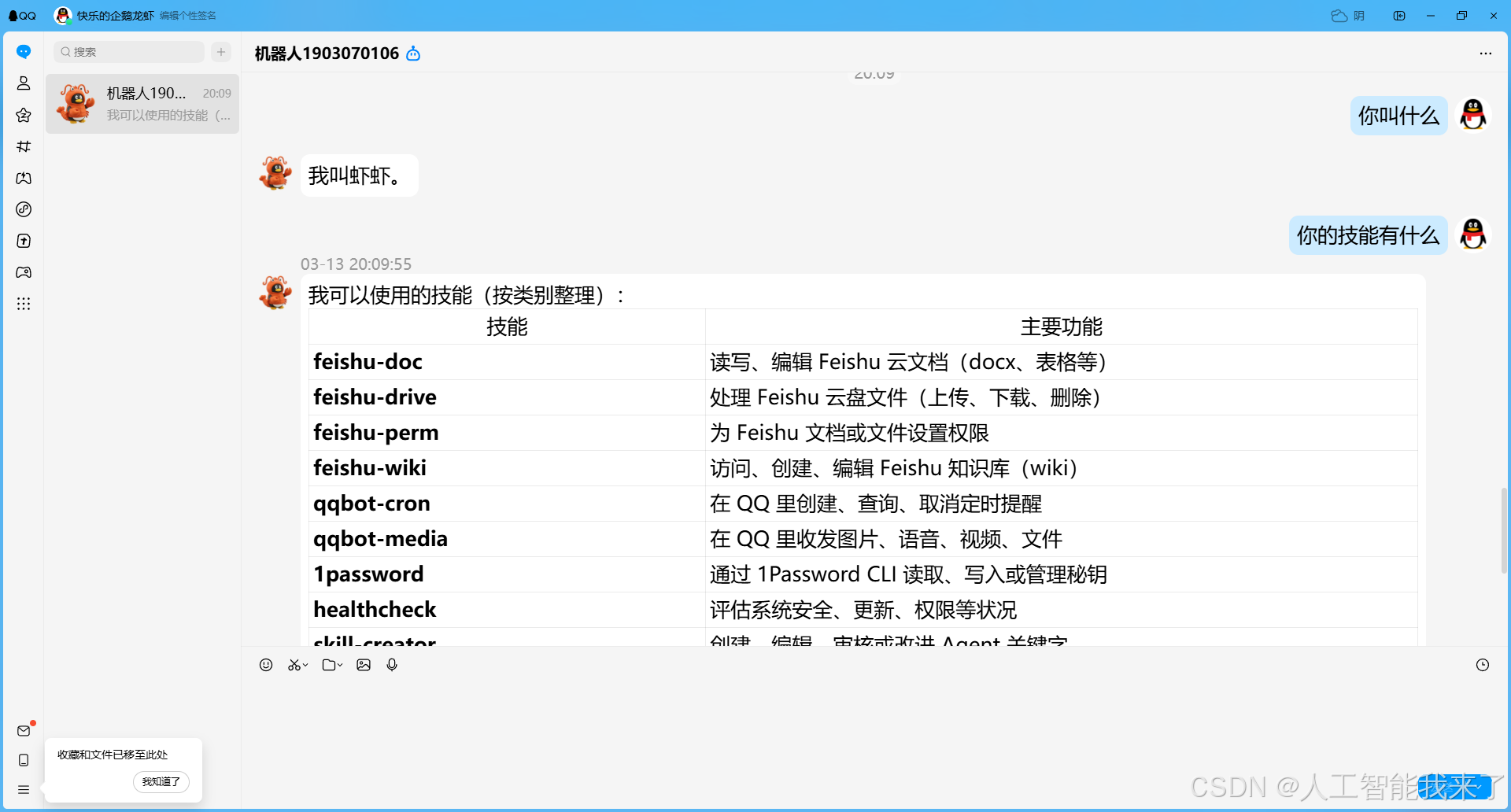
6.2 飞书正常

6.3 telegram正常