Go-Ethereum测试Solidity ERC20合约 – Go-Ethereum调用区块链方法
- 1. 环境配置和合约代码
- 2. Go Ethereum简介
- 3. 编写调试代码
-
- 3.1 Go Ethereum的JSON-RPC结构定义
- 3.2 查询区块号的JSON-RPC结构:
- 3.3 查询余额的JSON-RPC结构:
- 3.4 发起交易的JSON-RPC结构:
- 3.5 完整方法
- 4. 调试
一. 系列视频 二. 系列文章
1. Remix编写、编译、部署、测试Solidity ERC20合约 – 基础篇 2. Remix编写、编译、部署、测试Solidity ERC20合约 – 进阶篇 3. Hardhat编写、编译、部署、测试Solidity ERC20合约 – 基础篇 4. JSON-RPC调用区块链方法 5. JSON-RPC调用合约方法 6. JSON-RPC给合约账户同时转以太币和代币 7. web3.js调用区块链方法 8. web3.js调用合约方法 9. web3.js给合约账户同时转以太币和代币 10. Go-Ethereum调用区块链方法 11. Go-Ethereum调用合约方法 12. sendTransaction和sendRawTransaction区别 13. Metamask导入代币,转账ETH,转账代币 – 界面操作 14. Metamask连接hardhat本地节点 15. DAPP react界面-web3.js库-Metemask调用和显示-调用合约方法 16. web3js结合sepolia测试网 17. 总结
1. 环境配置和合约代码
参考文章12. Hardhat编写、编译、部署、测试Solidity ERC20合约 – 进阶篇 – Metamask导入代币,转账ETH,转账代币 GoLand 2025.2.4版本 go 1.25.4
2. Go Ethereum简介
Go Ethereum是以太坊协议的官方原始实现。 它是用Go编写的,完全开放源代码。 Go Ethereum可以作为独立的客户端Geth使用,也可以作为可以嵌入项目的库。 Geth和hardhat node一样是以太坊客户端,Geth是官方发布的标准以太坊节点,hardhat node是开发测试节点. 本节中,将Go Ethereum作为DAPP的开发库来使用。 github官方地址
3. 编写调试代码
为了突出业务逻辑,省略了错误处理。 对区块链的读操作比较简单,同web3.js一样,底层构造JSON-RPC结构。 对区块链的写操作,比web3.js复杂,需要构造交易的JSON-RPC结构。web3.js接口内部实现了组装细节。
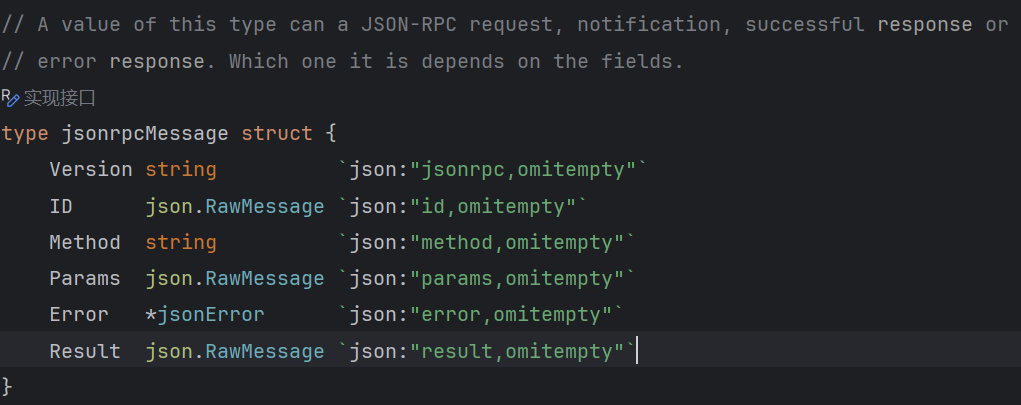
3.1 Go Ethereum的JSON-RPC结构定义
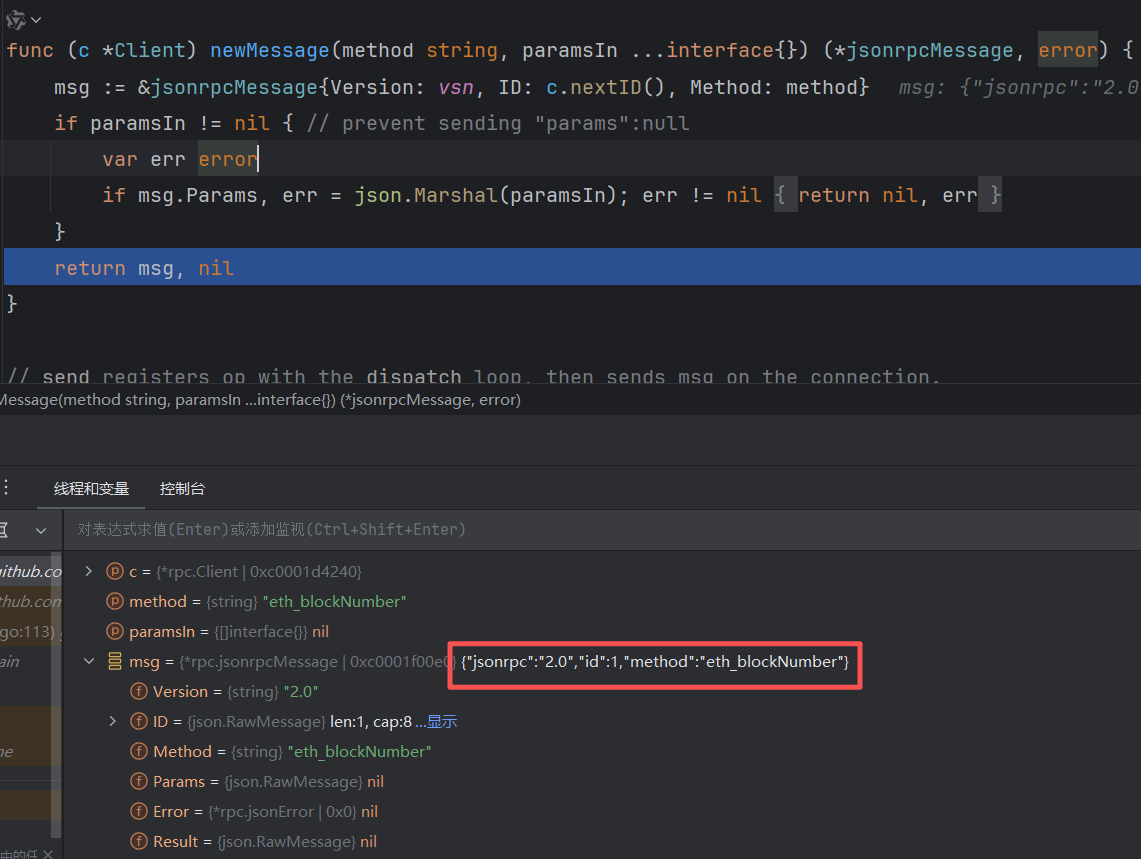
3.2 查询区块号的JSON-RPC结构:
Go Ethereum的调用方式:
ethe.BlockNumber(context.Background())
底层构建的JSON–RPC结构:
{
jsonrpc: '2.0',
method: 'eth_blockNumber',
params: [],
id: 1
}
3.3 查询余额的JSON-RPC结构:
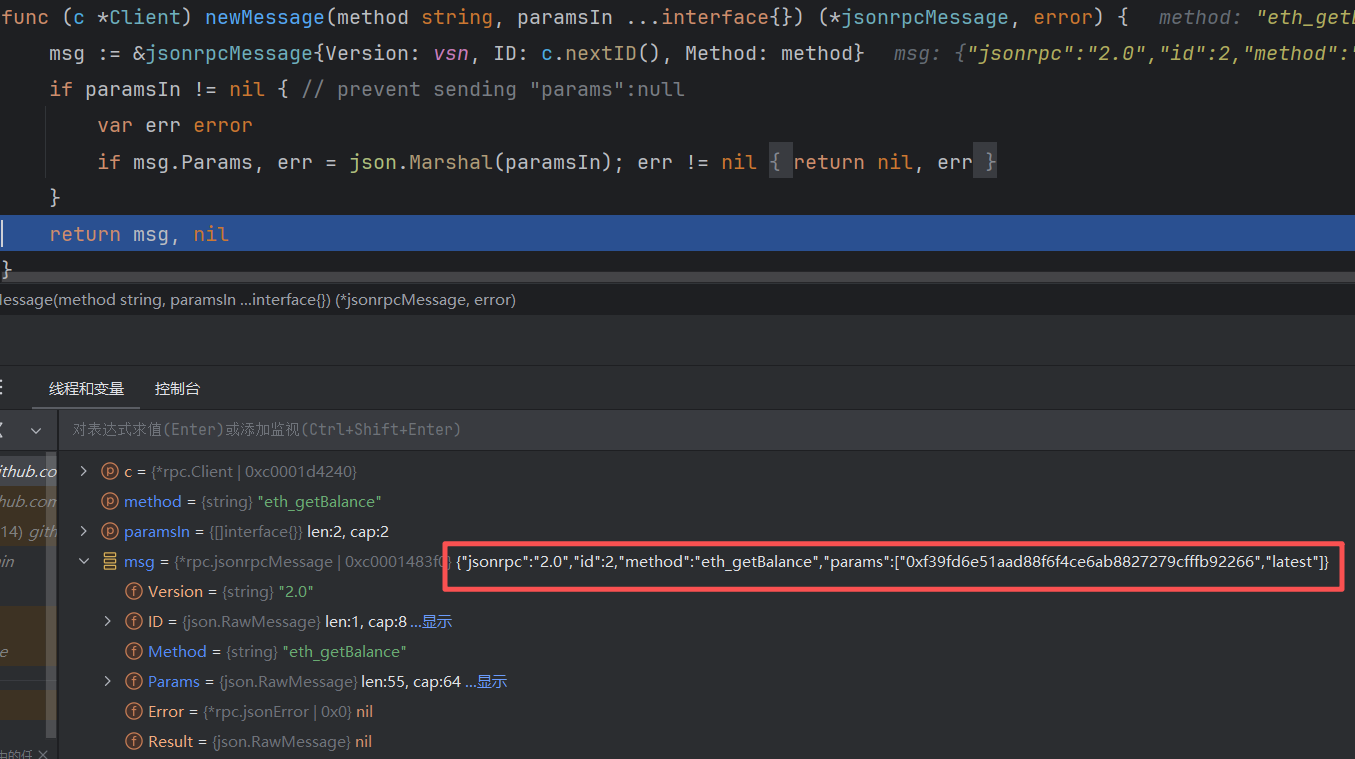
Go Ethereum的调用方式:
ethe.BalanceAt(context.Background(), fromAddress, nil)
底层构建的JSON–RPC结构:
{
jsonrpc: '2.0',
method: 'eth_getBalance',
params: [address, 'latest'],
id: 1
}
3.4 发起交易的JSON-RPC结构:
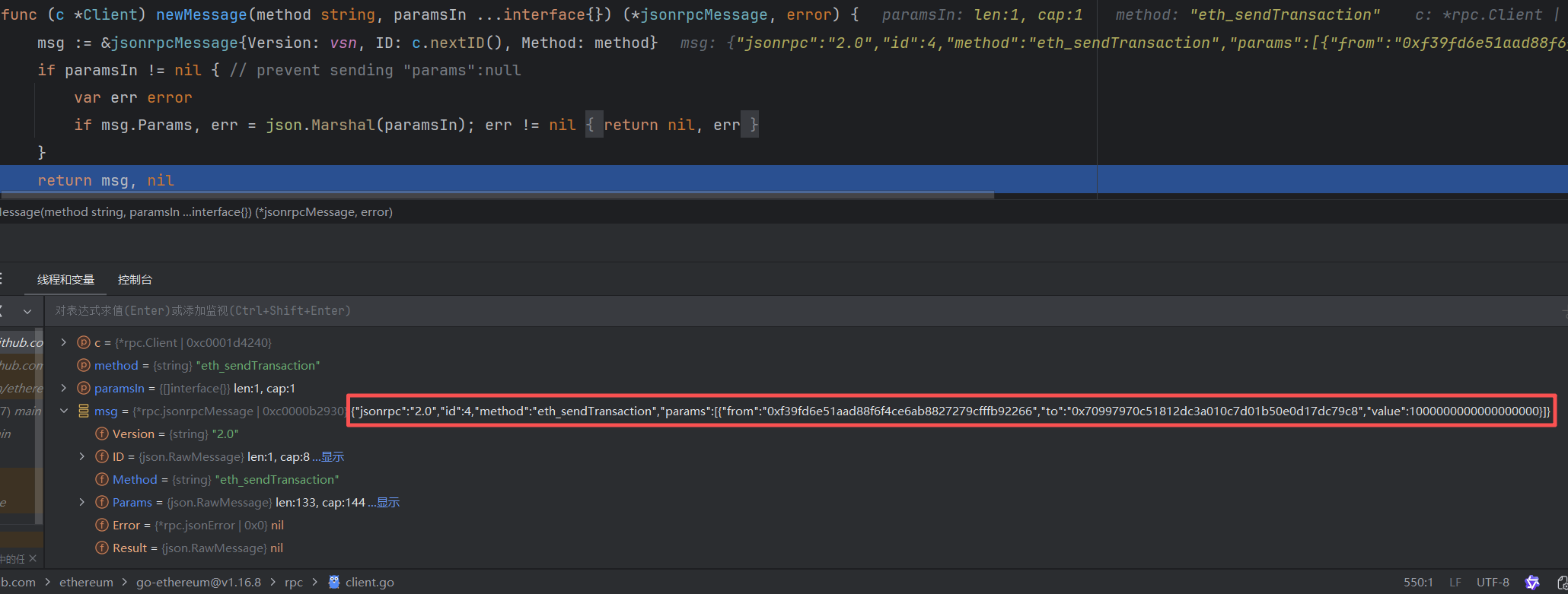
Go Ethereum的调用方式:
ethe.Client().Call(&txHash, "eth_sendTransaction", map[string]interface{}{
"from": fromAddress,
"to": toAddress,
"value": valueETH,
})
底层构建的JSON–RPC结构:
{
jsonrpc: '2.0',
method: 'eth_sendTransaction',
params: [{
from: fromAddress,
to: toAddress,
value: '0x' + BigInt(valueETH).toString(16).padStart(64, '0'),
}],
id: 1
}
3.5 完整方法
// sendTransaction方式
func (this *Geth) sendTransaction() {
var txHash common.Hash
// 获取底层的 rpc.Client
_ = this.ethe.Client().Call(&txHash, "eth_sendTransaction", map[string]interface{}{
"from": fromAddress,
"to": toAddress,
"value": valueETH,
})
}
调试代码,看到Go-Ethereum框架底层构建JSON-RPC结构,params字段是原始交易对象 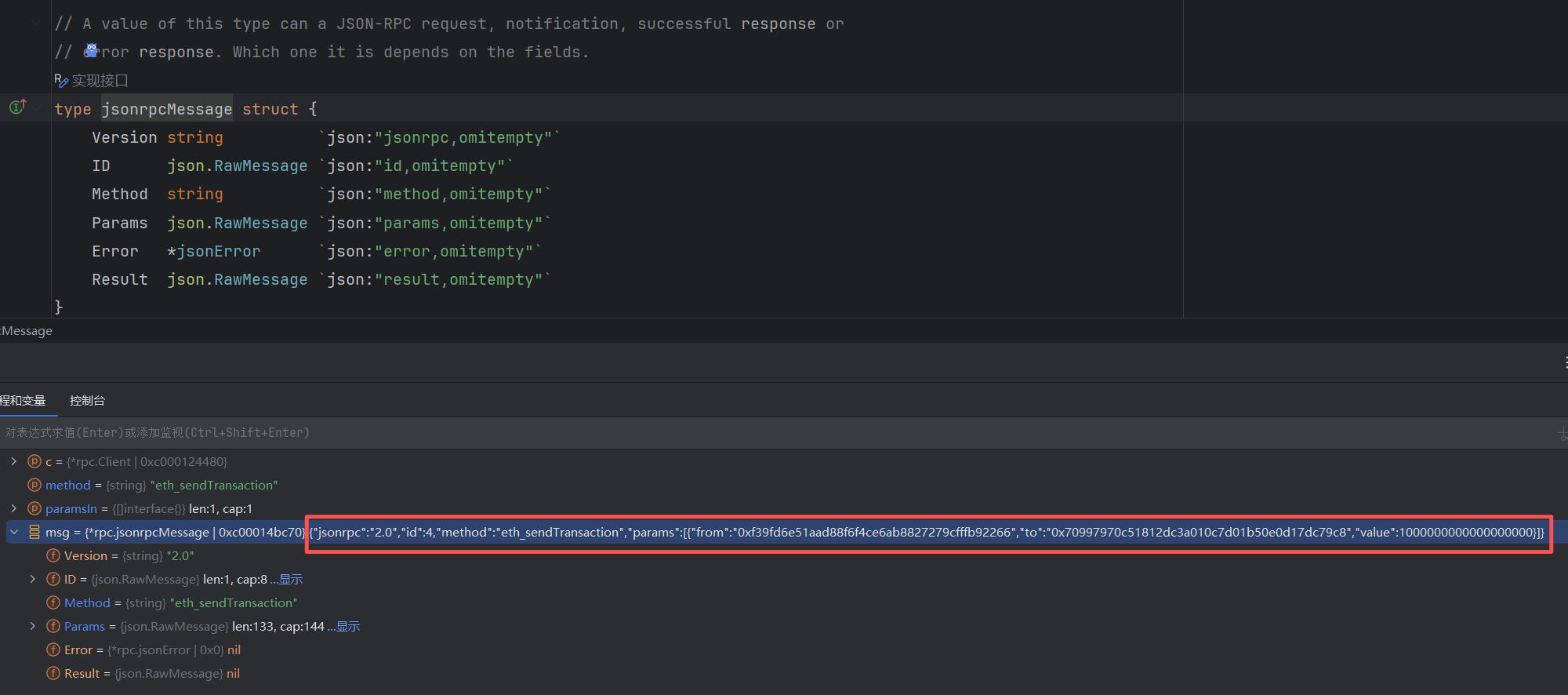
package main
func main() {
gethClient := (&Geth{}).NewClient()
gethClient.BlockChain()
}
package main
import (
"context"
"fmt"
"math/big"
"github.com/ethereum/go-ethereum/common"
"github.com/ethereum/go-ethereum/ethclient"
)
// hardhat 默认账户地址1
var fromAddress = common.HexToAddress("0xf39fd6e51aad88f6f4ce6ab8827279cfffb92266")
// hardhat 默认账户地址2、合约地址、Metamask 账户地址
var toAddress = common.HexToAddress("0x70997970C51812dc3A010C7d01b50e0d17dc79C8")
var valueETH = big.NewInt(1e18) // 1ETH
var url = "http://localhost:8545"
type Geth struct {
// 区块链调用
ethe *ethclient.Client
}
func (this *Geth) NewClient() *Geth {
// 连接网络
this.ethe, _ = ethclient.Dial(url)
return this
}
// 区块链操作
func (this *Geth) BlockChain() {
id, _ := this.ethe.BlockNumber(context.Background())
fmt.Println(id)
balance, _ := this.ethe.BalanceAt(context.Background(), fromAddress, nil)
fmt.Println("发送前", this.weiToETH(balance))
balance, _ = this.ethe.BalanceAt(context.Background(), toAddress, nil)
fmt.Println("发送前", this.weiToETH(balance))
this.sendTransaction()
balance, _ = this.ethe.BalanceAt(context.Background(), fromAddress, nil)
fmt.Println("发送后", this.weiToETH(balance))
balance, _ = this.ethe.BalanceAt(context.Background(), toAddress, nil)
fmt.Println("发送后", this.weiToETH(balance))
}
// sendTransaction方式
func (this *Geth) sendTransaction() {
var txHash common.Hash
// 获取底层的 rpc.Client
_ = this.ethe.Client().Call(&txHash, "eth_sendTransaction", map[string]interface{}{
"from": fromAddress,
"to": toAddress,
"value": valueETH,
})
}
// wei转ETH
func (this *Geth) weiToETH(wei *big.Int) *big.Float {
return new(big.Float).Quo(new(big.Float).SetInt(wei), big.NewFloat(1e18))
}
4. 调试
hh run ignition\\modules\\Mytoken.js –network localhost
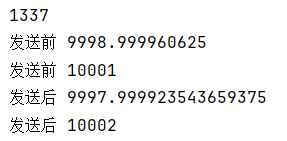
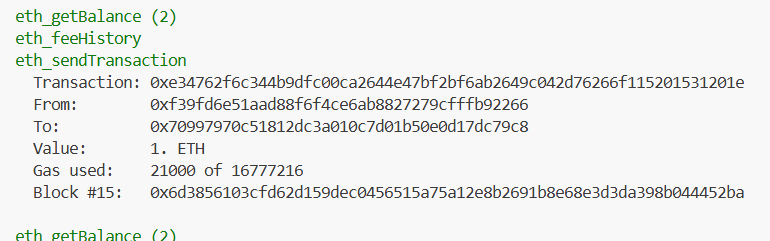
一. 系列视频 二. 系列文章