丹青幻境实操手册:添加‘揭榜’水印嵌入与版权区块链存证对接模块
“见微知著,凝光成影。执笔入画,神游万象。”
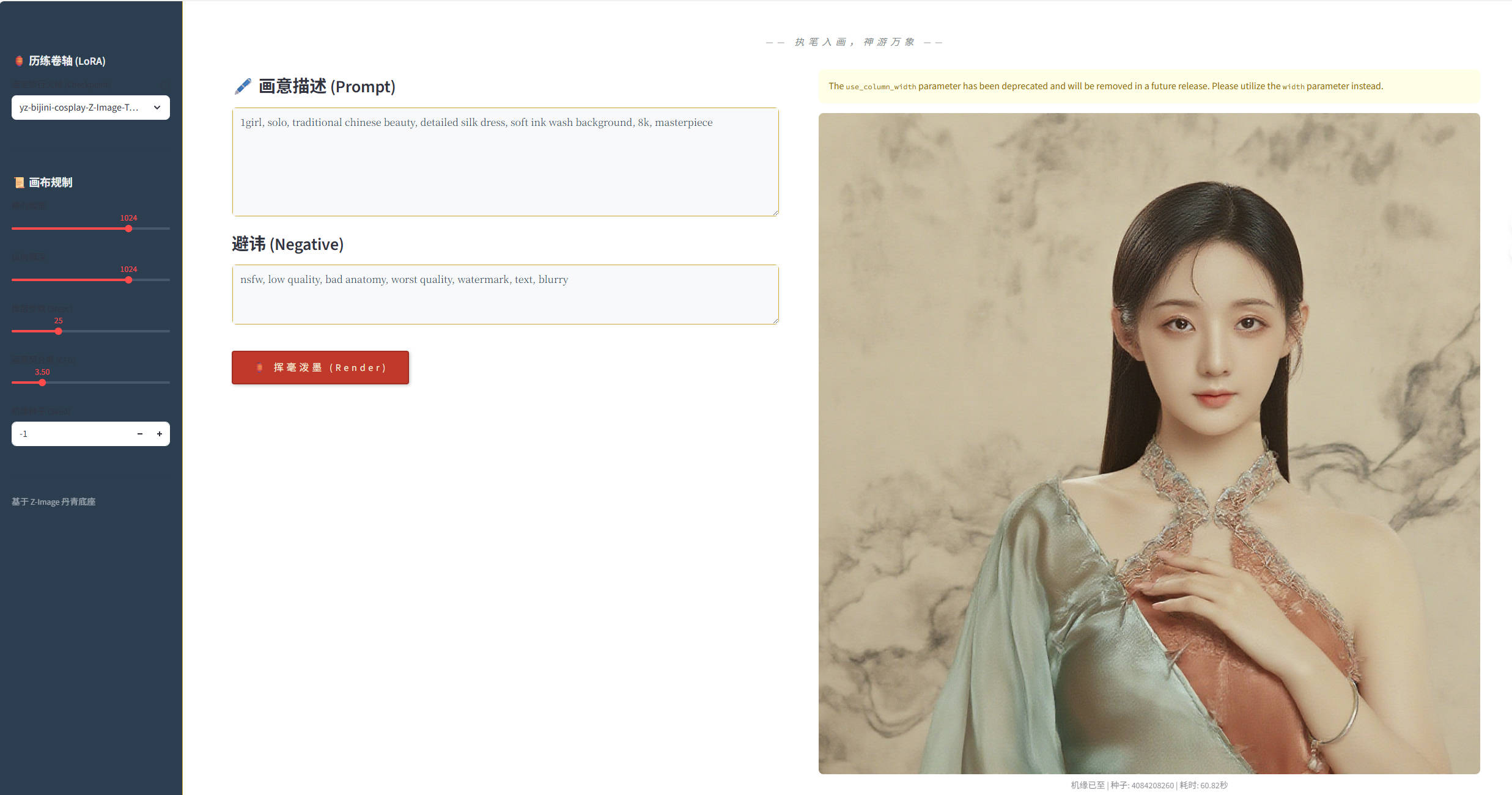
丹青幻境 是一款基于 Z-Image 架构与 Cosplay LoRA 历练卷轴打造的数字艺术终端。它告别了冷硬的科技感,将 4090 的磅礴算力隐于宣纸墨色之中,旨在为画师提供一个静谧、沉浸的“灵感实验室”。
1. 功能概述:为何需要'揭榜'与存证
在数字艺术创作领域,作品的版权保护和身份认证一直是创作者关注的焦点。丹青幻境新增的'揭榜'水印嵌入与版权区块链存证模块,正是为了解决这一痛点。
核心价值:
- 身份认证:为每幅生成的作品嵌入唯一创作者标识
- 版权保护:通过区块链技术实现不可篡改的创作时间证明
- 便捷操作:一键完成水印添加和存证,不打断创作流程
- 永久记录:区块链存证确保创作记录永久保存,可随时验证
这个功能模块让数字艺术创作不再是"匿名产出",而是有据可查、有源可溯的正式作品。
2. 环境准备与依赖安装
在开始使用'揭榜'功能前,需要确保环境已正确配置相关依赖。
2.1 新增依赖包
# 安装水印处理相关库
pip install Pillow opencv-python
# 安装区块链存证SDK(以某主流平台为例)
pip install blockchain-sdk cryptography
# 安装时间戳服务客户端
pip install rfc3161ng
2.2 配置文件更新
在丹青幻境主目录下创建或更新配置文件 config.py:
# 水印配置
WATERMARK_CONFIG = {
'position': 'bottom-right', # 水印位置:top-left, top-right, bottom-left, bottom-right
'opacity': 0.3, # 水印透明度
'size_ratio': 0.05, # 水印大小相对于图像宽度的比例
'default_text': '丹青幻境·创作', # 默认水印文本
}
# 区块链存证配置
BLOCKCHAIN_CONFIG = {
'api_key': 'your_api_key_here', # 区块链平台API密钥
'network': 'mainnet', # 网络类型:mainnet或testnet
'contract_address': '0x…', # 智能合约地址
'gas_limit': 200000, # 交易gas限制
}
# 时间戳服务配置
TIMESTAMP_CONFIG = {
'service_url': 'https://tsa.example.com', # 时间戳权威服务地址
'cert_path': './tsa_cert.pem', # TSA证书路径
}
3. '揭榜'水印嵌入实现详解
'揭榜'水印模块采用半透明文字水印技术,既保护版权又不影响作品观赏性。
3.1 水印生成核心代码
在丹青幻境主程序 app.py 中添加水印处理模块:
import cv2
import numpy as np
from PIL import Image, ImageDraw, ImageFont
import os
class WatermarkGenerator:
def __init__(self, config):
self.config = config
# 尝试加载中文字体,如果不存在则使用默认字体
try:
self.font = ImageFont.truetype("SimHei.ttf", 40)
except:
self.font = ImageFont.load_default()
def add_text_watermark(self, image_path, output_path, text=None):
"""添加文字水印到图像"""
if text is None:
text = self.config['default_text']
# 打开原始图像
original_image = Image.open(image_path).convert("RGBA")
width, height = original_image.size
# 创建透明水印层
watermark = Image.new("RGBA", original_image.size, (0, 0, 0, 0))
draw = ImageDraw.Draw(watermark)
# 计算水印位置和大小
text_bbox = draw.textbbox((0, 0), text, font=self.font)
text_width = text_bbox[2] – text_bbox[0]
text_height = text_bbox[3] – text_bbox[1]
# 根据配置确定水印位置
position = self._calculate_position(width, height, text_width, text_height)
# 绘制水印文字
draw.text(position, text, font=self.font, fill=(255, 255, 255, int(255 * self.config['opacity'])))
# 合并图像和水印
watermarked = Image.alpha_composite(original_image, watermark)
# 保存结果
watermarked.convert("RGB").save(output_path)
return output_path
def _calculate_position(self, img_width, img_height, text_width, text_height):
"""计算水印位置"""
margin = 20 # 边距
position_config = self.config['position']
if position_config == 'top-left':
return (margin, margin)
elif position_config == 'top-right':
return (img_width – text_width – margin, margin)
elif position_config == 'bottom-left':
return (margin, img_height – text_height – margin)
elif position_config == 'bottom-right':
return (img_width – text_width – margin, img_height – text_height – margin)
else:
return (margin, margin) # 默认左上角
3.2 水印功能集成到主界面
在Streamlit界面中添加'揭榜'功能按钮和配置选项:
# 在app.py的界面部分添加以下代码
def main():
# … 原有代码 …
# 在生成按钮后添加揭榜按钮
if st.button("🏮 挥毫泼墨"):
# … 图像生成代码 …
generated_image_path = "path/to/generated/image.png"
# 显示揭榜选项
st.session_state['generated_image'] = generated_image_path
# 显示揭榜区域
if 'generated_image' in st.session_state and st.session_state['generated_image']:
st.markdown("—")
st.subheader("🎯 揭榜留存")
col1, col2 = st.columns(2)
with col1:
watermark_text = st.text_input("水印文字", value="丹青幻境·创作")
watermark_position = st.selectbox(
"水印位置",
options=['bottom-right', 'bottom-left', 'top-right', 'top-left'],
index=0
)
with col2:
do_blockchain = st.checkbox("启用区块链存证", value=True)
custom_filename = st.text_input("保存文件名", value="丹青作品")
if st.button("📜 揭榜保存", type="primary"):
with st.spinner("正在添加水印并存证…"):
# 添加水印
watermark_config = {
'position': watermark_position,
'opacity': 0.3,
'default_text': watermark_text
}
watermarker = WatermarkGenerator(watermark_config)
output_path = f"./output/{custom_filename}.png"
watermarked_path = watermarker.add_text_watermark(
st.session_state['generated_image'],
output_path
)
# 区块链存证
if do_blockchain:
blockchain_proof = blockchain_register(watermarked_path, watermark_text)
st.session_state['blockchain_proof'] = blockchain_proof
st.success(f"作品已保存并存证: {output_path}")
st.image(watermarked_path, caption="带水印的作品")
4. 区块链存证对接实现
区块链存证模块为每幅作品生成唯一的数字指纹,并记录到区块链上。
4.1 数字指纹生成与存证
import hashlib
from datetime import datetime
import json
from blockchain_sdk import BlockchainClient # 假设的区块链SDK
class BlockchainRegister:
def __init__(self, config):
self.config = config
self.client = BlockchainClient(
api_key=config['api_key'],
network=config['network']
)
def generate_digital_fingerprint(self, image_path):
"""生成图像的数字指纹"""
with open(image_path, 'rb') as f:
image_data = f.read()
# 计算SHA-256哈希值
hash_sha256 = hashlib.sha256(image_data).hexdigest()
# 获取图像元数据
image = Image.open(image_path)
metadata = {
'hash': hash_sha256,
'timestamp': datetime.utcnow().isoformat(),
'size': image.size,
'mode': image.mode,
'format': image.format
}
return metadata
def register_to_blockchain(self, metadata, additional_info=None):
"""将元数据注册到区块链"""
if additional_info:
metadata.update(additional_info)
# 创建存证交易
transaction = {
'type': 'ARTWORK_REGISTRATION',
'metadata': metadata,
'timestamp': datetime.utcnow().isoformat()
}
# 发送到区块链
try:
tx_hash = self.client.register_asset(transaction)
return {
'success': True,
'transaction_hash': tx_hash,
'metadata': metadata,
'timestamp': transaction['timestamp']
}
except Exception as e:
return {
'success': False,
'error': str(e)
}
def blockchain_register(image_path, watermark_text):
"""区块链存证入口函数"""
# 初始化区块链客户端
registrar = BlockchainRegister(BLOCKCHAIN_CONFIG)
# 生成数字指纹
metadata = registrar.generate_digital_fingerprint(image_path)
metadata['watermark_text'] = watermark_text
metadata['tool'] = '丹青幻境'
# 注册到区块链
result = registrar.register_to_blockchain(metadata)
return result
4.2 存证验证功能
def verify_registration(tx_hash):
"""验证区块链存证"""
client = BlockchainClient(
api_key=BLOCKCHAIN_CONFIG['api_key'],
network=BLOCKCHAIN_CONFIG['network']
)
try:
# 查询交易
transaction = client.get_transaction(tx_hash)
if transaction and transaction['type'] == 'ARTWORK_REGISTRATION':
# 验证交易有效性
is_valid = client.verify_transaction(tx_hash)
return {
'exists': True,
'valid': is_valid,
'transaction': transaction,
'timestamp': transaction['timestamp']
}
else:
return {
'exists': False,
'valid': False
}
except Exception as e:
return {
'error': str(e)
}
# 在界面中添加验证功能
def add_verification_ui():
"""添加存证验证界面"""
st.subheader("🔍 存证验证")
tx_hash = st.text_input("输入交易哈希值", placeholder="0x…")
if st.button("验证存证"):
if tx_hash:
with st.spinner("正在查询区块链…"):
result = verify_registration(tx_hash)
if 'error' in result:
st.error(f"查询错误: {result['error']}")
elif not result['exists']:
st.warning("未找到对应的存证记录")
elif result['valid']:
st.success("存证验证有效!")
st.json(result['transaction'])
else:
st.error("存证记录无效或已被篡改")
else:
st.warning("请输入交易哈希值")
5. 完整集成与使用流程
5.1 模块集成到主程序
将上述模块集成到丹青幻境主程序 app.py 中:
# 在文件开头导入新增模块
from watermark_module import WatermarkGenerator
from blockchain_module import BlockchainRegister, verify_registration
# 在适当位置初始化组件
watermarker = WatermarkGenerator(WATERMARK_CONFIG)
blockchain_registrar = BlockchainRegister(BLOCKCHAIN_CONFIG)
# 在主函数中添加存证验证界面
if st.sidebar.checkbox("显示存证验证"):
add_verification_ui()
5.2 使用流程示例
- 自动添加半透明水印
- 生成图像的数字指纹
- 将存证信息上传到区块链
- 返回交易哈希供后续验证
5.3 批量处理功能
对于需要批量添加水印和存证的情况:
def batch_watermark_and_register(image_folder, output_folder, watermark_text):
"""批量处理图像水印和存证"""
os.makedirs(output_folder, exist_ok=True)
image_files = [f for f in os.listdir(image_folder)
if f.lower().endswith(('.png', '.jpg', '.jpeg'))]
results = []
for image_file in image_files:
input_path = os.path.join(image_folder, image_file)
output_path = os.path.join(output_folder, f"watermarked_{image_file}")
# 添加水印
watermarked_path = watermarker.add_text_watermark(
input_path, output_path, watermark_text
)
# 区块链存证
registration_result = blockchain_register(watermarked_path, watermark_text)
results.append({
'filename': image_file,
'output_path': watermarked_path,
'transaction_hash': registration_result.get('transaction_hash'),
'success': registration_result.get('success', False)
})
return results
6. 总结与最佳实践
通过本文介绍的'揭榜'水印嵌入与版权区块链存证模块,丹青幻境为数字艺术创作者提供了完整的版权保护解决方案。
6.1 功能优势总结
6.2 实践建议
6.3 扩展可能性
当前实现为基础版本,还可以进一步扩展:
- 支持多种水印样式(图形水印、数字水印)
- 集成多个区块链平台选择
- 添加版权交易和转让功能
- 实现跨平台验证服务
丹青幻境通过'揭榜'模块,不仅保护了创作者的劳动成果,也为数字艺术作品的商业化应用奠定了坚实基础。
获取更多AI镜像
想探索更多AI镜像和应用场景?访问 CSDN星图镜像广场,提供丰富的预置镜像,覆盖大模型推理、图像生成、视频生成、模型微调等多个领域,支持一键部署。
