文章目录
-
-
- 跨站追踪是怎么工作的?
- ITP 相关 API 总览
- 开启和关闭 ITP
- 白名单管理:某些域名不受限制
- 监听被拦截的追踪器
- ITP 的注意事项
- 写在最后
-
你有没有注意到,在 A 网站搜索了某个商品,跑到 B 网站就开始推送相关广告?这背后是跨站追踪技术。ITP(Intelligent Tracking Prevention,智能防跟踪)就是用来对抗这种追踪的。ArkWeb 提供了完整的 ITP 控制 API,让你决定为用户开不开这把"保护伞"。
跨站追踪是怎么工作的?
大白话:
ITP 会识别这些第三方追踪器,阻止它们跨站读写 Cookie 和存储数据,切断追踪链路。
ITP 相关 API 总览

开启和关闭 ITP
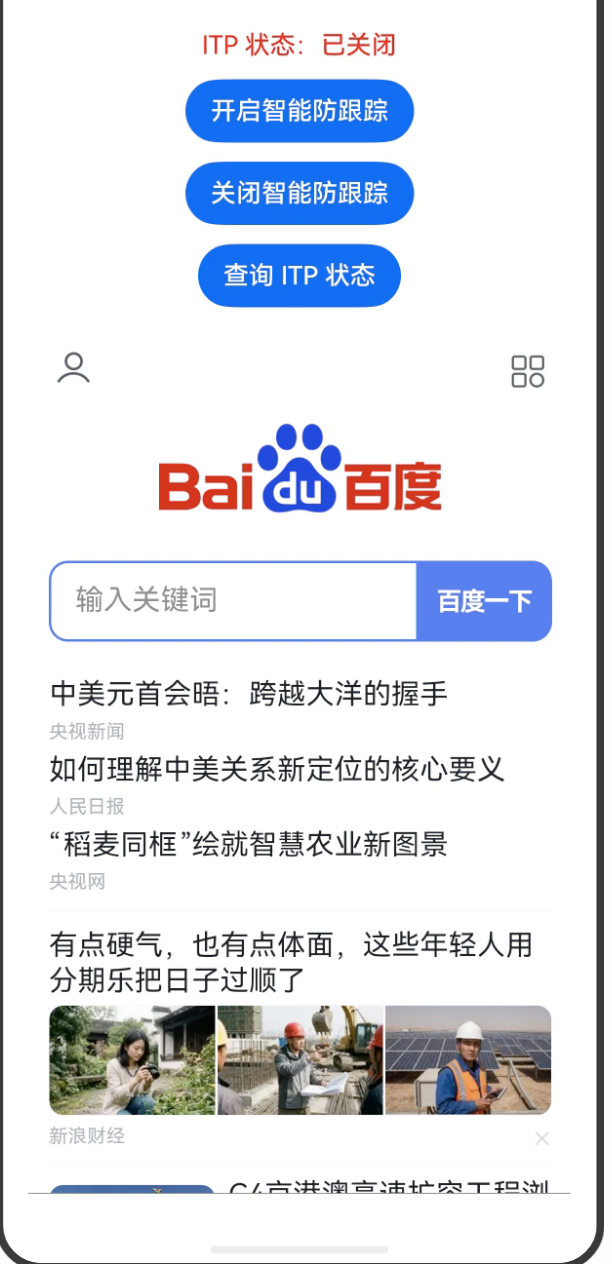
import { webview } from '@kit.ArkWeb';
import { BusinessError } from '@kit.BasicServicesKit';
@Entry
@Component
struct WebITPDemo {
controller: webview.WebviewController = new webview.WebviewController();
@State itpEnabled: boolean = false;
build() {
Column({ space: 12 }) {
// 显示当前 ITP 状态
Text(`ITP 状态:${this.itpEnabled ? '已开启' : '已关闭'}`)
.fontSize(16)
.fontColor(this.itpEnabled ? Color.Green : Color.Red)
// 开启 ITP
Button('开启智能防跟踪')
.onClick(() => {
try {
this.controller.enableIntelligentTrackingPrevention(true);
this.itpEnabled = true;
console.info('ITP 已开启');
} catch (error) {
console.error(`开启 ITP 失败: ${(error as BusinessError).message}`);
}
})
// 关闭 ITP
Button('关闭智能防跟踪')
.onClick(() => {
try {
this.controller.enableIntelligentTrackingPrevention(false);
this.itpEnabled = false;
console.info('ITP 已关闭');
} catch (error) {
console.error(`关闭 ITP 失败: ${(error as BusinessError).message}`);
}
})
// 查询当前状态
Button('查询 ITP 状态')
.onClick(() => {
try {
const enabled = this.controller.isIntelligentTrackingPreventionEnabled();
this.itpEnabled = enabled;
console.info('ITP 当前状态:', enabled);
} catch (error) {
console.error(`查询 ITP 状态失败: ${(error as BusinessError).message}`);
}
})
Web({ src: 'https://www.baidu.com', controller: this.controller })
.width('100%')
.layoutWeight(1)
// 监听防跟踪拦截结果
.onIntelligentTrackingPreventionResult((details) => {
// host:当前访问的主域名
// trackerHost:被拦截的追踪器域名
console.info(
`追踪器被拦截 → 主域:${details.host},追踪域:${details.trackerHost}`
);
})
}
.width('100%')
.height('100%')
.padding(16)
}
}
白名单管理:某些域名不受限制
有时候 ITP 会误伤——比如你的 App 有自己的登录域(login.yourapp.com)和主域(yourapp.com),ITP 可能会把 login.yourapp.com 识别为追踪器。白名单可以让这些域名不受 ITP 限制。

import { webview } from '@kit.ArkWeb';
import { BusinessError } from '@kit.BasicServicesKit';
@Entry
@Component
struct ITPBypassListDemo {
controller: webview.WebviewController = new webview.WebviewController();
build() {
Column({ space: 12 }) {
// 添加域名到白名单(这些域名不受 ITP 限制)
Button('添加白名单')
.onClick(() => {
try {
const trustedDomains = [
'login.yourapp.com',
'api.yourapp.com',
'cdn.yourapp.com'
];
webview.WebviewController.addIntelligentTrackingPreventionBypassingList(
trustedDomains
);
console.info('已添加白名单:', trustedDomains);
} catch (error) {
console.error(`添加白名单失败: ${(error as BusinessError).message}`);
}
})
// 移除部分白名单
Button('移除部分白名单')
.onClick(() => {
try {
// 只移除 cdn.yourapp.com,其他保留
const toRemove = ['cdn.yourapp.com'];
webview.WebviewController.removeIntelligentTrackingPreventionBypassingList(
toRemove
);
console.info('已移除:', toRemove);
} catch (error) {
console.error(`移除白名单失败: ${(error as BusinessError).message}`);
}
})
// 清空全部白名单
Button('清空所有白名单')
.onClick(() => {
// 这个 API 不需要传参,直接清空所有
webview.WebviewController.clearIntelligentTrackingPreventionBypassingList();
console.info('白名单已全部清空');
})
Web({ src: 'https://www.example.com', controller: this.controller })
.width('100%')
.layoutWeight(1)
}
.width('100%')
.height('100%')
.padding(16)
}
}
监听被拦截的追踪器
通过 onIntelligentTrackingPreventionResult 可以知道哪些追踪器被拦截了:
import { webview } from '@kit.ArkWeb';
@Entry
@Component
struct ITPResultDemo {
controller: webview.WebviewController = new webview.WebviewController();
// 记录被拦截的追踪器
@State blockedTrackers: string[] = [];
build() {
Column({ space: 8 }) {
Button('开启 ITP 并监控')
.onClick(() => {
this.controller.enableIntelligentTrackingPrevention(true);
})
Text('被拦截的追踪器:').fontSize(14).fontWeight(FontWeight.Bold)
List() {
ForEach(this.blockedTrackers, (item: string) => {
ListItem() {
Text(item).fontSize(12).padding(4)
}
})
}
.width('100%')
.height(200)
.border({ width: 1, color: Color.Gray })
Web({ src: 'https://www.example.com', controller: this.controller })
.width('100%')
.layoutWeight(1)
.onIntelligentTrackingPreventionResult((details) => {
const info = `${details.trackerHost} → 被 ${details.host} 页面拦截`;
if (!this.blockedTrackers.includes(info)) {
this.blockedTrackers = […this.blockedTrackers, info];
}
})
}
.width('100%')
.height('100%')
.padding(16)
}
}
ITP 的注意事项
1. ITP 是实例级别的
enableIntelligentTrackingPrevention 是调 controller 实例的方法,每个 Web 组件实例独立控制。白名单相关的 addIntelligentTrackingPreventionBypassingList 是静态方法,对整个应用生效。
2. 白名单是主机名,不是完整 URL
传入的域名只需要主机名,不要加 https:// 或者路径:
// 正确
['login.example.com', 'api.example.com']
// 错误
['https://login.example.com', 'api.example.com/v1']
3. 不是万能的
ITP 主要针对 Cookie 和存储层面的跨站追踪,对于基于 Canvas Fingerprinting 或 WebGL Fingerprinting 的追踪方式,ITP 无法完全阻止。
写在最后
ITP 这个功能对有隐私保护诉求的 App 来说很有意义,打开它基本零代价,用户隐私多一层保护。白名单机制可以避免误伤自家的关联域,两者配合使用效果最好。