📌 学习目标
- 掌握通过文本输入过滤符号的实现方法
- 理解相关API的使用
- 能够独立完成类似功能开发
🎯 核心概念
通过文本输入过滤符号。
💻 完 整 代 码
<!DOCTYPE html>
<html lang="en">
<head>
<title>Filter symbols by text input</title>
<meta property="og:description" content="通过在文本输入框中输入来按图标名称过滤符号。" />
<meta property="og:created" content="2006-06-25" />
<meta charset='utf-8'>
<meta name="viewport" content="width=device-width, initial-scale=1">
<link rel='stylesheet' href='https://unpkg.com/maplibre-gl@5.24.0/dist/maplibre-gl.css' />
<script src='https://unpkg.com/maplibre-gl@5.24.0/dist/maplibre-gl.js'></script>
<style>
body { margin: 0; padding: 0; }
html, body, #map { height: 100%; }
</style>
</head>
<body>
<style>
.filter-ctrl {
position: absolute;
top: 10px;
right: 10px;
z-index: 1;
}
.filter-ctrl input[type='search'] {
font: 12px/20px 'Helvetica Neue', Arial, Helvetica, sans-serif;
border: 0;
background-color: #fff;
margin: 0;
color: rgba(0, 0, 0, 0.5);
padding: 10px;
box-shadow: 0 0 0 2px rgba(0, 0, 0, 0.1);
border-radius: 3px;
width: 180px;
}
</style>
<div id="map"></div>
<div class="filter-ctrl">
<input
id="filter-input"
type="search"
name="filter"
placeholder="Filter by name"
/>
</div>
<script>
const places = {
'type': 'FeatureCollection',
'features': [
{
'type': 'Feature',
'properties': {
'icon': 'theatre'
},
'geometry': {
'type': 'Point',
'coordinates': [–77.038659, 38.931567]
}
},
{
'type': 'Feature',
'properties': {
'icon': 'theatre'
},
'geometry': {
'type': 'Point',
'coordinates': [–77.003168, 38.894651]
}
},
{
'type': 'Feature',
'properties': {
'icon': 'bar'
},
'geometry': {
'type': 'Point',
'coordinates': [–77.090372, 38.881189]
}
},
{
'type': 'Feature',
'properties': {
'icon': 'bicycle'
},
'geometry': {
'type': 'Point',
'coordinates': [–77.052477, 38.943951]
}
},
{
'type': 'Feature',
'properties': {
'icon': 'music'
},
'geometry': {
'type': 'Point',
'coordinates': [–77.031706, 38.914581]
}
},
{
'type': 'Feature',
'properties': {
'icon': 'music'
},
'geometry': {
'type': 'Point',
'coordinates': [–77.020945, 38.878241]
}
},
{
'type': 'Feature',
'properties': {
'icon': 'music'
},
'geometry': {
'type': 'Point',
'coordinates': [–77.007481, 38.876516]
}
}
]
};
const layerIDs = []; // 将包含一个用于过滤的列表。
const filterInput = document.getElementById('filter-input');
const map = new maplibregl.Map({
container: 'map',
style: 'https://tiles.openfreemap.org/styles/bright',
center: [–77.04, 38.907],
zoom: 11.15
});
map.on('load', () => {
// 添加包含地点坐标和信息的GeoJSON源。
map.addSource('places', {
'type': 'geojson',
'data': places
});
places.features.forEach((feature) => {
const symbol = feature.properties['icon'];
const layerID = `poi-${symbol}`;
// 如果此符号类型的图层尚未添加,则添加它。
if (!map.getLayer(layerID)) {
map.addLayer({
'id': layerID,
'type': 'symbol',
'source': 'places',
'layout': {
'icon-image': `${symbol}_11`,
'icon-overlap': 'always',
'text-field': symbol,
'text-font': ['Noto Sans Regular'],
'text-size': 11,
'text-transform': 'uppercase',
'text-letter-spacing': 0.05,
'text-offset': [0, 1.5]
},
'paint': {
'text-color': '#202',
'text-halo-color': '#fff',
'text-halo-width': 2
},
'filter': ['==', ['get', 'icon'], symbol]
});
layerIDs.push(layerID);
}
});
filterInput.addEventListener('keyup', (e) => {
// 如果输入值匹配layerID,则将其
// 可见性设置为'visible',否则隐藏它。
const value = e.target.value.trim().toLowerCase();
layerIDs.forEach((layerID) => {
map.setLayoutProperty(
layerID,
'visibility',
layerID.indexOf(value) > –1 ? 'visible' : 'none'
);
});
});
});
</script>
</body>
</html>
🔍 代码解析
1. 初始化地图
使用 new maplibregl.Map() 创建地图实例,配置了华盛顿特区区域,展示多个兴趣点(POI)数据。同时获取文本输入框元素用于后续过滤操作。
2. 关键配置项
- map.addLayer(): 动态创建符号图层,为每种图标类型创建独立图层
- filter: 使用 ['==', ['get', 'icon'], symbol] 过滤特定类型的要素
- setLayoutProperty(): 动态设置图层可见性(‘visible’ 或 ‘none’)
- keyup事件监听: 实时响应文本输入,实现即时过滤
⚙️ 参数说明
| icon-image | string | 是 | 图标图片名称,格式为 ${symbol}_11 |
| icon-overlap | string | 否 | 是否允许图标重叠,设置为’always’ |
| text-field | string/expression | 是 | 标签文本内容 |
| visibility | string | 是 | 图层可见性:‘visible’ 或 ‘none’ |
🎨 效果说明
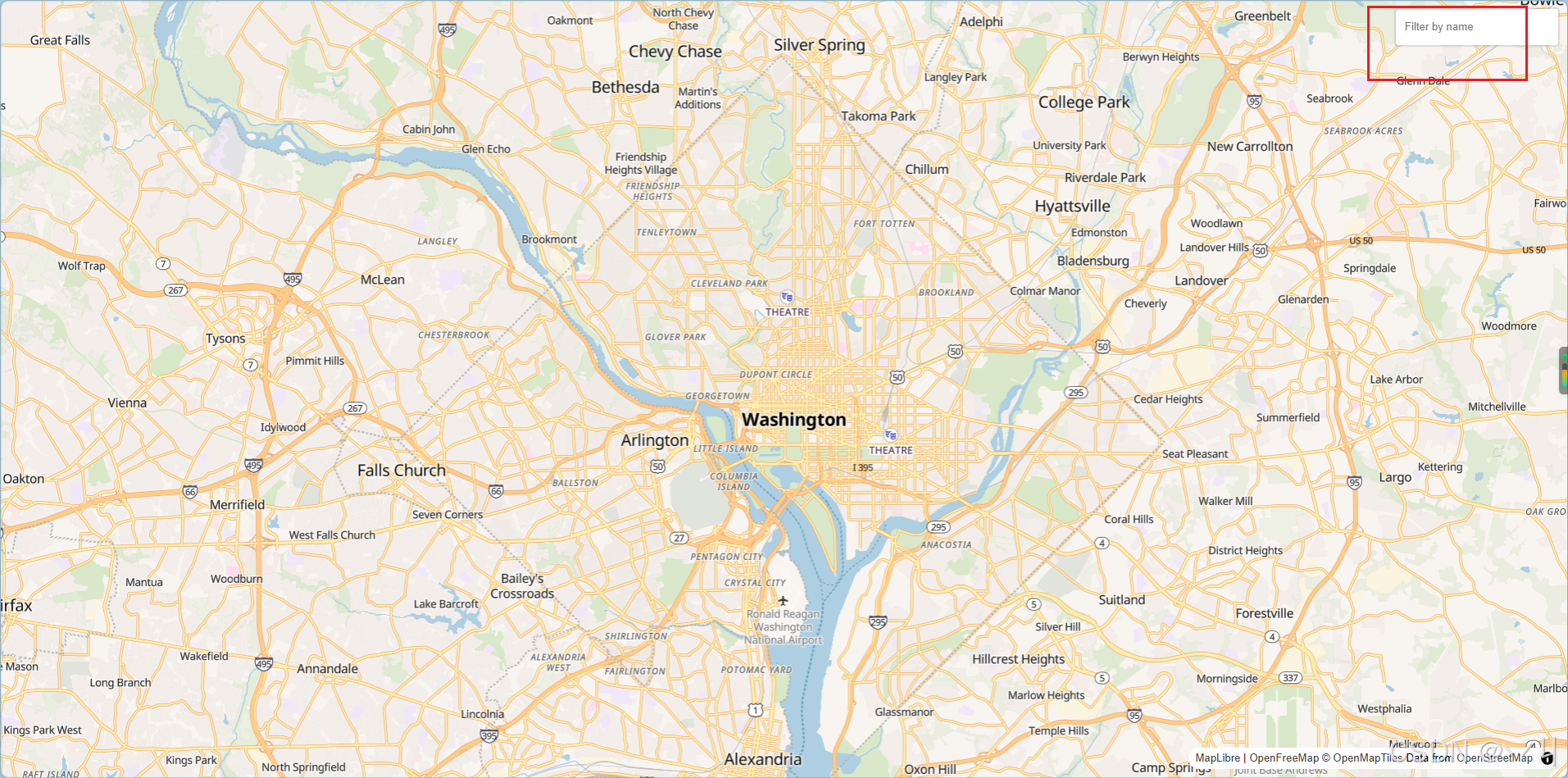
运行代码后,地图显示华盛顿特区的多个POI标记(剧院、酒吧、自行车、音乐等)。页面右上角有一个搜索输入框,用户输入文字时:
- 如果输入内容匹配图层ID(如"theatre"、“bar”),匹配的图层保持可见
- 不匹配的图层自动隐藏
- 输入为空时显示所有图层
💡 常 见 问 题
Q1: 过滤功能不生效? A: 检查以下几点:
Q2: 如何实现模糊匹配? A: 当前使用 indexOf() 实现子字符串匹配,如果需要更复杂的模糊搜索:
// 使用正则表达式实现模糊匹配
const regex = new RegExp(value, 'i');
layerIDs.forEach((layerID) => {
map.setLayoutProperty(layerID, 'visibility', regex.test(layerID) ? 'visible' : 'none');
});
Q3: 如何优化性能? A: 对于大量图层,考虑使用防抖(debounce)减少频繁的setLayoutProperty调用:
const debounceFilter = debounce((value) => {
layerIDs.forEach((layerID) => {
map.setLayoutProperty(layerID, 'visibility', layerID.indexOf(value) > –1 ? 'visible' : 'none');
});
}, 300);
filterInput.addEventListener('keyup', (e) => {
debounceFilter(e.target.value.trim().toLowerCase());
});
📝 练习任务
🌟 最佳实践
🔗 延伸阅读
-
Map API文档
-
MapLibre GL JS 官方文档
-
[下一课预告]:将继续学习地图图层的基础知识
本文是MapLibre GL JS实践课程系列的一部分,欢迎关注收藏


