文章目录
-
- 一、技术原理与可行性分析
-
- 1.1 IP定位的基本原理
- 1.2 不同级别的定位精度
- 1.3 与传统Geolocation对比
- 二、核心实现方案
-
- 2.1 三层架构设计
- 2.2 关键技术组件
-
- 1. **IP地址获取**
- 2. **IP到地理位置转换**
- 3. **逆地理编码(坐标→地址)**
- 2.3 精度优化策略
-
- 1. **多API验证**
- 2. **网络延迟推测**
- 3. **浏览器信号增强**
- 三、完整实现代码
无需服务器,纯前端技术即可通过IP地址获取用户的经纬度坐标和详细地址信息。
在Web开发中,获取用户地理位置是常见的需求。传统的HTML5 Geolocation API虽然精确,但需要用户授权,且移动端支持较好而桌面端较差。本文将介绍一种无需用户授权的替代方案:通过IP地址获取用户地理位置,并附上完整的可直接运行的代码。
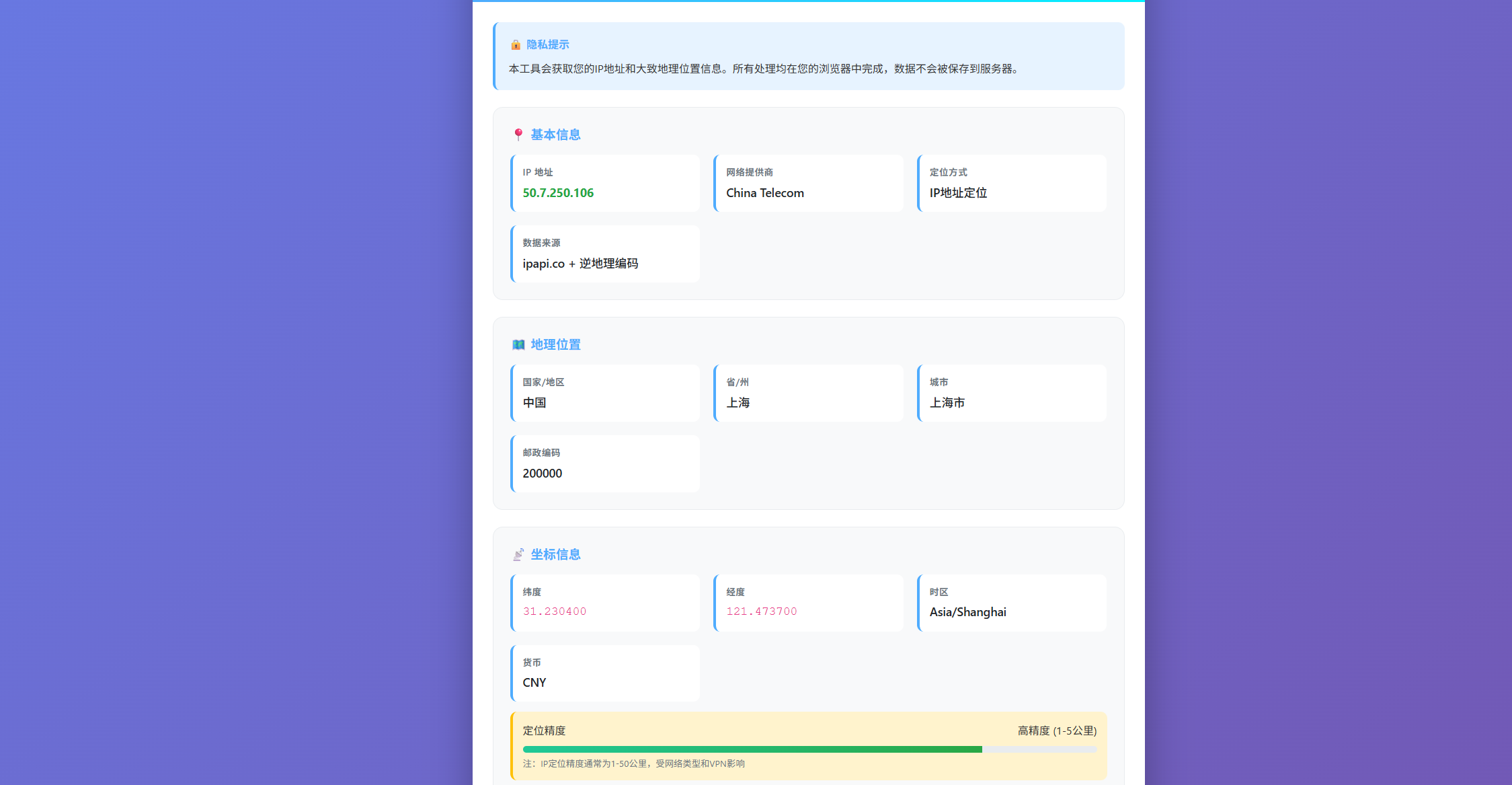
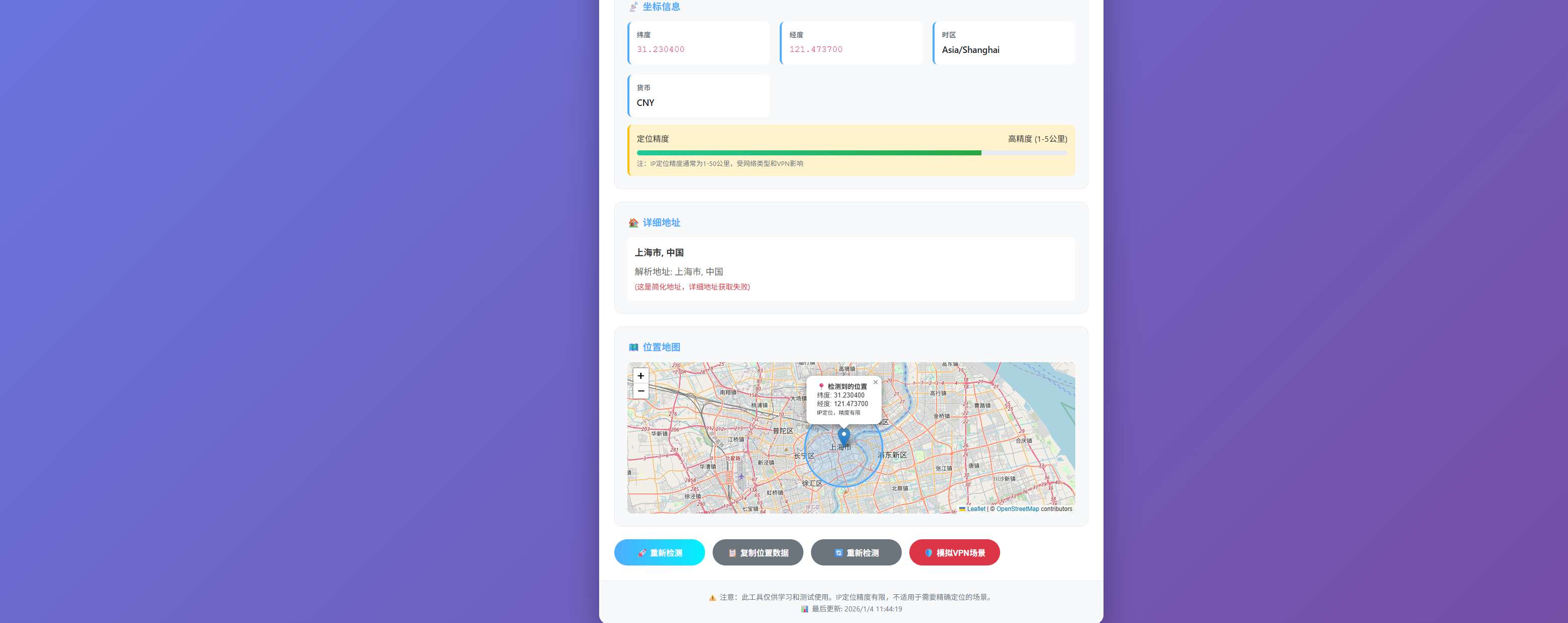
注:有大约5公里-50公里的误差
一、技术原理与可行性分析
1.1 IP定位的基本原理
IP地址定位基于庞大的地理位置数据库。每个IP地址段都被互联网服务提供商(ISP)分配,而这些IP段与物理位置有映射关系:
1.2 不同级别的定位精度
| 国家级别 | 99%+ | 全国范围 | 内容本地化、广告定向 |
| 省级/州级 | 85-95% | 省级范围 | 地区性服务、物流预估 |
| 城市级别 | 70-85% | 5-50公里 | 本地新闻、天气预报 |
| 经纬度坐标 | 60-80% | 1-50公里 | 大致位置标记、地理围栏 |
1.3 与传统Geolocation对比
| 需要用户授权 | ❌ 不需要 | ✅ 需要 |
| 桌面端支持 | ✅ 优秀 | ⚠️ 一般 |
| 移动端支持 | ✅ 优秀 | ✅ 优秀 |
| 精度 | ⚠️ 中等(1-50km) | ✅ 高(<100m) |
| 响应速度 | ✅ 快(<200ms) | ⚠️ 慢(1-3s) |
| VPN/代理影响 | ❌ 严重影响 | ✅ 不受影响 |
二、核心实现方案
2.1 三层架构设计
为了确保可靠性和准确性,我们采用三层架构:
用户访问
↓
获取IP地址
↓
主API定位(ipapi.co)
↓ 失败 → 备用API定位(ip-api.com)
↓ 失败 → 浏览器语言推测
↓
获取经纬度坐标
↓
逆地理编码(OpenStreetMap)
↓
详细地址信息
↓
可视化展示
2.2 关键技术组件
1. IP地址获取
// 多源IP获取,提高成功率
async function getUserIP() {
const apis = [
'https://api.ipify.org?format=json',
'https://api.ip.sb/ip',
'https://icanhazip.com'
];
for (const api of apis) {
try {
const response = await fetch(api);
const text = await response.text();
return text.trim();
} catch (error) {
continue;
}
}
throw new Error('无法获取IP地址');
}
2. IP到地理位置转换
async function getIPLocation(ip) {
// 使用ipapi.co API
const response = await fetch(`https://ipapi.co/${ip}/json/`);
const data = await response.json();
return {
latitude: parseFloat(data.latitude),
longitude: parseFloat(data.longitude),
country: data.country_name,
city: data.city,
region: data.region,
// … 其他信息
};
}
3. 逆地理编码(坐标→地址)
async function reverseGeocode(lat, lon) {
const response = await fetch(
`https://nominatim.openstreetmap.org/reverse?format=json&lat=${lat}&lon=${lon}&zoom=18&accept-language=zh`
);
const data = await response.json();
// 解析详细地址信息
const address = data.address || {};
return {
display_name: data.display_name,
full_address: [
address.road,
address.neighbourhood,
address.city,
address.county,
address.state,
address.country
].filter(Boolean).join(', ')
};
}
2.3 精度优化策略
1. 多API验证
// 同时使用多个API,选择最一致的结果
async function multiAPIVerification(ip) {
const results = await Promise.allSettled([
fetch('https://ipapi.co/json/'),
fetch('http://ip-api.com/json/' + ip),
fetch('https://api.ipgeolocation.io/ipgeo')
]);
// 分析结果的一致性
return analyzeConsistency(results);
}
2. 网络延迟推测
// 通过延迟推测距离(简单实现)
function estimateDistanceByLatency(apiEndpoint) {
const start = performance.now();
return fetch(apiEndpoint).then(() => {
const latency = performance.now() – start;
// 简单模型:延迟越高,距离可能越远
return Math.min(latency * 100, 50000); // 最大50公里
});
}
3. 浏览器信号增强
function enhanceWithBrowserSignals(ipLocation) {
return {
…ipLocation,
browserTimezone: Intl.DateTimeFormat().resolvedOptions().timeZone,
browserLanguage: navigator.language,
userAgentCountry: getUserAgentCountry(),
// 时区一致性检查
timezoneMatch: checkTimezoneConsistency(ipLocation.timezone),
// 语言一致性检查
languageMatch: checkLanguageConsistency(ipLocation.country_code)
};
}
三、完整实现代码
下面是一个可直接运行的完整实现,包含可视化界面:
<!DOCTYPE html>
<html lang="zh-CN">
<head>
<meta charset="UTF-8">
<meta name="viewport" content="width=device-width, initial-scale=1.0">
<title>IP地址定位测试工具</title>
<style>
* {
margin: 0;
padding: 0;
box-sizing: border-box;
}
body {
font-family: 'Segoe UI', Tahoma, Geneva, Verdana, sans-serif;
line-height: 1.6;
color: #333;
background: linear-gradient(135deg, #667eea 0%, #764ba2 100%);
min-height: 100vh;
padding: 20px;
}
.container {
max-width: 1000px;
margin: 0 auto;
background: white;
border-radius: 20px;
box-shadow: 0 20px 60px rgba(0, 0, 0, 0.3);
overflow: hidden;
}
header {
background: linear-gradient(90deg, #4facfe 0%, #00f2fe 100%);
color: white;
padding: 40px 30px;
text-align: center;
}
h1 {
font-size: 2.5rem;
margin-bottom: 10px;
text-shadow: 2px 2px 4px rgba(0, 0, 0, 0.2);
}
.subtitle {
font-size: 1.1rem;
opacity: 0.9;
max-width: 600px;
margin: 0 auto;
}
.main-content {
padding: 30px;
}
.card {
background: #f8f9fa;
border-radius: 15px;
padding: 25px;
margin-bottom: 25px;
border: 1px solid #e9ecef;
transition: transform 0.3s ease, box-shadow 0.3s ease;
}
.card:hover {
transform: translateY(-5px);
box-shadow: 0 10px 30px rgba(0, 0, 0, 0.1);
}
.card h3 {
color: #4facfe;
margin-bottom: 15px;
display: flex;
align-items: center;
gap: 10px;
}
.card h3 i {
font-size: 1.2rem;
}
.data-grid {
display: grid;
grid-template-columns: repeat(auto-fit, minmax(250px, 1fr));
gap: 20px;
margin-top: 15px;
}
.data-item {
background: white;
padding: 15px;
border-radius: 10px;
border-left: 4px solid #4facfe;
}
.data-item label {
display: block;
font-size: 0.85rem;
color: #6c757d;
margin-bottom: 5px;
font-weight: 600;
text-transform: uppercase;
letter-spacing: 0.5px;
}
.data-item .value {
font-size: 1.1rem;
color: #212529;
font-weight: 500;
word-break: break-all;
}
.value.coordinates {
font-family: 'Courier New', monospace;
color: #e83e8c;
}
.value.ip {
color: #28a745;
font-weight: bold;
}
.map-container {
height: 300px;
background: #e9ecef;
border-radius: 10px;
overflow: hidden;
margin-top: 15px;
position: relative;
}
#map {
width: 100%;
height: 100%;
}
.map-placeholder {
display: flex;
align-items: center;
justify-content: center;
height: 100%;
color: #6c757d;
font-size: 1.1rem;
}
.buttons {
display: flex;
gap: 15px;
margin-top: 20px;
flex-wrap: wrap;
}
button {
padding: 14px 28px;
border: none;
border-radius: 50px;
font-size: 1rem;
font-weight: 600;
cursor: pointer;
transition: all 0.3s ease;
display: flex;
align-items: center;
justify-content: center;
gap: 10px;
min-width: 180px;
}
.primary-btn {
background: linear-gradient(90deg, #4facfe 0%, #00f2fe 100%);
color: white;
}
.primary-btn:hover {
transform: translateY(-2px);
box-shadow: 0 10px 20px rgba(79, 172, 254, 0.3);
}
.secondary-btn {
background: #6c757d;
color: white;
}
.secondary-btn:hover {
background: #5a6268;
transform: translateY(-2px);
}
.danger-btn {
background: #dc3545;
color: white;
}
.danger-btn:hover {
background: #c82333;
transform: translateY(-2px);
}
.accuracy-meter {
margin-top: 15px;
padding: 15px;
background: #fff3cd;
border-radius: 10px;
border-left: 4px solid #ffc107;
}
.accuracy-label {
display: flex;
justify-content: space-between;
margin-bottom: 10px;
}
.meter-bar {
height: 10px;
background: #e9ecef;
border-radius: 5px;
overflow: hidden;
}
.meter-fill {
height: 100%;
background: linear-gradient(90deg, #20c997, #28a745);
width: 0%;
transition: width 1.5s ease;
}
.status {
padding: 20px;
text-align: center;
font-size: 1.1rem;
border-radius: 10px;
margin-bottom: 20px;
display: none;
}
.status.loading {
background: #cfe2ff;
color: #084298;
display: block;
}
.status.error {
background: #f8d7da;
color: #721c24;
display: block;
}
.status.success {
background: #d1e7dd;
color: #0f5132;
display: block;
}
.footer {
text-align: center;
padding: 20px;
color: #6c757d;
font-size: 0.9rem;
border-top: 1px solid #e9ecef;
background: #f8f9fa;
}
.loading-spinner {
display: inline-block;
width: 20px;
height: 20px;
border: 3px solid rgba(255, 255, 255, 0.3);
border-radius: 50%;
border-top-color: white;
animation: spin 1s ease-in-out infinite;
}
@keyframes spin {
to { transform: rotate(360deg); }
}
@media (max-width: 768px) {
.container {
border-radius: 10px;
}
header {
padding: 30px 20px;
}
h1 {
font-size: 2rem;
}
.main-content {
padding: 20px;
}
button {
width: 100%;
}
.data-grid {
grid-template-columns: 1fr;
}
}
/* 图标样式 */
.icon {
display: inline-block;
width: 24px;
height: 24px;
stroke-width: 0;
stroke: currentColor;
fill: currentColor;
}
/* 隐私提示 */
.privacy-notice {
background: #e7f3ff;
border-radius: 10px;
padding: 20px;
margin-bottom: 25px;
border-left: 4px solid #4facfe;
}
.privacy-notice h4 {
color: #4facfe;
margin-bottom: 10px;
display: flex;
align-items: center;
gap: 10px;
}
</style>
<!– Leaflet CSS –>
<link rel="stylesheet" href="https://unpkg.com/leaflet@1.9.4/dist/leaflet.css" />
<!– Leaflet JS –>
<script src="https://unpkg.com/leaflet@1.9.4/dist/leaflet.js"></script>
</head>
<body>
<div class="container">
<header>
<h1>🌍 IP地址精确定位工具</h1>
<p class="subtitle">通过IP地址获取用户的经纬度坐标、详细地址和网络信息</p>
</header>
<div class="main-content">
<!– 隐私提示 –>
<div class="privacy-notice">
<h4>🔒 隐私提示</h4>
<p>本工具会获取您的IP地址和大致地理位置信息。所有处理均在您的浏览器中完成,数据不会被保存到服务器。</p>
</div>
<!– 状态显示 –>
<div id="status" class="status"></div>
<!– IP信息卡片 –>
<div class="card">
<h3>📍 基本信息</h3>
<div class="data-grid">
<div class="data-item">
<label>IP 地址</label>
<div id="ip" class="value ip">正在获取…</div>
</div>
<div class="data-item">
<label>网络提供商</label>
<div id="isp" class="value">正在获取…</div>
</div>
<div class="data-item">
<label>定位方式</label>
<div id="method" class="value">IP地址定位</div>
</div>
<div class="data-item">
<label>数据来源</label>
<div id="source" class="value">ipapi.co + 逆地理编码</div>
</div>
</div>
</div>
<!– 位置信息卡片 –>
<div class="card">
<h3>🗺️ 地理位置</h3>
<div class="data-grid">
<div class="data-item">
<label>国家/地区</label>
<div id="country" class="value">正在获取…</div>
</div>
<div class="data-item">
<label>省/州</label>
<div id="region" class="value">正在获取…</div>
</div>
<div class="data-item">
<label>城市</label>
<div id="city" class="value">正在获取…</div>
</div>
<div class="data-item">
<label>邮政编码</label>
<div id="zipcode" class="value">正在获取…</div>
</div>
</div>
</div>
<!– 经纬度卡片 –>
<div class="card">
<h3>📡 坐标信息</h3>
<div class="data-grid">
<div class="data-item">
<label>纬度</label>
<div id="latitude" class="value coordinates">正在获取…</div>
</div>
<div class="data-item">
<label>经度</label>
<div id="longitude" class="value coordinates">正在获取…</div>
</div>
<div class="data-item">
<label>时区</label>
<div id="timezone" class="value">正在获取…</div>
</div>
<div class="data-item">
<label>货币</label>
<div id="currency" class="value">正在获取…</div>
</div>
</div>
<!– 精度指示器 –>
<div class="accuracy-meter">
<div class="accuracy-label">
<span>定位精度</span>
<span id="accuracy-text">未知</span>
</div>
<div class="meter-bar">
<div id="accuracy-meter" class="meter-fill"></div>
</div>
<small style="color: #6c757d; display: block; margin-top: 5px;">
注:IP定位精度通常为1-50公里,受网络类型和V*P*N影响
</small>
</div>
</div>
<!– 详细地址卡片 –>
<div class="card">
<h3>🏠 详细地址</h3>
<div id="detailed-address" style="font-size: 1.1rem; line-height: 1.6; padding: 15px; background: white; border-radius: 8px; min-height: 60px;">
正在获取详细地址信息…
</div>
</div>
<!– 地图容器 –>
<div class="card">
<h3>🗺️ 位置地图</h3>
<div class="map-container">
<div id="map"></div>
<div id="map-placeholder" class="map-placeholder">
获取位置后,将在此显示地图
</div>
</div>
</div>
<!– 操作按钮 –>
<div class="buttons">
<button id="locate-btn" class="primary-btn" onclick="startLocationDetection()">
<span class="loading-spinner" style="display: none;"></span>
<span id="btn-text">🚀 开始定位检测</span>
</button>
<button class="secondary-btn" onclick="copyLocationData()">
📋 复制位置数据
</button>
<button class="secondary-btn" onclick="refreshLocation()">
🔄 重新检测
</button>
</div>
</div>
<div class="footer">
<p>⚠️ 注意:此工具仅供学习和测试使用。IP定位精度有限,不适用于需要精确定位的场景。</p>
<p>📊 最后更新: <span id="update-time"></span></p>
</div>
</div>
<script>
// 全局变量
let map = null;
let marker = null;
let currentLocation = null;
// 页面加载完成后初始化
document.addEventListener('DOMContentLoaded', function() {
// 显示当前时间
document.getElementById('update-time').textContent = new Date().toLocaleString('zh-CN');
// 开始自动检测
setTimeout(() => {
startLocationDetection();
}, 1000);
});
// 主函数:开始位置检测
async function startLocationDetection() {
const btn = document.getElementById('locate-btn');
const btnText = document.getElementById('btn-text');
const spinner = btn.querySelector('.loading-spinner');
// 更新按钮状态
btnText.textContent = '正在定位…';
spinner.style.display = 'inline-block';
btn.disabled = true;
// 显示加载状态
showStatus('正在通过IP地址获取您的位置信息…', 'loading');
try {
// 1. 获取IP地址
const ip = await getUserIP();
document.getElementById('ip').textContent = ip;
// 2. 通过IP获取基础位置信息
const ipLocation = await getIPLocation(ip);
// 3. 进行逆地理编码获取详细地址
const detailedAddress = await reverseGeocode(
ipLocation.latitude,
ipLocation.longitude
);
// 4. 合并位置数据
currentLocation = {
ip: ip,
…ipLocation,
detailedAddress: detailedAddress,
timestamp: new Date().toISOString()
};
// 5. 更新UI
updateUI(currentLocation);
// 6. 在地图上标记位置
updateMap(currentLocation.latitude, currentLocation.longitude);
// 7. 更新精度指示器
updateAccuracyIndicator(ipLocation.accuracy || 'medium');
showStatus('位置信息获取成功!', 'success');
} catch (error) {
console.error('定位失败:', error);
showStatus(`定位失败: ${error.message}`, 'error');
// 使用默认位置(上海)作为演示
useDemoLocation();
} finally {
// 恢复按钮状态
btnText.textContent = '🚀 重新检测';
spinner.style.display = 'none';
btn.disabled = false;
}
}
// 获取用户公网IP
async function getUserIP() {
try {
// 方法1: 使用 ipify.org
const response = await fetch('https://api.ipify.org?format=json');
const data = await response.json();
return data.ip;
} catch (error) {
// 方法2: 使用多个备选API
const backupAPIs = [
'https://api.ipify.org?format=json',
'https://api.ip.sb/ip',
'https://icanhazip.com'
];
for (const api of backupAPIs) {
try {
const response = await fetch(api);
const text = await response.text();
return text.trim();
} catch (e) {
continue;
}
}
throw new Error('无法获取IP地址');
}
}
// 通过IP获取地理位置
async function getIPLocation(ip) {
// 尝试多个API以提高成功率
const apis = [
`https://ipapi.co/${ip}/json/`, // 主API
`https://ipapi.co/json/`, // 备选(自动检测IP)
'https://api.ipgeolocation.io/ipgeo?apiKey=demo' // 演示API
];
for (const apiUrl of apis) {
try {
console.log(`尝试API: ${apiUrl}`);
const response = await fetch(apiUrl, {
headers: {
'Accept': 'application/json'
}
});
if (!response.ok) continue;
const data = await response.json();
// 检查是否有经纬度数据
if (data.latitude && data.longitude) {
return {
latitude: parseFloat(data.latitude),
longitude: parseFloat(data.longitude),
country: data.country_name || data.country,
country_code: data.country_code || data.countryCode,
region: data.region || data.regionName || data.state_prov,
city: data.city || data.cityName,
postal: data.postal || data.zip || data.zipcode,
timezone: data.timezone || data.time_zone,
currency: data.currency || data.currency_code,
isp: data.isp || data.org || data.asn,
accuracy: data.accuracy || (data.accuracy_radius ? `${data.accuracy_radius}km` : 'medium')
};
}
} catch (error) {
console.warn(`API ${apiUrl} 失败:`, error);
continue;
}
}
throw new Error('所有IP定位API都失败了');
}
// 逆地理编码:坐标 -> 详细地址
async function reverseGeocode(latitude, longitude) {
try {
// 使用Nominatim(OpenStreetMap)进行逆地理编码
const response = await fetch(
`https://nominatim.openstreetmap.org/reverse?` +
`format=json&lat=${latitude}&lon=${longitude}` +
`&addressdetails=1&zoom=18&accept-language=zh`
);
if (!response.ok) {
throw new Error('逆地理编码服务不可用');
}
const data = await response.json();
if (data.error) {
throw new Error(data.error);
}
const address = data.address || {};
return {
display_name: data.display_name || '未知地址',
road: address.road || address.street || '',
neighborhood: address.neighbourhood || address.suburb || '',
city: address.city || address.town || address.village || '',
county: address.county || '',
state: address.state || address.region || '',
country: address.country || '',
postcode: address.postcode || '',
country_code: address.country_code || '',
full_address: [
address.road,
address.neighbourhood,
address.city || address.town,
address.county,
address.state,
address.country
].filter(Boolean).join(', ')
};
} catch (error) {
console.warn('逆地理编码失败:', error);
// 返回简化地址
return {
display_name: '无法获取详细地址',
full_address: '逆地理编码服务暂时不可用',
is_fallback: true
};
}
}
// 更新UI显示
function updateUI(location) {
// 基本信息
document.getElementById('isp').textContent = location.isp || '未知';
// 地理位置
document.getElementById('country').textContent = location.country || '未知';
document.getElementById('region').textContent = location.region || '未知';
document.getElementById('city').textContent = location.city || '未知';
document.getElementById('zipcode').textContent = location.postal || '未知';
// 坐标信息
document.getElementById('latitude').textContent = location.latitude.toFixed(6);
document.getElementById('longitude').textContent = location.longitude.toFixed(6);
document.getElementById('timezone').textContent = location.timezone || '未知';
document.getElementById('currency').textContent = location.currency || '未知';
// 详细地址
const addressElement = document.getElementById('detailed-address');
if (location.detailedAddress && location.detailedAddress.full_address) {
addressElement.innerHTML = `
<strong>${location.detailedAddress.display_name}</strong>
<div style="margin-top: 10px; color: #666;">
解析地址: ${location.detailedAddress.full_address}
${location.detailedAddress.is_fallback ? '<br><small style="color: #dc3545;">(这是简化地址,详细地址获取失败)</small>' : ''}
</div>
`;
} else {
addressElement.innerHTML = '<span style="color: #dc3545;">无法获取详细地址信息</span>';
}
}
// 更新地图显示
function updateMap(latitude, longitude) {
const mapContainer = document.getElementById('map');
const mapPlaceholder = document.getElementById('map-placeholder');
// 隐藏占位符
mapPlaceholder.style.display = 'none';
mapContainer.style.display = 'block';
if (!map) {
// 初始化地图
map = L.map('map').setView([latitude, longitude], 12);
// 添加地图图层
L.tileLayer('https://{s}.tile.openstreetmap.org/{z}/{x}/{y}.png', {
attribution: '© <a href="https://www.openstreetmap.org/copyright">OpenStreetMap</a> contributors',
maxZoom: 18
}).addTo(map);
} else {
// 更新地图中心
map.setView([latitude, longitude], 12);
}
// 移除旧标记
if (marker) {
map.removeLayer(marker);
}
// 添加新标记
marker = L.marker([latitude, longitude]).addTo(map);
// 添加弹出信息
marker.bindPopup(`
<b>📍 检测到的位置</b><br>
纬度: ${latitude.toFixed(6)}<br>
经度: ${longitude.toFixed(6)}<br>
<small>IP定位,精度有限</small>
`).openPopup();
// 添加精度圆圈(假设精度为5公里)
L.circle([latitude, longitude], {
color: '#4facfe',
fillColor: '#4facfe',
fillOpacity: 0.1,
radius: 5000 // 5公里
}).addTo(map);
}
// 更新精度指示器
function updateAccuracyIndicator(accuracy) {
const accuracyText = document.getElementById('accuracy-text');
const accuracyMeter = document.getElementById('accuracy-meter');
let percentage = 50; // 默认中等精度
if (typeof accuracy === 'string') {
if (accuracy.includes('high') || accuracy.includes('高')) {
percentage = 80;
accuracyText.textContent = '高精度 (1-5公里)';
} else if (accuracy.includes('low') || accuracy.includes('低')) {
percentage = 30;
accuracyText.textContent = '低精度 (50+公里)';
} else if (accuracy.includes('km')) {
const km = parseInt(accuracy);
if (km <= 5) {
percentage = 80;
accuracyText.textContent = `高精度 (${km}公里)`;
} else if (km <= 20) {
percentage = 60;
accuracyText.textContent = `中精度 (${km}公里)`;
} else {
percentage = 40;
accuracyText.textContent = `低精度 (${km}公里)`;
}
} else {
accuracyText.textContent = '中等精度 (5-20公里)';
}
} else {
accuracyText.textContent = '中等精度';
}
// 动画效果显示进度条
setTimeout(() => {
accuracyMeter.style.width = `${percentage}%`;
}, 100);
}
// 显示状态信息
function showStatus(message, type = 'info') {
const statusElement = document.getElementById('status');
// 清除旧状态
statusElement.className = 'status';
// 设置新状态
statusElement.textContent = message;
statusElement.classList.add(type);
statusElement.style.display = 'block';
// 3秒后自动隐藏成功/信息状态
if (type === 'success' || type === 'info') {
setTimeout(() => {
statusElement.style.display = 'none';
}, 3000);
}
}
// 使用演示位置(上海)
function useDemoLocation() {
const demoLocation = {
ip: '116.228.111.118',
latitude: 31.2304,
longitude: 121.4737,
country: '中国',
country_code: 'CN',
region: '上海',
city: '上海市',
postal: '200000',
timezone: 'Asia/Shanghai',
currency: 'CNY',
isp: 'China Telecom',
accuracy: 'high',
detailedAddress: {
display_name: '上海市, 中国',
full_address: '上海市, 中国',
is_fallback: true
}
};
currentLocation = demoLocation;
updateUI(demoLocation);
updateMap(demoLocation.latitude, demoLocation.longitude);
updateAccuracyIndicator('high');
showStatus('正在使用演示数据(上海)', 'info');
}
// 复制位置数据到剪贴板
function copyLocationData() {
if (!currentLocation) {
showStatus('请先获取位置数据', 'error');
return;
}
const data = {
时间: new Date().toLocaleString('zh-CN'),
IP地址: currentLocation.ip,
网络提供商: currentLocation.isp,
国家: currentLocation.country,
省份: currentLocation.region,
城市: currentLocation.city,
邮政编码: currentLocation.postal,
纬度: currentLocation.latitude,
经度: currentLocation.longitude,
时区: currentLocation.timezone,
货币: currentLocation.currency,
详细地址: currentLocation.detailedAddress?.full_address || '未知',
定位方式: 'IP地址定位',
精度: document.getElementById('accuracy-text').textContent
};
const text = Object.entries(data)
.map(([key, value]) => `${key}: ${value}`)
.join('\\n');
navigator.clipboard.writeText(text)
.then(() => {
showStatus('位置数据已复制到剪贴板!', 'success');
})
.catch(err => {
console.error('复制失败:', err);
showStatus('复制失败,请手动复制', 'error');
});
}
// 重新检测位置
function refreshLocation() {
// 清空地图
if (marker) {
map.removeLayer(marker);
marker = null;
}
// 重置显示
document.getElementById('ip').textContent = '正在获取…';
document.getElementById('isp').textContent = '正在获取…';
document.getElementById('country').textContent = '正在获取…';
document.getElementById('region').textContent = '正在获取…';
document.getElementById('city').textContent = '正在获取…';
document.getElementById('zipcode').textContent = '正在获取…';
document.getElementById('latitude').textContent = '正在获取…';
document.getElementById('longitude').textContent = '正在获取…';
document.getElementById('timezone').textContent = '正在获取…';
document.getElementById('currency').textContent = '正在获取…';
document.getElementById('detailed-address').textContent = '正在获取详细地址信息…';
// 显示地图占位符
document.getElementById('map-placeholder').style.display = 'flex';
document.getElementById('map').style.display = 'none';
// 重置精度指示器
document.getElementById('accuracy-meter').style.width = '0%';
document.getElementById('accuracy-text').textContent = '未知';
// 开始新的检测
startLocationDetection();
}
</script>
</body>
</html>
立即尝试:将完整代码保存为HTML文件,用浏览器打开即可体验纯前端的IP地理位置检测功能!
您好,我是肥晨。 欢迎关注我获取前端学习资源,日常分享技术变革,生存法则;行业内幕,洞察先机。