安装与初始化
安装
# 方式一:一键安装脚本(推荐)curl -fsSLhttps://openclaw.ai/install.sh | bash # 方式二:npm全局安装npm install -g openclaw # 方式三:Dockerdocker pull openclaw/openclaw:latestdocker run -d –name openclaw -v ~/.openclaw:/root/.openclaw openclaw/openclaw:latest
初始化
# 交互式初始化向导openclaw onboard # 快速配置向导openclaw configure # 验证安装openclaw –versionopenclaw –help # 查看全局帮助openclaw help # 顶级命令列表openclaw helpgateway # gateway 子命令帮助openclaw helpcron # cron 子命令帮助openclaw helpagents # agents 子命令帮助
Gateway 网关管理
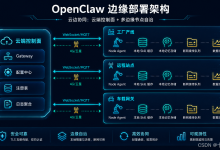
Gateway 是 OpenClaw 的核心后端 WebSocket 服务(默认ws://127.0.0.1:18789),所有消息、技能调用、渠道路由均经过 Gateway。
启停控制
openclaw gateway start # 启动网关openclaw gateway stop # 停止网关openclaw gateway restart # 重启网关(配置修改后必须执行)openclaw gateway status # 查看网关状态
运行模式
# 前台运行(默认)openclaw gateway run # 自定义端口+ 详细日志openclaw gateway–port 18789 –verbose # 绑定模式openclaw gateway–bind loopback # 仅本地访问(最安全,推荐)openclaw gateway–bind lan # 局域网访问openclaw gateway–bind tailnet # Tailscale 网络访问 # 认证模式openclaw gateway–auth token –token <t> #Token 认证openclaw gateway–auth password –password <p> #密码认证 # 开发模式openclaw gateway–dev # 强制启动(杀掉占用端口的进程)openclaw gateway–force # 日志选项openclaw gateway–ws-log compact # 紧凑WebSocket 日志openclaw gateway–raw-stream # 记录原始模型流事件到 jsonl
系统服务
openclaw gateway install # 安装为系统服务(开机自启)openclaw gateway uninstall # 移除系统服务openclaw gateway install –port 18789 –token <t> –force
健康检查与诊断
openclaw gateway health # 网关健康检查openclaw gateway health –json # JSON 格式输出openclaw gateway health –verbose # 详细信息openclaw gateway probe # 可达性+ 发现 + 健康 + 状态openclaw gateway discover # 通过Bonjour 发现网关 openclaw gatewaystatus –no-probe # 跳过实时RPC 探测openclaw gateway status –json # 机器可读格式
高级操作
openclaw gateway call <method> –params '<json>' # 直接 RPC 方法调用openclaw gateway usage-cost # 费用摘要(最近30 天)openclaw gateway usage-cost –days 7 # 最近7 天
Tailscale暴露
openclaw gateway–tailscale serve # Tailscale Serve暴露openclaw gateway–tailscale funnel # TailscaleFunnel 暴露(公网)
Agent 管理
Agent是智能实体——每个 Agent 拥有独立的模型、工作区和绑定渠道
查看 Agent
openclaw agents list # 列出所有Agentopenclaw agents list –json # JSON 格式openclaw agents list –bindings # 显示每个Agent 的渠道绑定
创建 Agent
# 交互式创建(推荐)openclaw agents addopenclaw agents add[name] # 非交互式创建(自动化部署)openclaw agents addmy-agent \\ –workspace ~/.openclaw/workspace-my-agent \\ –model anthropic/claude-sonnet-4-5 \\ –bind whatsapp:personal \\ –non-interactive
渠道绑定管理
一个 Agent 可绑定多个渠道,一个渠道可被多个 Agent 共享。openclaw agents bindings # 所有绑定关系openclaw agents bindings –agent <id> # 指定 Agent 的绑定openclaw agents bind –agent <id> –bind <channel[:accountId]> # 添加绑定openclaw agents unbind –agent <id> –bind <channel[:accountId]> # 移除绑定openclaw agents unbind –agent <id> –all # 移除所有绑定
手动运行 Agent
# 发送消息openclaw agent–message "Hello" –to <dest> # 指定会话openclaw agent–message "Hello" –session-id <id> # 思考级别openclaw agent–message "Hello" –thinking high # 绕过网关(本地直接运行)openclaw agent–message "Hello" –local # 发送并投递到渠道openclaw agent–message "Hello" –channel whatsapp –deliver # JSON 输出openclaw agent–message "Hello" –json
删除 Agent
openclaw agents delete <id> # 删除Agentopenclaw agents delete <id> –force # 强制删除(跳过确认)
会话管理
openclaw sessions # 列出已存储的对话会话
Cron 定时任务
在指定时间执行任务——早晨简报、定时提醒、数据检查等。
查看任务
openclaw cron list # 查看所有定时任务openclaw cron list–agent ops # 按Agent 筛选openclaw cron list–json # JSON 输出(含status 字段)openclaw cron status # 任务执行状态概览openclaw cron show<job-id> # 人类可读视图+ 投递路由预览openclaw cron get <job-id> # 原始存储JSON
状态字段含义:
创建任务
# Cron 表达式(5字段或6字段+ 可选 –tz)openclaw cron add–name "Morning Briefing" \\ –cron "0 8 * * *" \\ –message "Today's weather andschedule" \\ –channel "telegram:chat:123" # 固定间隔openclaw cron add–name "Check Status" \\ –every 10m \\ –message "Check service health" # 一次性/延迟任务(ISO8601 或相对时间)openclaw cron add–name "Reminder" \\ –at 20m \\ –message "Remind me in 20 minutes" # 快速创建(别名:create= add)openclaw croncreate "0 7 * * *" "Summarize overnight updates." \\ –name "Morning brief" –agent ops # 带时区openclaw cron add–name "NYC report" \\ –cron "0 9 * * 1-5" –tz America/New_York \\ –message "Workday summary"
会话类型
openclaw cron edit <job-id> –session isolatedopenclaw cron edit <job-id> –session "session:daily-brief"
投递模式
# 投递到Telegram 论坛话题openclaw cron edit<job-id> –announce –channel telegram \\ –to "-1001234567890" –thread-id 42 # 投递到Slackopenclaw cron edit <job-id> –announce –channel slack \\ –to "channel:C1234567890" # Webhook 投递openclaw croncreate "0 18 * * 1-5" "Summarize today's deploys as JSON."\\ –name "Deploy digest" –webhook"https://hooks.example.com/openclaw/cron" # 禁用投递openclaw cron edit <job-id> –no-deliver
Shell 命令任务
# 基础Shell 任务openclaw croncreate "*/15 * * * *" \\ –name "Queue depth probe" \\ –command "scripts/check-queue.sh"\\ –command-cwd "/srv/app" \\ –announce –channel telegram –to"-1001234567890" # 精确argv(不经过 shell 解析)openclaw croncreate "*/30 * * * *" \\ –name "Position export" \\ –command-argv'["node","scripts/export-position.mjs"]' \\ –command-cwd "/srv/app" \\ –command-env "NODE_ENV=production"\\ –command-input'{"mode":"summary"}' \\ –timeout-seconds 120 \\ –no-output-timeout-seconds 30 \\ –output-max-bytes 65536 \\ –webhook"https://hooks.example.com/openclaw/cron"
任务生命周期
openclaw cron edit<id> # 编辑任务openclaw cron rm<id> # 删除任务openclaw cronenable <id> # 启用openclaw crondisable <id> # 禁用openclaw cron run<id> # 手动触发(默认强制运行)openclaw cron run<id> –due # 仅当前到期时运行openclaw cron run<id> –wait –wait-timeout 10m –poll-interval 2s # 阻塞等待完成openclaw cronruns # 查看执行历史openclaw cron runs–id <id> –limit 50openclaw cron runs–id <id> –run-id <run-id> # 检查特定运行
模型与上下文选项
openclaw cron edit<id> –model anthropic/claude-sonnet-4-5 # 模型覆盖openclaw cron edit<id> –clear-model # 移除单任务模型openclaw cron edit<id> –thinking high # 思考级别覆盖openclaw cron edit<id> –light-context # 跳过工作区引导注入openclaw cron edit<id> –tools exec,read # 限制可用工具openclaw cron edit<id> –agent ops # 固定到指定 Agentopenclaw cron edit<id> –clear-agent # 恢复默认 Agent
配置管理
配置文件路径:~/.openclaw/openclaw.json,格式:JSON5(支持//注释和尾随逗号)
配置读写
openclaw config get<path> # 获取配置值openclaw config set<path> <value> # 设置配置值openclaw configunset <path> # 删除配置项openclaw configfile # 打印配置文件路径openclaw config validate # 验证配置schemaopenclaw config validate –json # JSON 格式验证结果openclaw config set <path> <value> –dry-run # 干运行(不写入磁盘)openclaw config patch # JSON mergepatch 方式部分更新