概述
Open Authorization简称OAuth,一个授权协议,官网。
有三个版本:
- OAuth1.0:发布于2006年,已废弃;
- OAuth2.0,当前主流版本,不向下兼容OAuth1.0。OAuth2.0允许不同客户端通过认证和授权的形式来访问被其保护起来的资源。注:下面大部分内容都是OAuth2.0
- OAuth2.1:目前仍是草案状态,IETF
OAuth 2.1没有RFC编号,在工程实践中,当一个系统支持OAuth 2.1时,则需要同时遵循以下OAuth2.0的规范RFC组合:
| 基础框架 | 6749 | OAuth2.0的核心骨架(保留授权码、客户端凭证等) |
| 强制PKCE | 7636 | 2.1的核心要求,Public Client(如SPA、App)必须使用PKCE防拦截 |
| 原生应用安全 | 8252 | 规定Native App必须使用系统浏览器,禁止内嵌WebView收集密码 |
| 浏览器应用安全 | 9126 | 引入PAR(Pushed Authorization Request),提升SPA的安全性 |
| 安全最佳实践 | 9700 | 明确规定废弃Implicit和Password模式,禁止Token在URL查询参数中传递等 |
| 设备授权 | 8628 | 针对IoT/智能电视的设备码流程 |
适用场景:
- 第三方应用或平台接入:在客户端和服务端中间,提供授权层,客户端不直接访问服务端,只是依靠授权层的授权,消费服务端提供的带权服务
- 微服务鉴权互信
- 第一方密码登录
OAuth2.0定义一组相当复杂的规范。涉及到:Roles角色、Client Types客户端类型、Client Profile客户端描述、Authorization Grants认证授权、Endpoints终端等。
理解:
- 不是身份认证协议。虽然在授权的过程中涉及到身份认证,但是OAuth2.0协议本身并不处理用户的信息。客户端访问受保护的资源时并不关心资源的拥有者
- 不提供一些消息签名
- 没有定义加密方式,目前使用较多的是JOSE规范
- 令牌被客户端持有并使用,但是客户端并不能解析以及处理令牌
角色
在授权过程中,主要包含以下几种角色:
- Authorization Server:授权服务器,对用户授权进行鉴别并根据鉴别结果进行同意或拒绝的授权响应的服务器;
- Resource Server:资源服务器;与授权服务器,可以是同一台服务器,也可不是;能够接受和响应受保护资源请求的服务器;
- Resource Owner:资源拥有者,如终端用户,作用是同意或者拒绝、甚至是选择性的给第三方应用程序的授权请求;
- Client:请求授权和请求访问受限资源的客户端程序,如第三方接入平台,请求者;
- User Agent:用户代理,指的资源拥有者授权的一些渠道,一般指浏览器、App。
授权模式
客户端必须得到用户的授权(Authorization Grant),才能获得令牌(Access Token)。
OAuth2.0官方标准有四种授权模式:
- Authorization Code:授权码模式,最复杂,用在服务端应用之间
- Implicit:隐式授权模式,用在移动或Web App
- Resource Owner Password Credentials:密码授权,简称Password
- Client Credentials:客户端模式,应用API访问
OAuth2.1有四种授权模式:
- Authorization Code:同上
- Client Credentials:同上
- Refresh Token:刷新令牌模式,Access Token过期后,静默获取新的Access Token,避免让用户重新登录;即使用之前获取refresh_token去换取新的access_token
- Device Authorization:设备授权模式,适用于智能电视、CLI命令行工具、IoT设备等没有键盘或浏览器输入不便的设备。设备显示一个用户码,用户在手机/电脑上访问特定URL输入该码进行授权
2.1 正式且永久地废弃两种模式:
- Implicit:Access Token直接通过URL片段#返回给前端,极易被浏览器历史记录、Referer头或恶意脚本窃取。替代方案:SPA现在必须使用授权码+PKCE
- Password:要求用户直接把用户名和密码交给第三方客户端。破坏OAuth的核心初衷(用户不向客户端暴露密码),且无法支持MFA。替代方案:即使是第一方应用,也应该让用户跳转到官方IdP登录页进行登录(使用授权码)。
2.1保留强大的扩展机制,在企业级复杂场景下,可通过grant_type=urn:ietf:params:oauth:grant-type:xxx形式自定义或引入其他标准扩展:
- JWT Bearer Grant (RFC 7523):客户端直接发送一个签名的JWT给授权服务器来换取 Access Token。常用于B2B场景或系统间高度信任的集成。
- SAML 2.0 Bearer Grant (RFC 7522):使用SAML Assertion来换取OAuth Access Token。常用于传统企业SAML联邦认证向OAuth迁移的过渡期。
- Token Exchange Grant (RFC 8693):允许用一个Token去换取另一个Token。场景:用户用Google的Access Token,通过你的服务器,去换取内部系统Access Token(Token转换/代理)。
- CIBA(Client Initiated Backchannel Authentication,OIDC扩展):后端发起认证。比如银行 App 在后台发起一笔转账,需要用户在手机银行 App 上确认,后端通过 CIBA 机制完成授权。
授权码模式
最严谨、最安全的标准流程,采用最多,一般流程:
- 用户访问客户端,客户端发现资源权限不够,把请求转发到第三方认证服务器
- 用户选择是否授权,在第三方服务器进行,一般不存在钓鱼欺骗
- 认证服务器根据客户端要求重定向链接,把请求重定向到客户端要求的链接,并保存一个授权码
- 客户端使用授权码,以及保持前面使用的重定向链接,向认证服务器申请令牌
- 认证服务器核对授权码和重定向链接,发放令牌
授权流程 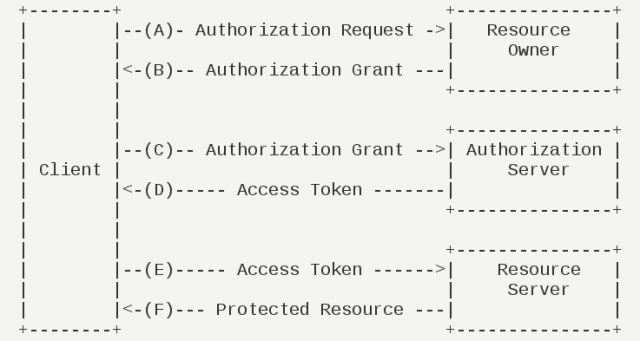 流程解读:
流程解读:
- 用户(资源持有者)打开客户端,客户端询问用户授权
- 用户同意授权
- 客户端向授权服务器申请授权
- 授权服务器对客户端进行认证,也包括用户信息的认证,认证成功后授权给予令牌
- 客户端获取令牌后,携带令牌向资源服务器请求资源
- 资源服务器确认令牌正确无误,给客户端返回资源
三大流程:
- AB两步获得授权许可;
- CD两步获得令牌;
- EF两步获得受控资源。
隐式授权
简洁模式也很普遍,相对于授权码模式,只是取消授权码这个环节,直接申请令牌,这样,整个过程都是对用户可见,不存在后台服务操作。
已不推荐使用,适用于纯前端应用。
流程特点:
- 通过 URLFragment直接返回Access Token
- 不经过授权码步骤,减少一次请求
- 存在安全风险:Token可能泄露在浏览器历史记录、Referer头
密码授权
密码授权是一种存在高风险的授权模式,相当于把账号密码交给客户端,客户端可以获得完整的账户下权限。
客户端模式
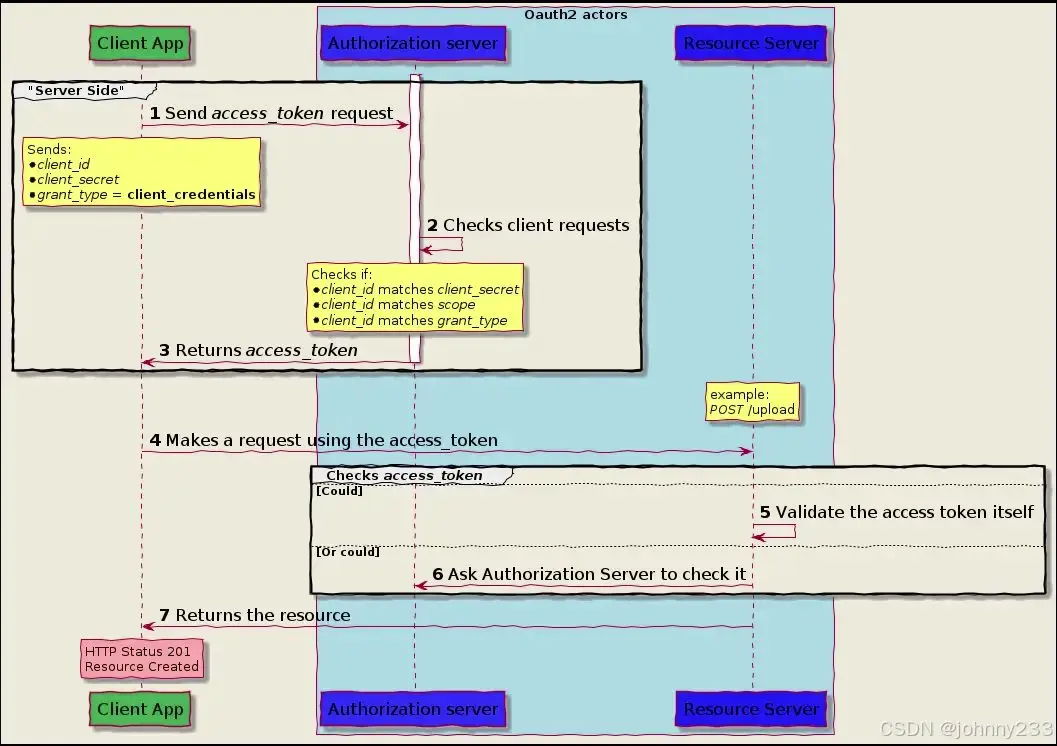
客户端使用自己的标识换token,客户端使用token访问资源
选型
针对具体的业务场景,如何选择一种授权模式呢?
OAuth 2.1
在OAuth 2.1协议下:
#mermaid-svg-PCIR27TtOc2VxeFq{font-family:\”trebuchet ms\”,verdana,arial,sans-serif;font-size:16px;fill:#333;}@keyframes edge-animation-frame{from{stroke-dashoffset:0;}}@keyframes dash{to{stroke-dashoffset:0;}}#mermaid-svg-PCIR27TtOc2VxeFq .edge-animation-slow{stroke-dasharray:9,5!important;stroke-dashoffset:900;animation:dash 50s linear infinite;stroke-linecap:round;}#mermaid-svg-PCIR27TtOc2VxeFq .edge-animation-fast{stroke-dasharray:9,5!important;stroke-dashoffset:900;animation:dash 20s linear infinite;stroke-linecap:round;}#mermaid-svg-PCIR27TtOc2VxeFq .error-icon{fill:#552222;}#mermaid-svg-PCIR27TtOc2VxeFq .error-text{fill:#552222;stroke:#552222;}#mermaid-svg-PCIR27TtOc2VxeFq .edge-thickness-normal{stroke-width:1px;}#mermaid-svg-PCIR27TtOc2VxeFq .edge-thickness-thick{stroke-width:3.5px;}#mermaid-svg-PCIR27TtOc2VxeFq .edge-pattern-solid{stroke-dasharray:0;}#mermaid-svg-PCIR27TtOc2VxeFq .edge-thickness-invisible{stroke-width:0;fill:none;}#mermaid-svg-PCIR27TtOc2VxeFq .edge-pattern-dashed{stroke-dasharray:3;}#mermaid-svg-PCIR27TtOc2VxeFq .edge-pattern-dotted{stroke-dasharray:2;}#mermaid-svg-PCIR27TtOc2VxeFq .marker{fill:#333333;stroke:#333333;}#mermaid-svg-PCIR27TtOc2VxeFq .marker.cross{stroke:#333333;}#mermaid-svg-PCIR27TtOc2VxeFq svg{font-family:\”trebuchet ms\”,verdana,arial,sans-serif;font-size:16px;}#mermaid-svg-PCIR27TtOc2VxeFq p{margin:0;}#mermaid-svg-PCIR27TtOc2VxeFq .label{font-family:\”trebuchet ms\”,verdana,arial,sans-serif;color:#333;}#mermaid-svg-PCIR27TtOc2VxeFq .cluster-label text{fill:#333;}#mermaid-svg-PCIR27TtOc2VxeFq .cluster-label span{color:#333;}#mermaid-svg-PCIR27TtOc2VxeFq .cluster-label span p{background-color:transparent;}#mermaid-svg-PCIR27TtOc2VxeFq .label text,#mermaid-svg-PCIR27TtOc2VxeFq span{fill:#333;color:#333;}#mermaid-svg-PCIR27TtOc2VxeFq .node rect,#mermaid-svg-PCIR27TtOc2VxeFq .node circle,#mermaid-svg-PCIR27TtOc2VxeFq .node ellipse,#mermaid-svg-PCIR27TtOc2VxeFq .node polygon,#mermaid-svg-PCIR27TtOc2VxeFq .node path{fill:#ECECFF;stroke:#9370DB;stroke-width:1px;}#mermaid-svg-PCIR27TtOc2VxeFq .rough-node .label text,#mermaid-svg-PCIR27TtOc2VxeFq .node .label text,#mermaid-svg-PCIR27TtOc2VxeFq .image-shape .label,#mermaid-svg-PCIR27TtOc2VxeFq .icon-shape .label{text-anchor:middle;}#mermaid-svg-PCIR27TtOc2VxeFq .node .katex path{fill:#000;stroke:#000;stroke-width:1px;}#mermaid-svg-PCIR27TtOc2VxeFq .rough-node .label,#mermaid-svg-PCIR27TtOc2VxeFq .node .label,#mermaid-svg-PCIR27TtOc2VxeFq .image-shape .label,#mermaid-svg-PCIR27TtOc2VxeFq .icon-shape .label{text-align:center;}#mermaid-svg-PCIR27TtOc2VxeFq .node.clickable{cursor:pointer;}#mermaid-svg-PCIR27TtOc2VxeFq .root .anchor path{fill:#333333!important;stroke-width:0;stroke:#333333;}#mermaid-svg-PCIR27TtOc2VxeFq .arrowheadPath{fill:#333333;}#mermaid-svg-PCIR27TtOc2VxeFq .edgePath .path{stroke:#333333;stroke-width:2.0px;}#mermaid-svg-PCIR27TtOc2VxeFq .flowchart-link{stroke:#333333;fill:none;}#mermaid-svg-PCIR27TtOc2VxeFq .edgeLabel{background-color:rgba(232,232,232, 0.8);text-align:center;}#mermaid-svg-PCIR27TtOc2VxeFq .edgeLabel p{background-color:rgba(232,232,232, 0.8);}#mermaid-svg-PCIR27TtOc2VxeFq .edgeLabel rect{opacity:0.5;background-color:rgba(232,232,232, 0.8);fill:rgba(232,232,232, 0.8);}#mermaid-svg-PCIR27TtOc2VxeFq .labelBkg{background-color:rgba(232, 232, 232, 0.5);}#mermaid-svg-PCIR27TtOc2VxeFq .cluster rect{fill:#ffffde;stroke:#aaaa33;stroke-width:1px;}#mermaid-svg-PCIR27TtOc2VxeFq .cluster text{fill:#333;}#mermaid-svg-PCIR27TtOc2VxeFq .cluster span{color:#333;}#mermaid-svg-PCIR27TtOc2VxeFq div.mermaidTooltip{position:absolute;text-align:center;max-width:200px;padding:2px;font-family:\”trebuchet ms\”,verdana,arial,sans-serif;font-size:12px;background:hsl(80, 100%, 96.2745098039%);border:1px solid #aaaa33;border-radius:2px;pointer-events:none;z-index:100;}#mermaid-svg-PCIR27TtOc2VxeFq .flowchartTitleText{text-anchor:middle;font-size:18px;fill:#333;}#mermaid-svg-PCIR27TtOc2VxeFq rect.text{fill:none;stroke-width:0;}#mermaid-svg-PCIR27TtOc2VxeFq .icon-shape,#mermaid-svg-PCIR27TtOc2VxeFq .image-shape{background-color:rgba(232,232,232, 0.8);text-align:center;}#mermaid-svg-PCIR27TtOc2VxeFq .icon-shape p,#mermaid-svg-PCIR27TtOc2VxeFq .image-shape p{background-color:rgba(232,232,232, 0.8);padding:2px;}#mermaid-svg-PCIR27TtOc2VxeFq .icon-shape .label rect,#mermaid-svg-PCIR27TtOc2VxeFq .image-shape .label rect{opacity:0.5;background-color:rgba(232,232,232, 0.8);fill:rgba(232,232,232, 0.8);}#mermaid-svg-PCIR27TtOc2VxeFq .label-icon{display:inline-block;height:1em;overflow:visible;vertical-align:-0.125em;}#mermaid-svg-PCIR27TtOc2VxeFq .node .label-icon path{fill:currentColor;stroke:revert;stroke-width:revert;}#mermaid-svg-PCIR27TtOc2VxeFq :root{–mermaid-font-family:\”trebuchet ms\”,verdana,arial,sans-serif;}
否机器对机器 M2M
是用户授权
Confidential Client有服务端可安全存储client_secret
Web App 有服务端
服务端脚本/后台任务
Public Client无服务端无法安全存储密钥
SPA纯前端WebApp
Native App本地、移动应用
输入受限设备智能电视、IoT、CLI
开始判断
是否有用户参与授权?
Client Credentials Grant服务间调用使用client_id+client_secret
客户端类型?
应用类型?
Authorization Code Grant标准流程推荐 + PKCE 防拦截
Authorization Code Grant
应用类型?
Authorization Code Grant + PKCE⚠️Implicit Grant已废弃
Authorization Code Grant + PKCE⚠️Password Grant已废弃必须使用系统浏览器
Device Authorization GrantRFC 8628用户码+设备码流程
OAuth 2.0
根据客户端类型与所有者来选型  根据是否需要前后端来选型
| 授权码模式 | Y | Y | Y | Y |
| 隐式授权模式 | Y | N | Y | N |
| 密码授权模式 | N | Y | N | Y |
| 客户端模式 | Y | Y | Y | Y |
Y表示满足,N表示不满足。
Token类型
Access Token:访问令牌,用于访问受保护的资源如API。
特点:
- 短期有效,通常1-24小时
- 可包含作用域(scope)限制
- 可包含用户身份信息,若包含,称为自包含Token。类型:
- Opaque Token(不透明令牌):
- 只是一个随机字符串,如UUID
- 资源服务器需要调用授权服务器的introspection端点验证Token
- 优点:Token本身不暴露用户信息
- 缺点:每次API调用都需要验证,增加延迟
- Self-contained Token(自包含令牌):
- 通常是JWT格式
- 包含用户信息和签名
- 资源服务器可本地验证(使用公钥验证签名)
- 优点:减少网络调用,提高性能
- 缺点:Token无法立即撤销(需要等待过期)
Refresh Token,刷新令牌。在Access Token过期后,无需用户重新登录即可获取新的Access Token。
特点:
- 长期有效,数天到数月
- 必须安全存储,如HttpOnly Cookie或安全存储
- 可设置轮换策略,每次使用后立即失效,颁发新的Refresh Token
ID Token,身份令牌,一般是JWT。
拓展
PKCE
Proof Key for Code Exchange,OAuth 2.0的重要安全扩展,用于防止授权码拦截攻击。
问题场景:
- 移动应用和SPA无法安全地存储client_secret
- 攻击者可能拦截授权码(通过恶意应用注册相同Scheme)
- 如果没有PKCE,攻击者可使用拦截到的授权码直接交换Access Token
PKCE解决方案:
- 客户端生成随机密钥code_verifier
- 客户端将code_verifier的哈希值(code_challenge)发送给授权服务器
- 在交换Token时,客户端必须提供原始code_verifier
- 授权服务器验证code_verifier的哈希值是否与之前code_challenge匹配
PKCE流程
授权服务器
客户端(SPA/移动应用)
授权服务器
客户端(SPA/移动应用)
#mermaid-svg-EkpKap0j37tNOszW{font-family:\”trebuchet ms\”,verdana,arial,sans-serif;font-size:16px;fill:#333;}@keyframes edge-animation-frame{from{stroke-dashoffset:0;}}@keyframes dash{to{stroke-dashoffset:0;}}#mermaid-svg-EkpKap0j37tNOszW .edge-animation-slow{stroke-dasharray:9,5!important;stroke-dashoffset:900;animation:dash 50s linear infinite;stroke-linecap:round;}#mermaid-svg-EkpKap0j37tNOszW .edge-animation-fast{stroke-dasharray:9,5!important;stroke-dashoffset:900;animation:dash 20s linear infinite;stroke-linecap:round;}#mermaid-svg-EkpKap0j37tNOszW .error-icon{fill:#552222;}#mermaid-svg-EkpKap0j37tNOszW .error-text{fill:#552222;stroke:#552222;}#mermaid-svg-EkpKap0j37tNOszW .edge-thickness-normal{stroke-width:1px;}#mermaid-svg-EkpKap0j37tNOszW .edge-thickness-thick{stroke-width:3.5px;}#mermaid-svg-EkpKap0j37tNOszW .edge-pattern-solid{stroke-dasharray:0;}#mermaid-svg-EkpKap0j37tNOszW .edge-thickness-invisible{stroke-width:0;fill:none;}#mermaid-svg-EkpKap0j37tNOszW .edge-pattern-dashed{stroke-dasharray:3;}#mermaid-svg-EkpKap0j37tNOszW .edge-pattern-dotted{stroke-dasharray:2;}#mermaid-svg-EkpKap0j37tNOszW .marker{fill:#333333;stroke:#333333;}#mermaid-svg-EkpKap0j37tNOszW .marker.cross{stroke:#333333;}#mermaid-svg-EkpKap0j37tNOszW svg{font-family:\”trebuchet ms\”,verdana,arial,sans-serif;font-size:16px;}#mermaid-svg-EkpKap0j37tNOszW p{margin:0;}#mermaid-svg-EkpKap0j37tNOszW .actor{stroke:hsl(259.6261682243, 59.7765363128%, 87.9019607843%);fill:#ECECFF;}#mermaid-svg-EkpKap0j37tNOszW text.actor>tspan{fill:black;stroke:none;}#mermaid-svg-EkpKap0j37tNOszW .actor-line{stroke:hsl(259.6261682243, 59.7765363128%, 87.9019607843%);}#mermaid-svg-EkpKap0j37tNOszW .innerArc{stroke-width:1.5;stroke-dasharray:none;}#mermaid-svg-EkpKap0j37tNOszW .messageLine0{stroke-width:1.5;stroke-dasharray:none;stroke:#333;}#mermaid-svg-EkpKap0j37tNOszW .messageLine1{stroke-width:1.5;stroke-dasharray:2,2;stroke:#333;}#mermaid-svg-EkpKap0j37tNOszW #arrowhead path{fill:#333;stroke:#333;}#mermaid-svg-EkpKap0j37tNOszW .sequenceNumber{fill:white;}#mermaid-svg-EkpKap0j37tNOszW #sequencenumber{fill:#333;}#mermaid-svg-EkpKap0j37tNOszW #crosshead path{fill:#333;stroke:#333;}#mermaid-svg-EkpKap0j37tNOszW .messageText{fill:#333;stroke:none;}#mermaid-svg-EkpKap0j37tNOszW .labelBox{stroke:hsl(259.6261682243, 59.7765363128%, 87.9019607843%);fill:#ECECFF;}#mermaid-svg-EkpKap0j37tNOszW .labelText,#mermaid-svg-EkpKap0j37tNOszW .labelText>tspan{fill:black;stroke:none;}#mermaid-svg-EkpKap0j37tNOszW .loopText,#mermaid-svg-EkpKap0j37tNOszW .loopText>tspan{fill:black;stroke:none;}#mermaid-svg-EkpKap0j37tNOszW .loopLine{stroke-width:2px;stroke-dasharray:2,2;stroke:hsl(259.6261682243, 59.7765363128%, 87.9019607843%);fill:hsl(259.6261682243, 59.7765363128%, 87.9019607843%);}#mermaid-svg-EkpKap0j37tNOszW .note{stroke:#aaaa33;fill:#fff5ad;}#mermaid-svg-EkpKap0j37tNOszW .noteText,#mermaid-svg-EkpKap0j37tNOszW .noteText>tspan{fill:black;stroke:none;}#mermaid-svg-EkpKap0j37tNOszW .activation0{fill:#f4f4f4;stroke:#666;}#mermaid-svg-EkpKap0j37tNOszW .activation1{fill:#f4f4f4;stroke:#666;}#mermaid-svg-EkpKap0j37tNOszW .activation2{fill:#f4f4f4;stroke:#666;}#mermaid-svg-EkpKap0j37tNOszW .actorPopupMenu{position:absolute;}#mermaid-svg-EkpKap0j37tNOszW .actorPopupMenuPanel{position:absolute;fill:#ECECFF;box-shadow:0px 8px 16px 0px rgba(0,0,0,0.2);filter:drop-shadow(3px 5px 2px rgb(0 0 0 / 0.4));}#mermaid-svg-EkpKap0j37tNOszW .actor-man line{stroke:hsl(259.6261682243, 59.7765363128%, 87.9019607843%);fill:#ECECFF;}#mermaid-svg-EkpKap0j37tNOszW .actor-man circle,#mermaid-svg-EkpKap0j37tNOszW line{stroke:hsl(259.6261682243, 59.7765363128%, 87.9019607843%);fill:#ECECFF;stroke-width:2px;}#mermaid-svg-EkpKap0j37tNOszW :root{–mermaid-font-family:\”trebuchet ms\”,verdana,arial,sans-serif;}
1.生成code_verifier
(随机字符串43-128字符)
2.计算 code_challenge
= BASE64URL(SHA256(code_verifier))
3.授权请求
GET /authorize?
response_type=code
&code_challenge=xxx
&code_challenge_method=S256
4. 存储 code_challenge
5. 返回授权码
?code=xxx
6. 交换Token
POST /token?
grant_type=authorization_code
&code=xxx
&code_verifier=原始的随机字符串
7. 验证 code_verifier
重新计算SHA256,
对比 code_challenge
8. 验证成功,返回Access Token
实现示例:
// JS实现PKCE
function generateCodeVerifier() {
// 生成43-128位的随机字符串
const array = new Uint32Array(32);
window.crypto.getRandomValues(array);
return btoa(String.fromCharCode.apply(null, array))
.replace(/\\+/g, '-')
.replace(/\\//g, '_')
.replace(/=/g, '');
}
async function generateCodeChallenge(codeVerifier) {
// 计算SHA256哈希
const encoder = new TextEncoder();
const data = encoder.encode(codeVerifier);
const hash = await crypto.subtle.digest('SHA-256', data);
// Base64URL编码
return btoa(String.fromCharCode(…new Uint8Array(hash)))
.replace(/\\+/g, '-')
.replace(/\\//g, '_')
.replace(/=/g, '');
}
// 使用PKCE发起授权请求
async function initiateAuthWithPKCE() {
const codeVerifier = generateCodeVerifier();
const codeChallenge = await generateCodeChallenge(codeVerifier);
// 存储 code_verifier(用于后续交换Token)
sessionStorage.setItem('code_verifier', codeVerifier);
// 重定向到授权端点
const authUrl = `https://oauth-server.com/authorize?` +
`response_type=code` +
`&client_id=YOUR_CLIENT_ID` +
`&code_challenge=${codeChallenge}` +
`&code_challenge_method=S256` +
`&redirect_uri=http://localhost:3000/callback`;
window.location.href = authUrl;
}
// 处理回调,交换Token
async function handleCallback() {
const urlParams = new URLSearchParams(window.location.search);
const code = urlParams.get('code');
const codeVerifier = sessionStorage.getItem('code_verifier');
const response = await fetch('https://oauth-server.com/token', {
method: 'POST',
headers: {
'Content-Type': 'application/x-www-form-urlencoded',
},
body: new URLSearchParams({
grant_type: 'authorization_code',
code: code,
client_id: 'YOUR_CLIENT_ID',
code_verifier: codeVerifier,
}),
});
const data = await response.json();
console.log('Access Token:', data.access_token);
}
实战
Google OAuth 2.0
基于Node.js集成示例
// 使用 google-auth-library 验证Google ID Token
const { OAuth2Client } = require('google-auth-library');
// 应用Client ID
const client = new OAuth2Client(CLIENT_ID);
async function verifyGoogleIdToken(idToken) {
try {
const ticket = await client.verifyIdToken({
idToken: idToken,
audience: CLIENT_ID,
});
const payload = ticket.getPayload();
// sub、email、name、picture
console.log('Google User ID:', payload.sub);
return payload;
} catch (error) {
console.error('验证失败:', error);
throw error;
}
}
Spring OAuth2
OAuth本身不存在标准实现,Java开发一般推荐Spring OAuth2。
引入依赖(二选一,后者包含前者)
<dependency>
<groupId>org.springframework.security.oauth</groupId>
<artifactId>spring-security-oauth2</artifactId>
</dependency>
<dependency>
<groupId>org.springframework.cloud</groupId>
<artifactId>spring-cloud-starter-oauth2</artifactId>
</dependency>
授权服务器配置
@Configuration
@EnableAuthorizationServer
@RequiredArgsConstructor
public class AuthorizationServerConfig extends AuthorizationServerConfigurerAdapter {
// 用于支持 password 模式
private final AuthenticationManager authenticationManager;
// 该对象用来将令牌信息存储到内存中
private final RedisConnectionFactory redisConnectionFactory;
// 该对象将为刷新token提供支持
private final UserDetailsService userDetailsService;
// 指定密码加密方式
@Bean
PasswordEncoder passwordEncoder() {
// 使用BCrypt强哈希函数加密方案(密钥迭代次数默认为10)
return new BCryptPasswordEncoder();
}
// 配置password授权模式
@Override
public void configure(ClientDetailsServiceConfigurer clients) throws Exception {
clients.inMemory()
.withClient("password")
.authorizedGrantTypes("password", "refresh_token") // 授权模式为password和refresh_token两种
.accessTokenValiditySeconds(1800) // 配置access_token的过期时间
.resourceIds("rid") //配置资源id
.scopes("all")
.secret("$2a$10$RMuFXGQ5AtH4wOvkUqyvuecpqUSeoxZYqilXzbz50dceRsga.WYiq"); //123加密后的密码
}
@Override
public void configure(AuthorizationServerEndpointsConfigurer endpoints) {
endpoints.tokenStore(new RedisTokenStore(redisConnectionFactory))
.authenticationManager(authenticationManager)
.userDetailsService(userDetailsService);
}
@Override
public void configure(AuthorizationServerSecurityConfigurer security) {
// 支持 client_id 和 client_secret做登录认证
security.allowFormAuthenticationForClients();
}
}
资源配置
@Configuration
@EnableResourceServer
public class ResourceServerConfig extends ResourceServerConfigurerAdapter {
@Override
public void configure(ResourceServerSecurityConfigurer resources) {
resources.resourceId("rid").stateless(true); // 设置这些资源仅基于令牌认证
}
@Override
public void configure(HttpSecurity http) throws Exception {
// 配置URL访问权限
http.authorizeRequests()
.antMatchers("/admin/**").hasRole("admin")
.antMatchers("/user/**").hasRole("user")
.anyRequest().authenticated();
}
}
Security配置
@Configuration
public class WebSecurityConfig extends WebSecurityConfigurerAdapter {
@Bean
@Override
public AuthenticationManager authenticationManagerBean() throws Exception {
return super.authenticationManagerBean();
}
@Bean
@Override
protected UserDetailsService userDetailsService() {
return super.userDetailsService();
}
@Override
protected void configure(AuthenticationManagerBuilder auth) throws Exception {
auth.inMemoryAuthentication()
.withUser("admin")
.password("$2a$10$RMuFXGQ5AtH4wOvkUqyvuecpqUSeoxZYqilXzbz50dceRsga.WYiq") //123
.roles("admin")
.and()
.withUser("johnny")
.password("$2a$10$RMuFXGQ5AtH4wOvkUqyvuecpqUSeoxZYqilXzbz50dceRsga.WYiq")
.roles("user");
}
@Override
protected void configure(HttpSecurity http) throws Exception {
http.antMatcher("/oauth/**").authorizeRequests()
.antMatchers("/oauth/**").permitAll()
.and().csrf().disable();
}
}
实现SSO
角色:授权服务器和客户端
TODO
集成Keycloak
TODO