在项目管理中,工时数据是成本核算、资源调配、绩效考核的基础依据。但在实际落地中,绝大多数团队仍然依赖周五催填Excel、手动汇总、来回邮件确认的传统模式。
数据偏差大、统计效率低、审批流程乱——这三个问题几乎成了项目管理者的“周末标配”。
本文从技术实现角度,分享基于飞书项目(Meego)开放平台开发的工时管理插件(Timer-Meego)——含数据模型设计、自动时间表生成引擎、工时审批工作流及关键伪代码实现,供飞书项目二开工程师、项目管理工具开发人员参考。
一、工时管理的三大核心痛点
跟多家车企、芯片设计、软件研发团队的PMO负责人交流后,发现工时管理的痛点高度一致:
| 填报靠回忆 | 项目结束后补填工时,全凭记忆,偏差30%以上 | 成本核算不准、绩效考核无依据 |
| 统计靠手工 | 收齐Excel后手动汇总、透视、核对 | 项目经理每周耗时半天以上 |
| 审批靠催收 | 填→发→汇总→审核→退回→重填,反复确认 | 流程冗长,沟通成本高 |
这些痛点的本质,是工时数据与研发工作项脱节,统计流程完全依赖人工。
二、系统整体架构设计
本插件定位为飞书项目的原生工时管理工具,整体分为三层架构:
| 接入层 | 飞书项目工作项深度集成 | 工作项自定义字段 + 按钮扩展 + 飞书消息推送 |
| 核心业务层 | 时间表管理、工时填报、审批流转、统计看板 | 时间报告阶段引擎 + 审批工作流 + 数据聚合服务 |
| 数据持久层 | 工时数据存储与报表生成 | 飞书项目自定义字段存储 + 多维表格 + 报表导出 |
核心依赖的飞书项目能力:
-
工作项自定义字段(存储工时数据)
-
工作项按钮扩展(填报入口)
-
自动化规则引擎(审批流转触发)
-
度量图表与仪表盘(工时统计看板)
-
OpenAPI(批量创建时间表、读取工时数据)
三、核心数据模型设计
python
# -*- coding: utf-8 -*-
"""
工时管理插件(Timer-Meego)核心数据模型
基于飞书项目工作项 + 自定义字段 + 自动化规则实现
"""
from datetime import datetime, date
from typing import List, Dict, Optional, Any
from enum import Enum
class TimesheetStatus(Enum):
"""时间表状态"""
DRAFT = "draft" # 草稿(未提交)
SUBMITTED = "submitted" # 已提交(待审批)
APPROVED = "approved" # 已批准
REJECTED = "rejected" # 已驳回
class TimeReportPeriod:
"""时间报告阶段(管理员配置)"""
def __init__(self):
self.period_id = ""
self.period_name = "" # 如 "FY2025-W8-ZU"
self.start_date = None # 阶段开始日期
self.end_date = None # 阶段结束日期
self.creator_id = "" # 创建人
self.created_time = None
self.is_active = True
class PersonalTimesheet:
"""个人时间表(系统自动为每个成员生成)"""
def __init__(self):
self.timesheet_id = ""
self.period_id = "" # 所属时间报告阶段
self.user_id = "" # 所属成员
self.status = TimesheetStatus.DRAFT
self.entries = [] # 工时条目列表
self.total_hours = 0.0
self.submitted_time = None
self.approved_time = None
self.approver_id = ""
class TimesheetEntry:
"""工时条目(关联具体工作项)"""
def __init__(self):
self.entry_id = ""
self.timesheet_id = "" # 所属时间表
self.workitem_id = "" # 关联的飞书项目工作项ID
self.workitem_type = "" # 工作项类型:任务/缺陷/需求
self.workitem_summary = "" # 工作项标题
self.entry_date = None # 填报日期
self.hours = 0.0 # 工时数
self.description = "" # 备注说明
self.created_time = None
self.updated_time = None
class TimesheetStatistics:
"""工时统计结果"""
def __init__(self):
self.project_id = ""
self.period_id = ""
self.total_hours = 0.0
self.user_hours = {} # {user_id: total_hours}
self.workitem_type_hours = {} # {workitem_type: total_hours}
self.daily_hours = {} # {date: total_hours}
四、核心业务流程伪代码实现
4.1 时间报告阶段管理(管理员后台配置)
python
def create_time_report_period(
period_name: str,
start_date: date,
end_date: date,
creator_id: str
) -> Dict[str, Any]:
"""
管理员创建时间报告阶段
系统自动为每个成员生成个人时间表
Args:
period_name: 阶段名称,如 "FY2025-W8-ZU"
start_date: 阶段开始日期
end_date: 阶段结束日期
creator_id: 创建人ID
Returns:
dict: 阶段ID、生成的时间表数量
"""
# 步骤1:创建时间报告阶段
period = TimeReportPeriod()
period.period_id = generate_period_id()
period.period_name = period_name
period.start_date = start_date
period.end_date = end_date
period.creator_id = creator_id
period.created_time = datetime.now()
period.is_active = True
period_repo.save(period)
# 步骤2:获取项目所有成员
members = project_api.get_all_members(project_id)
# 步骤3:为每个成员自动生成个人时间表
created_count = 0
for member in members:
timesheet = PersonalTimesheet()
timesheet.timesheet_id = generate_timesheet_id()
timesheet.period_id = period.period_id
timesheet.user_id = member.user_id
timesheet.status = TimesheetStatus.DRAFT
timesheet.total_hours = 0.0
timesheet_repo.save(timesheet)
created_count += 1
# 发送通知:提醒成员填报工时
feishu_message.send_timesheet_notification(
user_id=member.user_id,
period_name=period_name,
timesheet_id=timesheet.timesheet_id
)
return {
"code": 200,
"period_id": period.period_id,
"created_count": created_count
}
def batch_create_time_report_periods(
period_names: List[str],
start_dates: List[date],
end_dates: List[date],
creator_id: str
) -> Dict[str, Any]:
"""
批量创建多个时间报告阶段
支持按周/月/自定义周期批量生成
"""
results = []
for i in range(len(period_names)):
result = create_time_report_period(
period_name=period_names[i],
start_date=start_dates[i],
end_date=end_dates[i],
creator_id=creator_id
)
results.append(result)
return {
"code": 200,
"total": len(results),
"results": results
}
4.2 工时填报(成员关联工作项填报)
python
def submit_timesheet_entry(
timesheet_id: str,
workitem_id: str,
entry_date: date,
hours: float,
description: str,
user_id: str
) -> Dict[str, Any]:
"""
成员在个人时间表中填报工时
工时直接关联到具体的飞书项目工作项
Args:
timesheet_id: 时间表ID
workitem_id: 关联的工作项ID
entry_date: 填报日期
hours: 工时数
description: 备注说明
user_id: 填报人ID
Returns:
dict: 条目ID、更新时间表总工时
"""
# 步骤1:验证时间表归属
timesheet = timesheet_repo.get(timesheet_id)
if timesheet.user_id != user_id:
return {"code": 403, "msg": "无权操作他人的时间表"}
# 步骤2:验证时间表状态(已提交/已批准不可修改)
if timesheet.status in [TimesheetStatus.SUBMITTED, TimesheetStatus.APPROVED]:
return {"code": 400, "msg": "时间表已提交或已批准,不可修改"}
# 步骤3:获取工作项信息(用于追溯)
workitem = project_api.get_workitem(workitem_id)
if not workitem:
return {"code": 404, "msg": "工作项不存在"}
# 步骤4:创建工时条目
entry = TimesheetEntry()
entry.entry_id = generate_entry_id()
entry.timesheet_id = timesheet_id
entry.workitem_id = workitem_id
entry.workitem_type = workitem.type
entry.workitem_summary = workitem.summary
entry.entry_date = entry_date
entry.hours = hours
entry.description = description
entry.created_time = datetime.now()
entry.updated_time = datetime.now()
entry_repo.save(entry)
# 步骤5:更新时间表总工时
timesheet.entries.append(entry)
timesheet.total_hours = sum(e.hours for e in timesheet.entries)
timesheet_repo.save(timesheet)
# 步骤6:将工时数据写入飞书项目工作项的自定义字段(便于跨系统追溯)
project_api.update_workitem_custom_field(
workitem_id=workitem_id,
field_name="total_hours",
value=timesheet.total_hours
)
return {
"code": 200,
"entry_id": entry.entry_id,
"total_hours": timesheet.total_hours
}
4.3 工时审批工作流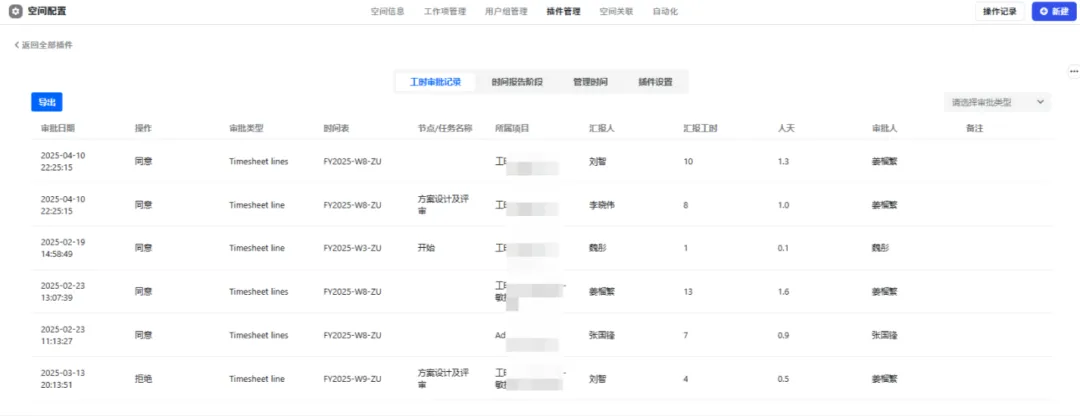
python
def submit_timesheet_for_approval(timesheet_id: str, user_id: str) -> Dict[str, Any]:
"""
成员提交时间表,触发审批流程
Args:
timesheet_id: 时间表ID
user_id: 提交人ID
"""
timesheet = timesheet_repo.get(timesheet_id)
# 步骤1:验证归属
if timesheet.user_id != user_id:
return {"code": 403, "msg": "无权操作"}
# 步骤2:验证是否有工时条目
if len(timesheet.entries) == 0:
return {"code": 400, "msg": "请至少填报一条工时再提交"}
# 步骤3:更新状态
timesheet.status = TimesheetStatus.SUBMITTED
timesheet.submitted_time = datetime.now()
timesheet_repo.save(timesheet)
# 步骤4:获取审批人(根据项目配置)
approver_id = get_project_approver(project_id)
timesheet.approver_id = approver_id
# 步骤5:发送审批通知
feishu_message.send_approval_notification(
approver_id=approver_id,
timesheet_id=timesheet_id,
user_id=user_id,
total_hours=timesheet.total_hours
)
return {"code": 200, "msg": "提交成功,等待审批"}
def approve_timesheet(timesheet_id: str, approver_id: str, decision: str) -> Dict[str, Any]:
"""
审批人审批时间表
Args:
timesheet_id: 时间表ID
approver_id: 审批人ID
decision: APPROVED / REJECTED
"""
timesheet = timesheet_repo.get(timesheet_id)
# 步骤1:验证审批人权限
if timesheet.approver_id != approver_id:
return {"code": 403, "msg": "无权审批"}
# 步骤2:更新状态
if decision == "APPROVED":
timesheet.status = TimesheetStatus.APPROVED
else:
timesheet.status = TimesheetStatus.REJECTED
timesheet.approved_time = datetime.now()
timesheet_repo.save(timesheet)
# 步骤3:发送审批结果通知
feishu_message.send_approval_result(
user_id=timesheet.user_id,
timesheet_id=timesheet_id,
decision=decision
)
# 步骤4:如果批准,将工时数据归档至统计表
if decision == "APPROVED":
archive_timesheet_data(timesheet)
return {"code": 200, "status": timesheet.status.value}
4.4 工时统计看板(数据聚合)
python
def get_timesheet_statistics(
project_id: str,
period_id: str
) -> Dict[str, Any]:
"""
获取工时统计看板数据
按项目、成员、时间段、工作项类型多维度聚合
"""
# 步骤1:获取该阶段所有已批准的时间表
timesheets = timesheet_repo.find_by_period_and_status(
period_id=period_id,
status=TimesheetStatus.APPROVED
)
# 步骤2:初始化统计数据
stats = TimesheetStatistics()
stats.project_id = project_id
stats.period_id = period_id
# 步骤3:聚合数据
for ts in timesheets:
stats.total_hours += ts.total_hours
# 按用户聚合
if ts.user_id not in stats.user_hours:
stats.user_hours[ts.user_id] = 0.0
stats.user_hours[ts.user_id] += ts.total_hours
# 按工作项类型聚合
for entry in ts.entries:
if entry.workitem_type not in stats.workitem_type_hours:
stats.workitem_type_hours[entry.workitem_type] = 0.0
stats.workitem_type_hours[entry.workitem_type] += entry.hours
# 按日期聚合
date_key = entry.entry_date.strftime("%Y-%m-%d")
if date_key not in stats.daily_hours:
stats.daily_hours[date_key] = 0.0
stats.daily_hours[date_key] += entry.hours
# 步骤4:生成看板数据
dashboard_data = {
"total_hours": stats.total_hours,
"user_distribution": [
{"user": uid, "hours": hours}
for uid, hours in stats.user_hours.items()
],
"workitem_type_distribution": [
{"type": wt, "hours": hours}
for wt, hours in stats.workitem_type_hours.items()
],
"daily_trend": [
{"date": d, "hours": h}
for d, h in sorted(stats.daily_hours.items())
],
"member_count": len(stats.user_hours)
}
return {"code": 200, "data": dashboard_data}
def export_timesheet_report(
project_id: str,
period_id: str,
format: str = "excel"
) -> Dict[str, Any]:
"""
导出工时报表(用于项目核算与绩效考核)
"""
stats = get_timesheet_statistics(project_id, period_id)
if format == "excel":
report_url = excel_generator.export(
data=stats["data"],
filename=f"工时报表_{period_id}_{datetime.now().strftime('%Y%m%d')}"
)
else:
report_url = pdf_generator.export(
data=stats["data"],
filename=f"工时报表_{period_id}_{datetime.now().strftime('%Y%m%d')}"
)
return {"code": 200, "report_url": report_url}
五、飞书项目API权限与配置清单
开发前需在飞书开发者后台创建自建应用,申请以下权限:
plaintext
project:workitem:read # 读取项目工作项信息
project:workitem:write # 创建工作项/更新工作项
project:customfield:read # 读取自定义字段配置
project:customfield:write # 写入自定义字段(存储工时数据)
contact:user:read # 读取用户信息
contact:department:read # 读取部门信息
message:send # 发送工时填报/审批通知
measure:metric:read # 读取度量图表数据
六、落地效果数据对比
| 工时填报 | 周五催收,靠回忆填写 | 关联工作项随时填报 | 数据准确率大幅提升 |
| 工时汇总 | 手动收齐+透视+核对,半天 | 系统自动汇聚,实时 | 效率提升90%以上 |
| 审批流程 | 邮件来回确认,周期长 | 线上自动流转,一键审批 | 周期从天级变分钟级 |
| 管理看板 | 手动整理图表 | 自动生成多维度看板 | 忙闲状态一目了然 |
| 报表导出 | 手动整理,易遗漏 | 一键导出标准报表 | 项目核算精准可控 |
七、落地踩坑经验总结
① 时间报告阶段的命名规范需提前统一
不同团队对时间报告阶段的命名习惯差异较大——有的按财务周期(FY2025-Q3),有的按迭代(Sprint 12),有的按周(W8)。建议在后台提供命名模板配置,统一规范。
② 工时填报需设置“锁定期”
项目结束后再补填工时,数据偏差极大。建议在时间报告阶段结束后设置锁定窗口(如结束后3天内可填,超时锁定),强制团队及时填报。
③ 审批人配置需支持多级审批
不同团队对工时审批的层级要求不同——有的项目经理一审即可,有的需要部门主管二审。建议审批流支持多级配置,按项目或按部门自定义。
④ 工时数据与财务系统对接需预留接口
工时数据最终会流向项目成本核算和人力成本分摊。建议在设计阶段预留标准化的数据导出接口(如JSON/CSV格式),便于与财务系统对接。
⑤ 移动端填报体验需单独优化
研发人员大量时间不在电脑前,移动端填报是刚需。飞书移动端的工作项详情页支持自定义字段展示,需确保工时填报入口在移动端同样可用。
八、结语
工时管理的本质,不是“管住员工的时间”,而是“看清时间的流向”。
把工时填报、审批流转、统计报表这些重复工作交给系统自动完成,让项目经理从“催收员”的角色中解脱出来,把时间花在资源调配、风险管控、团队赋能等高价值工作上。
让每一分钟都有产出记录,让每一次决策都有数据支撑。
📌 资料领取与免费试用
我们整理了配套资料和免费试用权限,供飞书项目二开工程师、项目管理工具开发人员参考。
领取方式:CSDN私信回复关键词【工时管理】 ,即可免费获取。