单词卡片翻转——从旋转动画到用户交互
一、卡片翻转的应用场景
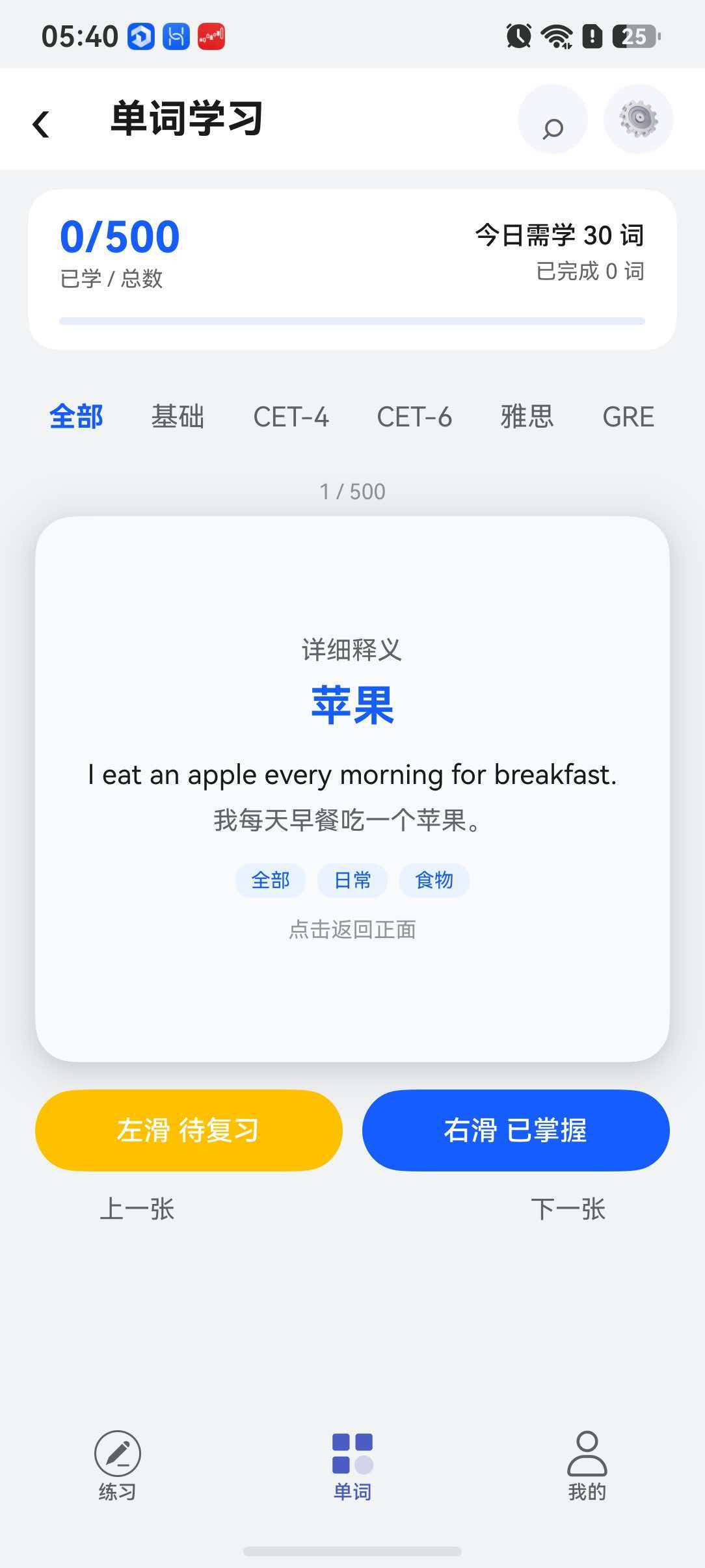
在英语学习 App 中,单词卡片是核心的学习交互方式。用户看到单词正面(英文),思考释义后翻转卡片看到背面(中文释义 + 例句),这是一个自然的学习流程。
本项目中,CourseHomePage 实现了完整的单词卡片翻转功能,包含 3D 旋转动画、正反面交叉淡入淡出、分类筛选、发音播放、掌握程度标记等交互。
二、核心翻转动画
2.1 状态变量
@Local isFlipped: boolean = false; // 翻转状态
@Local rotateY: number = 0; // Y 轴旋转角度
@Local frontOpacity: number = 1; // 正面透明度
@Local backOpacity: number = 0; // 背面透明度
四个变量共同控制卡片的视觉效果:
- isFlipped 用作文本状态标志
- rotateY 控制 3D 旋转角度
- frontOpacity / backOpacity 控制两面淡入淡出
2.2 flipCard 方法
private flipCard(): void {
animateTo({ duration: 400, curve: Curve.EaseInOut }, () => {
if (this.isFlipped) {
// 翻回正面
this.rotateY = 0;
this.frontOpacity = 1;
this.backOpacity = 0;
} else {
// 翻到背面
this.rotateY = 180;
this.frontOpacity = 0;
this.backOpacity = 1;
}
this.isFlipped = !this.isFlipped;
});
}
animateTo API:这是 ArkUI 的显式动画接口。第一个参数是动画配置(400ms 时长、EaseInOut 缓动曲线),第二个参数是状态变更闭包。框架自动插值计算中间帧的 rotateY 值,产生平滑的过渡效果。
2.3 正反面 UI 结构
Stack() {
// 正面 – 显示单词
Column() {
Text(currentWord().word) // 英文单词
.fontSize(34).fontWeight(FontWeight.Bold);
Text(currentWord().phonetic) // 音标
Text(currentWord().translation) // 中文释义
Text(currentWord().example) // 例句
}
.rotate({ x: 0, y: this.rotateY, z: 0, centerX: '50%', centerY: '50%', perspective: 1200 })
.opacity(this.frontOpacity)
.onClick(() => this.flipCard());
// 背面 – 显示详细释义
Column() {
Text('详细释义')
Text(currentWord().translation)
Text(currentWord().example)
Text(currentWord().exampleTranslation)
// 分类标签
}
.rotate({ x: 0, y: this.rotateY – 180, z: 0, centerX: '50%', centerY: '50%', perspective: 1200 })
.opacity(this.backOpacity)
.onClick(() => this.flipCard());
}
正反两面通过 Stack 堆叠在一起。翻转到背面时,rotateY 变为 180 度,同时背面的 rotation 为 rotateY – 180(即 -180→0 度),这样在视觉上始终以正面朝向用户。
perspective(透视):perspective: 1200 设置了 3D 透视的视距。值越小,3D 效果越明显;值越大,效果越平缓。1200 是一个较为自然的数值。
三、前后翻页导航
3.1 上一张 / 下一张
private nextCard(): void {
if (this.currentIndex < this.totalCount – 1) {
// 翻页时重置翻转状态到正面
this.isFlipped = false;
this.rotateY = 0;
this.frontOpacity = 1;
this.backOpacity = 0;
this.isFavorite = false;
this.currentIndex++;
}
}
private prevCard(): void {
if (this.currentIndex > 0) {
this.isFlipped = false;
this.rotateY = 0;
this.frontOpacity = 1;
this.backOpacity = 0;
this.isFavorite = false;
this.currentIndex—;
}
}
每次切换卡片时,都重置翻转状态为正面(未翻转)。这确保了用户每次看到新卡片时都是熟悉的"正面朝上"状态。
四、掌握程度标记
4.1 用户交互
Row({ space: 10 }) {
Button('左滑 待复习')
.backgroundColor('#FFc000')
.onClick(() => this.markUnfamiliar());
Button('右滑 已掌握')
.backgroundColor('#165DFF')
.onClick(() => this.markMastered());
}
4.2 标记逻辑
private markMastered(): void {
const word = this.currentWord();
GlobalContextUtils.showToast({ message: `已掌握: ${word.word}` });
this.masteredCount++;
this.learnedCount++;
this.nextCard();
}
private markUnfamiliar(): void {
const word = this.currentWord();
GlobalContextUtils.showToast({ message: `已加入生词本: ${word.word}` });
this.learnedCount++;
this.nextCard();
}
两个按钮的共同点:
- 都通过 showToast 给用户即时反馈
- 都增加 learnedCount(今日学习计数)
- 都自动跳到下一张卡片
不同点:
- markMastered 增加 masteredCount(已掌握计数)
- markUnfamiliar 实际调用 NewWordManager 将单词加入生词本(后续复习使用)
五、分类筛选
卡片页支持按词汇分类筛选:
Tabs({ barPosition: BarPosition.Start }) {
TabContent() { this.cardArea(); }
.tabBar(this.tabBuilder('全部', 'all'));
ForEach(WORD_CATEGORIES, (cat: WordCategory) => {
TabContent() { this.cardArea(); }
.tabBar(this.tabBuilder(cat.label, cat.key));
});
}
.barMode(BarMode.Scrollable)
.onTabBarClick((index: number) => {
if (index === 0) {
this.currentCategory = 'all';
} else {
this.currentCategory = WORD_CATEGORIES[index – 1].key;
}
this.currentIndex = 0;
this.resetCardState();
});
BarMode.Scrollable 使 Tab 在分类较多时可滚动,通过 onTabBarClick 切换分类时重置卡片状态。分类筛选通过 getFilteredWords() 方法实现:
private getFilteredWords(): WordCard[] {
if (this.currentCategory === 'all') {
return DEFAULT_WORD_CARDS; // 500 词全量
}
return DEFAULT_WORD_CARDS.filter(w => w.category === this.currentCategory);
}
六、发音功能
private playPronunciation(): void {
const word = this.currentWord();
if (word.audioUrl && word.audioUrl !== '') {
this.audioPlayer.play(word.audioUrl);
} else {
this.audioPlayer.play(''); // 播放系统默认提示音
}
}
用户点击单词或音标旁的播放按钮时触发,使用 AudioPlayer 单例播放当前单词的音频。
七、动画性能优化
卡片翻转动画涉及每一帧的旋转和透明度变化,以下要点有助于保证动画流畅:
八、总结
CourseHomePage 的卡片翻转实现,是 ArkTS 动画系统的一个典型应用。通过 animateTo 驱动状态变更,配合 rotate 和 opacity 实现立体的翻转效果。再加上分类筛选、发音播放、掌握标记等功能,构成了一个完整的单词学习交互闭环。这个模式可以扩展到其他需要"查看详情"的场景——例如闪卡学习、选择题的答案解析等。