一、XPath是什么?为什么重要?
大家好!今天我们来深入探讨XPath的高级语法。如果你做过网页爬虫,一定知道XPath是解析HTML/XML的利器。但很多人只停留在基础用法上,今天我要带你解锁XPath的全部潜力!
XPath的重要性:
精准定位:在复杂HTML结构中精确定位元素
效率提升:一条高级XPath可能代替多行代码
灵活性:处理各种复杂的网页结构
广泛应用:不仅用于爬虫,还在XML处理、数据提取等领域广泛使用
二、XPath轴语法详解(13种核心轴)
轴是XPath中最强大的功能之一,它定义了节点与当前节点之间的关系
2.1 基础环境设置
from lxml import etree
# 示例XML结构
parse_str = '''
<bookstore>
<book>
<title>Python编程</title>
<author>张三</author>
</book>
</bookstore>
'''
html = etree.HTML(parse_str)
2.2 13种轴语法全解析
1. child:: – 子节点轴
选择当前节点的所有子节点
# 完整语法
result = html.xpath('//book/child::title/text()')
print("child:: 结果:", result) # 输出: ['Python编程']
# 简写形式(推荐)
result = html.xpath('//book/title/text()')
print("简写结果:", result) # 输出: ['Python编程']
2. parent:: – 父节点轴
选择当前节点的父节点
# 完整语法
result = html.xpath('//author/parent::book')
print("父节点:", result)
# 简写形式(推荐)
result = html.xpath('//author/..')
print("简写父节点:", result)
3. ancestor:: – 祖先节点轴
选择当前节点的所有祖先节点
result = html.xpath('//title/ancestor::bookstore')
print("祖先节点:", result)
4. ancestor-or-self:: – 祖先及自身轴
选择当前节点的所有祖先节点及自身
result = html.xpath('//author/ancestor-or-self::*')
print("祖先及自身:", result)
5. descendant:: – 后代节点轴
选择当前节点的所有后代节点(子节点、孙节点等)
result = html.xpath('//bookstore/descendant::author')
print("后代节点:", result)
# 简写形式(非常常用!)
result = html.xpath('//bookstore//author')
print("简写后代:", result)
6. descendant-or-self:: – 后代及自身轴
选择当前节点的所有后
result = html.xpath('//bookstore/descendant-or-self::*')
print("后代及自身:", result)
7. following-sibling:: – 后续同级兄弟轴
选择当前节点之后的所有同级节点
str_2 = '''
<bookstore>
<title id="0">…</title>
<book id="1">…</book>
<book id="2">…</book>
<book id="3">…</book>
<title id="4">…</title>
</bookstore>
'''
html = etree.HTML(str_2)
result = html.xpath('//book[1]/following-sibling::book/@id')
print("后续兄弟节点:", result) # 输出: ['2', '3']
8. preceding-sibling:: – 前驱同级兄弟轴
选择当前节点之前的所有同级节点
result = html.xpath('//book[3]/preceding-sibling::book/@id')
print("前驱兄弟节点:", result) # 输出: ['1', '2']
9. following:: – 后续节点轴
选择文档中当前节点之后的所有节点(按文档顺序)
result = html.xpath('//book[1]/following::title/@id')
print("后续所有节点:", result) # 输出: ['4']
10. preceding:: – 前驱节点轴
选择文档中当前节点之前的所有节点(按文档顺序)
result = html.xpath('//title[last()]/preceding::title/@id')
print("前驱所有节点:", result) # 输出: ['0']
11. attribute:: – 属性轴
选择当前节点的所有属性
str_3 = '''
<book id="101" category="tech">Freedom</book>
<book id="102">1</book>
'''
html = etree.HTML(str_3)
# 完整语法
result = html.xpath('//book/attribute::*')
print("所有属性:", result)
# 简写形式(最常用!)
result = html.xpath('//book/@*')
print("简写属性:", result) # 输出: ['101', 'tech', '102']
12. namespace:: – 命名空间轴
选择当前节点的所有命名空间节点(较少使用)
result = html.xpath('//book/namespace::*')
print("命名空间:", result)
13. self:: – 自身轴
选择当前节点自身
# 完整语法
result = html.xpath('//book/self::*')
print("自身节点:", result)
# 简写形式
result = html.xpath('//book/.')
print("简写自身:", result)
2.3 轴语法记忆口诀
text
child:: – 孩子
parent:: – 父母
ancestor:: – 祖先
descendant:: – 后代
sibling:: – 兄弟
self:: – 自己
attribute:: – 属性
三、位置路径与谓词
3.1 位置路径表达式
# 绝对路径 – 从根节点开始
result = html.xpath('/bookstore/book/title')
# 相对路径 – 从当前节点开始
# 假设当前节点是bookstore
result = html.xpath('book/title')
# 任意位置 – 最常用!
result = html.xpath('//title') # 所有title元素
result = html.xpath('//book//title') # book下的所有title
3.2 位置谓词(数字筛选)
# 第一个book元素
result = html.xpath('//book[1]')
# 最后一个book元素
result = html.xpath('//book[last()]')
# 倒数第二个book元素
result = html.xpath('//book[last()-1]')
# 位置大于1的book元素
result = html.xpath('//book[position()>1]')
# 前3个book元素
result = html.xpath('//book[position()<=3]')
3.3 属性谓词
python
# 具有id属性的book元素
result = html.xpath('//book[@id]')
# id属性值为'101'的book元素
result = html.xpath('//book[@id="101"]')
# category属性为'tech'的book元素
result = html.xpath('//book[@category="tech"]')
# id不等于'101'的book元素
result = html.xpath('//book[@id!="101"]')
# 多属性筛选
result = html.xpath('//book[@id and @category]')
3.4 文本内容谓词
python
# price子元素值大于35的book
result = html.xpath('//book[price>35]')
# author子元素文本为'张三'的book
result = html.xpath('//book[author="张三"]')
# title包含'Python'的book
result = html.xpath('//book[contains(title, "Python")]')
3.5 组合谓词
python
# 使用and连接多个条件
result = html.xpath('//book[@category="tech" and price>30]')
# 使用or连接多个条件
result = html.xpath('//book[@id="101" or @category="fiction"]')
# 复杂组合
result = html.xpath('//book[position()>=2 and position()<=4 and price>40]')
四、XPath函数大全
4.1 节点集函数
# last() – 返回最后一个位置
result = html.xpath('//book[last()]')
result = html.xpath('//book[position()=last()]')
# position() – 返回当前位置
result = html.xpath('//book[position() mod 2 = 0]') # 偶数位置
result = html.xpath('//book[position()=1 or position()=last()]')
# count() – 统计节点数量
result = html.xpath('//bookstore[count(book)>5]')
# 注意:count()在谓词中直接使用
4.2 字符串函数
# text() – 获取文本内容
result = html.xpath('//book/text()')
# string() – 转换为字符串
result = html.xpath('string(//book[1]/price)')
# concat() – 连接字符串
result = html.xpath('concat(//book[1]/author, "-", //book[1]/title)')
# contains() – 是否包含子串
result = html.xpath('//book[contains(title, "Python")]')
result = html.xpath('//book[contains(@category, "tech")]')
# starts-with() – 是否以指定前缀开始
result = html.xpath('//book[starts-with(title, "Python")]')
# substring() – 提取子字符串
# 获取第1到第6个字符
result = html.xpath('substring(//book[1]/title, 1, 6)')
# 从第2个字符到末尾
result = html.xpath('substring(//book[1]/title, 2)')
# string-length() – 字符串长度
result = html.xpath('//book[string-length(title)>10]')
# normalize-space() – 删除多余空格
test_2 = '''
<author>
张三
</author>
'''
html = etree.HTML(test_2)
result = html.xpath('normalize-space(//author)')
print("规范化空格:", result) # 输出: '张三'
4.3 数值函数
# number() – 转换为数值
result = html.xpath('number(//book[1]/price)')
# floor() – 向下取整
result = html.xpath('floor(//book[1]/price)')
# ceiling() – 向上取整
result = html.xpath('ceiling(//book[1]/price)')
# round() – 四舍五入
result = html.xpath('round(//book[1]/price)')
4.4 布尔函数
# boolean() – 转换为布尔值
result = html.xpath('boolean(//book)')
# not() – 逻辑非
result = html.xpath('//book[not(@category)]') # 没有category属性的book
result = html.xpath('//book[not(price > 30)]') # price不大于30的book
# true()/false() – 布尔常量
# 在比较中使用
4.5 集合函数(XPath 2.0+)
# distinct-values() – 返回唯一值
# 注意:lxml不完全支持XPath 2.0
# distinct-values(//book/@category)
五、运算符详解
5.1 算术运算符
# 基本算术运算
result = html.xpath('//book[price * 0.9 < 40]') # 价格的90%小于40
result = html.xpath('//book[price div 2 > 20]') # 价格除以2大于20
result = html.xpath('//book[position() mod 2 = 0]') # 偶数位置
5.2 比较运算符
# 等于
result = html.xpath('//book[@id="101"]')
# 不等于
result = html.xpath('//book[@id!="101"]')
# 小于(在XML中需要转义)
result = html.xpath('//book[price < 30]') # 使用实体
result = html.xpath('//book[price < 30]') # 某些上下文可用
# 小于等于
result = html.xpath('//book[price <= 30]')
# 大于
result = html.xpath('//book[price > 35]')
# 大于等于
result = html.xpath('//book[price >= 35]')
5.3 逻辑运算符
# and – 逻辑与
result = html.xpath('//book[@category="tech" and price>30]')
# or – 逻辑或
result = html.xpath('//book[price<20 or price>50]')
# not() – 逻辑非(函数形式)
result = html.xpath('//book[not(@category="fiction")]')
六、通配符与节点测试
6.1 通配符
# * – 匹配任意元素节点
result = html.xpath('//book/*') # book的所有子元素
# @* – 匹配任意属性节点
result = html.xpath('//book/@*') # book的所有属性
result = html.xpath('//*[@*]') # 具有任意属性的所有元素
6.2 节点测试
# node() – 匹配任意节点
result = html.xpath('//book/node()') # book的所有子节点
# text() – 匹配文本节点
result = html.xpath('//book/title/text()')
# comment() – 匹配注释节点
# result = html.xpath('//comment()')
# processing-instruction() – 匹配处理指令节点
# result = html.xpath('//processing-instruction()')
七、综合实战演练
现在我们来一个完整的实战,把前面学的都用上!
from lxml import etree
# 复杂的XML结构
parse_str = '''
<?xml version="1.0" encoding="UTF-8"?>
<bookstore>
<category name="科技" id="cat1">
<book id="101" category="tech" language="zh">
<title>Python编程入门</title>
<author>张三</author>
<price>45.50</price>
<year>2023</year>
<description>这是一本关于Python编程的入门书籍。</description>
</book>
<book id="102" category="tech" language="en">
<title>Advanced JavaScript</title>
<author>John Smith</author>
<price>52.00</price>
<year>2022</year>
<description>Advanced JavaScript programming techniques.</description>
</book>
<book id="103" category="tech" language="zh">
<title>数据结构与算法</title>
<author>李四</author>
<price>38.00</price>
<year>2023</year>
</book>
</category>
<category name="文学" id="cat2">
<book id="201" category="fiction" language="zh">
<title>红楼梦</title>
<author>曹雪芹</author>
<price>65.00</price>
<year>1791</year>
</book>
<book id="202" category="fiction" language="zh">
<title>西游记</title>
<author>吴承恩</author>
<price>58.00</price>
<year>1592</year>
</book>
</category>
<category name="历史" id="cat3">
<book id="301" category="history">
<title>中国通史</title>
<author>王五</author>
<price>72.00</price>
<year>2021</year>
</book>
</category>
</bookstore>
'''
html = etree.HTML(parse_str)
print("=" * 60)
print("实战演练开始!")
print("=" * 60)
# 1. 基础查询
print("\\n1. 所有书籍的ID:")
result = html.xpath('//book/@id')
print(result) # ['101', '102', '103', '201', '202', '301']
# 2. 轴语法组合
print("\\n2. 科技类别的第一个书籍之后的所有书籍:")
result = html.xpath('//category[@name="科技"]/book[1]/following-sibling::book/@id')
print(result) # ['102', '103']
# 3. 复杂谓词
print("\\n3. 中文书籍且价格小于50:")
result = html.xpath('//book[@language="zh" and price<50]/@id')
print(result) # ['101', '103']
# 4. 函数应用
print("\\n4. 标题包含'Python'的书籍:")
result = html.xpath('//book[contains(title, "Python")]/@id')
print(result) # ['101']
print("\\n5. 标题长度大于10的书籍:")
result = html.xpath('//book[string-length(title)>10]/@id')
print(result) # ['101', '102', '103', '201', '202', '301']
# 5. 高级组合
print("\\n6. 奇数位置的书籍:")
result = html.xpath('//book[position() mod 2 = 1]/@id')
print(result) # ['101', '103', '201', '301']
print("\\n7. 没有描述信息的书籍:")
result = html.xpath('//book[not(description)]/@id')
print(result) # ['103', '201', '202', '301']
# 6. 跨层级查询
print("\\n8. 作者为张三的书籍标题:")
result = html.xpath('//book[author="张三"]/title/text()')
print(result) # ['Python编程入门']
# 7. 属性与文本组合
print("\\n9. 连接作者和书名:")
result = html.xpath('concat(//book[1]/author, " – ", //book[1]/title)')
print(result) # '张三 – Python编程入门'
# 8. 综合挑战
print("\\n10. 科技类别中,2023年出版且价格>40的书籍:")
result = html.xpath('//category[@name="科技"]/book[year=2023 and price>40]/@id')
print(result) # ['101']
print("\\n11. 所有类别中至少有一本书价格>60的类别:")
result = html.xpath('//category[book[price>60]]/@name')
print(result) # ['文学', '历史']
print("\\n12. 第一个类别的最后一本书:")
result = html.xpath('//category[1]/book[last()]/@id')
print(result) # ['103']
八、常见问题与解决方案
问题1:XPath提取不到数据
可能原因:
网页结构有变化
XPath写错了
有iframe或动态加载内容
解决方案:
# 1. 打印HTML确认结构
print(etree.tostring(html, encoding='unicode')[:500])
# 2. 使用更通用的XPath
# 不推荐://div[3]/ul[2]/li[4]/a
# 推荐://a[contains(@class, "target-class")]
# 3. 使用浏览器开发者工具复制XPath
# 右键元素 → 复制 → 复制XPath
问题2:提取的文本有空格或换行
解决方案:
# 使用normalize-space()函数
result = html.xpath('normalize-space(//div/text())')
# 或者用strip()后处理
result = [text.strip() for text in html.xpath('//div/text()')]
问题3:需要处理相对路径
解决方案:
# 先找到父元素,再从父元素开始查找
books = html.xpath('//book')
for book in books:
# 在book元素的上下文中查找
title = book.xpath('.//title/text()') # 注意开头的点!
author = book.xpath('.//author/text()')
九、实战演示
拿之前博客发的一篇 SpiderBuf–爬虫练习网站手把手带练(最新独特版10-20)-CSDN博客
里面的第十五题 来举例子 但是之前的写法是最方便最简单的
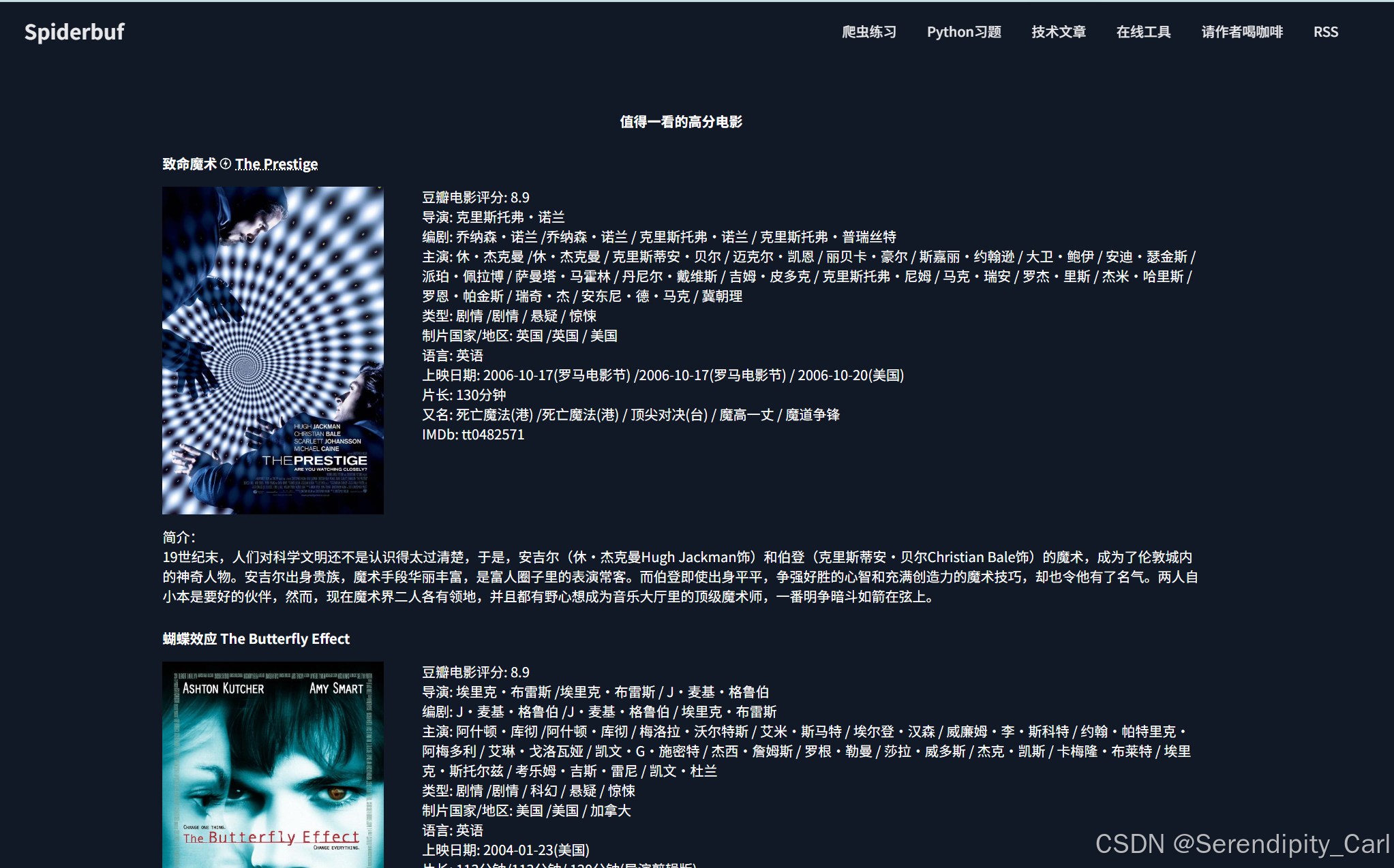
这里我直接将页面的源代码复制到本地html文件中
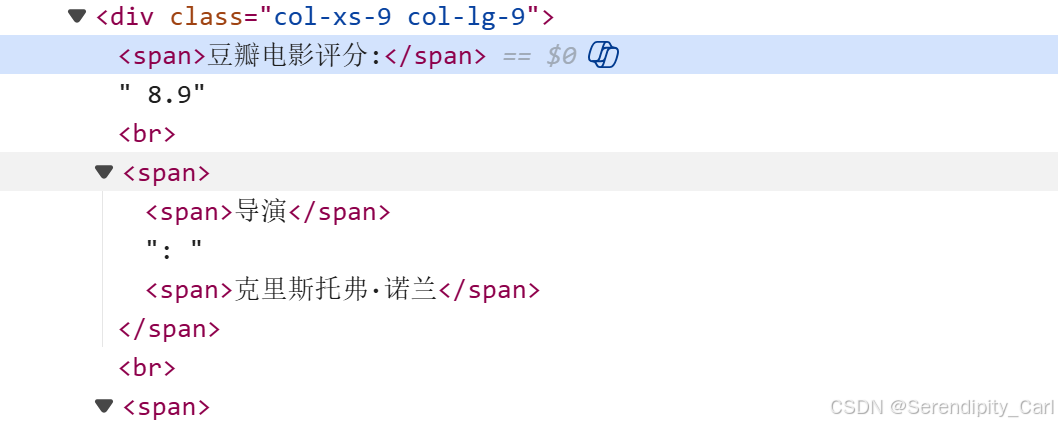
首先来提取这个豆瓣的评分 和这个span是一个节点 定位到这个豆瓣电影评分 提取后面兄弟的第一个文本节点
score = li.xpath('.//span[contains(text(),"豆瓣电影评分:")]/following-sibling::text()[1]')
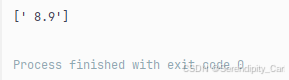
提取出来是这样的 前面还有个空格 我们可以 转换成字符串 然后去除两端的空格
from lxml import etree
# 读取文件
with open('GQ.html', 'r', encoding='utf-8') as f:
text = f.read()
html = etree.HTML(text).xpath('.//div[contains(@class,"row")]')
for li in html:
score = ''.join(li.xpath('.//span[contains(text(),"豆瓣电影评分:")]/following-sibling::text()[1]')).strip()
其次这个导演 也是一样的
director = ''.join(li.xpath('.//span[contains(text(),"导演")]/following-sibling::span/text()')).strip()
# 定位到和导演这个span标签 后面的兄弟节点span中的文本
接着我们来看这个 主演 主演有很多 回了这个 其它的也就会了
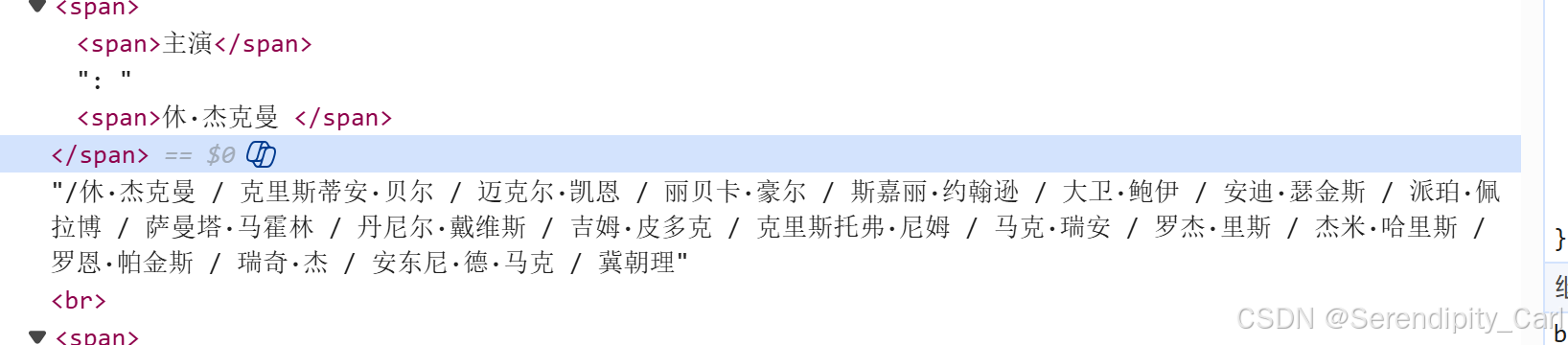
思路: 定位到主演这个span标签 然后定位到其父标签 之后的兄弟节点 中的文本 拿到第一个文本即可
actors = ''.join(li.xpath('.//span[contains(text(),"主演")]/following-sibling::span[1]/text()'))
actors += ''.join(li.xpath('normalize-space(.//span[contains(text(),"主演")]/../following-sibling::text()[1])'))

提取出来是以上图片中的样子 用 这个noarmalize-space函数去除空格 和之前的字段做个拼接即可
大家也可以多用高级语法 去提取复杂的静态文件 多加练习运用 Practice makes perfect!
你的点赞和关注是我更新的最大动力!
如果这篇教程对你有帮助:
👍 点赞支持一下
💬 评论分享你的XPath使用经验
🔔 关注我获取更多技术教程
⭐ 收藏本文,方便随时查阅
XPath之路,我们一起精通! 🚀