文章目录
-
- 前言
- 回顾一下基础用法
- 事务:批量插入的救命稻草
- 索引优化:查询慢的时候先看这个
- 手写一个轻量 ORM
- 实战:笔记应用的数据层
- 数据库升级别忘了处理
- 我的建议
前言
HarmonyOS 的 RelationalStore 底层就是 SQLite,基本用法大家应该都会——insert、query、update、delete,文档里都有。但项目里如果就这么裸写,代码会变得又臭又长,而且性能也容易出问题。
这篇聊三个进阶话题:事务批量操作、索引优化、以及手写一个轻量 ORM 把数据层封装干净。
回顾一下基础用法
先快速过一遍 RelationalStore 的基本操作,确保咱们在一个频道上:
import { relationalStore } from '@kit.ArkData';
// 获取数据库实例
const config: relationalStore.StoreConfig = {
name: 'notes.db',
securityLevel: relationalStore.SecurityLevel.S1
};
const store = await relationalStore.getRdbStore(context, config);
// 建表
await store.executeSql(`
CREATE TABLE IF NOT EXISTS note (
id INTEGER PRIMARY KEY AUTOINCREMENT,
title TEXT NOT NULL,
content TEXT,
category TEXT DEFAULT 'default',
created_at INTEGER NOT NULL,
updated_at INTEGER NOT NULL
)
`);
基础操作都会了,下面上硬菜。
事务:批量插入的救命稻草
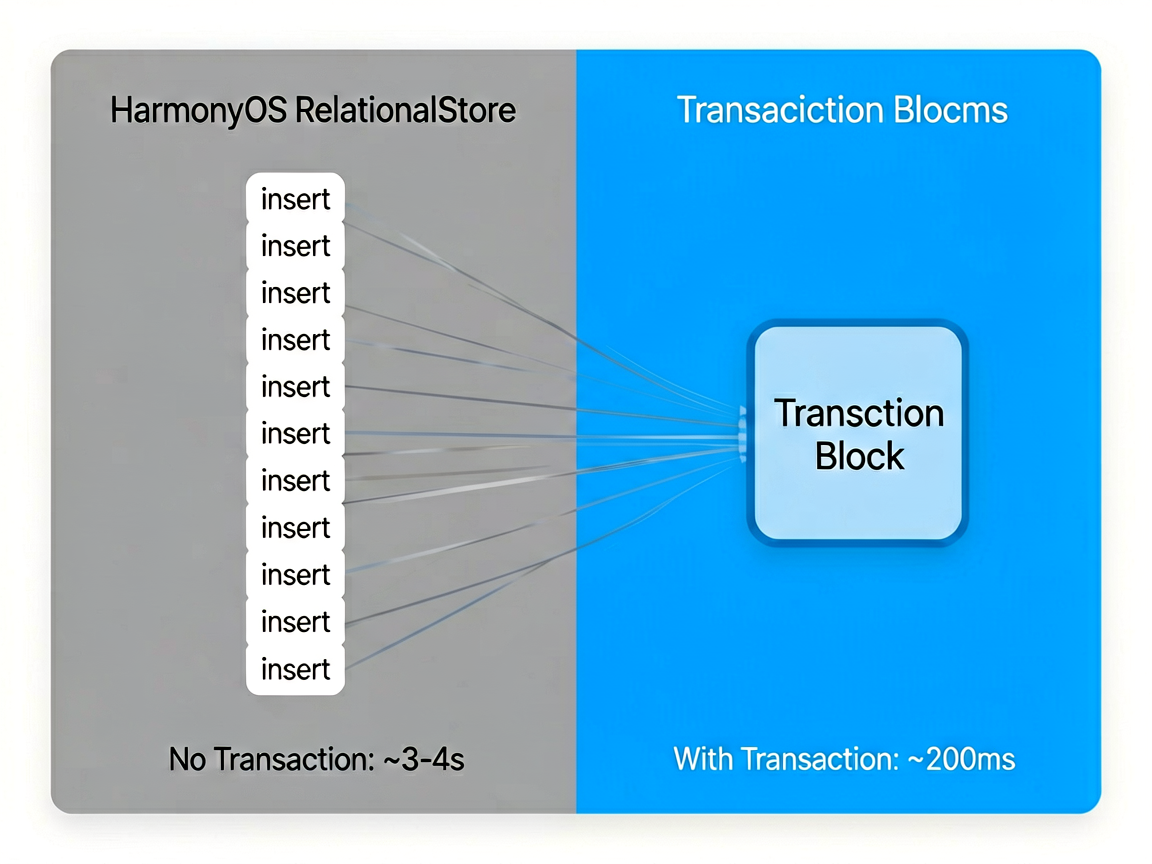
假设你要从服务器同步 500 条笔记到本地数据库。如果一条一条 insert,每次插入都是一次独立的事务——写磁盘、提交、确认,500 次下来可能要好几秒。
用事务包裹起来就完全不一样了,所有操作合并成一次磁盘写入:
async function batchInsertNotes(
store: relationalStore.RdbStore,
notes: NoteItem[]
) {
// 开启事务
await store.beginTransaction();
try {
for (const note of notes) {
const bucket: relationalStore.ValuesBucket = {
title: note.title,
content: note.content,
category: note.category,
created_at: note.createdAt,
updated_at: note.updatedAt
};
await store.insert('note', bucket);
}
// 提交事务
await store.commit();
console.info(`成功插入 ${notes.length} 条笔记`);
} catch (err) {
// 出错回滚
await store.rollback();
console.error(`批量插入失败,已回滚: ${JSON.stringify(err)}`);
}
}
实测 500 条数据:不用事务大概 3-4 秒,用事务 200 毫秒左右。差距就是这么夸张。
有个细节——beginTransaction 之后如果中间某一步抛异常,一定要在 catch 里调 rollback。不然事务会一直挂着,后续的数据库操作全卡住。
索引优化:查询慢的时候先看这个
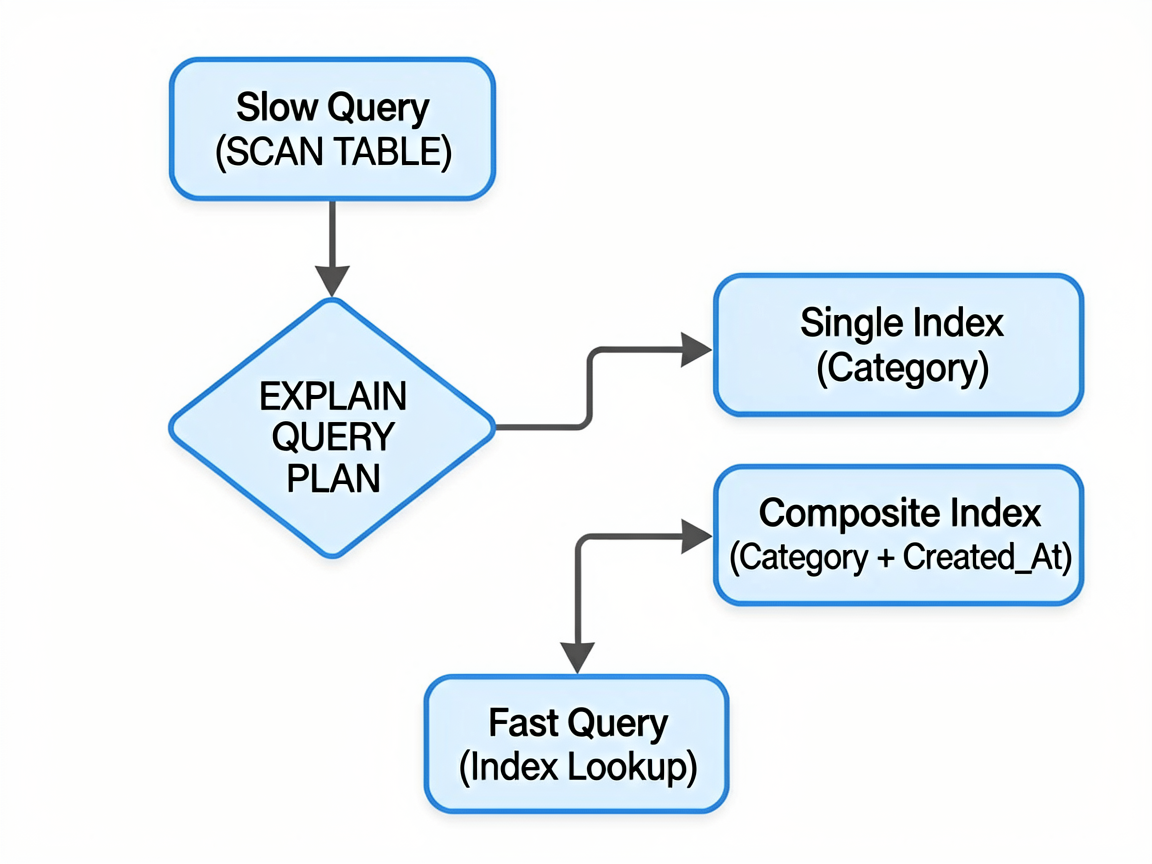
数据量大了以后,查询变慢是很常见的问题。在加索引之前,先用 EXPLAIN QUERY PLAN 看看查询到底慢在哪:
async function analyzeQuery(store: relationalStore.RdbStore) {
const result = await store.querySql(
"EXPLAIN QUERY PLAN SELECT * FROM note WHERE category = 'work' ORDER BY created_at DESC"
);
while (result.goToNextRow()) {
console.info(result.getString(0));
}
}
如果看到 SCAN TABLE note,说明做了全表扫描——这就是慢的原因。加个索引就能搞定:
// 创建单列索引
await store.executeSql(
'CREATE INDEX IF NOT EXISTS idx_note_category ON note(category)'
);
// 创建复合索引(适合经常一起查询的条件)
await store.executeSql(
'CREATE INDEX IF NOT EXISTS idx_note_category_time ON note(category, created_at DESC)'
);
加了复合索引后,同样的查询会从全表扫描变成索引查找,数据量越大提升越明显。
索引虽好,但别滥用。每个索引都会增加 insert/update/delete 的开销,因为每次写操作都要同步更新索引。我的经验是:只给 WHERE、ORDER BY、JOIN 用到的列建索引,别一口气给所有列都加上。
手写一个轻量 ORM
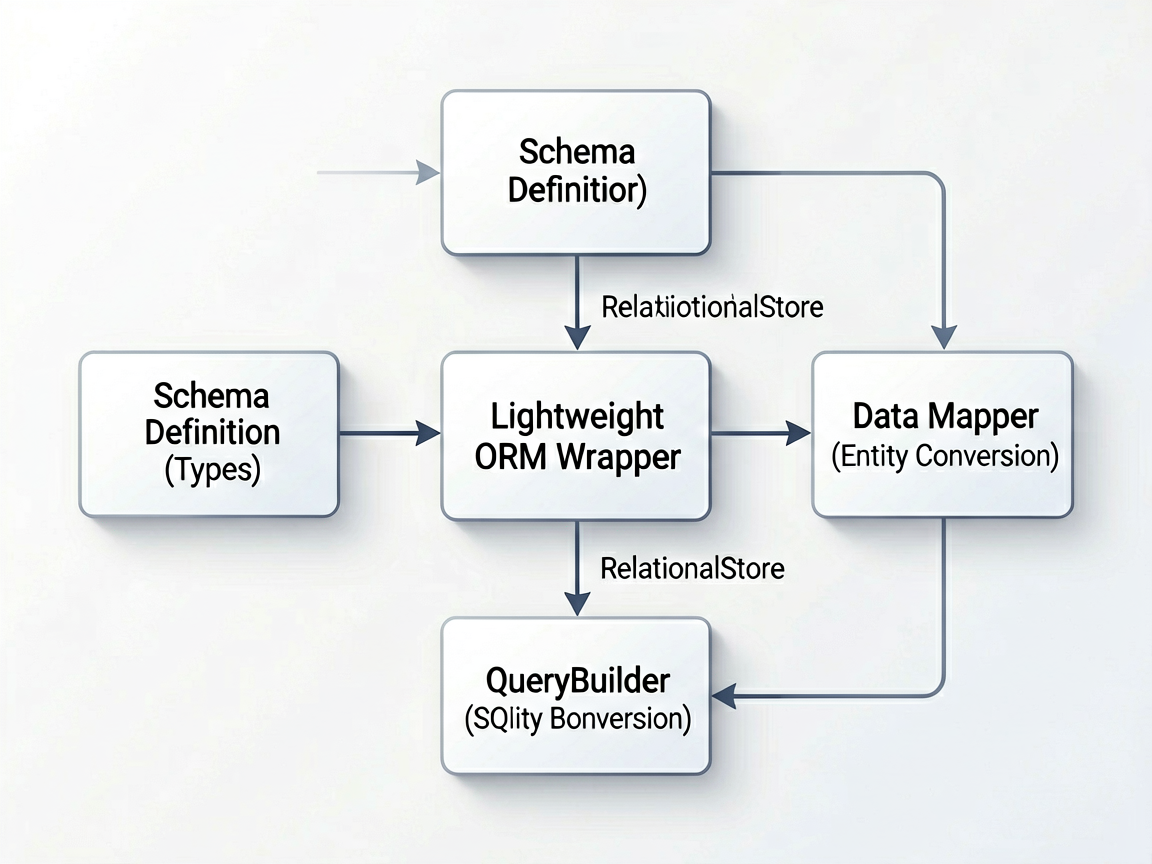
每次写 CRUD 都要拼 ValuesBucket、拼查询条件,写多了就想封装一下。下面是一个轻量的 ORM 实现,支持基本的增删改查:
import { relationalStore } from '@kit.ArkData';
// 字段类型定义
type FieldType = 'TEXT' | 'INTEGER' | 'REAL' | 'BLOB';
interface FieldDef {
name: string;
type: FieldType;
primaryKey?: boolean;
autoIncrement?: boolean;
notNull?: boolean;
defaultValue?: string | number | null;
index?: boolean; // 是否需要索引
}
interface TableDef {
name: string;
fields: FieldDef[];
}
export class LightORM {
private store: relationalStore.RdbStore;
constructor(store: relationalStore.RdbStore) {
this.store = store;
}
// 根据表定义自动建表 + 建索引
async createTable(table: TableDef) {
const columns = table.fields.map(f => {
let sql = `${f.name} ${f.type}`;
if (f.primaryKey) sql += ' PRIMARY KEY';
if (f.autoIncrement) sql += ' AUTOINCREMENT';
if (f.notNull && !f.primaryKey) sql += ' NOT NULL';
if (f.defaultValue !== undefined) sql += ` DEFAULT ${f.defaultValue}`;
return sql;
});
await this.store.executeSql(
`CREATE TABLE IF NOT EXISTS ${table.name} (${columns.join(', ')})`
);
// 自动创建标记了 index 的字段索引
for (const field of table.fields) {
if (field.index && !field.primaryKey) {
await this.store.executeSql(
`CREATE INDEX IF NOT EXISTS idx_${table.name}_${field.name} ON ${table.name}(${field.name})`
);
}
}
}
// 插入一条记录
async insert(table: string, data: Record<string, relationalStore.ValueType>): Promise<number> {
const bucket = this.toBucket(data);
return await this.store.insert(table, bucket);
}
// 批量插入(带事务)
async batchInsert(table: string, dataList: Record<string, relationalStore.ValueType>[]): Promise<void> {
await this.store.beginTransaction();
try {
for (const data of dataList) {
await this.store.insert(table, this.toBucket(data));
}
await this.store.commit();
} catch (err) {
await this.store.rollback();
throw err;
}
}
// 查询记录
async query(
table: string,
options: {
columns?: string[];
where?: string;
args?: string[];
orderBy?: string;
limit?: number;
offset?: number;
} = {}
): Promise<Record<string, relationalStore.ValueType>[]> {
const predicates = new relationalStore.RdbPredicates(table);
if (options.where && options.args) {
// 用原生 SQL 查询支持更灵活的 WHERE 条件
let sql = `SELECT ${options.columns?.join(', ') || '*'} FROM ${table}`;
sql += ` WHERE ${options.where}`;
if (options.orderBy) sql += ` ORDER BY ${options.orderBy}`;
if (options.limit) sql += ` LIMIT ${options.limit}`;
if (options.offset) sql += ` OFFSET ${options.offset}`;
const result = await this.store.querySql(sql, options.args);
return this.resultToRecords(result, options.columns);
}
if (options.orderBy) {
predicates.orderByDesc(options.orderBy);
}
if (options.limit) {
predicates.limitAs(options.limit);
}
if (options.offset) {
predicates.offsetAs(options.offset);
}
const result = await this.store.query(predicates, options.columns);
return this.resultToRecords(result, options.columns);
}
// 更新记录
async update(
table: string,
data: Record<string, relationalStore.ValueType>,
where: string,
args: string[]
): Promise<number> {
const bucket = this.toBucket(data);
const predicates = new relationalStore.RdbPredicates(table);
predicates.where(where, args);
return await this.store.update(bucket, predicates);
}
// 删除记录
async delete(
table: string,
where: string,
args: string[]
): Promise<number> {
const predicates = new relationalStore.RdbPredicates(table);
predicates.where(where, args);
return await this.store.delete(predicates);
}
// 统计数量
async count(table: string, where?: string, args?: string[]): Promise<number> {
let sql = `SELECT COUNT(*) as cnt FROM ${table}`;
if (where) sql += ` WHERE ${where}`;
const result = await this.store.querySql(sql, args);
if (result.goToNextRow()) {
return result.getLong(0);
}
return 0;
}
private toBucket(data: Record<string, relationalStore.ValueType>): relationalStore.ValuesBucket {
const bucket: relationalStore.ValuesBucket = {};
for (const key of Object.keys(data)) {
bucket[key] = data[key];
}
return bucket;
}
private resultToRecords(
resultSet: relationalStore.ResultSet,
columns?: string[]
): Record<string, relationalStore.ValueType>[] {
const records: Record<string, relationalStore.ValueType>[] = [];
const cols = columns || resultSet.columnNames;
while (resultSet.goToNextRow()) {
const record: Record<string, relationalStore.ValueType> = {};
for (let i = 0; i < cols.length; i++) {
const type = resultSet.getColumnType(cols[i]);
switch (type) {
case relationalStore.ColumnType.COLUMN_TYPE_INTEGER:
record[cols[i]] = resultSet.getLong(i);
break;
case relationalStore.ColumnType.COLUMN_TYPE_FLOAT:
record[cols[i]] = resultSet.getDouble(i);
break;
case relationalStore.ColumnType.COLUMN_TYPE_STRING:
record[cols[i]] = resultSet.getString(i);
break;
case relationalStore.ColumnType.COLUMN_TYPE_BLOB:
record[cols[i]] = resultSet.getBlob(i);
break;
default:
record[cols[i]] = null;
}
}
records.push(record);
}
resultSet.close();
return records;
}
}
实战:笔记应用的数据层
用这个 ORM 来封装一个笔记应用的数据层:
// 定义表结构
const noteTable: TableDef = {
name: 'note',
fields: [
{ name: 'id', type: 'INTEGER', primaryKey: true, autoIncrement: true },
{ name: 'title', type: 'TEXT', notNull: true },
{ name: 'content', type: 'TEXT' },
{ name: 'category', type: 'TEXT', index: true, defaultValue: "'default'" },
{ name: 'is_pinned', type: 'INTEGER', defaultValue: 0 },
{ name: 'created_at', type: 'INTEGER', notNull: true },
{ name: 'updated_at', type: 'INTEGER', notNull: true }
]
};
export class NoteRepository {
private orm: LightORM;
constructor(store: relationalStore.RdbStore) {
this.orm = new LightORM(store);
}
async init() {
await this.orm.createTable(noteTable);
}
// 新建笔记
async createNote(title: string, content: string, category: string = 'default') {
const now = Date.now();
return this.orm.insert('note', {
title, content, category,
created_at: now,
updated_at: now
});
}
// 获取笔记列表(置顶优先)
async getNotes(category?: string, page: number = 1, pageSize: number = 20) {
const where = category ? "category = ?" : undefined;
const args = category ? [category] : undefined;
return this.orm.query('note', {
columns: ['id', 'title', 'content', 'category', 'is_pinned', 'created_at'],
where,
args,
orderBy: 'is_pinned DESC, updated_at DESC',
limit: pageSize,
offset: (page – 1) * pageSize
});
}
// 更新笔记
async updateNote(id: number, updates: { title?: string; content?: string; category?: string }) {
const data: Record<string, relationalStore.ValueType> = {
updated_at: Date.now()
};
if (updates.title !== undefined) data['title'] = updates.title;
if (updates.content !== undefined) data['content'] = updates.content;
if (updates.category !== undefined) data['category'] = updates.category;
return this.orm.update('note', data, 'id = ?', [id.toString()]);
}
// 删除笔记
async deleteNote(id: number) {
return this.orm.delete('note', 'id = ?', [id.toString()]);
}
// 切换置顶状态
async togglePin(id: number) {
return this.orm.update(
'note',
{ is_pinned: 0 }, // 简单处理,实际应该先查再改
'id = ?',
[id.toString()]
);
}
// 搜索笔记
async searchNotes(keyword: string) {
return this.orm.query('note', {
columns: ['id', 'title', 'content', 'category', 'created_at'],
where: "title LIKE ? OR content LIKE ?",
args: [`%${keyword}%`, `%${keyword}%`],
orderBy: 'updated_at DESC',
limit: 50
});
}
// 批量导入(从其他应用迁移数据时用到)
async importNotes(notes: { title: string; content: string; category: string }[]) {
const now = Date.now();
const dataList = notes.map(n => ({
…n,
created_at: now,
updated_at: now
}));
return this.orm.batchInsert('note', dataList);
}
// 统计各分类的笔记数量
async getCategoryCounts(): Promise<Record<string, number>> {
const result = await this.orm.query('note', {
columns: ['category'],
});
const counts: Record<string, number> = {};
for (const row of result) {
const cat = row['category'] as string;
counts[cat] = (counts[cat] || 0) + 1;
}
return counts;
}
}
初始化和使用:
// EntryAbility 中初始化
async onCreate() {
const config: relationalStore.StoreConfig = {
name: 'notes.db',
securityLevel: relationalStore.SecurityLevel.S1
};
const store = await relationalStore.getRdbStore(this.context, config);
const repo = new NoteRepository(store);
await repo.init();
// 存到全局状态或 AppStorage 里
AppStorage.setOrCreate<NoteRepository>('noteRepo', repo);
}
// 在页面中使用
const repo = AppStorage.get<NoteRepository>('noteRepo')!;
// 创建笔记
const noteId = await repo.createNote('会议记录', '讨论了鸿蒙 7 的新特性…', 'work');
// 获取笔记列表
const notes = await repo.getNotes('work', 1, 20);
// 搜索
const results = await repo.searchNotes('鸿蒙');
数据库升级别忘了处理
数据库表结构变了,要处理升级逻辑。在 getRdbStore 的时候配一个回调:
const config: relationalStore.StoreConfig = {
name: 'notes.db',
securityLevel: relationalStore.SecurityLevel.S1
};
// 检查版本号,执行迁移
const store = await relationalStore.getRdbStore(context, config);
const currentVersion = await store.querySql('PRAGMA user_version');
if (currentVersion.goToNextRow() && currentVersion.getLong(0) < 2) {
// 从 v1 升级到 v2:新增 is_pinned 字段
await store.executeSql('ALTER TABLE note ADD COLUMN is_pinned INTEGER DEFAULT 0');
await store.executeSql('CREATE INDEX idx_note_pinned ON note(is_pinned)');
await store.executeSql('PRAGMA user_version = 2');
}
我的建议
关于数据层封装,我的经验是不要过度设计。上面这个 LightORM 够用了——表定义清晰、批量操作有事务、查询条件灵活。没必要搞成 Hibernate 那样重量级的东西,ArkTS 的装饰器能力有限,强行搞注解驱动反而增加复杂度。
另外提一嘴:数据库文件的路径用 context.databaseDir 获取,别自己拼路径。不同设备的沙箱路径不一样,硬编码铁定出问题。
性能方面,数据量超过 1 万条的时候就要认真考虑索引和分页了。我见过有同事一次性 query 出 5 万条记录然后在前端做筛选,直接 OOM。分页 + 索引 + 按需加载才是正道。