1.AB包的基础知识
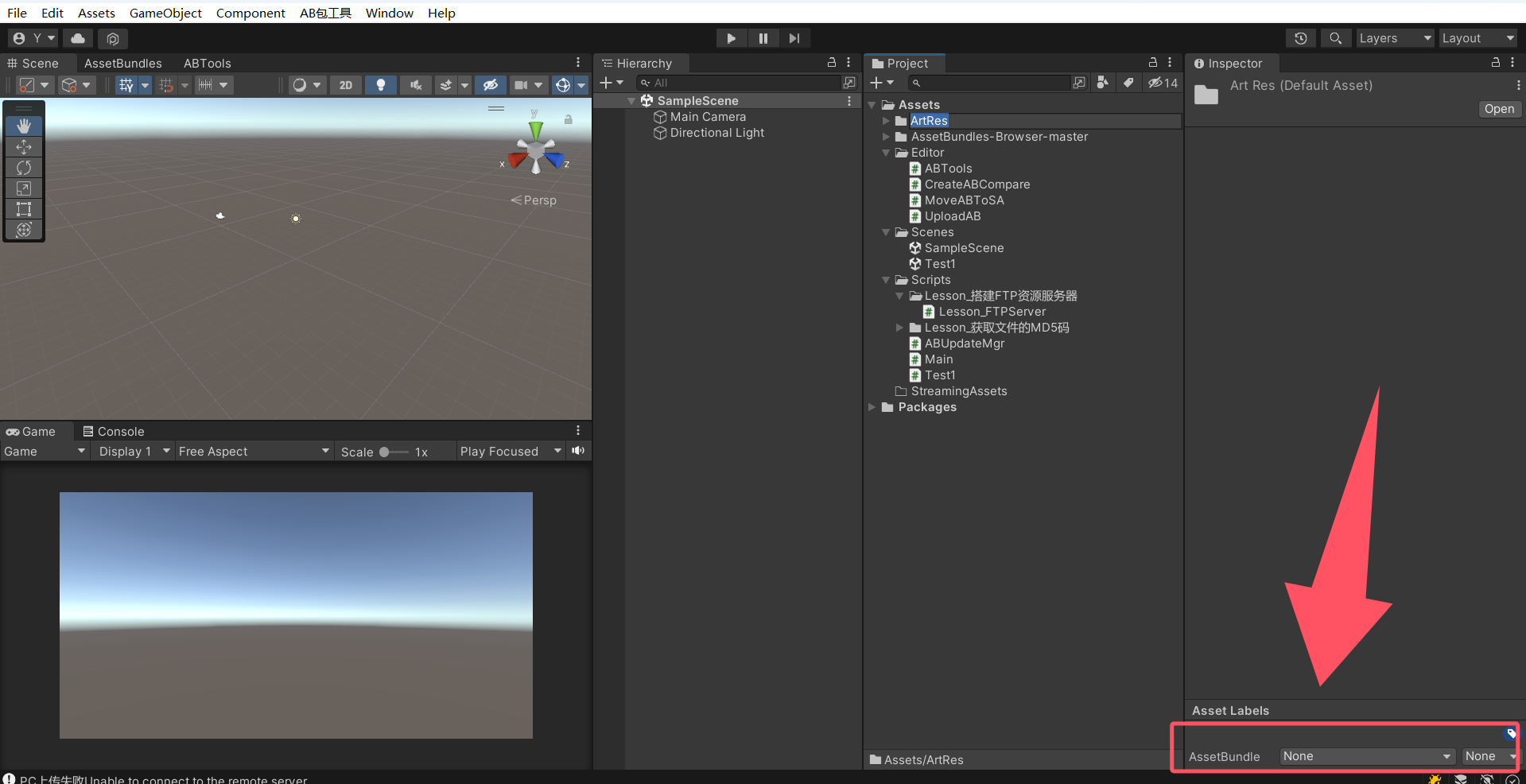
1.AB包是特定于平台的资产压缩包,有点类似于压缩文件,但是不能压缩C#脚本,将资源打AB包,资源是除开C#脚本以外的东西,预制体中显示的C#脚本,并不是真正的C#脚本,而是和C#脚本关联的数据,是Unity反射机制。
2.新版本的编辑器可能找不到了AssetBundle Browser界面,因为被Addressables封装了。
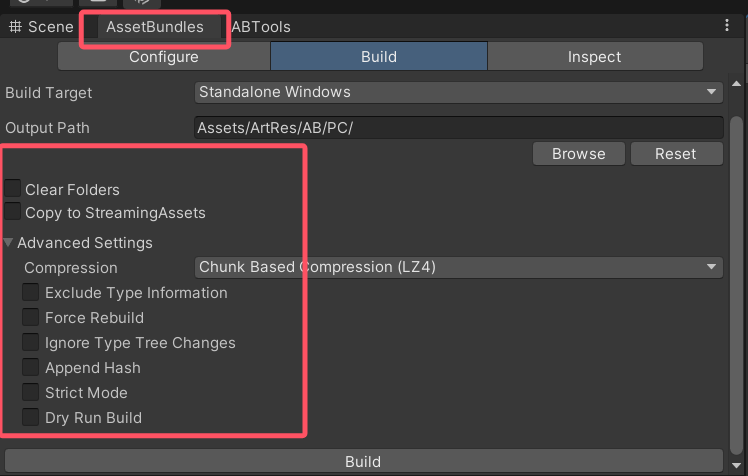
3.AssetBundles界面参数,简单描述下,BuildTarget 为打包平台, OutputPath 输出路径
三种压缩方式:
NoCompression 无压缩
LZ4 压缩方式,用到什么才压缩什么,压缩相对LZMA大一点
LZMA ,压缩最小,解压最慢,缺点:用一个资源,要解压所有
ainfest对应文件的配置信息
4.AB和Resources的对比:
Resources打包后只读,无法修改
AB包可以自定义存储位置,后期可以动态更新,压缩方式自定义。可以减少包体大小和减少初始包的大小和实现热更新。
2.Ftp服务器准备
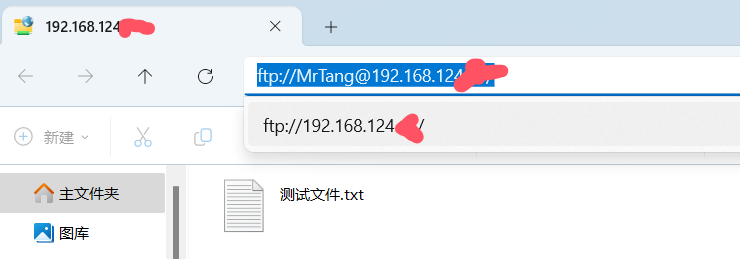
将Serv-U_10.1.0.1破解版.exe 不断下一步安装就行,ip地址从命令行 ipconfig 获取,记住自己添加的账号,权限选择为完全访问。能够在文件夹中通过ftp://192.168.124.xx/访问到自己设置的地址即可成功。
3.编写脚本 有注释,也可以丢给AI
using System;
using System.Collections;
using System.Collections.Generic;
using System.IO;
using System.Net;
using System.Security.Cryptography;
using System.Text;
using System.Threading.Tasks;
using UnityEditor;
using UnityEngine;
public class ABTools : EditorWindow
{
private int nowSelIndex = 0;
private string[] targetStrings = new string[] { "PC", "IOS", "Android" };
//资源服务器默认IP地址
private string serverIP = "ftp://192.168.31.xx";
[MenuItem("AB包工具/打开工具窗口")]
private static void OpenWindow()
{
//获取一个ABTools 编辑器窗口对象
ABTools windown = EditorWindow.GetWindowWithRect(typeof(ABTools), new Rect(0, 0, 350, 220)) as ABTools;
windown.Show();
}
private void OnGUI()
{
GUI.Label(new Rect(10, 10, 150, 15), "平台选择");
//页签显示 是从数组中取出字符串内容来显示 所以 需要改变当前选中的索引
nowSelIndex = GUI.Toolbar(new Rect(10, 30, 250, 20), nowSelIndex, targetStrings);
//资源服务器IP地址设置
GUI.Label(new Rect(10, 60, 150, 15), "资源服务器地址");
serverIP = GUI.TextField(new Rect(10, 80, 150, 20), serverIP);
//创建对比文件 按钮
if(GUI.Button(new Rect(10, 110, 100, 40), "创建对比文件"))
CreateABCompareFile();
//保存默认资源到StreamingAssets 按钮
if (GUI.Button(new Rect(115, 110, 225, 40), "保存默认资源到StreamingAssets"))
MoveABToStreamingAssets();
//上传AB包和对比文件 按钮
if (GUI.Button(new Rect(10, 160, 330, 40), "上传AB包和对比文件"))
UploadAllABFile();
}
//生成AB包对比文件
private void CreateABCompareFile()
{
//获取文件夹信息
//要根据选择的平台读取对应平台文件夹下的内容 来进行对比文件的生成
DirectoryInfo directory = Directory.CreateDirectory(Application.dataPath + "/ArtRes/AB/" + targetStrings[nowSelIndex]);
//获取该目录下的所有文件信息
FileInfo[] fileInfos = directory.GetFiles();
//用于存储信息的 字符串
string abCompareInfo = "";
foreach (FileInfo info in fileInfos)
{
//没有后缀的 才是AB包 我们只想要AB包的信息
if (info.Extension == "")
{
//Debug.Log("文件名:" + info.Name);
//拼接一个AB包的信息
abCompareInfo += info.Name + " " + info.Length + " " + GetMD5(info.FullName);
//用一个分隔符分开不同文件之间的信息
abCompareInfo += '|';
}
//Debug.Log("**********************");
//Debug.Log("文件名:" + info.Name);
//Debug.Log("文件路径:" + info.FullName);
//Debug.Log("文件后缀:" + info.Extension);
//Debug.Log("文件大小:" + info.Length);
}
//因为循环完毕后 会在最后由一个 | 符号 所以 把它去掉
abCompareInfo = abCompareInfo.Substring(0, abCompareInfo.Length – 1);
//Debug.Log(abCompareInfo);
//存储拼接好的 AB包资源信息
File.WriteAllText(Application.dataPath + "/ArtRes/AB/" + targetStrings[nowSelIndex] + "/ABCompareInfo.txt", abCompareInfo);
//刷新编辑器
AssetDatabase.Refresh();
Debug.Log("AB包对比文件生成成功");
}
//获取文件MD5码
private string GetMD5(string filePath)
{
//将文件以流的形式打开
using (FileStream file = new FileStream(filePath, FileMode.Open))
{
//声明一个MD5对象 用于生成MD5码
MD5 md5 = new MD5CryptoServiceProvider();
//利用API 得到数据的MD5码 16个字节 数组
byte[] md5Info = md5.ComputeHash(file);
//关闭文件流
file.Close();
//把16个字节转换为 16进制 拼接成字符串 为了减小md5码的长度
StringBuilder sb = new StringBuilder();
for (int i = 0; i < md5Info.Length; i++)
sb.Append(md5Info[i].ToString("x2"));
return sb.ToString();
}
}
//将选中资源移动到StreamingAssets文件夹中
private void MoveABToStreamingAssets()
{
//通过编辑器Selection类中的方法 获取再Project窗口中选中的资源
UnityEngine.Object[] selectedAsset = Selection.GetFiltered(typeof(UnityEngine.Object), SelectionMode.DeepAssets);
//如果一个资源都没有选择 就没有必要处理后面的逻辑了
if (selectedAsset.Length == 0)
return;
//用于拼接本地默认AB包资源信息的字符串
string abCompareInfo = "";
//遍历选中的资源对象
foreach (UnityEngine.Object asset in selectedAsset)
{
//通过Assetdatabase类 获取 资源的路径
string assetPath = AssetDatabase.GetAssetPath(asset);
//截取路径当中的文件名 用于作为 StreamingAssets中的文件名
string fileName = assetPath.Substring(assetPath.LastIndexOf('/'));
//判断是否有.符号 如果有 证明有后缀 不处理
if (fileName.IndexOf('.') != -1)
continue;
//你还可以在拷贝之前 去获取全路径 然后通过FIleInfo去获取后缀来判断 这样更加的准确
//利用AssetDatabase中的API 将选中文件 复制到目标路径
AssetDatabase.CopyAsset(assetPath, "Assets/StreamingAssets" + fileName);
//获取拷贝到StreamingAssets文件夹中的文件的全部信息
FileInfo fileInfo = new FileInfo(Application.streamingAssetsPath + fileName);
//拼接AB包信息到字符串中
abCompareInfo += fileInfo.Name + " " + fileInfo.Length + " " + CreateABCompare.GetMD5(fileInfo.FullName);
//用一个符号隔开多个AB包信息
abCompareInfo += "|";
}
//去掉最后一个|符号 为了之后拆分字符串方便
abCompareInfo = abCompareInfo.Substring(0, abCompareInfo.Length – 1);
//将本地默认资源的对比信息 存入文件
File.WriteAllText(Application.streamingAssetsPath + "/ABCompareInfo.txt", abCompareInfo);
//刷新窗口
AssetDatabase.Refresh();
}
//上传AB包文件到服务器
private void UploadAllABFile()
{
//获取文件夹信息
DirectoryInfo directory = Directory.CreateDirectory(Application.dataPath + "/ArtRes/AB/" + targetStrings[nowSelIndex] + "/");
//获取该目录下的所有文件信息
FileInfo[] fileInfos = directory.GetFiles();
foreach (FileInfo info in fileInfos)
{
//没有后缀的 才是AB包 我们只想要AB包的信息
//还有需要获取 资源对比文件 格式是txt(该文件夹中 只有对比文件的格式才是txt 所以可以这样判断)
if (info.Extension == "" ||
info.Extension == ".txt")
{
//上传该文件
FtpUploadFile(info.FullName, info.Name);
}
}
}
//异步上传文件
private async void FtpUploadFile(string filePath, string fileName)
{
await Task.Run(() =>
{
try
{
//1.创建一个FTP连接 用于上传
FtpWebRequest req = FtpWebRequest.Create(new Uri( serverIP + "/AB/" + targetStrings[nowSelIndex] + "/" + fileName)) as FtpWebRequest;
//2.设置一个通信凭证 这样才能上传
NetworkCredential n = new NetworkCredential("MrTang", "MrTang123");
req.Credentials = n;
//3.其它设置
// 设置代理为null
req.Proxy = null;
// 请求完毕后 是否关闭控制连接
req.KeepAlive = false;
// 操作命令-上传
req.Method = WebRequestMethods.Ftp.UploadFile;
// 指定传输的类型 2进制
req.UseBinary = true;
//4.上传文件
// ftp的流对象
Stream upLoadStream = req.GetRequestStream();
// 读取文件信息 写入该流对象
using (FileStream file = File.OpenRead(filePath))
{
//一点一点的上传内容
byte[] bytes = new byte[2048];
//返回值 代表读取了多少个字节
int contentLength = file.Read(bytes, 0, bytes.Length);
//循环上传文件中的数据
while (contentLength != 0)
{
//写入到上传流中
upLoadStream.Write(bytes, 0, contentLength);
//写完再读
contentLength = file.Read(bytes, 0, bytes.Length);
}
//循环完毕后 证明上传结束
file.Close();
upLoadStream.Close();
}
Debug.Log(fileName + "上传成功");
}
catch (Exception ex)
{
Debug.Log(fileName + "上传失败" + ex.Message);
}
});
}
}
4.验收成果
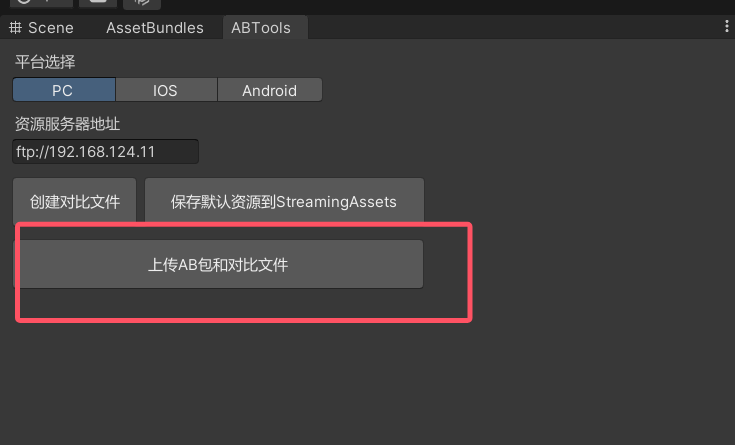
1.添加上面脚本后,在自己指定的Ftp服务器文件中,添加自己设置好的路径,再去Unity中的编辑器扩展中点击 上传AB包和对比文件 ,查看控制台消息。
5.资源包链接
通过网盘分享的文件:资源包 链接: https://pan.baidu.com/s/1q8kNFtQiXajFH2BoG7ZLwA 提取码: Rita –来自百度网盘超级会员v1的分享