在 OpenClaw 的分布式架构中,节点(Node) 是连接至中心 Gateway(网关) 的外围设备。它们承担着执行本地操作、采集环境数据、提供计算资源等职责。
1. 角色与通信
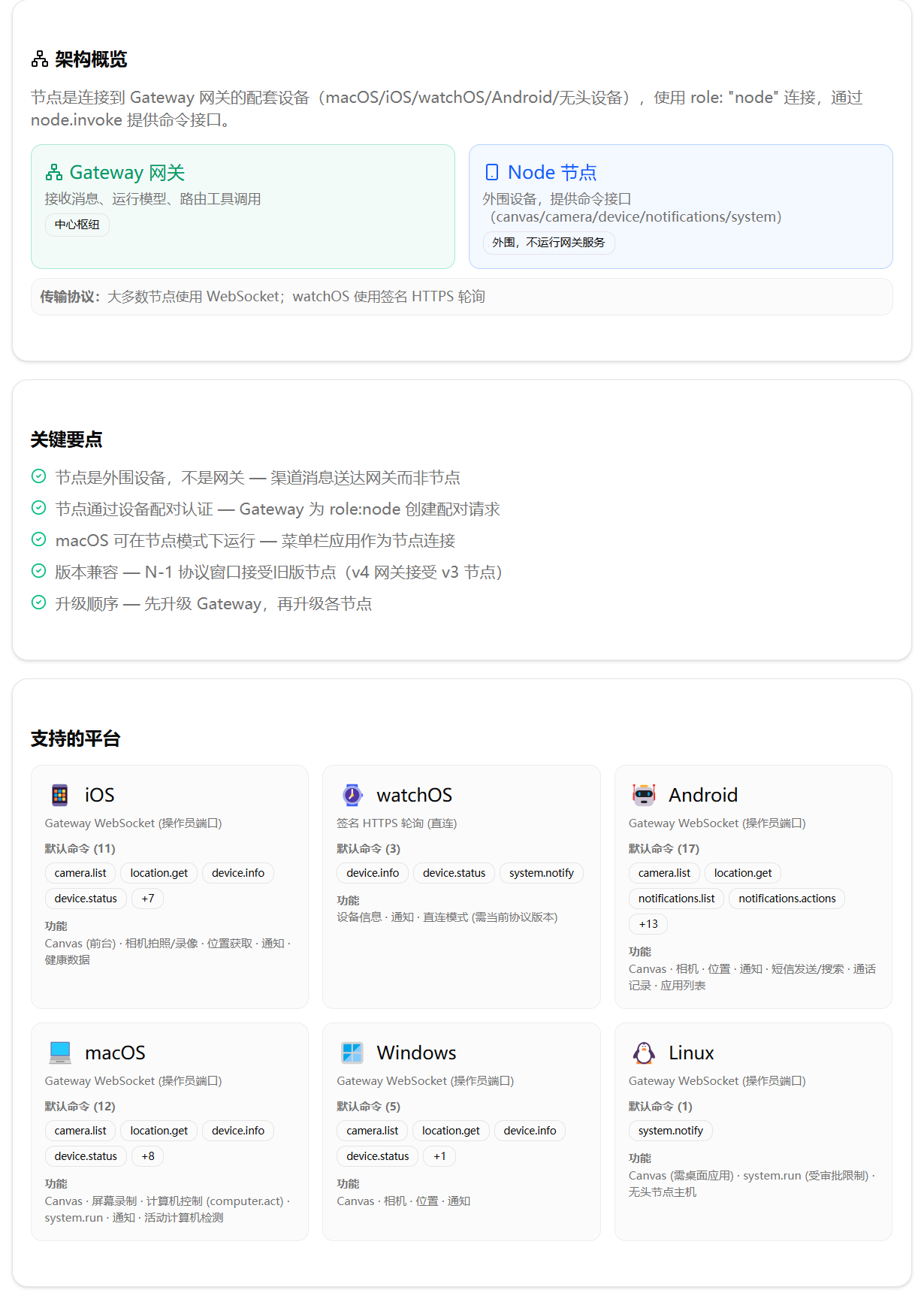
节点 本质上是运行于各类设备(macOS、iOS、watchOS、Android、无头服务器等)上的客户端进程,它通过 role: "node" 身份向 Gateway 发起连接,并对外暴露一组 命令接口(如 canvas.*、camera.*、device.*、notifications.*、system.* 等),通过 node.invoke 进行调用。Gateway 是中心枢纽,负责接收来自用户(如聊天机器人、Web UI)的请求,并将需要节点本地执行的操作路由至相应节点。
#mermaid-svg-jxlIttLHGa6J3n99{font-family:\”trebuchet ms\”,verdana,arial,sans-serif;font-size:16px;fill:#333;}@keyframes edge-animation-frame{from{stroke-dashoffset:0;}}@keyframes dash{to{stroke-dashoffset:0;}}#mermaid-svg-jxlIttLHGa6J3n99 .edge-animation-slow{stroke-dasharray:9,5!important;stroke-dashoffset:900;animation:dash 50s linear infinite;stroke-linecap:round;}#mermaid-svg-jxlIttLHGa6J3n99 .edge-animation-fast{stroke-dasharray:9,5!important;stroke-dashoffset:900;animation:dash 20s linear infinite;stroke-linecap:round;}#mermaid-svg-jxlIttLHGa6J3n99 .error-icon{fill:#552222;}#mermaid-svg-jxlIttLHGa6J3n99 .error-text{fill:#552222;stroke:#552222;}#mermaid-svg-jxlIttLHGa6J3n99 .edge-thickness-normal{stroke-width:1px;}#mermaid-svg-jxlIttLHGa6J3n99 .edge-thickness-thick{stroke-width:3.5px;}#mermaid-svg-jxlIttLHGa6J3n99 .edge-pattern-solid{stroke-dasharray:0;}#mermaid-svg-jxlIttLHGa6J3n99 .edge-thickness-invisible{stroke-width:0;fill:none;}#mermaid-svg-jxlIttLHGa6J3n99 .edge-pattern-dashed{stroke-dasharray:3;}#mermaid-svg-jxlIttLHGa6J3n99 .edge-pattern-dotted{stroke-dasharray:2;}#mermaid-svg-jxlIttLHGa6J3n99 .marker{fill:#333333;stroke:#333333;}#mermaid-svg-jxlIttLHGa6J3n99 .marker.cross{stroke:#333333;}#mermaid-svg-jxlIttLHGa6J3n99 svg{font-family:\”trebuchet ms\”,verdana,arial,sans-serif;font-size:16px;}#mermaid-svg-jxlIttLHGa6J3n99 p{margin:0;}#mermaid-svg-jxlIttLHGa6J3n99 .label{font-family:\”trebuchet ms\”,verdana,arial,sans-serif;color:#333;}#mermaid-svg-jxlIttLHGa6J3n99 .cluster-label text{fill:#333;}#mermaid-svg-jxlIttLHGa6J3n99 .cluster-label span{color:#333;}#mermaid-svg-jxlIttLHGa6J3n99 .cluster-label span p{background-color:transparent;}#mermaid-svg-jxlIttLHGa6J3n99 .label text,#mermaid-svg-jxlIttLHGa6J3n99 span{fill:#333;color:#333;}#mermaid-svg-jxlIttLHGa6J3n99 .node rect,#mermaid-svg-jxlIttLHGa6J3n99 .node circle,#mermaid-svg-jxlIttLHGa6J3n99 .node ellipse,#mermaid-svg-jxlIttLHGa6J3n99 .node polygon,#mermaid-svg-jxlIttLHGa6J3n99 .node path{fill:#ECECFF;stroke:#9370DB;stroke-width:1px;}#mermaid-svg-jxlIttLHGa6J3n99 .rough-node .label text,#mermaid-svg-jxlIttLHGa6J3n99 .node .label text,#mermaid-svg-jxlIttLHGa6J3n99 .image-shape .label,#mermaid-svg-jxlIttLHGa6J3n99 .icon-shape .label{text-anchor:middle;}#mermaid-svg-jxlIttLHGa6J3n99 .node .katex path{fill:#000;stroke:#000;stroke-width:1px;}#mermaid-svg-jxlIttLHGa6J3n99 .rough-node .label,#mermaid-svg-jxlIttLHGa6J3n99 .node .label,#mermaid-svg-jxlIttLHGa6J3n99 .image-shape .label,#mermaid-svg-jxlIttLHGa6J3n99 .icon-shape .label{text-align:center;}#mermaid-svg-jxlIttLHGa6J3n99 .node.clickable{cursor:pointer;}#mermaid-svg-jxlIttLHGa6J3n99 .root .anchor path{fill:#333333!important;stroke-width:0;stroke:#333333;}#mermaid-svg-jxlIttLHGa6J3n99 .arrowheadPath{fill:#333333;}#mermaid-svg-jxlIttLHGa6J3n99 .edgePath .path{stroke:#333333;stroke-width:2.0px;}#mermaid-svg-jxlIttLHGa6J3n99 .flowchart-link{stroke:#333333;fill:none;}#mermaid-svg-jxlIttLHGa6J3n99 .edgeLabel{background-color:rgba(232,232,232, 0.8);text-align:center;}#mermaid-svg-jxlIttLHGa6J3n99 .edgeLabel p{background-color:rgba(232,232,232, 0.8);}#mermaid-svg-jxlIttLHGa6J3n99 .edgeLabel rect{opacity:0.5;background-color:rgba(232,232,232, 0.8);fill:rgba(232,232,232, 0.8);}#mermaid-svg-jxlIttLHGa6J3n99 .labelBkg{background-color:rgba(232, 232, 232, 0.5);}#mermaid-svg-jxlIttLHGa6J3n99 .cluster rect{fill:#ffffde;stroke:#aaaa33;stroke-width:1px;}#mermaid-svg-jxlIttLHGa6J3n99 .cluster text{fill:#333;}#mermaid-svg-jxlIttLHGa6J3n99 .cluster span{color:#333;}#mermaid-svg-jxlIttLHGa6J3n99 div.mermaidTooltip{position:absolute;text-align:center;max-width:200px;padding:2px;font-family:\”trebuchet ms\”,verdana,arial,sans-serif;font-size:12px;background:hsl(80, 100%, 96.2745098039%);border:1px solid #aaaa33;border-radius:2px;pointer-events:none;z-index:100;}#mermaid-svg-jxlIttLHGa6J3n99 .flowchartTitleText{text-anchor:middle;font-size:18px;fill:#333;}#mermaid-svg-jxlIttLHGa6J3n99 rect.text{fill:none;stroke-width:0;}#mermaid-svg-jxlIttLHGa6J3n99 .icon-shape,#mermaid-svg-jxlIttLHGa6J3n99 .image-shape{background-color:rgba(232,232,232, 0.8);text-align:center;}#mermaid-svg-jxlIttLHGa6J3n99 .icon-shape p,#mermaid-svg-jxlIttLHGa6J3n99 .image-shape p{background-color:rgba(232,232,232, 0.8);padding:2px;}#mermaid-svg-jxlIttLHGa6J3n99 .icon-shape .label rect,#mermaid-svg-jxlIttLHGa6J3n99 .image-shape .label rect{opacity:0.5;background-color:rgba(232,232,232, 0.8);fill:rgba(232,232,232, 0.8);}#mermaid-svg-jxlIttLHGa6J3n99 .label-icon{display:inline-block;height:1em;overflow:visible;vertical-align:-0.125em;}#mermaid-svg-jxlIttLHGa6J3n99 .node .label-icon path{fill:currentColor;stroke:revert;stroke-width:revert;}#mermaid-svg-jxlIttLHGa6J3n99 :root{–mermaid-font-family:\”trebuchet ms\”,verdana,arial,sans-serif;}
节点设备
Gateway主机
路由工具调用
接收消息
WebSocket / HTTPS 轮询
WebSocket
WebSocket
WebSocket
签名 HTTPS 轮询
执行 system.run
调用相机
发送通知
Gateway 服务
智能体
消息渠道
macOS 节点
iOS 节点
Android 节点
无头 Linux 节点
watchOS 节点
本地命令
摄像头
通知
关键要点:
- 节点 ≠ 网关:节点不运行网关服务,所有外部队列消息(Telegram、WhatsApp 等)只送达 Gateway,节点仅响应 Gateway 派发的指令。
- 通信协议:
- 多数节点通过 Gateway WebSocket 连接(默认端口 18789,与操作员端口相同)。
- watchOS 由于系统限制,采用 签名 HTTPS 轮询(同一端口,使用短期设置码)。
- 旧版 Bridge 协议(TCP JSONL)已被移除,仅供历史参考。
关于 macOS 节点:macOS 菜单栏应用本身即以一个节点的身份连接至 Gateway,并原生提供 Canvas、相机、屏幕、通知和计算机控制等命令。不要在同一台 Mac 上启动第二个 CLI 节点——该应用已将 CLI 节点主机运行时作为内部工作进程运行,并保持唯一的 Gateway 连接和节点身份。
2. 节点配对与身份管理
2.1 配对流程
节点首次连接 Gateway 时,必须经过 设备配对 流程。节点在连接期间提供签名的设备身份,Gateway 为 role: node 创建设备配对请求。整个流程如下:
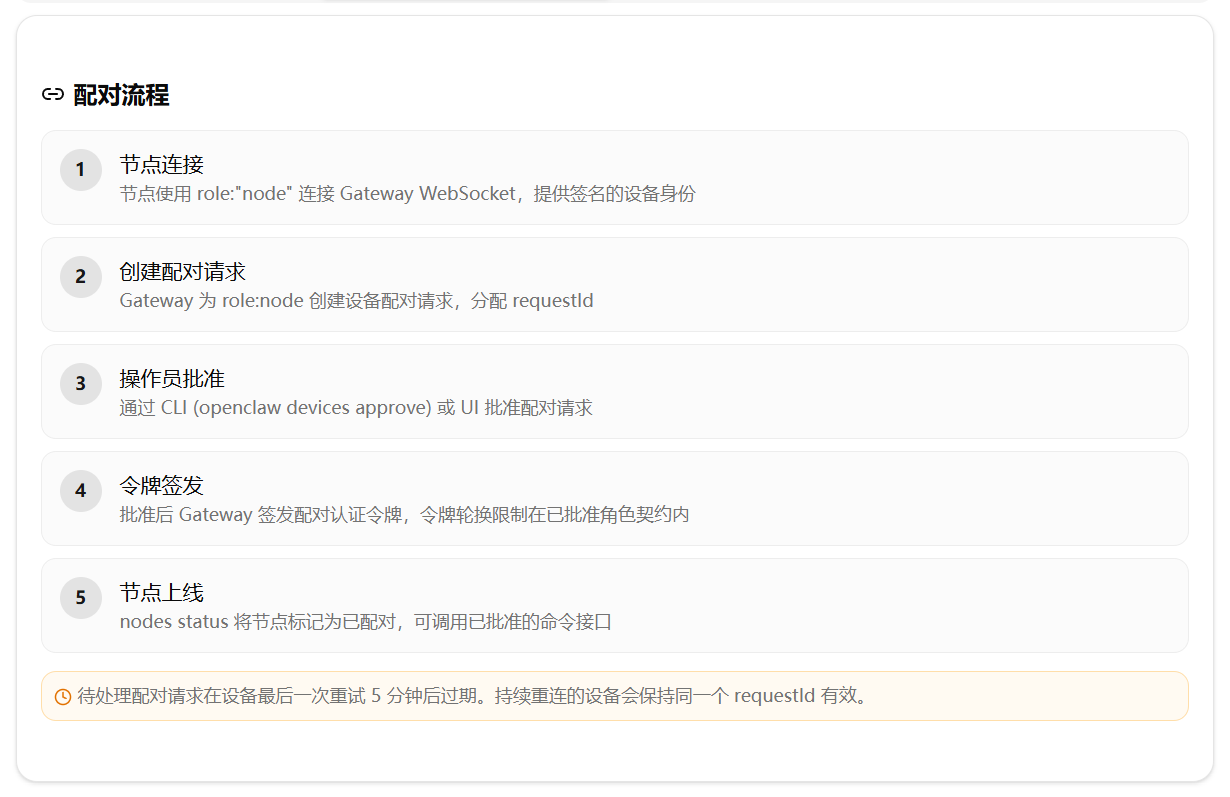
- 待处理请求有效期:若节点持续重连,则同一 requestId 保持有效(更新最后尝试时间),5 分钟无活动后过期。
- 取代机制:若节点使用变更的身份(角色/权限/公钥)重连,旧请求被取代,生成新 requestId,旧请求会收到 device.pair.resolved 事件,需重新 list 并批准新请求。
直连 Apple Watch:使用由管理员签发、短期有效且仅限节点使用的设置码来批准其固定的低风险命令接口;后续扩展能力仍需正常批准。
2.2 管理命令
| openclaw devices list | 列出所有待处理配对请求及已配对设备 |
| openclaw devices approve <requestId> | 批准配对请求 |
| openclaw devices reject <requestId> | 拒绝配对请求 |
| openclaw nodes status | 查看所有已配对节点的状态(含能力、版本和最近输入详情) |
| openclaw nodes describe –node <id/name/ip> | 查看节点详细信息(含权限、命令列表、活动中/待处理调用命令等) |
| openclaw nodes remove –node <id/name/ip> | 移除节点配对(撤销 node 角色;混合角色设备仅失去 node 角色,节点专用设备行被删除) |
| openclaw nodes rename –node <id/name/ip> –name "新名称" | 重命名节点(网关覆盖值) |
2.3 两层配对体系
OpenClaw 的节点配对实际上包含两个独立层次:
| 设备配对(Device Pairing) | 管控节点 WS connect 握手,决定“能否连接” | openclaw devices approve |
| 能力批准(Capability Approval) | 管控节点已声明命令的批准范围,决定“能做什么” | openclaw nodes pending/approve/reject |
能力批准的工作机制如下:
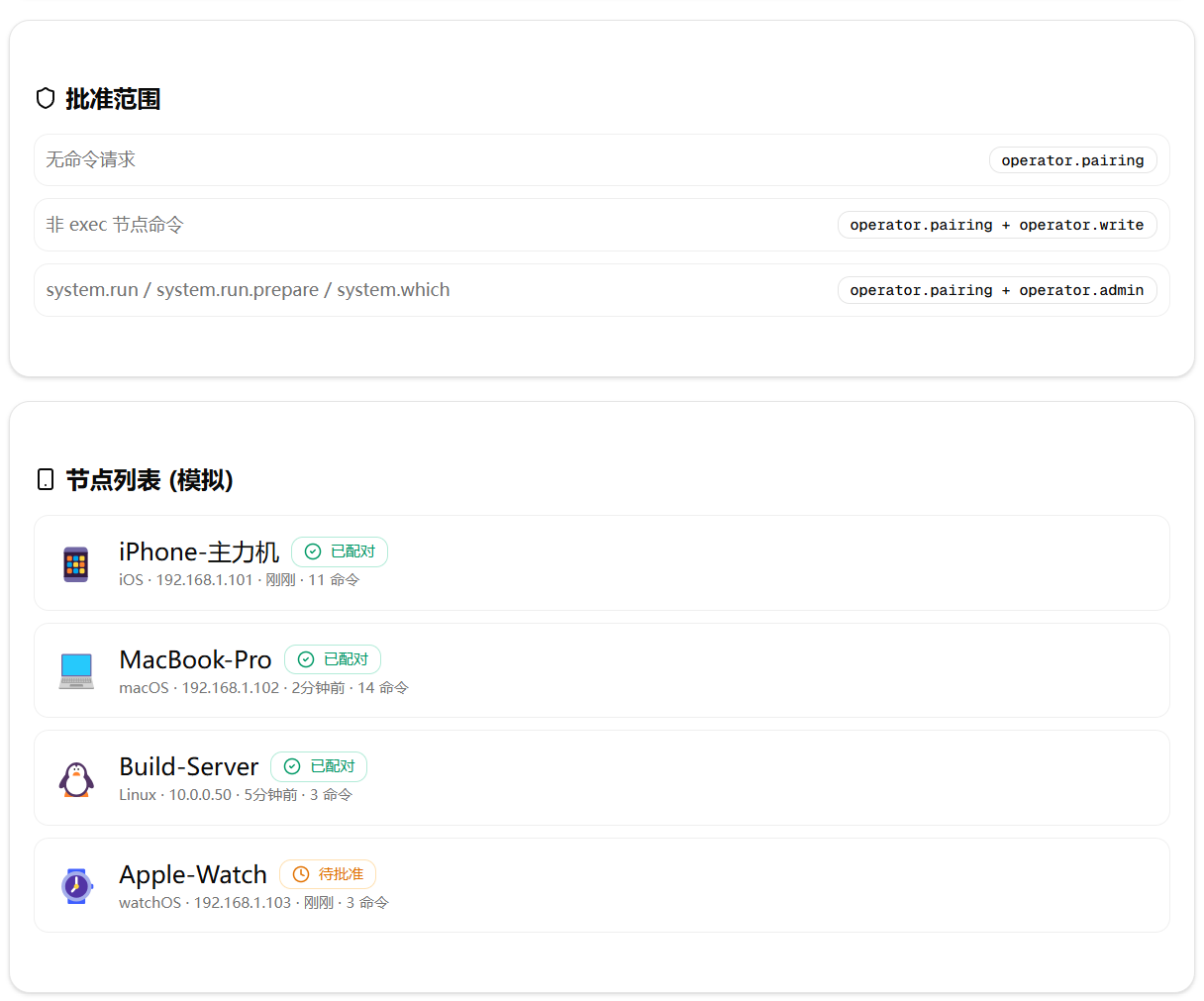
批准权限范围取决于待处理请求中声明的命令:
- 不含命令的请求:operator.pairing
- 普通节点命令:operator.pairing + operator.write
- 管理员敏感命令(system.run、system.run.prepare、system.which、browser.proxy、fs.listDir、system.execApprovals.get/set):operator.pairing + operator.admin
2.4 身份状态存储
无头节点(headless)使用 SQLite 数据库(~/.openclaw/state/openclaw.sqlite)持久化三类独立状态:
- node_host_config:客户端实例 ID、显示名称、Gateway 连接元数据。
- device_identities:已签名的设备密钥对与派生的加密设备 ID。
- device_auth_tokens:按加密设备 ID 和角色索引的配对身份验证令牌。
迁移说明:旧版 identity/device.json 等文件可通过 openclaw doctor –fix 自动导入 SQLite 并删除旧文件。已弃用的 nodes/paired.json 也已移除:Gateway 启动时会将剩余行归入设备记录,并将旧文件归档为 .migrated 后缀。
3. 版本兼容性与升级策略
Gateway WebSocket 支持 N-1 协议窗口:当前的 v4 Gateway 仍接受声明 role: "node" 和 client.mode: "node" 的 v3 节点连接,但操作员和 UI 会话必须使用当前协议。
升级顺序建议:
插件拥有的能力在节点升级到当前协议前保持隐藏。节点更改声明命令列表后,需拒绝旧设备配对并批准新请求,以更新 Gateway 存储的命令快照。
4. 启动节点主机
4.1 前台运行(openclaw node run)
在节点计算机上执行:
openclaw node run –host <gateway-host> –port 18789 –display-name "Build Node"
常用选项:
| –host | Gateway 主机地址(默认 127.0.0.1) |
| –port | Gateway WebSocket 端口(默认 18789) |
| –display-name | 节点显示名称(便于识别) |
| –context-path | Gateway WS 上下文路径(如 /openclaw-gw),附加至 WebSocket URL |
| –tls | 对 Gateway 连接使用 TLS |
| –no-tls | 即使本地 Gateway 配置启用了 TLS,也强制使用明文连接 |
| –tls-fingerprint <sha256> | 预期的 TLS 证书指纹(sha256) |
| –node-id <id> | 覆盖共享 SQLite 状态中存储的客户端实例 ID(不会重置配对) |
| –share-installed-apps | 公开设备已安装应用(macOS,默认关闭) |
4.2 Gateway 身份验证解析
openclaw node run 和 openclaw node install 从配置/环境变量解析 Gateway 身份验证(节点命令不提供 –token/–password 标志):
非回环 WS 连接:对于连接到非回环 ws:// Gateway 的节点,需设置 OPENCLAW_ALLOW_INSECURE_PRIVATE_WS=1,否则节点启动会失败并提示使用 wss://、SSH 隧道或 Tailscale。
4.3 通过 SSH 隧道连接远程 Gateway
若 Gateway 绑定至回环地址(gateway.bind=loopback),远程节点无法直连,需创建 SSH 隧道:
# 终端 A:将本地 18790 转发至 Gateway 的 127.0.0.1:18789
ssh -N -L 18790:127.0.0.1:18789 user@gateway-host
# 终端 B:节点连接隧道本地端口
export OPENCLAW_GATEWAY_TOKEN="<gateway-token>"
openclaw node run –host 127.0.0.1 –port 18790 –display-name "Build Node"
4.4 作为服务运行(openclaw node install)
若需持久化运行,可安装为系统服务:
openclaw node install –host <gateway-host> –port 18789 –display-name "Build Node"
openclaw node start
openclaw node restart
openclaw node stop
openclaw node uninstall
安装支持与服务管理相同的选项,额外支持:
- –runtime <runtime>:服务运行时(node 或 bun,默认 node)
- –force:重新安装/覆盖已有安装
- –json:机器可读输出
5. 远程命令执行:system.run 与 Exec 工具
5.1 角色职责划分
| Gateway 主机 | 接收消息、运行模型、路由工具调用 |
| 节点主机 | 在节点计算机上执行 system.run / system.which |
| 审批机制 | 通过节点主机本地 ~/.openclaw/exec-approvals.json 强制执行 |
5.2 Exec 审批流程
#mermaid-svg-2gjKhi8IYVC6r1us{font-family:\”trebuchet ms\”,verdana,arial,sans-serif;font-size:16px;fill:#333;}@keyframes edge-animation-frame{from{stroke-dashoffset:0;}}@keyframes dash{to{stroke-dashoffset:0;}}#mermaid-svg-2gjKhi8IYVC6r1us .edge-animation-slow{stroke-dasharray:9,5!important;stroke-dashoffset:900;animation:dash 50s linear infinite;stroke-linecap:round;}#mermaid-svg-2gjKhi8IYVC6r1us .edge-animation-fast{stroke-dasharray:9,5!important;stroke-dashoffset:900;animation:dash 20s linear infinite;stroke-linecap:round;}#mermaid-svg-2gjKhi8IYVC6r1us .error-icon{fill:#552222;}#mermaid-svg-2gjKhi8IYVC6r1us .error-text{fill:#552222;stroke:#552222;}#mermaid-svg-2gjKhi8IYVC6r1us .edge-thickness-normal{stroke-width:1px;}#mermaid-svg-2gjKhi8IYVC6r1us .edge-thickness-thick{stroke-width:3.5px;}#mermaid-svg-2gjKhi8IYVC6r1us .edge-pattern-solid{stroke-dasharray:0;}#mermaid-svg-2gjKhi8IYVC6r1us .edge-thickness-invisible{stroke-width:0;fill:none;}#mermaid-svg-2gjKhi8IYVC6r1us .edge-pattern-dashed{stroke-dasharray:3;}#mermaid-svg-2gjKhi8IYVC6r1us .edge-pattern-dotted{stroke-dasharray:2;}#mermaid-svg-2gjKhi8IYVC6r1us .marker{fill:#333333;stroke:#333333;}#mermaid-svg-2gjKhi8IYVC6r1us .marker.cross{stroke:#333333;}#mermaid-svg-2gjKhi8IYVC6r1us svg{font-family:\”trebuchet ms\”,verdana,arial,sans-serif;font-size:16px;}#mermaid-svg-2gjKhi8IYVC6r1us p{margin:0;}#mermaid-svg-2gjKhi8IYVC6r1us .label{font-family:\”trebuchet ms\”,verdana,arial,sans-serif;color:#333;}#mermaid-svg-2gjKhi8IYVC6r1us .cluster-label text{fill:#333;}#mermaid-svg-2gjKhi8IYVC6r1us .cluster-label span{color:#333;}#mermaid-svg-2gjKhi8IYVC6r1us .cluster-label span p{background-color:transparent;}#mermaid-svg-2gjKhi8IYVC6r1us .label text,#mermaid-svg-2gjKhi8IYVC6r1us span{fill:#333;color:#333;}#mermaid-svg-2gjKhi8IYVC6r1us .node rect,#mermaid-svg-2gjKhi8IYVC6r1us .node circle,#mermaid-svg-2gjKhi8IYVC6r1us .node ellipse,#mermaid-svg-2gjKhi8IYVC6r1us .node polygon,#mermaid-svg-2gjKhi8IYVC6r1us .node path{fill:#ECECFF;stroke:#9370DB;stroke-width:1px;}#mermaid-svg-2gjKhi8IYVC6r1us .rough-node .label text,#mermaid-svg-2gjKhi8IYVC6r1us .node .label text,#mermaid-svg-2gjKhi8IYVC6r1us .image-shape .label,#mermaid-svg-2gjKhi8IYVC6r1us .icon-shape .label{text-anchor:middle;}#mermaid-svg-2gjKhi8IYVC6r1us .node .katex path{fill:#000;stroke:#000;stroke-width:1px;}#mermaid-svg-2gjKhi8IYVC6r1us .rough-node .label,#mermaid-svg-2gjKhi8IYVC6r1us .node .label,#mermaid-svg-2gjKhi8IYVC6r1us .image-shape .label,#mermaid-svg-2gjKhi8IYVC6r1us .icon-shape .label{text-align:center;}#mermaid-svg-2gjKhi8IYVC6r1us .node.clickable{cursor:pointer;}#mermaid-svg-2gjKhi8IYVC6r1us .root .anchor path{fill:#333333!important;stroke-width:0;stroke:#333333;}#mermaid-svg-2gjKhi8IYVC6r1us .arrowheadPath{fill:#333333;}#mermaid-svg-2gjKhi8IYVC6r1us .edgePath .path{stroke:#333333;stroke-width:2.0px;}#mermaid-svg-2gjKhi8IYVC6r1us .flowchart-link{stroke:#333333;fill:none;}#mermaid-svg-2gjKhi8IYVC6r1us .edgeLabel{background-color:rgba(232,232,232, 0.8);text-align:center;}#mermaid-svg-2gjKhi8IYVC6r1us .edgeLabel p{background-color:rgba(232,232,232, 0.8);}#mermaid-svg-2gjKhi8IYVC6r1us .edgeLabel rect{opacity:0.5;background-color:rgba(232,232,232, 0.8);fill:rgba(232,232,232, 0.8);}#mermaid-svg-2gjKhi8IYVC6r1us .labelBkg{background-color:rgba(232, 232, 232, 0.5);}#mermaid-svg-2gjKhi8IYVC6r1us .cluster rect{fill:#ffffde;stroke:#aaaa33;stroke-width:1px;}#mermaid-svg-2gjKhi8IYVC6r1us .cluster text{fill:#333;}#mermaid-svg-2gjKhi8IYVC6r1us .cluster span{color:#333;}#mermaid-svg-2gjKhi8IYVC6r1us div.mermaidTooltip{position:absolute;text-align:center;max-width:200px;padding:2px;font-family:\”trebuchet ms\”,verdana,arial,sans-serif;font-size:12px;background:hsl(80, 100%, 96.2745098039%);border:1px solid #aaaa33;border-radius:2px;pointer-events:none;z-index:100;}#mermaid-svg-2gjKhi8IYVC6r1us .flowchartTitleText{text-anchor:middle;font-size:18px;fill:#333;}#mermaid-svg-2gjKhi8IYVC6r1us rect.text{fill:none;stroke-width:0;}#mermaid-svg-2gjKhi8IYVC6r1us .icon-shape,#mermaid-svg-2gjKhi8IYVC6r1us .image-shape{background-color:rgba(232,232,232, 0.8);text-align:center;}#mermaid-svg-2gjKhi8IYVC6r1us .icon-shape p,#mermaid-svg-2gjKhi8IYVC6r1us .image-shape p{background-color:rgba(232,232,232, 0.8);padding:2px;}#mermaid-svg-2gjKhi8IYVC6r1us .icon-shape .label rect,#mermaid-svg-2gjKhi8IYVC6r1us .image-shape .label rect{opacity:0.5;background-color:rgba(232,232,232, 0.8);fill:rgba(232,232,232, 0.8);}#mermaid-svg-2gjKhi8IYVC6r1us .label-icon{display:inline-block;height:1em;overflow:visible;vertical-align:-0.125em;}#mermaid-svg-2gjKhi8IYVC6r1us .node .label-icon path{fill:currentColor;stroke:revert;stroke-width:revert;}#mermaid-svg-2gjKhi8IYVC6r1us :root{–mermaid-font-family:\”trebuchet ms\”,verdana,arial,sans-serif;}
是
是
否
批准
拒绝
否
智能体发起 exec host=node
Gateway 构建 systemRunPlan
是否需要审批?
节点主机检查本地审批文件
匹配 allowlist?
执行命令并返回结果
弹出审批提示(UI/CLI)
管理员批准/拒绝
返回 SYSTEM_RUN_DENIED
审批安全要点:
- 审批绑定额的请求上下文。Exec 路径会在审批前准备规范的 systemRunPlan。
- 批准后,Gateway 转发已存储的计划,而不是调用方之后编辑的命令、cwd 或会话字段——若检测到编辑,则拒绝运行。
- 对于直接执行的 shell/运行时文件,OpenClaw 会尽力绑定具体的本地文件操作数;若文件在执行前发生变化,则拒绝运行。
- 若无法为解释器/运行时命令准确识别具体的本地文件,则拒绝由审批支持的执行。
5.3 将 Exec 路由至节点
方式一:全局配置
openclaw config set tools.exec.host node
openclaw config set tools.exec.mode allowlist
openclaw config set tools.exec.node "build-node"
方式二:会话内临时指定
/exec host=node security=allowlist node=build-node
方式三:按智能体覆盖(openclaw.json)
{
agents: {
list: [{
id: "main",
tools: { exec: { node: "build-node" } }
}]
}
}
host=auto 不会自动选择节点,必须显式指定 host=node 才生效。
6. 节点扩展能力
OpenClaw 将节点提升为 一等插件宿主(first-class plugin host) ,节点可以声明式地提供三种扩展能力:
6.1 节点托管的 MCP 服务器
在节点计算机上配置 MCP 服务器(而非 Gateway)。配置位于节点 openclaw.json 的 nodeHost.mcp.servers 中:
{
nodeHost: {
mcp: {
servers: {
localDocs: {
command: "npx",
args: ["-y", "@modelcontextprotocol/server-filesystem", "/srv/docs"],
toolFilter: { include: ["read_*", "search"] }
},
internalApi: {
url: "https://mcp.internal.example/mcp",
transport: "streamable-http",
headers: { Authorization: "Bearer ${INTERNAL_MCP_TOKEN}" }
}
}
}
}
}
- 节点启动后自动运行 MCP 客户端,发布发现的工具(pluginId: node-mcp)。
- 工具调用通过内置的 mcp.tools.call.v1 节点命令往返。
- 无需在 Gateway 配置匹配的 MCP 插件或 JS 插件。
- 限制(v1):仅支持请求/响应工具,不支持 MCP 流式/通知/采样/OAuth;每节点 128 个描述符,每个描述符描述 1024 字符。
重启节点(openclaw node restart)以应用配置变更;节点不监视配置文件。
6.2 节点托管的 Skills
节点可将自身 ~/.openclaw/skills 目录中的 Skills 发布给智能体使用。
- 节点连接后,通过 node.skills.update 方法发布有效的 SKILL.md 文件。
- Gateway 将节点 Skills 合并到技能快照中(仅当节点在线)。
- Skills 目录名必须与 frontmatter 中的 name 匹配。
- 添加/更改 Skills 无需重新配对,但需重启节点主机生效。
执行细节:
- Skills 条目包含节点定位器(node-locator),文件、相对引用和二进制文件均保留在节点上。
- 智能体通过 exec host=node node=<node-id> 加载和执行。
- 需要节点已批准 system.run,且智能体 Exec 策略允许 host=node,否则 Skills 不会出现在快照中。
冲突处理:
- 工具名冲突:所有冲突组成员获得确定性的节点前缀名称。
- 节点 Skills 与本地 Skills 冲突:节点 Skills 获得节点前缀名称,本地 Skills 保持不变。
限制(v1):每节点 64 个 Skills,每个 64KB,总计 512KB。
6.3 节点托管的插件工具(动态工具)
节点主机上的插件可注册带有 agentTool 元数据的命令;节点通过 node.pluginTools.update 方法发布描述符,Gateway 将其物化为通过 node.invoke 执行的智能体工具。
策略边界:
- 节点提供的 pluginId 无法满足插件 ID 作用域的工具允许列表条目(保留的 node-mcp 除外)。
- 拒绝列表始终优先。
- 节点 Skills 仅当会话实际可以执行 host=node 时才生效。
6.4 浏览器代理(零配置)
节点主机若未禁用 browser.enabled,会自动公布浏览器代理,使智能体无需额外配置即可在该节点上使用浏览器自动化。
- 默认:代理公开节点的常规浏览器配置文件范围。
- 限制模式:设置 nodeHost.browserProxy.allowProfiles 后,代理变为限制模式:拒绝非允许列表中的配置文件定位,阻止持久化配置文件的创建/删除路由。
- 禁用:在节点上设置 nodeHost.browserProxy.enabled: false。
6.5 本地模型推理(Ollama)
节点可以公开本地运行的 Ollama 模型,智能体通过 node_inference 工具远程运行有界提示词,无需 Gateway 直接访问 Ollama。
6.6 会话目录(Codex / Claude / OpenCode / Pi)
节点可公布各类 AI 代码编辑器会话记录,供操作员在控制台浏览或接管。
- Codex:通过 codex.appServer.threads.list.v1、codex.appServer.thread.turns.list.v1 等只读命令,需安装 Codex CLI。
- Claude:内置 Anthropic 插件发现 ~/.claude/projects/ 中的会话,支持 CLI 和 Desktop 会话。
- OpenCode / Pi:类似地发现并列表,支持终端恢复。
接管(Resume):
- 在 Gateway 本地的 CLI 会话可通过 –fork-session 创建分支,保留原始转录不变。
- 无头节点需在 nodeHost.agentRuns.claude.enabled: true 等配置下才公布执行命令。
- 接管后,后续轮次在节点上运行,使用节点的 Claude 默认配置,不继承 Gateway 的 MCP/Skills 等。
6.7 终端文件上传
控制台支持将文件拖入配对节点终端。节点需公布 terminal.upload 命令(首次需批准配对升级)。
- 每个文件 ≤ 16 MiB,暂存于节点临时目录,返回 shell 引用的路径(不执行)。
- 支持 POSIX shell、PowerShell、cmd.exe(部分字符限制)。
7. 命令策略与配置
7.1 命令三层关卡
节点命令必须通过以下关卡才能调用:
| 设备配对 | 节点能否连接 Gateway | openclaw devices approve |
| Gateway 节点命令策略 | RPC 命令 ID 是否被 gateway.nodes.commands.allow/deny 及平台默认值允许 | openclaw.json 配置 |
| Exec 审批 | 节点能否本地运行特定 shell 命令 | 节点本地 exec-approvals.json |
7.2 平台默认允许命令(策略上限)
实际可用命令还需节点应用实现。当前的 macOS 应用不会声明上述所有命令。 
7.3 配置示例(openclaw.json)
commands.deny 优先级最高,可屏蔽任何命令。 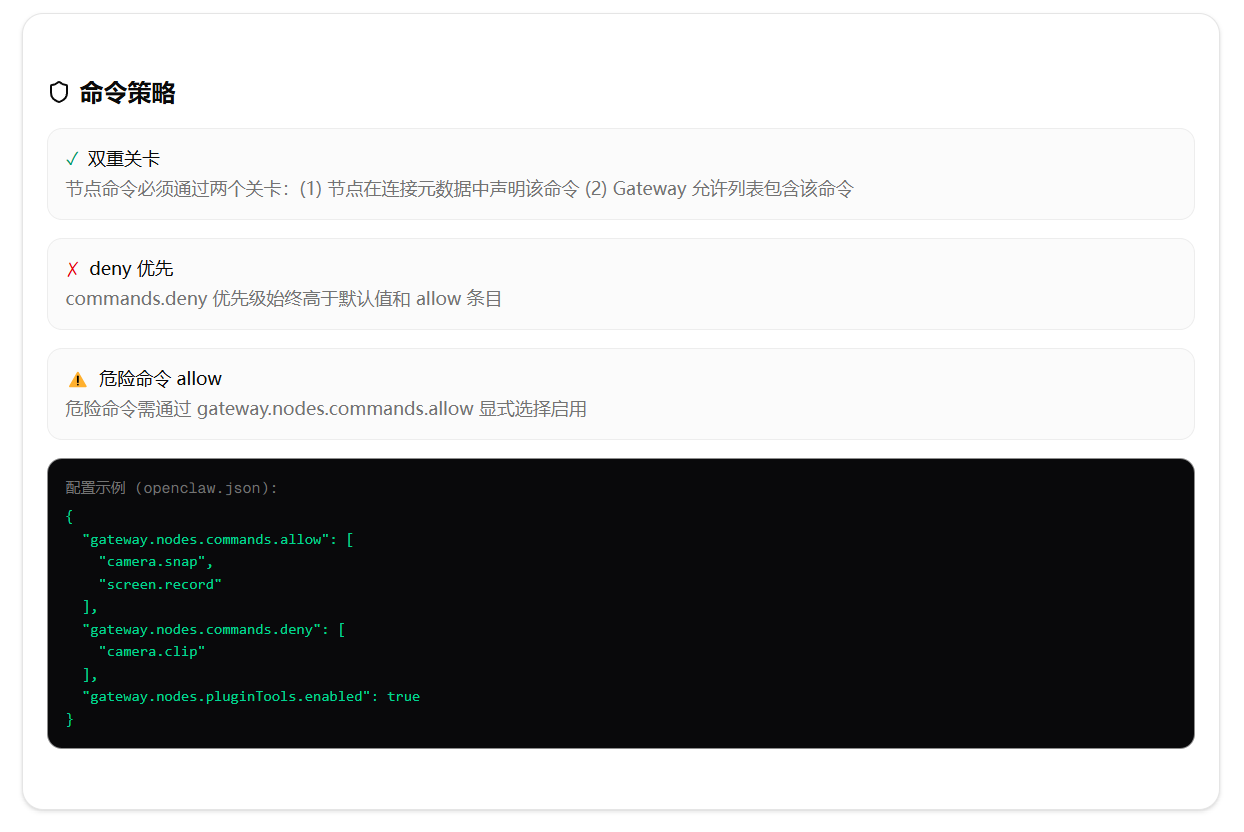
7.4 按智能体覆盖 Exec 节点
{
agents: {
list: [{
id: "main",
tools: { exec: { node: "build-node" } }
}]
}
}
8. 常用节点操作示例
8.1 Canvas 控制(WebView)
Canvas 通过 Gateway WebSocket 暴露,智能体可以显示/隐藏面板、导航、执行 JavaScript 和捕获截图。
| openclaw nodes canvas present –node <id> –target <url/本地路径> | 显示 Canvas 页面 |
| openclaw nodes canvas hide –node <id> | 隐藏 Canvas |
| openclaw nodes canvas navigate –node <id> <url> | 导航至新 URL |
| openclaw nodes canvas eval –node <id> –js "document.title" | 执行 JS 表达式 |
| openclaw nodes canvas snapshot –node <id> –format png | 截取 Canvas 截图 |
snapshot 需要面板可见,否则返回 CANVAS_HIDDEN;需先执行 present。canvas.navigate 接受本地 Canvas 路径、HTTP(S) URL 和 file:// URL。
A2UI 支持:
- A2UI 由 Gateway Canvas 宿主托管,在 Canvas 面板内渲染。
- 支持 A2UI v0.8 服务器到客户端消息(beginRendering、surfaceUpdate、dataModelUpdate、deleteSurface)。
- createSurface(v0.9)暂不支持。
8.2 相机操作
OpenClaw 支持在已配对的 iOS、Android、macOS 和 Linux 节点上捕获照片(jpg)或短视频片段(mp4,可选音频)。
# 列出摄像头设备
openclaw nodes camera list –node <id>
# 拍照(默认前后双摄像头,2 条 MEDIA 输出)
openclaw nodes camera snap –node <id> –facing front –max-width 1200
# 录制短视频(mp4)
openclaw nodes camera clip –node <id> –duration 3000 –no-audio
参数说明:
- camera.snap:facing(front/back,默认 front)、maxWidth(默认 1600)、quality(0-1,默认 0.9)、delayMs(默认 0,上限 10000)、deviceId
- camera.clip:durationMs(默认 3000,限制 250-60000ms)、includeAudio(默认 true)
照片会被重新压缩以保持 base64 编码载荷 < 5MB。视频片段限制 ≤ 60 秒以避免载荷过大。
前台要求:与 canvas.* 类似,iOS/Android 节点仅允许在前台执行 camera.* 命令,后台调用返回 NODE_BACKGROUND_UNAVAILABLE。
8.3 屏幕录制
openclaw nodes screen record –node <id> –duration 10s –fps 10 –screen 0
支持 –no-audio 禁用麦克风,–screen 选择显示器(0 = 主显示器)。
8.4 位置获取
需在节点设置中启用位置权限,并授予“始终”权限(后台尽力获取)。
openclaw nodes location get –node <id> –accuracy precise –max-age 15000
返回经纬度、精度、时间戳。
8.5 SMS(仅 Android)
需授予 SMS 权限,且 Gateway 配置允许 sms.send 和 sms.search。
openclaw nodes invoke –node <id> –command sms.send –params '{"to":"+15555550123","message":"Hello"}'
8.6 设备信息与个人数据
# 设备状态
openclaw nodes invoke –node <id> –command device.status –params '{}'
# 已安装应用(需 –share-installed-apps 启用共享)
openclaw nodes invoke –node <id> –command device.apps –params '{"limit":10}'
# 通知列表(Android)
openclaw nodes invoke –node <id> –command notifications.list –params '{}'
# 最新照片
openclaw nodes invoke –node <id> –command photos.latest –params '{"limit":1}'
8.7 底层调用与流式命令
原始 RPC 调用:
openclaw nodes invoke –node <idOrNameOrIp> –command canvas.eval –params '{"javaScript":"location.href"}'
- –invoke-timeout <ms>:节点调用超时(默认 15000ms)
- –idempotency-key <key>:可选的幂等键
- nodes invoke 阻止 system.run 和 system.run.prepare;这些命令只能通过带有 host=node 的 Exec 工具运行
流式节点命令:长时间运行的流式节点命令使用附加的 node.invoke.progress 事件。每个事件包含调用 ID、从零开始的序列号和大小受限的 UTF-8 文本块;Gateway 对文本块排序后再传递给调用方。node.invoke.result 仍是唯一的最终响应。
9. 无头节点主机与权限映射
9.1 无头节点启动
用于无界面的服务器环境,暴露 system.run / system.which:
openclaw node run –host <gateway-host> –port 18789
- 配对流程同普通节点。
- Exec 审批通过 ~/.openclaw/exec-approvals.json 本地管理。
- 在 macOS 上,无头节点主机可通过本地 Unix socket 与 macOS 应用通信,将 system.run 请求转发至应用执行。
10. 故障排查
10.1 诊断命令
openclaw status
openclaw gateway status
openclaw logs –follow
openclaw doctor
openclaw nodes status
openclaw nodes describe –node <idOrNameOrIp>
openclaw approvals get –node <idOrNameOrIp>
健康信号:
- 节点已连接且已配对 role: node
- nodes describe 包含正在调用的能力
- Exec 审批显示预期的模式/允许列表
10.2 常见错误代码
| NODE_BACKGROUND_UNAVAILABLE | 应用在后台 | 将节点应用带到前台 |
| CAMERA_DISABLED | 相机开关在节点设置中已关闭 | 在节点设置中启用相机 |
| *_PERMISSION_REQUIRED | 操作系统权限缺失/被拒绝 | 在系统设置中授予权限 |
| LOCATION_DISABLED | 位置模式已关闭 | 在节点设置中启用位置 |
| LOCATION_PERMISSION_REQUIRED | 请求的位置模式未授予 | 授予相应位置权限 |
| LOCATION_BACKGROUND_UNAVAILABLE | 应用在后台但只有“使用期间”权限 | 授予“始终”权限或带到前台 |
| COMPUTER_DISABLED | 计算机控制未启用 | 在 macOS 应用中启用,然后批准配对更新 |
| ACCESSIBILITY_REQUIRED | 缺少辅助功能权限 | 在系统设置中授予辅助功能权限 |
| SYSTEM_RUN_DENIED | Exec 审批被拒绝 | 检查节点本地 exec-approvals.json |
10.3 检查
当 host=node 运行时,Gateway 将执行绑定到已准备的规范 systemRunPlan。若调用方在批准转发前修改了命令、cwd 或会话元数据,Gateway 会将其作为审批不匹配而拒绝。
结语
节点体系为 OpenClaw 提供了分布式的执行与数据采集能力。通过严格的设备配对、能力批准和命令策略三层把关,确保了安全性与可控性。节点作为一等插件宿主,可以声明式地提供 MCP 服务器、Skills 和动态工具,且安装/移除/筛选这些扩展无需重新配对——配对批准的是命令族(如 mcp.tools.call.v1),而非具体工具。