Python asyncio 模块学习记录:从“等着”到“切出去干点别的”
最近在补 Python 的异步编程,绕不开 asyncio。一开始我对它的理解挺模糊:async、await、协程、事件循环、Task,这些词看起来都认识,但放在一起就有点飘。
这篇文章算是一份学习记录。我主要理清 asyncio 主要的几个问题:它解决什么问题,核心概念是什么,代码应该怎么写,以及有哪些容易踩坑的地方。
1. asyncio 解决的是什么问题?
先说结论:asyncio 主要适合 I/O 密集型任务。
比如:
- 网络请求
- 数据库查询
- 文件读写
- WebSocket 通信
- 定时任务
- 爬虫
- 聊天服务
- 高并发接口调用
这些任务的共同点是:程序经常不是在“计算”,而是在“等待”。
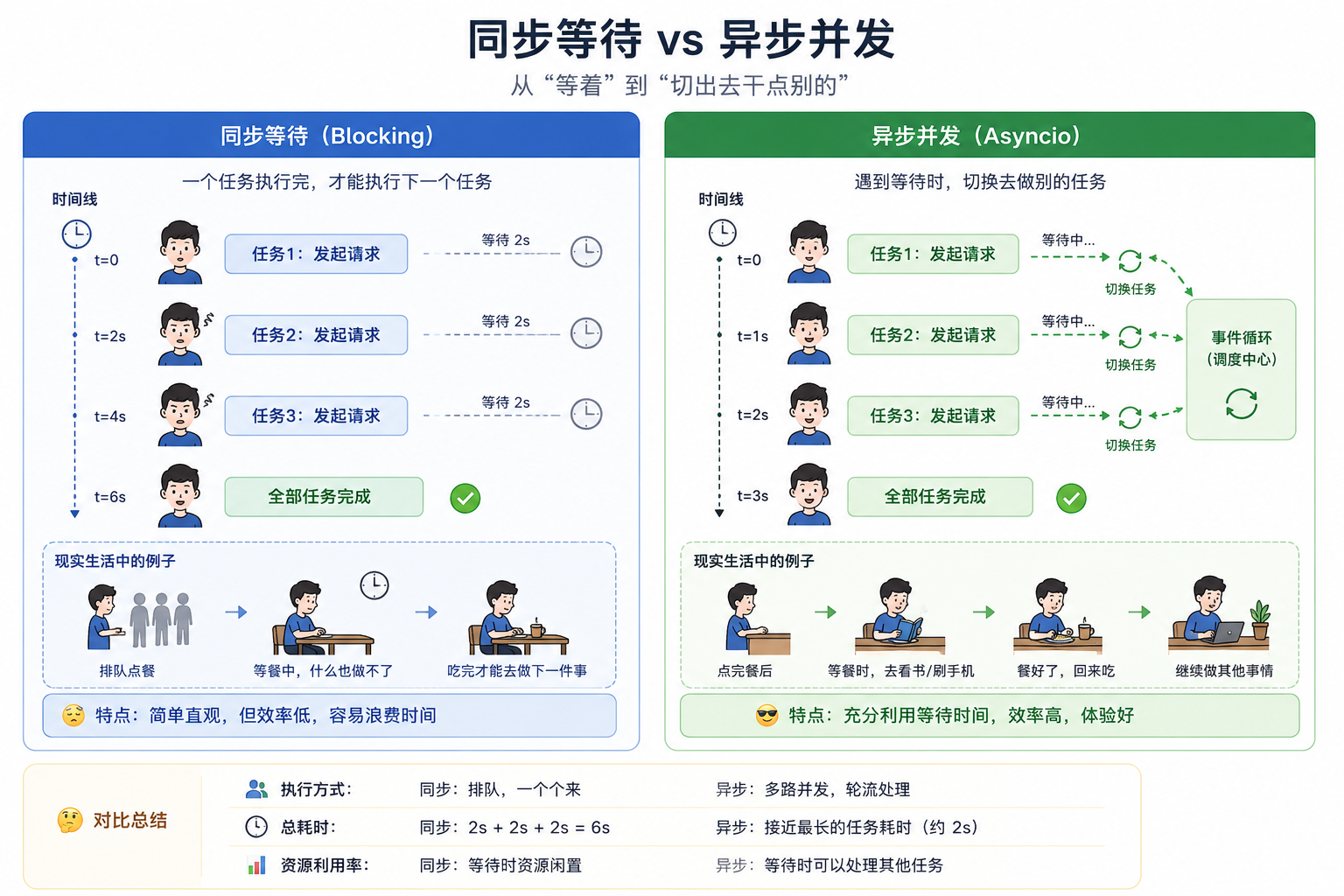
举个很普通的例子:请求 3 个接口,每个接口都要等 2 秒。
同步写法大概是这样:
import time
def fetch(name):
print(f"开始请求 {name}")
time.sleep(2)
print(f"完成请求 {name}")
fetch("A")
fetch("B")
fetch("C")
总耗时大约 6 秒,因为它是一个接一个等。
但异步的想法是:
既然 A 在等网络返回,那我为什么不先去处理 B?B 也在等,那我再去处理 C。
也就是说,asyncio 并不是让 Python 同时做很多计算,而是让程序在等待的时候别傻站着。
2. 一个简单的异步例子
先看代码:
import asyncio
async def fetch(name):
print(f"开始请求 {name}")
await asyncio.sleep(2)
print(f"完成请求 {name}")
async def main():
await asyncio.gather(
fetch("A"),
fetch("B"),
fetch("C"),
)
asyncio.run(main())
这段代码总耗时大约 2 秒,而不是 6 秒。
注意这里有几个关键词:
- async def:定义一个协程函数
- await:等待一个异步操作完成
- asyncio.sleep():异步版本的 sleep
- asyncio.gather():并发运行多个协程
- asyncio.run():启动事件循环,运行入口协程
这就是 asyncio 最基础的味道。
3. 协程是什么?
普通函数调用后会立刻执行:
def hello():
print("hello")
hello()
但协程函数不一样:
async def hello():
print("hello")
hello()
你会发现,直接调用 hello() 并不会真正执行函数体,它只是返回了一个协程对象。
真正执行它,需要:
await hello()
或者在最外层:
asyncio.run(hello())
可以先粗略理解成:
协程是一种可以暂停和恢复的函数。
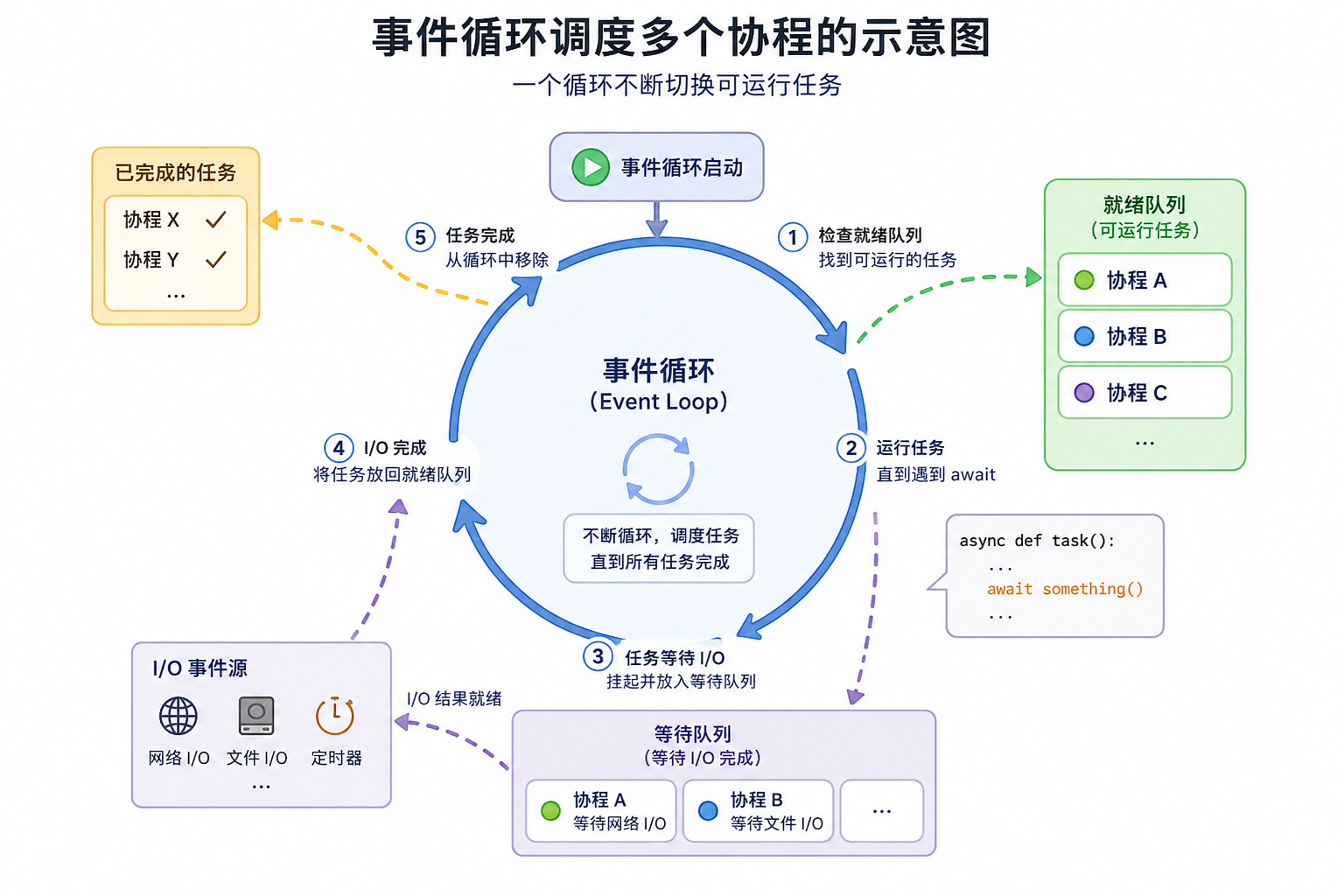
当协程执行到 await 时,它会把控制权交还给事件循环。事件循环发现这个任务暂时在等,就会去调度别的任务。
4. 事件循环:asyncio 的调度中心
事件循环可以理解成 asyncio 的“管家”。它不断检查:
- 哪些任务可以运行?
- 哪些任务正在等待?
- 哪些任务已经完成?
- 等待完成后该恢复哪个任务?
流程大概是这样:
5. await 到底在等什么?
await 后面通常接的是一个“可等待对象”,常见有:
- 协程对象
- Task
- Future
- 一些异步库返回的对象
比如:
await asyncio.sleep(1)
这里不是让线程阻塞 1 秒,而是告诉事件循环:
当前协程先暂停 1 秒,这段时间你可以去执行别的任务。
这点很关键。
如果在异步函数里写:
time.sleep(1)
那就糟了。它会阻塞整个线程,事件循环也动不了,其他协程也没法执行。
正确写法是:
await asyncio.sleep(1)
6. create_task:把协程变成任务
看一个容易误解的例子:
async def work(name):
print(f"{name} start")
await asyncio.sleep(1)
print(f"{name} end")
async def main():
await work("A")
await work("B")
这段代码虽然用了 async,但仍然是顺序执行。因为它先等 A 完成,再等 B 完成。
如果想让 A 和 B 同时开始,需要创建任务:
async def main():
task_a = asyncio.create_task(work("A"))
task_b = asyncio.create_task(work("B"))
await task_a
await task_b
也可以写成:
async def main():
await asyncio.gather(
work("A"),
work("B"),
)
我的理解是:
- 协程像“任务说明书”
- Task 像“已经交给事件循环执行的任务”
只定义协程不代表它已经被调度执行。
7. gather:等一组任务全部完成
asyncio.gather() 很适合批量并发。
import asyncio
async def download(index):
print(f"开始下载文件 {index}")
await asyncio.sleep(1)
print(f"下载完成文件 {index}")
return f"file-{index}"
async def main():
results = await asyncio.gather(
download(1),
download(2),
download(3),
)
print(results)
asyncio.run(main())
输出类似:
开始下载文件 1
开始下载文件 2
开始下载文件 3
下载完成文件 1
下载完成文件 2
下载完成文件 3
['file-1', 'file-2', 'file-3']
gather() 的特点是:
它会等所有任务完成,并按照传入顺序返回结果。
8. 一个更贴近实际的例子:批量处理请求
这里不用真实网络请求,先用 asyncio.sleep() 模拟接口耗时。
import asyncio
import random
async def request_api(user_id):
delay = random.uniform(0.5, 2)
print(f"请求用户 {user_id},预计耗时 {delay:.2f}s")
await asyncio.sleep(delay)
return {
"user_id": user_id,
"status": "ok",
}
async def main():
user_ids = [101, 102, 103, 104, 105]
tasks = [
request_api(user_id)
for user_id in user_ids
]
results = await asyncio.gather(*tasks)
for item in results:
print(item)
asyncio.run(main())
这类场景在真实项目里很常见:比如批量查用户信息、批量调用第三方接口、批量拉取远程资源。
不过这里也引出一个问题:如果一次性创建几千个任务,会不会把服务打爆?
答案是:会有风险。
这时候就需要限制并发数量,避免造成较大的访问量,服务器宕机。
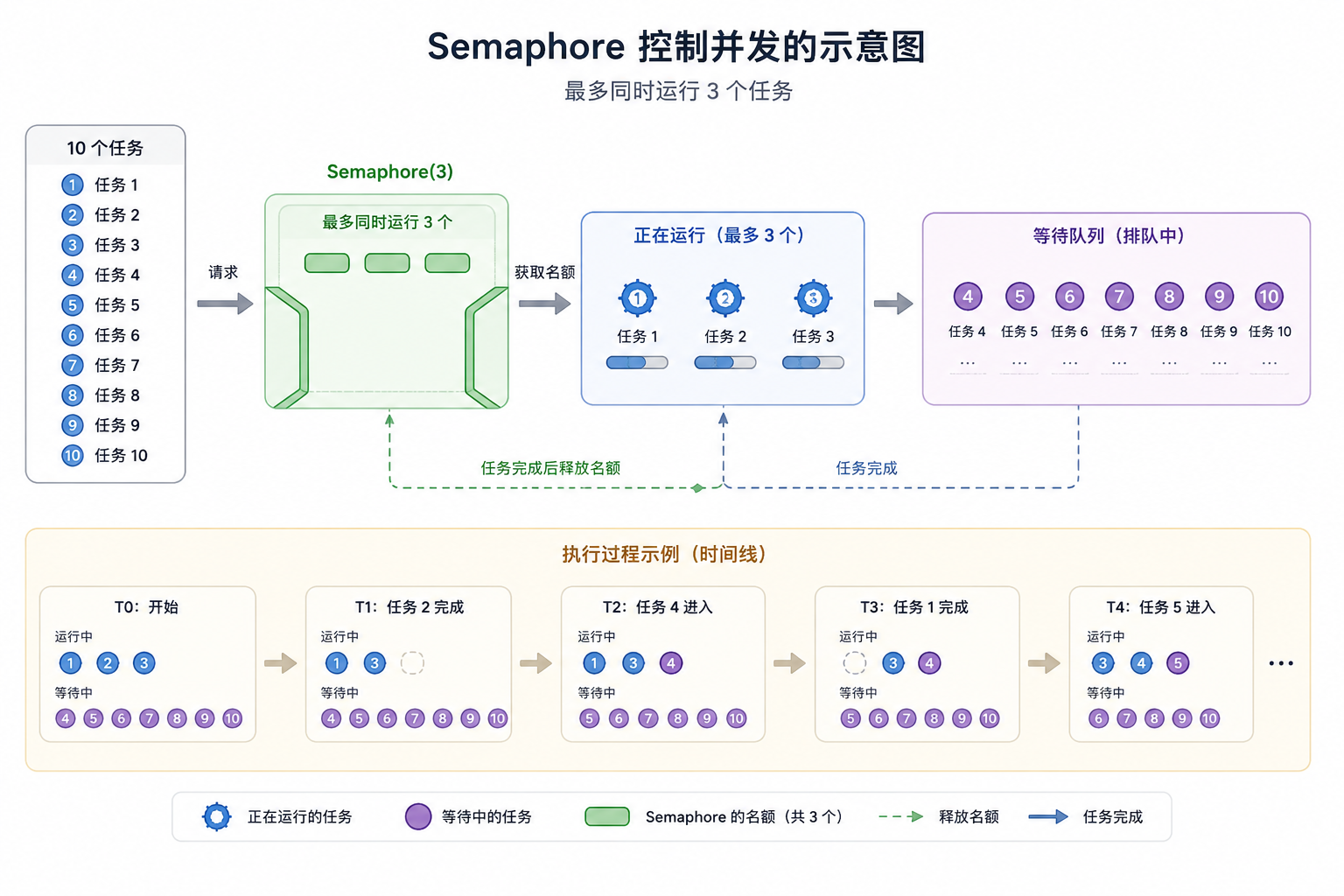
9. 用 Semaphore 控制并发数量
Semaphore 可以控制同一时间最多有多少个任务在执行某段逻辑。
import asyncio
import random
async def request_api(user_id, sem):
async with sem:
delay = random.uniform(0.5, 2)
print(f"开始请求用户 {user_id}")
await asyncio.sleep(delay)
print(f"完成请求用户 {user_id}")
return user_id
async def main():
sem = asyncio.Semaphore(3)
tasks = [
request_api(user_id, sem)
for user_id in range(1, 11)
]
results = await asyncio.gather(*tasks)
print(results)
asyncio.run(main())
这里 Semaphore(3) 表示最多同时执行 3 个请求。
这个写法很实用。写爬虫、批量请求接口、批量处理消息时,经常能用上。
#mermaid-svg-zuiFtd3yTSmR2Buz{font-family:\”trebuchet ms\”,verdana,arial,sans-serif;font-size:16px;fill:#333;}@keyframes edge-animation-frame{from{stroke-dashoffset:0;}}@keyframes dash{to{stroke-dashoffset:0;}}#mermaid-svg-zuiFtd3yTSmR2Buz .edge-animation-slow{stroke-dasharray:9,5!important;stroke-dashoffset:900;animation:dash 50s linear infinite;stroke-linecap:round;}#mermaid-svg-zuiFtd3yTSmR2Buz .edge-animation-fast{stroke-dasharray:9,5!important;stroke-dashoffset:900;animation:dash 20s linear infinite;stroke-linecap:round;}#mermaid-svg-zuiFtd3yTSmR2Buz .error-icon{fill:#552222;}#mermaid-svg-zuiFtd3yTSmR2Buz .error-text{fill:#552222;stroke:#552222;}#mermaid-svg-zuiFtd3yTSmR2Buz .edge-thickness-normal{stroke-width:1px;}#mermaid-svg-zuiFtd3yTSmR2Buz .edge-thickness-thick{stroke-width:3.5px;}#mermaid-svg-zuiFtd3yTSmR2Buz .edge-pattern-solid{stroke-dasharray:0;}#mermaid-svg-zuiFtd3yTSmR2Buz .edge-thickness-invisible{stroke-width:0;fill:none;}#mermaid-svg-zuiFtd3yTSmR2Buz .edge-pattern-dashed{stroke-dasharray:3;}#mermaid-svg-zuiFtd3yTSmR2Buz .edge-pattern-dotted{stroke-dasharray:2;}#mermaid-svg-zuiFtd3yTSmR2Buz .marker{fill:#333333;stroke:#333333;}#mermaid-svg-zuiFtd3yTSmR2Buz .marker.cross{stroke:#333333;}#mermaid-svg-zuiFtd3yTSmR2Buz svg{font-family:\”trebuchet ms\”,verdana,arial,sans-serif;font-size:16px;}#mermaid-svg-zuiFtd3yTSmR2Buz p{margin:0;}#mermaid-svg-zuiFtd3yTSmR2Buz .label{font-family:\”trebuchet ms\”,verdana,arial,sans-serif;color:#333;}#mermaid-svg-zuiFtd3yTSmR2Buz .cluster-label text{fill:#333;}#mermaid-svg-zuiFtd3yTSmR2Buz .cluster-label span{color:#333;}#mermaid-svg-zuiFtd3yTSmR2Buz .cluster-label span p{background-color:transparent;}#mermaid-svg-zuiFtd3yTSmR2Buz .label text,#mermaid-svg-zuiFtd3yTSmR2Buz span{fill:#333;color:#333;}#mermaid-svg-zuiFtd3yTSmR2Buz .node rect,#mermaid-svg-zuiFtd3yTSmR2Buz .node circle,#mermaid-svg-zuiFtd3yTSmR2Buz .node ellipse,#mermaid-svg-zuiFtd3yTSmR2Buz .node polygon,#mermaid-svg-zuiFtd3yTSmR2Buz .node path{fill:#ECECFF;stroke:#9370DB;stroke-width:1px;}#mermaid-svg-zuiFtd3yTSmR2Buz .rough-node .label text,#mermaid-svg-zuiFtd3yTSmR2Buz .node .label text,#mermaid-svg-zuiFtd3yTSmR2Buz .image-shape .label,#mermaid-svg-zuiFtd3yTSmR2Buz .icon-shape .label{text-anchor:middle;}#mermaid-svg-zuiFtd3yTSmR2Buz .node .katex path{fill:#000;stroke:#000;stroke-width:1px;}#mermaid-svg-zuiFtd3yTSmR2Buz .rough-node .label,#mermaid-svg-zuiFtd3yTSmR2Buz .node .label,#mermaid-svg-zuiFtd3yTSmR2Buz .image-shape .label,#mermaid-svg-zuiFtd3yTSmR2Buz .icon-shape .label{text-align:center;}#mermaid-svg-zuiFtd3yTSmR2Buz .node.clickable{cursor:pointer;}#mermaid-svg-zuiFtd3yTSmR2Buz .root .anchor path{fill:#333333!important;stroke-width:0;stroke:#333333;}#mermaid-svg-zuiFtd3yTSmR2Buz .arrowheadPath{fill:#333333;}#mermaid-svg-zuiFtd3yTSmR2Buz .edgePath .path{stroke:#333333;stroke-width:2.0px;}#mermaid-svg-zuiFtd3yTSmR2Buz .flowchart-link{stroke:#333333;fill:none;}#mermaid-svg-zuiFtd3yTSmR2Buz .edgeLabel{background-color:rgba(232,232,232, 0.8);text-align:center;}#mermaid-svg-zuiFtd3yTSmR2Buz .edgeLabel p{background-color:rgba(232,232,232, 0.8);}#mermaid-svg-zuiFtd3yTSmR2Buz .edgeLabel rect{opacity:0.5;background-color:rgba(232,232,232, 0.8);fill:rgba(232,232,232, 0.8);}#mermaid-svg-zuiFtd3yTSmR2Buz .labelBkg{background-color:rgba(232, 232, 232, 0.5);}#mermaid-svg-zuiFtd3yTSmR2Buz .cluster rect{fill:#ffffde;stroke:#aaaa33;stroke-width:1px;}#mermaid-svg-zuiFtd3yTSmR2Buz .cluster text{fill:#333;}#mermaid-svg-zuiFtd3yTSmR2Buz .cluster span{color:#333;}#mermaid-svg-zuiFtd3yTSmR2Buz div.mermaidTooltip{position:absolute;text-align:center;max-width:200px;padding:2px;font-family:\”trebuchet ms\”,verdana,arial,sans-serif;font-size:12px;background:hsl(80, 100%, 96.2745098039%);border:1px solid #aaaa33;border-radius:2px;pointer-events:none;z-index:100;}#mermaid-svg-zuiFtd3yTSmR2Buz .flowchartTitleText{text-anchor:middle;font-size:18px;fill:#333;}#mermaid-svg-zuiFtd3yTSmR2Buz rect.text{fill:none;stroke-width:0;}#mermaid-svg-zuiFtd3yTSmR2Buz .icon-shape,#mermaid-svg-zuiFtd3yTSmR2Buz .image-shape{background-color:rgba(232,232,232, 0.8);text-align:center;}#mermaid-svg-zuiFtd3yTSmR2Buz .icon-shape p,#mermaid-svg-zuiFtd3yTSmR2Buz .image-shape p{background-color:rgba(232,232,232, 0.8);padding:2px;}#mermaid-svg-zuiFtd3yTSmR2Buz .icon-shape .label rect,#mermaid-svg-zuiFtd3yTSmR2Buz .image-shape .label rect{opacity:0.5;background-color:rgba(232,232,232, 0.8);fill:rgba(232,232,232, 0.8);}#mermaid-svg-zuiFtd3yTSmR2Buz .label-icon{display:inline-block;height:1em;overflow:visible;vertical-align:-0.125em;}#mermaid-svg-zuiFtd3yTSmR2Buz .node .label-icon path{fill:currentColor;stroke:revert;stroke-width:revert;}#mermaid-svg-zuiFtd3yTSmR2Buz :root{–mermaid-font-family:\”trebuchet ms\”,verdana,arial,sans-serif;}
10 个任务
Semaphore 限制
同时最多运行 3 个
任务完成后释放名额
后续任务继续进入
10. 超时处理:asyncio.wait_for
异步任务里,超时控制很重要。比如请求第三方接口,不可能无限等下去。
import asyncio
async def slow_request():
await asyncio.sleep(5)
return "done"
async def main():
try:
result = await asyncio.wait_for(slow_request(), timeout=2)
print(result)
except asyncio.TimeoutError:
print("请求超时")
asyncio.run(main())
这里 slow_request() 要 5 秒,但 wait_for() 只等 2 秒,所以会抛出 TimeoutError。
这类代码在实际项目里很常见,因为异步程序如果缺少超时,可能会堆积大量迟迟不结束的任务。
11. 取消任务:task.cancel()
任务被创建后,也可以取消。
import asyncio
async def worker():
try:
while True:
print("working…")
await asyncio.sleep(1)
except asyncio.CancelledError:
print("任务被取消,开始清理资源")
raise
async def main():
task = asyncio.create_task(worker())
await asyncio.sleep(3)
task.cancel()
try:
await task
except asyncio.CancelledError:
print("main 捕获取消结果")
asyncio.run(main())
这里要注意:
CancelledError 不只是一个普通错误,它通常意味着任务生命周期要结束了。如果捕获它,一般清理完资源后要继续 raise,不要悄悄吞掉。
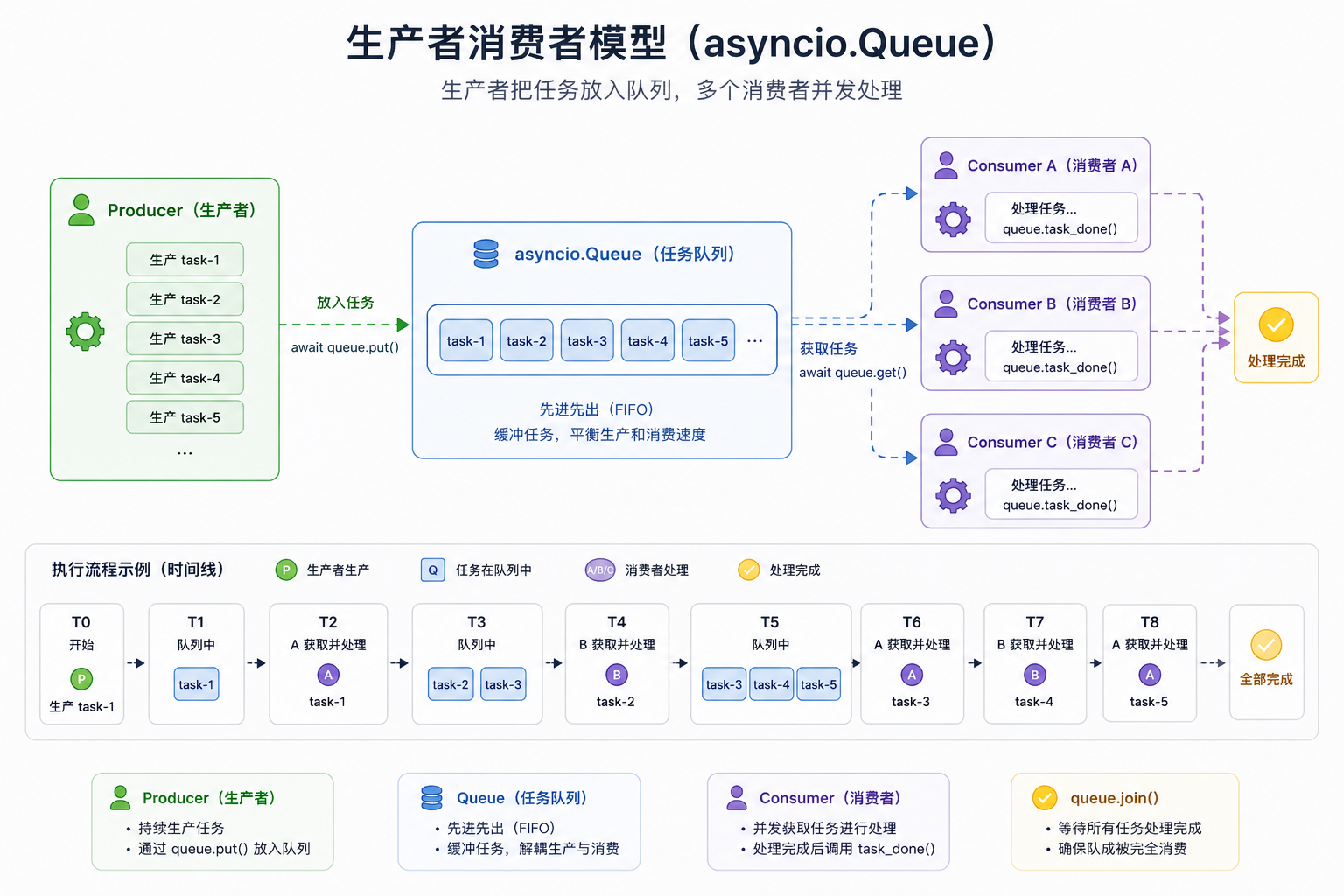
12. Queue:生产者和消费者模型
asyncio.Queue 很适合处理“一个地方生产任务,另一个地方消费任务”的场景。
import asyncio
import random
async def producer(queue):
for i in range(1, 6):
await asyncio.sleep(0.5)
item = f"task-{i}"
await queue.put(item)
print(f"生产 {item}")
async def consumer(queue, name):
while True:
item = await queue.get()
try:
print(f"{name} 处理 {item}")
await asyncio.sleep(random.uniform(0.5, 1.5))
finally:
queue.task_done()
async def main():
queue = asyncio.Queue()
producers = [
asyncio.create_task(producer(queue))
]
consumers = [
asyncio.create_task(consumer(queue, "worker-A")),
asyncio.create_task(consumer(queue, "worker-B")),
]
await asyncio.gather(*producers)
await queue.join()
for c in consumers:
c.cancel()
asyncio.run(main())
这个例子很像后台任务系统:
- producer 负责放入任务
- consumer 负责处理任务
- queue 负责缓冲任务
13. asyncio 适合什么,不适合什么?
适合:
- 高并发网络请求
- Web 服务
- WebSocket
- 爬虫
- 消息队列消费者
- 定时任务调度
- I/O 密集型后台任务
不太适合:
- 大量 CPU 计算
- 图像处理
- 视频编码
- 大规模数学运算
- 需要真正并行计算的场景
因为 asyncio 的并发主要发生在等待 I/O 的时候。
如果任务本身一直占着 CPU 算东西,它不会主动让出控制权,事件循环也没机会调度别的协程。
CPU 密集型任务通常更适合:
- multiprocessing
- concurrent.futures.ProcessPoolExecutor
- C 扩展
- NumPy 这类释放 GIL 的计算库
14. 几个常见坑
坑 1:async 函数调用后没有 await
async def hello():
print("hello")
hello()
这样不会真正执行。要写:
await hello()
或者:
asyncio.run(hello())
坑 2:在 async 函数里用了 time.sleep
async def bad():
time.sleep(1)
这会阻塞事件循环。应该写:
async def good():
await asyncio.sleep(1)
坑 3:以为 async 就一定更快
如果任务是 CPU 密集型,asyncio 不一定更快,甚至可能更绕。
坑 4:忘了处理异常
task = asyncio.create_task(do_something())
如果创建了任务但后面不 await,它里面的异常可能不容易被及时发现。更稳妥的方式是保存 task,并在合适的地方等待或统一管理。
坑 5:在已经运行的事件循环里调用 asyncio.run
asyncio.run() 通常只应该作为程序入口调用一次。
在 Jupyter、某些 Web 框架或异步环境里,事件循环可能已经存在,这时再调用 asyncio.run() 就容易报错。
15. 总结
我对 asyncio 的理解大概是:
它不是让 Python 魔法般同时执行很多代码,而是提供了一套协作式调度机制,让程序在等待 I/O 的时候主动让出执行权。
也就是说,asyncio 的核心不是“快”,而是“别浪费等待时间”。
它的几个关键词可以串起来理解:
#mermaid-svg-2HEYxAoqzjlDQ3EG{font-family:\”trebuchet ms\”,verdana,arial,sans-serif;font-size:16px;fill:#333;}@keyframes edge-animation-frame{from{stroke-dashoffset:0;}}@keyframes dash{to{stroke-dashoffset:0;}}#mermaid-svg-2HEYxAoqzjlDQ3EG .edge-animation-slow{stroke-dasharray:9,5!important;stroke-dashoffset:900;animation:dash 50s linear infinite;stroke-linecap:round;}#mermaid-svg-2HEYxAoqzjlDQ3EG .edge-animation-fast{stroke-dasharray:9,5!important;stroke-dashoffset:900;animation:dash 20s linear infinite;stroke-linecap:round;}#mermaid-svg-2HEYxAoqzjlDQ3EG .error-icon{fill:#552222;}#mermaid-svg-2HEYxAoqzjlDQ3EG .error-text{fill:#552222;stroke:#552222;}#mermaid-svg-2HEYxAoqzjlDQ3EG .edge-thickness-normal{stroke-width:1px;}#mermaid-svg-2HEYxAoqzjlDQ3EG .edge-thickness-thick{stroke-width:3.5px;}#mermaid-svg-2HEYxAoqzjlDQ3EG .edge-pattern-solid{stroke-dasharray:0;}#mermaid-svg-2HEYxAoqzjlDQ3EG .edge-thickness-invisible{stroke-width:0;fill:none;}#mermaid-svg-2HEYxAoqzjlDQ3EG .edge-pattern-dashed{stroke-dasharray:3;}#mermaid-svg-2HEYxAoqzjlDQ3EG .edge-pattern-dotted{stroke-dasharray:2;}#mermaid-svg-2HEYxAoqzjlDQ3EG .marker{fill:#333333;stroke:#333333;}#mermaid-svg-2HEYxAoqzjlDQ3EG .marker.cross{stroke:#333333;}#mermaid-svg-2HEYxAoqzjlDQ3EG svg{font-family:\”trebuchet ms\”,verdana,arial,sans-serif;font-size:16px;}#mermaid-svg-2HEYxAoqzjlDQ3EG p{margin:0;}#mermaid-svg-2HEYxAoqzjlDQ3EG .label{font-family:\”trebuchet ms\”,verdana,arial,sans-serif;color:#333;}#mermaid-svg-2HEYxAoqzjlDQ3EG .cluster-label text{fill:#333;}#mermaid-svg-2HEYxAoqzjlDQ3EG .cluster-label span{color:#333;}#mermaid-svg-2HEYxAoqzjlDQ3EG .cluster-label span p{background-color:transparent;}#mermaid-svg-2HEYxAoqzjlDQ3EG .label text,#mermaid-svg-2HEYxAoqzjlDQ3EG span{fill:#333;color:#333;}#mermaid-svg-2HEYxAoqzjlDQ3EG .node rect,#mermaid-svg-2HEYxAoqzjlDQ3EG .node circle,#mermaid-svg-2HEYxAoqzjlDQ3EG .node ellipse,#mermaid-svg-2HEYxAoqzjlDQ3EG .node polygon,#mermaid-svg-2HEYxAoqzjlDQ3EG .node path{fill:#ECECFF;stroke:#9370DB;stroke-width:1px;}#mermaid-svg-2HEYxAoqzjlDQ3EG .rough-node .label text,#mermaid-svg-2HEYxAoqzjlDQ3EG .node .label text,#mermaid-svg-2HEYxAoqzjlDQ3EG .image-shape .label,#mermaid-svg-2HEYxAoqzjlDQ3EG .icon-shape .label{text-anchor:middle;}#mermaid-svg-2HEYxAoqzjlDQ3EG .node .katex path{fill:#000;stroke:#000;stroke-width:1px;}#mermaid-svg-2HEYxAoqzjlDQ3EG .rough-node .label,#mermaid-svg-2HEYxAoqzjlDQ3EG .node .label,#mermaid-svg-2HEYxAoqzjlDQ3EG .image-shape .label,#mermaid-svg-2HEYxAoqzjlDQ3EG .icon-shape .label{text-align:center;}#mermaid-svg-2HEYxAoqzjlDQ3EG .node.clickable{cursor:pointer;}#mermaid-svg-2HEYxAoqzjlDQ3EG .root .anchor path{fill:#333333!important;stroke-width:0;stroke:#333333;}#mermaid-svg-2HEYxAoqzjlDQ3EG .arrowheadPath{fill:#333333;}#mermaid-svg-2HEYxAoqzjlDQ3EG .edgePath .path{stroke:#333333;stroke-width:2.0px;}#mermaid-svg-2HEYxAoqzjlDQ3EG .flowchart-link{stroke:#333333;fill:none;}#mermaid-svg-2HEYxAoqzjlDQ3EG .edgeLabel{background-color:rgba(232,232,232, 0.8);text-align:center;}#mermaid-svg-2HEYxAoqzjlDQ3EG .edgeLabel p{background-color:rgba(232,232,232, 0.8);}#mermaid-svg-2HEYxAoqzjlDQ3EG .edgeLabel rect{opacity:0.5;background-color:rgba(232,232,232, 0.8);fill:rgba(232,232,232, 0.8);}#mermaid-svg-2HEYxAoqzjlDQ3EG .labelBkg{background-color:rgba(232, 232, 232, 0.5);}#mermaid-svg-2HEYxAoqzjlDQ3EG .cluster rect{fill:#ffffde;stroke:#aaaa33;stroke-width:1px;}#mermaid-svg-2HEYxAoqzjlDQ3EG .cluster text{fill:#333;}#mermaid-svg-2HEYxAoqzjlDQ3EG .cluster span{color:#333;}#mermaid-svg-2HEYxAoqzjlDQ3EG div.mermaidTooltip{position:absolute;text-align:center;max-width:200px;padding:2px;font-family:\”trebuchet ms\”,verdana,arial,sans-serif;font-size:12px;background:hsl(80, 100%, 96.2745098039%);border:1px solid #aaaa33;border-radius:2px;pointer-events:none;z-index:100;}#mermaid-svg-2HEYxAoqzjlDQ3EG .flowchartTitleText{text-anchor:middle;font-size:18px;fill:#333;}#mermaid-svg-2HEYxAoqzjlDQ3EG rect.text{fill:none;stroke-width:0;}#mermaid-svg-2HEYxAoqzjlDQ3EG .icon-shape,#mermaid-svg-2HEYxAoqzjlDQ3EG .image-shape{background-color:rgba(232,232,232, 0.8);text-align:center;}#mermaid-svg-2HEYxAoqzjlDQ3EG .icon-shape p,#mermaid-svg-2HEYxAoqzjlDQ3EG .image-shape p{background-color:rgba(232,232,232, 0.8);padding:2px;}#mermaid-svg-2HEYxAoqzjlDQ3EG .icon-shape .label rect,#mermaid-svg-2HEYxAoqzjlDQ3EG .image-shape .label rect{opacity:0.5;background-color:rgba(232,232,232, 0.8);fill:rgba(232,232,232, 0.8);}#mermaid-svg-2HEYxAoqzjlDQ3EG .label-icon{display:inline-block;height:1em;overflow:visible;vertical-align:-0.125em;}#mermaid-svg-2HEYxAoqzjlDQ3EG .node .label-icon path{fill:currentColor;stroke:revert;stroke-width:revert;}#mermaid-svg-2HEYxAoqzjlDQ3EG :root{–mermaid-font-family:\”trebuchet ms\”,verdana,arial,sans-serif;}
async def
创建协程
create_task
交给事件循环调度
遇到 await 暂停
执行其他任务
I/O 完成后恢复
asyncio 刚开始看起来概念很多,但抓住几个点会清晰很多:
- async def 定义协程函数
- 调用协程函数只会得到协程对象,不会立即执行
- await 会暂停当前协程,把控制权交给事件循环
- create_task() 会把协程包装成任务并调度执行
- gather() 可以等待多个任务完成
- Semaphore 可以限制并发数量
- Queue 适合生产者消费者模型
- 不要在异步代码里写阻塞操作,比如 time.sleep()
目前我觉得,学习 asyncio 最好的方式不是一上来背概念,而是多写几个小例子:模拟请求、限制并发、处理超时、取消任务、队列消费。写着写着,事件循环和协程之间的关系就会慢慢变得具体,通过几个例子的编写练习,尝试去融会贯通。