目录
1. HTTP 基于 TCP socket:快速实现一个HTTP的效果
2. HTTP request,response -> url, uri, decode, encode, 格式问题,字节流粘报问题,序列化分序列化问题 — http协议本身宏观
2.1 HTTP协议
2.2 认识 URL 和 uri
2.3 urlencode和urldecode(了解)
2.4 HTTP协议请求与响应格式
3. HTTP的方法
3.1 HTTP的状态码
3.2 HTTP常见Header
3.3 HTTP常见方法
1. GET方法(重点)
2. POST方法(重点)
3. PUT方法(不常用)
4. HEAD 方法
5. DELETE 方法
6. OPTIONS方法(大部分的服务器都不支持)
7. GET、POST:前后端联动,才能讲解清楚
7.1 GET、前端:
7.2 POST 方法
5. HTTP历史及版本核心技术与时代背景
HTTP/0.9
HTTP/1.0
HTTP/1.1
HTTP/2.0
HTTP/3.0
1. HTTP 基于 TCP socket:快速实现一个HTTP的效果
要写HTTP,首先得是TCP:
// TcpServer.hpp
// 负责网络通信的功能
#pragma once
#include "Socket.hpp"
#include "InetAddr.hpp"
#include <memory>
#include <unistd.h>
#include <sys/types.h>
#include <signal.h>
#include <functional>
using callback_t = std::function<std::string(std::string &)>; //&输入输出
// TcpServer:只负责进行IO
class TcpServer
{
public:
TcpServer(int port, callback_t cb) // callback_t cb 什么种类的服务器
: _port(port),
_listensocket(std::make_unique<TcpSocket>()),
_cb(cb)
// 初始化对象
{
_listensocket->BuildListenSocketMethod(_port);
}
void HandlerRequest(std::shared_ptr<Socket> sockfd, InetAddr addr)
{
// 短服务
std::string inbuffer; // 字节流式的队列
ssize_t n = sockfd->Recv(&inbuffer);
if (n > 0)
{
std::string send_str = _cb(inbuffer);
sockfd->Send(send_str);
}
else if (n == 0)
{
LOG(LogLevel::DEBUG) << addr.ToString() << " quit, me too!";
}
else
{
LOG(LogLevel::FATAL) << addr.ToString() << " read error, quit!";
}
sockfd->Close();
}
void Run()
{
signal(SIGCHLD, SIG_IGN);
while (true)
{
// 获取新连接:你要得到sockfd,还要得到客户端的addr:client addr
InetAddr addr;
auto sockfd = _listensocket->Accept(&addr);
if (sockfd == nullptr)
continue;
LOG(LogLevel::DEBUG) << "获取一个新连接:" << addr.ToString() << ", sockfd : " << sockfd->SockFd();
if (fork() == 0)
{
// 子进程不需要listen套接字
_listensocket->Close();
HandlerRequest(sockfd, addr);
exit(0);
}
// 父进程将文件描述符关闭
sockfd->Close();
}
}
~TcpServer()
{
}
private:
int _port;
std::unique_ptr<Socket> _listensocket; // 没有创建Socket的对象,只是创建了对应的指针
callback_t _cb;
};
// Main.cc
#include "TcpServer.hpp"
#include <memory>
void Usage(std::string proc)
{
std::cerr << "Usage: " << proc << " localport" << std::endl;
}
std::string TestHttp(std::string &requeststr)
{
std::cout<< "#############################" << std::endl;
std::cout << requeststr << std::endl;
std::cout<< "#############################" << std::endl;
return "hello sy";
}
int main(int argc, char *argv[])
{
if (argc != 2)
{
Usage(argv[0]);
exit(0);
}
EnableConsoleLogStrategy(); // 此时全部会将日志全部丢弃,丢弃到 /dev/null 中
// 计算器对象
uint16_t serverport = std::stoi(argv[1]);
std::unique_ptr<TcpServer> tsock = std::make_unique<TcpServer>(serverport, TestHttp);
tsock->Run();
return 0;
}
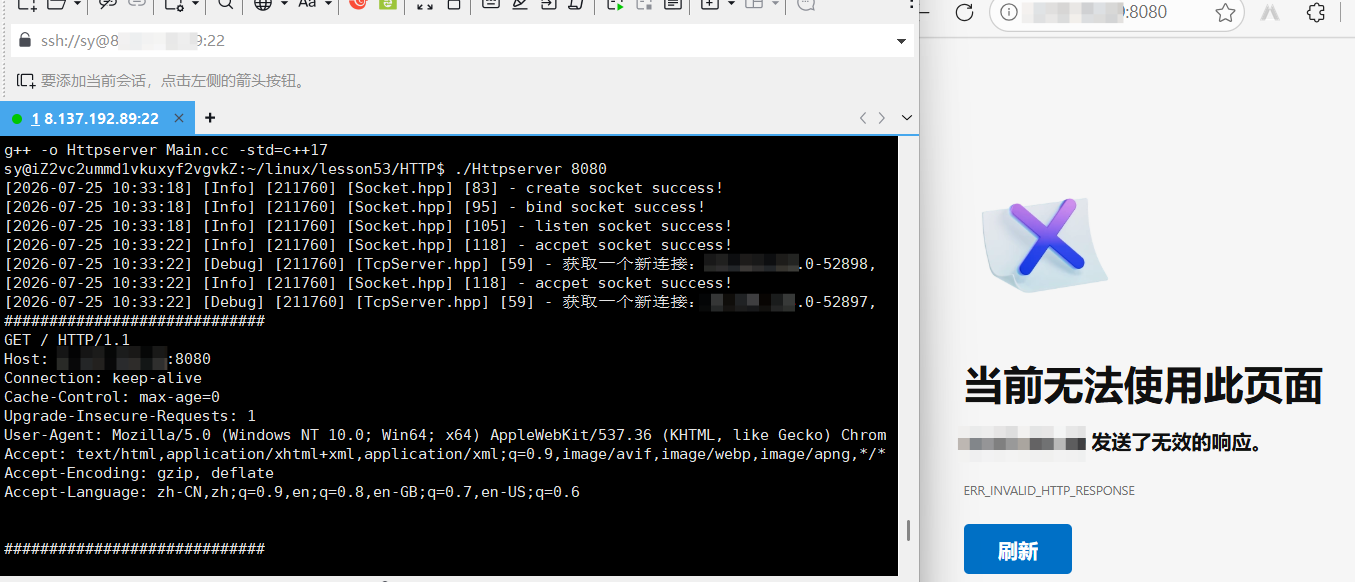
HTTP所对应的请求报头:
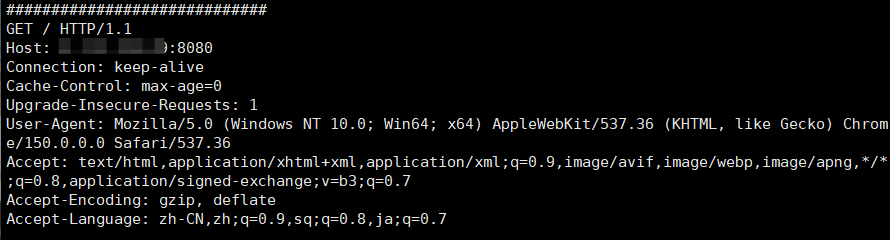
HTTP协议,在我看来,就是大字符串,只有“一行”,只不过,多行\\r\\n要被解析为回车换行,不被解析的话就是可以看作是一行。
HTTP协议是如何进程序列化的?如何进行反序列化的?
序列化:
第一行 + \\r\\n
第二行 对应的 key value格式 + \\r\\n 以此类推
反序列化:
假设读到一个完整的http报文
按照 \\r\\n -> 进行substr一行一行的截取出来,以空格为分割符分割第一行和以:空格来分割,进一步来做反序列化。
HTTP序列和反序列化的过程,就是一个字符串的拼接和切分的过程,这个过程http协议没有用任何第三方的库,自己完成的。
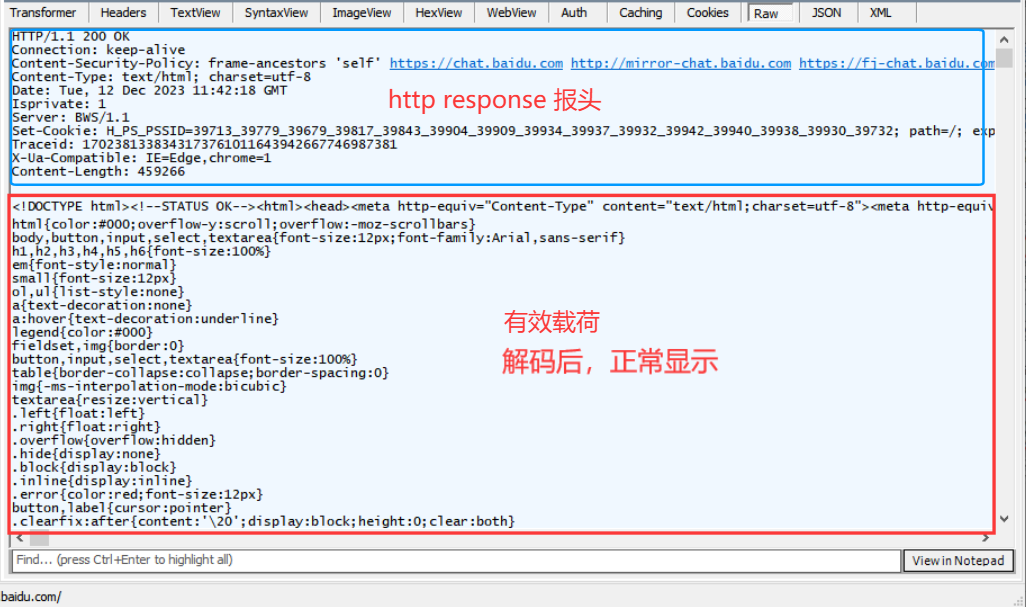
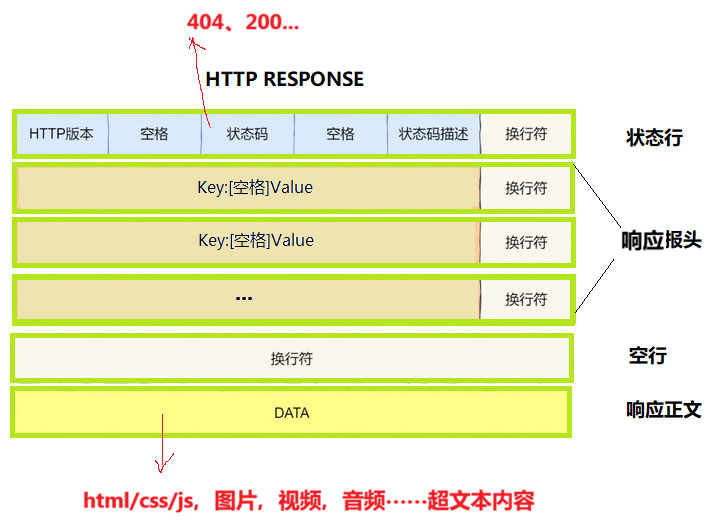
HTTP应答的报文,暂时看不到,网上找的图:
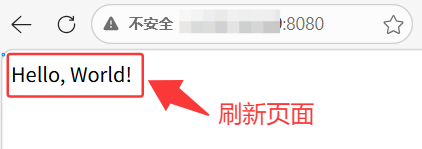
快速写一个HTTP:
#include "TcpServer.hpp"
#include <memory>
void Usage(std::string proc)
{
std::cerr << "Usage: " << proc << " localport" << std::endl;
}
std::string TestHttp(std::string &requeststr)
{
std::cout<< "#############################" << std::endl;
std::cout << requeststr << std::endl;
std::cout<< "#############################" << std::endl;
std::string response = "HTTP/1.1 200 OK\\r\\n\\r\\n"; //响应报头结束之后有一个空行
// 正文 —— hello world – 借助大模型
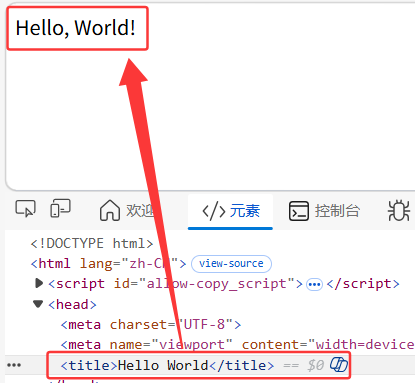
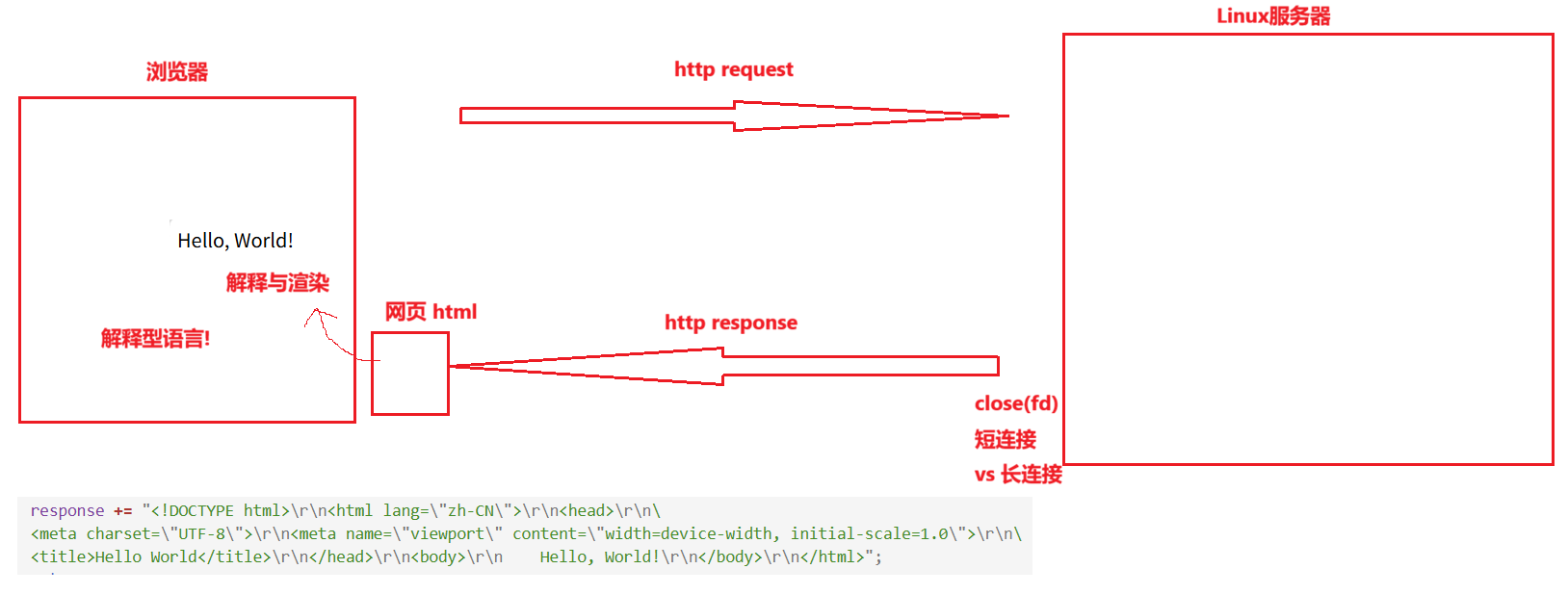
response += "<!DOCTYPE html>\\r\\n<html lang=\\"zh-CN\\">\\r\\n<head>\\r\\n <meta charset=\\"UTF-8\\">\\r\\n <meta name=\\"viewport\\" content=\\"width=device-width, initial-scale=1.0\\">\\r\\n <title>Hello World</title>\\r\\n</head>\\r\\n<body>\\r\\n Hello, World!\\r\\n</body>\\r\\n</html>";
return response;
}
int main(int argc, char *argv[])
{
if (argc != 2)
{
Usage(argv[0]);
exit(0);
}
EnableConsoleLogStrategy(); // 此时全部会将日志全部丢弃,丢弃到 /dev/null 中
// 计算器对象
uint16_t serverport = std::stoi(argv[1]);
std::unique_ptr<TcpServer> tsock = std::make_unique<TcpServer>(serverport, TestHttp);
tsock->Run();
return 0;
}
总结:
2. HTTP request,response -> url, uri, decode, encode, 格式问题,字节流粘报问题,序列化分序列化问题 — http协议本身宏观
2.1 HTTP协议
应⽤层协议是我们程序猿⾃⼰定的. 但实际上, 已经有⼤佬们定义了⼀些现成的, ⼜⾮常好⽤的应⽤层协议, 供我们直接参考使⽤。 HTTP(超⽂本传输协议)就是其中之⼀。
在互联⽹世界中,HTTP(HyperText Transfer Protocol,超⽂本传输协议)是⼀个⾄关重要的协议。它定义了客户端(如浏览器)与服务器之间如何通信,以交换或传输超⽂本(如HTML⽂档)。
HTTP协议是客户端与服务器之间通信的基础。客户端通过HTTP协议向服务器发送请求,服务器收到请求后处理并返回响应。HTTP协议是⼀个无连接、无状态的协议,即每次请求都需要建⽴新的连接,且服务器不会保存客客户端状态信息。
2.2 认识 URL 和 uri
平时我们俗称的 "网址" 其实就是说的 URL
域名其实是会被自动转换公网IP的,域名转换为公网IP的过程其实被称为DNS:

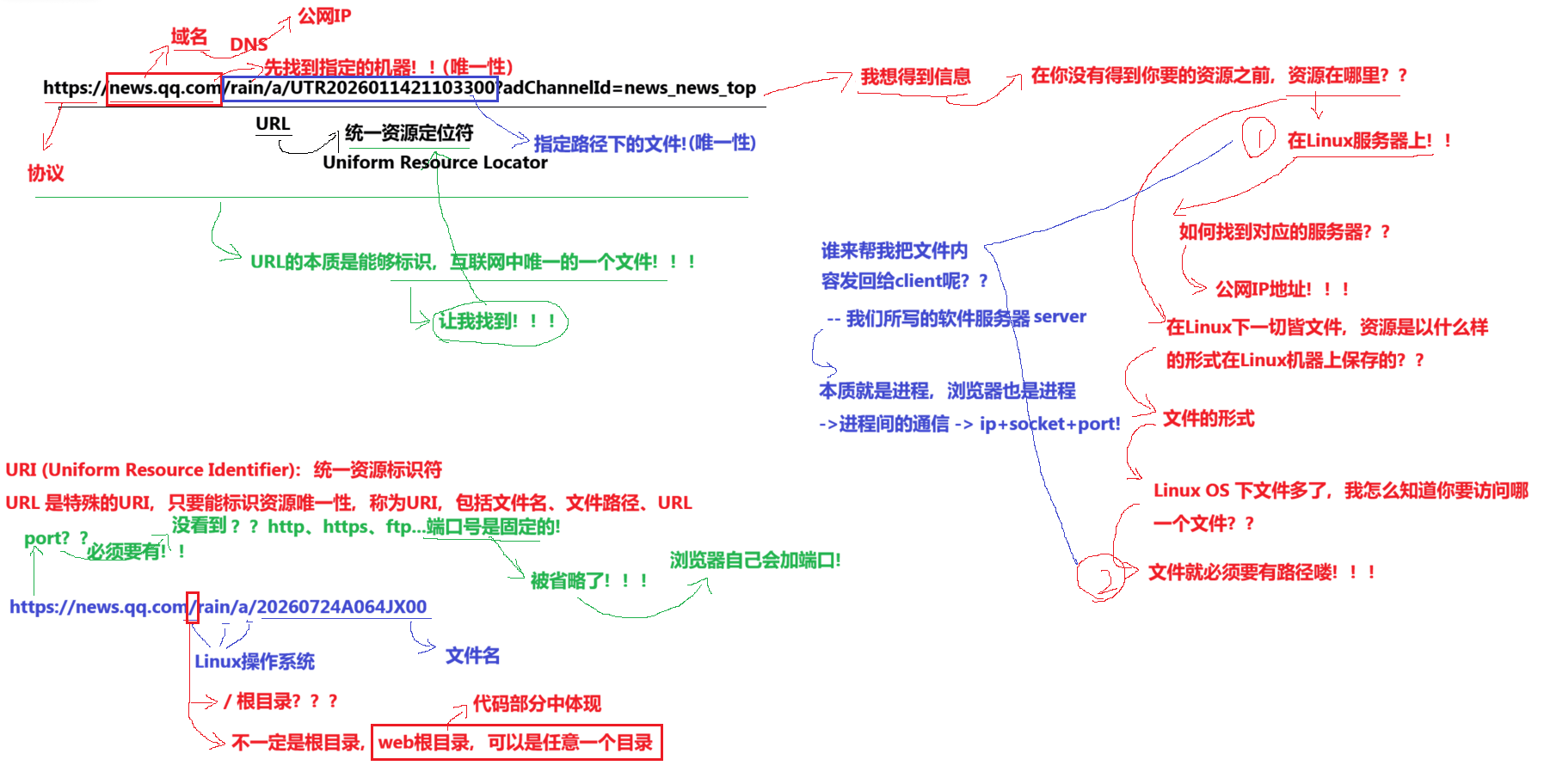
核心区别:
URI 就像身份证号(唯一标识一个人,但不告诉你他在哪)。
URL 就像家庭住址(不仅标识这个人,还告诉你他住在哪,你可以去找他)。
看到协议潜台词就是端口号(默认端口号)
2.3 urlencode和urldecode(了解)
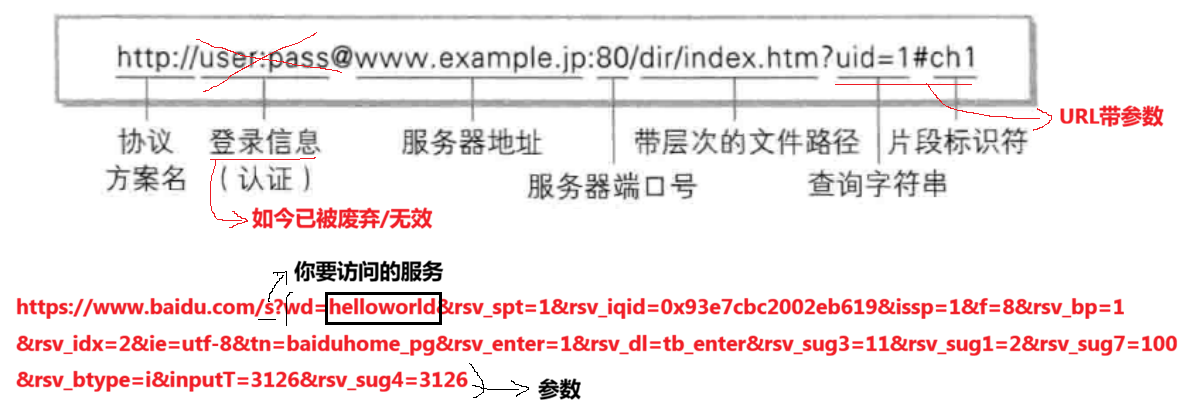
像 / ? : 等这样的字符, 已经被 url 当做特殊意义理解了. 因此这些字符不能随意出现。⽐如, 某个参数中需要带有这些特殊字符, 就必须先对特殊字符进⾏转义。
转义的规则如下:
将需要转码的字符转为16进制,然后从右到左,取4位(不⾜4位直接处理),每2位做⼀位,前⾯加上%,编码成%XY格式
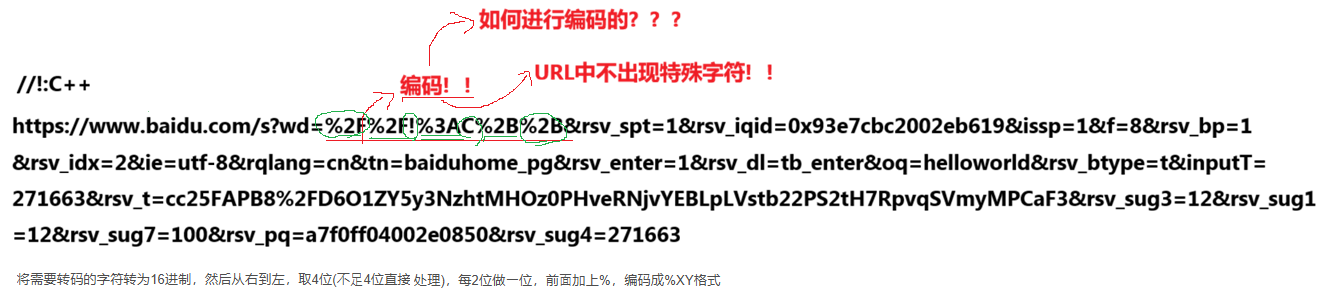
如果要进行编写编码和解码的C++源代码的话就直接在网上搜索即可,或者是用大模型来形成。urldecode和urlencode网上都有对应的工具。
2.4 HTTP协议请求与响应格式
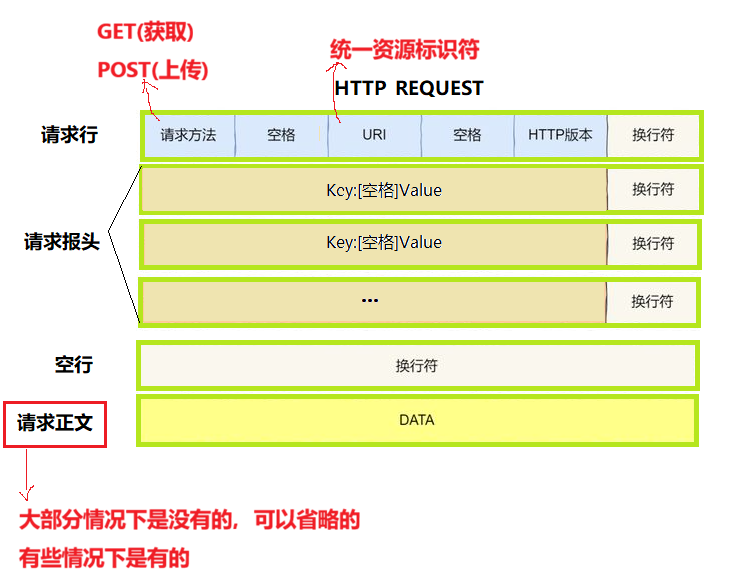
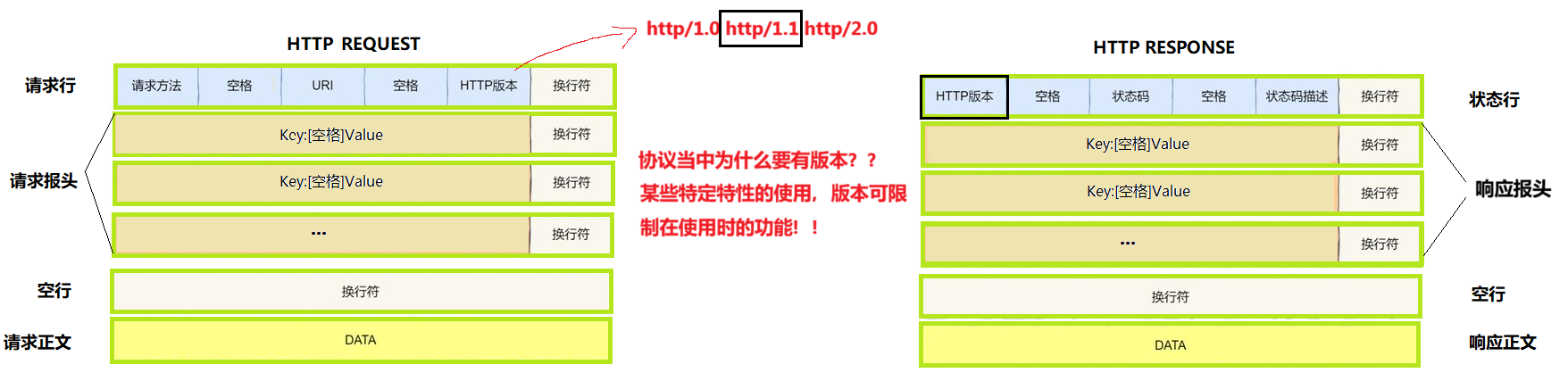
HTTP Request 请求
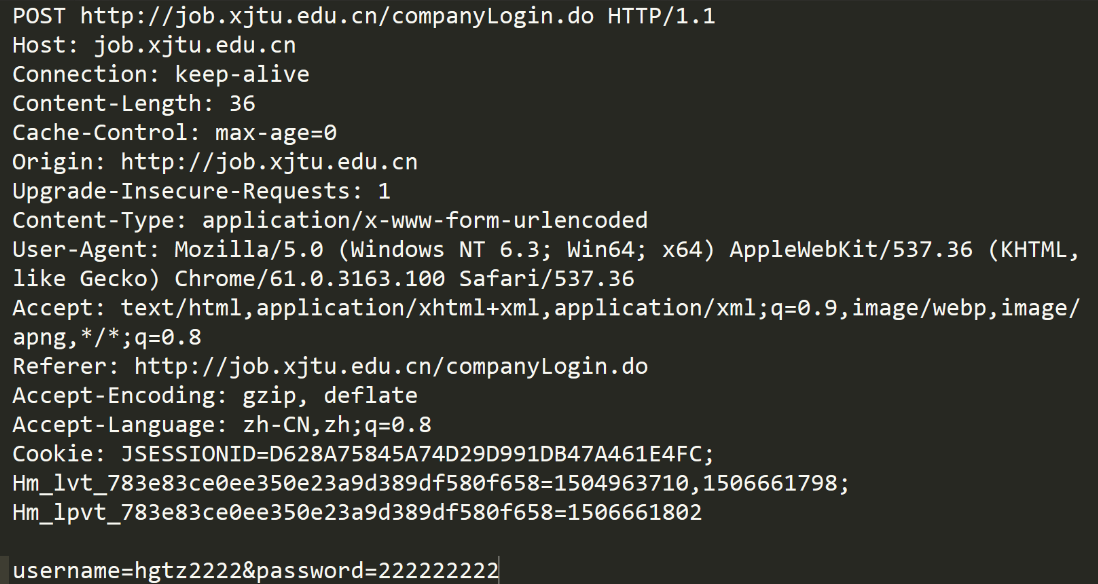
- 首行:[方法] + [URL] + [版本]
- Header:请求的属性,冒号空格分割的键值对;每组属性之间使用 \\r\\n 分割;遇到空行标识 Header 部分结束
- Body:空行后面的内容都是Body。Body允许为空字符串。如果Body存在,则在Header中会有一个 Content-Length属性来表述Body的长度。
协议中版本的认识:
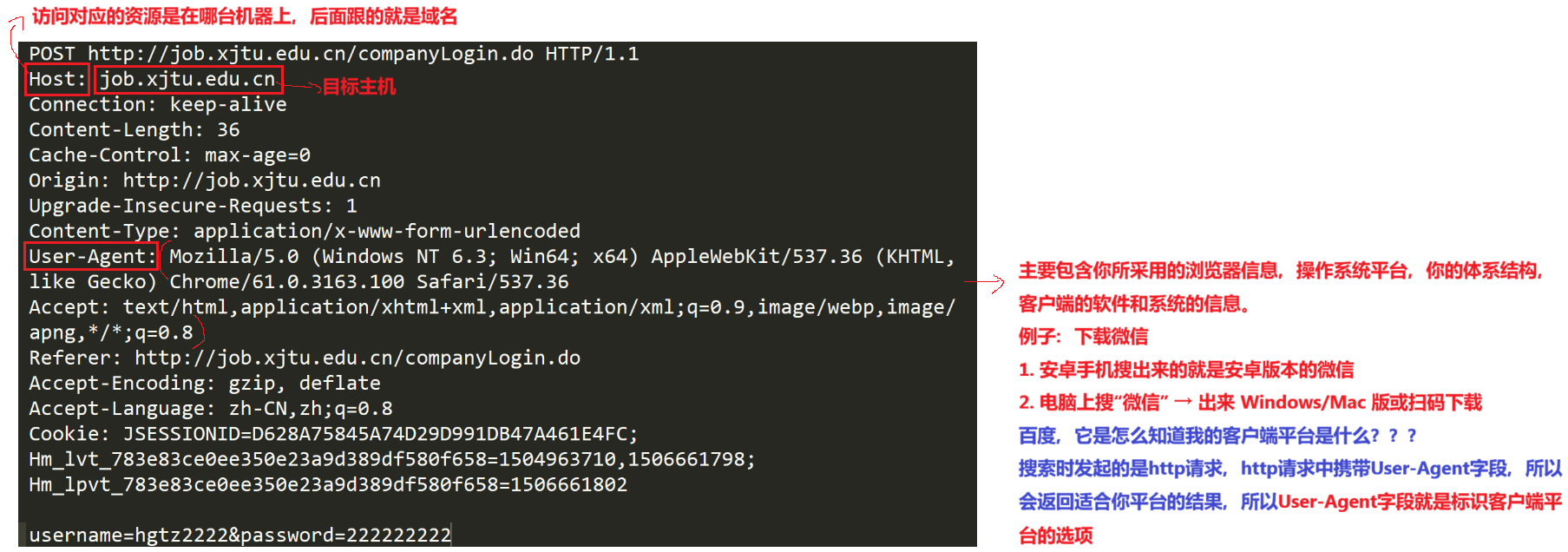
User-Agent:
User-Agent 涉及在爬虫技术中:
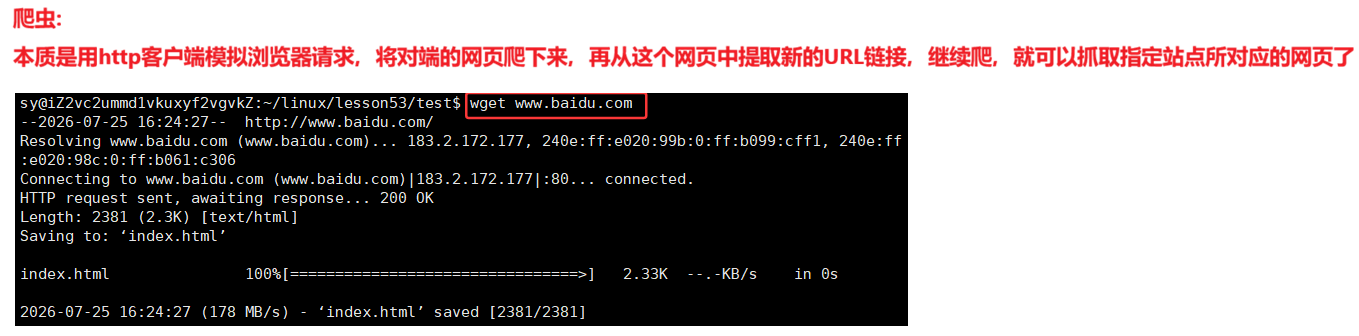
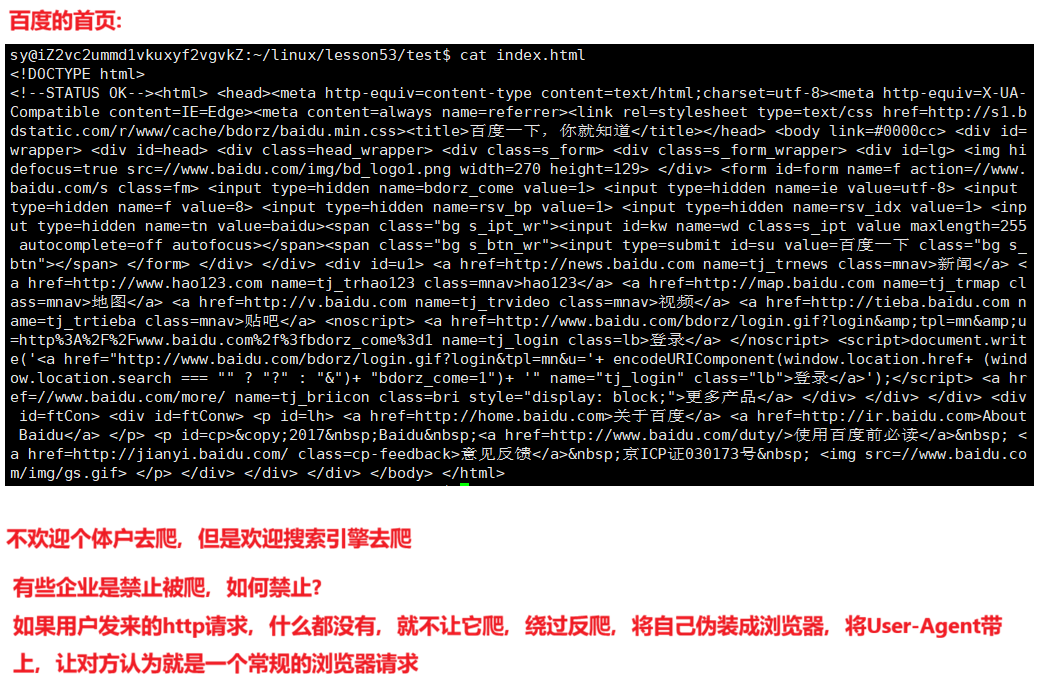
爬虫是违法的,除非爬自己的服务器上的。
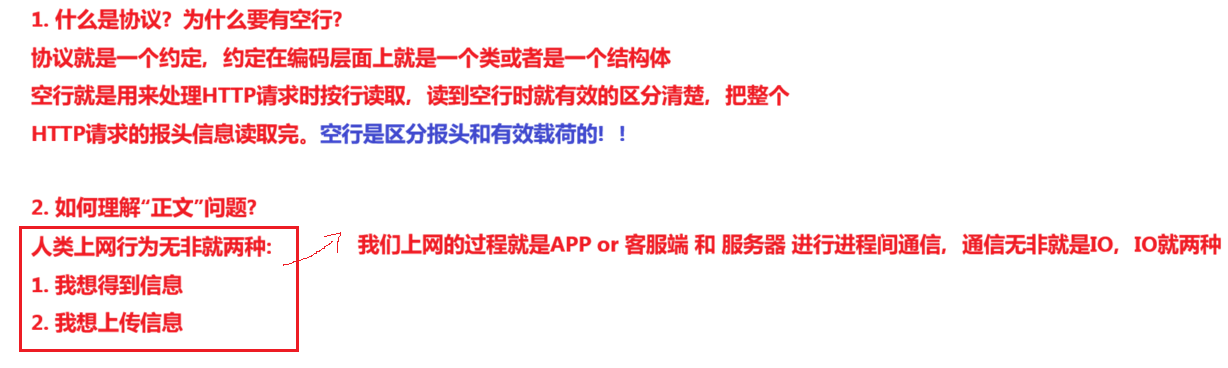
Content-Length:表明有效载荷是多长
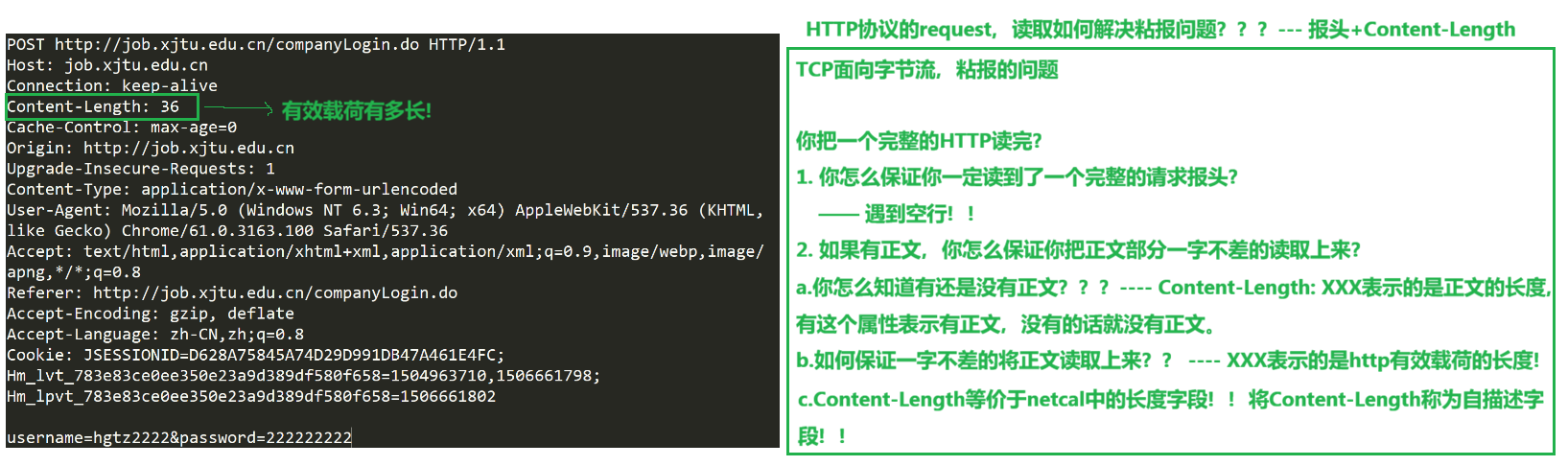
response中解决粘报的问题和request解决粘报的问题是一样的。
在之前的代码中并没有带上Content-Length的字段,为什么也能通过??
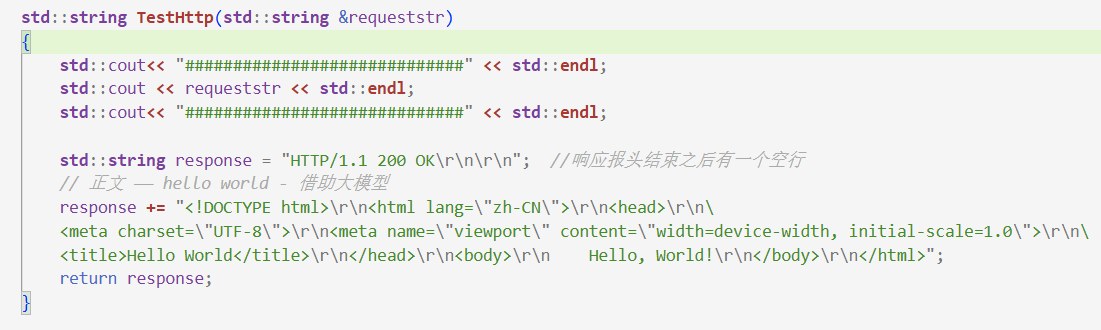
这是因为设计的浏览器太强大了!!!它允许在协议层面上缺失,它会自动识别你对应的正文!!
工业级的写规模最大的是操作系统,浏览器也是一个很难的软件,千万行代码级别的项目。大部分的浏览器用的是谷歌的代码,谷歌浏览器的代码是开源的。
HTTP Response应答
状态码:表示这次请求的可信度 or 是否出错。例如:404,是给浏览器看的;状态码为200表明:请求是成功的
状态码描述符:404对应的是:NotFound,是给人看的,表示请求的资源不存在;200对应的描述符是OK
HTTP应答的第一行被称为状态行,Response 不需要我们处理,交给浏览器自己去处理。
注意事项:
http请求,必须要有应答报文,即便是错误的!!!(除非服务器挂掉)
对应代码的实现:
//Http.hpp
#pragma once
#include <iostream>
#include <string>
#include <unordered_map>
#include "Logger.hpp"
static const std::string linesep = "\\r\\n";
static const std::string innersep1 = " ";
static const std::string innersep2 = ": ";
// 定制 http 协议!!
class HttpRequest
{
private:
std::string ReadOneLine(std::string &reqstr)
{
auto pos = reqstr.find(linesep);
if (pos == std::string::npos) // 没找到,返回空对象
return std::string();
auto line = reqstr.substr(0, pos);
reqstr.erase(0, pos + linesep.size());
return line; // 将第一行提取出来
}
public:
HttpRequest() {}
void Serialize()
{
// 不做
// 请求就不用做序列化了,请求的序列化是浏览器客户端发起请求要做的
}
// reqstr:认为一定是一个完整的HTTP请求字符串
bool Deserialize(std::string &reqstr)
{
LOG(LogLevel::DEBUG) << "\\r\\n####################################################";
LOG(LogLevel::DEBUG) << "处理前: " << reqstr;
std::string reqline = ReadOneLine(reqstr);
if (reqline.empty())
return false;
LOG(LogLevel::DEBUG) << "\\r\\n####################################################";
LOG(LogLevel::DEBUG) << "成功读取第一行(请求行): " << reqline;
LOG(LogLevel::DEBUG) << "\\r\\n####################################################";
LOG(LogLevel::DEBUG) << "处理后: " << reqstr;
return false;
}
~HttpRequest() {}
private:
std::string _method;
std::string _uri;
std::string _httpversion;
std::unordered_map<std::string, std::string> _req_headers;
std::string _black_line;
std::string _req_body;
};
class HttpResponse
{
public:
HttpResponse() {}
void Serialize()
{
}
void Deserialize()
{
// 不做
// 应答的反序列化是浏览器自己要做的
}
~HttpResponse() {}
private:
std::string _httpversion;
int _code;
std::string _desc;
std::unordered_map<std::string, std::string> _resp_headers;
std::string _black_line;
std::string _resp_body;
};
class Http
{
public:
Http() {}
std::string HanlderRequest(std::string &requeststr)
{
HttpRequest req;
req.Deserialize(requeststr);
return std::string(); // 应答暂时不写,应答一个空串
}
~Http() {}
};
// Main.cc
#include "Http.hpp"
#include "TcpServer.hpp"
#include <memory>
void Usage(std::string proc)
{
std::cerr << "Usage: " << proc << " localport" << std::endl;
}
int main(int argc, char *argv[])
{
if (argc != 2)
{
Usage(argv[0]);
exit(0);
}
EnableConsoleLogStrategy(); // 此时全部会将日志全部丢弃,丢弃到 /dev/null 中
// HTTP协议
std::unique_ptr<Http> http = std::make_unique<Http>();
// 网络服务
uint16_t serverport = std::stoi(argv[1]);
std::unique_ptr<TcpServer> tsock = std::make_unique<TcpServer>(serverport,
[&http](std::string &reqstr) -> std::string /*返回值*/
{
return http->HanlderRequest(reqstr);
});
tsock->Run();
return 0;
}
访问公网IP + port :


Http.hpp的修改:
//Http.hpp
#pragma once
#include <iostream>
#include <string>
#include <sstream>
#include <unordered_map>
#include "Logger.hpp"
static const std::string linesep = "\\r\\n";
static const std::string innersep1 = " ";
static const std::string innersep2 = ": ";
// 定制 http 协议!!
class HttpRequest
{
private:
std::string ReadOneLine(std::string &reqstr)
{
auto pos = reqstr.find(linesep);
if (pos == std::string::npos) // 没找到,返回空对象
return std::string();
auto line = reqstr.substr(0, pos);
reqstr.erase(0, pos + linesep.size());
return line; // 将第一行提取出来
}
void ParseReqLine(std::string reqline)
{
// GET / HTTP/1.1 –> std::string _method; std::string _uri; std::string _httpversion;
std::stringstream ss(reqline);
ss >> _method >> _uri >> _httpversion;
}
public:
HttpRequest() {}
void Serialize()
{
// 不做
// 请求就不用做序列化了,请求的序列化是浏览器客户端发起请求要做的
}
// reqstr:认为一定是一个完整的HTTP请求字符串
bool Deserialize(std::string &reqstr)
{
// LOG(LogLevel::DEBUG) << "\\r\\n####################################################";
// LOG(LogLevel::DEBUG) << "处理前: " << reqstr;
std::string reqline = ReadOneLine(reqstr);
if (reqline.empty())
return false;
// LOG(LogLevel::DEBUG) << "\\r\\n####################################################";
LOG(LogLevel::DEBUG) << "成功读取第一行(请求行): " << reqline;
// LOG(LogLevel::DEBUG) << "\\r\\n####################################################";
// LOG(LogLevel::DEBUG) << "处理后: " << reqstr;
ParseReqLine(reqline);
LOG(LogLevel::DEBUG) << "_method:" << _method ;
LOG(LogLevel::DEBUG) << "_uri:" << _uri ;
LOG(LogLevel::DEBUG) << "_httpversion:" << _httpversion ;
return false;
}
~HttpRequest() {}
private:
std::string _method;
std::string _uri;
std::string _httpversion;
std::unordered_map<std::string, std::string> _req_headers;
std::string _black_line;
std::string _req_body;
};
class HttpResponse
{
public:
HttpResponse() {}
void Serialize()
{
}
void Deserialize()
{
// 不做
// 应答的反序列化是浏览器自己要做的
}
~HttpResponse() {}
private:
std::string _httpversion;
int _code;
std::string _desc;
std::unordered_map<std::string, std::string> _resp_headers;
std::string _black_line;
std::string _resp_body;
};
class Http
{
public:
Http() {}
std::string HanlderRequest(std::string &requeststr)
{
HttpRequest req;
req.Deserialize(requeststr);
return std::string(); // 应答暂时不写,应答一个空串
}
~Http() {}
};

// Http.hpp
#pragma once
#include <iostream>
#include <string>
#include <sstream>
#include <unordered_map>
#include "Logger.hpp"
static const std::string linesep = "\\r\\n";
static const std::string innersep1 = " ";
static const std::string innersep2 = ": ";
// 定制 http 协议!!
class HttpRequest
{
private:
std::string ReadOneLine(std::string &reqstr, bool *status)
{
auto pos = reqstr.find(linesep);
if (pos == std::string::npos) // 没找到,返回空对象
{
*status = false;
return std::string();
}
*status = true;
auto line = reqstr.substr(0, pos);
reqstr.erase(0, pos + linesep.size()); // 如果是空行的话,将\\r\\n移除掉
return line; // 将第一行提取出来
}
void ParseReqLine(std::string reqline)
{
// GET / HTTP/1.1 –> std::string _method; std::string _uri; std::string _httpversion;
std::stringstream ss(reqline);
ss >> _method >> _uri >> _httpversion;
}
void BuildKV(std::string &line,std::string *k,std::string *v)
{
auto pos = line.find(innersep2);
if(pos == std::string::npos)
{
*k = *v = std::string();
return;
}
*k = line.substr(0, pos);
*v = line.substr(pos + innersep2.size());
}
public:
HttpRequest() {}
void Serialize()
{
// 不做
// 请求就不用做序列化了,请求的序列化是浏览器客户端发起请求要做的
}
// reqstr:认为一定是一个完整的HTTP请求字符串
bool Deserialize(std::string &reqstr)
{
bool status = true;
// LOG(LogLevel::DEBUG) << "\\r\\n####################################################";
// LOG(LogLevel::DEBUG) << "处理前: " << reqstr;
std::string reqline = ReadOneLine(reqstr, &status);
if (!status)
return false;
// LOG(LogLevel::DEBUG) << "\\r\\n####################################################";
LOG(LogLevel::DEBUG) << "成功读取第一行(请求行): " << reqline;
// LOG(LogLevel::DEBUG) << "\\r\\n####################################################";
// LOG(LogLevel::DEBUG) << "处理后: " << reqstr;
ParseReqLine(reqline);
LOG(LogLevel::DEBUG) << "_method:" << _method ;
LOG(LogLevel::DEBUG) << "_uri:" << _uri ;
LOG(LogLevel::DEBUG) << "_httpversion:" << _httpversion ;
while(true)
{
status = true;
reqline = ReadOneLine(reqstr, &status);
if(status && !reqline.empty())
{
std::string k,v;
BuildKV(reqline, &k, &v);
if(k.empty() || v.empty())
continue;
_req_headers.insert(std::make_pair(k,v));
}
else if(status)
{
// status 为真,但是reqline为空,说明遇到空行了
_blank_line = linesep;
break;
}
else
{
return false;
}
}
for(auto &elem : _req_headers)
{
LOG(LogLevel::DEBUG) << elem.first << "# " << elem.second;
}
return false;
}
~HttpRequest() {}
private:
std::string _method;
std::string _uri;
std::string _httpversion;
std::unordered_map<std::string, std::string> _req_headers;
std::string _blank_line;
std::string _req_body;
};
class HttpResponse
{
public:
HttpResponse() {}
void Serialize()
{
}
void Deserialize()
{
// 不做
// 应答的反序列化是浏览器自己要做的
}
~HttpResponse() {}
private:
std::string _httpversion;
int _code;
std::string _desc;
std::unordered_map<std::string, std::string> _resp_headers;
std::string _black_line;
std::string _resp_body;
};
class Http
{
public:
Http() {}
std::string HanlderRequest(std::string &requeststr)
{
HttpRequest req;
req.Deserialize(requeststr);
return std::string(); // 应答暂时不写,应答一个空串
}
~Http() {}
};

uri:
8080 端口:

8081端口:

uri:/ 表明请求目标服务器的首页 -> / -> /index.html
uri:/a/b/c.html -> 请求目标服务器web根目录下的指定路径下的文件!
1. 什么是web根目录?
web根目录是你自己指明的系统的任意的一个路径,这个路径下会按特定的目录组织形式,把资源文件把存起来!!
以下结构便是web根目录:index为默认的首页

2. 什么是资源?
图片、文本、html、音频、视频都是资源,资源都是文件,所以不准将网页内置到C++的字符串中,这样的话,写出来的东西没有人用。必须是一个独立的文件,以路径的方式直接请求。
//Http.hpp
#pragma once
#include <iostream>
#include <string>
#include <sstream>
#include <unordered_map>
#include "Logger.hpp"
static const std::string linesep = "\\r\\n";
static const std::string innersep1 = " ";
static const std::string innersep2 = ": ";
static const std::string webroot = "./wwwroot";
static const std::string defaulthome = "index.html";
// 定制 http 协议!!
class HttpRequest
{
private:
std::string ReadOneLine(std::string &reqstr, bool *status)
{
auto pos = reqstr.find(linesep);
if (pos == std::string::npos) // 没找到,返回空对象
{
*status = false;
return std::string();
}
*status = true;
auto line = reqstr.substr(0, pos);
reqstr.erase(0, pos + linesep.size()); // 如果是空行的话,将\\r\\n移除掉
return line; // 将第一行提取出来
}
void ParseReqLine(std::string reqline)
{
// GET / HTTP/1.1 –> std::string _method; std::string _uri; std::string _httpversion;
std::stringstream ss(reqline);
ss >> _method >> _uri >> _httpversion;
}
void BuildKV(std::string &line, std::string *k, std::string *v)
{
auto pos = line.find(innersep2);
if (pos == std::string::npos)
{
*k = *v = std::string();
return;
}
*k = line.substr(0, pos);
*v = line.substr(pos + innersep2.size());
}
public:
HttpRequest() {}
void Serialize()
{
// 不做
// 请求就不用做序列化了,请求的序列化是浏览器客户端发起请求要做的
}
// reqstr:认为一定是一个完整的HTTP请求字符串
bool Deserialize(std::string &reqstr)
{
bool status = true;
// LOG(LogLevel::DEBUG) << "\\r\\n####################################################";
// LOG(LogLevel::DEBUG) << "处理前: " << reqstr;
std::string reqline = ReadOneLine(reqstr, &status);
if (!status)
return false;
// LOG(LogLevel::DEBUG) << "\\r\\n####################################################";
// LOG(LogLevel::DEBUG) << "成功读取第一行(请求行): " << reqline;
// LOG(LogLevel::DEBUG) << "\\r\\n####################################################";
// LOG(LogLevel::DEBUG) << "处理后: " << reqstr;
ParseReqLine(reqline);
// LOG(LogLevel::DEBUG) << "_method:" << _method;
// LOG(LogLevel::DEBUG) << "_uri:" << _uri;
// LOG(LogLevel::DEBUG) << "_httpversion:" << _httpversion;
while (true)
{
status = true;
reqline = ReadOneLine(reqstr, &status);
if (status && !reqline.empty())
{
std::string k, v;
BuildKV(reqline, &k, &v);
if (k.empty() || v.empty())
continue;
_req_headers.insert(std::make_pair(k, v));
}
else if (status)
{
// status 为真,但是reqline为空,说明遇到空行了
_blank_line = linesep;
break;
}
else
{
return false;
}
}
// for(auto &elem : _req_headers)
// {
// LOG(LogLevel::DEBUG) << elem.first << "# " << elem.second;
// }
_req_body = reqstr;
_path = webroot;
_path += _uri; // ./wwwroot/ or ./wwwroot/a/b/c.html
if (_uri == "/")
{
_path += defaulthome; // ./wwwroot/index.html
}
LOG(LogLevel::DEBUG) << "_path:" << _path;
return true;
}
~HttpRequest() {}
private:
std::string _method;
std::string _uri;
std::string _httpversion;
std::unordered_map<std::string, std::string> _req_headers;
std::string _blank_line;
std::string _req_body;
std::string _path; // 我们真正的要访问的资源的路径!
};
class HttpResponse
{
public:
HttpResponse() {}
void Serialize()
{
}
void Deserialize()
{
// 不做
// 应答的反序列化是浏览器自己要做的
}
~HttpResponse() {}
private:
std::string _httpversion;
int _code;
std::string _desc;
std::unordered_map<std::string, std::string> _resp_headers;
std::string _black_line;
std::string _resp_body;
};
class Http
{
public:
Http() {}
std::string HanlderRequest(std::string &requeststr)
{
HttpRequest req;
if (req.Deserialize(requeststr))
{
}
return std::string(); // 应答暂时不写,应答一个空串
}
~Http() {}
};


当请求的资源不存在就是404!!!
index.html中填入内容,借助大模型。
//Http.hpp
#pragma once
#include <iostream>
#include <string>
#include <sstream>
#include <fstream>
#include <unordered_map>
#include "Logger.hpp"
static const std::string linesep = "\\r\\n";
static const std::string innersep1 = " ";
static const std::string innersep2 = ": ";
static const std::string webroot = "./wwwroot";
static const std::string defaulthome = "index.html";
// 定制 http 协议!!
class HttpRequest
{
private:
std::string ReadOneLine(std::string &reqstr, bool *status)
{
auto pos = reqstr.find(linesep);
if (pos == std::string::npos) // 没找到,返回空对象
{
*status = false;
return std::string();
}
*status = true;
auto line = reqstr.substr(0, pos);
reqstr.erase(0, pos + linesep.size()); // 如果是空行的话,将\\r\\n移除掉
return line; // 将第一行提取出来
}
void ParseReqLine(std::string reqline)
{
// GET / HTTP/1.1 –> std::string _method; std::string _uri; std::string _httpversion;
std::stringstream ss(reqline);
ss >> _method >> _uri >> _httpversion;
}
void BuildKV(std::string &line, std::string *k, std::string *v)
{
auto pos = line.find(innersep2);
if (pos == std::string::npos)
{
*k = *v = std::string();
return;
}
*k = line.substr(0, pos);
*v = line.substr(pos + innersep2.size());
}
public:
HttpRequest() {}
void Serialize()
{
// 不做
// 请求就不用做序列化了,请求的序列化是浏览器客户端发起请求要做的
}
// reqstr:认为一定是一个完整的HTTP请求字符串
bool Deserialize(std::string &reqstr)
{
bool status = true;
// LOG(LogLevel::DEBUG) << "\\r\\n####################################################";
// LOG(LogLevel::DEBUG) << "处理前: " << reqstr;
std::string reqline = ReadOneLine(reqstr, &status);
if (!status)
return false;
// LOG(LogLevel::DEBUG) << "\\r\\n####################################################";
// LOG(LogLevel::DEBUG) << "成功读取第一行(请求行): " << reqline;
// LOG(LogLevel::DEBUG) << "\\r\\n####################################################";
// LOG(LogLevel::DEBUG) << "处理后: " << reqstr;
ParseReqLine(reqline);
// LOG(LogLevel::DEBUG) << "_method:" << _method;
// LOG(LogLevel::DEBUG) << "_uri:" << _uri;
// LOG(LogLevel::DEBUG) << "_httpversion:" << _httpversion;
while (true)
{
status = true;
reqline = ReadOneLine(reqstr, &status);
if (status && !reqline.empty())
{
std::string k, v;
BuildKV(reqline, &k, &v);
if (k.empty() || v.empty())
continue;
_req_headers.insert(std::make_pair(k, v));
}
else if (status)
{
// status 为真,但是reqline为空,说明遇到空行了
_blank_line = linesep;
break;
}
else
{
return false;
}
}
// for(auto &elem : _req_headers)
// {
// LOG(LogLevel::DEBUG) << elem.first << "# " << elem.second;
// }
_req_body = reqstr;
_path = webroot;
_path += _uri; // ./wwwroot/ or ./wwwroot/a/b/c.html
if (_uri == "/")
{
_path += defaulthome; // ./wwwroot/index.html
}
LOG(LogLevel::DEBUG) << "_path:" << _path;
return true;
}
std::string Path()
{
return _path;
}
~HttpRequest() {}
private:
std::string _method;
std::string _uri;
std::string _httpversion;
std::unordered_map<std::string, std::string> _req_headers;
std::string _blank_line;
std::string _req_body;
std::string _path; // 我们真正的要访问的资源的路径!
};
class HttpResponse
{
public:
HttpResponse():_httpversion("HTTP/1.1"),_black_line("\\r\\n")
{}
std::string Serialize()
{
std::string respstr = _httpversion + innersep1 + std::to_string(_code) + \\
innersep1 + _desc + linesep;
for(auto &elem : _resp_headers)
{
std::string line = elem.first + innersep2 + elem.second + linesep;
respstr += line;
}
respstr += _black_line;
respstr += _resp_body;
return respstr;
}
void Deserialize()
{
// 不做
// 应答的反序列化是浏览器自己要做的
}
void ReadContent(const std::string &path)
{
// 以二进制的方式读取
std::ifstream file(path, std::ios::binary);
if (!file.is_open())
{
std::cerr << "Failed to open file: " << path << std::endl;
}
// 定位到文件末尾获取文件大小
file.seekg(0, std::ios::end); // 移动一个文件的读写位置,直接把开头处文件的读写位置定位到文件结尾
std::streampos fileSize = file.tellg(); // std::streampos:为整数,file.tellg()读取当前文件的读写位置,获取文件大小
file.seekg(0, std::ios::beg); // 文件位置回到begin
// 创建足够大的字符串来保存数据
_resp_body.resize(static_cast<size_t>(fileSize));
// 读取文件内容到字符串
file.read(&_resp_body[0], fileSize);
// 检查是否读取了所有数据
if (!file)
{
throw std::runtime_error("读取文件时出错: " + path);
}
file.close();
}
void SetCode(int code,const std::string &desc)
{
_code = code;
_desc = desc;
}
~HttpResponse() {}
private:
std::string _httpversion;
int _code;
std::string _desc;
std::unordered_map<std::string, std::string> _resp_headers;
std::string _black_line;
std::string _resp_body;
};
class Http
{
public:
Http() {}
std::string HanlderRequest(std::string &requeststr)
{
std::string respstr;
HttpRequest req;
if (req.Deserialize(requeststr))
{
HttpResponse resp;
resp.ReadContent(req.Path());
resp.SetCode(200,"OK");
respstr = resp.Serialize();
}
return respstr; // 应答暂时不写,应答一个空串
}
~Http() {}
};
在浏览器上访问8080端口:

这个页面是从web服务器中读取index.html,构建应答给我们返回的。
工具 telnet:

上面的工具使用的有点问题,telnet 可能认为GET / HTTP/1.1后面为\\n,可能不是我们代码中写的 \\r\\n
尝试看一下百度的首页:

出现报错:

favicon.ico是一个网站所对应的站点的符号,以百度为例:
 ,红色框内就是favicon.ico,就是一个小图标,而我们自己刚刚弄得网站灰色的,意思是空的:
可以在网上找以 .ico 结尾的小图片,与index.html放在同一级目录。
3. HTTP的方法
3.1 HTTP的状态码
| 类别 | 原因 | |
| 1XX | Informational(信息性状态码) | 接收的请求正在处理 |
| 2XX | Success(成功状态码) | 请求正常处理完毕 |
| 3XX | Redirection(重定向状态码) | 需要进行附加操作以完成请求 |
| 4XX | Client Error(客户端错误状态码) | 服务器无法处理请求 |
| 5XX | Server Error(服务器错误状态码) | 服务器处理请求出错 |
最常见的状态码,比如 200(OK),404(Not Found),403(Forbidden),302(Redirect,重定向),504(Bad Gateway)
| 状态码 | 含义 | 应用样例 |
| 100 | Continue | 上传⼤⽂件时,服务器告诉客⼾端可以继续上传 |
| 200 | OK(重点) | 访问⽹站⾸⻚,服务器返回⽹⻚内容 |
| 201 | Created | 发布新⽂章,服务器返回⽂章创建成功的信息 |
| 204 | No Content | 删除⽂章后,服务器返回“⽆内容”表⽰操作成功 |
| 301 | Moved Permanently | ⽹站换域名后,⾃动跳转到新域名;搜索引擎更新⽹站 链接时使⽤ |
| 302 | Found 或 See Other | ⽤⼾登录成功后,重定向到⽤⼾⾸⻚ |
| 304 | Not Modified | 浏览器缓存机制,对未修改的资源返回304状态码 |
| 400 | Bad Request | 填写表单时,格式不正确导致提交失败(eg:登录、注册) |
| 401 | Unauthorized | 访问需要登录的⻚⾯时,未登录或认证失败 |
| 403 | Forbidden | 尝试访问你没有权限查看的⻚⾯ |
| 404 | Not Found | 访问不存在的⽹⻚链接 |
| 500 | Internal Server Error | 服务器崩溃或数据库错误导致⻚⾯⽆法加载 |
| 502 | Bad Gateway | 使⽤代理服务器时,代理服务器⽆法从上游服务器获取 有效响应 |
| 503 | Service Unavailable | 服务器维护或过载,暂时⽆法处理请求 |
404 为什么是客户端错误??
明明是服务器没有这个资源!在一个网站进行访问的时候,是通过点击页面来进行请求的。而不是通过进行输入url来进行请求不存在的页面(属于请求不合理)。
5XX:属于服务端错误
500:服务端错误
服务器中收到了accept获取新连接之后,创建子进程成功了就处理请求了。创建失败,服务器崩溃,服务器崩溃只是不创建子进程了,但是还有当前进程,当前进程自己给别人应答服务套接字,服务器一旦崩溃,创建子进程失败,创建管道失败,权限问题打开文件失败,打开数据库失败,这种错误叫做服务器内部错误。很多服务时间一久,访问的时候容易挂掉,挂掉的话就是服务器端崩溃的话题。例如:百度挂掉等等就是服务器错误。
503:也属于服务器挂掉的一种
为了减少服务器的崩溃:不应该允许任何的用户来连接,应该要去统计当前的连接数,超过规定的最大连接数,之后的accept的新连接直接关掉,不在受理更多的请求了,返回503。在学校选课的时候,人比较多,页面直接崩掉,使劲刷,过一会就自动弹出来了,因为服务端没挂,只是收到连接,直接把你的连接直接关掉了,页面没显示出来,使劲刷,过一会就出来了,只是说是限流,控制你的访问。
生态类的认知:
你愿不愿意,让别人知道你的服务器承载能力的便也在哪里???— 不愿意!!!
5开头的错误很少返回!!!企业一般是不会返回过多的详细的错误码,详细的错误码会暴露自己的服务器细节,所以大多客户端的错误码是随便写的,但是我们自己写的时候就要认真写!
以下是仅包含重定向相关状态码的表格:
| 状态码 | 含义 | 是否为临时重定向 | 应用样例 |
| 301(重点) | Moved Permanently | 否(永久重定向) | ⽹站换域名后,⾃动跳转到新域名;搜索引擎更新⽹站链接时使⽤ |
| 302(重点) | Found 或 See Other | 是(临时重定向) | 用户登录成功后,重定向到用户⾸⻚ |
| 307 | Temporary Redirect | 是(临时重定向) | 临时重定向资源到新的位置(较少使用) |
| 308 | Permanent Redirect | 否(永久重定向) | 永久重定向资源到新的位置(较少使⽤) |
临时重定向:
因为提供服务的一方,服务的地址(新的url)发生变更,要求client更改访问位置,去新地址访问 — 重定向。
例子:
张三李四去学校的东门的面馆吃面,但是由于面馆前在修路,面馆上的通知:由于面馆前修路,就餐体验不好,临时搬至学校的西门,张三和李四看到通知便向学校的西门出发。这就是所谓的临时重定向!!!
永久重定向:
例子:
之后张三李四过了几天又想去学校的东门吃那家面馆,看见上面的通知单:因本店搬至西门之后,生意更加好了,所以本店决定永久搬至西门,之后吃饭就到西门就餐,之后再去吃面的话直接就往学校的西门去。这就是所谓的永久重定向!!!
临时 和 永久重定向最大的区别是:影不影响客户对地址的认识!!
- 临时重定向不会影响,从老地址跳到新地址!!!
- 永久重定向会影响客户对目标地址的认知!!!
为什么??
在B站看一个视频,要先进行登录,自动跳转到登录页面,登录之后自动跳转到首页或者是正在看的视频,就是通过重定向来完成的,包括注册。临时重定向:用户登录成功后,重定向到首页,注册也是。
永久重定向:搜索引擎,全网中大大小小的网站都不想支持个人用户去爬虫,就有一定对应的反爬机制。但是欢迎搜索引擎去进行爬虫。这是因为搜索引擎有流量,就有曝光!!!搜索引擎是给所有的站点进行引流的!!!谁给的money多,谁就在搜索结果中靠前!!!
为什么要做永久重定向???
对于搜索引擎来讲,临时重定向没有意义,永久重定向对于搜索引擎太重要了!!!
例子:
老的域名是:www.a.com,新的域名是:www.b.com
搜索引擎又不知道,请求的依然是www.a.com,理所当然的就是搜索引擎就会发生一次重定向,会跳转到www.b.com中去访问,但是如果是临时重定向,搜索引擎是不会记录下来对应的网址是从a.com跳转到b.com的过程,搜索引擎只会去抓取a网站和b网站所对应的网页资源,用户去搜的话,有可能从老地址经过重定向跳过去,也有可能会从新地址直接过去。有些浏览器对临时重定向不会做,抓取的一直都是a.com,所以网站上面的新内容是抓不到的。引出来一种重定向:永久重定向,当搜索引擎一旦发现请求之后,客户返回的状态码是302,客户一方面进行www.b.com的跳转,一方面搜索引擎将这个网站相关的内容,网址,全部将www.a.com替换成www.b.com,搜索引擎将老的域名替换掉,下一次搜索引擎再也不爬取a.com而是直接去爬取b.com,这样搜索引擎整理出来的网页内容和网址信息就是新网址,用户点击的话就会往新网址中去,不会去旧的网址。
所以网站换域名之后,自动就跳转到新域名;搜索引擎更新网站链接时使用,对应的就是永久重定向!!!
永久重定向典型的作用:更改客户端的书签。客户一般都是搜索引擎
为什么要做永久重定向???—- 总结:
重定向技术是要求对页面的二次获取,有时,网站为了增加灵活性,在用户登录之后跳转到首页,之后再更改任意网址这样就可以跳转到热点网址;访问网页使用新地址,不要访问老地址,所以使用永久重定向。
怎么做的??
临时和永久重定向的技术原理是一样的,无非就是要求客户端多做一些事情:
客户端访问当前的服务器,发起 http request,访问的网址是:www.a.com,网址发生变化,服务端进行应答,带有301/302重定向功能的http response,server应答报头中必须携带一个重要的属性:Location,Location会指明新地址。重定向报文不需要有效载荷!!
Location

验证重定向功能:


打开我们定义的网站,输入:公网IP+port/redir,自动就跳转到了我们重定向的网页:

回车:


非要请求不存在的网页:

回车:

暂时关掉


//Http.hpp
#pragma once
#include <iostream>
#include <string>
#include <sstream>
#include <fstream>
#include <unordered_map>
#include "Logger.hpp"
static const std::string linesep = "\\r\\n";
static const std::string innersep1 = " ";
static const std::string innersep2 = ": ";
static const std::string webroot = "./wwwroot";
static const std::string defaulthome = "index.html";
static const std::string html_404 = "404.html";
// 定制 http 协议!!
class HttpRequest
{
private:
std::string ReadOneLine(std::string &reqstr, bool *status)
{
auto pos = reqstr.find(linesep);
if (pos == std::string::npos) // 没找到,返回空对象
{
*status = false;
return std::string();
}
*status = true;
auto line = reqstr.substr(0, pos);
reqstr.erase(0, pos + linesep.size()); // 如果是空行的话,将\\r\\n移除掉
return line; // 将第一行提取出来
}
void ParseReqLine(std::string reqline)
{
// GET / HTTP/1.1 –> std::string _method; std::string _uri; std::string _httpversion;
std::stringstream ss(reqline);
ss >> _method >> _uri >> _httpversion;
LOG(LogLevel::DEBUG) << "_method:" << _method;
LOG(LogLevel::DEBUG) << "_uri:" << _uri;
LOG(LogLevel::DEBUG) << "_httpversion:" << _httpversion;
}
void BuildKV(std::string &line, std::string *k, std::string *v)
{
auto pos = line.find(innersep2);
if (pos == std::string::npos)
{
*k = *v = std::string();
return;
}
*k = line.substr(0, pos);
*v = line.substr(pos + innersep2.size());
}
public:
HttpRequest() {}
void Serialize()
{
// 不做
// 请求就不用做序列化了,请求的序列化是浏览器客户端发起请求要做的
}
// reqstr:认为一定是一个完整的HTTP请求字符串
bool Deserialize(std::string &reqstr)
{
bool status = true;
// LOG(LogLevel::DEBUG) << "\\r\\n####################################################";
// LOG(LogLevel::DEBUG) << "处理前: " << reqstr;
std::string reqline = ReadOneLine(reqstr, &status);
if (!status)
return false;
// LOG(LogLevel::DEBUG) << "\\r\\n####################################################";
// LOG(LogLevel::DEBUG) << "成功读取第一行(请求行): " << reqline;
// LOG(LogLevel::DEBUG) << "\\r\\n####################################################";
// LOG(LogLevel::DEBUG) << "处理后: " << reqstr;
ParseReqLine(reqline);
while (true)
{
status = true;
reqline = ReadOneLine(reqstr, &status);
if (status && !reqline.empty())
{
std::string k, v;
BuildKV(reqline, &k, &v);
if (k.empty() || v.empty())
continue;
_req_headers.insert(std::make_pair(k, v));
}
else if (status)
{
// status为真,但是reqline为空,说明遇到空行了
_blank_line = linesep;
break;
}
else
{
LOG(LogLevel::DEBUG) << "非法请求";
// return false; 暂时关掉
break;
}
}
// for(auto &elem : _req_headers)
// {
// LOG(LogLevel::DEBUG) << elem.first << "# " << elem.second;
// }
_req_body = reqstr;
_path = webroot;
_path += _uri; // ./wwwroot/ or ./wwwroot/a/b/c.html
if (_uri == "/")
{
_path += defaulthome; // ./wwwroot/index.html
}
LOG(LogLevel::DEBUG) << "_path:" << _path;
return true;
}
std::string Path()
{
return _path;
}
~HttpRequest() {}
private:
std::string _method;
std::string _uri;
std::string _httpversion;
std::unordered_map<std::string, std::string> _req_headers;
std::string _blank_line;
std::string _req_body;
std::string _path; // 我们真正的要访问的资源的路径!
};
class HttpResponse
{
private:
std::string Code2Desc(int code)
{
switch (code)
{
case 200:
return "OK";
case 400:
return "Bad Request";
case 404:
return "Not Found";
default:
return "";
}
}
public:
HttpResponse() : _httpversion("HTTP/1.1"), _black_line(linesep)
{
}
std::string Serialize()
{
std::string respstr = _httpversion + innersep1 + std::to_string(_code) +
innersep1 + _desc + linesep;
// 有效载荷
if (!_resp_body.empty())
{
std::string len = std::to_string(_resp_body.size());
SetHeader("Content-Length", len);
}
for (auto &elem : _resp_headers)
{
std::string line = elem.first + innersep2 + elem.second + linesep;
respstr += line;
}
respstr += _black_line;
respstr += _resp_body;
return respstr;
}
void Deserialize()
{
// 不做
// 应答的反序列化是浏览器自己要做的
}
bool ReadContent(const std::string &path)
{
// 以二进制的方式读取
std::ifstream file(path, std::ios::binary);
if (!file.is_open())
{
LOG(LogLevel::WARNING) << path << "资源不存在!";
return false;
}
// 定位到文件末尾获取文件大小
file.seekg(0, std::ios::end); // 移动一个文件的读写位置,直接把开头处文件的读写位置定位到文件结尾
std::streampos fileSize = file.tellg(); // std::streampos:为整数,file.tellg()读取当前文件的读写位置,获取文件大小
file.seekg(0, std::ios::beg); // 文件位置回到begin
// 创建足够大的字符串来保存数据
_resp_body.resize(static_cast<size_t>(fileSize));
// 读取文件内容到字符串
file.read(&_resp_body[0], fileSize);
file.close();
return true;
}
void SetCode(int code)
{
if (code >= 100 && code < 600)
{
_code = code;
_desc = Code2Desc(_code);
}
else
{
LOG(LogLevel::DEBUG) << "非法的状态码:" << code;
}
}
bool SetHeader(const std::string &key, const std::string &value)
{
_resp_headers[key] = value;
return true;
}
~HttpResponse() {}
private:
std::string _httpversion;
int _code;
std::string _desc;
std::unordered_map<std::string, std::string> _resp_headers;
std::string _black_line;
std::string _resp_body;
};
class Http
{
public:
Http() {}
std::string HanlderRequest(std::string &requeststr)
{
std::string respstr;
HttpRequest req;
LOG(LogLevel::DEBUG) << requeststr;
if (req.Deserialize(requeststr))
{
HttpResponse resp;
if (resp.ReadContent(req.Path()))
{
resp.SetCode(200);
}
else
{
// ./wwwroot/404.html
std::string err_404 = webroot + "/" + html_404;
resp.ReadContent(err_404);
// 资源不存在!!!
resp.SetCode(404);
}
respstr = resp.Serialize();
}
return respstr; // 应答暂时不写,应答一个空串
}
~Http() {}
};

访问一个不存在的页面:

点击返回首页,直接跳转到首页页面:

点击关于的按钮,以web根目录作为绝对路径,去访问任何文件

添加登录注册的页面:(借助大模型生成)

以下两个页面均可实现跳转的功能:


真正访问一个网站不是拿着超链接进行访问的,用页面内部自己提供的链接去访问的。
发起一次请求,就会请求首页、1.png、2.png的信息


结论:
http请求,获取任何页面的时候页面由多个元素构成,获取完整首页不一定只对应一次HTTP请求。可能一个首页的获取对应的是几十个几百个HTTP的请求!!!!
http的应答是超文本,有自己的类型的!!客户端是如何得知正文的类型??
Content-Type:是专门用来表示正文类型的!!又因为正文类型是非常多的,所以有 Content-type 对照表!!!
如何区分文件类型?通过资源后缀区分文件类型的!!
自己在网上找的后缀合集,仅供参考。
//Http.hpp
#pragma once
#include <iostream>
#include <string>
#include <sstream>
#include <fstream>
#include <unordered_map>
#include "Logger.hpp"
static const std::string linesep = "\\r\\n";
static const std::string innersep1 = " ";
static const std::string innersep2 = ": ";
static const std::string webroot = "./wwwroot";
static const std::string defaulthome = "index.html";
static const std::string html_404 = "404.html";
static const std::string suffixsep = ".";
// 定制 http 协议!!
class HttpRequest
{
private:
std::string ReadOneLine(std::string &reqstr, bool *status)
{
auto pos = reqstr.find(linesep);
if (pos == std::string::npos) // 没找到,返回空对象
{
*status = false;
return std::string();
}
*status = true;
auto line = reqstr.substr(0, pos);
reqstr.erase(0, pos + linesep.size()); // 如果是空行的话,将\\r\\n移除掉
return line; // 将第一行提取出来
}
void ParseReqLine(std::string reqline)
{
// GET / HTTP/1.1 –> std::string _method; std::string _uri; std::string _httpversion;
std::stringstream ss(reqline);
ss >> _method >> _uri >> _httpversion;
LOG(LogLevel::DEBUG) << "_method:" << _method;
LOG(LogLevel::DEBUG) << "_uri:" << _uri;
LOG(LogLevel::DEBUG) << "_httpversion:" << _httpversion;
}
void BuildKV(std::string &line, std::string *k, std::string *v)
{
auto pos = line.find(innersep2);
if (pos == std::string::npos)
{
*k = *v = std::string();
return;
}
*k = line.substr(0, pos);
*v = line.substr(pos + innersep2.size());
}
public:
HttpRequest() {}
void Serialize()
{
// 不做
// 请求就不用做序列化了,请求的序列化是浏览器客户端发起请求要做的
}
// reqstr:认为一定是一个完整的HTTP请求字符串
bool Deserialize(std::string &reqstr)
{
bool status = true;
// LOG(LogLevel::DEBUG) << "\\r\\n####################################################";
// LOG(LogLevel::DEBUG) << "处理前: " << reqstr;
std::string reqline = ReadOneLine(reqstr, &status);
if (!status)
return false;
// LOG(LogLevel::DEBUG) << "\\r\\n####################################################";
// LOG(LogLevel::DEBUG) << "成功读取第一行(请求行): " << reqline;
// LOG(LogLevel::DEBUG) << "\\r\\n####################################################";
// LOG(LogLevel::DEBUG) << "处理后: " << reqstr;
ParseReqLine(reqline);
while (true)
{
status = true;
reqline = ReadOneLine(reqstr, &status);
if (status && !reqline.empty())
{
std::string k, v;
BuildKV(reqline, &k, &v);
if (k.empty() || v.empty())
continue;
_req_headers.insert(std::make_pair(k, v));
}
else if (status)
{
// status为真,但是reqline为空,说明遇到空行了
_blank_line = linesep;
break;
}
else
{
LOG(LogLevel::DEBUG) << "非法请求";
// return false; 暂时关掉
break;
}
}
// for(auto &elem : _req_headers)
// {
// LOG(LogLevel::DEBUG) << elem.first << "# " << elem.second;
// }
_req_body = reqstr;
_path = webroot;
_path += _uri; // ./wwwroot/ or ./wwwroot/a/b/c.html
if (_uri == "/")
{
_path += defaulthome; // ./wwwroot/index.html
}
LOG(LogLevel::DEBUG) << "_path:" << _path;
return true;
}
std::string Path()
{
return _path;
}
void SetPath(const std::string &path)
{
_path = path;
}
std::string Suffix()
{
// _path : /index.html
if (_path.empty())
return std::string();
else
{
auto pos = _path.rfind(suffixsep); // 倒着找
if (pos == std::string::npos)
return std::string();
else
return _path.substr(pos); //.html
}
}
~HttpRequest() {}
private:
std::string _method;
std::string _uri;
std::string _httpversion;
std::unordered_map<std::string, std::string> _req_headers;
std::string _blank_line;
std::string _req_body;
std::string _path; // 我们真正的要访问的资源的路径!
};
class HttpResponse
{
private:
std::string Code2Desc(int code)
{
switch (code)
{
case 200:
return "OK";
case 400:
return "Bad Request";
case 404:
return "Not Found";
default:
return "";
}
}
public:
HttpResponse() : _httpversion("HTTP/1.1"), _black_line(linesep)
{
}
std::string Serialize()
{
std::string respstr = _httpversion + innersep1 + std::to_string(_code) +
innersep1 + _desc + linesep;
// 有效载荷
if (!_resp_body.empty())
{
std::string len = std::to_string(_resp_body.size());
SetHeader("Content-Length", len);
}
for (auto &elem : _resp_headers)
{
std::string line = elem.first + innersep2 + elem.second + linesep;
respstr += line;
}
respstr += _black_line;
respstr += _resp_body;
return respstr;
}
void Deserialize()
{
// 不做
// 应答的反序列化是浏览器自己要做的
}
bool ReadContent(const std::string &path)
{
// 以二进制的方式读取
std::ifstream file(path, std::ios::binary);
if (!file.is_open())
{
LOG(LogLevel::WARNING) << path << "资源不存在!";
return false;
}
// 定位到文件末尾获取文件大小
file.seekg(0, std::ios::end); // 移动一个文件的读写位置,直接把开头处文件的读写位置定位到文件结尾
std::streampos fileSize = file.tellg(); // std::streampos:为整数,file.tellg()读取当前文件的读写位置,获取文件大小
file.seekg(0, std::ios::beg); // 文件位置回到begin
// 创建足够大的字符串来保存数据
_resp_body.resize(static_cast<size_t>(fileSize));
// 读取文件内容到字符串
file.read(&_resp_body[0], fileSize);
file.close();
return true;
}
void SetCode(int code)
{
if (code >= 100 && code < 600)
{
_code = code;
_desc = Code2Desc(_code);
}
else
{
LOG(LogLevel::DEBUG) << "非法的状态码:" << code;
}
}
bool SetHeader(const std::string &key, const std::string &value)
{
_resp_headers[key] = value;
return true;
}
~HttpResponse() {}
private:
std::string _httpversion;
int _code;
std::string _desc;
std::unordered_map<std::string, std::string> _resp_headers;
std::string _black_line;
std::string _resp_body;
};
class Http
{
std::string Suffix2Desc(const std::string &suffix)
{
if (suffix == ".html")
return "text/html";
else if (suffix == ".css")
return "text/css";
else if (suffix == ".js")
return "application/x-javascript";
else if (suffix == ".png")
return "image/png";
else if (suffix == ".jpg")
return "image/jpeg";
else if (suffix == ".txt")
return "text/plain";
else
return "text/html";
}
public:
Http() {}
std::string HanlderRequest(std::string &requeststr)
{
std::string respstr;
HttpRequest req;
LOG(LogLevel::DEBUG) << requeststr;
if (req.Deserialize(requeststr))
{
HttpResponse resp;
if (resp.ReadContent(req.Path()))
{
std::string suffix = req.Suffix();
std::string mime_type_value = Suffix2Desc(suffix); // 资源后缀,转成Content-Type类型
resp.SetHeader("Content-Type", mime_type_value);
resp.SetCode(200);
}
else
{
// 真实站点是如何访问的?– 前后端配合 html中的链接标签
// ./wwwroot/404.html
std::string err_404 = webroot + "/" + html_404;
req.SetPath(err_404);
resp.ReadContent(req.Path());
std::string suffix = req.Suffix();
std::string mime_type_value = Suffix2Desc(suffix); // 资源后缀,转成Content-Type类型
resp.SetHeader("Content-Type", mime_type_value);
// 资源不存在!!!
resp.SetCode(404);
}
respstr = resp.Serialize();
}
return respstr; // 应答暂时不写,应答一个空串
}
~Http() {}
};
开启8081端口:

请求不存在的页面:


图片大小是:553469,验证:

3.2 HTTP常见Header
- Content-Type: 数据类型(text/html等)
- Content-Length: Body的⻓度
- Host: 客⼾端告知服务器, 所请求的资源是在哪个主机的哪个端⼝上;
- User-Agent: 声明用户的操作系统和浏览器版本信息;
- Referer: 当前页面是从哪个页面跳转过来的;
- Location: 搭配3xx状态码使⽤, 告诉客户端接下来要去哪⾥访问;
- Cookie: ⽤于在客户端存储少量信息. 通常⽤于实现会话(session)的功能;
Referer
打开首页,点击注册按钮,跳转到注册的页面:

再从注册页面点击登录的按钮:

再从登陆页面返回首页,会请求index、1.png、2.png页面:

上面的截图中的referer字段展示了当前展示的页面是来自于哪个页面的。referer:当前请求,上一个页面是什么?我就知道你是从哪里跳转过来的。
referer的作用:
1. 数据统计 2. 拦截!
其它的报头属性:
- Host:请求目标主机的服务 + 端口
代理服务器通过Host属性来知道要访问的目标服务器在哪里
- Connection:keep-alive (长连接选项)
1. 解决 http 的粘报问题 (空行 + Content-Length)
2. 什么叫做长服务
3. 我们创建的首页,是收到了3个http请求,我们的服务器,一次处理一个请求,请求完就断开连接,所以要创建3个fd,3个子进程!效率太低,3个fd背后是要进行3次TCP建立连接!!!
建立一条连接,在一条连接上发起多次http请求,对此创建一个fd,创建一个子进程,同时处理多个http应答。
用一条连接来解决一次长时间的大网页的获取,将这种采用单连接,可以同时发起http请求的长服务,所对应的工作模式,叫做Connection: keep-alive,叫长连接处理,是HTTP/1.1新增的特性。Connection: keep-alive 期望支持长连接
浏览器的种类为什么会有这么多???
HTTP应答并没有按标准来应答,但是浏览器也是照样能显示出来,按正常来说,浏览器是会报错的,这就意味着:浏览器端也是不怎么标准的。HTTP协议有很强的容错性,也就是说约束力并不强,包括html,浏览器前端的标准化工作做的并不是很好。html虽然说的是跨平台但是实际上并不是,因为它要解决各种兼容性问题。因为厂家谁也不服谁,浏览器的标准做并不好。
- Upgrade-Insecure-Request: 协议升级的字段,后续会提到
- Accept:将来能接收的类型
- Accept-Encoding: 接收方能接收的编码的格式
- Accept-Language: 支持的语言类型
以上是请求的报头。
3.3 HTTP常见方法

后面两种可以不用考虑。以上列举出来很多种常见的方法,但是99%使用的都是 GET 和 POST,不准客户随便的上传(PUT)和删除(DELETE)文件,POST以下的方法一般都是被成熟的服务器禁用的。
两种行为:
- 从服务器端获取内容
- 上传数据到服务器
1. GET方法(重点)
用途:用于请求URL指定的资源
示例:GET /index.html HTTP/1.1
特性:指定资源经服务器端解析后返回响应内容
2. POST方法(重点)
用途:⽤于传输实体的主体,通常⽤于提交表单数据。
示例:POST / HTTP/1.1
特性:可以发送⼤量的数据给服务器,并且数据包含在请求体中。
3. PUT方法(不常用)
用途:⽤于传输⽂件,将请求报⽂主体中的⽂件保存到请求URL指定的位置。
示例:PUT /a.html HTTP/1.1
特性:不太常⽤,但在某些情况下,如RESTful API中,⽤于更新资源。
4. HEAD 方法
用途:与GET⽅法类似,但不返回报⽂主体部分,仅返回响应头。
示例: HEAD /index.html HTTP/1.1
特性:⽤于确认URL的有效性及资源更新的⽇期时间等。
~$ curl -i www.baidu.com
HTTP/1.1 200 OK
Cache-Control: private, no-cache, no-store, proxy-revalidate, no-transform
Content-Length: 2381
Content-Type: text/html
Pragma: no-cache
Server: bfe
Set-Cookie: BDORZ=27315; max-age=86400; domain=.baidu.com; path=/
Date: Wed, 29 Jul 2026 07:02:52 GMT
<!DOCTYPE html>
……
</html>
curl –head www.baidu.com #只获取报头的部分,不要正文,通常检测这个服务是否活跃,当前是否健康,获取相关应答时的相关属性
~$ curl –head www.baidu.com #只获取报头的部分,不要正文
HTTP/1.1 200 OK
Cache-Control: private, no-cache, no-store, proxy-revalidate, no-transform
Content-Length: 0
Content-Type: text/html
Pragma: no-cache
Server: bfe
Date: Wed, 29 Jul 2026 07:04:42 GMT
5. DELETE 方法
用途:⽤于删除⽂件,是PUT的相反⽅法。
示例:DELETE /a.html HTTP/1.1(文件存在则删除掉)
特性:按请求URL删除指定的资源。
6. OPTIONS方法(大部分的服务器都不支持)
用途:用于查询针对请求URL指定的资源⽀持的⽅法。
示例:OPTIONS * HTTP/1.1
特性:返回允许的⽅法,如GET、POST等。
# 搭建⼀个nginx⽤来测试
# sudo apt install nginx
# sudo nginx — 开启
# ps ajx | grep nginx — 查看
# sudo nginx -s stop — 停⽌服务
访问:公网IP + 80端口:

不支持的效果:
# curl -X OPTIONS -i http://127.0.0.1
HTTP/1.1 405 Not Allowed
Server: nginx/1.18.0 (Ubuntu)
Date: Wed, 29 Jul 2026 07:30:23 GMT
Content-Type: text/html
Content-Length: 166
Connection: keep-alive
<html>
<head><title>405 Not Allowed</title></head>
<body>
<center><h1>405 Not Allowed</h1></center>
<hr><center>nginx/1.18.0 (Ubuntu)</center>
</body>
</html>
root@iZ2vc2ummd1vkuxyf2vgvkZ:/home/sy#
405:nginx默认不支持让用户查开放了哪些功能,大部分的服务器将OPTIONS方法是禁用掉的,因为服务器的细节暴露的越少越好。
支持的效果:
HTTP/1.1 200 OK
Allow: GET, HEAD, POST, OPTIONS
Content-Type: text/plain
Content-Length: 0
Server: nginx/1.18.0 (Ubuntu)
Date: Sun, 16 Jun 2024 09:04:44 GMT
Access-Control-Allow-Origin: *
Access-Control-Allow-Methods: GET, POST, OPTIONS
Access-Control-Allow-Headers: Content-Type, Authorization
7. GET、POST:前后端联动,才能讲解清楚
7.1 GET、前端:
上传数据到服务器是通过html中的表单来进行实现的,方法没写默认就是 GET:

点击登录,就会过渡到后端,这就涉及到后端了:

以上图片证明:浏览器获取数据框当中的数据,构建HTTP request
访问的 /a/b/c 的资源根本就不存在 ,不存在相当于发生了重定向,所以显示404页面。


点击登录:

使用GET方法:
浏览器要请求的所对应的action结合IP地址+端口号+action中的内容作为要请求的路径资源,表单当中的键值和value值拼接到url后面,中间用 ? 连接,也就是将后半部分的数据交给前面的资源来处理。
以上便是:GET:传参,通过url进行参数传递!
GET既可以获取信息,又可以上传信息!!!包含 ? 的话,后面有参数的话就是上传信息,否则的话就是获取网页信息。
/a/b/c 就是要处理表单的后端模块!!!

对于登录的页面中的action断然不会是 /a/b/c ,而是 /login,注册页面的 action 对应的也是 /register,action是不对应wwwroot里面的资源,所以的在http.hpp的服务器内部的解决这些问题。

刷新登录页面,输入值,回车:


请求的不一定是网页资源。
// Http.hpp
#pragma once
#include <iostream>
#include <string>
#include <sstream>
#include <fstream>
#include <unordered_map>
#include <functional>
#include "Logger.hpp"
static const std::string linesep = "\\r\\n";
static const std::string innersep1 = " ";
static const std::string innersep2 = ": ";
static const std::string webroot = "./wwwroot";
static const std::string defaulthome = "index.html";
static const std::string html_404 = "404.html";
static const std::string suffixsep = ".";
static const std::string argssep = "?";
// 定制 http 协议!!
class HttpRequest
{
private:
std::string ReadOneLine(std::string &reqstr, bool *status)
{
auto pos = reqstr.find(linesep);
if (pos == std::string::npos) // 没找到,返回空对象
{
*status = false;
return std::string();
}
*status = true;
auto line = reqstr.substr(0, pos);
reqstr.erase(0, pos + linesep.size()); // 如果是空行的话,将\\r\\n移除掉
return line; // 将第一行提取出来
}
void ParseReqLine(std::string reqline)
{
// GET / HTTP/1.1 –> std::string _method; std::string _uri; std::string _httpversion;
std::stringstream ss(reqline);
ss >> _method >> _uri >> _httpversion;
}
void BuildKV(std::string &line, std::string *k, std::string *v)
{
auto pos = line.find(innersep2);
if (pos == std::string::npos)
{
*k = *v = std::string();
return;
}
*k = line.substr(0, pos);
*v = line.substr(pos + innersep2.size());
}
public:
HttpRequest() {}
void Serialize()
{
// 不做
// 请求就不用做序列化了,请求的序列化是浏览器客户端发起请求要做的
}
// reqstr:认为一定是一个完整的HTTP请求字符串
bool Deserialize(std::string &reqstr)
{
bool status = true;
std::string reqline = ReadOneLine(reqstr, &status);
if (!status)
return false;
ParseReqLine(reqline);
while (true)
{
status = true;
reqline = ReadOneLine(reqstr, &status);
if (status && !reqline.empty())
{
std::string k, v;
BuildKV(reqline, &k, &v);
if (k.empty() || v.empty())
continue;
_req_headers.insert(std::make_pair(k, v));
}
else if (status)
{
// status为真,但是reqline为空,说明遇到空行了
_blank_line = linesep;
break;
}
else
{
LOG(LogLevel::DEBUG) << "非法请求";
// return false; 暂时关掉
break;
}
}
// for(auto &elem : _req_headers)
// {
// LOG(LogLevel::DEBUG) << elem.first << "# " << elem.second;
// }
_req_body = reqstr;
_path = webroot;
_path += _uri; // ./wwwroot/ or ./wwwroot/a/b/c.html
if (_uri == "/")
{
_path += defaulthome; // ./wwwroot/index.html
}
LOG(LogLevel::DEBUG) << "_path:" << _path;
auto pos = _path.find(argssep);
if(pos != std::string::npos)
{
// 找到了"?"
_args = _path.substr(pos+argssep.size());
_path = _path.substr(0,pos);
}
LOG(LogLevel::DEBUG) << "_path:" << _path;
LOG(LogLevel::DEBUG) << "_args:" << _args;
return true;
}
std::string Path()
{
return _path;
}
void SetPath(const std::string &path)
{
_path = path;
}
std::string Suffix()
{
// _path : /index.html
if (_path.empty())
return std::string();
else
{
auto pos = _path.rfind(suffixsep); // 倒着找
if (pos == std::string::npos)
return std::string();
else
return _path.substr(pos); //.html
}
}
~HttpRequest() {}
private:
std::string _method;
std::string _uri;
std::string _httpversion;
std::unordered_map<std::string, std::string> _req_headers;
std::string _blank_line;
std::string _req_body;
std::string _path; // 我们真正的要访问的资源的路径!
std::string _args;
};
class HttpResponse
{
private:
std::string Code2Desc(int code)
{
switch (code)
{
case 200:
return "OK";
case 400:
return "Bad Request";
case 404:
return "Not Found";
case 301:
return "Moved Permanently";
case 302:
return "See Other";
case 307:
return "Temporary Redirect";
default:
return "";
}
}
public:
HttpResponse() : _httpversion("HTTP/1.1"), _black_line(linesep)
{
}
std::string Serialize()
{
std::string respstr = _httpversion + innersep1 + std::to_string(_code) +
innersep1 + _desc + linesep;
// 有效载荷
if (!_resp_body.empty())
{
std::string len = std::to_string(_resp_body.size());
SetHeader("Content-Length", len);
}
for (auto &elem : _resp_headers)
{
std::string line = elem.first + innersep2 + elem.second + linesep;
respstr += line;
}
respstr += _black_line;
respstr += _resp_body;
return respstr;
}
void Deserialize()
{
// 不做
// 应答的反序列化是浏览器自己要做的
}
bool ReadContent(const std::string &path)
{
// 以二进制的方式读取
std::ifstream file(path, std::ios::binary);
if (!file.is_open())
{
LOG(LogLevel::WARNING) << path << "资源不存在!";
return false;
}
// 定位到文件末尾获取文件大小
file.seekg(0, std::ios::end); // 移动一个文件的读写位置,直接把开头处文件的读写位置定位到文件结尾
std::streampos fileSize = file.tellg(); // std::streampos:为整数,file.tellg()读取当前文件的读写位置,获取文件大小
file.seekg(0, std::ios::beg); // 文件位置回到begin
// 创建足够大的字符串来保存数据
_resp_body.resize(static_cast<size_t>(fileSize));
// 读取文件内容到字符串
file.read(&_resp_body[0], fileSize);
file.close();
return true;
}
void SetCode(int code)
{
if (code >= 100 && code < 600)
{
_code = code;
_desc = Code2Desc(_code);
}
else
{
LOG(LogLevel::DEBUG) << "非法的状态码:" << code;
}
}
bool SetHeader(const std::string &key, const std::string &value)
{
_resp_headers[key] = value;
return true;
}
~HttpResponse() {}
private:
std::string _httpversion;
int _code;
std::string _desc;
std::unordered_map<std::string, std::string> _resp_headers;
std::string _black_line;
std::string _resp_body;
};
using func_t = std::function<HttpResponse(HttpRequest &)>;
class Http
{
private:
// HTTP的功能路由
std::unordered_map<std::string, func_t> _handlers;
public:
std::string Suffix2Desc(const std::string &suffix)
{
if (suffix == ".html")
return "text/html";
else if (suffix == ".css")
return "text/css";
else if (suffix == ".js")
return "application/x-javascript";
else if (suffix == ".png")
return "image/png";
else if (suffix == ".jpg")
return "image/jpeg";
else if (suffix == ".txt")
return "text/plain";
else
return "text/html";
}
public:
Http() {}
// /login -> ./wwwroot/login
void Register(const std::string &action, func_t handler)
{
std::string key = webroot;
key += action;
_handlers[key] = handler;
}
std::string HanlderRequest(std::string &requeststr)
{
std::string respstr;
HttpRequest req;
LOG(LogLevel::DEBUG) << requeststr;
if (req.Deserialize(requeststr))
{
HttpResponse resp;
// 1. 交互式处理
std::string target = req.Path(); //./wwwroot/login
if (_handlers.find(target) != _handlers.end())
{
resp = _handlers[target](req);
}
else
{
// 2. 处理静态网页资源!!
if (resp.ReadContent(req.Path()))
{
std::string suffix = req.Suffix();
std::string mime_type_value = Suffix2Desc(suffix); // 资源后缀,转成Content-Type类型
resp.SetHeader("Content-Type", mime_type_value);
resp.SetCode(200);
}
else
{
resp.SetCode(302);
// http://8.137.192.89:8080/404.html,站内重定向:只用写/404.html,如果不是站内的话,就要写新的域名,就要重新写
resp.SetHeader("Location", "/404.html");
}
respstr = resp.Serialize();
}
}
return respstr; // 应答暂时不写,应答一个空串
}
~Http() {}
};
//Main.cc
#include "Http.hpp"
#include "TcpServer.hpp"
#include <memory>
void Usage(std::string proc)
{
std::cerr << "Usage: " << proc << " localport" << std::endl;
}
//处理交互式功能
HttpResponse Login(HttpRequest& req)
{
LOG(LogLevel::DEBUG) << "—–Login";
}
HttpResponse Register(HttpRequest& req)
{
LOG(LogLevel::DEBUG) << "—–Register";
}
HttpResponse Search(HttpRequest& req)
{
LOG(LogLevel::DEBUG) << "—–Search";
}
int main(int argc, char *argv[])
{
if (argc != 2)
{
Usage(argv[0]);
exit(0);
}
EnableConsoleLogStrategy(); // 此时全部会将日志全部丢弃,丢弃到 /dev/null 中
// HTTP协议
std::unique_ptr<Http> http = std::make_unique<Http>(); //默认是处理静态网页的
http->Register("/login",Login);
http->Register("/register",Register);
http->Register("/search",Search);
// 网络服务
uint16_t serverport = std::stoi(argv[1]);
std::unique_ptr<TcpServer> tsock = std::make_unique<TcpServer>(serverport,
[&http](std::string &reqstr) -> std::string /*返回值*/
{
return http->HanlderRequest(reqstr);
});
tsock->Run();
return 0;
}
点击页面的的登陆,成功的转到了HTTP内部的login模块,将请求资源和参数就分开了。


以上便意味着:

将HTTP对外以URL提供服务的方式,叫做restful风格的微服务接口


百度中没有写方法,默认就是GET方法,所以在百度中搜索关键词就会显示在url的后面:

HTTP既可以给我们返回静态网页,也会跟我们进行动态交互,将客户端的参数提交给服务端,动态交互采用的类似的是:用关键词和回调函数,用哈希表构建路由,交给上层注册对应的register方法.
7.2 POST 方法
<form action="/login" method="POST">
开启对应的端口,输入登录的信息:

浏览器中url并不会显示对应的参数。


GET和POST都会提参,POST通过正文来传参,GET是通过url来传参。
//Http.hpp
HttpRequest() {}
void Serialize()
{
// 不做
// 请求就不用做序列化了,请求的序列化是浏览器客户端发起请求要做的
}
// reqstr:认为一定是一个完整的HTTP请求字符串
bool Deserialize(std::string &reqstr)
{
// ……
// 大小写忽略式的进行比较,完美方案:strcasecmp
if (_method == "GET")
{
auto pos = _path.find(argssep);
if (pos != std::string::npos)
{
// 找到了"?"
_req_body = _path.substr(pos + argssep.size());
_path = _path.substr(0, pos);
}
LOG(LogLevel::DEBUG) << "_path:" << _path;
LOG(LogLevel::DEBUG) << "_args:" << _req_body;
}
else if (_method == "POST")
{
_req_body = reqstr;
}
return true;
}
// ……
std::string Body()
{
return _req_body;
}
// ……
~HttpRequest() {}
private:
std::string _method;
std::string _uri;
std::string _httpversion;
std::unordered_map<std::string, std::string> _req_headers;
std::string _blank_line;
std::string _req_body;
std::string _path; // 我们真正的要访问的资源的路径!
};
// Main.cc
#include "Http.hpp"
#include "TcpServer.hpp"
#include <memory>
void Usage(std::string proc)
{
std::cerr << "Usage: " << proc << " localport" << std::endl;
}
//处理交互式功能
HttpResponse Login(HttpRequest& req)
{
// 登录的时候,你需要什么?? username and passwd,username and passwd在req内当中
LOG(LogLevel::DEBUG) << "—–Login: " << req.Body();
}
HttpResponse Register(HttpRequest& req)
{
LOG(LogLevel::DEBUG) << "—–Register" << req.Body();
}
HttpResponse Search(HttpRequest& req)
{
LOG(LogLevel::DEBUG) << "—–Search" << req.Body();
}
int main(int argc, char *argv[])
{
if (argc != 2)
{
Usage(argv[0]);
exit(0);
}
EnableConsoleLogStrategy(); // 此时全部会将日志全部丢弃,丢弃到 /dev/null 中
// HTTP协议
std::unique_ptr<Http> http = std::make_unique<Http>(); //默认是处理静态网页的
http->Register("/login",Login);
http->Register("/register",Register);
http->Register("/search",Search);
// 网络服务
uint16_t serverport = std::stoi(argv[1]);
std::unique_ptr<TcpServer> tsock = std::make_unique<TcpServer>(serverport,
[&http](std::string &reqstr) -> std::string /*返回值*/
{
return http->HanlderRequest(reqstr);
});
tsock->Run();
return 0;
}

变为GET方法:
<form action="/login" method="GET">
使用GET方法,将参数回显回来了:


GET方法照样也能够获得对应的参数

总结:


在浏览器中输入公网IP+port,回车,fiddler抓包:

输入登录信息,回车,fiddler抓包

改为POST方法,继续抓包:

上述的抓包信息,体现了GET和POST传参都是不安全的!!!!
所以就需要HTTPS协议!!!

4. Cookie 和 Session
回到HTTP协议的定义:HTTP是一个无连接、无状态的协议,HTTP底层是基于TCP,为什么是无连接的呢?因为TCP面向连接与HTTP无关!!!无状态又是什么???访问网站首页的时候,再一次访问时,HTTP不知道之前是访问过一次的,仍然还是会访问的。历史请求,和用户行为,不做任何记录!!!狭义上来讲,HTTP就是一个工具,url指向的是网页、图片、音频推给你,所以说是无状态的!!但是这和生活经验是冲突的!!!
例子:
访问B站,打开对应的首页,进行登录(不管是扫码还是输入文本),就是一种HTTP请求,登陆成功,重定向,重定向到首页,后面将B站网页关闭掉,再次访问B站网页,就会发现自己仍然是处在登陆状态,仍然还记得我!!所以以上例子就是和经验冲突的。

登陆过的B站,之后再打开B站就处于登陆状态,是因为登录的时候,服务端会给浏览器通过HTTP协议写入Cookie的东西


将所有的Cookie全部删掉:

刷新页面,此时就处于非登录状态: 
什么叫Cookie??
以下描述并不是实际上在互联网上应用的Cookie,只是为了好理解:

验证一下:
基本格式:
完整的 Set -Cookie 示例
Set-Cookie: username=peter; expires=Thu, 18 Dec 2024 12:00:00 UTC; path=/;domain=.example.com; secure; HttpOnly
时间的解释:
时间格式必须遵守RFC 1123标准,具体格式样例: Tue, 01 Jan 2030 12:34:56 GMT或者UTC(推荐) 。
- Tue: 星期⼆(星期⼏的缩写)
- ,: 逗号分隔符
- 01: ⽇期(两位数表⽰)
- Jan: ⼀⽉(⽉份的缩写)
- 2030: 年份(四位数)
- 12:34:56: 时间(⼩时、分钟、秒)
- GMT: 格林威治标准时间(时区缩写)
- HttpOnly:仅在HTTP协议中有效
其他属性的解释:
- expires=<date> [要验证]:设置 Cookie 的过期⽇期/时间。如果未指定此属性,则Cookie 默认为会话 Cookie,即当浏览器关闭时过期。
- path=<some_path> [要验证]:限制 Cookie 发送到服务器的哪些路径。默认为设置它的路径。
- domain=<domain_name> [了解即可]:指定哪些主机可以接受该 Cookie。默认为设置它的主机。
- secure [了解即可]:仅当使⽤ HTTPS 协议时才发送 Cookie。这有助于防⽌ Cookie 在不安全的 HTTP 连接中被截获。
- HttpOnly [了解即可]:标记 Cookie 为 HttpOnly,意味着该 Cookie 不能被客⼾端脚本(如JavaScript)访问。这有助于防⽌跨站脚本攻击(XSS)。


为什么要有Cookie??Cookie是如何实现的??
Cookie的作用就是:在线管理与会话保持功能!每次登陆一个网站时也叫做一个会话。
Cookie保存的方法时文件级的还是内存级的,验证方法:
如果cookie的到期时间是浏览会话结束时,表示的Cookie就是内存级的。浏览器进程干掉(整个浏览器叉掉),Cookie就会失效。否则,Cookie是未来才过期的,就是文件级的。
Cookie是允许连续设计的:


设置多个cookie值成功:


服务器端如何保护用户的私密信息??
server端一旦认证成功,在服务器端形成一个文件,可以是文件级的,也可以是内存级的,这个文件叫做session文件,都有对应的编号:session_id,认证通过之后就会形成一个session,session保存的就是个人私有信息,应答中写入session_id存入cookie文件中

客户端所对应的信息就变相的保存在了服务端,所以个人信息泄露的事情在今天就不存在了,个人信息全部保存在了服务器端,浏览器端只存在了一个session_id。同样hacker拿着session_id去登陆,一样被盗号了!!!(这种情况解决不了但是有缓解的策略)
一瞬间IP从一个省跨越到另一个省,服务器可以将你的session_id强制失效,对自己的来说无非就是重新登录的事。这样的做法保证不被冒充。
真实情况下会话保持的功能:是Cookie + Session 来做的 !!
session 是由服务器端维护的!在服务器端可能存在多个session,先描述在组织的进行管理。
5. HTTP历史及版本核心技术与时代背景
HTTP(Hypertext Transfer Protocol,超⽂本传输协议)作为互联⽹中浏览器和服务器间通信的基⽯,经历了从简单到复杂、从单⼀到多样的发展过程。以下将按照时间顺序,介绍HTTP的主要版本、核⼼技术及其对应的时代背景。
HTTP/0.9
核心技术:
- 仅⽀持GET请求⽅法。
- 仅⽀持纯⽂本传输,主要是HTML格式。
- ⽆请求和响应头信息。
时代背景:
- 1991年,HTTP/0.9版本作为HTTP协议的最初版本,⽤于传输基本的超⽂本HTML内容。
- 当时的互联⽹还处于起步阶段,⽹⻚内容相对简单,主要以⽂本为主。
HTTP/1.0
核心技术:
- 引⼊POST和HEAD请求⽅法。(POST意味着有交互式)
- 请求和响应头信息,⽀持多种数据格式(MIME)。
- ⽀持缓存(cache)。
- 状态码(status code)、多字符集⽀持等。
时代背景:
- 1996年,随着互联⽹的快速发展,⽹⻚内容逐渐丰富,HTTP/1.0版本应运⽽⽣。
- 为了满⾜⽇益增⻓的⽹络应⽤需求,HTTP/1.0增加了更多的功能和灵活性。
- 然⽽,HTTP/1.0的⼯作⽅式是每次TCP连接只能发送⼀个请求,性能上存在⼀定局限。
HTTP/1.1
核心技术:
- 引⼊持久连接(persistent connection),⽀持管道化(pipelining)。
- 允许在单个TCP连接上进⾏多个请求和响应,提⾼了性能。
- 引⼊分块传输编码(chunked transfer encoding)。
- ⽀持Host头,允许在⼀个IP地址上部署多个Web站点。
时代背景:
- 1999年,随着⽹⻚加载的外部资源越来越多,HTTP/1.0的性能问题愈发突出。
- HTTP/1.1通过引⼊持久连接和管道化等技术,有效提⾼了数据传输效率。
- 同时,互联⽹应⽤开始呈现出多元化、复杂化的趋势,HTTP/1.1的出现满⾜了这些需求。
HTTP/2.0
核心技术:
- 多路复⽤(multiplexing),⼀个TCP连接允许多个HTTP请求
- ⼆进制帧格式(binary framing),优化数据传输。
- 头部压缩(header compression),减少传输开销。
- 服务器推送(server push),提前发送资源到客⼾端。
时代背景:
- 2015年,随着移动互联⽹的兴起和云计算技术的发展,⽹络应⽤对性能的要求越来越⾼。
- HTTP/2.0通过多路复⽤、⼆进制帧格式等技术,显著提⾼了数据传输效率和⽹络性能。
- 同时,HTTP/2.0还⽀持加密传输(HTTPS),提⾼了数据传输的安全性。
HTTP/3.0
核心技术:
- 使⽤QUIC协议替代TCP协议,基于UDP构建的多路复⽤传输协议。
- 减少了TCP三次握⼿及TLS握⼿时间,提⾼了连接建⽴速度。
- 解决了TCP中的线头阻塞问题,提⾼了数据传输效率。
时代背景:
- 2022年,随着5G、物联⽹等技术的快速发展,⽹络应⽤对实时性、可靠性的要求越来越⾼。
- HTTP/3.0通过使⽤QUIC协议,提⾼了连接建⽴速度和数据传输效率,满⾜了这些需求。
- 同时,HTTP/3.0还⽀持加密传输(HTTPS),保证了数据传输的安全性。