应用层协议HTTP
目录
应用层协议HTTP
一、HTTP概述
1.1.HTTP协议
1.2.URL网址
二、HTTP协议请求与响应格式
2.1.HTTP请求
2.2.HTTP响应
三、HTTP常见方法
3.1.GET方法
3.2.POST方法
3.3.GET VS POST
3.4.PUT方法(不常用)
3.5.HEAD方法(不常用)
3.6.DELETE方法(不常用)
3.7.OPTION方法(不常用)
四、HTTP状态码
五、HTTP常见Header
5.1.connection报头
六、重定向
6.1.临时重定向
6.2.永久重定向
七、Connection长连接
7.1.短连接
7.2.长连接
八、Cookie与Session
8.1.Cookie
8.2.Session
九、简易HTTP服务器
9.1.HTTP协议
9.2.TCP通信
9.3.Socket封装
9.4.Mutex封装
9.5.Log封装
9.6.InetAddr封装
9.7.Common封装
9.8.Util封装
9.9.Main函数代码
9.10.Makefile
9.11.wwwroot文件目录
一、HTTP概述
1.1.HTTP协议
HTTP(Hyper Text Transfer Protocol):超文本传输协议
规定了客户端与服务器之间通信,用来交换或传输超文本
- 客户端:通过HTTP协议向服务器发送请求(Request)
- 服务器:收到请求后处理并且返回响应(Response)
HTTP是一个无连接、无状态的协议
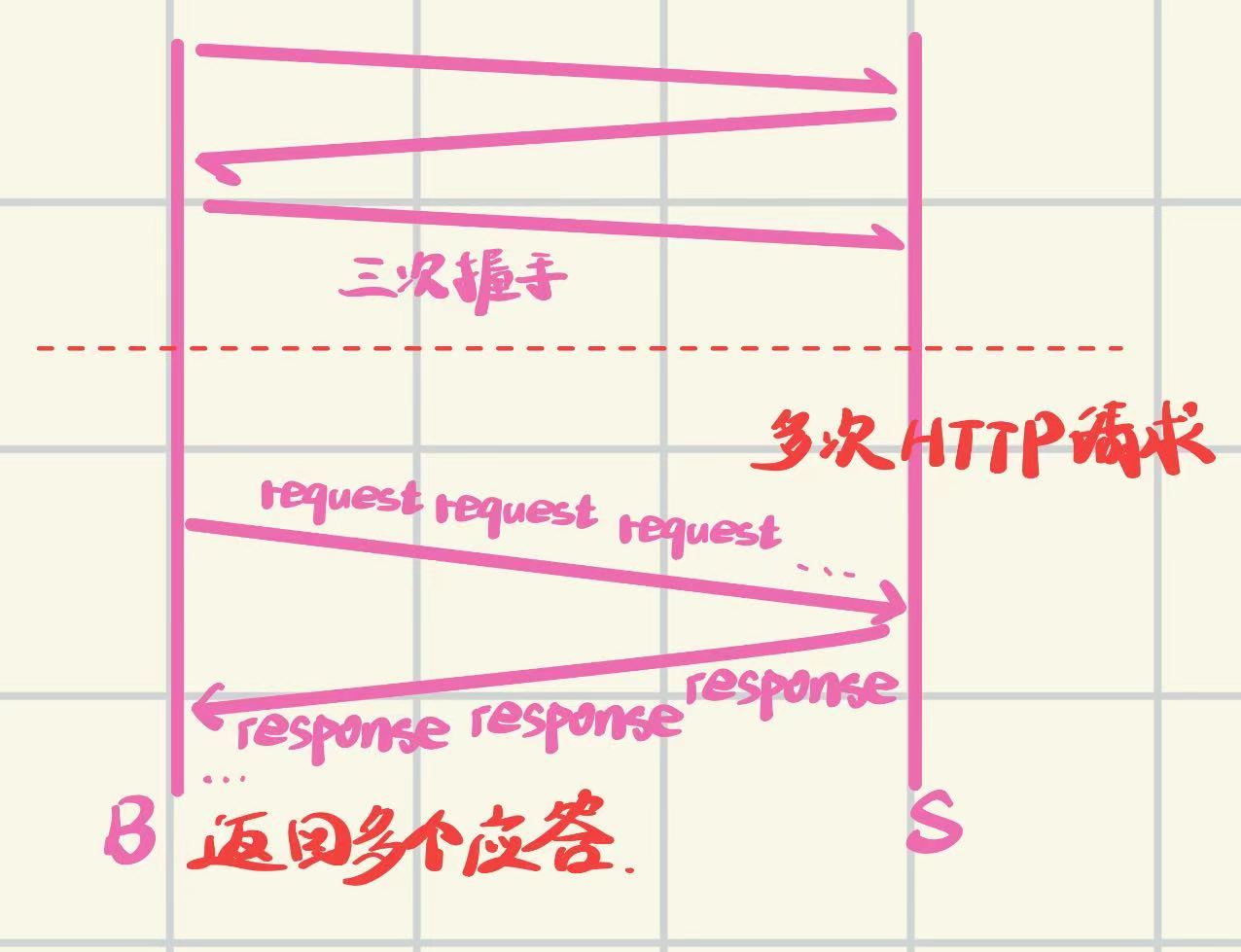
- 无连接:TCP保持长连接,HTTP不需维护连接,一次处理多组请求和响应
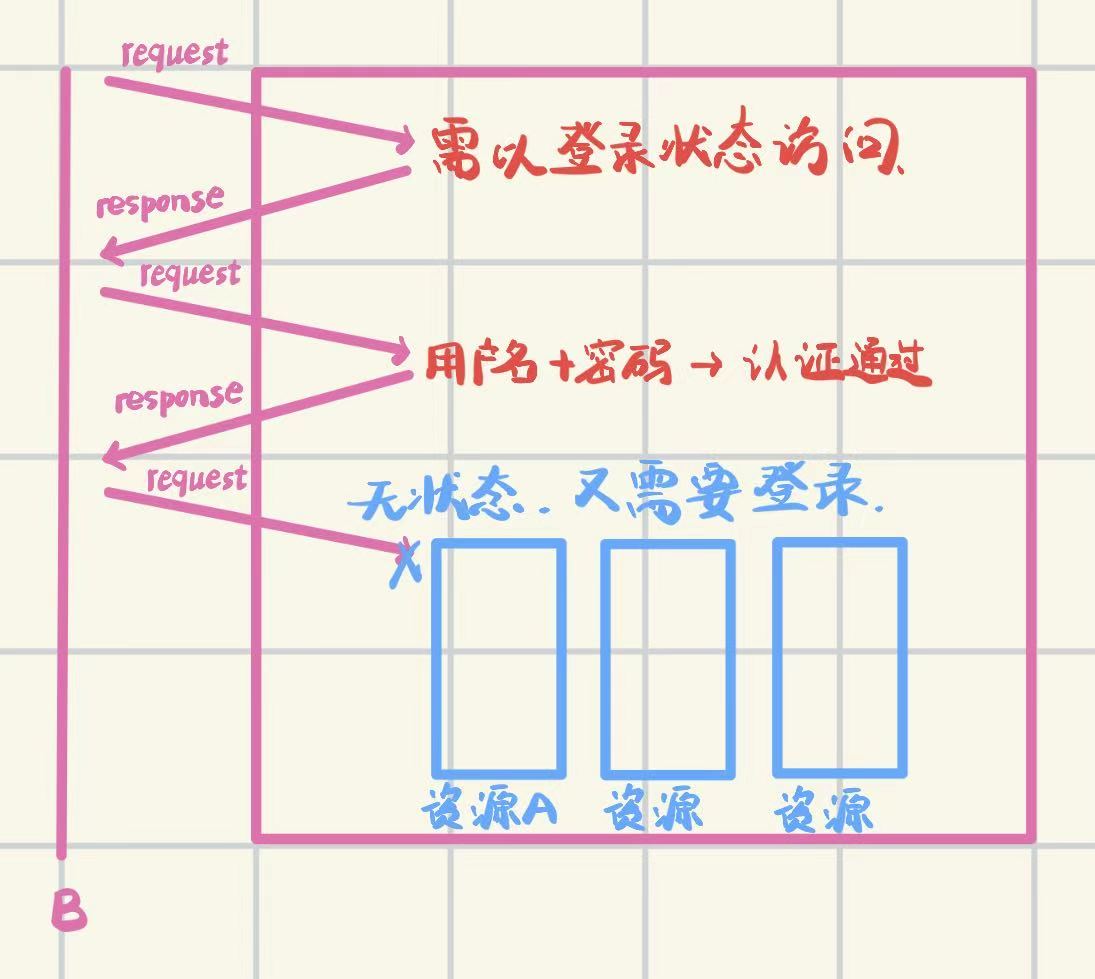
- 无状态:服务器不会保存客户端的状态信息,通过Cookie与Session解决
1.2.URL网址
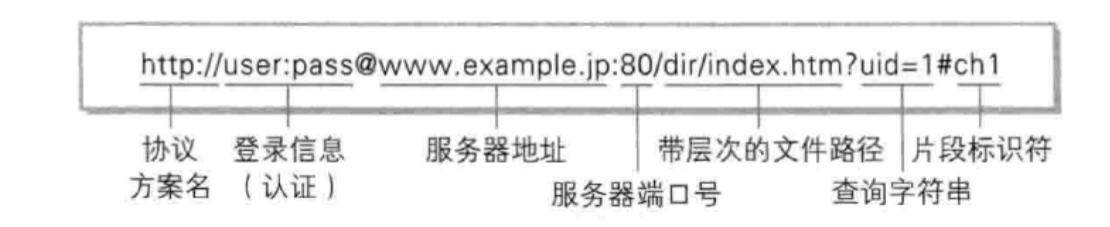
URL(Uniform Resource Locator):统一资源定位符
静态网站:
https://blog.csdn.net/yonakaame/article/details/163593389?spm=1011.2124.3001.6209
https:获取资源采用的协议
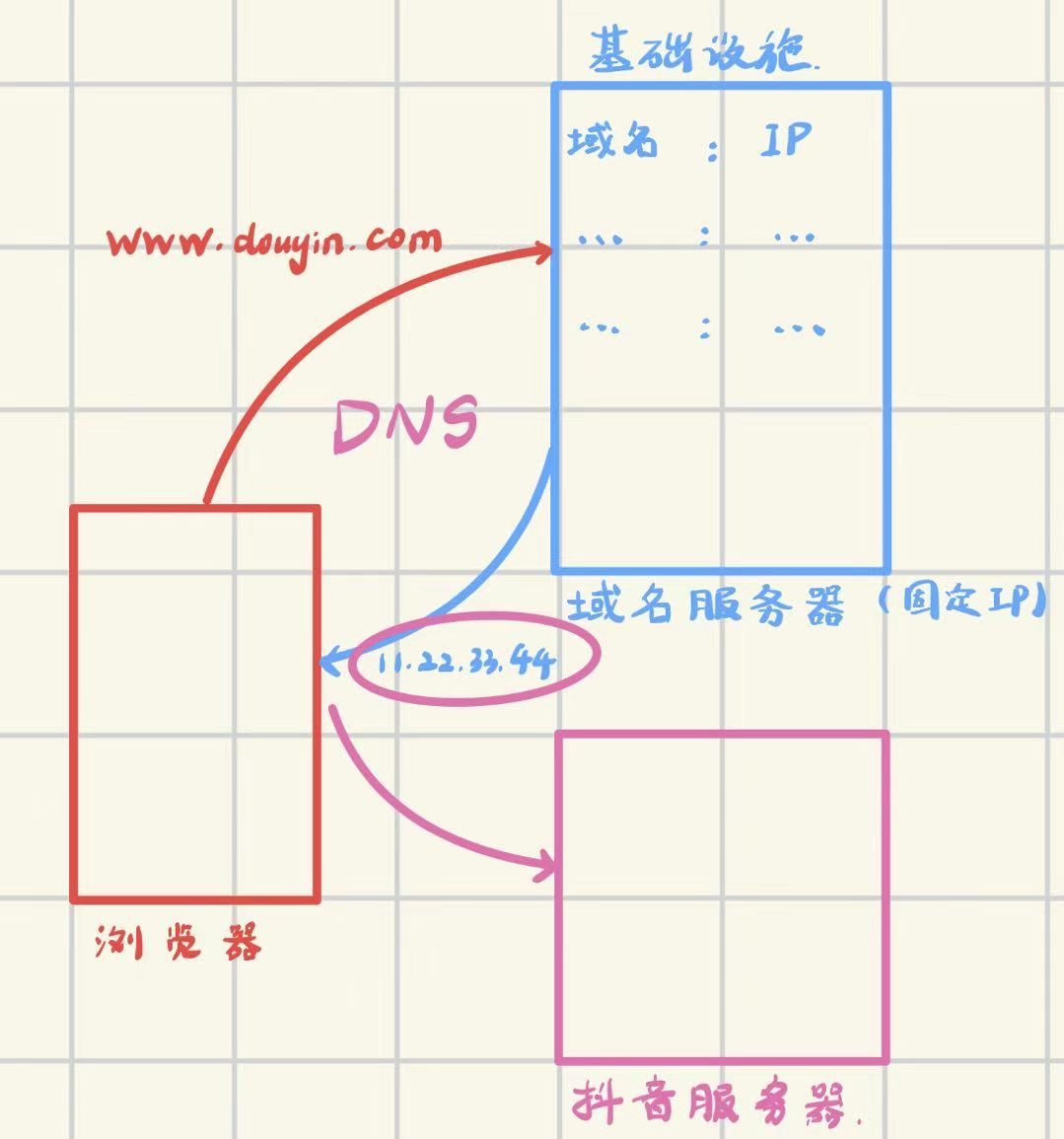
blog.csdn.net:域名(DNS解析出IP地址)
yonakaame/article/details/163593389:要访问的资源路径
?spm=1011.2124.3001.6209:query查询参数
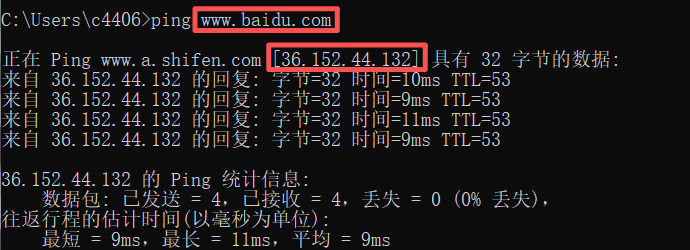
IP地址:指明目标公司的主机
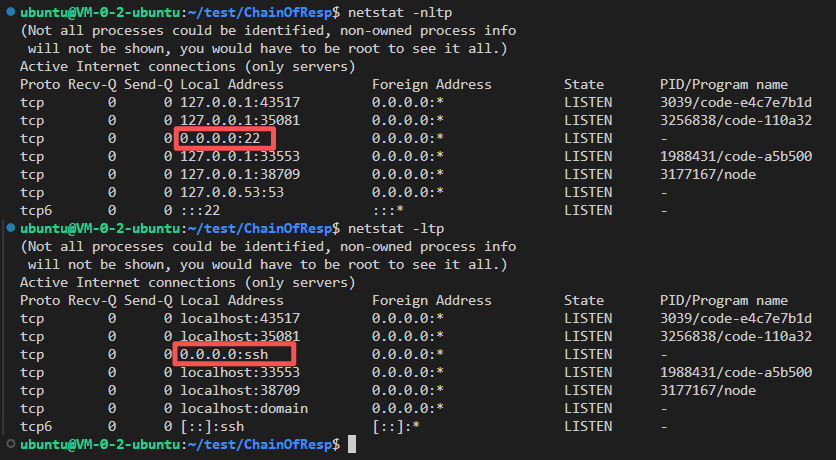
端口号:指明主机服务器程序
成熟的协议,端口号是固定的
- HTTPS:443
- HTTP:80
- SSH:22
网络I/O的理解:
- 将远端数据拿到本地(短视频、视频、网页、图片、音频)
- 将本地数据上传远端
网络资源的理解:
没有获取时,以文件的形式保存在Linux主机的特定路径下
- http[s]:端口号
- 域名:IP地址
- 路径:目标主机上特定路径的一个文件(全网内唯一的文件)
动态交互式网站:

- https://www.baidu.com/s?
- wd=hello%20%3A%2F%2F%40%20world&
- rsv_spt=1&
- rsv_iqid=0xb1745845002e6817&
- issp=1&
- f=8&
- rsv_bp=1&
- rsv_idx=2&
- ie=utf-8&
- tn=baiduhome_pg&
- rsv_enter=1&
- rsv_dl=tb_click&
- rsv_t=9e31gEsWRi2ZHQdos0V4j9i%2BYXf7sMbsp4yKUaGFzLChfGlzPl0jLyN7sPMssQgR&
- rsv_sug3=1&
- rsv_sug1=21&
- rsv_sug7=100&
- rsv_btype=i&
- prefixsug=hello%2520%253A%252F%252F%2540%2520world&
- rsp=0&
- inputT=15077&
- rsv_sug4=15077
wd:输入的关键词(// : @这些字符具有特殊用途,直接在URL中出现会解析失败)
URLEncode与URLDecode:
如果参数中具有特殊用途的字符,需要对它进行转义,编码规则如下
%XY:将字符转为16进制,从右到左取4位,每2位做1位,前面加%

B/S模式:
客户端(一般指浏览器Browser)自动编码,服务器自动解码
二、HTTP协议请求与响应格式
2.1.HTTP请求
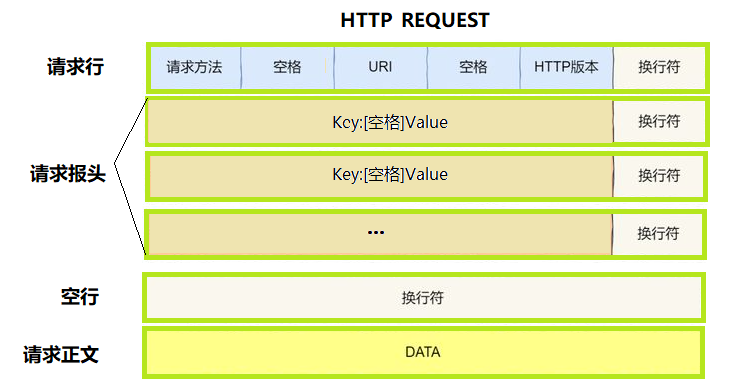
HTTP协议:结构化的信息
网页的内容必须是在服务器特定路径下的文件
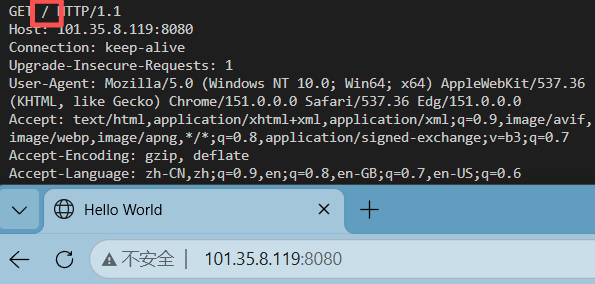
- /:web的根目录(wwwroot),不是Linux主机上的根目录
- URI:请求的资源的路径
- 资源路径:wwwroot + URI(./wwwroot/a/b/c.html)
HTTP请求的本质:
请求web根目录下的特定路径下的资源
浏览器请求的时候,以首页作为站点入口,一个网站就是一颗多叉树
用户点击对应的链接后,浏览器会形成新的访问地址,发起二次请求
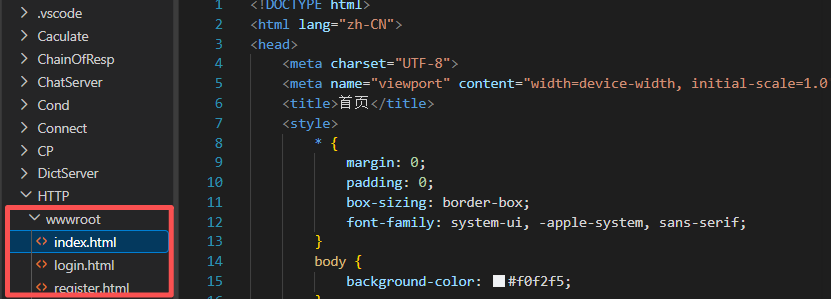
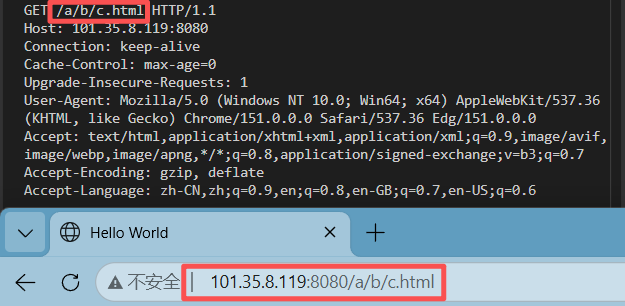
服务器会自动拼接首页(index.html):
HTTP请求的特点:
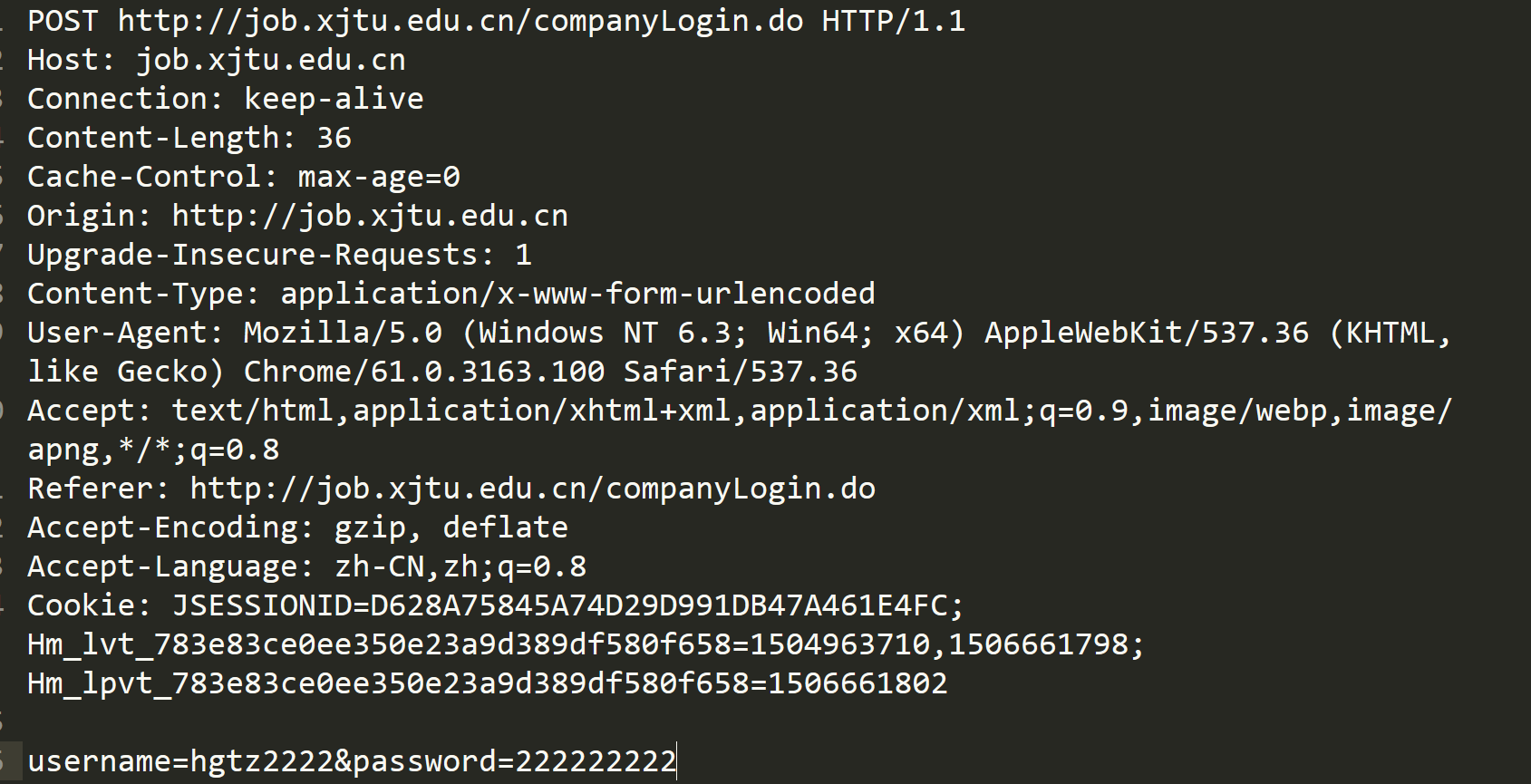
- 以空行为分隔符实现报头与有效载荷的分离
- 采用特殊字符来进行区域的区分
- 序列化和反序列化不依赖任何第三方库,用的是特殊字符进行子串拼接
客户端与服务器保证报文完整性:
- Step1:读取字节流,分析读到的字节流,确认是否存在空行
- Step2:提取Content-Length,获取正文长度,读取或截取指定长度的内容
2.2.HTTP响应
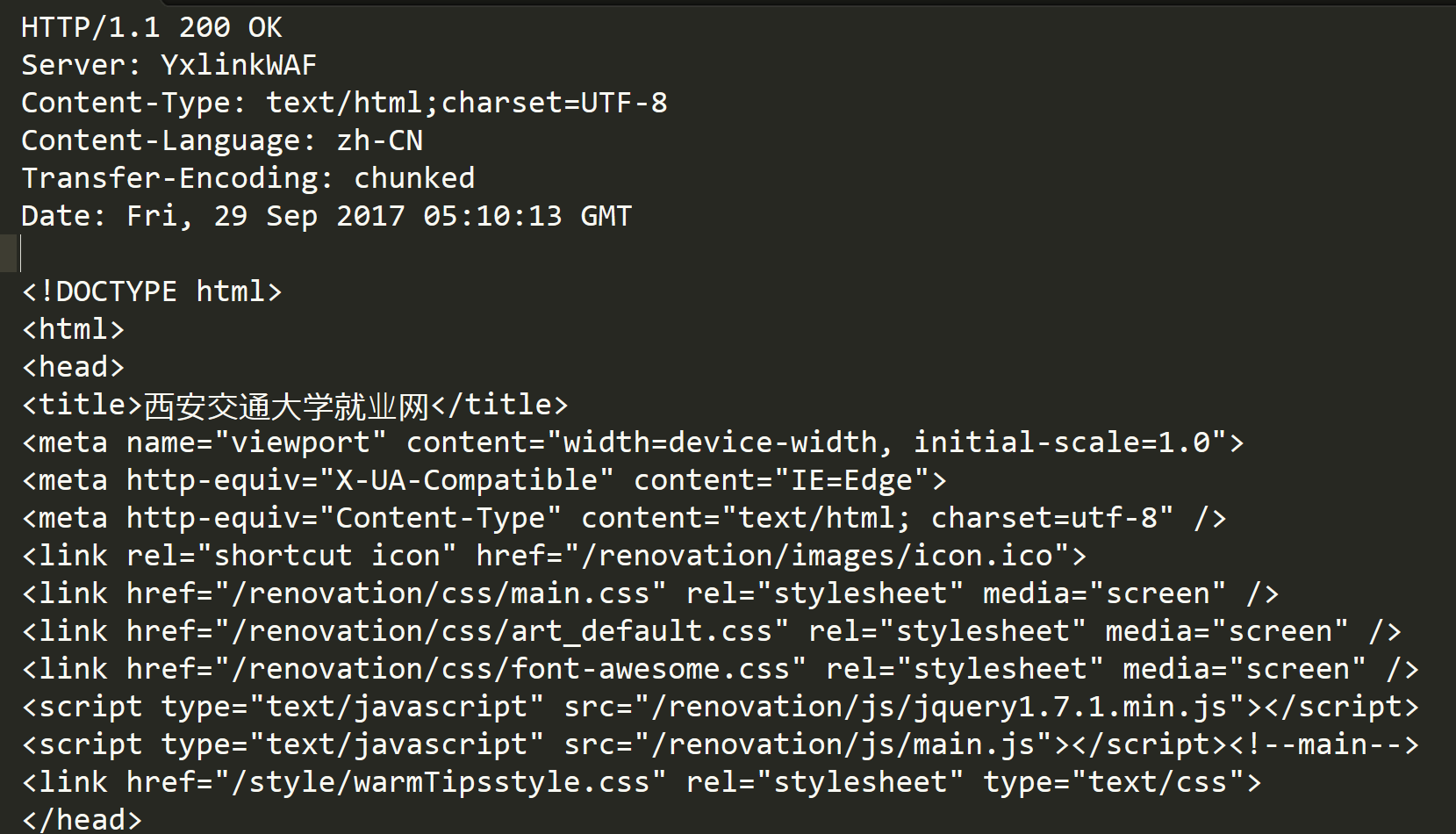
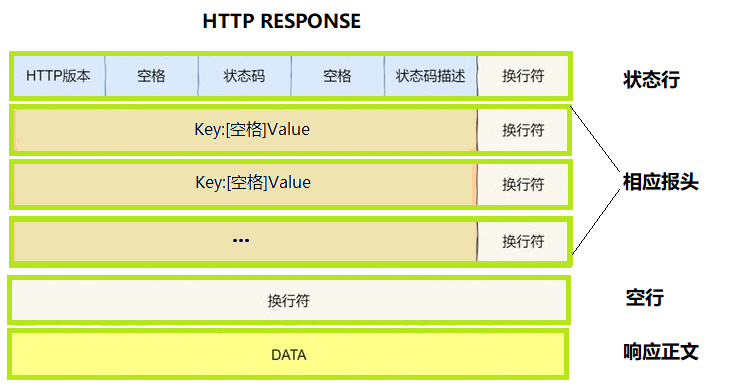
三、HTTP常见方法
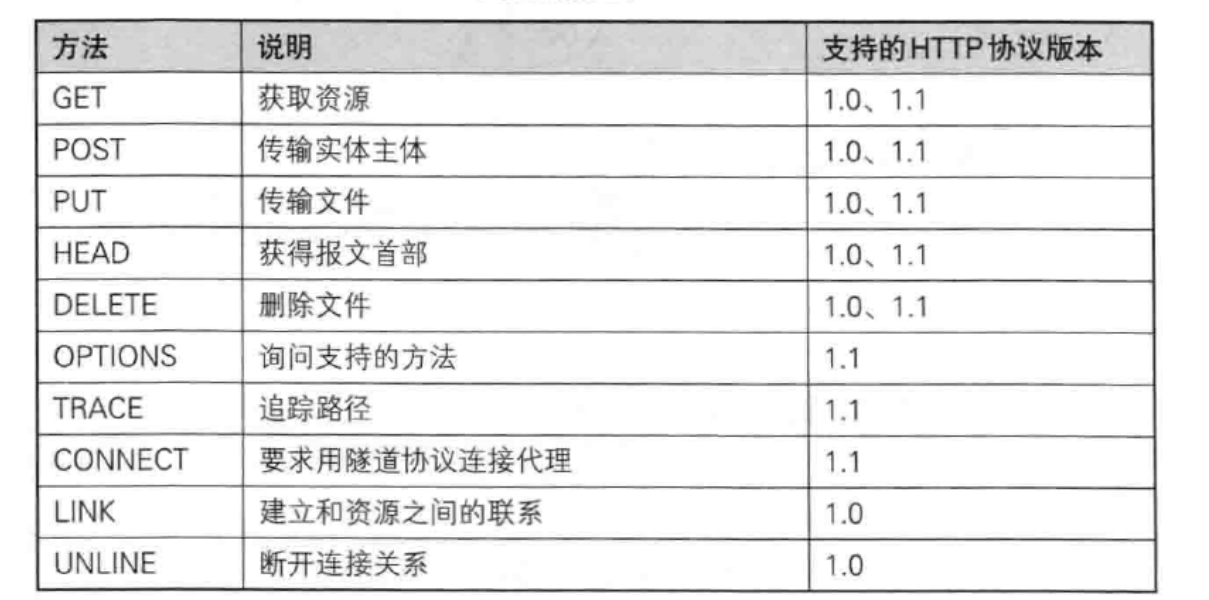
3.1.GET方法
功能:请求URL指定的资源(也可以上传资源,静态资源:图片、视频、音频、网页)
示例:GET /index.html HTTP/1.1
特点:指定资源通过服务器解析后返回响应内容

3.2.POST方法
功能:提交表单数据(用户向远端提交参数,通过请求正文上传资源)
示例:POST /submit.cgi HTTP/1.1
特点:数据包含在请求体中
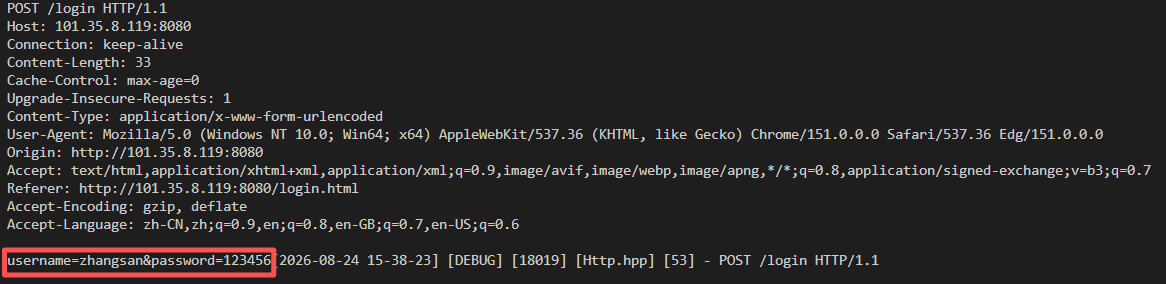
3.3.GET VS POST
GET提交参数不建议过长,因为URI长度有限
POST正文传参,可以传递长数据
GET会回显参数
POST不会回显,更加私密
注:两者都为明文传送,安全性低,可以抓取
要做到真正的安全,必须要把报文进行加密(HTTPS)
3.4.PUT方法(不常用)
功能:传输文件,将请求报文主体(有效载荷)的文件保存到请求URL指定的位置
示例:PUT /exmaple.html HTTP/1.1
特点:不常用,在RESTful API中用于更新资源
3.5.HEAD方法(不常用)
功能:不返回报文主体,只返回响应报头
示例:HEAD /index.html HTTP/1.1
特点:用于确认URL有效性和资源更新的日期
3.6.DELETE方法(不常用)
功能:删除文件
示例:DELETE /example.html HTTP/1.1
特点:按请求URL删除指定的资源
3.7.OPTION方法(不常用)
功能:用于查询针对请求URL指定的资源支持的方法
示例:OPTION * HTTP/1.1
特点:返回允许的方法,如GET,POST等
四、HTTP状态码
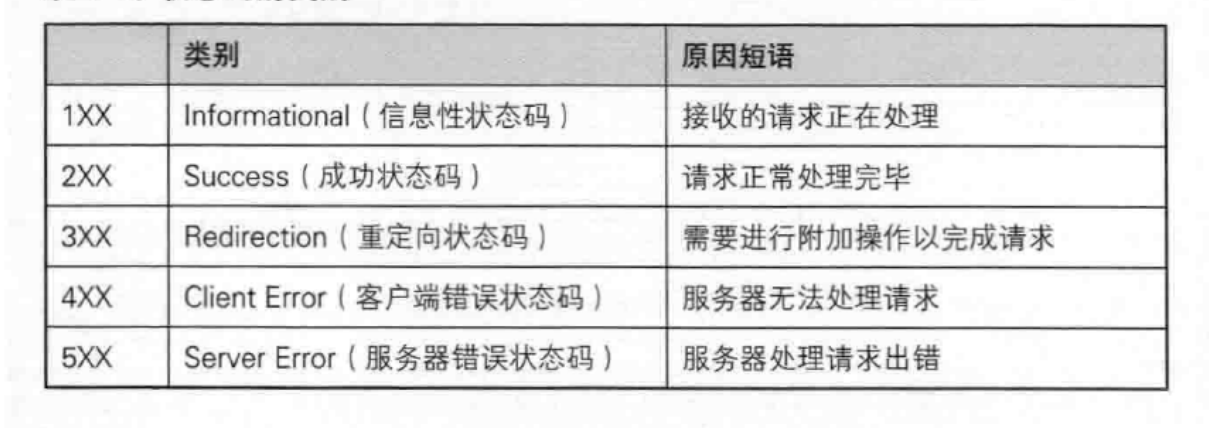
常见的状态码:
- 200:OK
- 404:Not Found
- 302:Redirect重定向
- 504:Bad Gateway
| 状态码 | 含义 | 应用样例 |
| 100 | Continue | 上传大文件,服务器告诉客户端可以继续上传 |
| 200 | OK | 访问网站时,服务器返回网页内容 |
| 201 | Created | 发布新文章,服务器返回文章创建成功的信息 |
| 204 | No Content | 删除旧文章,服务器返回无内容表示操作成功 |
| 301 | Moved Permanently | 网站换域名,自动跳转到新域名 |
| 302 | Found | 用户登录成功,重定向到用户首页 |
| 304 | Not Modified | 浏览器缓存机制,对未缓存的资源返回状态码 |
| 400 | Bad Request | 填写表单时,格式不正确导致提交失败 |
| 401 | Unauthorized | 访问需要登录的页面时,未登录或认证失败 |
| 403 | Forbidden | 尝试访问没有权限查看的页面 |
| 404 | Not Found | 访问不存在的网页链接 |
| 500 | Internal Server Error | 服务器崩溃,数据库出错导致页面无法加载 |
| 502 | Bad Gateway | 用代理服务器时,代理服务器无法从上游服务器获取有效响应 |
| 503 | Service Unavailable | 服务器维护,服务器过载,暂时无法处理请求 |
五、HTTP常见Header
5.1.connection报头
一张网页内,可能会有多种资源,在浏览器获得网页后
识别网页还有其他的资源时,会向服务器发起二次请求
- Content-Type:数据类型(表示有效载荷的类型)
- Content-Length:正文长度(表示正文部分的字节数)
- Connection:keep-alive(支持长连接),close(短连接)
- Host:客户端告诉服务器,所请求的资源在哪个主机的哪个端口
- User-Agent:客户端的信息
- Accept:客户端要请求的资源
- Referer:当前页面是从哪个页面跳转过来的
- Location:告诉客户端接下来去哪里访问
六、重定向
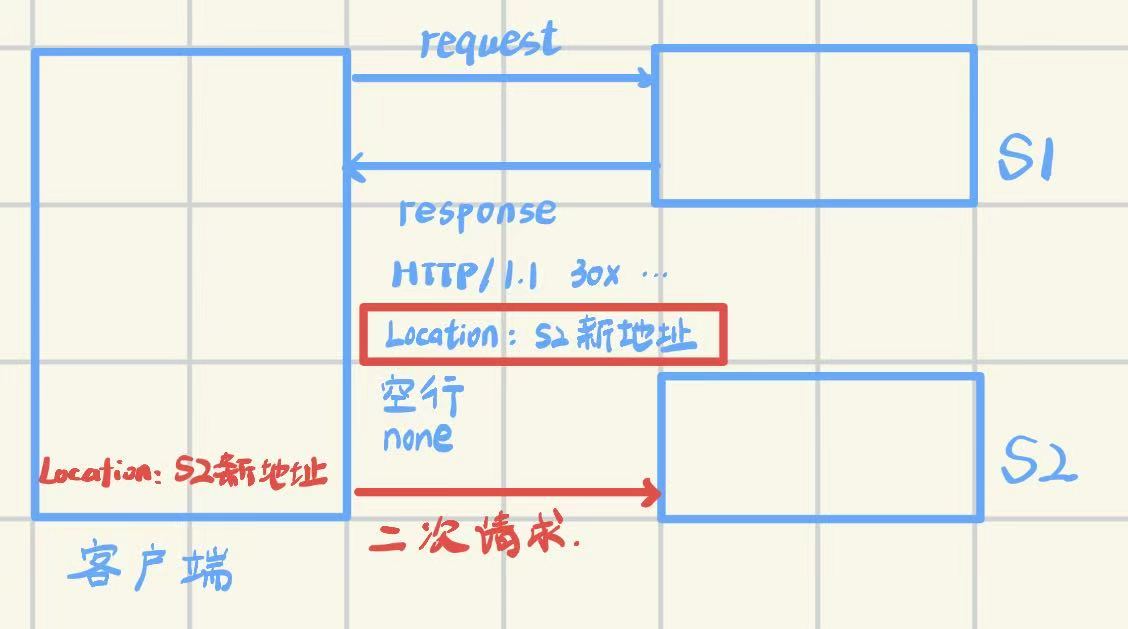
6.1.临时重定向
状态码:302(HTTP/1.0)或 307(HTTP/1.1)
含义:Found 或者 See Other
请求的资源暂时位于不同的URL,客户端继续使用原始URI请求
客户端不改变任何信息,适用于用户登录成功后页面跳转到用户首页
6.2.永久重定向
状态码:301(HTTP/1.0)或 308(HTTP/1.1)
含义:Moved Permanently
请求的资源永久移动到新的URL,客户端需要使用新的URI请求
适用于网站域名变更,自动跳转新域名,搜索引擎更新网站链接时使用
七、Connection长连接
7.1.短连接
HTTP/1.0版本,网络资源比较少,一条连接处理一个请求,为短服务

7.2.长连接
HTTP/1.1版本,一条连接就可以交互多个请求,为长服务
网络版本计算器本身就是一个长连接的服务
将接收到的一个或多个报文进行解析后处理
八、Cookie与Session
会话管理与会话保持
8.1.Cookie
文件级Cookie:不会随着浏览器或者电脑的关闭而释放
内存级Cookie:随着浏览器关闭,自动释放Cookie资源

Cookie存在安全性问题,为一定程度解决安全问题,需要Session
8.2.Session
服务器端对Session进行管理,需要先描述再组织

用户的私密信息不会被泄漏,在服务端进行保存
但是黑客依旧能够截取session_id进行盗号访问
公司可以通过IP溯源、地址变更、异常账号检测进行辅助保护
九、简易HTTP服务器
9.1.HTTP协议
- Http.hpp
#pragma once
#include "Socket.hpp"
#include "TcpServer.hpp"
#include "Util.hpp"
#include "Log.hpp"
#include <iostream>
#include <string>
#include <memory>
#include <unordered_map>
#include <sstream>
#include <functional>
using namespace SocketModule;
using namespace LogModule;
const std::string gspace = " "; // 空格
const std::string glinespace = "\\r\\n"; // 换行
const std::string glinesep = ": "; // :[空格]
const std::string webroot = "./wwwroot"; // web根目录
const std::string homepage = "/index.html"; // 首页
const std::string page_404 = "/404.html"; // 404页面
// HTTP 请求
// 浏览器 → 服务器
class HttpRequest
{
public:
HttpRequest()
: _is_interact(false)
{
}
std::string Serialize()
{
return std::string();
}
void ParseReqLine(std::string &reqline)
{
// GET / HTTP/1.1
std::stringstream ss(reqline);
ss >> _method >> _uri >> _version;
}
bool Deserialize(std::string &reqstr)
{
std::cout << reqstr;
// 提取请求行
std::string reqline;
bool res = Util::ReadOneLine(reqstr, &reqline, glinespace);
LOG(LogLevel::DEBUG) << reqline;
// 打印剩下的信息
std::cout << "\\n";
std::cout << reqstr;
// 反序列化
ParseReqLine(reqline);
if (_uri == "/")
{
// ./wwwroot/index.html
_uri = webroot + _uri + homepage;
}
else
{
// ./wwwroot/a/b/c.html
_uri = webroot + _uri;
}
// _uri: ./wwwroot/login?username=zhangsan&password=123456
// if(_method == "POST")
// {
// _is_interact = true;
// while(true)
// {
// Util::ReadOneLine(reqstr, &reqline, glinespace);
// if(reqline != glinespace)
// {
// // 获得了request header
// // 得到请求报头
// // Content-Length
// }
// else
// {
// break;
// }
// Util::ReadOneLine(reqstr, &reqline, glinespace); // 正文数据
// }
// }
LOG(LogLevel::DEBUG) << "_method: " << _method;
LOG(LogLevel::DEBUG) << "_uri: " << _uri;
LOG(LogLevel::DEBUG) << "_version: " << _version;
// 处理交互请求
const std::string temp = "?";
auto pos = _uri.find(temp);
if (pos == std::string::npos)
{
return true;
}
_args = _uri.substr(pos + temp.size());
_uri = _uri.substr(0, pos);
_is_interact = true;
return true;
}
std::string Uri()
{
return _uri;
}
bool isInteract()
{
return _is_interact;
}
std::string Args()
{
return _args;
}
~HttpRequest()
{
}
private:
std::string _method; // 请求方法
std::string _uri; // URI
std::string _version; // HTTP版本
std::unordered_map<std::string, std::string> _headers; // 请求报头
std::string _blankline; // 空行
std::string _text; // 请求正文
std::string _args; // 参数
bool _is_interact; // 是否交互
};
// HTTP 响应
// 服务器 → 浏览器
class HttpResponse
{
public:
HttpResponse()
: _blankline(glinespace), _version("HTTP/1.0")
{
}
// 序列化
std::string Serialize()
{
// 状态行
std::string status_line = _version + gspace + std::to_string(_code) + gspace + _desc + glinespace;
// 响应报头
std::string resp_header;
for (auto &header : _headers)
{
std::string line = header.first + glinesep + header.second + glinespace;
resp_header += line;
}
// 状态行 + 响应报头 + 空行 + 响应正文
return status_line + resp_header + _blankline + _text;
}
// 设置浏览器请求的目标文件
void SetTargetFile(const std::string &target)
{
_targetfile = target;
}
// 设置状态码
void SetCode(int code)
{
_code = code;
switch (_code)
{
case 200:
_desc = "OK";
break;
case 404:
_desc = "Not Found";
break;
case 301:
_desc = "Moved Permanently";
break;
case 302:
_desc = "See other";
break;
default:
break;
}
}
void SetText(const std::string &t)
{
_text = t;
}
// 设置响应报头
void SetHeader(const std::string &key, const std::string &value)
{
auto iter = _headers.find(key);
if (iter != _headers.end())
{
return;
}
_headers.insert(std::make_pair(key, value));
}
// Content-Type对照表
std::string Uri2Suffix(const std::string &_targetfile)
{
// ./wwwroot/a/b/c.html → html
auto pos = _targetfile.rfind(".");
if (pos == std::string::npos)
{
return "text/html";
}
std::string suffix = _targetfile.substr(pos);
if (suffix == ".html" || suffix == ".htm")
{
return "text/html";
}
else if (suffix == ".jpg")
{
return "image/jpeg";
}
else if (suffix == ".png")
{
return "image/png";
}
else
{
// …
return " ";
}
}
// 服务器生成响应资源
bool MakeResponse()
{
if (_targetfile == "./wwwroot/favicon.ico")
{
LOG(LogLevel::DEBUG) << "用户请求: " << _targetfile << "忽略";
return false;
}
if (_targetfile == "./wwwroot/redir_test")
{
SetCode(301);
SetHeader("Location", "https://www.qq.com/");
return true;
}
int filesize = 0;
bool res = Util::ReadFileContent(_targetfile, &_text);
if (!res)
{
_text = "";
LOG(LogLevel::WARNING) << "client want get : " << _targetfile << " but not found";
SetCode(404);
_targetfile = webroot + page_404;
filesize = Util::FileSize(_targetfile);
Util::ReadFileContent(_targetfile, &_text);
std::string suffix = Uri2Suffix(_targetfile);
SetHeader("Content-Type", suffix);
SetHeader("Content-Length", std::to_string(filesize));
// SetCode(302);
// SetHeader("Location", "http://101.35.8.119:8080/404.html");
// return true
}
else
{
LOG(LogLevel::DEBUG) << "读取文件: " << _targetfile;
SetCode(200);
filesize = Util::FileSize(_targetfile);
std::string suffix = Uri2Suffix(_targetfile);
SetHeader("Content-Type", suffix);
SetHeader("Content-Length", std::to_string(filesize));
SetHeader("Set-Cookie", "username=zhangsan");
}
return true;
}
// 反序列化
bool Deserialize(std::string &reqstr)
{
return true;
}
~HttpResponse()
{
}
public:
// private:
std::string _version; // HTTP版本
int _code; // 状态码(404)
std::string _desc; // 状态码描述("Not Found")
std::unordered_map<std::string, std::string> _headers; // 响应报头
std::string _blankline; // 空行
std::string _text; // 响应正文
std::string _targetfile; // 浏览器申请的目标文件资源
};
using http_func_t = std::function<void(HttpRequest &req, HttpResponse &resp)>;
class Http
{
public:
Http(uint16_t port)
: _tsvrp(std::make_unique<TcpServer>(port))
{
}
void HandlerHttpRequest(std::shared_ptr<Socket> &sock, InetAddr &client)
{
std::string httpreqstr;
// 服务器接收浏览器请求
int n = sock->Recv(&httpreqstr);
if (n > 0)
{
// 缺少对报文完整性审核
// 对浏览器请求反序列化
HttpRequest req;
HttpResponse resp;
req.Deserialize(httpreqstr);
// 如果需要交互
if (req.isInteract())
{
// _uri: ./wwwroot/login
if (_route.find(req.Uri()) == _route.end())
{
// SetCode(302);
}
else
{
// 调用交互服务
// 参数1: 获取请求参数
// 参数2: 发送应答文本
_route[req.Uri()](req, resp);
// 将响应的内容进行序列化
std::string response_str = resp.Serialize();
// 向浏览器发送响应内容
sock->Send(response_str);
}
}
else
{
// 获取浏览器请求的URL
resp.SetTargetFile(req.Uri());
// 获取特定路径下的文件资源
if (resp.MakeResponse())
{
// 将响应的内容进行序列化
std::string response_str = resp.Serialize();
// 向浏览器发送响应内容
sock->Send(response_str);
}
}
// HttpResponse resp;
// resp._version = "HTTP/1.1";
// resp._code = 200;
// resp._desc = "OK";
// LOG(LogLevel::DEBUG) << "用户请求: " << filename;
// bool res = Util::ReadFileContent(filename, &(resp._text));
// (void)res;
// std::string response_str = resp.Serialize();
// sock->Send(response_str);
}
#ifdef DEBUG
std::string httpreqstr;
// 服务器接收浏览器请求
sock->Recv(&httpreqstr);
std::cout << httpreqstr;
// 服务器给浏览器发应答
HttpResponse resp;
resp._version = "HTTP/1.1";
resp._code = 200;
resp._desc = "OK";
// "./wwwroot/index.html"
std::string filename = webroot + homepage;
bool res = Util::ReadFileContent(filename, &(resp._text));
(void)res;
std::string response_str = resp.Serialize();
sock->Send(response_str);
#endif
}
void Start()
{
_tsvrp->Start(
[this](std::shared_ptr<Socket> &sock, InetAddr &client)
{
this->HandlerHttpRequest(sock, client);
});
}
// 注册服务
void RegisterService(const std::string name, http_func_t h)
{
std::string key = webroot + name; // ./wwwroot/login
auto iter = _route.find(key);
if (iter == _route.end())
{
_route.insert(std::make_pair(key, h));
}
}
~Http()
{
}
private:
std::unique_ptr<TcpServer> _tsvrp;
std::unordered_map<std::string, http_func_t> _route;
};
9.2.TCP通信
#include "Socket.hpp"
#include <iostream>
#include <memory>
#include <sys/wait.h>
#include <functional>
using namespace SocketModule;
using namespace LogModule;
// IO服务
using ioservice_t = std::function<void(std::shared_ptr<Socket> &sock, InetAddr &client)>;
// TCP服务器: 实现连接, 不需要关心传递的数据
class TcpServer
{
public:
TcpServer(uint16_t port)
: _port(port), _listensockptr(std::make_unique<TcpSocket>()), _isrunning(false)
{
_listensockptr->BuildListenSocketMethod(_port);
}
void Start(ioservice_t callback)
{
_isrunning = true;
while (_isrunning)
{
InetAddr client;
auto sock = _listensockptr->Accept(&client);
if (sock == nullptr)
{
continue;
}
LOG(LogLevel::DEBUG) << "accept success…" << client.StringAddr();
// 多进程实现
pid_t id = fork();
if (id < 0)
{
LOG(LogLevel::FATAL) << "fork error…";
exit(FORK_ERR);
}
else if (id == 0)
{
// 子进程
// 关闭listensockfd
_listensockptr->Close();
if (fork() > 0)
{
exit(0);
}
// 孙子进程
callback(sock, client); // 执行IO服务
sock->Close();
exit(OK);
}
else
{
// 父进程
// 关闭sockfd
sock->Close();
pid_t rid = ::waitpid(id, nullptr, 0);
(void)rid;
}
}
_isrunning = false;
}
~TcpServer()
{
}
private:
uint16_t _port;
std::unique_ptr<Socket> _listensockptr;
bool _isrunning;
};
9.3.Socket封装
- socket.hpp
#pragma once
#include <iostream>
#include <string>
#include <unistd.h>
#include <sys/socket.h>
#include <sys/types.h>
#include <netinet/in.h>
#include <arpa/inet.h>
#include <cstdlib>
#include "Log.hpp"
#include "Common.hpp"
#include "InetAddr.hpp"
namespace SocketModule
{
using namespace LogModule;
const static int gbacklog = 16;
// 设计模式: 模板方法模式
// 基类socket
// 大部分方法为纯虚方法
class Socket
{
public:
virtual ~Socket() {} // 析构函数
virtual void SocketOrDie() = 0; // 创建套接字
virtual void BindOrDie(uint16_t port) = 0; // 绑定IP和端口号
virtual void ListenOrDie(int backlog) = 0; // 监听
virtual std::shared_ptr<Socket> Accept(InetAddr *client) = 0; // 获取
virtual void Close() = 0; // 关闭
virtual int Recv(std::string *out) = 0; // 读取
virtual int Send(const std::string &message) = 0; // 写入
virtual int Connect(const std::string &server_ip, uint16_t port) = 0; // 连接
public:
void BuildListenSocketMethod(uint16_t port, int backlog = gbacklog)
{
SocketOrDie();
BindOrDie(port);
ListenOrDie(backlog);
}
void BuildTcpClientSocketMethod()
{
SocketOrDie();
}
};
const static int defaultfd = -1;
class TcpSocket : public Socket
{
public:
TcpSocket()
: _sockfd(defaultfd)
{
}
TcpSocket(int fd)
: _sockfd(fd)
{
}
void SocketOrDie() override
{
_sockfd = ::socket(AF_INET, SOCK_STREAM, 0);
if (_sockfd < 0)
{
LOG(LogLevel::FATAL) << "socket error";
exit(SOCKET_ERR);
}
LOG(LogLevel::INFO) << "socket success";
}
void BindOrDie(uint16_t port) override
{
InetAddr localaddr(port);
int n = ::bind(_sockfd, localaddr.NetAddrPtr(), localaddr.NetAddrLen());
if (n < 0)
{
LOG(LogLevel::FATAL) << "bind error";
exit(BIND_ERR);
}
LOG(LogLevel::INFO) << "bind success";
}
void ListenOrDie(int backlog) override
{
int n = ::listen(_sockfd, backlog);
if (n < 0)
{
LOG(LogLevel::FATAL) << "listen error";
exit(LISTEN_ERR);
}
LOG(LogLevel::INFO) << "listen success";
}
std::shared_ptr<Socket> Accept(InetAddr *client) override
{
struct sockaddr_in peer;
socklen_t len = sizeof(peer);
int fd = ::accept(_sockfd, CONV(peer), &len);
if (fd < 0)
{
LOG(LogLevel::WARNING) << "accept warning…";
return nullptr;
}
client->SetAddr(peer);
// return fd;
return std::make_shared<TcpSocket>(fd);
}
void Close() override
{
if (_sockfd >= 0)
{
::close(_sockfd);
}
}
int Recv(std::string *out) override
{
// 流式读取(不用关心读到的是什么)
char buffer[4096];
ssize_t n = ::recv(_sockfd, buffer, sizeof(buffer) – 1, 0);
if (n > 0)
{
buffer[n] = 0;
*out += buffer;
}
return n;
}
int Send(const std::string &message) override
{
return ::send(_sockfd, message.c_str(), message.size(), 0);
}
int Connect(const std::string &server_ip, uint16_t port) override
{
InetAddr server(server_ip, port);
return ::connect(_sockfd, server.NetAddrPtr(), server.NetAddrLen());
}
~TcpSocket()
{
}
private:
int _sockfd;
};
};
9.4.Mutex封装
#pragma once
#include <iostream>
#include <pthread.h>
namespace MutexModule
{
class Mutex
{
public:
Mutex()
{
pthread_mutex_init(&_mutex, nullptr);
}
void Lock()
{
int n = pthread_mutex_lock(&_mutex);
(void)n;
}
void unLock()
{
int n = pthread_mutex_unlock(&_mutex);
(void)n;
}
~Mutex()
{
pthread_mutex_destroy(&_mutex);
}
pthread_mutex_t *Get()
{
return &_mutex;
}
private:
pthread_mutex_t _mutex;
};
class LockGuard
{
public:
LockGuard(Mutex &mutex)
:_mutex(mutex)
{
_mutex.Lock();
}
~LockGuard()
{
_mutex.unLock();
}
private:
Mutex &_mutex;
};
};
9.5.Log封装
#ifndef __LOG_HPP__
#define __LOG_HPP__
#include <iostream>
#include <string>
#include <filesystem> // C++17中 文件操作的相关封装
#include <fstream>
#include "Mutex.hpp"
#include <memory>
#include <unistd.h>
#include <sstream>
#include <ctime>
#include <cstdio>
namespace LogModule
{
using namespace MutexModule;
const std::string gsep = "\\r\\n";
// 2. 刷新策略(策略模式: C++多态)
// 策略基类
class LogStrategy
{
public:
~LogStrategy() = default;
virtual void SyncLog(const std::string &message) = 0;
};
// 策略a: 显示器打印
class ConsoleLogStrategy : public LogStrategy
{
public:
ConsoleLogStrategy()
{
}
void SyncLog(const std::string &message) override
{
// 加锁
LockGuard lockguard(_mutex);
// 打印日志
std::cout << message << gsep;
}
~ConsoleLogStrategy()
{
}
private:
Mutex _mutex;
};
// 缺省参数
const std::string defaultpath = "/var/log/";
const std::string defaultfile = "my.log";
// 策略b: 指定文件写入
class FileLogStrategy : public LogStrategy
{
public:
FileLogStrategy(const std::string &path = defaultpath, const std::string &file = defaultfile)
: _path(path), _file(file)
{
// 加锁
LockGuard lockguard(_mutex);
// 如果当前路径存在
if (std::filesystem::exists(_path))
{
return;
}
// 如果当前路径不存在
try
{
std::filesystem::create_directories(_path);
}
catch (const std::filesystem::filesystem_error &e)
{
std::cerr << e.what() << "\\n";
}
}
void SyncLog(const std::string &message) override
{
// 加锁
LockGuard lockguard(_mutex);
// "./log" + "/" + "my.log"
std::string filename = _path + (_path.back() == '/' ? "" : "/") + _file;
// 以追加的方式打开文件
std::ofstream out(filename, std::ios::app);
if (!out.is_open())
{
return;
}
// 写入日志
out << message << gsep;
// 关闭文件
out.close();
}
~FileLogStrategy()
{
}
private:
std::string _path; // 日志文件所在路径
std::string _file; // 日志文件名称
Mutex _mutex; // 互斥锁
};
// 形成完整日志 && 根据策略选择不同刷新方式
// 1. 形成日志等级
enum class LogLevel
{
DEBUG,
INFO,
WARNING,
ERROR,
FATAL
};
std::string LeveltoStr(LogLevel level)
{
switch (level)
{
case LogLevel::DEBUG:
return "DEBUG";
case LogLevel::INFO:
return "INFO";
case LogLevel::WARNING:
return "WARNING";
case LogLevel::ERROR:
return "ERROR";
case LogLevel::FATAL:
return "FATAL";
default:
return "UNKNOW";
}
}
// 2. 获取时间方法
std::string GetTimeStamp()
{
time_t curr = time(nullptr);
struct tm curr_tm;
localtime_r(&curr, &curr_tm);
char timebuffer[128];
snprintf(timebuffer, sizeof(timebuffer), "%4d-%02d-%02d %02d-%02d-%02d",
curr_tm.tm_year + 1900, curr_tm.tm_mon + 1, curr_tm.tm_mday,
curr_tm.tm_hour, curr_tm.tm_min, curr_tm.tm_sec);
return timebuffer;
}
// 日志类
class Logger
{
public:
Logger()
{
// 默认使用显示器
EnableConsoleLogStrategy();
}
void EnableFileLogStrategy()
{
_fflush_strategy = std::make_unique<FileLogStrategy>();
}
void EnableConsoleLogStrategy()
{
_fflush_strategy = std::make_unique<ConsoleLogStrategy>();
}
// 内部类: 表示未来的一条日志
class LogMessage
{
public:
LogMessage(LogLevel &level, std::string &src_name, int line_number, Logger &logger)
: _curr_time(GetTimeStamp()), _level(level), _pid(getpid()), _src_name(src_name), _line_number(line_number), _logger(logger)
{
// 日志左半部分
std::stringstream ss;
ss << "[" << _curr_time << "] "
<< "[" << LeveltoStr(_level) << "] "
<< "[" << _pid << "] "
<< "[" << _src_name << "] "
<< "[" << _line_number << "] "
<< "- ";
_loginfo = ss.str();
}
template <typename T>
LogMessage &operator<<(const T &info)
{
// 日志右半部分
std::stringstream ss;
ss << info;
_loginfo += ss.str();
return *this;
}
~LogMessage()
{
if (_logger._fflush_strategy)
{
_logger._fflush_strategy->SyncLog(_loginfo);
}
}
private:
std::string _curr_time; // 时间
LogLevel _level; // 等级
pid_t _pid; // 进程PID
std::string _src_name; // 文件名
int _line_number; // 行号
std::string _loginfo; // 一条完整的日志信息
Logger &_logger;
};
LogMessage operator()(LogLevel level, std::string name, int line)
{
return LogMessage(level, name, line, *this);
}
~Logger()
{
}
private:
std::unique_ptr<LogStrategy> _fflush_strategy;
};
// 全局日志对象
Logger logger;
// 使用宏简化用户操作, 获取文件名和行号
#define LOG(level) logger(level, __FILE__, __LINE__)
#define Enable_Console_Log_Strategy() logger.EnableConsoleLogStrategy()
#define Enbale_File_Log_Strategy() logger.EnableFileLogStrategy()
};
#endif
9.6.InetAddr封装
#pragma once
#include <iostream>
#include <string>
#include <cstring>
#include <sys/types.h>
#include <sys/socket.h>
#include <netinet/in.h>
#include <arpa/inet.h>
#include "Common.hpp"
// 网络地址 <=> 主机地址
class InetAddr
{
public:
InetAddr()
{
}
InetAddr(struct sockaddr_in &addr)
{
SetAddr(addr);
}
InetAddr(const std::string &ip, uint16_t port)
: _ip(ip), _port(port)
{
memset(&_addr, 0, sizeof(_addr));
_addr.sin_family = AF_INET;
// 主机序列 → 网络序列(端口号)
_addr.sin_port = htons(_port);
// 点分十进制 → 网络序列(IP地址)
inet_pton(AF_INET, _ip.c_str(), &_addr.sin_addr);
}
InetAddr(uint16_t port)
: _port(port), _ip("0")
{
memset(&_addr, 0, sizeof(_addr));
_addr.sin_family = AF_INET;
_addr.sin_port = htons(_port);
_addr.sin_addr.s_addr = INADDR_ANY;
}
void SetAddr(struct sockaddr_in &addr)
{
_addr = addr;
// 网络序列 → 主机序列(端口号)
_port = ntohs(_addr.sin_port);
// 网络序列 → 点分十进制(IP地址)
char ipbuffer[64];
inet_ntop(AF_INET, &_addr.sin_addr, ipbuffer, sizeof(_addr));
_ip = ipbuffer;
}
uint16_t Port()
{
return _port;
}
std::string Ip()
{
return _ip;
}
const struct sockaddr_in &NetAddr()
{
return _addr;
}
const struct sockaddr *NetAddrPtr()
{
return CONV(_addr);
}
socklen_t NetAddrLen()
{
return sizeof(_addr);
}
bool operator==(const InetAddr &addr)
{
return addr._ip == _ip && addr._port == _port;
}
std::string StringAddr()
{
return _ip + " : " + std::to_string(_port);
}
~InetAddr()
{
}
private:
struct sockaddr_in _addr;
std::string _ip;
uint16_t _port;
};
9.7.Common封装
#pragma once
#include <iostream>
#include <unistd.h>
#include <string>
#include <cstring>
#include <sys/types.h>
#include <sys/socket.h>
#include <netinet/in.h>
#include <arpa/inet.h>
enum ExitCode
{
OK = 0,
USAGE_ERR,
SOCKET_ERR,
BIND_ERR,
LISTEN_ERR,
CONNECT_ERR,
FORK_ERR,
OPEN_ERR,
};
// 禁止拷贝
class NoCopy
{
public:
NoCopy()
{
}
~NoCopy()
{
}
NoCopy(const NoCopy &) = delete;
const NoCopy &operator=(const NoCopy &) = delete;
};
#define CONV(addr) ((struct sockaddr *)&addr)
9.8.Util封装
#pragma once
#include <iostream>
#include <fstream>
#include <string>
class Util
{
public:
// 默认以文本方式读取
// 但是图片是二进制的
// static bool ReadFileContent(const std::string &filename, std::string *out)
// {
// std::ifstream in(filename);
// if (!in.is_open())
// {
// return false;
// }
// std::string line;
// while (std::getline(in, line)) // getline会吃掉\\n
// {
// *out += line;
// }
// in.close();
// return true;
// }
// 以二进制方式读取
static bool ReadFileContent(const std::string &filename, std::string *out)
{
int filesize = FileSize(filename);
if(filesize > 0)
{
std::ifstream in(filename, std::ios::binary);
if(!in.is_open())
{
return false;
}
out->resize(filesize);
in.read((char *)(out->c_str()), filesize);
in.close();
}
else
{
return false;
}
return true;
}
static bool ReadOneLine(std::string &bigstr, std::string *out, const std::string &sep)
{
auto pos = bigstr.find(sep);
if (pos == std::string::npos)
{
return false;
}
*out = bigstr.substr(0, pos);
bigstr.erase(0, pos + sep.size());
return true;
}
static int FileSize(const std::string &filename)
{
// 以二进制方式打开文件
std::ifstream in(filename, std::ios::binary);
if(!in.is_open())
{
return -1;
}
// 将pos位移到文件结尾
in.seekg(0, in.end);
// 获取当前的读写位置(相当于文件大小)
int filesize = in.tellg();
// 将pos位移到文件开始
in.seekg(0, in.beg);
in.close();
return filesize;
}
};
9.9.Main函数代码
#include "Http.hpp"
///////////////////////// RESTful风格的网络接口 /////////////////////////
void Login(HttpRequest &req, HttpResponse &resp)
{
LOG(LogLevel::DEBUG) << req.Args() << ", 我们成功进入到处理数据的逻辑";
std::string text = "hello: " + req.Args();
resp.SetCode(200);
resp.SetHeader("Content-Type", "text/plain");
resp.SetHeader("Content-Length", std::to_string(text.size()));
resp.SetText(text);
}
int main(int argc, char *argv[])
{
if (argc != 2)
{
std::cout << "Usage: " << argv[0] << " port" << std::endl;
exit(USAGE_ERR);
}
uint16_t port = std::stoi(argv[1]);
std::unique_ptr<Http> httpsvr = std::make_unique<Http>(port);
httpsvr->RegisterService("/login", Login);
httpsvr->Start();
return 0;
}
9.10.Makefile
myhttp:Main.cc
g++ -o $@ $^ -std=c++17
.PHONY:clean
clean:
rm -rf myhttp
9.11.wwwroot文件目录

- index.html
<!DOCTYPE html>
<html lang="zh-CN">
<head>
<meta charset="UTF-8">
<meta name="viewport" content="width=device-width, initial-scale=1.0">
<title>首页</title>
<style>
* {
margin: 0;
padding: 0;
box-sizing: border-box;
font-family: system-ui, -apple-system, sans-serif;
}
body {
background-color: #f0f2f5;
}
/* 导航栏 */
.navbar {
background-color: #ffffff;
box-shadow: 0 1px 4px rgba(0,0,0,0.08);
padding: 0 40px;
height: 64px;
display: flex;
align-items: center;
justify-content: space-between;
}
.logo {
font-size: 22px;
font-weight: 600;
color: #1f2329;
}
.nav-links a {
margin-left: 24px;
text-decoration: none;
color:#4e5969;
font-size:15px;
}
.nav-links a:hover{
color:#4080ff;
}
/* 主内容 */
.home-container {
min-height: calc(100vh – 64px);
display:flex;
flex-direction:column;
justify-content:center;
align-items:center;
padding:20px;
}
.home-title{
font-size:36px;
color:#1f2329;
margin-bottom:16px;
}
.home-desc{
font-size:16px;
color:#6b7785;
margin-bottom:32px;
}
.btn-group{
display:flex;
gap:16px;
}
/* a标签伪装成按钮样式 */
.btn{
width:120px;
height:44px;
line-height:44px;
text-align:center;
border-radius:8px;
font-size:15px;
text-decoration:none;
}
.btn-primary{
background-color:#4080ff;
color:#fff;
}
.btn-primary:hover{
background-color:#2b6ed9;
}
.btn-outline{
background-color:#fff;
color:#4080ff;
border:1px solid #4080ff;
}
.btn-outline:hover{
background-color:#f0f7ff;
}
</style>
</head>
<body>
<nav class="navbar">
<div class="logo">我的系统</div>
<div class="nav-links">
<a href="./index.html">首页</a>
<a href="./login.html">登录</a>
<a href="./register.html">注册</a>
</div>
</nav>
<div class="home-container">
<h1 class="home-title">欢迎来到系统首页</h1>
<p class="home-desc">请登录账号以体验完整功能</p>
<div class="btn-group">
<a href="/image/1.png">图片1</a>
<a href="./login.html" class="btn btn-primary">去登录</a>
<a href="./register.html" class="btn btn-outline">去注册</a>
<img src="/image/1.png" />
</div>
</div>
</body>
</html>
- 404.html
<!DOCTYPE html>
<html lang="zh-CN">
<head>
<meta charset="UTF-8">
<meta name="viewport" content="width=device-width, initial-scale=1.0">
<title>404 – 页面未找到</title>
<style>
* {
margin: 0;
padding: 0;
box-sizing: border-box;
font-family: system-ui, -apple-system, sans-serif;
}
body {
background-color: #f0f2f5;
display: flex;
flex-direction: column;
justify-content: center;
align-items: center;
min-height: 100vh;
}
.wrap{
text-align: center;
}
h1 {
font-size: 80px;
color:#4080ff;
margin-bottom:12px;
}
p {
font-size:18px;
color:#6b7785;
margin-bottom:30px;
}
a {
display: inline-block;
padding:12px 28px;
background-color:#4080ff;
color:#fff;
text-decoration:none;
border-radius:8px;
}
a:hover{
background-color:#2b6ed9;
}
</style>
</head>
<body>
<div class="wrap">
<h1>404</h1>
<p>你访问的资源不存在</p>
<a href="/">返回首页</a>
</div>
</body>
</html>
- login.html
<!DOCTYPE html>
<html lang="zh-CN">
<head>
<meta charset="UTF-8">
<meta name="viewport" content="width=device-width, initial-scale=1.0">
<title>登录页面</title>
<style>
* {
margin: 0;
padding: 0;
box-sizing: border-box;
font-family: system-ui, -apple-system, sans-serif;
}
body {
background-color: #f0f2f5;
display: flex;
justify-content: center;
align-items: center;
min-height: 100vh;
}
.login-container {
background: #ffffff;
width: 400px;
padding: 40px 32px;
border-radius: 12px;
box-shadow: 0 2px 12px rgba(0,0,0,0.1);
}
.login-title {
text-align: center;
font-size: 26px;
color: #1f2329;
margin-bottom: 32px;
}
.form-item {
margin-bottom: 20px;
}
.form-item label {
display: block;
font-size: 14px;
color: #4e5969;
margin-bottom: 6px;
}
.form-item input {
width: 100%;
height: 44px;
padding: 0 14px;
border: 1px solid #dcdfe6;
border-radius: 8px;
font-size: 15px;
transition: border-color 0.2s;
}
.form-item input:focus {
outline: none;
border-color: #4080ff;
}
.login-btn {
width: 100%;
height: 46px;
background-color: #4080ff;
color: #fff;
border: none;
border-radius: 8px;
font-size: 16px;
cursor: pointer;
margin-top: 8px;
}
.login-btn:hover {
background-color: #2b6ed9;
}
.tip-row {
display: flex;
justify-content: space-between;
margin-top: 16px;
font-size: 13px;
}
.tip-row a {
color: #4080ff;
text-decoration: none;
}
</style>
</head>
<body>
<div class="login-container">
<h2 class="login-title">账号登录</h2>
<form id="loginForm" action="/login" method="POST">
<div class="form-item">
<label>账号</label>
<input type="text" id="username" name="username" placeholder="请输入账号">
</div>
<div class="form-item">
<label>密码</label>
<input type="password" id="password" name="password" placeholder="请输入密码">
</div>
<button class="login-btn" type="submit">登录</button>
<div class="tip-row">
<a href="#">忘记密码</a>
<a href="#">注册账号</a>
</div>
</form>
</div>
<script>
const form = document.getElementById('loginForm');
form.addEventListener('submit', e => {
// e.preventDefault();
const username = document.getElementById('username').value.trim();
const password = document.getElementById('password').value.trim();
if (!username || !password) {
alert('账号和密码不能为空');
return;
}
console.log('登录提交', { username, password });
alert('登录请求已触发');
});
</script>
</body>
</html>
- register.html
<!DOCTYPE html>
<html lang="zh-CN">
<head>
<meta charset="UTF-8">
<meta name="viewport" content="width=device-width, initial-scale=1.0">
<title>注册页面</title>
<style>
* {
margin: 0;
padding: 0;
box-sizing: border-box;
font-family: system-ui, -apple-system, sans-serif;
}
body {
background-color: #f0f2f5;
display: flex;
justify-content: center;
align-items: center;
min-height: 100vh;
}
.register-container {
background: #ffffff;
width: 400px;
padding: 40px 32px;
border-radius: 12px;
box-shadow: 0 2px 12px rgba(0, 0, 0, 0.1);
}
.register-title {
text-align: center;
font-size: 26px;
color: #1f2329;
margin-bottom: 32px;
}
.form-item {
margin-bottom: 20px;
}
.form-item label {
display: block;
font-size: 14px;
color: #4e5969;
margin-bottom: 6px;
}
.form-item input {
width: 100%;
height: 44px;
padding: 0 14px;
border: 1px solid #dcdfe6;
border-radius: 8px;
font-size: 15px;
transition: border-color 0.2s;
}
.form-item input:focus {
outline: none;
border-color: #4080ff;
}
.register-btn {
width: 100%;
height: 46px;
background-color: #4080ff;
color: #fff;
border: none;
border-radius: 8px;
font-size: 16px;
cursor: pointer;
margin-top: 8px;
}
.register-btn:hover {
background-color: #2b6ed9;
}
.tip-row {
display: flex;
justify-content: center;
margin-top: 16px;
font-size: 13px;
}
.tip-row a {
color: #4080ff;
text-decoration: none;
}
</style>
</head>
<body>
<div class="register-container">
<h2 class="register-title">账号注册</h2>
<form id="registerForm" action="/register" method="GET">
<div class="form-item">
<label>账号</label>
<input type="text" id="regUsername" name="username" placeholder="请设置账号">
</div>
<div class="form-item">
<label>密码</label>
<input type="password" id="regPwd" name="password" placeholder="请设置密码">
</div>
<div class="form-item">
<label>确认密码</label>
<input type="password" id="regPwd2" name="confirm_password" placeholder="请再次输入密码">
</div>
<div class="form-item">
<label>邮箱</label>
<input type="email" id="regEmail" name="email" placeholder="请输入邮箱">
</div>
<button class="register-btn" type="submit">注册</button>
<div class="tip-row">
<a href="#">已有账号?去登录</a>
</div>
</form>
</div>
<script>
const form = document.getElementById('registerForm');
form.addEventListener('submit', e => {
// e.preventDefault();
const username = document.getElementById('regUsername').value.trim();
const pwd = document.getElementById('regPwd').value.trim();
const pwd2 = document.getElementById('regPwd2').value.trim();
const email = document.getElementById('regEmail').value.trim();
if (!username || !pwd || !pwd2 || !email) {
e.preventDefault();
alert('所有项不能为空');
return;
}
if (pwd !== pwd2) {
e.preventDefault();
alert('两次输入密码不一致');
return;
}
console.log('注册提交', { username, pwd, email });
alert('注册请求已触发');
})
</script>
</body>
</html>