学习目标
说明 SELinux 如何保护资源,更改系统的当前 SELinux 模式,以及设置系统的默认 SELinux 模式。
描述SELinux架构
安全增强型Linux(SELinux)是Linux的一项重要安全功能。对文件、端口和其他资源的访问是在精细的级别上进行控制的。进程仅被允许访问其SELinux策略或布尔值设置指定的资源。
文件权限控制特定用户或组的文件访问权限。但是,文件权限不会阻止具有文件访问权限的授权用户将文件用于非预期用途。
例如,具有文件的写访问权限时,其他编辑器或程序仍然可以打开和修改仅供特定程序写入的结构化数据文件,这可能会导致损坏或数据安全问题。文件权限不会阻止此类不受欢迎的访问,因为它们不控制文件的使用方式,而仅控制谁可以读取、写入或运行文件。
SELinux由应用开发人员定义的若干应用相关策略组成,这些策略准确声明了对于应用使用的每个二进制可执行文件、配置文件和数据文件,哪些操作和访问权限是恰当且被允许的。此策略称为目标策略,因为一个策略定义了应用的活动。策略声明了各个程序、文件和网络端口上配置的预定义标签。
SELinux用法
SELinux强制执行一组访问规则,明确定义进程和资源之间允许的操作。任何未在访问规则中定义的操作均不被允许。由于仅允许定义的操作,安全性设计较差的应用仍然能够受到保护,免于被恶意使用。具有目标策略的应用或服务在受限域中运行,而没有策略的应用则不受限地运行,但没有任何SELinux保护。可以禁用个别目标策略,以协助应用和安全策略的开发和调试。
SELinux具有以下操作模式:
-
Enforcing:SELinux强制执行加载的策略。此模式是红帽企业Linux中的默认模式。
-
Permissive:SELinux加载策略并处于活动状态,但不强制执行访问控制规则,而是记录访问违规。此模式有助于对应用和规则进行测试和故障排除。
-
Disabled:SELinux已关闭。SELinux违规不会被拒绝或记录。强烈建议不要禁用SELinux。
# 编辑/etc/selinux/config 设置SELINUX=enforcing,然后重启系统,开启SELinux
[root@localhost ~]# vim /etc/selinux/config
/etc/selinux/config配置内容:
# This file controls the state of SELinux on the system.
# SELINUX= can take one of these three values:
# enforcing – SELinux security policy is enforced.
# permissive – SELinux prints warnings instead of enforcing.
#
# disabled – No SELinux policy is loaded.
#
SELINUX=enforcing
# SELINUXTYPE= can take one of three values:
# targeted – Targeted processes are protected,
#
# minimum – Modification of targeted policy. Only selected processes are
#
protected.
# mls – Multi Level Security protection.
SELINUXTYPE=targeted
[root@localhost ~]# reboot
# 关闭防火墙
[root@localhost ~]# systemctl disable firewalld –now
SELinux基本概念
SELinux的主要目标是保护用户数据,以防止被已遭泄露的应用或系统服务访问。大多数Linux管理员都熟悉标准的用户、组和全局文件权限安全模型,这被称为自主访问控制(DAC),因为管理员会根据需要设置文件权限。SELinux提供了一个额外的基于对象的安全层,它在粒度规则中定义,称为强制访问控制 (MAC),因为MAC策略适用于所有用户,无法通过自主配置设置来针对特定用户绕过这些策略。
例如,Web服务器的开放防火墙端口允许对Web客户端进行远程匿名访问。但是,访问该端口的恶意用户可能会试图通过现有的漏洞来破坏系统。如果示例漏洞破坏了apache用户和组的权限,则恶意用户可能会直接访问/var/www/html文档根目录内容、系统的/tmp和/var/tmp目录,或者其他可访问的文件和目录。
SELinux策略是安全规则,定义了特定进程如何访问相关的文件、目录和端口。每个资源实体(如文件、进程、目录或端口)都有一个标签,称为SELinux上下文。上下文标签与定义的SELinux策略规则匹配,以允许进程访问带有这些标签的资源。默认情况下,策略不允许任何访问,除非有显式规则授予了访问权限。如果未定义允许规则,则所有访问都被禁止。
SELinux标签具有user、role、type和 securitylevel字段。RHEL中默认启用的目标策略使用type上下文定义规则。类型上下文名称通常以_t结尾。
SELinux上下文示例:
unconfined_u:object_r:httpd_sys_content_t:s0 /var/www/html/file2
格式:SELinux User:Role:Type:Level 文件路径

策略访问规则概念
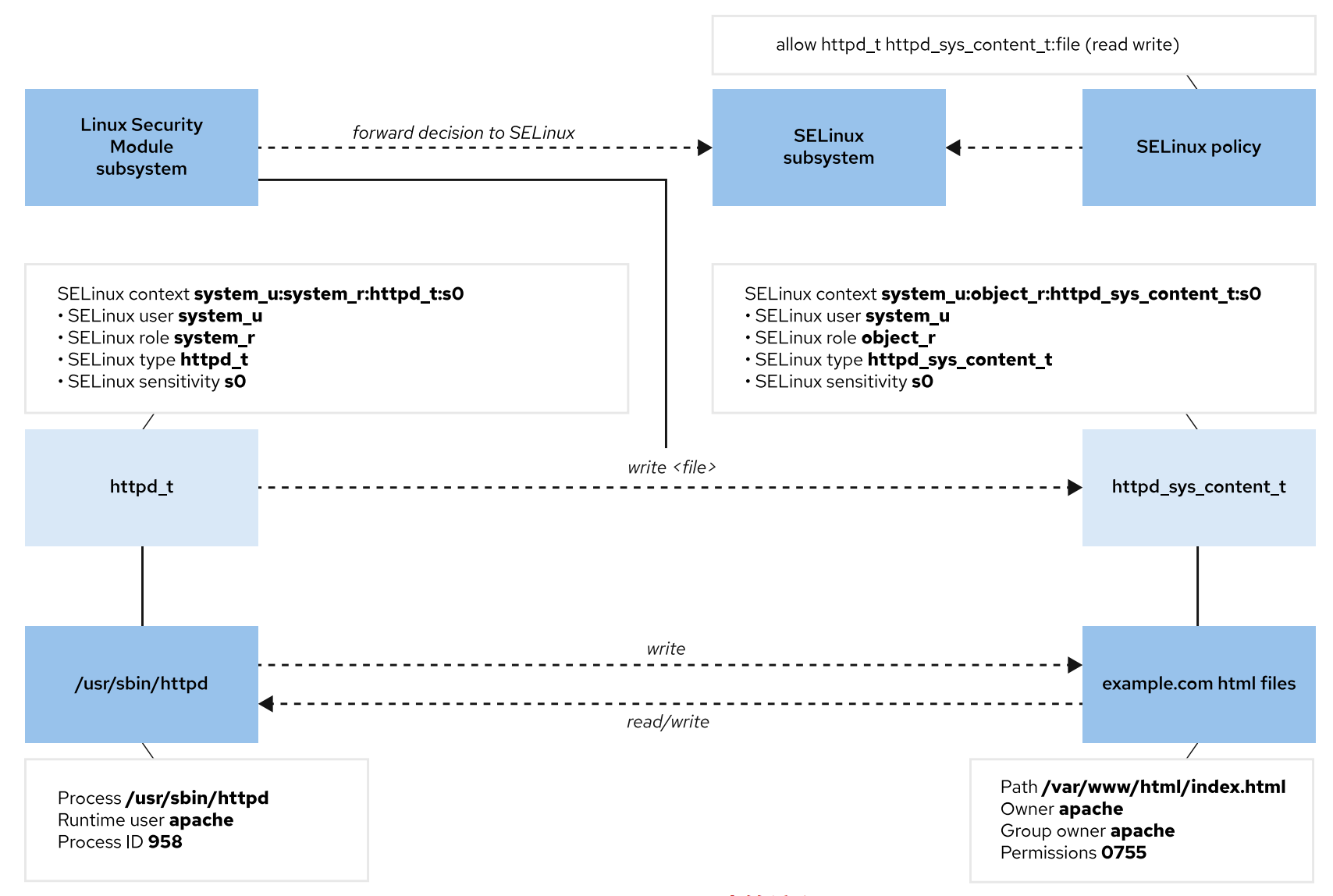
例如,Web服务器进程标有httpd_t类型的上下文。/var/www/html/目录和其他位置上的Web服务器文件和目录标有httpd_sys_content_t类型上下文。/tmp和/var/tmp目录中的临时文件具有tmp_t类型上下文作为标签。Web服务器的端口具有http_port_t类型上下文作为标签。
Apache Web服务器进程使用httpd_t类型上下文运行。策略规则允许Apache访问标记了httpd_sys_content_t类型上下文的文件和目录。默认情况下,/var/www/html目录中的文件具有 httpd_sys_content_t类型上下文。默认情况下,Web服务器策略没有使用标有tmp_t的文件的allow规则,例如在/tmp和/var/tmp目录中,因此不允许访问。在启用 SELinux的情况下,使用已失守Web服务器进程的恶意用户依然无法访问/tmp目录文件。
MariaDB服务器进程使用mysqld_t类型上下文运行。默认情况下,/data/mysql目录中的文件具有 mysqld_db_t类型上下文。MariaDB服务器可以访问标有mysqld_db_t的文件,但没有允许其他服务访问文件的规则,如标有httpd_sys_content_t的文件。
图:SELinux决策流程
许多列出资源的命令使用 -Z 选项来管理SELinux上下文。例如,ps、ls、cp和mkdir命令都使用-Z选项。
[root@localhost ~]# ps axZ
LABEL PID TTY STAT TIME COMMAND
system_u:system_r:init_t:s0 1
0:02
Ss
/usr/lib/systemd/systemd rhgb –switched-root –system –deserializ
0:00 [kthreadd]
system_u:system_r:kernel_t:s0 2
S
system_u:system_r:kernel_t:s0 3
0:00 [rcu_gp]
I<
system_u:system_r:kernel_t:s0 4 0:00 [rcu_par_gp]
I<
system_u:system_r:kernel_t:s0 5
0:00 [kworker/0:0-
I
cgroup_destroy]
0:00 [kworker/0:0H-
system_u:system_r:kernel_t:s0 6
I<
events_highpri]
system_u:system_r:kernel_t:s0 7
0:00 [kworker/0:1-
I
mpt_poll_0
[root@localhost ~]# yum install -y httpd
[root@localhost ~]# systemctl start httpd
[root@localhost ~]# ps -ZC httpd
LABEL PID TTY TIME CMD
system_u:system_r:httpd_t:s0 2749 00:00:00 httpd
system_u:system_r:httpd_t:s0 2750 00:00:00 httpd
system_u:system_r:httpd_t:s0 2751 00:00:00 httpd
system_u:system_r:httpd_t:s0 2752 00:00:00 httpd
system_u:system_r:httpd_t:s0 2753 00:00:00 httpd
system_u:system_r:httpd_t:s0 2754 00:00:00 httpd
[root@localhost ~]# ll -Z /var/www
drwxr-xr-x. root root system_u:object_r:httpd_sys_script_exec_t:s0 cgi-bin
drwxr-xr-x. root root system_u:object_r:httpd_sys_content_t:s0 html
更改SELinux模式
使用getenforce命令查看当前的SELinux模式。使用setenforce命令更改SELinux模式。
[root@localhost ~]# getenforce
Enforcing
[root@localhost ~]# setenforce
usage: setenforce [ Enforcing | Permissive | 1 | 0 ]
[root@localhost ~]# setenforce 0
[root@localhost ~]# getenforce
Permissive
[root@localhost ~]# setenforce Enforcing
[root@localhost ~]# getenforce
Enforcing
或者,使用内核参数在引导时设置SELinux模式。传递enforcing=0内核参数将系统引导至permissive模式,或传递enforcing=1来引导至enforcing模式。传递selinux=0内核参数禁用 SELinux,或传递 selinux=1来启用 SELinux。
红帽建议您在将SELinux模式从Permissive更改为Enforcing时重新启动服务器。重新启动可确保以 permissive模式启动的服务在下一次启动时受到限制。
设置默认SELinux模式
要持久配置SELinux,请使用/etc/selinux/config文件。在以下默认示例中,配置将SELinux设置为 enforcing模式。注释列出了其他有效值,如permissive和disabled模式。
[root@localhost ~]# vim /etc/selinux/config
# This file controls the state of SELinux on the system.
# SELINUX= can take one of these three values:
# enforcing – SELinux security policy is enforced.
# permissive – SELinux prints warnings instead of enforcing.
#
#
# disabled – No SELinux policy is loaded.
SELINUX=enforcing
# SELINUXTYPE= can take one of three values:
# targeted – Targeted processes are protected,
#
# minimum – Modification of targeted policy. Only selected processes are
protected.
# mls – Multi Level Security protection.
SELINUXTYPE=targeted
系统在启动时会读取此文件,并相应地配置SELinux。selinux=0|1和enforcing=0|1内核参数将覆盖此配置。
指导练习:更改SELinux强制模式
在本实验中,您将练习暂时性管理以及持久性管理SELinux模式。
成果:查看和设置当前的SELinux模式。
说明
1.将默认的 SELinux模式更改为 permissive。
1.1. 使用getenforce命令验证RHEL计算机上的当前SELinux模式。
[root@localhost ~]# getenforce
Enforcing
1.2.使用vim /etc/selinux/config命令来编辑配置文件。将SELINUX参数从enforcing更改为 permissive模式。
[root@localhost ~]# vim /etc/selinux/config
SELINUX=permissive
1.3. 使用grep命令,确认SELINUX参数显示了permissive模式。
[root@localhost ~]# grep '^SELINUX' /etc/selinux/config
SELINUX=permissive
SELINUXTYPE=targeted
[root@localhost ~]#
1.4. 使用getenforce命令,确认SELinux参数显示了enforcing模式。
[root@localhost ~]# getenforce
Enforcing
1.5. 使用setenforce命令,将SELINUX模式更改为 permissive模式并验证更改。
[root@localhost ~]# setenforce 0
[root@localhost ~]# getenforce
Permissive
2.在配置文件中,将默认的SELinux模式改回到enforcing模式。
2.1. 使用vim/etc/selinux/config命令来编辑配置文件。将 SELINUX参数从permissive更改为 enforcing模式。
[root@localhost ~]# vim /etc/selinux/config
SELINUX=enforcing
2.2. 使用grep命令,确认SELINUX参数在系统启动时设置enforcing模式。
[root@localhost ~]# grep '^SELINUX' /etc/selinux/config
SELINUX=enforcing
SELINUXTYPE=targeted
3.在命令行中将SELinux模式设置为enforcing。重新启动计算机并验证SELinux模式。
3.1.使用setenforce命令,当前的SELinux模式设置为enforcing模式。使用getenforce命令,确认 SELinux模式已设置为enforcing模式。
[root@localhost ~]# setenforce 1
[root@localhost ~]# getenforce
Enforcing
[root@localhost ~]#
3.2. 重新启动计算机以实施持久配置。
[root@localhost ~]# reboot
3.3. 登录计算机并验证 SELinux模式。
[root@localhost ~]# getenforce
Enforcing
控制SELinux文件上下文
学习目标
使用semanage fcontext命令管理确定文件和目录默认上下文的SELinux策略规则,并使用restorecon命令将SELinux策略定义的上下文应用到文件和目录。
初始SELinux上下文
所有资源(如进程、文件和端口)都标有SELinux上下文。SELinux在/etc/selinux/targeted/contexts/files/目录中维护基于文件的文件标签策略数据库。新文件在文件名与现有标签策略匹配时获得默认标签。
当新文件的名称与现有标签策略不匹配时,该文件将继承与父级目录相同的标签。使用标签继承时,所有文件在创建时始终都带有标签,无论文件是否存在显式策略。
在具有现有标签策略的默认位置创建文件时,或者存在针对自定义位置的策略时,新文件将使用正确的 SELinux上下文进行标记。但是,如果在没有现有标签策略的情况下在意外位置创建文件,则继承的标签可能不适合新文件的预期用途。
此外,将文件复制到新位置可能会导致该文件的SELinux上下文发生变化,新的上下文由新位置的标签策略决定,或者从父目录继承(如果不存在策略)。在复制期间可以保持文件的SELinux上下文,以保留为文件的原始位置确定的上下文标签。例如,在复制过程中,cp -p命令会尽可能保留所有文件属性,而cp -c命令则仅保留SELinux上下文。
注意
复制文件始终会创建新的文件索引节点,并且必须先设置该索引节点的属性,包括 SELinux上下文,如前文所述。
但是,如果移动发生在同一文件系统内,则移动文件通常不会创建新的索引节点,而是将现有索引节点的文件名移动到新位置。由于现有索引节点的属性不需要初始化, 因此使用mv移动的文件会保留其SELinux上下文,除非您使用-Z选项为文件设置了 新的上下文。
复制或移动文件后,请验证它是否具有适当的SELinux上下文,并根据需要进行正确 设置。
以下示例演示了此过程的工作方式。
在/tmp目录中创建两个文件。两个文件都获得user_tmp_t上下文类型。将第一个文件移动 到/var/www/html目录,再将第二个文件复制到这个目录。
移动的文件保留从原始/tmp目录标记的文件上下文。
复制的文件具有新的索引节点,并从目标/var/www/html目录继承SELinux上下文。
ls -Z命令显示文件的SELinux上下文。观察在/tmp目录中创建的文件的标签。
[root@localhost ~]# touch /tmp/file1 /tmp/file2
[root@localhost ~]# ls -1Z /tmp/file*
-rw-r–r–. root root unconfined_u:object_r:user_tmp_t:s0 /tmp/file1
-rw-r–r–. root root unconfined_u:object_r:user_tmp_t:s0 /tmp/file2
ls -Zd命令显示指定目录的SELinux上下文。注意/var/www/html目录的标签以及其中的文件。
[root@localhost ~]# ls -Zd /var/www/html/
drwxr-xr-x. root root system_u:object_r:httpd_sys_content_t:s0 /var/www/html/
将一个文件从/tmp目录移至/var/www/html目录。将另一个文件复制到同一目录中。注意每个文件生成 的标签。
[root@localhost ~]# mv /tmp/file1 /var/www/html/
[root@localhost ~]# cp /tmp/file2 /var/www/html/
[root@localhost ~]# ll -Z /var/www/html/file*
-rw-r–r–. root root unconfined_u:object_r:user_tmp_t:s0 /var/www/html/file1
-rw-r–r–. root root unconfined_u:object_r:httpd_sys_content_t:s0
/var/www/html/file2
移动的文件保留其原始标签,复制的文件则继承目标目录标签。尽管此讨论不重要,但unconfined_u是 SELinux用户,object_r是SELinux角色,而s0则是(最低可能的)敏感度级别。高级SELinux配置和功能 使用这些值。
更改SELinux上下文
您可以使用 semanage fcontext、restorecon和chcon命令更改文件的 SELinux上下文。
为文件设置上下文的建议方法是,使用semanage fcontext命令创建文件上下文策略,然后使用 restorecon命令将策略中指定的上下文应用到文件。此方法确保您可以在必要时使用restorecon命令轻 松地将文件重新标记为正确的上下文。这种方法的优点是您不需要记住上下文应该是什么,而且您可以 轻松地更正一组文件的上下文。
chcon命令直接在文件上设置SELinux上下文,但不引用系统的SELinux策略。虽然chcon可用于测试和调 试,但使用此方法手动设置上下文是暂时的。手动设置的文件上下文在重启后仍然有效,但如果您运行 restorecon来重新标记文件系统的内容,则上下文可能会被替换掉。
重要
发生SELinux系统重新标记时,系统中的所有文件都标上其策略默认值。对文件使用 restorecon时,如果不符合SELinux策略中的规则,您手动设置的任何上下文都将 被替换掉。
以下示例使用从/父目录继承的default_t SELinux上下文来创建目录。
[root@localhost ~]# mkdir /virtual
[root@localhost ~]# ls -Zd /virtual
drwxr-xr-x. root root unconfined_u:object_r:default_t:s0 /virtual
chcon命令将/virtual目录的文件上下文设置为httpd_sys_content_t类型。
[root@localhost ~]# chcon -t httpd_sys_content_t /virtual
[root@localhost ~]# chcon -t httpd_sys_content_t /virtual
[root@localhost ~]# ls -Zd /virtual
drwxr-xr-x. root root unconfined_u:object_r:httpd_sys_content_t:s0 /virtual
运行restorecon命令可将上下文重置为默认值default_t。注意reset消息。
[root@localhost ~]# restorecon -v /virtual/
restorecon reset /virtual context unconfined_u:object_r:httpd_sys_content_t:s0->unconfined_u:object_r:default_t:s0
[root@localhost ~]# ls -Zd /virtual/
drwxr-xr-x. root root unconfined_u:object_r:default_t:s0 /virtual/
定义SELinux默认文件上下文策略
semanage fcontext命令可显示和修改用来确定默认文件上下文的策略。您可以通过运行semanage fcontext -l命令来列出所有文件上下文策略规则。这些规则使用扩展的正则表达式语法来指定路径和文件 名称。
查看策略时,最常见的扩展正则表达式是(/.*)?,它通常附加到目录名称。这种符号被幽默地称为"海盗",因为它看起来像一张带有眼罩的脸,旁边有一只带钩的手。
此语法描述为”一个以斜杠开头并后跟任意数量的字符的字符集,该集合可以存在或不存在”。更简单地 说,此语法匹配目录本身,即使为空,也会匹配该目录中创建的几乎任何文件名。
例如,以下规则指定/var/www/cgi-bin目录或其子目录(及其子目录,等等)中的任何文件都应具有 system_u:object_r:httpd_sys_script_exec_t:s0 SELinux上下文,除非有更具体的规则覆盖此上下文。
/var/www/cgi-bin(/.*)? all files system_u:object_r:httpd_sys_script_exec_t:s0
semanage fcontext 命令选项参考表
| -a , –add | 添加指定对象类型的记录 |
| -d , –delete | 删除指定对象类型的记录 |
| -l , –list | 列出指定对象类型的记录 |
要管理SELinux上下文,请安装policycoreutils和policycoreutils-python-utils软件包,其中包含 restorecon和 semanage命令。
# semanage需要安装
[root@localhost ~]# yum install -y policycoreutils-python
# restorecon属于policycoreutils,最小化安装一般自带,缺失就装
[root@localhost ~]# yum install -y policycoreutils
要将目录中的所有文件重置为默认策略上下文,首先使用semanage fcontext -l命令查找并验证是否存在 适用于预期文件上下文的正确策略。然后,对通配符目录名称使用restorecon命令,以递归方式重置所 有文件。在以下示例中,查看在运行semanage和restorecon命令前后的文件上下文。
首先,检查文件的 SELinux上下文:
[root@localhost ~]# ls -1Z /var/www/html/file*
-rw-r–r–. root root unconfined_u:object_r:user_tmp_t:s0 /var/www/html/file1
-rw-r–r–. root root unconfined_u:object_r:httpd_sys_content_t:s0
/var/www/html/file2
然后,使用 semanage fcontext -l命令列出默认的 SELinux文件上下文:
[root@localhost ~]# semanage fcontext -l
SELinux fcontext
/bin/.* all files
/dev/.* all files
/run/.* all files
/var/.* all files
type Context
/.次 all files
regular file
regular file
/nsr(/.*)? all files
/sys(/.*)? all files
/xen(/.*)? all files
/mnt(//]*)? directory
/mnt(//]*)? symbolic link
all files <<None>>
/usr/.* all files
/srv/.* all files
/opt/. all files
system_u:object_r:default_t:s0
/[^/]+
system_u:object_r:etc_runtime_t:s0
/a?quota\\.(user|group) regular file
system_u:object_r:quota_db_t:s0
system_u:object_r:var_t:s0
system_u:object_r:sysfs_t:s0
system_u:object_r:xen_image_t:s0
system_u:object_r:mnt_t:s0
system_u:object_r:mnt_t:s0
system_u:object_r:bin_t:s0
system_u:object_r:device_t:s0
system_u:object_r:var_run_t:s0
system_u:object_r:var_t:s0
/tmp/.*
system_u:object_r:usr_t:s0
system_u:object_r:var_t:s0
system_u:object_r:usr_t:s0
/etc/.* all files
system_u:object_r:etc_t:s0
/lib/.* all files
system_u:object_r:lib_t:s0
/usr/.*\\.cgi regular file
system_u:object_r:httpd_sys_script_exec_t:s0
/opt/.*\\.cgi regular file
system_u:object_r:httpd_sys_script_exec_t:s0
/root(/.*)? all files
system_u:object_r:admin_home_t:s0
/dev/[0-9].* character device
system_u:object_r:usb_device_t:s0
/run/.*\\.*pid all files <<None>>
/mnt//]*/.* all files <<None>>
/rhev(//]*)? directory
system_u:object_r:mnt_t:s0
/dev/.*mouse.* character device
system_u:object_r:mouse_device_t:s0
/dev/.*tty/]* character device
system_u:object_r:tty_device_t:s0
/etc/.*12tp(/.*)? all files
system_u:object_r:l2tp_conf_t:s0
/etc/[mg]dm(/.*)? all files
system_u:object_r:xdm_etc_t:s0
/dev/(misc/)?psaux character device
system_u:object_r:mouse_device_t:s0
/dev/(raw/)?rawct1 character device
system_u:object_r:fixed_disk_device_t:s0
[root@localhost ~]# semanage fcontext -l | grep /var/www | head -n 1
/var/ww(/.*)? all files
system_u:object_r:httpd_sys_content_t:s0
semanage命令输出表明/var/www/目录中的所有文件和子目录将默认具有httpd_sys_content_t上下 文。对通配符文件夹运行restorecon命令,可恢复所有文件和子目录的默认上下文。
[root@localhost ~]# restorecon -Rv /var/www
restorecon reset /var/www/html/file1 context unconfined_u:object_r:user_tmp_t:s0->unconfined_u:object_r:httpd_sys_content_t:s0
[root@localhost ~]# ls -1Z /var/www/html/file*
-rw-r–r–. root root unconfined_u:object_r:httpd_sys_content_t:s0
/var/www/html/file1
-rw-r–r–. root root unconfined_u:object_r:httpd_sys_content_t:s0
/var/www/html/file2
以下示例使用semanage命令为新目录添加上下文。首先,创建内含index.html文件的/dir1目录。查看 文件和目录的 SELinux上下文。
[root@localhost ~]# mkdir /dir1
[root@localhost ~]# touch /dir1/index.html
[root@localhost ~]# ls -Zd /dir1
drwxr-xr-x. root root unconfined_u:object_r:default_t:s0 /dir1
[root@localhost ~]# ls -Z /dir1
-rw-r–r–. root root unconfined_u:object_r:default_t:s0 index.html
接下来,使用 semanage fcontext命令为目录添加SELinux文件上下文策略。
[root@localhost ~]# semanage fcontext -a -t httpd_sys_content_t '/dir1(/.*)?'
对通配符目录使用restorecon命令,以设置该目录及其中所有文件的默认上下文。
[root@localhost ~]# restorecon -RFvv /dir1
restorecon reset /dir1 context unconfined_u:object_r:default_t:s0->system_u:object_r:httpd_sys_content_t:s0
restorecon reset /dir1/index.html context unconfined_u:object_r:default_t:s0->system_u:object_r:httpd_sys_content_t:s0
[root@localhost ~]# ls -Zd /dir1
drwxr-xr-x. root root system_u:object_r:httpd_sys_content_t:s0 /dir1
[root@localhost ~]# ls -Z /dir1
-rw-r–r–. root root system_u:object_r:httpd_sys_content_t:s0 index.html
使用semanage fcontext- l -C命令查看对默认策略的任何本地自定义。
[root@localhost ~]# semanage fcontext -l -C
SELinux fcontext type Context
all files
/usr/bin/spice-streaming-agent all files
system_u:object_r:xserver_exec_t:s0
/dir1(/.*)?
all files
system_u:object_r:httpd_sys_content_t:s0
指导练习:控制SELinux文件上下文
在本实验中,您将持久地更改一个目录及其内容的SELinux上下文。
成果:配置ApacheHTTP服务器,以便从非标准文档根目录发布Web内容。
说明
1.配置Apache,以使用非标准位置上的文档目录。
1.1. 创建/custom目录。
[root@localhost ~]# mkdir /custom
2.2. 在/custom目录中创建index.html文件。index.html文件应包含This is SERVERA.文本。
[root@localhost ~]# echo 'This is SERVERA.' > /custom/index.html
2.3.配置Apache以使用新的目录位置。编辑Apache /etc/httpd/conf/httpd.conf配置文件,将两处位置 上的/var/www/html目录替换为/custom。您可以使用vim /etc/httpd/conf/httpd.conf命令来执行此操 作。以下示例显示了/etc/httpd/conf/httpd.conf文本文件的预期内容。
[root@localhost ~]# vim /etc/httpd/conf/httpd.conf
修改配置片段:
119 DocumentRoot "/custom"
124 <Directory "/custom">
3.重启ApacheWeb服务,确认该服务正在运行。
3.1. 使用systemctl命令重启ApacheWeb服务。
[root@localhost ~]# systemctl restart httpd
3.2.验证该服务是否正在运行。
[root@localhost ~]# systemctl status httpd
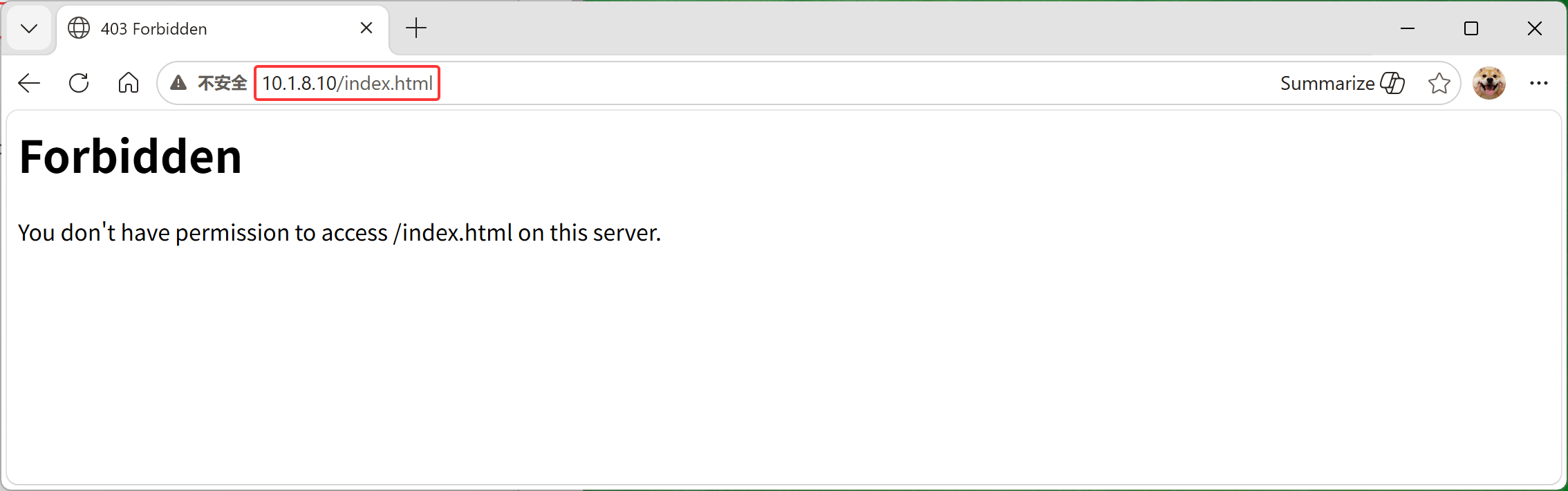
4.在笔记本上打开Web浏览器,并尝试查看http://主机IP/index.html WEB页面。您会收到一条错误消 息,指出您不具有访问该文件的权限。
5.要想授予对WEB服务器上index.html文件的访问权限,您必须配置SELinux。定义一条SELinux文件上 下文规则,以便将/custom目录及目录中所有文件的上下文类型设置为httpd_sys_content_t。
[root@localhost ~]# semanage fcontext -a -t httpd_sys_content_t '/custom(/.*)?'
6.更正/custom目录中的文件上下文。
[root@localhost ~]# restorecon -Rv /custom/
restorecon reset /custom context unconfined_u:object_r:default_t:s0->unconfined_u:object_r:httpd_sys_content_t:s0
restorecon reset /custom/index.html context unconfined_u:object_r:default_t:s0->unconfined_u:object_r:httpd_sys_content_t:s0
[root@localhost ~]# ls -Z /custom/
-rw-r–r–. root root unconfined_u:object_r:httpd_sys_content_t:s0 index.html
7.再次尝试在笔记本上的Web浏览器中查看http://主机IP/index.html 。您应看到This is SERVERA.消 息。
使用布尔值调整SELinux策略
学习目标
使用setsebool命令激活和停用SELinux策略规则,使用semanage boolean -l命令管理SELinux布尔值的 持久值,并查阅以_selinux结尾的man页面以查找有关SELinux布尔值的有用信息。
SELinux布尔值
应用或服务开发人员编写SELinux目标策略来定义目标应用的允许行为。开发人员可以在SELinux策略中 包含可选的应用行为,当特定系统上允许相关行为时启用该策略。SELinux布尔值可启用或禁用SELinux 策略的可选行为。通过使用布尔值,您可以有选择地调整应用的行为。
这些可选行为是特定于应用的,必须为各个目标应用发现和选择。如需了解服务相关的布尔值,请参阅 该服务的 SELinux man page。例如,Web 服务器httpd 服务有其httpd(8) man page,以及用于记录其 SELinux策略的httpd_selinux(8)man page,包括支持的进程类型、文件上下文和可用的布尔值行为。 SELinux man page在 selinux-policy-doc 软件包中提供。
使用getsebool命令列出此系统上目标策略的可用布尔值,以及当前的布尔值状态。使用setsebool命令 启用或禁用这些行为的运行状态。setsebool -P命令选项通过写入策略文件使设置持久有效。只有特权用 户才能设置SELinux布尔值。
[root@localhost ~]# getsebool -a
abrt_anon_write –> off
abrt_handle_event –> off
abrt_upload_watch_anon_write –> on
antivirus_can_scan_system –> off
antivirus_use_jit –> off
auditadm_exec_content –> on
authlogin_nsswitch_use_ldap –> off
authlogin_radius –> off
authlogin_yubikey –> off
awstats_purge_apache_log_files –> off
boinc_execmem –> on
cdrecord_read_content –> off
cluster_can_network_connect –> off
cluster_manage_all_files –> off
cluster_use_execmem –> off
cobbler_anon_write –> off
cobbler_can_network_connect –> off
cobbler_use_cifs –> off
cobbler_use_nfs –> off
collectd_tcp_network_connect –> off
condor_tcp_network_connect –> off
conman_can_network –> off
conman_use_nfs –> off
示例httpd策略布尔值
httpd服务策略包括httpd_enable_homedirs布尔值,它通过httpd启用主目录共享。通常,用户只有在 登录本地系统后才能访问其本地主目录。或者,通过使用远程文件共享协议(如NFS)来共享和访问主目 录。在这两种情况下,主目录默认为不利用https进行共享,用户也无法通过浏览器访问该目录。
[root@localhost ~]# getsebool httpd_enable_homedirs
httpd_enable_homedirs –> off
您可以启用共享并允许用户使用浏览器访问其主目录。启用后,httpd服务共享标有user_home_dir_t文 件上下文的主目录。然后,用户可以从浏览器访问和管理其主目录文件。
管理策略布尔值
使用setsebool命令但不带-P选项设置SELinux布尔值是临时的,设置将在重新启动后恢复为持久的值。 使用semanage boolean -l命令可以查看其他信息,这将列出策略文件中的布尔值,包括布尔值是否持 久、当前值和默认值,以及简短的描述。
[root@localhost ~]# semanage boolean -l | grep httpd_enable_homedirs
httpd_enable_homedirs (off , off) Allow httpd to enable homedirs
httpd_enable_homedirs
[root@localhost ~]# setsebool httpd_enable_homedirs on
[root@localhost ~]# semanage boolean -l | grep httpd_enable_homedirs
httpd_enable_homedirs (on , off) Allow httpd to enable homedirs
httpd_enable_homedirs
[root@localhost ~]# getsebool httpd_enable_homedirs
httpd_enable_homedirs –> on
上一示例将httpd_enable_homedirs布尔值的当前值临时设置为on,直到系统重新启动为止。要更改默 认设置,请使用setsebool-P命令使设置持久有效。以下示例设置一个持久值,然后查看策略文件中的布 尔值信息。
[root@localhost ~]# setsebool -P httpd_enable_homedirs on
[root@localhost ~]# semanage boolean -l | grep httpd_enable_homedirs
httpd_enable_homedirs
httpd_enable_homedirs (on , on) Allow httpd to enable homedirs
使用semanage boolean -l -C命令。尽管当前设置和默认设置似乎相同,但仍会显示布尔值。但是,如果 当前设置与上次启动的默认设置不同,-C选项就会匹配。在这个httpd_enable_homedirs示例中,原始 的默认引导设置是off。
[root@localhost ~]# semanage boolean -l -C
SELinux boolean
httpd_enable_homedirs
SELinux boolean State Default Description
httpd_enable_homedirs (on , on) Allow httpd to enable homedirs
将httpd_enable_homedirs布尔值还原
[root@localhost ~]# setsebool httpd_enable_homedirs off
[root@localhost ~]# setsebool -P httpd_enable_homedirs off
[root@localhost ~]# semanage boolean -l | grep httpd_enable_homedirs
httpd_enable_homedirs (off , off) Allow httpd to enable homedirs
httpd_enable_homedirs
指导练习:使用布尔值调整SELinux策略
在本练习中,您将配置Apache,以便从用户的主目录发布Web内容。
成果:配置ApacheWeb服务,以从用户的主目录发布Web内容。
1.编辑/etc/httpd/conf.d/userdir.conf配置文件以启用Apache功能,以便用户可以从其主目录发布Web 内容。注释掉IfModule部分中将UserDir变量设置为disabled值的行,并取消注释将UserDir变量设置为 public_html值的行。
[root@localhost ~]# vim /etc/httpd/conf.d/userdir.conf
修改片段:
17 #UserDir disabled
24 UserDir public_html
2.重启Apache Web服务
[root@localhost ~]# systemctl restart httpd
3.打开另一个终端窗口,再使用student用户身份登录RHEL。在~/public_html目录中创建index.html Web内容文件。
3.1. 在另一个终端窗口中,以 student用户身份登录RHEL计算机。
[root@localhost ~]# su – student
[student@localhost ~]$
3.2. 使用 mkdir命令来创建~/public_html目录。
[student@localhost ~]$ mkdir ~/public_html
3.3. 创建包含以下内容的index.html文件:
[student@localhost ~]$ echo 'This is student conntent on SERVERA.' > ~/public_html/index.html
3.4.要使Apache Web 服务提供/home/student/public_html目录的内容,必须允许它共
享/home/student目录中的文件和子目录。创建了/home/student/public_html目录后,它自动配置了允 许具有主目录权限的任何人访问其内容的权限。
更改/home/student目录权限,以允许Apache Web服务访问 public_html子目录。
[student@localhost ~]$ chmod 711 ~
[student@localhost ~]$ ll -ld ~
drwx–x–x. 5 student student 111 12月 3 19:36 /home/student
5.在笔记本上打开Web浏览器,再输入http://主机IP/~student/index.html地址。错误消息指出您不具 有访问该文件的权限。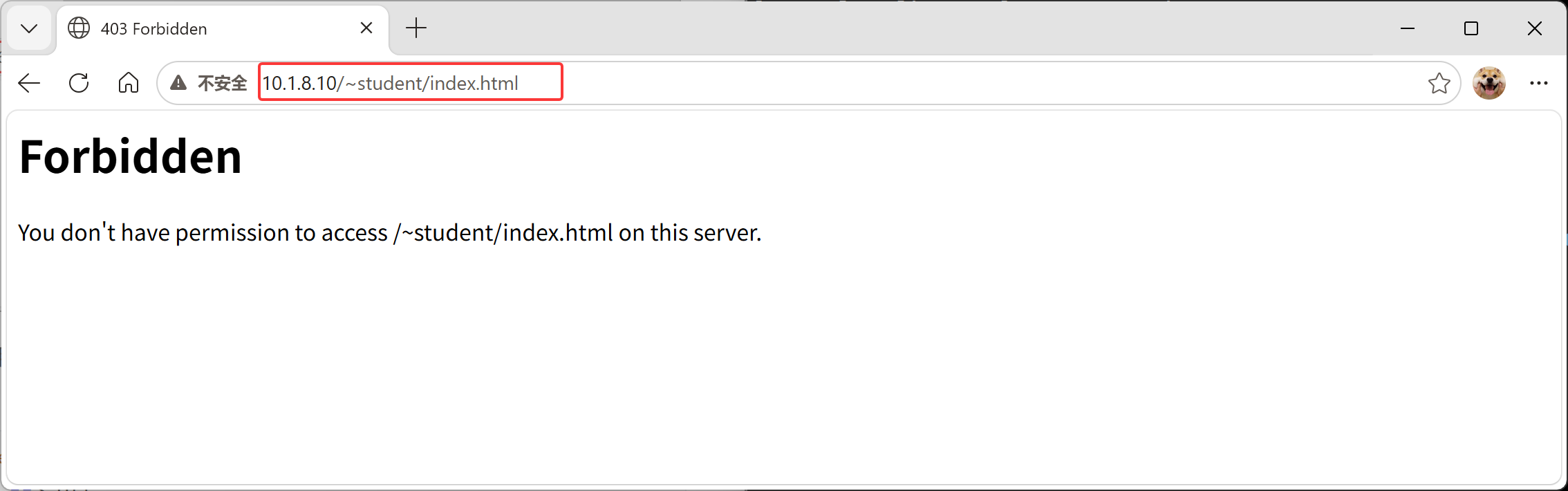
6.切换到另一个终端,再使用getsebool命令查看是否有任何布尔值限制对httpd服务的主目录的访问。
[root@localhost ~]# getsebool -a | grep httpd_enable_homedirs
httpd_enable_homedirs –> off
7.使用setsebool命令,持久启用对httpd服务的主目录的访问权限。
[root@localhost ~]# setsebool -P httpd_enable_homedirs on
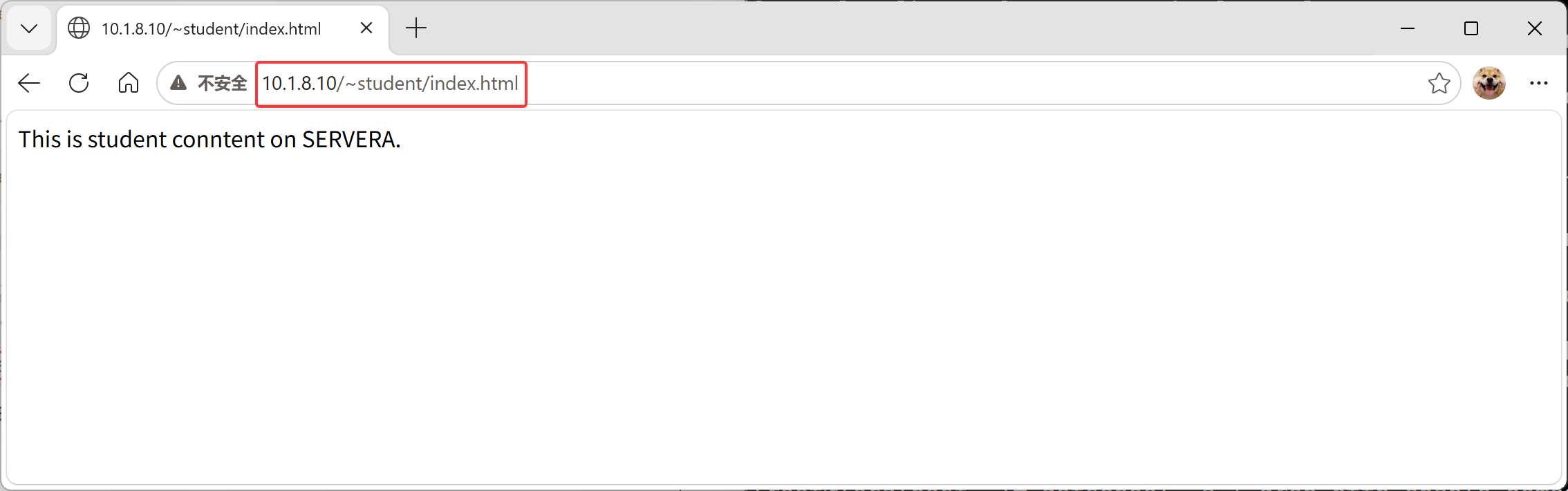
8.验证当您输入http://主机IP/~student/index.html地址后Web浏览器会显示This is student conntent on SERVERA.消息。
调查和解决SELinux问题
学习目标
使用SELinux日志分析工具,以及利用sealert命令在SELinux故障排除期间显示有用的信息。
对SELinux问题进行故障排除
当应用因SELinux访问遭拒而意外失败时,可以使用一些方法和工具来解决这些问题。在启用SELinux 时,最好先了解一些基本概念和行为。
-
SELinux由明确定义允许操作的目标策略组成。
-
策略条目定义将要交互的已标记进程和已标记资源。
-
通过使用标签,策略声明进程类型以及文件或端口上下文。
-
策略条目定义一种进程类型、一个资源标签,以及要允许的显式操作。
-
操作可以是系统调用、内核函数或其他特定的编程例程。
-
如果没有为特定的进程资源操作关系创建条目,则操作将被拒绝。
-
当某个操作被拒绝时,该次尝试将与实用的上下文信息一起记录下来。
红帽企业Linux为发行版中的几乎所有服务提供稳定的目标SELinux策略。因此,正确配置了常见RHEL服 务后,很少会出现与之相关的SELinux访问问题。如果服务实施不正确或新应用具有不完整的策略,就会 出现SELinux访问问题。
在进行广泛的SELinux配置更改之前,请先考虑这些故障排除概念。
大多数访问拒绝表明SELinux通过阻止不当操作来正常工作。
评估遭拒的操作需要对正常的预期服务操作有所了解。
最常见的SELinux问题是新的、复制的或移动文件具有不正确的上下文。当现有策略引用其位置时,可以轻松修复文件上下文。
_selinux man page中记录了可选的布尔策略功能。实施布尔值功能通常需要设置额外的非SELinux配置。
SELinux策略不会取代或规避文件权限或访问控制列表限制。
如果有常见的应用或服务出现故障,并且已知该服务具有有效的SELinux策略,首先检查该服务的 _selinux man page,以验证正确的上下文类型标签。查看受影响的进程和文件属性,以验证是否设置了 正确的标签。
监控SELinux违规
setroubleshoot-server软件包中的SELinux故障排除服务提供了诊断SELinux问题的工具。当SELinux拒 绝某一操作时,会在/var/log/audit/audit.log安全日志文件中记录一条AccessVectorCache(AVC)消息。 SELinux故障排除服务会监控AVC事件,并将事件摘要发送到/var/log/messages 文件。
[root@localhost /]# yum install -y setroubleshoot-server
AVC摘要包括事件唯一标识符(UUID)。使用sealert -l UUID命令来查看特定事件的综合报告详细信息。使 用sealert -a /var/log/audit/audit.log命令来查看所有现有的事件。
考虑在标准Apache Web服务器上执行以下示例命令序列的情况:您将创建/root/mypage,并将它移到 默认的Apache内容文件夹(/var/www/html)。然后在启动Apache服务后,您将尝试检索文件内容。
[root@localhost /]# touch /root/mypage
[root@localhost ~]# echo setroubleshoot > /root/mypage
[root@localhost /]# mv /root/mypage /custom
[root@localhost /]# systemctl restart httpd
[root@localhost ~]# curl http://localhost/mypage
<!DOCTYPE HTML PUBLIC "-//IETF//DTD HTML 2.0//EN">
<html><head>
<title>403 Forbidden</title>
</head><body>
<h1>Forbidden</h1>
<p>You don't have permission to access /mypage
on this server.</p>
</body></html>
Web服务器不显示内容,并且返回permission denied错误。AVC事件记录到/var/log/audit/audit.log 和/var/log/messages文件中。注意/var/log/messages事件消息中建议的 sealert命令和 UUID。
[root@localhost ~]# tail /var/log/audit/audit.log
type=AVC msg=audit(1764762128.071:191): avc: denied { getattr } for pid=3057
comm="httpd" path="/custom/mypage" dev="dm-0" ino=69478638
scontext=system_u:system_r:httpd_t:s0
tcontext=unconfined_u:object_r:admin_home_t:s0 tclass=file permissive=0
[root@localhost ~]# tail /var/log/messages
Dec 3 19:42:10 localhost setroubleshoot[3273]: SELinux is preventing
/usr/sbin/httpd from getattr access on the 文件 /custom/mypage. 如需要完整的 SELinux
信息,请运行 sealert -l 91d42111-5669-44b8-afaa-427782ad1fce
Dec 3 19:42:10 localhost setroubleshoot[3273]: SELinux is preventing
/usr/sbin/httpd from getattr access on the 文件 /custom/mypage.#012#012***** 插件
restorecon (99.5 置信度) 建议 *****************************************#012#012如
果要修复标签。/custom/mypage默认标签应该是 httpd_sys_content_t。#012Then 你可以运行
restorecon。由于访问父目录的权限不足,可能已停止访问尝试,在这种情况下尝试相应地更改以下命令。
#012Do#012# /sbin/restorecon -v /custom/mypage#012#012***** 插件 catchall (1.49
置信度) 建议 *******************************************#012#012如果你相信 httpd应
该允许_BASE_PATH getattr 访问 mypage file默认情况下。#012Then 应该将这个情况作为 bug 报
告。#012可以生成本地策略模块以允许此访问。#012Do#012暂时允许此访问权限执行:#012# ausearch –
c 'httpd' –raw | audit2allow -M my-httpd#012# semodule -X 300 -i my-httpd.pp#012
Dec 3 19:42:10 localhost setroubleshoot[3273]: failed to retrieve rpm info for
/custom/mypage
sealert输出描述了事件,包括受影响的进程、访问的文件以及已尝试并被拒绝的操作。输出中包含更正 文件标签的建议(如果适用)。其他建议描述了如何生成新的策略来允许被拒绝的操作。所给的建议仅 可在适合您的情景时使用。
重要
sealert输出中包含置信度评级,表示给定建议化解拒绝的置信度。但是,该建议 可能不适合您的情景。
例如,如果AVC拒绝是因为被拒文件位于错误的位置,那么指出要调整文件的上下文 标签或为此位置和操作创建新策略的建议在技术上是正确的,但不是适合您的情景的 恰当解决方案。如果根本原因是位置或文件名错误,则应移动或重命名文件,然后恢 复正确的文件上下文,这才是正确的解决方案。
[root@localhost ~]# sealert -l 91d42111-5669-44b8-afaa-427782ad1fce
SELinux is preventing /usr/sbin/httpd from getattr access on the 文件 /custom/mypage.
***** 插件 restorecon (99.5 置信度) 建议 *****************************************
如果要修复标签。/custom/mypage默认标签应该是 httpd_sys_content_t。 Then 你可以运行restorecon。由于访问父目录的权限不足,可能已停止访问尝试,在这种情况下尝试相应地 更改以下命令。 Do # /sbin/restorecon -v /custom/mypage
***** 插件 catchall (1.49 置信度) 建议 *******************************************
如果你相信 httpd应该允许_BASE_PATH getattr 访问 mypage file默认情况下。
Then 应该将这个情况作为 bug 报告。
可以生成本地策略模块以允许此访问。
Do
暂时允许此访问权限执行:
# ausearch -c 'httpd' –raw | audit2allow -M my-httpd
# semodule -X 300 -i my-httpd.pp
更多信息:
源环境 (Context) system_u:system_r:httpd_t:s0
目标环境 unconfined_u:object_r:admin_home_t:s0
目标对象 /custom/mypage [ file ]
httpd
源
源路径 /usr/sbin/httpd
<Unknown>
端口
主机 localhost.localdomain
源 RPM 软件包 httpd-2.4.51-7.el9_0.x86_64
目标 RPM 软件包
SELinux 策略 RPM selinux-policy-targeted-34.1.29-1.el9_0.noarch
本地策略 RPM selinux-policy-targeted-34.1.29-1.el9_0.noarch
Selinux 已启用
True
策略类型
targeted
强制模式
Enforcing
主机名 localhost.localdomain
平台 Linux localhost.localdomain
5.14.0-70.22.1.el9_0.x86_64 #1 SMP PREEMPT Tue Aug
2 10:02:12 EDT 2022 x86_64 x86_64
警报计数 2
第一个 2025-12-03 19:42:08 CST
最后一个 2025-12-03 19:42:08 CST
本地 ID 91d42111-5669-44b8-afaa-427782ad1fce
原始核查信息
type=AVC msg=audit(1764762128.71:192): avc: denied { getattr } for pid=3057
comm="httpd" path="/custom/mypage" dev="dm-0" ino=69478638
scontext=system_u:system_r:httpd_t:s0
tcontext=unconfined_u:object_r:admin_home_t:s0 tclass=file permissive=0
type=SYSCALL msg=audit(1764762128.71:192): arch=x86_64 syscall=newfstatat
success=no exit=EACCES a0=ffffff9c a1=7f0d3803b370 a2=7f0d3d9dd830 a3=100 items=0
ppid=3053 pid=3057 auid=4294967295 uid=48 gid=48 euid=48 suid=48 fsuid=48 egid=48
sgid=48 fsgid=48 tty=(none) ses=4294967295 comm=httpd exe=/usr/sbin/httpd
subj=system_u:system_r:httpd_t:s0 key=(null)
Hash: httpd,httpd_t,admin_home_t,file,getattr
[root@localhost ~]#
在本例中,所访问的文件位于正确的位置,但没有正确的SELinux文件上下文。Raw Audit Messages部 分显示来自/var/log/audit.log事件条目的信息。使用/sbin/restorecon -v /custom/mypage命令来设置 正确的上下文标签。要以递归方式更正多个文件,请对父目录使用 restorecon -R命令。
[root@localhost ~]# /sbin/restorecon -v /custom/mypage
/sbin/restorecon reset /custom/mypage context
unconfined_u:object_r:admin_home_t:s0->unconfined_u:object_r:httpd_sys_content_t:s0
[root@localhost ~]# ll -Zd /custom/mypage
-rw-r–r–. root root unconfined_u:object_r:httpd_sys_content_t:s0 /custom/mypage
[root@localhost ~]# curl http://localhost/mypage
setroubleshoot
[root@localhost ~]#
使用ausearch命令,搜索/var/log/audit.log日志文件中的AVC事件。使用-m选项指定AVC消息类型,并 使用-ts选项提供时间提示,例如recent。
[root@localhost ~]# ausearch -m AVC -ts recent
time->Wed Dec 3 19:42:08 2025
type=PROCTITLE msg=audit(1764762128.071:192):
proctitle=2F7573722F7362696E2F6874747064002D44464F524547524F554E44
type=SYSCALL msg=audit(1764762128.071:192): arch=c000003e syscall=262 success=no
exit=-13 a0=ffffff9c a1=7f0d3803b370 a2=7f0d3d9dd830 a3=100 items=0 ppid=3053
pid=3057 auid=4294967295 uid=48 gid=48 euid=48 suid=48 fsuid=48 egid=48 sgid=48
fsgid=48 tty=(none) ses=4294967295 comm="httpd" exe="/usr/sbin/httpd"
subj=system_u:system_r:httpd_t:s0 key=(null)
type=AVC msg=audit(1764762128.071:192): avc: denied { getattr } for pid=3057
comm="httpd" path="/custom/mypage" dev="dm-0" ino=69478638
scontext=system_u:system_r:httpd_t:s0
tcontext=unconfined_u:object_r:admin_home_t:s0 tclass=file permissive=0
控制SELinux端口标记
学习目标
验证网络端口是否具有正确的SELinux类型,以便服务与之绑定。
SELinux端口标记
除了文件上下文和进程类型标记外,SELinux还使用SELinux上下文来标记网络端口。SELinux通过标记网 络端口并将规则包含在服务的目标策略中来控制网络访问。例如,SSH目标策略包括 22/TCP 端口和 ssh_port_t端口上下文标签。在HTTP策略中,默认的 80/TCP 和443/TCP端口使用http_port_t端口上下 文标签。
当目标进程尝试打开端口进行侦听时,SELinux会验证目标策略是否包含允许该进程类型与该端口上下文 类型绑定的条目。然后,SElinux可以阻止恶意服务控制本应由其他合法网络服务使用的端口。
管理SELinux端口标记
如果服务试图侦听非标准端口,SELinux将阻止该尝试,除非您通过使用正确的端口上下文标记端口,将 该端口添加到服务的目标策略中。
通常,targeted策略已使用正确的类型标记了所有预期的端口。例如,由于Web应用通常使用端口 8008/TCP,因此该端口已标有http_port_t,这是Web服务器默认的端口类型。单个端口只能标记一个端 口上下文。
列出端口标签
使用grep命令来过滤端口号。
[root@localhost ~]# grep gopher /etc/services
gopher 70 # Internet Gopher
gopher 70/udp
使用semanage命令列出当前的端口标签分配。
[root@localhost ~]# semanage port -l
SELinux 端口类型 协议 端口号
afs3_callback_port_t tcp
7001
tcp
afs3_callback_port_t udp
udp
7001
afs_bos_port_t udp 7007
udp
afs_fs_port_t tcp 2040
tcp
afs_fs_port_t udp
udp
7000, 7005
afs_ka_port_t udp
udp
7004
……
使用grep命令,通过服务名称过滤SELinux端口标签。
[root@localhost ~]# semanage port -l | grep ftp
ftp_data_port_t tcp 20
tcp
ftp_port_t
21, 989, 990
tcp
ftp_port_t
989, 990
udp
tftp_port_t udp
69
一个端口标签可以在列表中针对每个支持的网络协议出现多次。
使用grep命令,通过端口号过滤 SELinux端口标签。
[root@localhost ~]# semanage port -l | grep -w 70
tcp
gopher_port_t tcp
70
gopher_port_t udp 70
udp
管理端口绑定
使用semanage命令,分配新端口标签,删除端口标签,以及修改现有端口标签。
重要
RHEL发行版中包含的所有服务几乎都提供SELinux策略模块,其中包含该服务的默 认端口上下文。您无法使用semanage命令更改默认端口标签。相反,您必须修改并 重新加载目标服务的策略模块。本课程不讨论编写和生成策略模块。
您可以使用现有的端口上下文标签(类型)标记新端口。semanage port命令的-a选项可添加新端口标 签,-t 选项表示类型,-p 选项则表示协议。
语法:semanage port -a -t port_label -p tcp|udp PORTNUMBER
例如,允许gopher服务侦听端口71/TCP:
[root@localhost ~]# semanage port -a -t gopher_port_t -p tcp 71
要查看对默认策略的本地更改,可使用semanage port命令的-C选项。
[root@localhost ~]# semanage port -l -C
SELinux 端口类型 协议 端口号
gopher_port_t tcp 71
tcp
[root@localhost ~]#
使用semanage命令加 -d 选项来删除端口标签。例如,删除端口 71/TCP 与gopher_port_t类型的绑定:
[root@localhost ~]# semanage port -d -t gopher_port_t -p tcp 71
要在需求发生改变时更改端口绑定,请使用 -m选项。这样做与删除旧绑定并添加新绑定相比更加高效。
例如,要将端口71/TCP从gopher_port_t修改为http_port_t,请使用以下命令:
# 环境准备
[root@localhost ~]# semanage port -a -t gopher_port_t -p tcp 71
[root@localhost ~]# semanage port -l -C
SELinux 端口类型 协议 端口号
gopher_port_t tcp 71
tcp
# 将端口71/TCP从gopher_port_t修改为http_port_t
[root@localhost ~]# semanage port -m -t http_port_t -p tcp 71
[root@localhost ~]# semanage port -l -C
SELinux 端口类型
协议 端口号
http_port_t tcp
71
[root@localhost ~]#
使用semanage命令查看修改情况。
[root@localhost ~]# semanage port -l -C
SELinux 端口类型 协议 端口号
71
http_port_t tcp
[root@localhost ~]# semanage port -l | grep http
8080, 8118, 8123, 10001-10010
http_cache_port_t tcp
tcp
http_cache_port_t udp 3130
udp
http_port_t tcp
71, 80, 81, 443, 488, 8008, 8009, 8443,
9000
pegasus_http_port_t tcp 5988
tcp
pegasus_https_port_t tcp 5989
tcp
指导练习:控制SELinux端口标记
在本实验中,您要将系统配置为在非标准端口上允许HTTP访问。
成果:配置在RHEL上运行的Web服务器,以便成功地在非标准端口上提供内容。
说明
您的组织正在部署一个新的自定义Web应用。此Web应用在非标准端口上运行;本例中为82/TCP。 一位初级管理员已在您的servera主机上对此应用进行了配置。但是,Web服务器内容还是无法访问。
1.配置初始环境。
[root@localhost ~]# systemctl start firewalld.service
[root@localhost ~]# vim /etc/httpd/conf/httpd.conf
修改配置,设置监听端口:
42 Listen 82
2.尝试通过重启httpd服务来修复Web内容问题。
2.1. 重新启动httpd.service。此命令预计会失败。
[root@localhost ~]# systemctl restart httpd.service
Job for httpd.service failed because the control process exited with error code.
See "systemctl status httpd.service" and "journalctl -xeu httpd.service" for
details.
2.2. 查看httpd服务的状态。注意到permission denied错误。
[root@localhost ~]# systemctl status httpd.service
× httpd.service – The Apache HTTP Server
Loaded: loaded (/usr/lib/systemd/system/httpd.service; disabled; vendor
preset: disabled)
Active: failed (Result: exit-code) since Wed 2025-12-03 19:57:55 CST; 18s
ago
Docs: man:httpd.service(8)
Process: 3429 ExecStart=/usr/sbin/httpd $OPTIONS -DFOREGROUND (code=exited,
status=1/FAILURE)
Main PID: 3429 (code=exited, status=1/FAILURE)
Status: "Reading configuration…"
CPU: 47ms
12月 03 19:57:55 localhost.localdomain systemd[1]: Starting The Apache HTTP
Server…
12月 03 19:57:55 localhost.localdomain httpd[3429]: AH00558: httpd: Could not
reliably determine the server's fully qualified domain name.
12月 03 19:57:55 localhost.localdomain httpd[3429]: (13)Permission denied:
AH00072: make_sock: could not bind to address [::]:82
12月 03 19:57:55 localhost.localdomain httpd[3429]: (13)Permission denied:
AH00072: make_sock: could not bind to address 0.0.0.0:82
12月 03 19:57:55 localhost.localdomain httpd[3429]: no listening sockets
available, shutting down
12月 03 19:57:55 localhost.localdomain systemd[1]: httpd.service: Main process
exited, code=exited, status=1/FAILURE
12月 03 19:57:55 localhost.localdomain systemd[1]: httpd.service: Failed with
result 'exit-code'.
12月 03 19:57:55 localhost.localdomain systemd[1]: Failed to start The Apache
HTTP Server.
lines 8-18/18 (END)
2.3. 检查SELinux是否在阻止httpd绑定到端口82/TCP。
[root@localhost ~]# sealert -a /var/log/audit/audit.log
输出摘要:
SELinux is preventing /usr/sbin/httpd from name_bind access on the tcp_socket
port 82.
***** 插件 bind_ports (99.5 置信度) 建议
*****************************************
如果你想允许 /usr/sbin/httpd绑定到网络端口 $PORT_数
Then you need to modify the port type.
Do
# semanage port -a -t PORT_TYPE -p tcp 82
其中 PORT_TYPE 是以下之一:http_cache_port_t, http_port_t,
jboss_management_port_t, jboss_messaging_port_t, ntop_port_t, puppet_port_t。
***** 插件 catchall (1.49 置信度) 建议
*******************************************
如果你相信 httpd应该允许_BASE_PATH name_bind 访问 port 82 tcp_socket默认情况下。
Then 应该将这个情况作为 bug 报告。
可以生成本地策略模块以允许此访问。
Do
暂时允许此访问权限执行:
# ausearch -c 'httpd' –raw | audit2allow -M my-httpd
# semodule -X 300 -i my-httpd.pp
3.将SELinux配置为允许httpd 绑定到端口82/TCP,然后重新启动httpd.service服务。
3.1. 查找适合端口82/TCP的端口类型。
http_port_t 类型包括默认的HTTP端口80/TCP和443/TCP。这是Web服务器的正确端口类型。
[root@localhost ~]# semanage port -l | grep http
http_cache_port_t tcp 8080, 8118, 8123, 10001-10010
tcp
udp
http_cache_port_t udp 3130
http_port_t
71, 80, 81, 443, 488, 8008, 8009, 8443,
tcp
9000
pegasus_http_port_t tcp 5988
tcp
pegasus_https_port_t tcp 5989
tcp
3.2. 为端口 82/TCP 分配 http_port_t 类型。
[root@localhost ~]# semanage port -a -t http_port_t -p tcp 82
3.3.重新启动httpd.service服务。此命令应该会成功。
[root@localhost ~]# systemctl restart httpd.service
4.验证现在是否可以访问在端口82/TCP上运行的Web服务器。
[root@localhost ~]# curl http://localhost:82
This is SERVERA.
5.在笔记本上,检查是否可以从浏览器访问Web服务。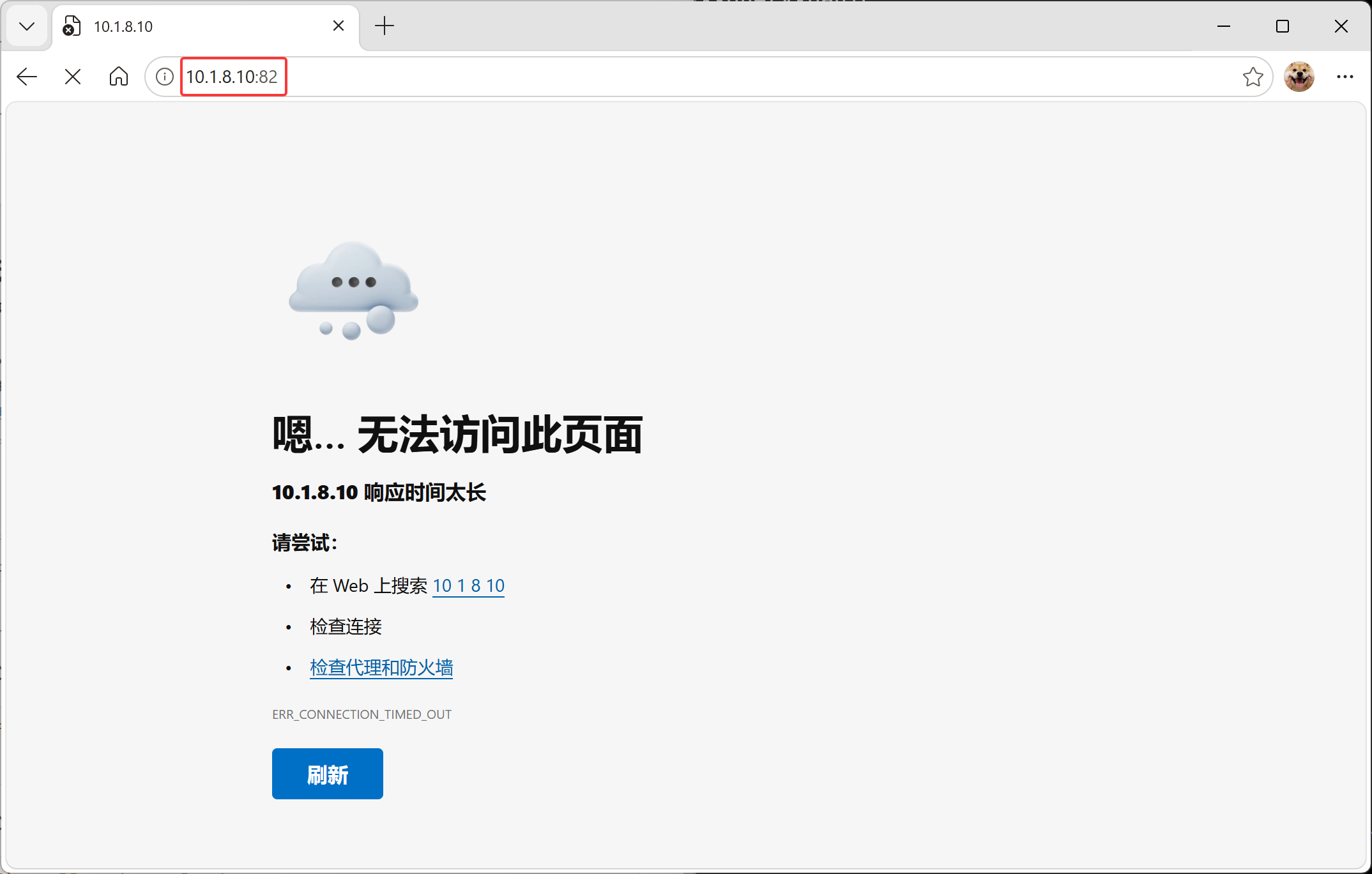
该错误意味着您仍无法从笔记本连接到Web服务。
6.在 web服务器上,打开防火墙上的端口82/TCP。
6.1. 使在web服务器上的防火墙默认区域的永久配置中打开端口82/TCP。
[root@localhost ~]# firewall-cmd –permanent –add-port=82/tcp
success
6.2. 在web服务器上激活防火墙更改。
[root@localhost ~]# firewall-cmd –reload
success
7.从笔记本访问Web服务。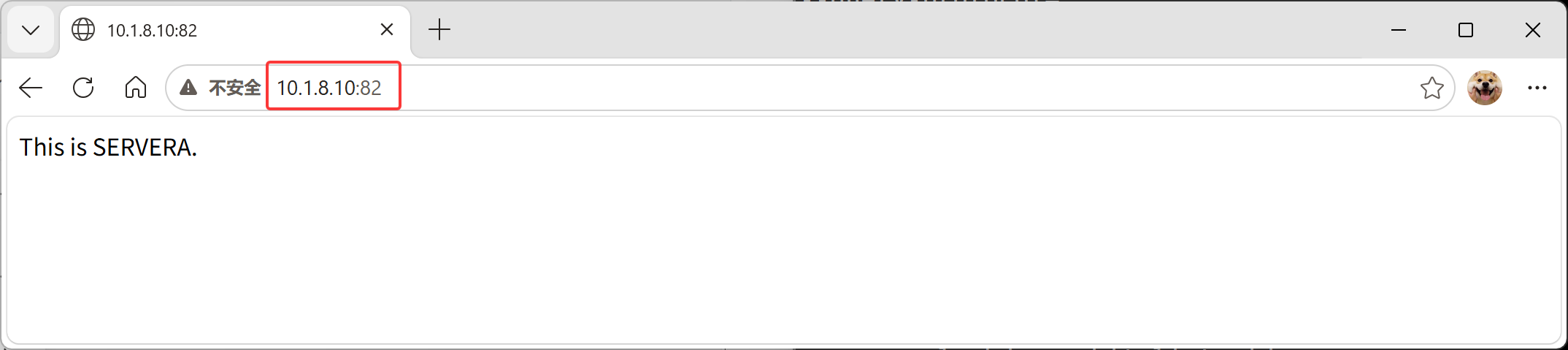
总结
- 使用 getenforce和setenforce命令可以管理系统的 SELinux模式。
- semanage命令可以管理SELinux策略规则。restorecon命令可以应用策略所定义的上下文。
- 布尔值是可更改SELinux策略行为的参数。您可以启用或禁用它们来调整策略。
- sealert命令可显示有助于SELinux故障排除的有用信息。
- SELinux策略通过标记网络端口来严格控制网络流量。例如,端口22/TCP具有标签ssh_port_t与其 相关联。当某个进程希望侦听端口时,SELinux将检查是否允许与其相关联的标签绑定该端口标 签。
- 使用semanage命令来添加、删除和修改标签。