
专栏:Spring Cloud
个人主页:手握风云
目录
一、RestTemplate 的问题
二、OpenFeign 介绍
三、OpenFeign 快速上手
3.1. 引入依赖
3.2. 开启功能
3.3. 编写 Feign 客户端接口
3.4. 调用远程接口
四、OpenFeign 参数传递
4.1. 单个普通参数(Query 参数)
4.2. 多个普通参数
4.3. 对象作为 Query 参数拼接
4.4. 传递 JSON 请求体
五、最佳实践
5.1. Feign 继承方式
5.2. Feign 抽取独立模块
一、RestTemplate 的问题
在前面的项目中,我们可以使用RestTemplate完成微服务之间的HTTP远程调用。从示例代码能够看到,调用方通过拼接目标服务的访问地址,再借助 getForObject 方法发起 http 请求,拿到远端返回的数据,完成业务逻辑组装。
public OrderInfo selectOrderById(Integer orderId) {
OrderInfo orderInfo = orderMapper.selectOrderById(orderId);
String url = "http://product-service/product/" + orderInfo.getProductId();
ProductInfo productInfo = restTemplate.getForObject(url, ProductInfo.class);
orderInfo.setProductInfo(productInfo);
return orderInfo;
}
虽然 RestTemplate 已经对底层 HTTP 请求做了封装,对比原生 HTTPClient,使用上已经简化不少,但是它依旧存在明显的缺陷。
第一个问题是需要手动拼接 URL 地址。这种方式虽然灵活,但是代码封装比较臃肿。当请求参数较多、URL 逻辑复杂的时候,手动拼接字符串很容易出现书写错误,引发调用异常。
第二个问题是代码可读性差、编码风格不统一。远程调用的 http 请求逻辑直接写在业务方法内部,URL字符串、返回值类型硬编码在代码中,和普通本地方法调用写法差异很大,阅读和维护起来不够直观。
微服务主流的通信方式分为两种,分别是 HTTP 通信与 RPC 通信。Spring Cloud 框架默认采用HTTP 实现微服务通信,常用实现方案包含 RestTemplate 与 OpenFeign。
RPC 全称远程过程调用,核心思想是可以像调用本地方法一样调用远程服务,使用者不需要关心底层网络通信的具体实现细节。RPC 并不限定底层协议,可以使用 HTTP、TCP、UDP 等多种协议,在TCP/IP四层模型中同时跨越传输层与应用层。业界常见的RPC框架有 Dubbo、Thrift、gRPC。
二、OpenFeign 介绍
OpenFeign 是一款声明式的 Web Service 客户端,它能够简化微服务之间的远程调用。使用OpenFeign 发起调用的体验,类似于 Controller 调用 Service,开发者只需要定义接口,并在接口上添加对应的注解,就可以完成远程调用的全部配置。
OpenFeign的前身是Netflix公司开源的Feign组件。2013年6月Netflix发布了Feign的第一个版本1.0.0;2016年7月,Netflix发布Feign最后一个版本8.18.0,之后Netflix将Feign捐赠给开源社区。同年7月,OpenFeign发布首个版本9.0.0,此后一直由社区持续维护更新。
简单来说,Netflix Feign就是OpenFeign的前身,OpenFeign是在原有Feign基础之上升级而来,功能更强大、使用也更加灵活。现在网络各类技术文章,以及企业项目中使用的Feign,基本都是OpenFeign。
Spring Cloud Feign 是 Spring 框架对 Feign 做的一层封装,目的是把 Feign 集成进 Spring Cloud完整生态。因为Feign项目更名,Spring Cloud也提供了两套不同的starter依赖。旧版本为spring‑cloud‑starter‑feign,新版本为 spring‑cloud‑starter‑openfeign。
由于原始的Netflix Feign已经停止维护,我们实际开发项目中,要选用 spring‑cloud‑starter‑openfeign 这个依赖。如果需要查阅官方资料,可以参考 OpenFeign 的GitHub文档,以及 Spring Cloud OpenFeign的官方文档。
OpenFeign 官方文档:https://github.com/openfeign/feign
Spring Cloud Feign 文档:Spring Cloud OpenFeign
三、OpenFeign 快速上手
3.1. 引入依赖
导入 spring‑cloud‑starter‑openfeign
<dependency>
<groupId>org.springframework.cloud</groupId>
<artifactId>spring-cloud-starter-openfeign</artifactId>
</dependency>
3.2. 开启功能
启动类增加注解 @EnableFeignClients 开启 Feign。
package com.yang.order;
import org.springframework.boot.SpringApplication;
import org.springframework.boot.autoconfigure.SpringBootApplication;
import org.springframework.cloud.openfeign.EnableFeignClients;
@EnableFeignClients
@SpringBootApplication
public class OrderServiceApplication {
public static void main(String[] args) {
SpringApplication.run(OrderServiceApplication.class, args);
}
}
3.3. 编写 Feign 客户端接口
- @FeignClient 注解修饰接口;
- value/name 指定目标微服务名称,用于 Nacos 服务发现,底层自动负载均衡;path 统一设置请求路径前缀;
- 接口方法直接使用 SpringMVC 注解定义请求路径、参数;
package com.yang.order.api;
import com.yang.order.model.ProductInfo;
import org.springframework.cloud.openfeign.FeignClient;
import org.springframework.web.bind.annotation.PathVariable;
import org.springframework.web.bind.annotation.RequestMapping;
@FeignClient(value = "product-service", path = "/product")
public interface ProductApi {
@RequestMapping("/{productId}")
ProductInfo getProductInfo(@PathVariable("productId") Integer productId);
}
3.4. 调用远程接口
直接 @Autowired 注入 Feign 接口,像调用本地方法一样调用接口方法,完成远程 http 调用。
package com.yang.order.service;
import com.yang.order.api.ProductApi;
import com.yang.order.mapper.OrderMapper;
import com.yang.order.model.OrderInfo;
import com.yang.order.model.ProductInfo;
import org.springframework.beans.factory.annotation.Autowired;
import org.springframework.stereotype.Service;
import org.springframework.web.client.RestTemplate;
@Service
public class OrderService {
@Autowired
private OrderMapper orderMapper;
@Autowired
private RestTemplate restTemplate;
@Autowired
private ProductApi productApi;
public OrderInfo selectOrderById(Integer orderId) {
OrderInfo orderInfo = orderMapper.selectOrderById(orderId);
/*String url = "http://product-service/product/" + orderInfo.getProductId();
ProductInfo productInfo = restTemplate.getForObject(url, ProductInfo.class);*/
ProductInfo productInfo = productApi.getProductInfo(orderInfo.getProductId());
orderInfo.setProductInfo(productInfo);
return orderInfo;
}
}
四、OpenFeign 参数传递
4.1. 单个普通参数(Query 参数)
package com.yang.product.controller;
import com.yang.product.model.ProductInfo;
import com.yang.product.service.ProductService;
import org.springframework.beans.factory.annotation.Autowired;
import org.springframework.web.bind.annotation.*;
@RestController
@RequestMapping("/product")
public class ProductController {
@RequestMapping("/p1")
public String p1(Integer id) {
return "product-service 接收到参数, id:" + id;
}
}
package com.yang.order.api;
import org.springframework.cloud.openfeign.FeignClient;
import org.springframework.web.bind.annotation.RequestMapping;
import org.springframework.web.bind.annotation.RequestParam;
@FeignClient(value = "product-service", path = "/product")
public interface ProductApi {
@RequestMapping("/p1")
public String p1(@RequestParam("id") Integer id);
}
package com.yang.order.controller;
import com.yang.order.api.ProductApi;
import com.yang.order.model.ProductInfo;
import org.springframework.beans.factory.annotation.Autowired;
import org.springframework.web.bind.annotation.RequestMapping;
import org.springframework.web.bind.annotation.RestController;
@RestController
@RequestMapping("/feign")
public class FeignController {
@Autowired
private ProductApi productApi;
@RequestMapping("/o1")
public String o1(Integer id) {
return productApi.p1(id);
}
}
4.2. 多个普通参数
@RequestMapping("/p2")
public String p2(Integer id, String name) {
return "product-service 接收到参数, id:" + id + ", name:" + name;
}
@RequestMapping("/p2")
public String p2(@RequestParam("id") Integer id, @RequestParam("name") String name);
@RequestMapping("/o2")
public String o2(Integer id, String name) {
return productApi.p2(id, name);
}
4.3. 对象作为 Query 参数拼接
@RequestMapping("/p3")
public String p3(ProductInfo productInfo) {
return "product-service 接收到参数: productInfo" + productInfo.toString();
}
@RequestMapping("/p3")
public String p3(@SpringQueryMap ProductInfo productInfo);
@RequestMapping("/o3")
public String o3(ProductInfo productInfo) {
productInfo.setId(45);
productInfo.setProductName("T恤");
return productApi.p3(productInfo);
}
4.4. 传递 JSON 请求体
@RequestMapping("/p4")
public String p4(@RequestBody ProductInfo productInfo) {
return "product-service 接收到参数: productInfo " + productInfo.toString();
}
@RequestMapping("/p4")
public String p4(@RequestBody ProductInfo productInfo);
@RequestMapping("/o4")
public String o4(ProductInfo productInfo) {
productInfo.setId(46);
productInfo.setProductName("T恤");
return productApi.p4(productInfo);
}
五、最佳实践
5.1. Feign 继承方式
Feign 支持继承的开发模式,我们可以把公共的接口操作封装到单独的接口当中。具体思路为:预先定义公共接口,由服务提供方的 Controller 去实现这个接口;而服务消费方编写 Feign 客户端接口时,直接继承该公共接口即可。
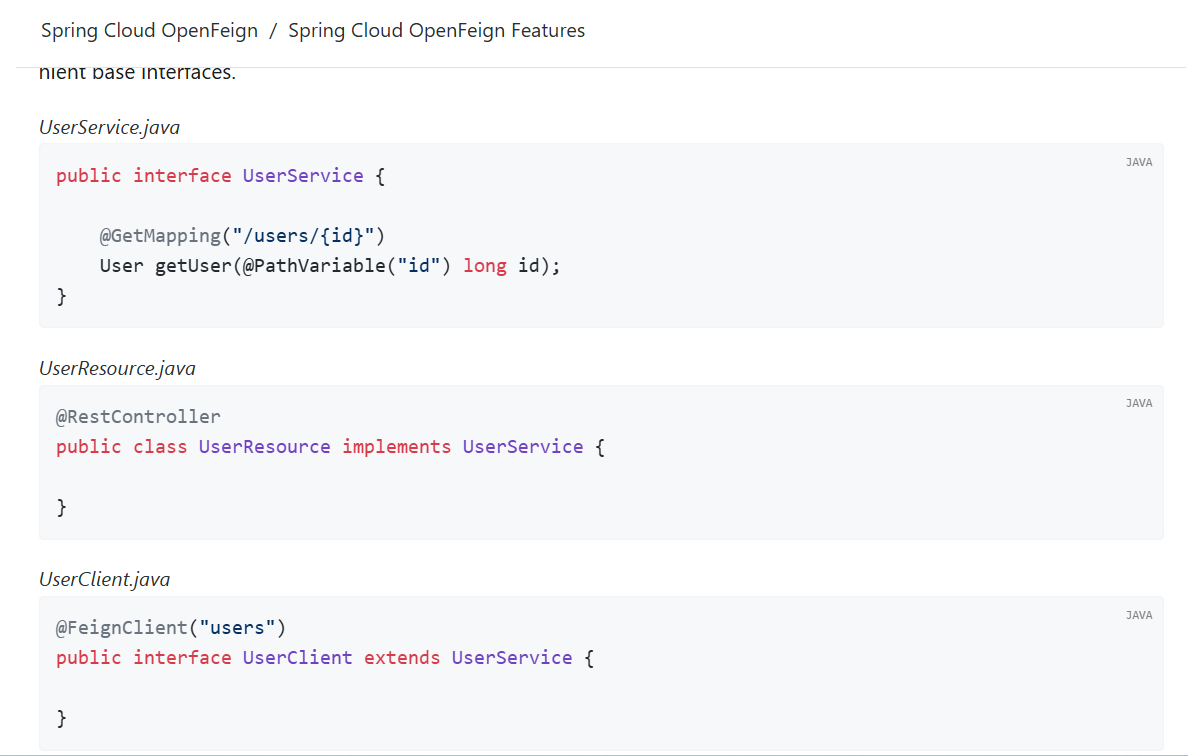
首先需要创建一个独立的 Module 模块,这个模块用于存放公共接口,打包生成 Jar 包之后,可以同时给服务提供方和服务消费方共同依赖使用。创建模块完成后,在 pom 文件引入 web 以及 openfeign 相关依赖,接着把接口方法、实体模型复制到这个公共模块,编写公共接口,在接口上完整定义好所有请求相关的 SpringMVC 注解。
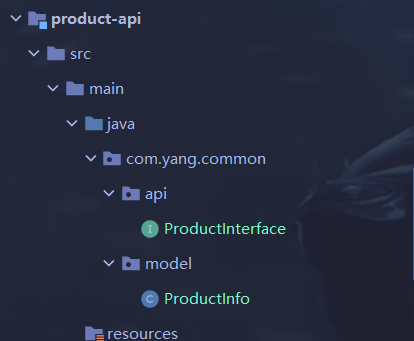
package com.yang.common.api;
import com.yang.common.model.ProductInfo;
import org.springframework.cloud.openfeign.SpringQueryMap;
import org.springframework.web.bind.annotation.PathVariable;
import org.springframework.web.bind.annotation.RequestBody;
import org.springframework.web.bind.annotation.RequestMapping;
import org.springframework.web.bind.annotation.RequestParam;
public interface ProductInterface {
@RequestMapping("/{productId}")
ProductInfo getProductById(@PathVariable("productId") Integer productId);
@RequestMapping("/p1")
String p1(@RequestParam("id") Integer id);
@RequestMapping("/p2")
String p2(@RequestParam("id") Integer id, @RequestParam("name") String name);
@RequestMapping("/p3")
String p3(@SpringQueryMap ProductInfo productInfo);
@RequestMapping("/p4")
String p4(@RequestBody ProductInfo productInfo);
}
package com.yang.common.model;
import lombok.Data;
import java.util.Date;
@Data
public class ProductInfo {
private Integer id;
private String productName;
private Integer productPrice;
private Integer state;
private Date createTime;
private Date updateTime;
}
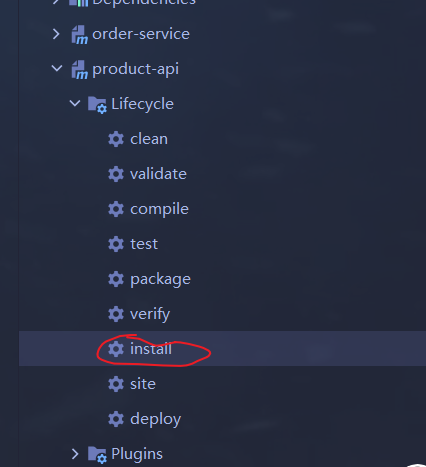
完成代码编写之后,通过 Maven 执行打包、install 命令,将生成的 Jar 包安装到本地 Maven 仓库,确认 Jar 包构建成功。
对于服务提供方,只需要让 Controller 类实现刚刚定义好的公共接口,然后重写接口中的业务方法,完成业务逻辑实现即可,不需要再重复书写 RequestMapping 等请求注解。
对于服务消费方,创建 Feign 客户端接口,添加@FeignClient注解,直接继承来自公共模块的接口,不需要再重复定义接口方法。完成后启动项目,发起远程调用进行功能测试。
5.2. Feign 抽取独立模块
虽然官方推荐继承的实现方式,但是在真实企业开发当中,更常采用将 Feign 接口抽取为独立模块的方案。该方案和继承模式操作上有相似之处,但设计理念不一样。
该方案的处理逻辑是,将完整的Feign Client客户端以及业务涉及的实体类全部抽取到独立Module模块,将模块打包为Jar包,服务消费方直接引入这个Jar包就可以获得Feign调用能力。在企业项目中,这个公共Jar包一般由服务提供方负责维护。
首先新建独立 Module 模块,在模块中引入 openfeign 依赖,把 Feign 客户端接口、实体Model类全部复制到此模块中。通过 Maven 执行 install,将该模块打包安装到本地仓库。
服务消费方做如下修改:删除项目内部原本手写的 Feign 接口与实体类,在 pom 当中引入刚刚打包好的公共 Jar 依赖,修改代码当中实体类、接口的导入路径,指向Jar包内的类。
由于 Feign 接口存放在外部 Jar,启动类上的 @EnableFeignClients 注解需要指定扫描范围,有两种配置方式,第一种通过 basePackages 指定扫描的包路径;第二种通过 clients 属性直接指定要加载的 Feign 客户端 Class 对象。配置完成后,启动项目进行远程调用测试。
package com.yang.order;
import com.yang.common.api.ProductApi;
import org.springframework.boot.SpringApplication;
import org.springframework.boot.autoconfigure.SpringBootApplication;
import org.springframework.cloud.openfeign.EnableFeignClients;
@EnableFeignClients(clients = {ProductApi.class})
@SpringBootApplication
public class OrderServiceApplication {
public static void main(String[] args) {
SpringApplication.run(OrderServiceApplication.class, args);
}
}