[!Note] 本仓库包含以后训练(post-trained)模型权重和配置文件,采用 Hugging Face Transformers 格式。
这些工件与 Hugging Face Transformers、vLLM、SGLang、TokenSpeed 等框架兼容。
[!Tip] 如果您需要无需自行维护基础设施的托管式、可扩展推理服务,官方 Qwen API 服务由 Qwen Cloud 提供。
其中,Qwen3.8-Flash 是基于 Qwen3.8-Flash-Next 的官方版本,具备更多生产级特性,例如默认支持 1M 上下文长度、内置官方工具等。更多信息请参阅 Qwen3.8-Flash 概览。
随着基础模型的前沿不断向更大的参数量和更长的上下文窗口推进,问题不再仅仅是我们能把规模做到多大,而是我们能否做到高效扩展。朝着让所有人受益的通用人工智能(AGI)实现可持续进步,需要架构上的创新。今天,我们分享这一方向上的一个具体进展:Qwen3.8-Flash-Next。
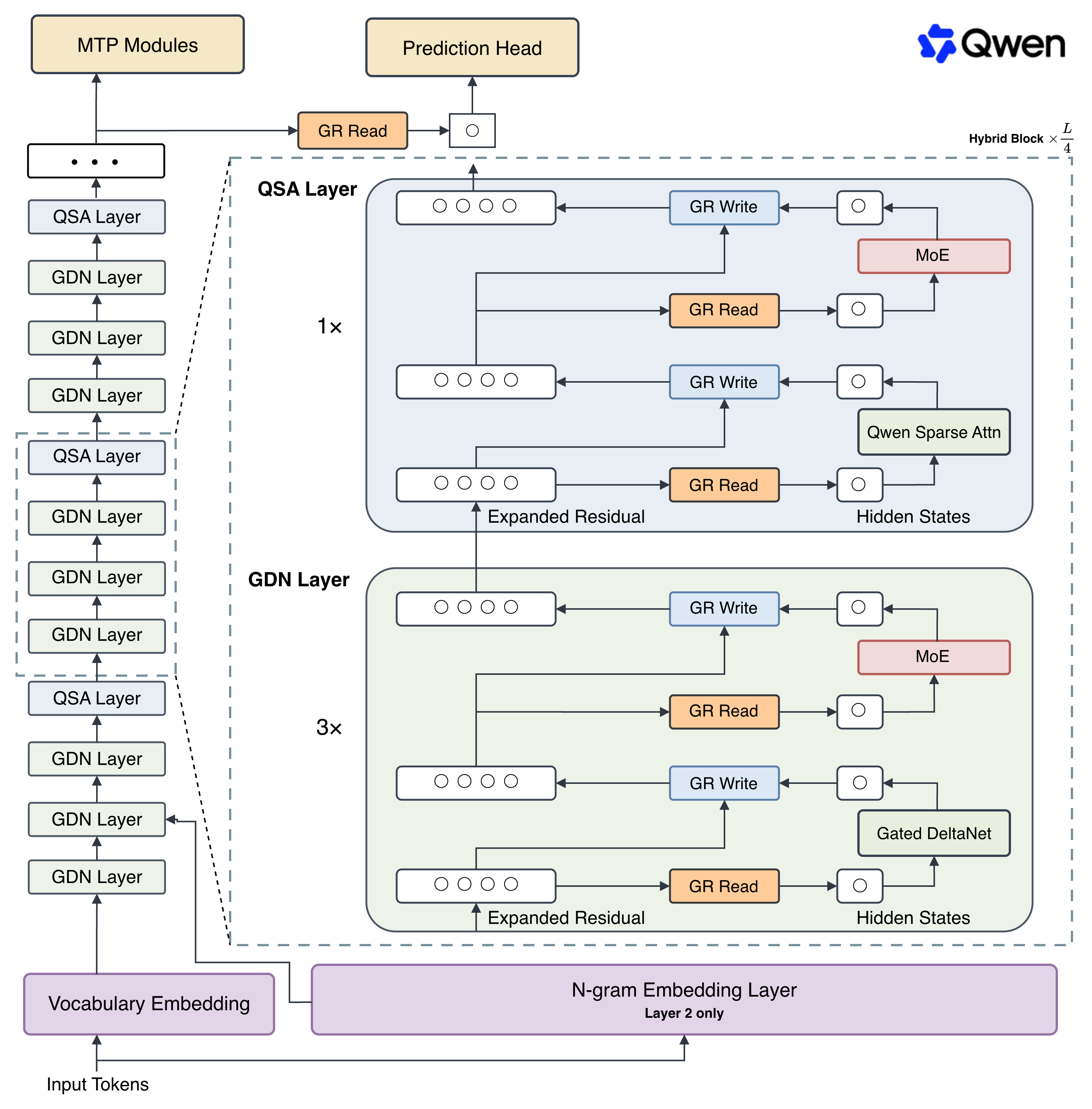
这个将为 Qwen4 奠定基础的架构实验性预览版,围绕对现代大语言模型(LLM)核心组件在大规模下如何交互这一问题的根本性重新思考而构建。
亮点
该架构下的首个开源权重发布是 Qwen3.8-Flash-Next,它引入了:
- 采用 QSA 的混合注意力:Gated DeltaNet 与 Gated Attention 的组合被重新设计为 Gated DeltaNet 与 Qwen 稀疏注意力(QSA)。QSA 并非选择单个 token 进行处理,而是在微块(micro-block)级别上运行。这显著降低了长上下文延迟,而随着智能体工作负载日益主导真实世界的使用场景,这一能力变得至关重要。
- 门控残差(Gated Residual):带归一化的残差流是让深度 LLM 训练变得可控的关键。门控残差通过逐元素、依赖数据的读取门(read gate)和按分支的标量写入门(write gate)来调节流经加宽残差流的信息。这带来了跨层的更细粒度表达能力,同时保持训练稳定并将推理开销保持在较低水平。
- N-gram 嵌入(N-gram Embedding):嵌入为参数扩展提供了一个独特的维度,相比混合专家(MoE),它所需计算更少,且更易于卸载。通过以短 n-gram 进行索引,该方法在不牺牲质量的前提下,让参数扩展对内存受限的加速器非常高效。
- 定制化训练方案(Tailored Training Recipe):Muon 和 AdamW 优化器被应用于特定的权重类别以最大化效率。在重新拟合的扩展定律(scaling laws)指导下,我们取消了传统的批大小预热(batch-size warmup),直接从目标批大小开始训练,从而大幅减少优化器总步数,同时可安全地使用更大的学习率,实现稳健收敛。
更多细节请参阅我们的博客文章 Qwen3.8-Flash-Next 和技术报告。
我们很高兴能与您一同开启这一新篇章,也欢迎您就我们接下来的构建工作提供反馈。
模型概览
- 类型:带视觉编码器的因果语言模型(Causal Language Model with Vision Encoder)
- 训练阶段:预训练与后训练(Pre-training & Post-training)
- 语言模型
- 参数量:125B,其中 6B 激活,另有 51B n-gram 嵌入和 4B MTP
- 隐藏维度:2560
- Token 嵌入:248320(已填充)
- N-gram 嵌入:20,000,000(第 2 层的二元/三元组,bigrams/trigrams)
- 层数:48
- 隐藏层布局:12 ×(3 ×(Gated DeltaNet → MoE)→ 1 ×(Qwen 稀疏注意力 → MoE))
- Gated DeltaNet:
- 线性注意力头数量:V 用 48 个,QK 用 16 个
- 头维度:128
- Qwen 稀疏注意力:
- 注意力头数量:Q 用 24 个,KV 用 2 个
- 头维度:256
- 旋转位置嵌入维度:64
- 索引器结构:MQA,含 4 个查询头(Query Heads)和 1 个共享键头(Shared Key Head)
- 索引器头维度:128
- 预算:512 个块或 2048 个 token
- 混合专家(Mixture Of Experts)
- 专家数量:512
- 激活的专家数量:10 个路由(Routed)+ 1 个共享(Shared)
- 专家中间维度:640
- 门控残差(Gated Residual):
- 分支数:4
- 瓶颈秩(Bottleneck Rank):320
- LM 输出:248320(已填充)
- MTP:1 层,采用多步训练
- 上下文长度:原生 262,144,可扩展至 1,000,000 个 token。
基准测试结果
语言能力
| # 参数量 | 125B | 27B | 397B | 284B | – |
| # 激活参数量 | 6B | 27B | 17B | 13B | – |
| # N-gram 嵌入参数量 | 51B | – | – | – | – |
| 编程 | |||||
| 智能体编程DeepSWE 1.1 | 58.7 | 42.2 | 16.5 | 54.4 | – |
| 智能体编程SWE-bench Pro | 62.5 | 61.7 | 55.8 | 56.0 | 53.4 |
| 多语言软件工程SWE-bench Multilingual | 81.0 | 73.8 | 75.8 | – | 77.5 |
| 仓库级代码生成NL2Repo-Bench | 48.1 | 42.3 | 41.1 | 54.2 | 47.6 |
| 智能体 | |||||
| 长周期办公任务CoWorkBench | 73.9 | 70.7 | 65.1 | 45.1 | 68.2 |
| 专业工作任务JobBench | 55.7 | 33.4 | 27.6 | 41.3 | 36.6 |
| 前沿智能体任务Agents’ Last Exam | Pass@1 24.3得分 51.2 | Pass@1 20.4得分 42.9 | Pass@1 13.2得分 33.6 | Pass@1 25.2得分 – | – |
| 真实场景工具使用Toolathlon Verified (Pass@1) | 73.5 | 67.1 | 50.6 | 70.3 | – |
| 综合 | |||||
| 指令遵循IFBench | 81.3 | 79.5 | 79.1 | 79.2 | 62.5 |
| 科学推理GPQA Diamond | 91.7 | 89.2 | 90.3 | 90.8 | 91.3 |
| 多学科推理HLE | 35.9 | 30.8 | 34.7 | 33.8 | 40.0 |
| 竞赛级编程LiveCodeBench v6 | 91.9 | 90.3 | 89.6 | 90.6 | 88.8 |
说明:
视觉语言能力
| 智能体多模态智能 | ||||
| 多模态工具使用ClawEval-MM | Pass@3 64.4平均 60.4 | Pass@3 57.4平均 56.9 | Pass@3 57.4平均 60.1 | Pass@3 52.5平均 54.7 |
| 应用复刻RecreationBench | 49.9 | 47.1 | 30.2 | – |
| 移动端使用AndroidWorld | 84.5 | 81.9 | 81.0 | 62.0 |
| 计算机操作OSWorld 2.0 | 二值 19.4部分 52.3 | 二值 19.4部分 48.0 | 二值 2.8部分 21.5 | – |
| 可视化网页开发Vision2Web | 64.0 | 62.9 | 42.1 | – |
| 通用多模态智能 | ||||
| 具身智能ERQA | 72.3 | 65.5 | 69.8 | 40.8 |
| 长视频理解LVBench | 76.6 | 72.4 | 76.2 | 63.0 |
| 真实场景感知RealWorldQA | 88.5 | 85.9 | 86.9 | 73.9 |
| 视觉数学问题求解MathVision | 无 CI 90.6有 CI 95.7 | 无 CI 90.0有 CI 94.6 | 无 CI 90.3有 CI 88.7 | 无 CI 65.5 |
| 科学图表分析CharXiv (RQ) | 无 CI 84.6有 CI 90.6 | 无 CI 83.7有 CI 90.2 | 无 CI 85.8有 CI 85.9 | 无 CI 66.0 |
说明:
快速开始
为了更顺畅的集成,我们推荐通过 API 使用 Qwen3.8-Flash-Next。
部署 Qwen3.8-Flash-Next
[!Important] 不同框架之间的推理效率和吞吐量差异显著。 我们建议使用最新版本的框架,以确保获得最佳性能和兼容性。 对于生产环境工作负载或高吞吐场景,强烈推荐使用专用推理引擎,例如 SGLang、KTransformers 或 vLLM。
Qwen3.8-Flash-Next 可以使用流行的推理框架部署,例如:
- SGLang:Qwen3.8-Flash-Next Cookbook
- vLLM:Qwen3.8-Flash-Next Recipe
- TokenSpeed:Qwen3.8-Flash-Next Recipe
API 用法
[!Important] Qwen3.8-Flash-Next 模型默认以思考模式运行,在生成最终回复之前会生成以 thinking\\n… response\\n\\n 标记的思考内容。 如需禁用思考内容并直接获得回复,请参阅此处的示例:指令(非思考)模式。
[!Tip] 我们建议使用以下采样参数组合进行生成:
- 思考模式:temperature=1.0、top_p=0.95、top_k=20、min_p=0.0、presence_penalty=0.0、repetition_penalty=1.0
- 指令(或非思考)模式:temperature=0.7、top_p=0.80、top_k=20、min_p=0.0、presence_penalty=1.5、repetition_penalty=1.0
请注意,各推理框架对采样参数的支持情况有所不同。
[!Tip] 在多轮智能体任务中,降低推理投入(reasoning effort)并不总能减少整体任务完成时间。虽然它可能让单轮回复更快,但也可能导致分析不足、更多失败和反复重试,从而增加总延迟和 token 消耗。
Qwen3.8-Flash-Next 支持通过 enable_thinking、preserve_thinking 和 reasoning_effort 控制思考行为。
Chat Completions API
Chat Completions API 可用于大多数推理框架,以及 Qwen Cloud。 开始之前,请确保已安装,并已配置 API 密钥和 API 基础 URL,例如:
pip install -U openai
# Set the following accordingly
export OPENAI_BASE_URL="http://localhost:8000/v1"
export OPENAI_API_KEY="EMPTY"
纯文本输入
from openai import OpenAI
# Configured by environment variables
client = OpenAI()
messages = [
{"role": "user", "content": "Write a Python function to merge two sorted linked lists."},
]
completion = client.chat.completions.create(
model="Qwen/Qwen3.8-Flash-Next",
messages=messages,
extra_body={
"chat_template_kwargs": {
"enable_thinking": True, # on by default
"preserve_thinking": True, # on by default
},
},
reasoning_effort="xhigh", # xhigh by default; supported levels are xhigh, medium, and low
stream=True,
stream_options={"include_usage": True},
)
reasoning_content = ""
answer_content = ""
is_answering = False
print("\\n" + "=" * 20 + "Reasoning" + "=" * 20 + "\\n")
for chunk in completion:
if not chunk.choices:
print("\\nUsage:")
print(chunk.usage)
continue
delta = chunk.choices[0].delta
if hasattr(delta, "reasoning_content") and delta.reasoning_content is not None:
if not is_answering:
print(delta.reasoning_content, end="", flush=True)
reasoning_content += delta.reasoning_content
elif hasattr(delta, "reasoning") and delta.reasoning is not None:
if not is_answering:
print(delta.reasoning, end="", flush=True)
reasoning_content += delta.reasoning
if hasattr(delta, "content") and delta.content:
if not is_answering:
print("\\n" + "=" * 20 + "Answer" + "=" * 20 + "\\n")
is_answering = True
print(delta.content, end="", flush=True)
answer_content += delta.content
messages.append({
"role": "assistant",
"content": answer_content,
"reasoning_content": reasoning_content,
"reasoning": reasoning_content,
})
图像输入
from openai import OpenAI
# Configured by environment variables
client = OpenAI()
messages = [
{
"role": "user",
"content": [
{
"type": "image_url",
"image_url": {
"url": "https://qianwen-res.oss-accelerate.aliyuncs.com/Qwen3.5/demo/CI_Demo/mathv-1327.jpg"
}
},
{
"type": "text",
"text": "The centres of the four illustrated circles are in the corners of the square. The two big circles touch each other and also the two little circles. With which factor do you have to multiply the radii of the little circles to obtain the radius of the big circles?\\nChoices:\\n(A) $\\\\frac{2}{9}$\\n(B) $\\\\sqrt{5}$\\n(C) $0.8 \\\\cdot \\\\pi$\\n(D) 2.5\\n(E) $1+\\\\sqrt{2}$"
}
]
}
]
chat_response = client.chat.completions.create(
model="Qwen/Qwen3.8-Flash-Next",
messages=messages,
)
print("Chat response:", chat_response)
视频输入
from openai import OpenAI
# Configured by environment variables
client = OpenAI()
messages = [
{
"role": "user",
"content": [
{
"type": "video_url",
"video_url": {
"url": "https://qianwen-res.oss-accelerate.aliyuncs.com/Qwen3.5/demo/video/N1cdUjctpG8.mp4"
}
},
{
"type": "text",
"text": "How many porcelain jars were discovered in the niches located in the primary chamber of the tomb?"
}
]
}
]
chat_response = client.chat.completions.create(
model="Qwen/Qwen3.8-Flash-Next",
messages=messages,
)
# When vLLM is launched with `–media-io-kwargs '{"video": {"num_frames": -1}}'`,
# video frame sampling can be configured via `extra_body` (e.g., by setting `fps`).
# This feature is currently supported only in vLLM.
#
# By default, `fps=2` and `do_sample_frames=True`.
# With `do_sample_frames=True`, you can customize the `fps` value to set your desired video sampling rate.
# chat_response = client.chat.completions.create(
# model="Qwen/Qwen3.8-Flash-Next",
# messages=messages,
# extra_body={
# "mm_processor_kwargs": {"fps": 2, "do_sample_frames": True},
# },
# )
print("Chat response:", chat_response)
指令(或非思考)模式
Qwen3.8-Flash-Next 默认会在回复前进行思考。 您可以通过配置 API 参数,获得模型不经思考的直接回复。 例如,
from openai import OpenAI
# Configured by environment variables
client = OpenAI()
messages = [
{
"role": "user",
"content": [
{
"type": "image_url",
"image_url": {
"url": "https://qianwen-res.oss-accelerate.aliyuncs.com/Qwen3.5/demo/RealWorld/RealWorld-04.png"
}
},
{
"type": "text",
"text": "Where is this?"
}
]
}
]
chat_response = client.chat.completions.create(
model="Qwen/Qwen3.8-Flash-Next",
messages=messages,
temperature=0.7,
top_p=0.8,
presence_penalty=1.5,
extra_body={
"top_k": 20,
"chat_template_kwargs": {"enable_thinking": False},
},
)
print("Chat response:", chat_response)
[!Note] 如果您使用 Qwen Cloud 的 API,除了更改 model 之外,请直接使用 "enable_thinking": False,而不要使用 "chat_template_kwargs": {"enable_thinking": False}。
禁用保留思考(Disable Preserved Thinking)
默认情况下,Qwen3.8-Flash-Next 会保留所有历史消息中的思考块,从而在整段对话中维持完整的推理轨迹。这种被称为"保留思考"(preserved thinking)的行为可确保完整的上下文连续性,对于决策一致性至关重要、并能减少冗余推理的智能体场景尤其有益。它还能提升 KV 缓存利用率,在思考和非思考模式下都优化推理效率。
如果您只希望保留最新用户消息中的思考块,可以通过将 preserve_thinking 设置为 False 来禁用此行为:
from openai import OpenAI
# Configured by environment variables
client = OpenAI()
messages = [...]
chat_response = client.chat.completions.create(
model="Qwen/Qwen3.8-Flash-Next",
messages=messages,
extra_body={
"chat_template_kwargs": {"preserve_thinking": False},
},
)
print("Chat response:", chat_response)
[!Note] 如果您使用 Qwen Cloud 的 API,除了更改 model 之外,请直接使用 "preserve_thinking": False,而不要将其包裹在 chat_template_kwargs 中。
最佳实践
为了获得最佳性能,我们推荐以下设置:
采样参数:我们建议使用以下采样参数组合:
- 思考模式:temperature=1.0、top_p=0.95、top_k=20、min_p=0.0、presence_penalty=0.0、repetition_penalty=1.0
- 指令(或非思考)模式:temperature=0.7、top_p=0.80、top_k=20、min_p=0.0、presence_penalty=1.5、repetition_penalty=1.0
对于受支持的框架,您可以调整 presence_penalty 参数(取值在 0 到 2 之间)以减少无休止的重复。但是,使用较大的值有时可能导致语言混用和模型性能轻微下降。
充足的输出长度:为优化智能体任务的性能,我们建议分配足够的输出长度,让模型能够生成详细而全面的回复。对于支持为内部推理和最终输出分别设置 token 上限的框架,我们建议在 1M 上下文长度内采用以下配置:
- 思考内容(Reasoning Content):将最大输出长度设置为 262,144 个 token。
- 最终回复(Final Response):将最大输出长度设置为 131,072 个 token。
这些设置为复杂推理提供了必要的容量,同时为高质量最终交付成果留出充足空间。
处理超长文本:Qwen3.8-Flash-Next 原生支持最长 262,144 个 token 的上下文长度。对于总长度(包括输入和输出)超过此限制的长周期任务,我们推荐使用 RoPE 缩放技术来有效处理长文本,例如 YaRN。
YaRN 目前受多个推理框架支持,例如 vLLM、SGLang 和 TokenSpeed。 通常,对于受支持的框架,有两种方式启用 YaRN:
-
修改模型配置文件:
在 config.json 文件中,将 text_config 中的 rope_parameters 字段改为:
{
"mrope_interleaved": true,
"mrope_section": [
11,
11,
10
],
"rope_type": "yarn",
"rope_theta": 10000000,
"partial_rotary_factor": 0.25,
"factor": 4.0,
"original_max_position_embeddings": 262144
} -
传递命令行参数:
对于 vLLM,您可以使用
VLLM_ALLOW_LONG_MAX_MODEL_LEN=1 vllm serve ... –hf-overrides '{"text_config": {"rope_parameters": {"mrope_interleaved": true, "mrope_section": [11, 11, 10], "rope_type": "yarn", "rope_theta": 10000000, "partial_rotary_factor": 0.25, "factor": 4.0, "original_max_position_embeddings": 262144}}}' –max-model-len 1000000
对于 SGLang,您可以使用
SGLANG_ALLOW_OVERWRITE_LONGER_CONTEXT_LEN=1 python -m sglang.launch_server ... –json-model-override-args '{"text_config": {"rope_parameters": {"mrope_interleaved": true, "mrope_section": [11, 11, 10], "rope_type": "yarn", "rope_theta": 10000000, "partial_rotary_factor": 0.25, "factor": 4.0, "original_max_position_embeddings": 262144}}}' –context-length 1000000
对于 TokenSpeed,您可以使用
TOKENSPEED_ALLOW_OVERWRITE_LONGER_CONTEXT_LEN=1 tokenspeed serve ... –hf-overrides '{"text_config": {"rope_parameters": {"mrope_interleaved": true, "mrope_section": [11, 11, 10], "rope_type": "yarn", "rope_theta": 10000000, "partial_rotary_factor": 0.25, "factor": 4.0, "original_max_position_embeddings": 262144}}}' –max-model-len 1000000
[!NOTE] 所有主流的开源框架实现的是静态 YaRN,这意味着缩放因子(scaling factor)不随输入长度变化,可能影响短文本上的性能。 我们建议仅在需要处理长上下文时才修改 rope_parameters 配置。 同时建议按需修改 factor。例如,如果您的应用典型上下文长度为 524,288 个 token,那么最好将 factor 设置为 2.0。
长视频理解:为优化纯文本和图像的推理效率,发布的 video_preprocessor_config.json 中的 size 参数配置得较为保守。建议将 video_preprocessor_config 文件中的 longest_edge 参数设置为 469,762,048(对应 224k 视频 token),以支持对小时级视频进行更高帧率采样,从而获得更优异的性能。例如,
{"longest_edge": 469762048, "shortest_edge": 4096}
或者,通过引擎启动参数覆盖默认值。有关实现细节,请参阅:vLLM / SGLang。
引用
如果您觉得我们的工作有帮助,欢迎引用我们。
@techreport{qwen2026design,
title = {On the Design of {Qwen3.8-Next} Architecture: Evaluation, Efficiency, and Training Stability},
author = {{Qwen Team}},
institution = {Alibaba Group},
month = {August},
year = {2026}
}
@misc{qwen3.8flashnext,
title = {{Qwen3.8-Flash-Next}: A New Architecture, Towards Ultimate Cost-Efficiency},
author = {{Qwen Team}},
month = {August},
year = {2026},
url = {https://qwen.ai/blog?id=qwen3.8-flash-next}
}