鸿蒙原生 AI 实战:用蓝耘 MaaS 给纪念日 App 装上「大模型大脑」
一个 API Key,六大主流大模型,零迁移成本接入鸿蒙原生应用。本文以「纪念日管理 App」为例,完整拆解蓝耘元生代 MaaS 平台在 HarmonyOS 上的集成全流程。
一、为什么选蓝耘 MaaS?
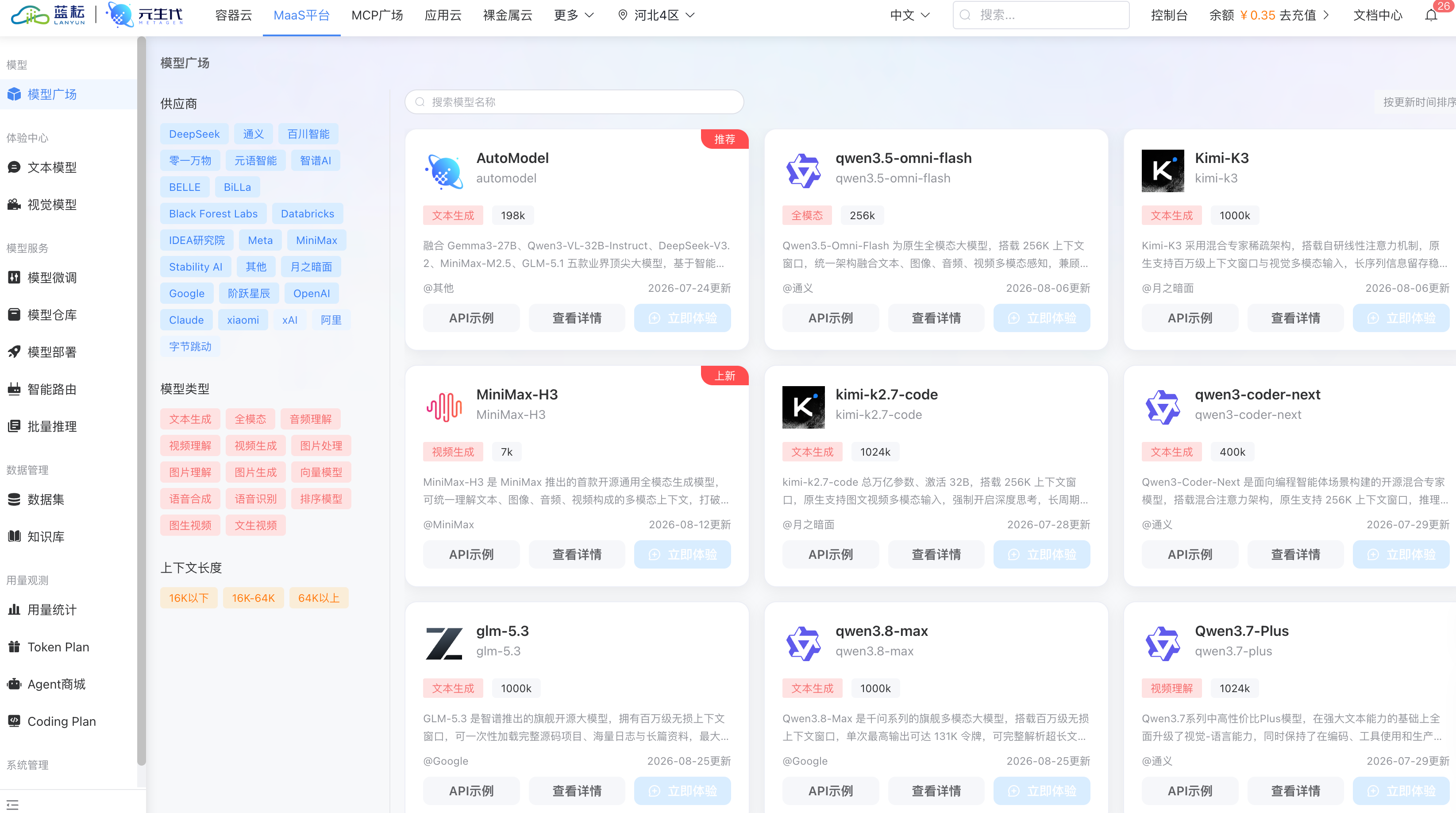
做鸿蒙 App 集成 AI 时,我面临一个现实问题:DeepSeek、Kimi、Qwen、GLM、MiniMax……每个模型各有优势,但逐个对接 API 成本太高。 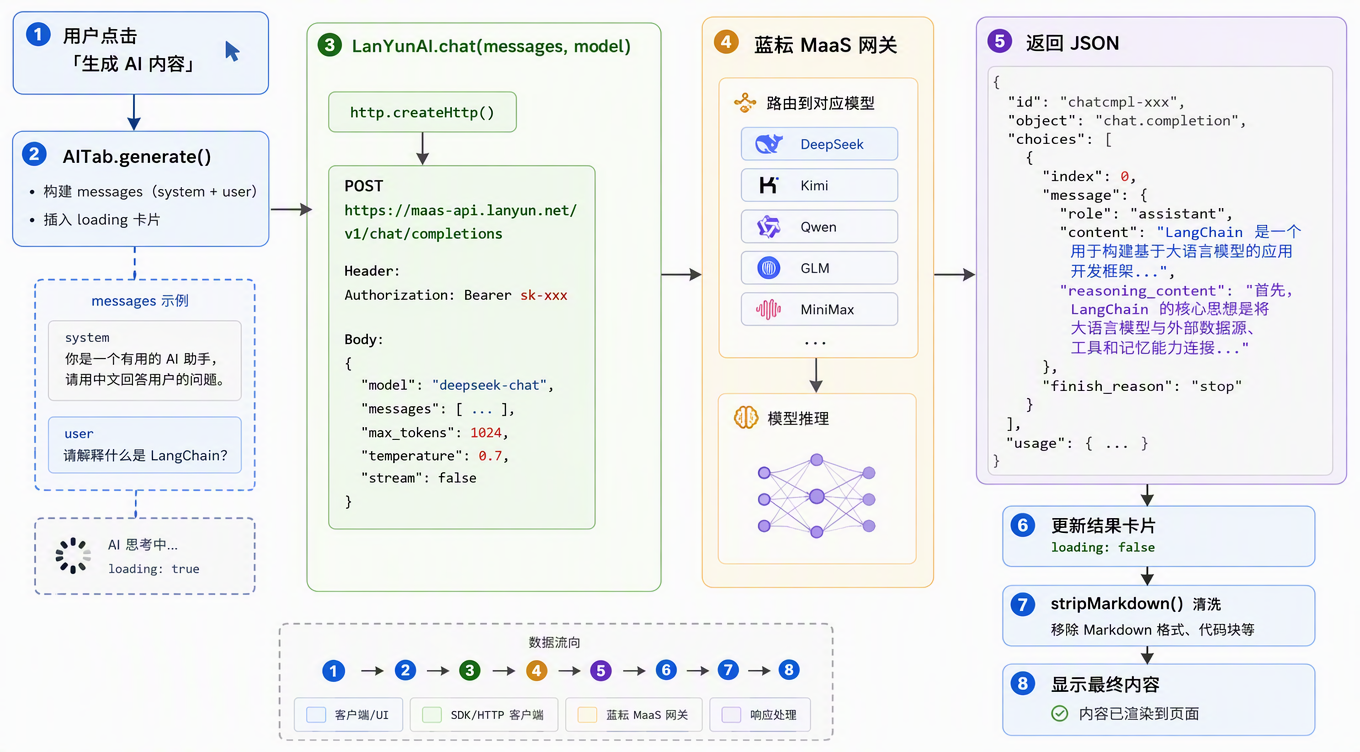
蓝耘元生代 MaaS 平台解决了这个痛点:
| 多模型统一网关 | 一个 API Key 调用 DeepSeek-V3.2、Kimi-K2.5、Qwen3.6、GLM-5.2、MiniMax-M3 等主流大模型 |
| OpenAI 兼容协议 | 请求/响应格式与 OpenAI Chat Completions 完全一致,现有代码直接改个 URL 就能跑 |
| 智能路由 | 按任务类型自动选最优模型,带故障转移 |
| 流式输出 | 支持 SSE 逐字返回 |
| 成本可控 | usage 字段含 reasoning_tokens / cached_tokens |
一句话总结:接入蓝耘 MaaS = 一次对接,全家桶模型随便切。
蓝耘 MaaS: https://maas.lanyun.net/#/model/modelSquare
二、先看效果:蓝耘 MaaS API 实调演示
纸上得来终觉浅。在写鸿蒙代码之前,先用 curl 直接调蓝耘 MaaS API,看看真实返回效果。
2.1 调用方式
蓝耘 MaaS 兼容 OpenAI Chat Completions 协议,请求格式完全一致:
curl -X POST https://maas-api.lanyun.net/v1/chat/completions \\
-H "Content-Type: application/json" \\
-H "Authorization: Bearer sk-你的APIKey" \\
-d '{
"model": "deepseek-v4-flash",
"messages": [
{"role": "system", "content": "你是蓝耘AI选礼助手…"},
{"role": "user", "content": "我女朋友下周过生日,预算500元…"}
],
"max_tokens": 2048,
"temperature": 0.8,
"stream": false
}'
就这?对,就这。 改个 URL、填个 API Key,跟调 OpenAI 一模一样。
2.2 三次调用,三个模型,同一个 Key
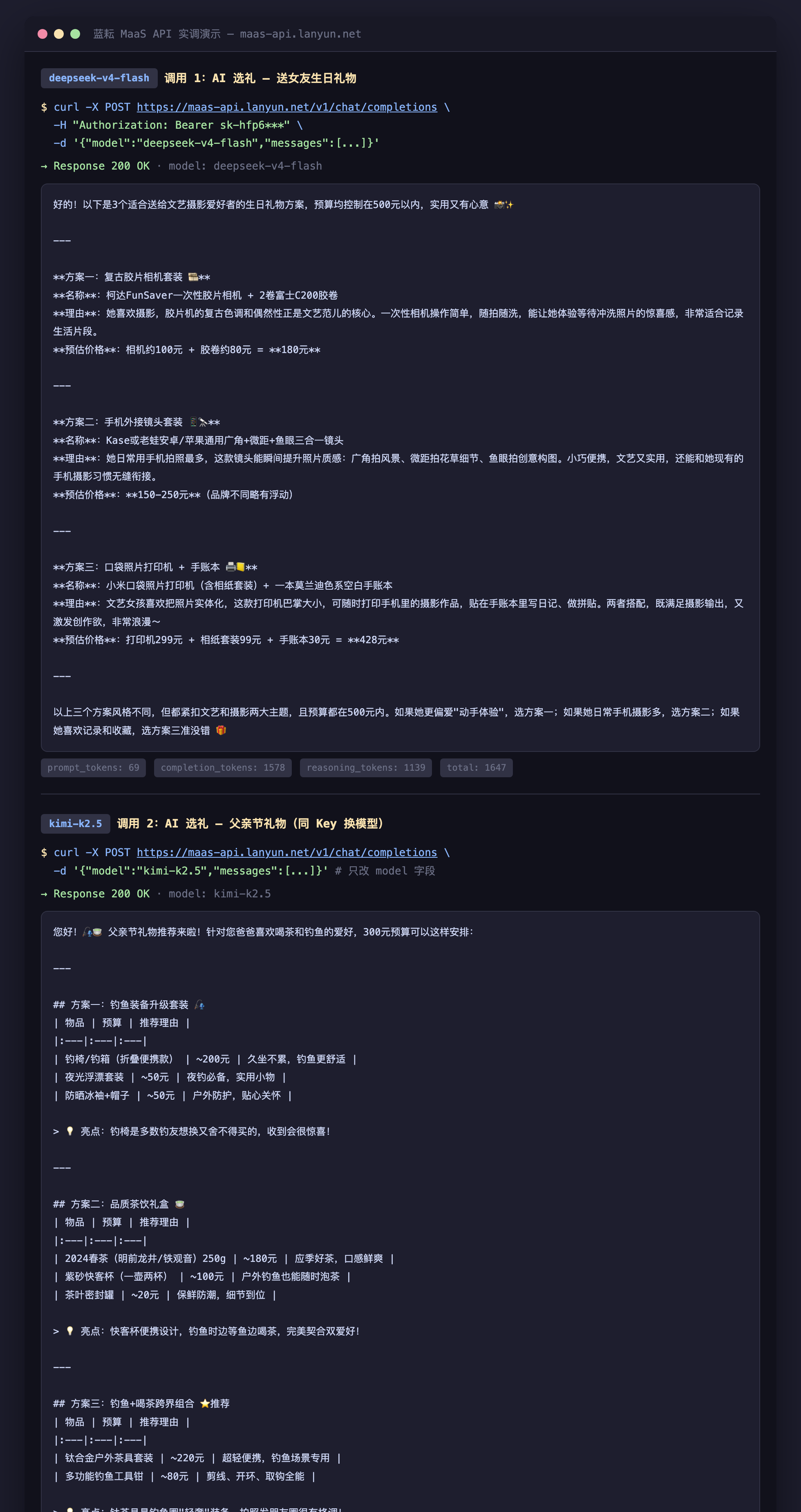
我用同一个 API Key,只改 "model" 字段,分别调了三个模型:
2.3 调用 1:deepseek-v4-flash — AI 选礼
Prompt:我女朋友下周过生日,预算500元,她喜欢文艺和摄影,请推荐3个礼物方案
蓝耘 AI 返回(节选):
好的!以下是3个适合送给文艺摄影爱好者的生日礼物方案,预算均控制在500元以内 📸✨
方案一:复古胶片相机套装 🎞️ 柯达FunSaver一次性胶片相机 + 2卷富士C200胶卷 — 胶片机的复古色调和偶然性正是文艺范儿的核心 预估:180元
方案二:手机外接镜头套装 📱🔭 Kase/老蛙 广角+微距+鱼眼三合一镜头 — 瞬间提升手机照片质感,小巧便携 预估:150-250元
方案三:口袋照片打印机 + 手账本 🖨️📒 小米口袋照片打印机 + 莫兰迪色系手账本 — 随时打印摄影作品贴在手账里 预估:428元
usage:prompt_tokens: 69, completion_tokens: 1578, reasoning_tokens: 1139, total: 1647
DeepSeek 推理模型先在 reasoning_content 里做了 1139 tokens 的思维链推理,然后输出结构化的礼物方案,每个方案都有名称、理由、价格,格式清晰。
2.4 调用 2:kimi-k2.5 — 同一 Key 换模型
只改 "model": "kimi-k2.5",其余参数不动:
Prompt:父亲节快到了,预算300元,爸爸喜欢喝茶和钓鱼,请推荐3个礼物方案
蓝耘 AI 返回(节选):
您好!🎣🍵 父亲节礼物推荐来啦!
方案一:钓鱼装备升级套装 🎣 | 物品 | 预算 | 推荐理由 | | 钓椅/钓箱(折叠便携款) | ~200元 | 久坐不累,钓鱼更舒适 | | 夜光浮漂套装 | ~50元 | 夜钓必备,实用小物 | | 防晒冰袖+帽子 | ~50元 | 户外防护,贴心关怀 |
方案二:品质茶饮礼盒 🍵 | 2024春茶 250g | ~180元 | 应季好茶,口感鲜爽 | | 紫砂快客杯(一壶两杯) | ~100元 | 户外钓鱼也能随时泡茶 |
方案三:钓鱼+喝茶跨界组合 ⭐推荐 | 钛合金户外茶具套装 | ~220元 | 超轻便携,钓鱼场景专用 | | 多功能钓鱼工具钳 | ~80元 | 剪线、开环、取钩全能 |
💡 亮点:钛茶具是钓鱼圈"轻奢"装备,拍照发朋友圈很有格调!
usage:prompt_tokens: 66, completion_tokens: 417, text_tokens: 417, total: 483
Kimi 的特色是表格输出,格式规整,适合需要结构化展示的场景。
2.5 调用 3:qwen3.6-flash — 同一 Key 再换模型
只改 "model": "qwen3.6-flash":
Prompt:请为我的恋爱纪念日写一段温馨感人的祝福语,100字左右
蓝耘 AI 返回:
亲爱的,今天是我们的恋爱纪念日✨。回首相伴的点点滴滴,每一份温柔与陪伴都让我倍感珍惜🌸。愿未来的岁月里,我们继续携手同行,看遍四季花开,共度晨昏冷暖💑。爱你如初,岁岁年年,纪念日快乐!🎂💖
usage:prompt_tokens: 66, completion_tokens: 883, reasoning_tokens: 817, total: 949
Qwen 的中文表达非常优美,适合祝福语、文案等需要文采的场景。
2.6 关键发现
| 同一个 API Key | 三次调用用的是完全相同的 Key,无需为每个模型单独申请 |
| 同一个 URL | 都是 https://maas-api.lanyun.net/v1/chat/completions |
| 只改 model 字段 | 请求体其他参数完全不变,只改 "model" 一个字段 |
| 响应格式一致 | 都是 choices[0].message.content,解析代码完全相同 |
| usage 透明 | 返回含 reasoning_tokens / cached_tokens,成本精确可控 |
| 模型各有特色 | DeepSeek 推理强、Kimi 格式规整、Qwen 中文优美 |
这就是蓝耘 MaaS 的核心价值:一次对接,六个模型随意切,代码零改动。
上面是 curl 直接调的效果。接下来看怎么在鸿蒙 ArkTS 里集成同样的能力。
三、项目概览
63-anniversary-mgr/
├── entry/src/main/ets/
│ ├── common/
│ │ ├── LanYunAI.ets ← 蓝耘 MaaS AI 服务层(核心)
│ │ └── Theme.ets ← 主题色系(含蓝耘品牌色)
│ ├── pages/
│ │ ├── Index.ets ← 主入口:3 Tab(首页 · AI助手 · 我的)
│ │ ├── HomeTab.ets ← 首页:倒计时 + 快捷功能 + AI入口 + 日历
│ │ ├── AITab.ets ← AI助手:选纪念日→选场景→AI生成
│ │ └── ProfileTab.ets ← 我的:蓝耘平台信息展示
│ └── entryability/
│ └── EntryAbility.ets ← 入口 + 安全区初始化
└── module.json5 ← 网络权限配置
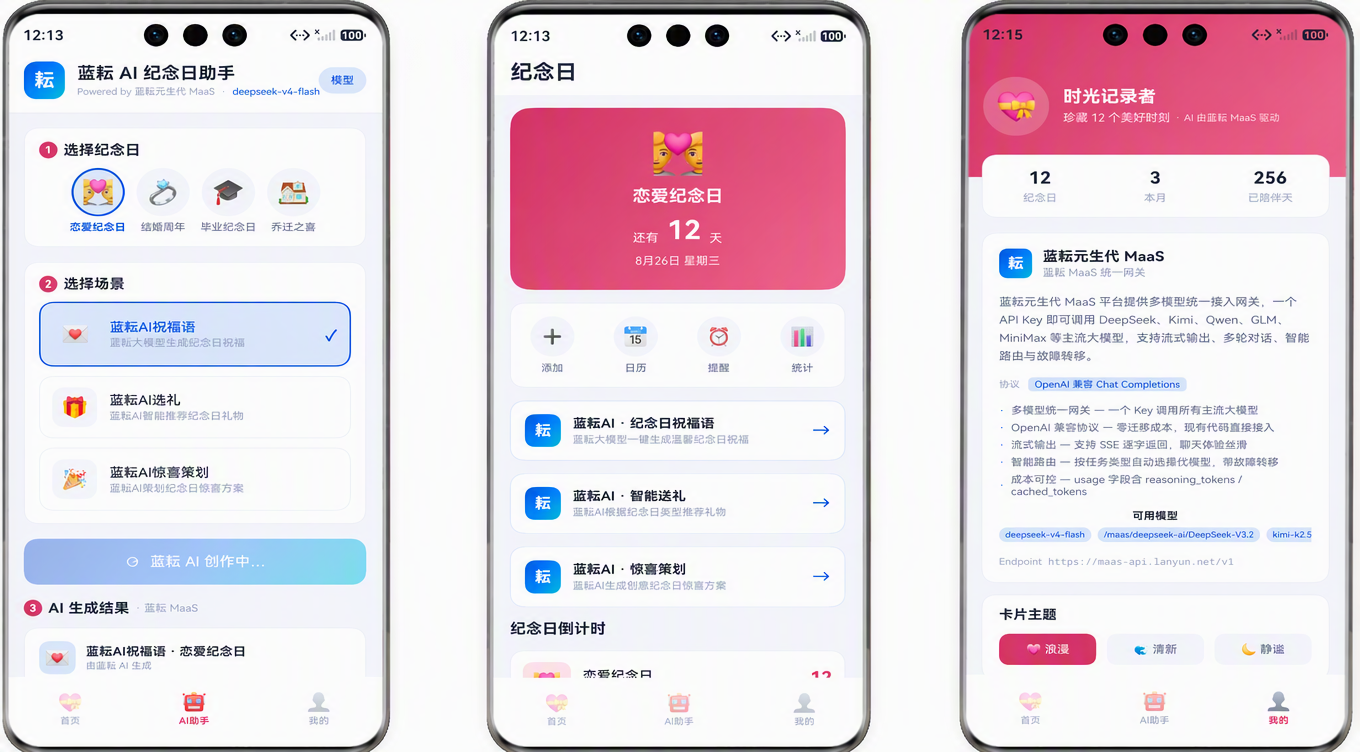
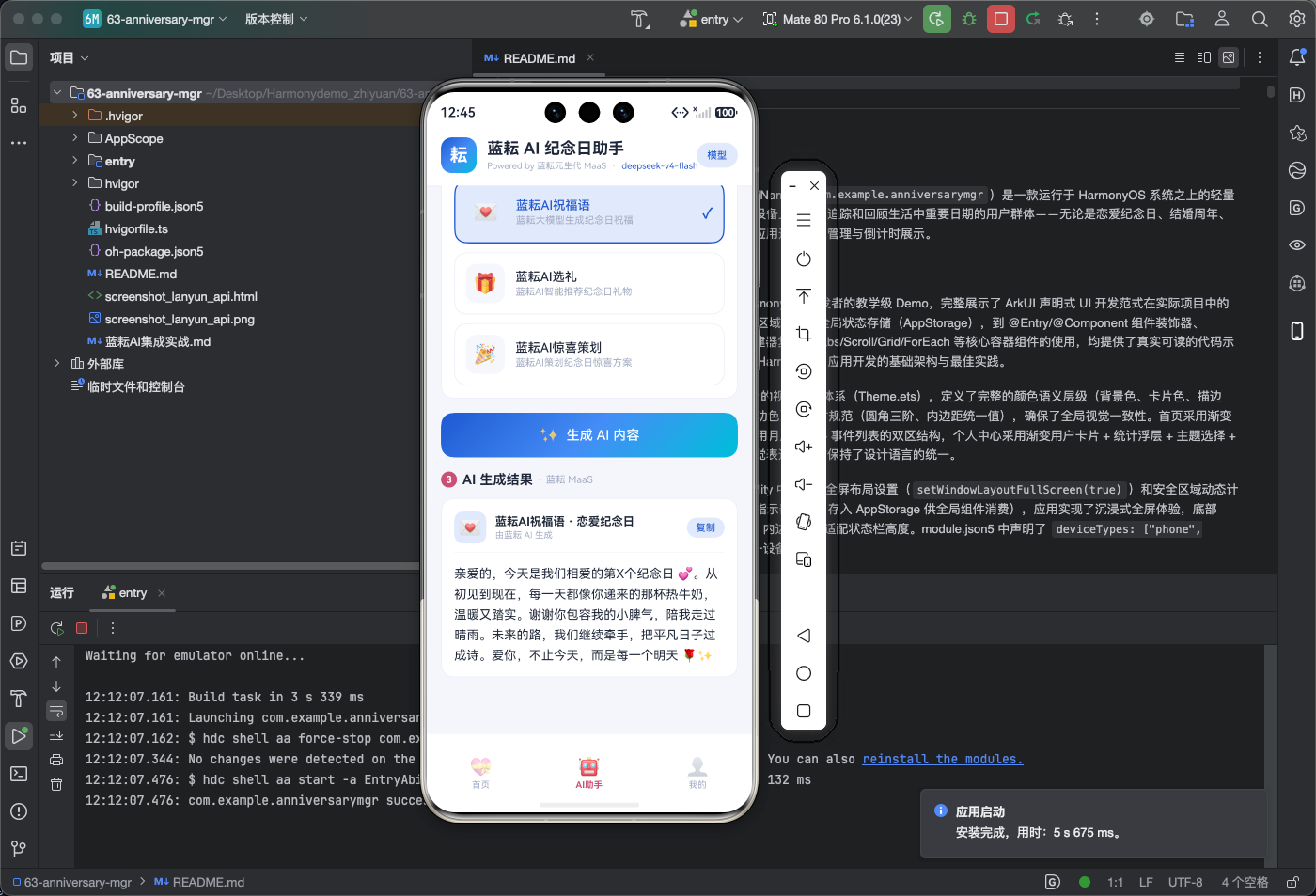
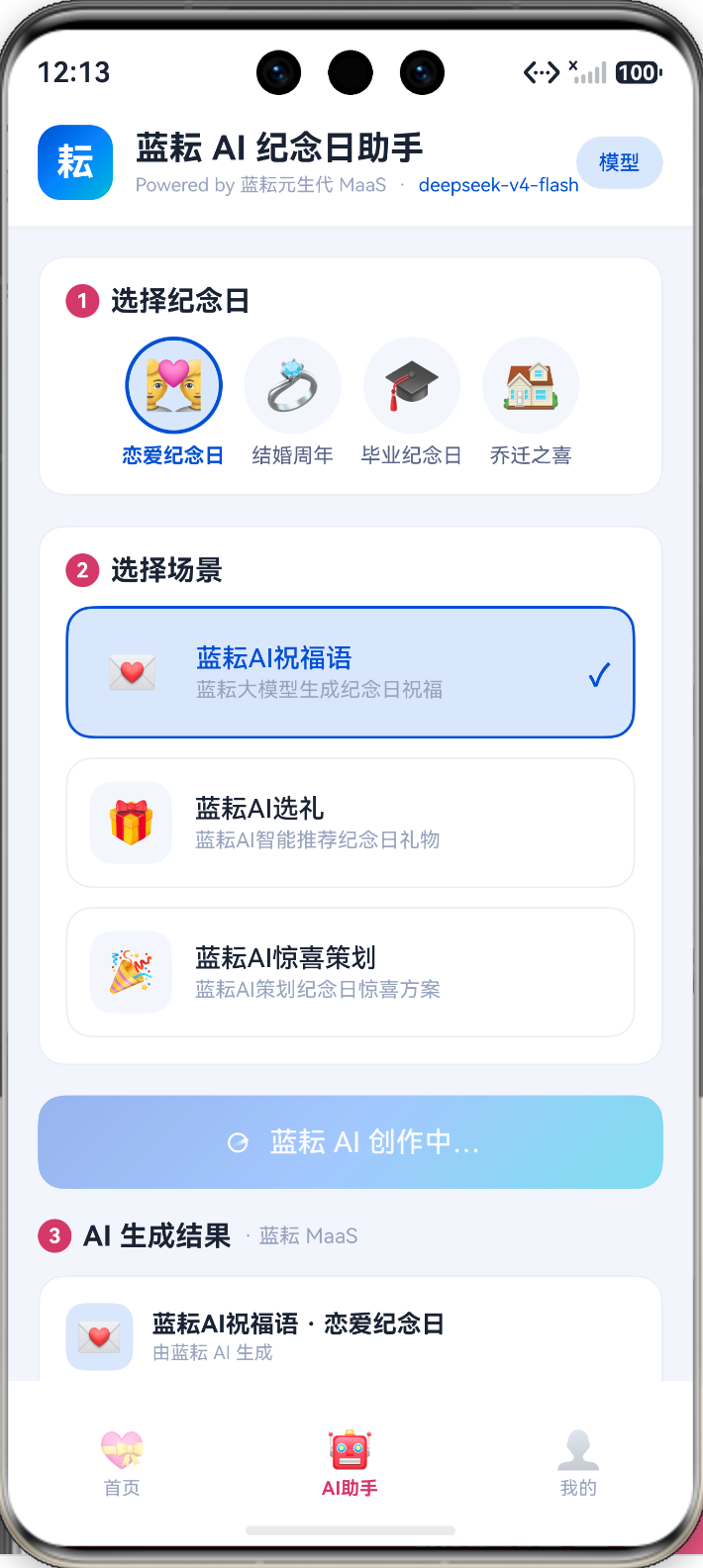
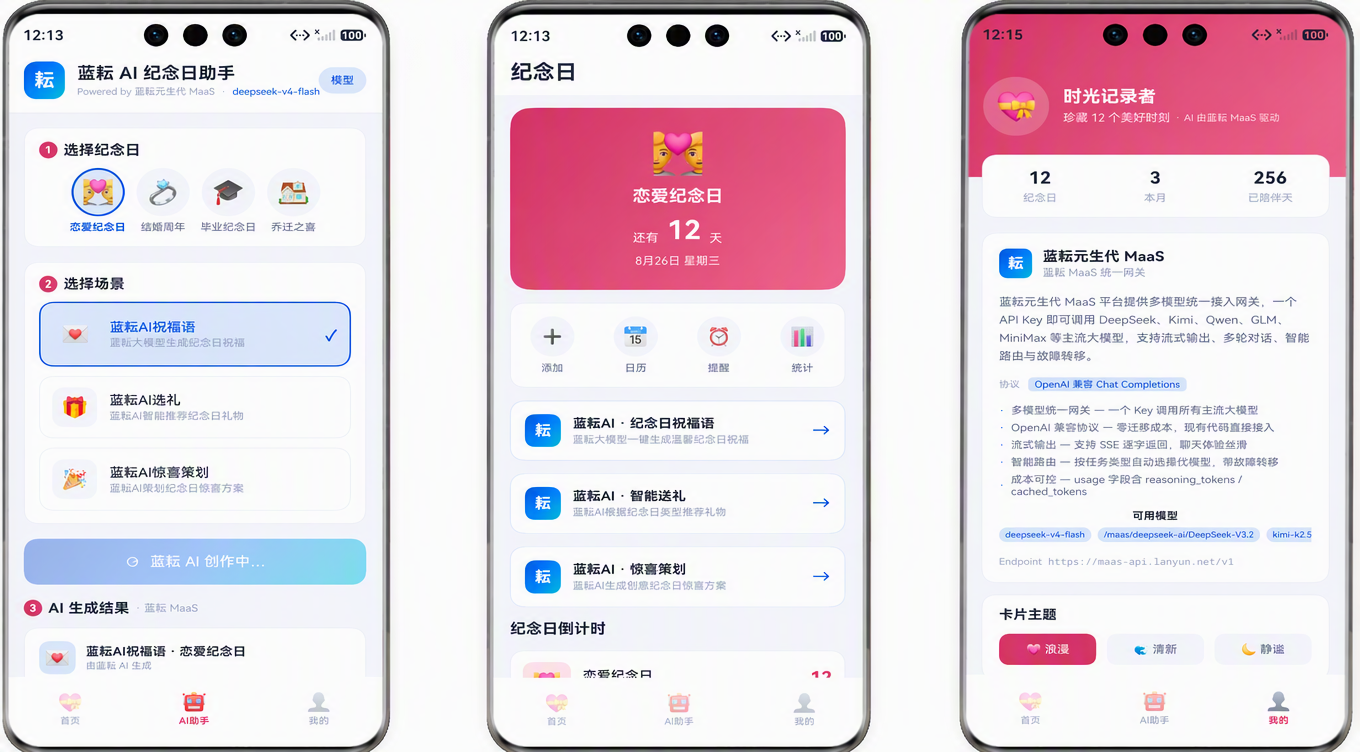
底部 3 个 Tab,AI 功能深度融入每个页面:
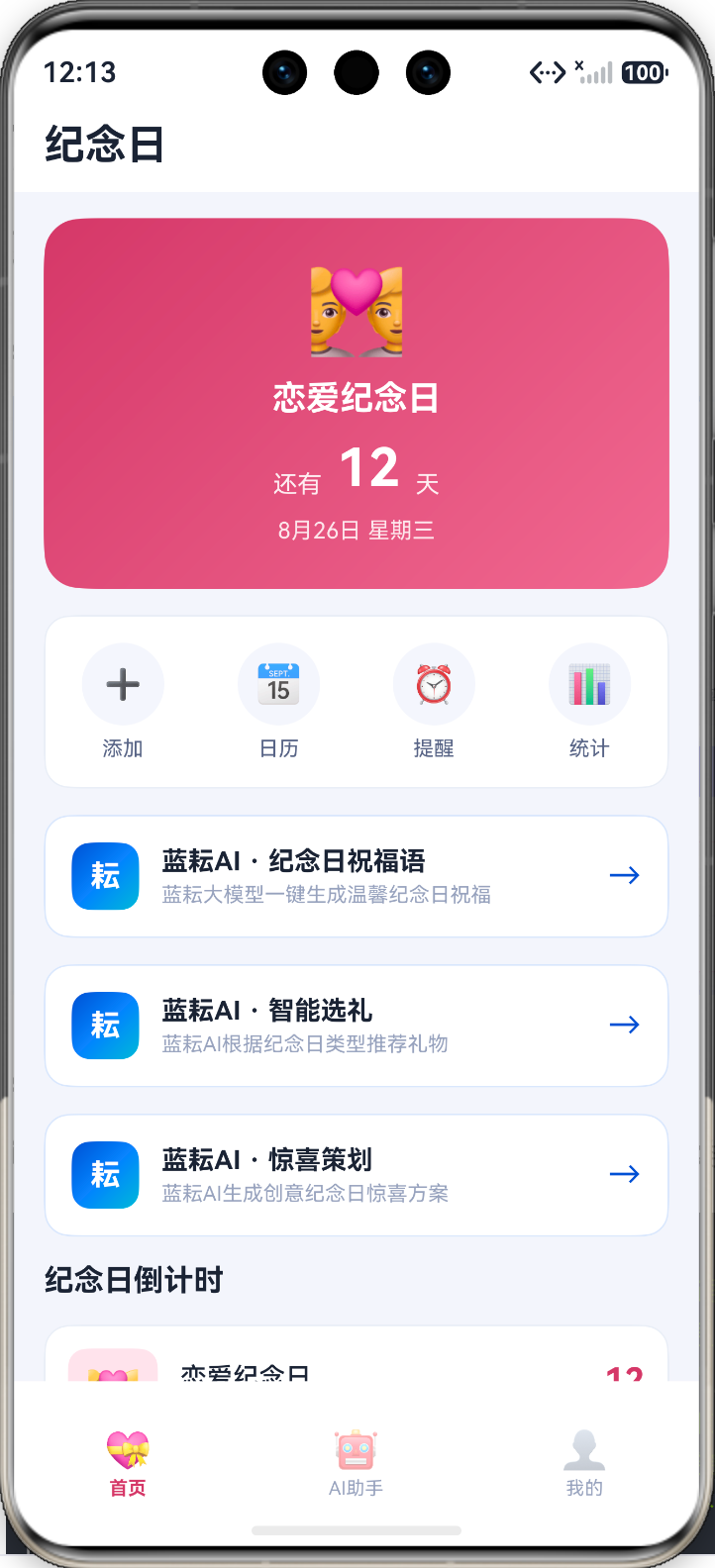
- 首页:3 个蓝耘 AI 横幅(祝福语/选礼/惊喜策划),点击直达 AI 助手并预选场景
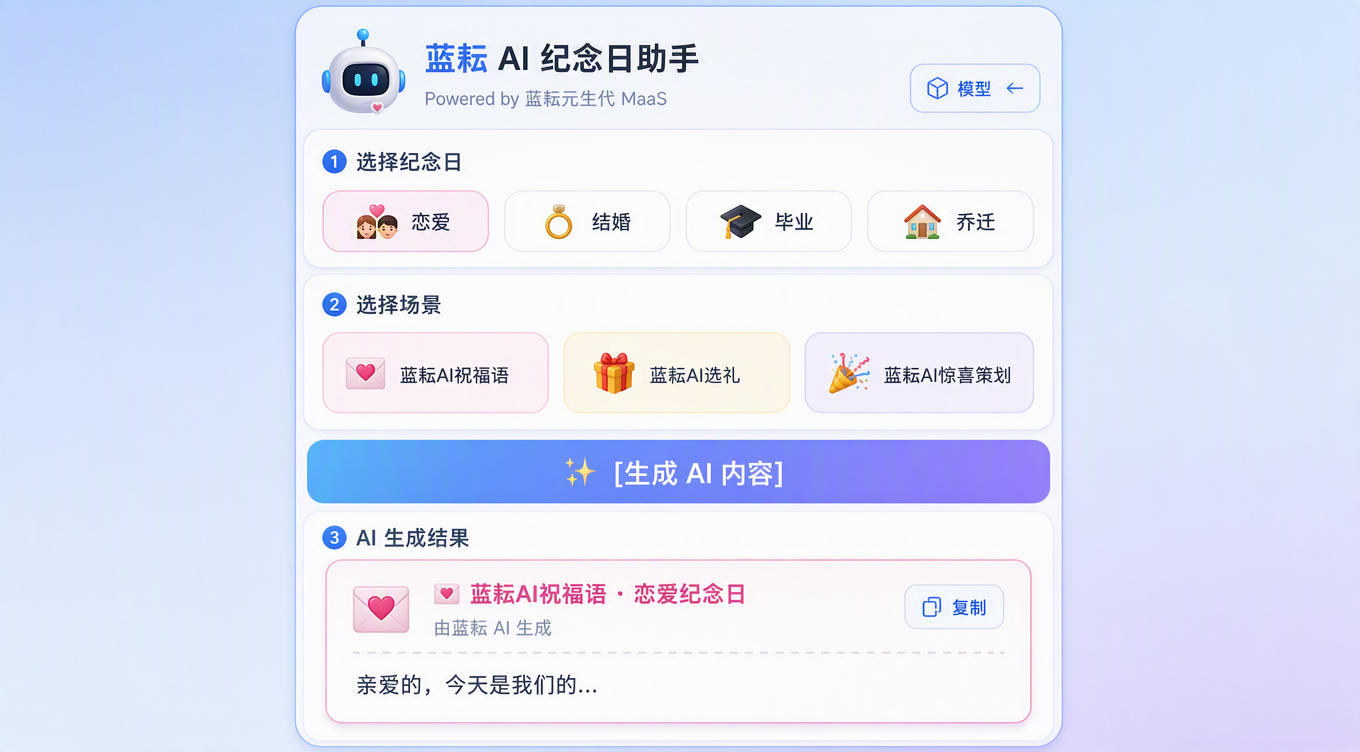
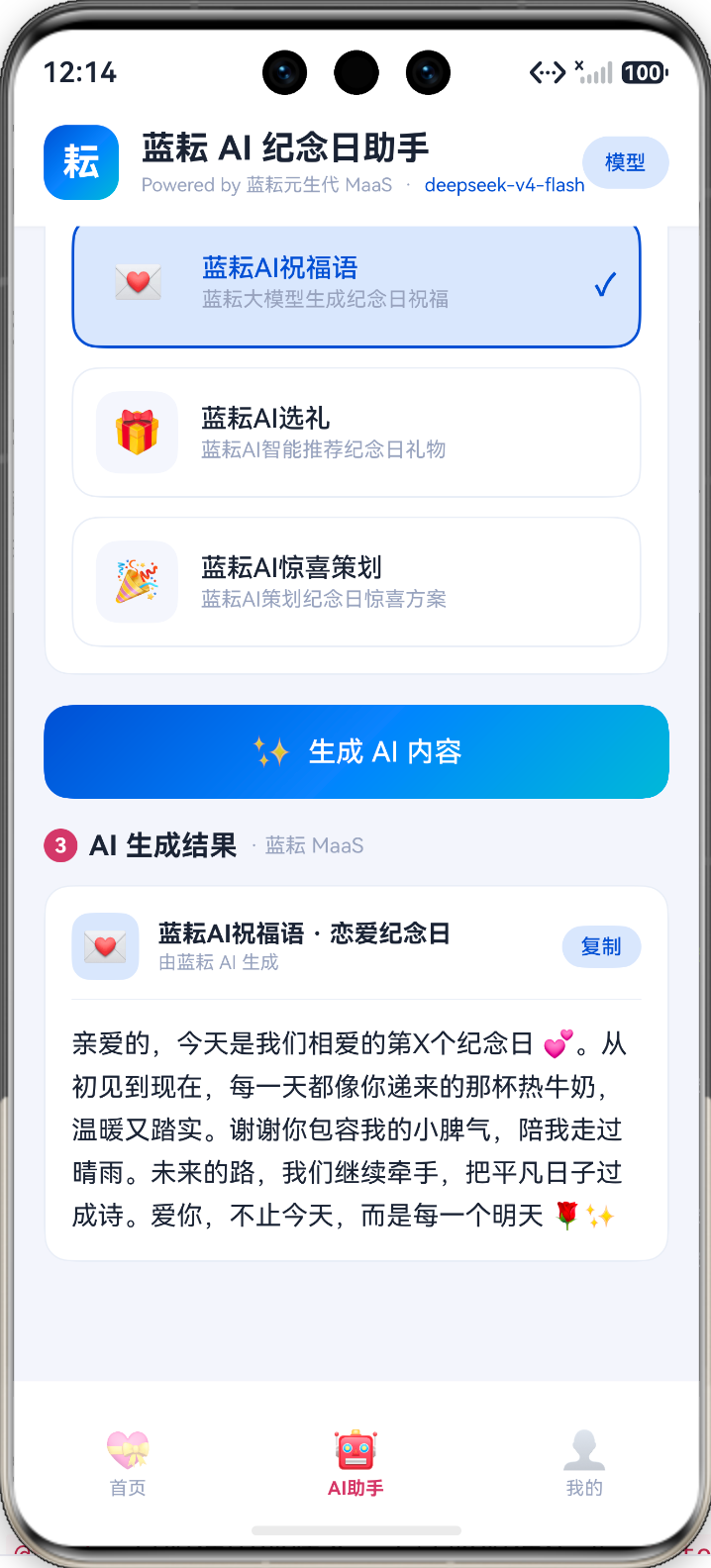
- AI助手:卡片式三步生成体验,支持 6 个模型热切换
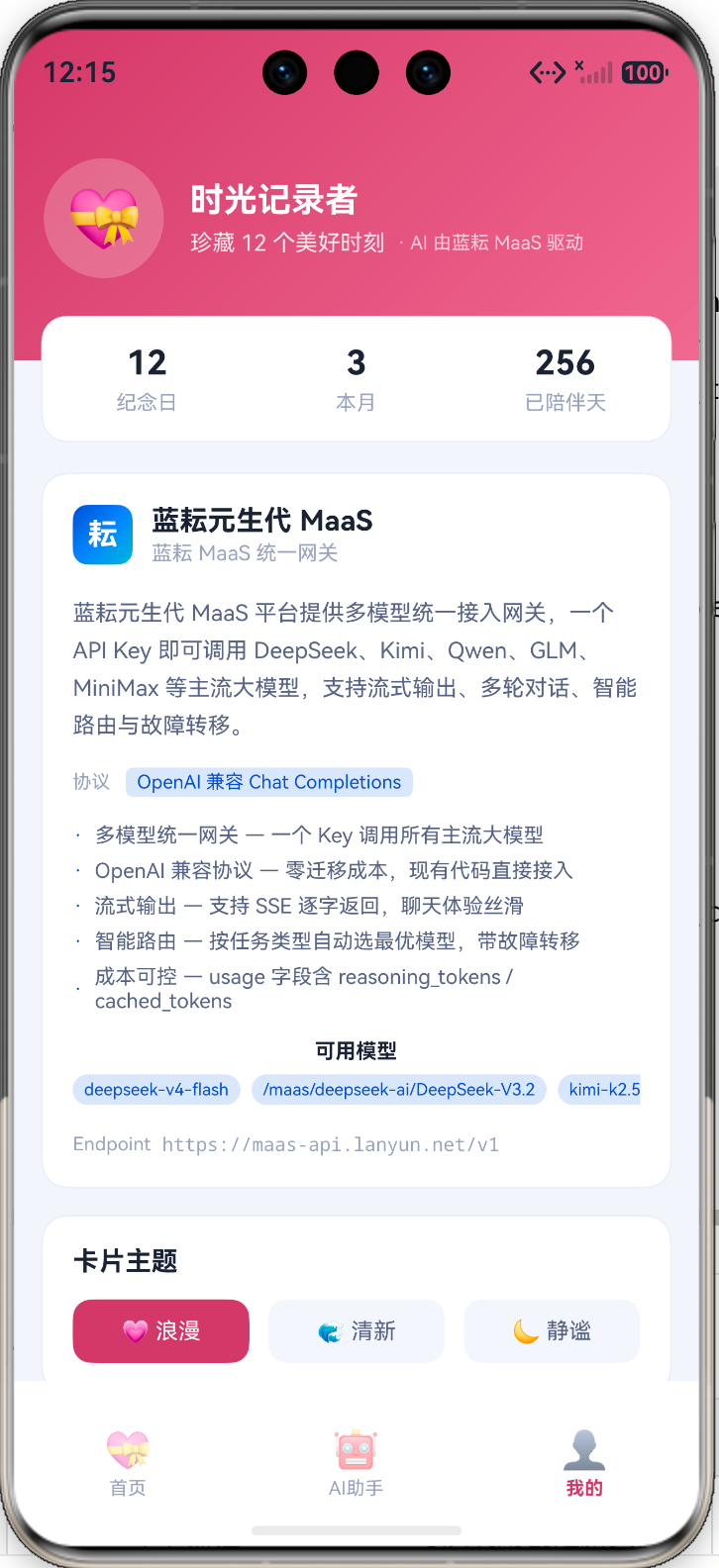
- 我的:完整展示蓝耘平台信息、可用模型、API 端点
四、核心实现:蓝耘 MaaS 服务层
4.1 协议设计
蓝耘 MaaS 兼容 OpenAI Chat Completions 协议,所以接口定义非常简洁:
// LanYunAI.ets
/** 聊天消息结构 */
export interface ChatMessage {
role: string; // system | user | assistant
content: string;
}
/** 非流式响应结构 */
interface ChatResponse {
choices: ChoiceItem[];
}
interface ChoiceItem {
message: MessageItem;
finish_reason?: string;
}
interface MessageItem {
content?: string;
reasoning_content?: string; // 推理模型的思维链
}
注意 reasoning_content 字段——蓝耘 MaaS 对接的 DeepSeek 等推理模型会返回思维链内容,当 content 为空时需要 fallback 到 reasoning_content,否则用户会看到空结果。
4.2 核心调用函数
const BASE_URL = 'https://maas-api.lanyun.net/v1';
const API_KEY = 'sk-xxxxx';
const DEFAULT_MODEL = 'deepseek-v4-flash';
export async function chat(
messages: ChatMessage[],
model: string = DEFAULT_MODEL,
maxTokens: number = 2048,
temperature: number = 0.7
): Promise<string> {
const client = http.createHttp();
// 超时保护:90 秒
const timeoutPromise = new Promise<string>((_, reject) => {
setTimeout(() => reject(new Error('请求超时(90s)')), 90000);
});
const requestPromise = new Promise<string>(async (resolve, reject) => {
try {
const resp = await client.request(BASE_URL + '/chat/completions', {
method: http.RequestMethod.POST,
header: {
'Content-Type': 'application/json',
'Authorization': 'Bearer ' + API_KEY,
},
extraData: JSON.stringify({
model: model,
messages: messages,
max_tokens: maxTokens,
temperature: temperature,
stream: false,
}),
connectTimeout: 30000,
readTimeout: 60000,
});
if (resp.responseCode !== 200) {
const errBody = `${resp.result}`.substring(0, 500);
resolve('[请求失败] 状态码: ' + resp.responseCode + '\\n' + errBody);
return;
}
const json: ChatResponse = JSON.parse(`${resp.result}`);
const msg = json.choices?.[0]?.message;
if (!msg) {
resolve('[蓝耘 AI 返回为空]');
return;
}
// content 优先,reasoning_content 兜底
const content = msg.content ?? '';
const reasoning = msg.reasoning_content ?? '';
if (content.length > 0) {
resolve(content);
} else if (reasoning.length > 0) {
resolve(reasoning);
} else {
resolve('[蓝耘 AI 返回为空]');
}
} catch (e) {
reject(e);
}
});
try {
const result = await Promise.race([requestPromise, timeoutPromise]);
return result;
} catch (e) {
return '[请求异常] ' + (e as Error).message;
} finally {
client.destroy(); // 关键:防止资源泄漏
}
}
几个鸿蒙特有的坑:
4.3 模型列表
蓝耘 MaaS 的模型 ID 有两种格式,都能用:
export const LAN_YUN_MODELS: string[] = [
'deepseek-v4-flash', // 短别名格式
'/maas/deepseek-ai/DeepSeek-V3.2', // 完整路径格式
'kimi-k2.5',
'qwen3.6-flash',
'/maas/zhipuai/GLM-5.2',
'minimax-m3',
];
用户可以在 App 内热切换模型,不同模型擅长不同任务:
- DeepSeek — 推理强,适合惊喜策划等需要逻辑的场景
- Kimi — 长文本好,适合生成详细方案
- Qwen-Flash — 速度快,适合祝福语等短文本
- GLM — 中文表达自然
- MiniMax — 创意性强
五、AI 助手页面:三步卡片式生成
5.1 交互设计
5.2 Prompt 工程
每个场景预置了模板 Prompt,运行时替换纪念日类型和名称:
private scenes: SceneItem[] = [
{ id: 0, emoji: '💌', title: '蓝耘AI祝福语',
prompt: '请为我的{type}「{name}」写一段温馨感人的纪念日祝福语,要求真诚有爱,100字左右,适当使用emoji。' },
{ id: 1, emoji: '🎁', title: '蓝耘AI选礼',
prompt: '我的{type}「{name}」快到了,请推荐3个适合的纪念日礼物,每个礼物简要说明推荐理由,格式清晰。' },
{ id: 2, emoji: '🎉', title: '蓝耘AI惊喜策划',
prompt: '请为我的{type}「{name}」策划一个有创意的纪念日惊喜方案,包含具体步骤和注意事项,让这一天难忘。' },
];
System Prompt 设定 AI 人设:
const messages: ChatMessage[] = [
{
role: 'system',
content: '你是蓝耘 AI 纪念日助手,集成在纪念日管理 App 中。' +
'你由蓝耘元生代 MaaS 平台驱动。' +
'回答要温暖有爱、简洁实用,使用中文,适当使用 emoji 增加亲和力。'
},
{ role: 'user', content: promptText }
];
5.3 生成流程:Loading 卡片 + 异步更新
private generate() {
// 1. 先插入 loading 卡片
this.resultId++;
const cardId = this.resultId;
this.results.unshift({
id: cardId,
anniversaryName: anniversary.name,
sceneTitle: scene.title,
sceneEmoji: scene.emoji,
content: '',
loading: true,
});
this.results = this.results.slice(); // 触发 UI 更新
this.generating = true;
// 2. 调用蓝耘 MaaS
chat(messages, model).then((reply: string) => {
const idx = this.results.findIndex(r => r.id === cardId);
if (idx >= 0) {
this.results.splice(idx, 1, {
id: cardId,
anniversaryName: anniversary.name,
sceneTitle: scene.title,
sceneEmoji: scene.emoji,
content: reply.length > 0 ? reply : '[蓝耘 AI 返回为空]',
loading: false,
});
this.results = […this.results]; // 触发 UI 更新
}
this.generating = false;
}).catch((e: Error) => {
// 错误也更新到卡片,不弹窗
// …
});
}
关键技巧:
- this.results.slice() 和 […this.results] 都能触发 ArkUI 的状态更新,但 splice 后必须重新赋值
- Loading 卡片让用户立即看到反馈,不用等 AI 返回
- 错误信息直接写进卡片内容,不弹 Toast,体验更连贯
5.4 Markdown 清洗
大模型返回的内容带 Markdown 标记,在鸿蒙 Text 组件中直接显示会很丑:
private stripMarkdown(md: string): string {
let t = md;
t = t.replace(/\\*\\*(.+?)\\*\\*/g, '$1'); // **粗体**
t = t.replace(/\\*(.+?)\\*/g, '$1'); // *斜体*
t = t.replace(/^#{1,6}\\s+/gm, ''); // # 标题
t = t.replace(/^(\\d+)\\.\\s+/gm, '$1. '); // 有序列表
t = t.replace(/^[-*]\\s+/gm, '· '); // 无序列表 → ·
t = t.replace(/`(.+?)`/g, '$1'); // `代码`
return t;
}
六、跨页面联动:首页横幅 → AI 助手预选
6.1 AppStorage 跨 Tab 通信
首页有 3 个 AI 横幅,点击后需要跳转到 AI 助手 Tab 并自动选中对应场景。用 AppStorage 实现:
// HomeTab.ets — 横幅点击
function goAI(scene: number): void {
AppStorage.setOrCreate('aiPresetScene', scene);
AppStorage.setOrCreate('currentTab', 1); // 切换到 AI 助手 Tab
}
// Index.ets — Tab 索引绑定
@StorageLink('currentTab') current: number = 0;
// AITab.ets — 读取预选场景
@StorageProp('aiPresetScene') presetScene: number = –1;
aboutToAppear(): void {
if (this.presetScene >= 0 && this.presetScene < this.scenes.length) {
this.selectedScene = this.presetScene;
}
}
为什么用 @StorageLink 而不是 @State?
@State 是组件内部状态,无法跨组件传递。@StorageLink 双向绑定 AppStorage,写入即同步,完美解决跨 Tab 通信问题。
6.2 3 Tab 架构
最终底部导航精简为 3 个 Tab:
Tabs({ barPosition: BarPosition.End, index: this.current }) {
TabContent() { HomeTab() }.tabBar(this.bar('首页', '💝', 0))
TabContent() { AITab() }.tabBar(this.bar('AI助手', '🤖', 1))
TabContent() { ProfileTab() }.tabBar(this.bar('我的', '👤', 2))
}
原来的「添加」和「日历」功能合并进首页,以弹层形式呈现,减少导航层级。
七、主题设计:蓝耘品牌色融入
7.1 双色系策略
应用保留玫红主色(纪念日主题),新增蓝耘品牌蓝用于 AI 相关组件:
// Theme.ets
export class C {
// 应用主色:浪漫玫红
static readonly primary: string = '#C44569';
static readonly primarySoft: string = '#FCE4EC';
static readonly accent: string = '#E07090';
// 蓝耘品牌色:深蓝 → 青蓝渐变(AI 组件专用)
static readonly lanYun: string = '#1B4FCC'; // 蓝耘深蓝
static readonly lanYunDeep: string = '#0D2E7A'; // 蓝耘墨蓝
static readonly lanYunAccent: string = '#3B82F6'; // 蓝耘亮蓝
static readonly lanYunCyan: string = '#06B6D4'; // 蓝耘青蓝
static readonly lanYunSoft: string = '#DCE7FB'; // 蓝耘浅蓝背景
// 蓝耘渐变组合
static readonly gradLanYun: LinearGradient = {
angle: 135,
colors: [['#1B4FCC', 0.0], ['#3B82F6', 0.5], ['#06B6D4', 1.0]]
};
}
7.2 视觉区分
| 纪念日倒计时卡片 | 玫红渐变 | primary → accent |
| AI 横幅、AI 按钮 | 蓝耘渐变 | gradLanYun |
| AI 选中态 | 蓝耘深蓝 | lanYun + lanYunSoft 背景 |
| 普通功能卡片 | 白色 + 灰边 | card + stroke |
用户一眼就能区分「App 原生功能」和「蓝耘 AI 功能」。
八、网络权限与安全区
8.1 网络权限
// module.json5
"requestPermissions": [
{
"name": "ohos.permission.INTERNET",
"reason": "$string:reason_internet",
"usedScene": { "abilities": ["EntryAbility"], "when": "inuse" }
}
]
8.2 全屏沉浸式 + 安全区适配
// EntryAbility.ets
win.setWindowLayoutFullScreen(true);
const top = win.getWindowAvoidArea(window.AvoidAreaType.TYPE_SYSTEM);
const bottom = win.getWindowAvoidArea(window.AvoidAreaType.TYPE_NAVIGATION_INDICATOR);
AppStorage.setOrCreate('safeTop', px2vp(top.topRect.height));
AppStorage.setOrCreate('safeBottom', px2vp(bottom.bottomRect.height));
每个页面通过 @StorageProp 读取安全区高度,动态计算 padding:
@StorageProp('safeTop') safeTop: number = 0;
@StorageProp('safeBottom') safeBottom: number = 0;
// 使用
.padding({ top: this.safeTop + 12, bottom: D.pad + this.safeBottom + 20 })
九、模型热切换
AITab 顶部有「模型」按钮,点击弹出底部选择器:
@Builder
ModelSheet() {
Stack({ alignContent: Alignment.Bottom }) {
Column()
.width('100%').height('100%').backgroundColor('#80000000')
.onClick(() => { this.showModelSheet = false; })
Column({ space: 14 }) {
Row() {
Text('选择蓝耘 MaaS 模型').fontSize(16).fontWeight(FontWeight.Bold)
Text('✕').fontSize(18).fontColor(C.textDim)
.onClick(() => { this.showModelSheet = false; })
}.width('100%').justifyContent(FlexAlign.SpaceBetween)
ForEach(LAN_YUN_MODELS, (m: string, idx: number) => {
Row({ space: 10 }) {
Text(m).fontSize(13)
.fontColor(this.currentModel === idx ? C.lanYun : C.textSub)
.layoutWeight(1)
if (this.currentModel === idx) {
Text('✓').fontSize(16).fontColor(C.lanYun).fontWeight(FontWeight.Bold)
}
}
.width('100%').padding(12).borderRadius(D.rSm)
.backgroundColor(this.currentModel === idx ? C.lanYunSoft : C.cardSoft)
.onClick(() => {
this.currentModel = idx;
this.showModelSheet = false;
promptAction.showToast({ message: '已切换至 ' + m });
})
}, (m: string) => m)
}
.width('100%').padding(20).backgroundColor(C.card)
.borderRadius({ topLeft: D.rLg, topRight: D.rLg })
}
.width('100%').height('100%')
}
切换后,下次生成就会使用新模型。这就是蓝耘 MaaS 的核心价值——同一个 chat() 函数,只改 model 参数,6 个模型随意切换,零代码改动。
十、完整调用链路
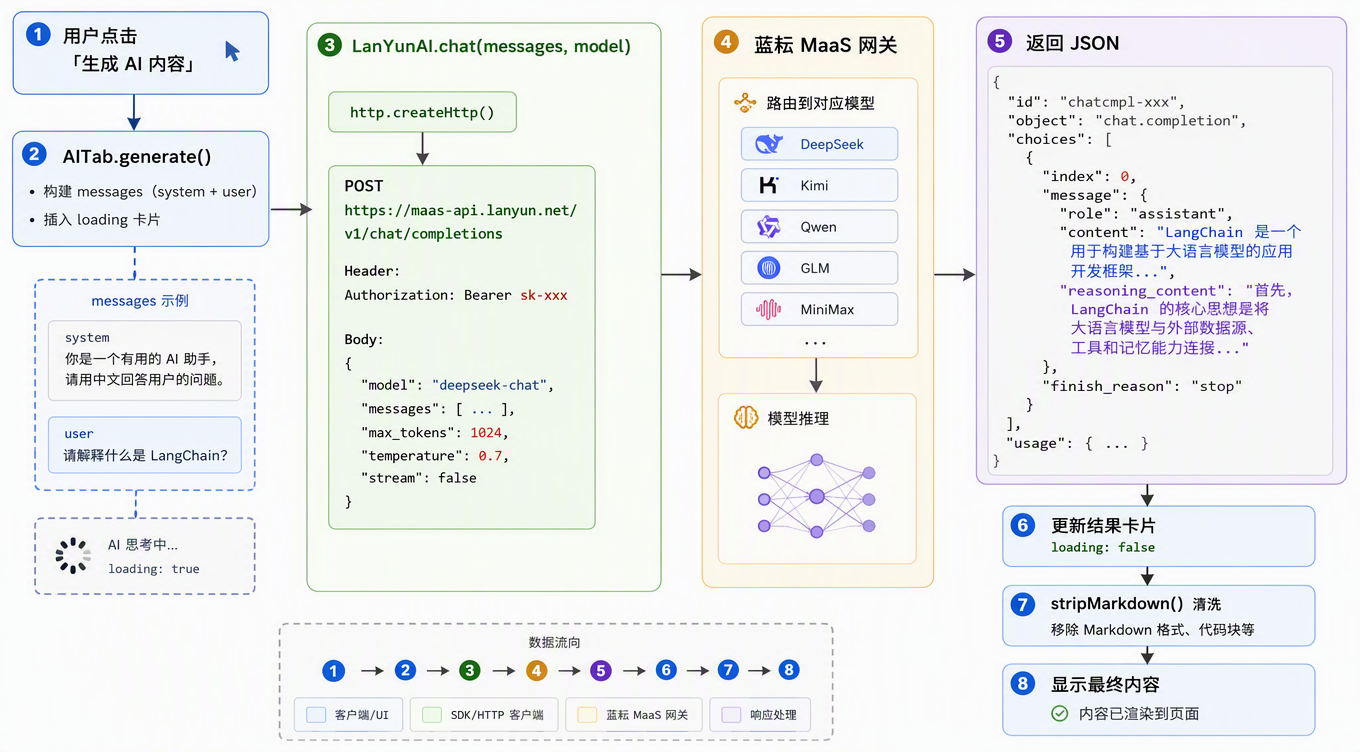
十一、踩坑总结
| http.createHttp() 内存泄漏 | 每次调用创建新实例 | finally { client.destroy(); } |
| 请求卡死不返回 | 鸿蒙 http 超时机制不完善 | Promise.race + 90s 兜底 |
| DeepSeek 返回空内容 | 推理模型 content 为空,内容在 reasoning_content | fallback 到 reasoning_content |
| @State 无法跨 Tab | 组件内部状态不共享 | @StorageLink + AppStorage |
| Markdown 显示混乱 | Text 组件不解析 Markdown | stripMarkdown() 正则清洗 |
| splice 后 UI 不更新 | ArkUI 数组监听机制 | splice 后 […arr] 重新赋值 |
| 模型 ID 格式不统一 | 蓝耘支持短别名和完整路径两种 | 都能用,无需统一 |
十二、效果一览
首页
- 玫红渐变倒计时卡片
- 4 宫格快捷功能(添加/日历/提醒/统计)
- 3 个蓝耘 AI 横幅,点击直达 AI 助手
- 纪念日列表 + 本月日历预览
AI 助手
- 蓝耘品牌色 Header,显示当前模型
- 三步卡片式生成:选纪念日 → 选场景 → 生成
- 6 个模型热切换
- 结果卡片支持复制
- Loading 动画 + 错误内联展示
我的
- 蓝耘平台信息卡:名称、协议、描述、特性列表
- 可用模型横向滚动展示
- API Endpoint 展示
十三、总结
蓝耘 MaaS 在鸿蒙上的集成体验可以概括为三点:
对于鸿蒙开发者来说,蓝耘 MaaS 是目前接入 AI 大模型成本最低的方案之一。整个集成过程只用了 @kit.NetworkKit 的 http 模块,没有任何第三方依赖,完全原生。
一个 API Key,六大模型,鸿蒙原生,就这么简单。