10分钟快速上手fuel-core:从零构建并运行本地区块链节点的完整教程
【免费下载链接】fuel-core Rust full node implementation of the Fuel v2 protocol.  项目地址: https://gitcode.com/GitHub_Trending/fu/fuel-core
fuel-core 是 Fuel v2 协议的 Rust 全节点实现,它负责区块生产、交易执行、P2P 同步与 GraphQL 查询。本教程带你 10 分钟完成环境搭建,从零构建二进制并启动一个可出块的本地区块链节点,同时详解 Makefile、cargo-make 与 xtask 的构建体系。
🧰 第一步:环境搭建(系统依赖 + Rust 工具链)
fuel-core 构建支持 macOS 与 Linux,依赖 clang 等系统组件。按你的系统执行安装命令:
| macOS | brew update && brew install cmake |
| Debian/Ubuntu | apt install -y cmake pkg-config build-essential git clang libclang-dev |
| Arch | pacman -Syu –needed –noconfirm cmake gcc pkgconf git clang |
然后准备 Rust 工具链。项目通过 rust-toolchain.toml 锁定了 Rust 1.93.0 并声明了 wasm32-unknown-unknown 目标——只要你的 cargo 较新,克隆仓库后工具链会自动对齐:
git clone https://gitcode.com/GitHub_Trending/fu/fuel-core
cd fuel-core
rustup target add wasm32-unknown-unknown
💡 提示:wasm32 目标用于编译状态转换字节码(state transition bytecode),是节点执行交易的必备组件。
🔨 第二步:用 Makefile 构建节点二进制
仓库根目录的 Makefile 是一层薄薄的入口,它把常用命令映射到 cargo-make 任务。先运行 make help 查看全部可用目标:
Supported make targets:
make build – Build release binary with production features
make debug – Build debug binary with production features
make fmt – Format all code
make test – Run all tests
make ci-checks – Run all CI checks
make bench – Run benchmarks
make clean – Clean build artifacts
执行构建(首次构建依赖较多,请耐心等待):
make build # release 二进制(推荐运行节点使用)
make debug # debug 二进制(开发调试用,产物在 target/debug/)
任务定义在 Makefile.toml 中。选择 cargo-make 的原因在文件开头注释写得很清楚:workspace 中有二十多个 crate(txpool、p2p、executor、relayer 等),cargo-make 会在每个 workspace 成员上独立执行任务,避免 feature 统一(feature unification)导致发布 crate 时隐式依赖其他 crate 特性的问题。
⚙️ 第三步:理解 xtask 开发构建流程
官方推荐用 xtask 做开发构建(见 xtask/):
cargo xtask build
它的逻辑很简单,两步走(见 xtask/src/commands/build.rs):
也就是说,cargo xtask build 能保证你提交的代码与客户端 GraphQL schema 永远同步——这是纯 cargo build 做不到的。xtask/src/main.rs 中只注册了 build 和 dump 两个子命令,dump 单独执行则只刷新 schema 文件。
🚀 第四步:运行本地区块链节点
构建完成后,最简启动方式(内存数据库,重启即清空,适合学习):
./target/debug/fuel-core run –db-type in-memory
成功启动后你会看到类似日志:
INFO fuel_core::cli::run: Block production mode: Instant
INFO fuel_core::graphql_api::service: Binding GraphQL provider to 127.0.0.1:4000
节点默认开启即时出块(Instant 模式),并且自动把 GraphQL 服务绑定到 127.0.0.1:4000 的 /v1/graphql 端点。常用参数速查:
| –db-type in-memory | 使用内存数据库,不持久化(默认 RocksDB,数据在 ~/.fuel/db) |
| –poa-instant=false | 关闭自动出块,变成"被动"节点 |
| –snapshot <路径> | 从指定快照做(re)genesis |
| –port <端口> | 更换 GraphQL 服务端口 |
| –enable-p2p / –enable-relayer | 启用 P2P 网络与以太坊 Relayer 服务 |
可用 ./target/debug/fuel-core run –help 查看全部选项。
📈 节点内部:交易从提交到上链的全流程
跑起来之后,一个交易在节点内部是怎么流转的?官方时序图给出了完整答案——用户提交交易 → 进入交易池 → 通过 GossipSub 广播 → 区块生产者请求交易、打包出块 → 新块高度通过心跳传播、节点触发同步拉取新区块:
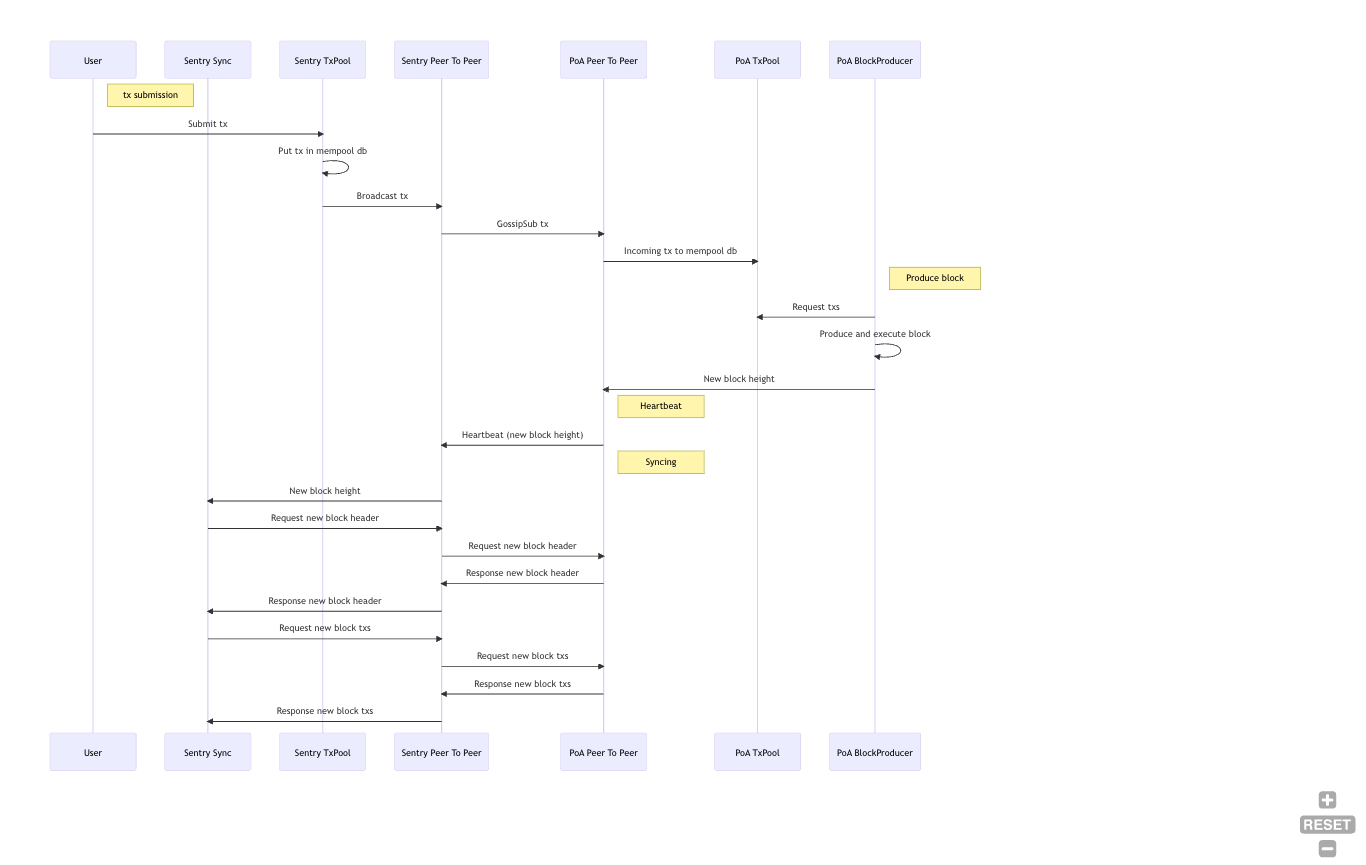
对应源码模块也一一可寻:交易池在 crates/services/txpool_v2/,P2P 在 crates/services/p2p/,区块生产在 crates/services/producer/,同步在 crates/services/sync/。架构采用"端口-适配器"(六边形)风格,设计说明见 docs/architecture.md。
🐛 第五步(可选):配置 IDE 调试
想断点调试节点,推荐 CLion + 官方 Rust 插件,或 VS Code + CodeLLDB。CLion 的 Run Configuration 核心是命令 run –all-features –bin fuel-core — run <ARGUMENTS>,效果如下:
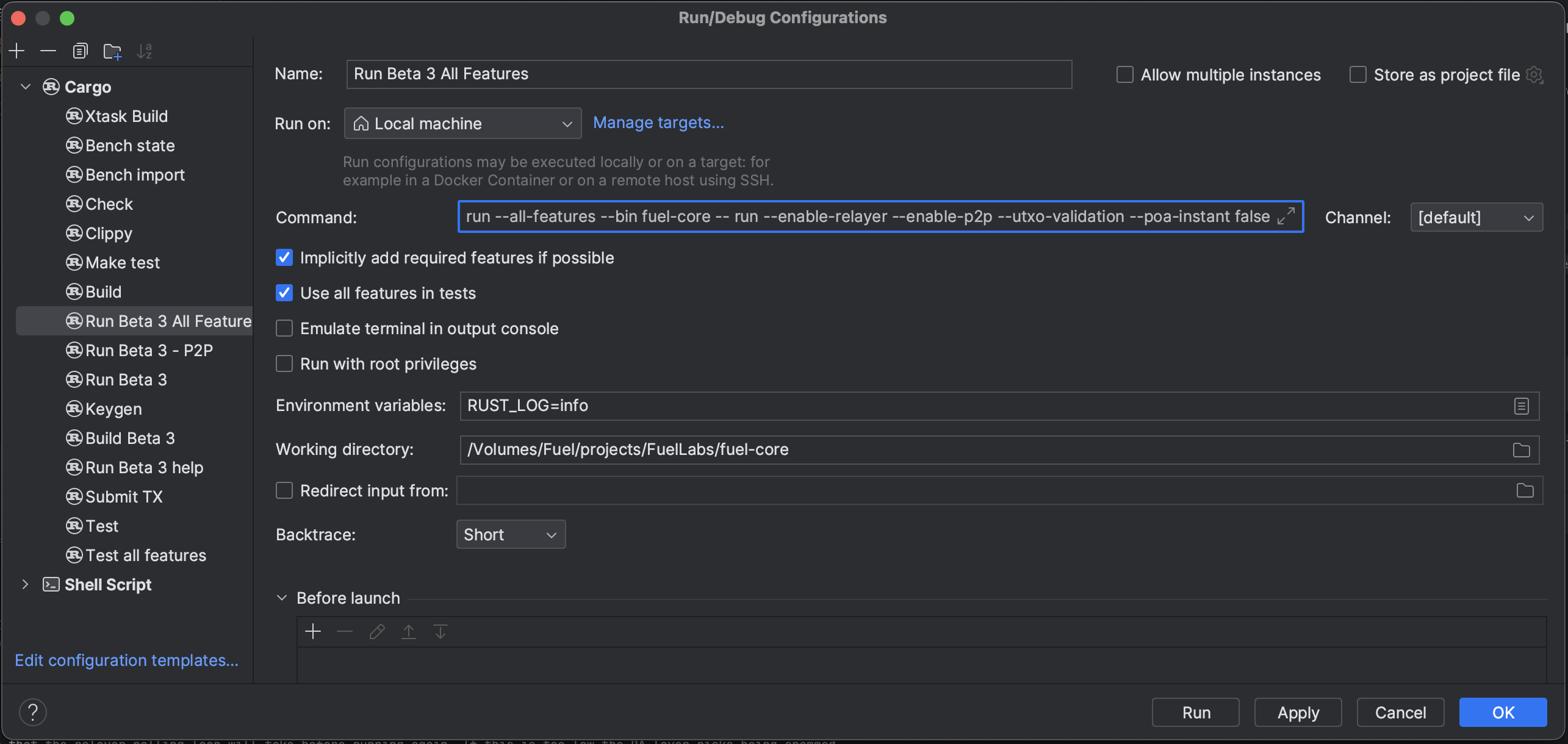
更完整的调试指南(含 VS Code 的 launch.json 示例、环境变量 .env 用法)见 docs/developers/debugging.md。
🛠️ 常见问题排查(Troubleshooting)
| Address already in use (os error 48) | 端口被占,换端口(–port)或用 lsof -i :PORT 找到进程并结束 |
| Failed to open rocksdb … incompatible db | 数据库是旧版本创建的,删除 ~/.fuel/db 重试,或改用 –db-type in-memory |
| macOS 报 Too many open files | 文件描述符上限太低,执行 ulimit -n 10240 |
| 想看更详细日志 | 设置环境变量 RUST_LOG=debug(支持 EnvFilter 语法) |
📚 关键文件路径速查
- 项目入口与说明:README.md、Cargo.toml
- 构建任务定义:Makefile、Makefile.toml
- 开发构建工具:xtask/src/main.rs、xtask/src/commands/dump.rs
- CI 检查脚本:ci_checks.sh(贡献代码前务必运行)
- 测试套件:tests/(含 make test 背后的 nextest 集成测试)
- Docker 部署:deployment/Dockerfile
10 分钟走完全程:装依赖 → make build → fuel-core run –db-type in-memory,你的本地 Fuel v2 区块链节点已经在出块了。下一步可以试着用 GraphQL 查询 127.0.0.1:4000/v1/graphql,向自己的节点提交第一笔交易!
【免费下载链接】fuel-core Rust full node implementation of the Fuel v2 protocol. 项目地址: https://gitcode.com/GitHub_Trending/fu/fuel-core
创作声明:本文部分内容由AI辅助生成(AIGC),仅供参考