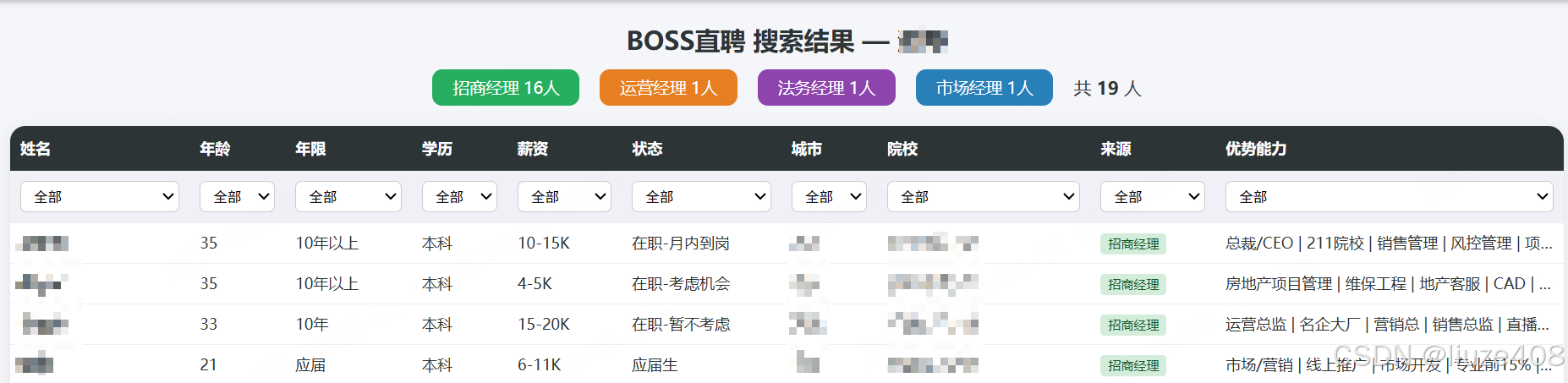
一、启动调试端口浏览器
—–默认使用端口9222/9229/19222
1、编辑脚本文件
在 D:\\zhaopin\\boss-zhipin-mcp 路径下创建 start_chrome_debug.bat 文件
@echo off
setlocal EnableDelayedExpansion
cd /d "%~dp0"
:: 1) Try system Python first (if user has it in PATH)
python –version >nul 2>&1
if !ERRORLEVEL! equ 0 (
set "PY=python"
goto :RUN
)
:: 2) Try project venv
if exist "%~dp0.venv\\Scripts\\python.exe" (
set "PY=%~dp0.venv\\Scripts\\python.exe"
goto :RUN
)
:: 3) Try common Python install paths
for %%d in (
"C:\\Python313\\python.exe"
"C:\\Python312\\python.exe"
"C:\\Python311\\python.exe"
"C:\\Python310\\python.exe"
"%LOCALAPPDATA%\\Programs\\Python\\Python313\\python.exe"
"%LOCALAPPDATA%\\Programs\\Python\\Python312\\python.exe"
) do (
if exist %%d (
set "PY=%%~d"
goto :RUN
)
)
echo Python not found. Please install Python 3.10+ or set up a venv.
pause
exit /b 1
:RUN
echo Using: %PY%
"%PY%" launch_chrome_debug.py
pause
2、编辑运行文件
在 D:\\zhaopin\\boss-zhipin-mcp 路径下创建 launch_chrome_debug.py 文件
"""
Launch Chrome with remote-debugging-port so boss-zhipin-mcp can reuse it.
Called by start_chrome_debug.bat / .ps1. Written in Python because Python's
subprocess.Popen(list) handles argument quoting reliably and we can read
Chrome's stderr to diagnose why the debug port did not open.
Why a dedicated profile (.chrome-debug) instead of the default User Data?
When Chrome is force-killed, the default profile can keep a stale
'SingletonLock'. A freshly launched Chrome then thinks another instance is
already running and REFUSES to bind –remote-debugging-port. A dedicated,
lock-free profile avoids this and binds reliably. BOSS login done inside
this Chrome persists in that profile across runs.
"""
import json
import os
import socket
import subprocess
import sys
import time
import urllib.request
CHROME_PATHS = [
r"C:\\Program Files\\Google\\Chrome\\Application\\chrome.exe",
r"C:\\Program Files (x86)\\Google\\Chrome\\Application\\chrome.exe",
os.path.expandvars(r"%LOCALAPPDATA%\\Google\\Chrome\\Application\\chrome.exe"),
r"D:\\Program Files\\Google\\Chrome\\Application\\chrome.exe",
"/Applications/Google Chrome.app/Contents/MacOS/Google Chrome",
"/usr/bin/google-chrome",
"/usr/bin/chromium-browser",
]
PORTS = [9222, 9229, 19222]
# Dedicated, lock-free profile next to this script (no spaces in path).
DEBUG_PROFILE = os.path.join(os.path.dirname(os.path.abspath(__file__)), ".chrome-debug")
# Windows process-creation flags so Chrome fully detaches from this script.
DETACHED_PROCESS = 0x00000008
CREATE_NEW_PROCESS_GROUP = 0x00000200
def log(msg: str) -> None:
print(msg, flush=True)
def find_chrome() -> str | None:
for p in CHROME_PATHS:
if os.path.exists(p):
return p
for name in ["chrome", "chrome.exe", "google-chrome", "chromium-browser"]:
import shutil
path = shutil.which(name)
if path:
return path
return None
def is_port_listening(port: int) -> dict | None:
"""Return /json/version payload if a Chrome CDP endpoint answers."""
try:
req = urllib.request.Request(
f"http://127.0.0.1:{port}/json/version", method="GET"
)
with urllib.request.urlopen(req, timeout=2) as resp:
return json.loads(resp.read().decode("utf-8"))
except Exception:
return None
def tcp_port_open(port: int) -> bool:
s = socket.socket(socket.AF_INET, socket.SOCK_STREAM)
s.settimeout(1)
try:
return s.connect_ex(("127.0.0.1", port)) == 0
finally:
s.close()
def kill_chrome() -> None:
log("Closing running Chrome…")
try:
subprocess.run(
["taskkill", "/F", "/IM", "chrome.exe", "/T"],
capture_output=True, text=True, errors="ignore",
)
except Exception as e:
log(f" taskkill warning: {e}")
time.sleep(2)
def chrome_still_running() -> int:
try:
result = subprocess.run(
["tasklist", "/FI", "IMAGENAME eq chrome.exe", "/FO", "CSV", "/NH"],
capture_output=True, text=True, errors="ignore",
)
return sum(1 for ln in result.stdout.splitlines() if "chrome.exe" in ln.lower())
except Exception:
return 0
def launch_chrome(chrome: str, port: int, user_data_dir) -> subprocess.Popen | None:
args = [
chrome,
f"–remote-debugging-port={port}",
"–no-first-run",
"–no-default-browser-check",
"–restore-last-session",
]
if user_data_dir:
args.append(f"–user-data-dir={user_data_dir}")
try:
proc = subprocess.Popen(
args,
stdout=subprocess.PIPE,
stderr=subprocess.PIPE,
creationflags=DETACHED_PROCESS | CREATE_NEW_PROCESS_GROUP,
)
log(f" Launched Chrome PID={proc.pid}, port={port}"
+ (f", profile={user_data_dir}" if user_data_dir else " (default profile)"))
return proc
except Exception as e:
log(f" Failed to launch Chrome: {e}")
return None
def cleanup(proc: subprocess.Popen | None) -> None:
if proc:
try:
proc.terminate()
proc.wait(timeout=3)
except Exception:
pass
kill_chrome()
time.sleep(2)
def wait_for_port(port: int, timeout: int = 20) -> dict | None:
for _ in range(timeout):
info = is_port_listening(port)
if info:
return info
time.sleep(1)
return None
def diagnose() -> None:
log("Diagnosis:")
log(f" chrome.exe processes still running: {chrome_still_running()}")
for port in PORTS:
log(f" port {port}: http={is_port_listening(port) is not None}, "
f"tcp_listen={tcp_port_open(port)}")
log(" Common causes:")
log(" – Antivirus/firewall blocks localhost listening ports.")
log(" – Organization policy disables remote debugging.")
log(" – Chrome needs to be run as Administrator.")
def main() -> int:
# 1) Reuse an already-open debug port if present.
for port in PORTS:
info = is_port_listening(port)
if info:
log(f"FOUND: debug port {port} is already open.")
log(f"Browser: {info.get('Browser', 'unknown')}")
log("Keep Chrome open and use the MCP.")
input("Press Enter to close this window (Chrome stays open)…")
return 0
# 2) Find Chrome.
chrome = find_chrome()
if not chrome:
log("ERROR: Chrome not found. Install Chrome or edit CHROME_PATHS.")
input("Press Enter to exit…")
return 1
log(f"Chrome path: {chrome}")
# 3) Close any running Chrome.
kill_chrome()
if chrome_still_running():
log("WARNING: Some chrome.exe processes are still running.")
log("Close them manually in Task Manager, then retry.")
input("Press Enter to exit…")
return 1
log("Chrome closed.")
# 4) Try dedicated profile first (reliable), then default profile (reuses login).
configs = [
("dedicated profile (.chrome-debug)", DEBUG_PROFILE),
("default profile", None),
]
for cfg_name, udir in configs:
log(f"— Attempt: {cfg_name} —")
ok_port = None
ok_info = None
for port in PORTS:
log(f"Trying debug port {port}…")
proc = launch_chrome(chrome, port, udir)
if not proc:
continue
info = wait_for_port(port, timeout=20)
if info:
ok_port = port
ok_info = info
break
# Failure: report why.
if proc.poll() is not None:
err = ""
try:
if proc.stderr:
err = proc.stderr.read().decode("utf-8", "ignore")[:1200]
except Exception:
pass
log(f" Chrome exited (code {proc.returncode}). stderr:\\n{err}")
else:
log(f" Chrome alive but port {port} not bound "
f"(tcp_listen={tcp_port_open(port)}).")
cleanup(proc)
if ok_port:
log(f"SUCCESS: debug port {ok_port} is open ({cfg_name}).")
log(f"Browser: {ok_info.get('Browser', 'unknown')}")
log("The MCP auto-detects 9222 / 9229 / 19222.")
if udir:
log("NOTE: this is a dedicated profile — log in to BOSS here once; "
"the session persists in this profile for future runs.")
else:
log("Your existing BOSS login from the default profile is reused.")
log("Keep Chrome open and use the MCP.")
input("Press Enter to close this window (Chrome stays open)…")
return 0
log(f"Attempt '{cfg_name}' failed on all ports.\\n")
log("FAILED: none of ports 9222/9229/19222 opened.")
diagnose()
input("Press Enter to exit…")
return 1
if __name__ == "__main__":
sys.exit(main())
至此,访问 boss-zhipin-mcp 的前提条件已经完成,否则会被系统检测,自动打开新窗口导致一直反复横跳登录界面。
二、安装 boss-zhipin-mcp 服务
—–本项目参考 Snseam/boss-zhipin-mcp ,下方代码已经更新,请自取下载
1、拉取代码
git 链接地址 https://github.com/liuze408/boss-zhipin-mcp.git
项目存放路径 D:\\zhaopin\\boss-zhipin-mcp ,供参考
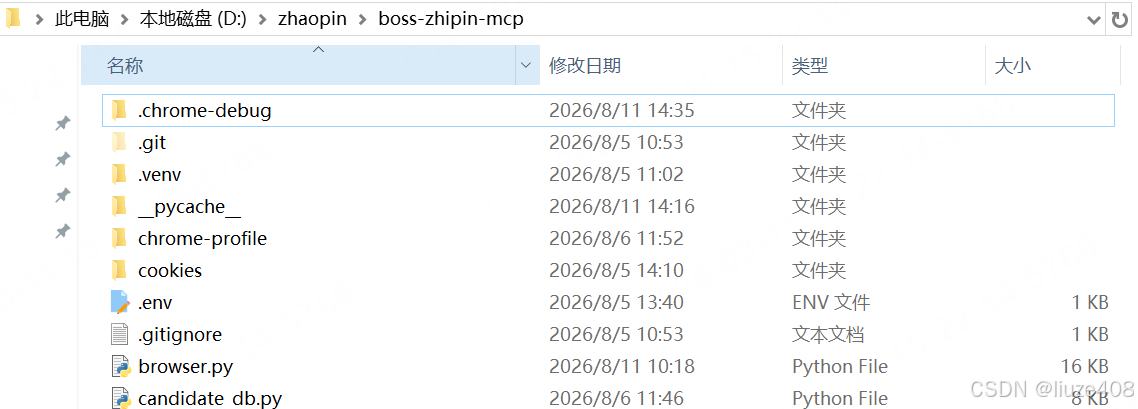
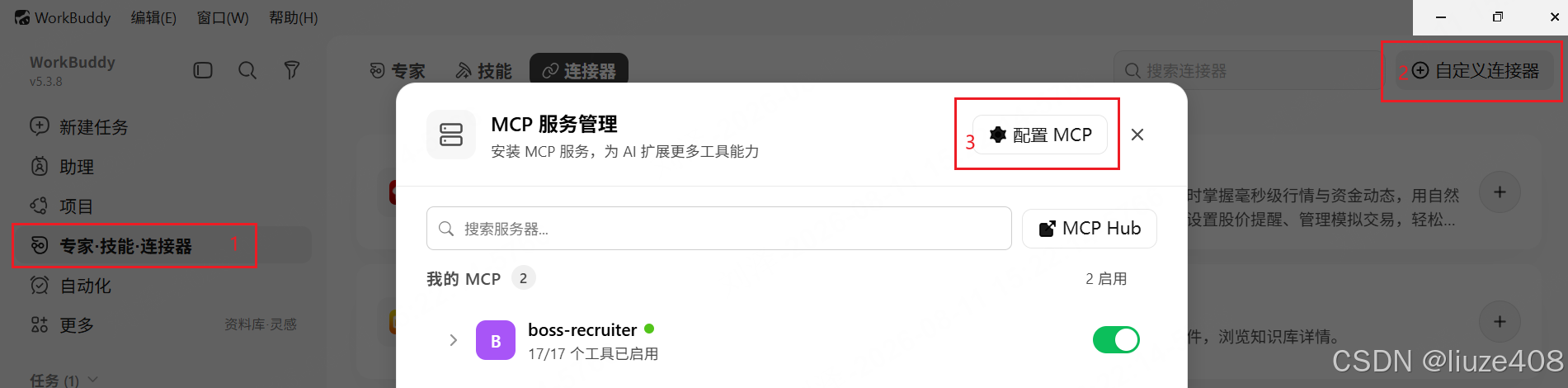
2、打开 workBuddy 配置连接器(即mcp)
①点击左上方连接器,②点击右侧的自定义连接器,③点击配置 MCP ,将下方代码复制进去即可。路径需要参照修改。
{
"mcpServers": {
"boss-recruiter": {
"type": "stdio",
"command": "D:\\\\zhaopin\\\\boss-zhipin-mcp\\\\.venv\\\\Scripts\\\\python.exe",
"args": [
"D:\\\\zhaopin\\\\boss-zhipin-mcp\\\\server.py"
],
"cwd": "D:\\\\zhaopin\\\\boss-zhipin-mcp",
"env": {
"PYTHONPATH": "D:\\\\zhaopin\\\\boss-zhipin-mcp",
"PYTHONIOENCODING": "utf-8",
"PYTHONUTF8": "1"
},
"disabled": false
}
}
}
3、对话框聊天
在会话框和 workBuddy 对话,询问词包含下方对应的工具即可调用工具
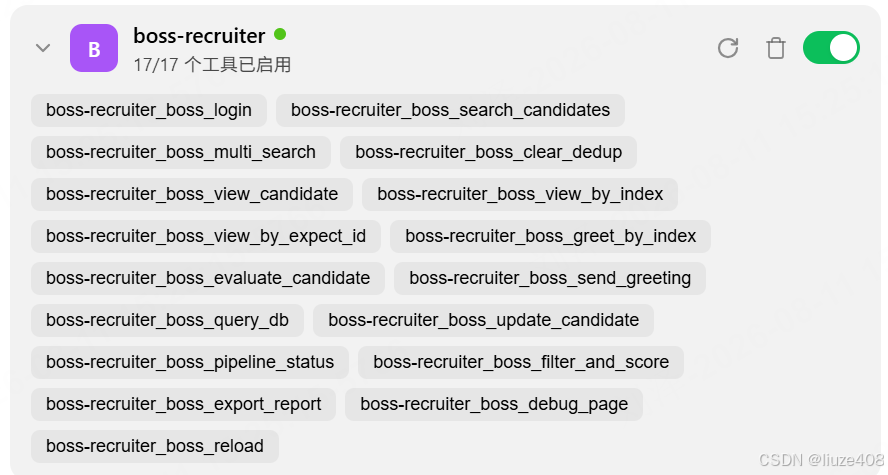
(由于Boss监测技术,此项目仅限于搜索牛人推荐页)
参考询问词:
请用 boss_multi_search,关键词 ["招商经理","运营经理","法务经理","市场经理"],城市XX,请帮我把生成的候选人按名字、年龄、工作年限、学历,优势能力等你认为属于筛选条件的候选人名单生成一个表格给我,每个表头都能筛,不要用老旧的数据库里面的内容回答我。