适配器模式在多支付渠道集成中的实践
在电商、SaaS 订阅与跨境出海业务中,系统通常需要对接多家外部支付渠道(如微信支付、支付宝、银联、PayPal、Stripe 等)。每个支付渠道的技术规范往往差异极大:
- 数据格式异构:有的使用 JSON,有的使用 XML,有的使用 Form 表单编码;
- 加密与签名算法各异:涉及 RSA2、SM2、HMAC-SHA256,证书模式或公钥模式;
- 异步回调与错误码千差万别:微信返回 SUCCESS/FAIL,支付宝返回 TRADE_SUCCESS/TRADE_CLOSED,银联返回 00/01。
如果直接在订单业务服务中通过大量的 if (channel == WECHAT) { … } else if (channel == ALIPAY) { … } 编写代码,不出半年整个支付模块就会演变成数千行不可维护的“代码泥潭”,新增或升级一个支付渠道就会引发全量回归测试的风险。
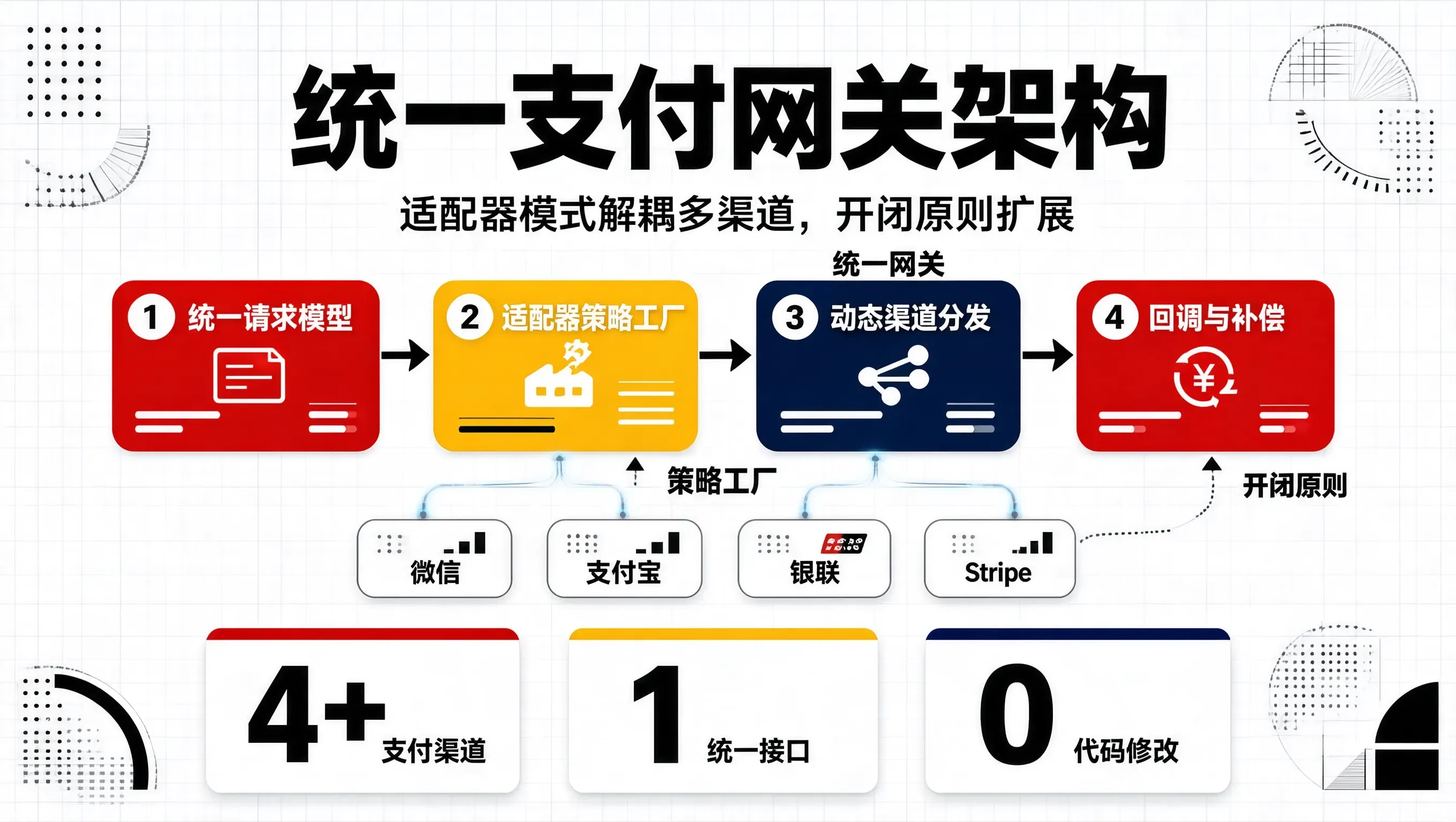
引入适配器模式(Adapter Pattern)结合策略工厂,能够构建一套高内聚、低耦合且符合开闭原则(OCP)的统一支付网关架构。
统一支付架构模型设计
为了让上游业务系统(如收银台、订单服务、会员订阅)与底层千差万别的支付渠道解耦,我们抽象出标准的统一支付内核(Unified Payment Core):
[ 上游订单/收银台服务 ]
│ (只面向统一标准接口交互)
▼
[ 统一支付网关服务 (PaymentGatewayService) ]
│ (基于 channelCode 动态分派)
▼
[ 支付适配器策略工厂 (PaymentAdapterFactory) ]
├── WechatPayAdapter ──> [ 转换请求/签名 ] ──> 微信支付 API (JSON+RSA)
├── AlipayAdapter ──> [ 转换请求/签名 ] ──> 支付宝开放平台 (Form+RSA2)
├── UnionPayAdapter ──> [ 转换请求/签名 ] ──> 银联在线网关 (XML+SM2)
└── StripePayAdapter ──> [ 转换请求/签名 ] ──> Stripe API (REST)
核心接口与统一模型定义
1. 统一请求与响应标准模型
package com.example.payment.model;
import java.math.BigDecimal;
import java.util.Map;
public record UnifiedPayRequest(
String tradeOrderNo, // 系统内部唯一支付交易流水号
BigDecimal amount, // 支付金额(元)
String subject, // 订单标题
String clientIp, // 客户端发起 IP
String openId, // 渠道特定用户标识 (如微信 openid)
String returnUrl, // 同步跳转地址
String notifyUrl, // 异步回调地址
Map<String, String> extraParams // 渠道扩展附加参数
) {}
public record UnifiedPayResponse(
boolean success,
String channelTradeNo, // 渠道方交易流水号
String payData, // 支付凭据(如微信 JSAPI 调起参数、支付宝唤起 URL)
String errorCode,
String errorMessage
) {}
public record UnifiedNotifyResult(
boolean isSuccess,
String tradeOrderNo,
String channelTradeNo,
BigDecimal totalAmount,
String rawResponseToChannel // 响应给渠道的 ACK 报文
) {}
2. 支付适配器顶层接口
package com.example.payment.adapter;
import com.example.payment.model.UnifiedNotifyResult;
import com.example.payment.model.UnifiedPayRequest;
import com.example.payment.model.UnifiedPayResponse;
import java.util.Map;
public interface PaymentChannelAdapter {
/**
* 获取支持的渠道标识 (如: WECHAT_V3, ALIPAY_PAGE, STRIPE)
*/
String getChannelCode();
/**
* 发起统一统一下单/支付
*/
UnifiedPayResponse pay(UnifiedPayRequest request);
/**
* 统一解析并校验异步回调通知
*/
UnifiedNotifyResult parseAndVerifyNotify(Map<String, String> headers, String body);
/**
* 主动查询订单支付状态
*/
UnifiedNotifyResult queryOrderStatus(String tradeOrderNo);
}
适配器具体实现落地
1. 微信支付渠道适配器(WechatPayAdapter)
package com.example.payment.adapter.impl;
import com.example.payment.adapter.PaymentChannelAdapter;
import com.example.payment.model.UnifiedNotifyResult;
import com.example.payment.model.UnifiedPayRequest;
import com.example.payment.model.UnifiedPayResponse;
import org.slf4j.Logger;
import org.slf4j.LoggerFactory;
import org.springframework.stereotype.Component;
import java.math.BigDecimal;
import java.util.Map;
@Component
public class WechatPayAdapter implements PaymentChannelAdapter {
private static final Logger log = LoggerFactory.getLogger(WechatPayAdapter.class);
@Override
public String getChannelCode() {
return "WECHAT_PAY";
}
@Override
public UnifiedPayResponse pay(UnifiedPayRequest request) {
log.info("【微信支付】构建统一下单报文, tradeOrderNo: {}", request.tradeOrderNo());
// 1. 将标准请求转换为微信特有的 V3 API JSON 结构
// 微信金额单位为分
long totalFeeFen = request.amount().multiply(new BigDecimal("100")).longValue();
try {
// 2. 调用微信 SDK / HTTP 客户端发起请求并加签 (模拟调用)
String prepayId = "wx_prepay_id_" + System.currentTimeMillis();
String jsapiJson = String.format("{\\"appId\\":\\"wx123456\\",\\"prepayId\\":\\"%s\\"}", prepayId);
return new UnifiedPayResponse(true, prepayId, jsapiJson, null, null);
} catch (Exception e) {
log.error("微信统一下单异常", e);
return new UnifiedPayResponse(false, null, null, "WECHAT_ERROR", e.getMessage());
}
}
@Override
public UnifiedNotifyResult parseAndVerifyNotify(Map<String, String> headers, String body) {
log.info("【微信支付】接收到异步通知,执行公钥验签与报文解密…");
// 1. 提取微信头部签名: Wechatpay-Signature, Wechatpay-Timestamp, Wechatpay-Nonce
// 2. 证书/平台公钥验签与 AES-256-GCM 解密 (此处简写核心逻辑)
String mockTradeOrderNo = "ORD_20260907_0001";
String mockChannelTradeNo = "WX_TRANSACTION_987654321";
return new UnifiedNotifyResult(
true,
mockTradeOrderNo,
mockChannelTradeNo,
new BigDecimal("99.00"),
"{\\"code\\":\\"SUCCESS\\",\\"message\\":\\"成功\\"}"
);
}
@Override
public UnifiedNotifyResult queryOrderStatus(String tradeOrderNo) {
// 实现微信主动查单接口
return new UnifiedNotifyResult(true, tradeOrderNo, "WX_TX_123", BigDecimal.TEN, "SUCCESS");
}
}
2. 支付宝渠道适配器(AlipayAdapter)
package com.example.payment.adapter.impl;
import com.example.payment.adapter.PaymentChannelAdapter;
import com.example.payment.model.UnifiedNotifyResult;
import com.example.payment.model.UnifiedPayRequest;
import com.example.payment.model.UnifiedPayResponse;
import org.slf4j.Logger;
import org.slf4j.LoggerFactory;
import org.springframework.stereotype.Component;
import java.math.BigDecimal;
import java.util.Map;
@Component
public class AlipayAdapter implements PaymentChannelAdapter {
private static final Logger log = LoggerFactory.getLogger(AlipayAdapter.class);
@Override
public String getChannelCode() {
return "ALIPAY";
}
@Override
public UnifiedPayResponse pay(UnifiedPayRequest request) {
log.info("【支付宝】构建手机网站支付请求, tradeOrderNo: {}", request.tradeOrderNo());
// 支付宝金额单位为元,支持字符串格式
String totalAmountStr = request.amount().setScale(2, java.math.RoundingMode.HALF_UP).toString();
// 构造唤起 URL 或表单 HTML
String alipayForm = "<form name='alipayment' action='https://openapi.alipay.com/gateway.do' method='POST'>…</form>";
return new UnifiedPayResponse(true, "ALI_PREPAY_" + request.tradeOrderNo(), alipayForm, null, null);
}
@Override
public UnifiedNotifyResult parseAndVerifyNotify(Map<String, String> headers, String body) {
log.info("【支付宝】接收到 Form 表单异步通知,执行 RSA2 验签…");
// 验证支付宝签名与 trade_status
return new UnifiedNotifyResult(
true,
"ORD_20260907_0002",
"20260907220014000000",
new BigDecimal("199.00"),
"success" // 支付宝要求的 ACK 响应文本
);
}
@Override
public UnifiedNotifyResult queryOrderStatus(String tradeOrderNo) {
return new UnifiedNotifyResult(true, tradeOrderNo, "ALI_TX_456", BigDecimal.ONE, "SUCCESS");
}
}
适配器策略工厂与统一分发网关
利用 Spring 的依赖自动注入,将所有 PaymentChannelAdapter 统一收集至 Map 中:
package com.example.payment.factory;
import com.example.payment.adapter.PaymentChannelAdapter;
import org.springframework.stereotype.Component;
import java.util.List;
import java.util.Map;
import java.util.concurrent.ConcurrentHashMap;
@Component
public class PaymentAdapterFactory {
private final Map<String, PaymentChannelAdapter> adapterMap = new ConcurrentHashMap<>();
public PaymentAdapterFactory(List<PaymentChannelAdapter> adapters) {
for (PaymentChannelAdapter adapter : adapters) {
adapterMap.put(adapter.getChannelCode(), adapter);
}
}
public PaymentChannelAdapter getAdapter(String channelCode) {
PaymentChannelAdapter adapter = adapterMap.get(channelCode);
if (adapter == null) {
throw new IllegalArgumentException("不支持的支付渠道: " + channelCode);
}
return adapter;
}
}
统一门面网关服务:
package com.example.payment.service;
import com.example.payment.adapter.PaymentChannelAdapter;
import com.example.payment.factory.PaymentAdapterFactory;
import com.example.payment.model.UnifiedNotifyResult;
import com.example.payment.model.UnifiedPayRequest;
import com.example.payment.model.UnifiedPayResponse;
import org.slf4j.Logger;
import org.slf4j.LoggerFactory;
import org.springframework.stereotype.Service;
import java.util.Map;
@Service
public class PaymentGatewayService {
private static final Logger log = LoggerFactory.getLogger(PaymentGatewayService.class);
private final PaymentAdapterFactory adapterFactory;
public PaymentGatewayService(PaymentAdapterFactory adapterFactory) {
this.adapterFactory = adapterFactory;
}
/**
* 统一统一下单入口
*/
public UnifiedPayResponse createPayment(String channelCode, UnifiedPayRequest request) {
PaymentChannelAdapter adapter = adapterFactory.getAdapter(channelCode);
return adapter.pay(request);
}
/**
* 统一异步回调入口
*/
public String handleCallback(String channelCode, Map<String, String> headers, String body) {
PaymentChannelAdapter adapter = adapterFactory.getAdapter(channelCode);
UnifiedNotifyResult result = adapter.parseAndVerifyNotify(headers, body);
if (!result.isSuccess()) {
log.error("渠道 [{}] 异步回调验签失败, 原始报文: {}", channelCode, body);
return "fail";
}
// 执行核心订单状态变更与分布式流水登记(通过状态机与幂等流水表)
log.info("支付成功,开始驱动订单履约: tradeOrderNo={}, channelTradeNo={}",
result.tradeOrderNo(), result.channelTradeNo());
// 返回给渠道期望的响应字符串 (如 "success" 或 {"code":"SUCCESS"})
return result.rawResponseToChannel();
}
}
生产主动查单与轮询补偿机制
在网络不稳定或渠道异步回调丢失(丢包/防火墙拦截)的情况下,不能单纯依赖回调。系统必须配备定时主动查单轮询任务:
工程收益总结
在采用适配器模式重构支付中台后: