长安链: Cryptogen层支持HSM
参考
https://docs.chainmaker.org.cn/operation/%E7%A1%AC%E4%BB%B6%E5%8A%A0%E5%AF%86.html
https://docs.chainmaker.org.cn/tech/%E7%A1%AC%E4%BB%B6%E5%8A%A0%E5%AF%86.html
测试网络部署架构:
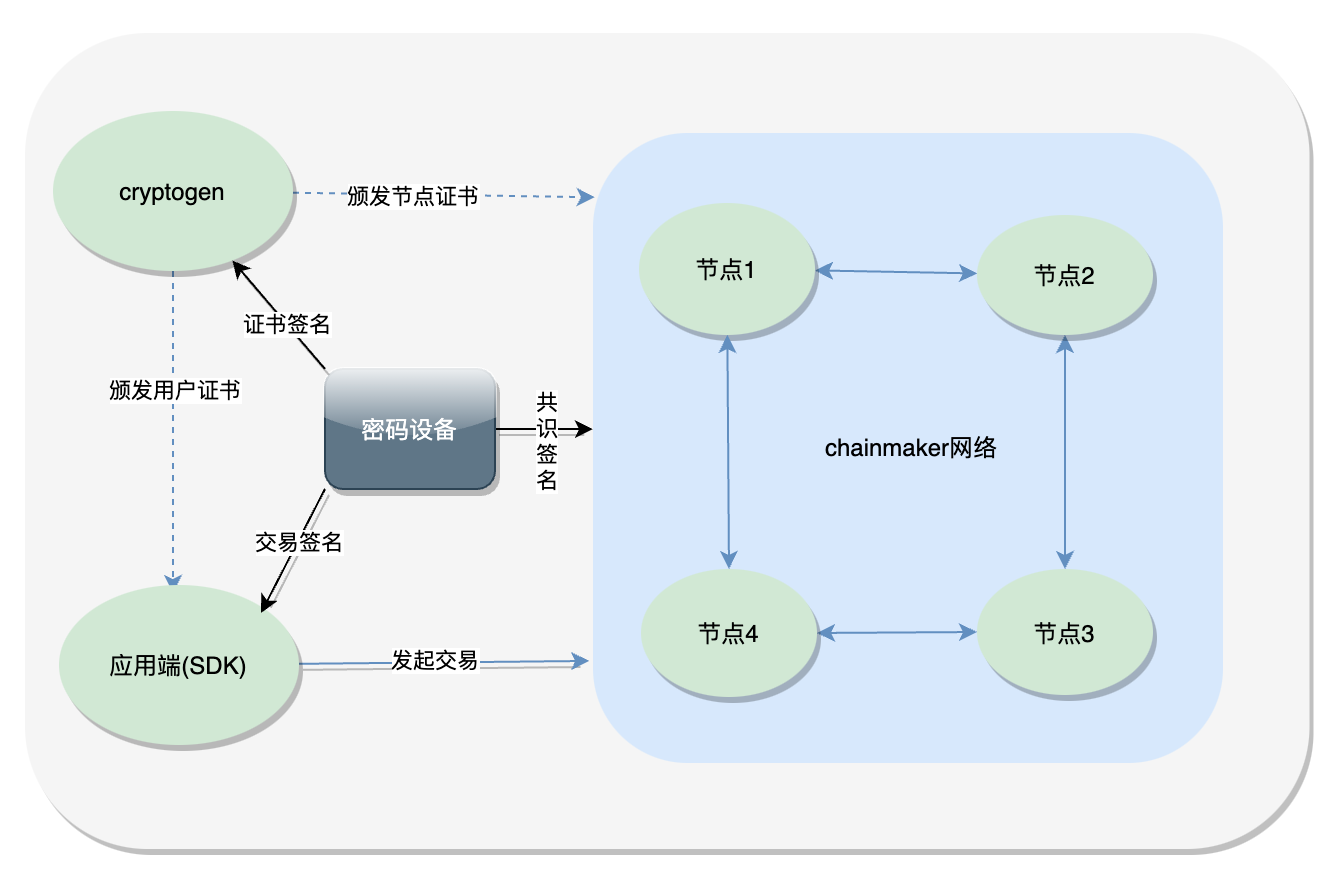
推荐部署架构

Fabric: 使用Fabric Ca Server
参考Thales LUNA:
https://cpl.thalesgroup.com/sites/default/files/content/integration_guides/field_document/2020-06/007-000084-001_BlockChain_Hyperledger_Integration Guide_RevD.pdf
https://cpl.thalesgroup.com/sites/default/files/content/integration_guides/field_document/2021-03/BlockChain_Hyperledger_LunaHSM_Integration%20Guide_RevE.pdf
Msp目录可以用Fabric提供的cryptogen命令生成,但是用cryptogen命令生成是非常不灵活的,生产环境中,应当使用Fabric提供的另一个组件FabricCA。Fabric ca已支持使用HSM, 由它产生的证书配到peer|orderer下
Fabric根CA模式使用HSM, 如下图: (此文档都是针对这个应用场景) 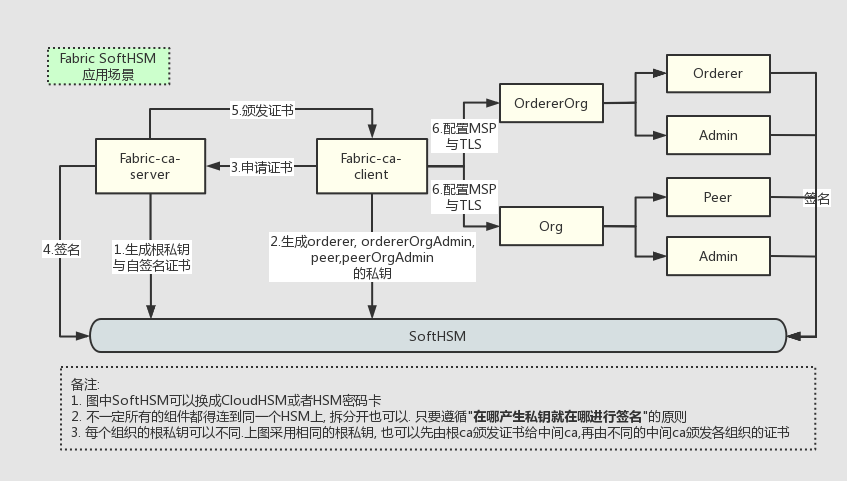 安装Golang, 编译fabric-ca-server和fabric-ca-client项目:
- (0) 安装Go语言编译环境
- (1) 下载测试项目fabric-basic-network
- (2) fabric-ca-server 体验hsm
- (3) fabric-ca-client 体验hsm
cd fabric-ca-client
创建 orderer 和 org 使用的 hsm slot
# softhsm中的创建命令 (slot index 与我的不一样没关系)
softhsm2-util –init-token –slot 0 –label "fabric"#已在上一步fabric-ca-server时创建过了
softhsm2-util –init-token –slot 1 –label "orderer.example.com"
softhsm2-util –init-token –slot 2 –label "org1.example.com"
#查看
softhsm2-util –show-slots
#删除
#softhsm2-util –delete-token –serial xxxx
向 ca-server 申请证书,并存入ca-client使用的hsm中
#运行前先确认 fabric-ca-server是否开着
cd native
./gencerts.sh
注意gencerts.sh脚本内与 hsm 相关的配置
BCCSP_DEFAULT=PKCS11#FIXME: PKCS11 | SW
PIN=222222# hsm的user pin
LIB=/usr/local/lib/softhsm/libsofthsm2.so #hsm的so库
脚本内申请证书相关的方法genmsp参数说明
ORG_DIR=$1
ORG_NAME=$2
NODE_DIR=$3
NODE_NAME=$4
LABEL=$5#hsm的lable, org${org}.example.com 和 orderer.example.com
NODE_OU=$6
BCCSP_SWITCH=$7#SW表示存本地, PKCS11表示存HSM内
#使用方法
## org1的peer0证书
genmsp peerOrganizations org${org}.example.com peers peer${peer}. org${org}.example.com peer SW
## org1的Admin证书
genmsp peerOrganizations org${org}.example.com users Admin@ org${org}.example.com admin SW
## ordererOrg的orderer证书
genmsp ordererOrganizations example.com orderers orderer. orderer.example.com orderer $BCCSP_DEFAULT
## ordererOrg的Admin证书
genmsp ordererOrganizations example.com orderers orderer2. orderer.example.com orderer $BCCSP_DEFAULT
运行成功,证书将会生成在此目录下 crypto-config
tree -L 1 -d crypto-config
crypto-config
├── ordererOrganizations#orderer相关
├── peerOrganizations#org peer相关
└── register#ca登记员相关(ca-client自己使用)
在Fabric各组件上使用HSM
下载Fabric项目
git clone https://github.com/hyperledger/fabric.git
git checkout v2.2.1
编译命令
# 各组件分别编译 (输出文件在 .build/bin 目录下)
make cryptogen
make configtxgen
make orderer
make peer
# or 编译所有组件
make native
# 各组件分别生成 docker image
make orderer-docker
make peer-docker
make tools-docker
# or 生成所有 docker image
make docker
# 查看
make docker-list
# native docker checks
make all
编译Fabric的docker image
make docker GO_TAGS=pkcs11
Orderer 体验hsm
配置文件说明
3-orgs/multi-orderers-multi-orgs-no-ca/0.bootOrderer/docker-compose.yaml
services:
orderer.example.com:
environment: #添加环境变量
– ORDERER_GENERAL_BCCSP_DEFAULT=PKCS11
– ORDERER_GENERAL_BCCSP_PKCS11_LIBRARY=/usr/local/lib/softhsm/libsofthsm2.so
– ORDERER_GENERAL_BCCSP_PKCS11_PIN=222222
– ORDERER_GENERAL_BCCSP_PKCS11_LABEL=orderer.example.com
– ORDERER_GENERAL_BCCSP_PKCS11_HASH=SHA2
– ORDERER_GENERAL_BCCSP_PKCS11_SECURITY=256
#softhsm 相关
– SOFTHSM2_CONF=/etc/softhsm2.conf
volumes: #添加映射文件
#softhsm 相关
– /etc/softhsm2.conf:/etc/softhsm2.conf
– /var/lib/softhsm/tokens/:/var/lib/softhsm/tokens/
– /usr/local/lib/softhsm/libsofthsm2.so:/usr/local/lib/softhsm/libsofthsm2.so #使用基于fabric-ca-hsm镜像制作的image的话, 这个文件不用映射
test hsm in orderer
#部署一个orderer
make ORGNUM=1 MAJORITY=0 USE_CRYPTOGEN=0 boot_orderer
#部署一个peer和一个应用通道
make ORGNUM=1 MAJORITY=0 USE_CRYPTOGEN=0 boot_org1
#添加一个orderer
make ORGNUM=1 MAJORITY=0 USE_CRYPTOGEN=0 add_1orderer
#参数说明
# ORGNUM: peer组织总数
# MAJORITY: 1表示使用需要绝大多数同意的策略; 0表示使用单个组织同意的策略
# USE_CRYPTOGEN: 1表示用cryptogen重新生成msp; 0表示拷取fabric-ca-client生成好的msp
orderer都能正常运转的话,我认为orderer上配置HSM算是成功了
结论
主机上能成功使用HSM的组件
- Fabric-ca-server
- Fabric-ca-client
容器化后能成功使用HSM的组件(需要将softhsm能力做进image中)
- Fabric-ca-server
- Orderer
往期精彩回顾: