这篇用一个示例把 4 个 Lottie 素材放到同一屏上同时播放,演示两件事:多路动画怎么各自独立又统一控制,以及 LottieAnimation 那个「写了 width 也不生效」的坑到底该怎么解。
本文是 QML Lottie 系列第 2 篇,共 3 篇。
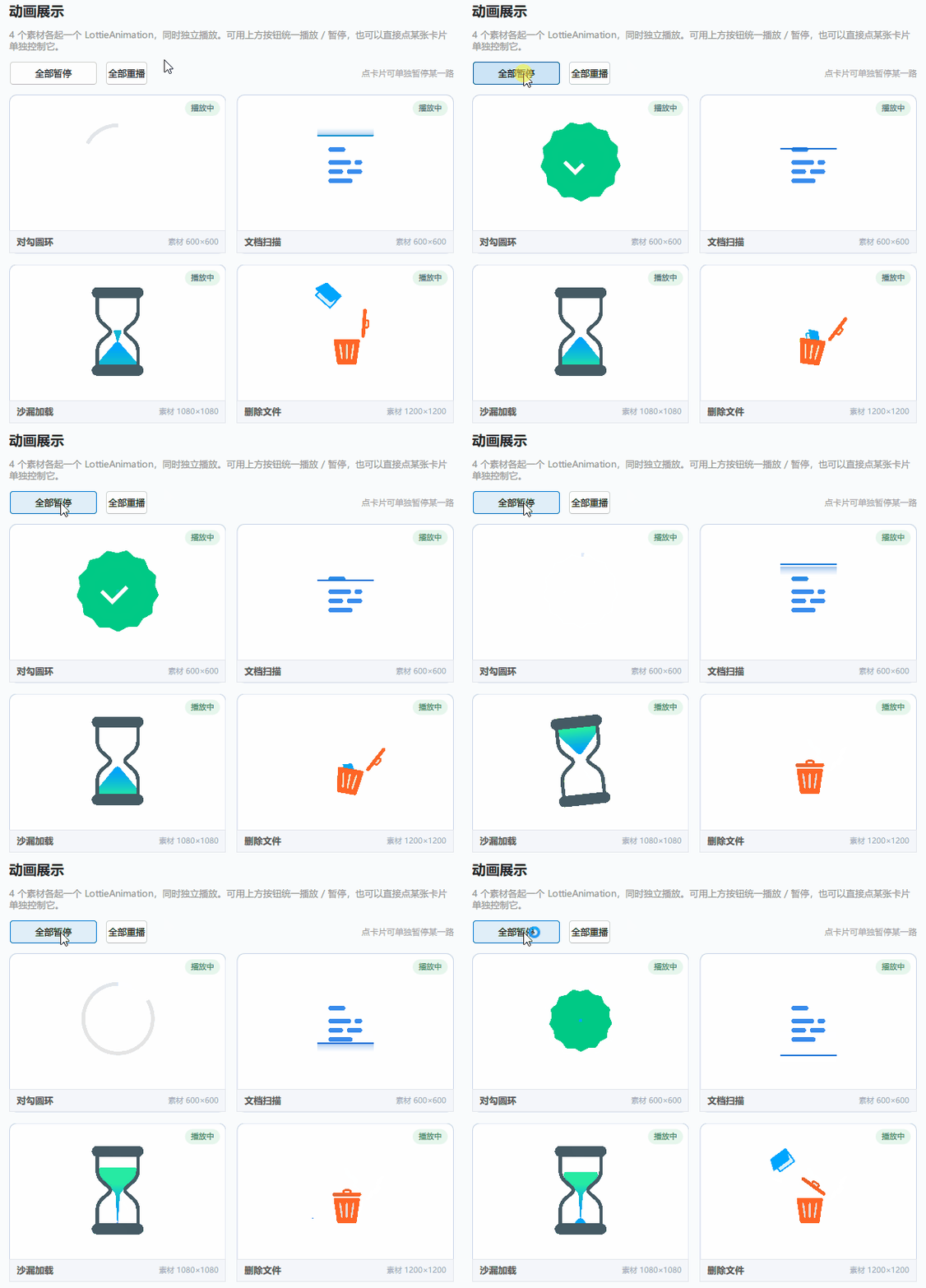
动画展示
4 个素材各占一张卡片,进入即同时播放。顶部一排是「全部播放 / 全部暂停」和「全部重播」,直接点某张卡片则只控制那一路。
演示代码
import QtQuick
import QtQuick.Controls
import QtQuick.Layouts
import Qt.labs.lottieqt
Rectangle {
id: root
color: "#FAFBFC"
property bool allPlaying: true
property var cards: [
{ name: "对勾圆环", src: "qrc:/lottie/success.json" },
{ name: "文档扫描", src: "qrc:/lottie/document-ocr-scan.json" },
{ name: "沙漏加载", src: "qrc:/lottie/loading-sand-clock_qt.json" },
{ name: "删除文件", src: "qrc:/lottie/delete-bin.json" }
]
// 统一控制所有卡片:卡片本身对外暴露 setPlaying()
// 注意 Grid 只管摆放、不能按下标取子项,要通过 Repeater 来索引
function setAll(on) {
allPlaying = on
for (var i = 0; i < cardRepeater.count; ++i) {
var c = cardRepeater.itemAt(i)
if (c)
c.setPlaying(on)
}
}
// 单卡片被点了之后,把「全部播放 / 全部暂停」的文案同步过来
function syncAllPlaying() {
for (var i = 0; i < cardRepeater.count; ++i) {
var c = cardRepeater.itemAt(i)
if (c && c.playing) {
allPlaying = true
return
}
}
allPlaying = false
}
ColumnLayout {
anchors.fill: parent
anchors.margins: 18
spacing: 12
// … 省略页面标题与说明文案 …
// 统一控制
RowLayout {
Layout.fillWidth: true
spacing: 10
Button {
text: root.allPlaying ? "全部暂停" : "全部播放"
implicitHeight: 32
implicitWidth: 116
onClicked: root.setAll(!root.allPlaying)
}
Button {
text: "全部重播"
implicitHeight: 32
onClicked: {
root.setAll(true)
for (var i = 0; i < cardRepeater.count; ++i) {
var c = cardRepeater.itemAt(i)
if (!c)
continue
var a = c.childAnim()
a.gotoAndPlay(a.startFrame)
}
}
}
Item { Layout.fillWidth: true }
Label {
text: "点卡片可单独暂停某一路"
color: "#999"
font.pixelSize: 11
}
}
Grid {
id: grid
Layout.fillWidth: true
Layout.fillHeight: true
columns: 2
columnSpacing: 14
rowSpacing: 14
Repeater {
id: cardRepeater
model: root.cards
delegate: Rectangle {
id: card
property bool playing: true
width: (grid.width – grid.columnSpacing) / 2
height: (grid.height – grid.rowSpacing) / 2
radius: 10
color: "#FFFFFF"
border.color: card.playing ? "#C9D4E8" : "#E3E6ED"
border.width: 1
clip: true
function setPlaying(on) {
playing = on
if (on)
anim.play()
else
anim.pause()
}
// 供控件外部统一驱动的出口
function childAnim() { return anim }
// 定尺容器:LottieAnimation 自己的宽高会被素材尺寸覆盖,缩放只能靠 scale
Item {
id: animBox
readonly property real side: Math.max(50, Math.min(card.width – 44,
card.height – 30 – 30))
width: side
height: side
anchors.horizontalCenter: parent.horizontalCenter
anchors.top: parent.top
anchors.topMargin: 14
LottieAnimation {
id: anim
source: modelData.src
autoPlay: true
loops: LottieAnimation.Infinite
quality: LottieAnimation.MediumQuality
transformOrigin: Item.TopLeft
scale: (width > 0 && height > 0)
? Math.min(animBox.width / width, animBox.height / height)
: 1
}
}
// … 省略底部名称与素材尺寸信息条 …
// … 省略右上角播放状态角标 …
// 点卡片单独开关这一路动画
MouseArea {
anchors.fill: parent
anchors.bottomMargin: 30
cursorShape: Qt.PointingHandCursor
onClicked: {
card.setPlaying(!card.playing)
root.syncAllPlaying()
}
}
}
}
}
}
}
关键逻辑讲解
尺寸改不动的正解
四个素材的固有尺寸各不相同,有 600×600 的,也有 1200×1200 的。如果你直接给 LottieAnimation 写 width / height,会发现完全不起作用——因为素材加载完成后,控件尺寸会被强制改写成素材本身的大小。
这是 Qt 源码里写死的行为,素材 JSON 里是多大,控件就被改成多大:
// qt 6.8.2 src/qtlottie/src/imports/lottieanimation.cpp
setWidth(m_animWidth); // 素材 JSON 里的 "w"
setHeight(m_animHeight); // 素材 JSON 里的 "h"
官方文档也明确说了这件事:改 LottieAnimation 的宽高不会影响动画显示的大小,要控制尺寸得把它套在一个外层容器里。
所以正确做法是:外面放一个 Item 当「画框」,动画自己用 scale 缩进去适配画框。
Item {
id: animBox
width: 230
height: 230
anchors.centerIn: parent // 居中的锚点挂在【外层】
LottieAnimation {
id: anim
source: "qrc:/lottie/success.json"
transformOrigin: Item.TopLeft
scale: (width > 0 && height > 0)
? Math.min(animBox.width / width, animBox.height / height)
: 1 // 加载前 width=0,不给守卫会算出 NaN
}
}
这里面有三个细节都不能省,少一个就会出问题。第一个是 transformOrigin: Item.TopLeft,默认缩放原点是中心,素材缩小时会往中间塌,和左上角对齐的外层容器对不上,所以必须改成从左上角开始缩。第二个是居中的 anchors 必须挂在外层 Item 上,挂在内层等于去居中那个 600×600 的大控件,缩完照样错位。第三个是 width > 0 的守卫,素材加载完成前 width 是 0,直接做除法会得到 NaN,整个动画就不显示了。
这样写还有个额外好处:换素材不用改数字。不管素材是 600² 还是 1200²,Math.min 都会自己算出合适的缩放比例。示例里卡片尺寸跟着窗口变,动画也会自动重新缩放,原理是一样的。
顺带提醒一下,不要试图去改素材 JSON 里的 w / h 来缩小动画。Lottie 的宽高是合成视口,图层坐标是绝对坐标,改小只会裁掉内容,不会等比缩小。
想按编号取卡片,别找 Grid,找 Repeater
统一控制所有卡片时,需要按下标一张一张拿到它们。最开始我写的是 grid.itemAt(i),运行直接报错说 itemAt 不是个函数。
原因很简单:Grid、Row、Column、Flow 这些布局组件只管把子项摆到正确位置,并不提供「按下标取子项」的能力。要索引子项,得找包裹在里面的 Repeater。
Repeater { id: cardRepeater; model: root.cards; delegate: … }
// 正确写法
cardRepeater.count
cardRepeater.itemAt(i)
每张卡片自己管自己的播放状态
每张卡片内部维护自己的播放状态,对外只暴露两个函数:一个用来开关播放,一个返回内部动画对象供外部统一操作。
function setPlaying(on) {
playing = on
if (on)
anim.play()
else
anim.pause()
}
function childAnim() { return anim }
顶层不直接操作动画控件,而是遍历所有卡片调用 setPlaying()。之所以要用这种「广播下去、卡片自己执行」的结构,是因为 LottieAnimation 本身没有 playing 属性,外面读不到它当前在不在播,只能在卡片里自己维护一份状态。
反过来,点单张卡片暂停后,顶部按钮的文案也要跟着变,所以有个 syncAllPlaying() 反过来查一遍所有卡片:只要还有一路在播,按钮就显示「全部暂停」,全停了才显示「全部播放」。
再说说「全部重播」为什么用 gotoAndPlay() 而不是 play()。play() 是从当前位置继续播,如果动画已经跑到一半了,点重播不会有任何视觉变化。gotoAndPlay(startFrame) 才会强制把播放头拨回第一帧再开始,这才是「重播」该有的效果。这个区别很容易忽略,记一下就好。
性能开销跟显示尺寸没关系,跟素材本身大小有关
同屏跑四路动画大约 280 帧/秒,还算流畅。但成本花在哪得心里有数:
| 对勾圆环 | 600×600 | 约 177 px |
| 文档扫描 | 600×600 | 约 177 px |
| 沙漏加载 | 1080×1080 | 约 177 px |
| 删除文件 | 1200×1200 | 约 177 px |
LottieAnimation 是用 QPainter 渲染的,每帧要绘制的尺寸是素材的固有尺寸,跟屏幕上显示多大没关系。1200×1200 的素材缩到 177 px 显示,每帧照样按 1200² 的尺寸来画。所以同屏路数多、素材又大的时候,渲染开销会线性上涨。
示例里统一用了 MediumQuality 画质。三档画质的区别大致是:LowQuality 最快但画面不平滑,HighQuality 最好看但开销最大,MediumQuality 介于两者之间。四路同跑时用中档是画面和性能比较平衡的选择。
系列文章
- QML 动画选择:GIF与Lottie 的区别,以及 Qt 6.8 与 6.11 的 Lottie 实现差异
- QML Lottie动画:素材独立控制与尺寸适配 【本篇】
- QML Lottie动画:播放控制、逐帧拖拽、方向控制
已验证环境:
- Qt 版本:推荐 Qt 6.11
- 操作系统:Windows 11
- 工程下载:QML 示例合集V2.0 – qml_lottie