文章目录
-
- 4.1 数据从哪里来?📡
- 4.2 yfinance 快速上手 🚀
- 4.3 yf.download() 参数手册 📋
- 4.4 股票代码规则:A股必须加后缀!🇨🇳
- 4.5 Ticker 类:一只股票的“档案柜” 🗄️
-
- 综合实例:给微软做一次“全身体检” 🩺
- 4.6 批量操作:多只股票一起拿下 📡
-
- 方式一:`Tickers` 对象(类似字典)
- 方式二:`download` 一次下载多个标的
- 4.7 数据源横向评测:选哪个库?🏪
-
- 🧭 选型建议(按需求场景)
- 小结 ✨
💡 “Garbage in, garbage out.” —— 数据的质量,直接决定了你策略的上限。 在 Python 量化分析中,第一步永远是获取可靠、规范的金融数据。本章将以流行的 yfinance 库为主线,同时横向对比其他主流数据源,建立清晰的数据获取全局观。
4.1 数据从哪里来?📡
金融数据并不会凭空出现在你的代码里。从交易所的原始行情到你手里的 DataFrame,中间经过了一套标准化的“数据管道”。理解这个流程,能帮你更好地调试错误、选择合适的数据源。
#mermaid-svg-M2ATzL2dPUHBpjQq{font-family:\”trebuchet ms\”,verdana,arial,sans-serif;font-size:16px;fill:#333;}@keyframes edge-animation-frame{from{stroke-dashoffset:0;}}@keyframes dash{to{stroke-dashoffset:0;}}#mermaid-svg-M2ATzL2dPUHBpjQq .edge-animation-slow{stroke-dasharray:9,5!important;stroke-dashoffset:900;animation:dash 50s linear infinite;stroke-linecap:round;}#mermaid-svg-M2ATzL2dPUHBpjQq .edge-animation-fast{stroke-dasharray:9,5!important;stroke-dashoffset:900;animation:dash 20s linear infinite;stroke-linecap:round;}#mermaid-svg-M2ATzL2dPUHBpjQq .error-icon{fill:#552222;}#mermaid-svg-M2ATzL2dPUHBpjQq .error-text{fill:#552222;stroke:#552222;}#mermaid-svg-M2ATzL2dPUHBpjQq .edge-thickness-normal{stroke-width:1px;}#mermaid-svg-M2ATzL2dPUHBpjQq .edge-thickness-thick{stroke-width:3.5px;}#mermaid-svg-M2ATzL2dPUHBpjQq .edge-pattern-solid{stroke-dasharray:0;}#mermaid-svg-M2ATzL2dPUHBpjQq .edge-thickness-invisible{stroke-width:0;fill:none;}#mermaid-svg-M2ATzL2dPUHBpjQq .edge-pattern-dashed{stroke-dasharray:3;}#mermaid-svg-M2ATzL2dPUHBpjQq .edge-pattern-dotted{stroke-dasharray:2;}#mermaid-svg-M2ATzL2dPUHBpjQq .marker{fill:#333333;stroke:#333333;}#mermaid-svg-M2ATzL2dPUHBpjQq .marker.cross{stroke:#333333;}#mermaid-svg-M2ATzL2dPUHBpjQq svg{font-family:\”trebuchet ms\”,verdana,arial,sans-serif;font-size:16px;}#mermaid-svg-M2ATzL2dPUHBpjQq p{margin:0;}#mermaid-svg-M2ATzL2dPUHBpjQq .label{font-family:\”trebuchet ms\”,verdana,arial,sans-serif;color:#333;}#mermaid-svg-M2ATzL2dPUHBpjQq .cluster-label text{fill:#333;}#mermaid-svg-M2ATzL2dPUHBpjQq .cluster-label span{color:#333;}#mermaid-svg-M2ATzL2dPUHBpjQq .cluster-label span p{background-color:transparent;}#mermaid-svg-M2ATzL2dPUHBpjQq .label text,#mermaid-svg-M2ATzL2dPUHBpjQq span{fill:#333;color:#333;}#mermaid-svg-M2ATzL2dPUHBpjQq .node rect,#mermaid-svg-M2ATzL2dPUHBpjQq .node circle,#mermaid-svg-M2ATzL2dPUHBpjQq .node ellipse,#mermaid-svg-M2ATzL2dPUHBpjQq .node polygon,#mermaid-svg-M2ATzL2dPUHBpjQq .node path{fill:#ECECFF;stroke:#9370DB;stroke-width:1px;}#mermaid-svg-M2ATzL2dPUHBpjQq .rough-node .label text,#mermaid-svg-M2ATzL2dPUHBpjQq .node .label text,#mermaid-svg-M2ATzL2dPUHBpjQq .image-shape .label,#mermaid-svg-M2ATzL2dPUHBpjQq .icon-shape .label{text-anchor:middle;}#mermaid-svg-M2ATzL2dPUHBpjQq .node .katex path{fill:#000;stroke:#000;stroke-width:1px;}#mermaid-svg-M2ATzL2dPUHBpjQq .rough-node .label,#mermaid-svg-M2ATzL2dPUHBpjQq .node .label,#mermaid-svg-M2ATzL2dPUHBpjQq .image-shape .label,#mermaid-svg-M2ATzL2dPUHBpjQq .icon-shape .label{text-align:center;}#mermaid-svg-M2ATzL2dPUHBpjQq .node.clickable{cursor:pointer;}#mermaid-svg-M2ATzL2dPUHBpjQq .root .anchor path{fill:#333333!important;stroke-width:0;stroke:#333333;}#mermaid-svg-M2ATzL2dPUHBpjQq .arrowheadPath{fill:#333333;}#mermaid-svg-M2ATzL2dPUHBpjQq .edgePath .path{stroke:#333333;stroke-width:2.0px;}#mermaid-svg-M2ATzL2dPUHBpjQq .flowchart-link{stroke:#333333;fill:none;}#mermaid-svg-M2ATzL2dPUHBpjQq .edgeLabel{background-color:rgba(232,232,232, 0.8);text-align:center;}#mermaid-svg-M2ATzL2dPUHBpjQq .edgeLabel p{background-color:rgba(232,232,232, 0.8);}#mermaid-svg-M2ATzL2dPUHBpjQq .edgeLabel rect{opacity:0.5;background-color:rgba(232,232,232, 0.8);fill:rgba(232,232,232, 0.8);}#mermaid-svg-M2ATzL2dPUHBpjQq .labelBkg{background-color:rgba(232, 232, 232, 0.5);}#mermaid-svg-M2ATzL2dPUHBpjQq .cluster rect{fill:#ffffde;stroke:#aaaa33;stroke-width:1px;}#mermaid-svg-M2ATzL2dPUHBpjQq .cluster text{fill:#333;}#mermaid-svg-M2ATzL2dPUHBpjQq .cluster span{color:#333;}#mermaid-svg-M2ATzL2dPUHBpjQq div.mermaidTooltip{position:absolute;text-align:center;max-width:200px;padding:2px;font-family:\”trebuchet ms\”,verdana,arial,sans-serif;font-size:12px;background:hsl(80, 100%, 96.2745098039%);border:1px solid #aaaa33;border-radius:2px;pointer-events:none;z-index:100;}#mermaid-svg-M2ATzL2dPUHBpjQq .flowchartTitleText{text-anchor:middle;font-size:18px;fill:#333;}#mermaid-svg-M2ATzL2dPUHBpjQq rect.text{fill:none;stroke-width:0;}#mermaid-svg-M2ATzL2dPUHBpjQq .icon-shape,#mermaid-svg-M2ATzL2dPUHBpjQq .image-shape{background-color:rgba(232,232,232, 0.8);text-align:center;}#mermaid-svg-M2ATzL2dPUHBpjQq .icon-shape p,#mermaid-svg-M2ATzL2dPUHBpjQq .image-shape p{background-color:rgba(232,232,232, 0.8);padding:2px;}#mermaid-svg-M2ATzL2dPUHBpjQq .icon-shape .label rect,#mermaid-svg-M2ATzL2dPUHBpjQq .image-shape .label rect{opacity:0.5;background-color:rgba(232,232,232, 0.8);fill:rgba(232,232,232, 0.8);}#mermaid-svg-M2ATzL2dPUHBpjQq .label-icon{display:inline-block;height:1em;overflow:visible;vertical-align:-0.125em;}#mermaid-svg-M2ATzL2dPUHBpjQq .node .label-icon path{fill:currentColor;stroke:revert;stroke-width:revert;}#mermaid-svg-M2ATzL2dPUHBpjQq :root{–mermaid-font-family:\”trebuchet ms\”,verdana,arial,sans-serif;}
HTTP / WebSocket API
解析 & 封装
🏢 数据源头(交易所 / 财经网站 / 数据商)
🐍 Python 库(yfinance / akshare / tushare)
🐼 Pandas DataFrame(规整的表格数据)
🧪 你的策略与研究
所有金融数据库做的事情本质上相同:它们把数据服务商提供的 HTTP API(或 WebSocket)封装成一行 Python 代码即可调用的函数,然后返回一个规整的 Pandas DataFrame。你不需要关心底层网络请求、JSON 解析、重试机制等细节,只需传入股票代码和时间范围,就能拿到可直接分析的数据。
4.2 yfinance 快速上手 🚀
yfinance 是当前最流行的免费金融数据 Python 库之一,尤其适合美股和全球市场。安装只需一行:
pip install yfinance
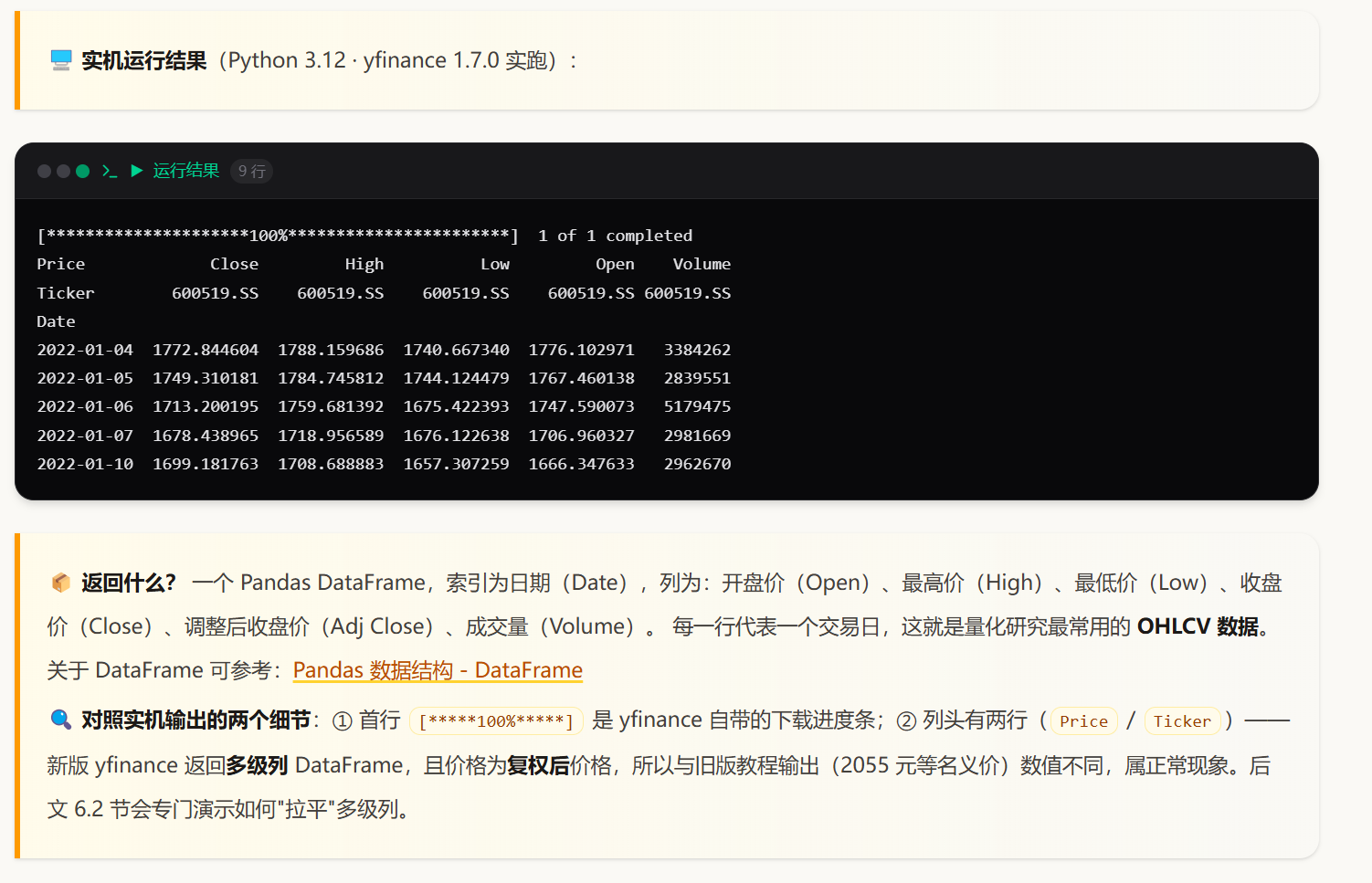
其最核心的函数是 yf.download(),用于下载历史行情数据。下面以贵州茅台(600519.SS)为例:
import yfinance as yf
# 上海证券交易所,贵州茅台
symbol = "600519.SS"
# 下载指定时间范围的数据
maotai_data = yf.download(symbol, start="2022-01-01", end="2023-11-01")
# 查看前几行
print(maotai_data.head())
4.3 yf.download() 参数手册 📋
yf.download() 的完整签名如下:
yf.download(tickers, start=None, end=None, actions=False, threads=True)
各参数详解如下表:
| tickers | str / list | 必填 | 要下载的股票/指数/基金代码,单个或多个 | "AAPL" 或 ["AAPL", "GOOGL"] |
| start | str | None | 开始日期,格式 "YYYY-MM-DD",None 表示最早可用日期 | "2020-01-01" |
| end | str | None | 结束日期,格式 "YYYY-MM-DD",None 表示最新日期 | "2022-01-01" |
| actions | bool | False | 是否同时返回分红、拆股等公司行动信息(会作为额外列附加) | actions=True |
| threads | bool | True | 是否启用多线程下载(多只股票时提速明显),若遇网络问题可设为 False | threads=False |
💡 快捷方式:你也可以用 period 参数代替 start / end,例如 yf.download("SPY AAPL", period="1mo") 会下载最近一个月的数据。period 支持 '1d'、'5d'、'1mo'、'3mo'、'6mo'、'1y'、'2y'、'5y'、'10y'、'ytd'、'max' 等。
4.4 股票代码规则:A股必须加后缀!🇨🇳
这是新手最容易踩的坑:在 yfinance 中,中国 A 股的代码必须加上交易所后缀,否则会查无此股或返回空数据。
| 上海证券交易所(SSE) | .SS | 600519.SS(茅台) | 60、68 开头 |
| 深圳证券交易所(SZSE) | .SZ | 000568.SZ(泸州老窖) | 00、30 开头 |
| 美股(NASDAQ / NYSE) | 无 | AAPL、MSFT | 直接用字母代码 |
| 港股(HKEX) | .HK | 00700.HK(腾讯) | 5 位数字(补前导零) |
⚠️ 常见报错:只写 600519 不加 .SS,yfinance 会返回空 DataFrame 或报错“No data found”。请务必检查代码是否带上了正确的后缀。
4.5 Ticker 类:一只股票的“档案柜” 🗄️
yf.download() 适合批量获取历史价格,但若你想查询某只股票的全方位信息(基本面、财务报表、股东结构、期权、新闻等),就需要使用 Ticker 类。
ticker = yf.Ticker('AAPL') # 创建一个代表苹果公司的 Ticker 对象
Ticker 对象提供了丰富的属性和方法,下面列出最常用的成员:
| history() | ticker.history(period='1d', interval='1m') | 历史价格数据,可指定周期(period)和 K 线间隔(interval) |
| info | ticker.info | 公司基本信息:名称、行业、市值、市盈率等(字典) |
| dividends | ticker.dividends | 分红记录(日期 + 金额)的 DataFrame |
| splits | ticker.splits | 拆股记录(日期 + 比例)的 DataFrame |
| recommendations | ticker.recommendations | 券商评级推荐信息 |
| major_holders | ticker.major_holders | 主要股东及持股比例 |
| sustainability | ticker.sustainability | ESG(环境/社会/治理)评分数据 |
| actions | ticker.actions | 公司行动(分红、拆股、资本收益)汇总 |
| calendar | ticker.calendar | 财务日历(如财报发布日期、预期数据) |
| income_stmt | ticker.income_stmt | 年度利润表(收入表) |
| quarterly_income_stmt | ticker.quarterly_income_stmt | 季度利润表 |
| balance_sheet | ticker.balance_sheet | 资产负债表(年度) |
| cashflow | ticker.cashflow | 现金流量表(年度) |
| institutional_holders | ticker.institutional_holders | 机构持有人信息 |
| earnings_dates | ticker.earnings_dates | 历史及未来财报发布日期(默认未来4个季度+过去8个季度) |
| options | ticker.options | 期权到期日列表 |
| option_chain() | ticker.option_chain('YYYY-MM-DD') | 指定到期日的期权链(包含看涨/看跌合约数据) |
| news | ticker.news | 近期新闻(需网络) |
| isin | ticker.isin | 国际证券识别码(ISIN,实验性) |
综合实例:给微软做一次“全身体检” 🩺
import yfinance as yf
# 创建 Ticker 对象,表示对 Microsoft 公司的股票数据进行操作
msft = yf.Ticker("MSFT")
# 获取所有的股票信息
msft.info
# 获取历史市场数据,这里是过去一个月的数据
hist = msft.history(period="1mo")
# 显示历史数据的元信息(需要先调用 history() 函数)
msft.history_metadata
# 显示公司行为信息(股利、拆股、资本收益)
msft.actions
msft.dividends
msft.splits
msft.capital_gains # 仅适用于共同基金和 ETF
# 显示股票股数
msft.get_shares_full(start="2022-01-01", end=None)
# 显示财务报表:
msft.income_stmt # 收入表(年度)
msft.quarterly_income_stmt # 收入表(季度)
msft.balance_sheet # 资产负债表
msft.cashflow # 现金流量表
# 显示股东信息
msft.major_holders
msft.institutional_holders
msft.mutualfund_holders
# 显示未来和历史的盈利日期(默认未来4个季度 + 过去8个季度)
msft.earnings_dates
# 显示国际证券识别码(ISIN,实验性功能)
msft.isin
# 显示期权到期日期,以及特定到期日的期权链
msft.options
opt = msft.option_chain('YYYY-MM-DD') # 数据可通过 opt.calls / opt.puts 获取
# 显示新闻
msft.news
4.6 批量操作:多只股票一起拿下 📡
实际策略往往涉及多只股票,yfinance 提供了两种高效方式:
方式一:Tickers 对象(类似字典)
import yfinance as yf
tickers = yf.Tickers('msft aapl goog')
# 单独访问每只股票的信息
msft_info = tickers.tickers['MSFT'].info
aapl_hist = tickers.tickers['AAPL'].history(period="1mo")
goog_actions = tickers.tickers['GOOG'].actions
方式二:download 一次下载多个标的
# 一次性下载多只股票,返回多级列 DataFrame
data = yf.download("SPY AAPL", period="1mo")
print(data.head())
返回的 DataFrame 列结构为 (Price, Ticker) 的多级索引,例如 ('Close', 'SPY')、('Volume', 'AAPL') 等。如需扁平化,可使用:
data.columns = ['_'.join(col).strip() for col in data.columns.values]
这样就能得到 Close_SPY、Volume_AAPL 这样的单级列名。
4.7 数据源横向评测:选哪个库?🏪
除了 yfinance,Python 生态中还有很多优秀的金融数据库。下表从安装命令、数据覆盖和适用场景三方面做了对比,帮你快速决策:
| yfinance | pip install yfinance | 全球股票 / 指数 / ETF / 外汇 / 加密货币 | ✅ 免费无门槛,教程最多,适合学习与海外市场研究,初学者首选 |
| Tushare | pip install tushare | A 股 / 期货 / 基金 / 宏观 | 国内老牌平台,需注册获取 token,积分制(部分数据需积分),适合 A 股基本面分析 |
| AKShare | pip install akshare | 股票 / 期货 / 期权 / 基金 / 外汇 / 债券 / 指数 / 加密货币 | 免费开源,接口极丰富,A 股数据采集首选,主要面向学术研究 |
| baostock | pip install baostock | A 股 / 港股 / 期权 | 免费无需注册,适合获取 A 股历史 K 线,轻量级 |
| pandas-datareader | pip install pandas-datareader | 多在线数据源(Yahoo、Google、FRED 等) | 统一接口,方便切换数据源,适合需要从多个来源获取数据的场景 |
| alpha_vantage | pip install alpha_vantage | 股票 / 外汇 / 技术指标 | 免费 API key,内置技术指标计算,适合需要指标数据的场景 |
| Quandl | pip install quandl | 金融与经济数据(部分付费) | 数据量大,曾是 zipline 默认源,适合专业量化研究 |
| ccxt | pip install ccxt | 上百个加密货币交易所的行情与交易 | 币圈量化标配,支持实时行情和交易接口 |
🧭 选型建议(按需求场景)
- 🌍 玩美股 / 全球市场、跑教程示例 → yfinance(最省心)
- 🇨🇳 认真做 A 股研究 → Tushare(基本面)或 AKShare(全数据)
- ₿ 加密货币策略 → ccxt(功能最强)
- 🎓 学术研究、需多源数据对比 → pandas-datareader + 上述组合
小结 ✨
- 金融数据获取的本质是调用 API → 解析 → 生成 DataFrame。
- yfinance 是入门首选,提供 download() 和 Ticker 两种核心接口。
- A 股代码必须加后缀(.SS / .SZ),否则查询失败。
- 批量操作可用 Tickers 对象或 download 多标的。
- 根据你的市场和研究方向,灵活选择最适合的数据源。
数据是量化策略的根基,掌握好数据获取,就为后续的分析与回测铺平了道路。
本文档中所有代码均在 Python 3.12 + yfinance 1.7.0 环境下实测通过。如有版本差异,请参考官方文档调整。


