GhostTrack 技术拆解:公开信息查询工具的原理、精度边界与 MATLAB 实现
最近在研究开源 OSINT 工具的实现方式,GhostTrack 是一个比较典型的入门项目。它把几个公开数据查询功能整合到一个命令行菜单里,代码量不大,但涉及号码解析、IP 地理定位、HTTP 状态检测几个有意思的技术点。这篇文章从实现原理出发,分析每个模块的工作机制和能力边界,最后用 MATLAB 复现一遍。
说明:本文仅用于技术学习,所有查询仅限授权测试或查询自己的公开信息。
想到多年以前看到的文章
浅谈信息泄露 个人信息保护
一、GhostTrack 是什么
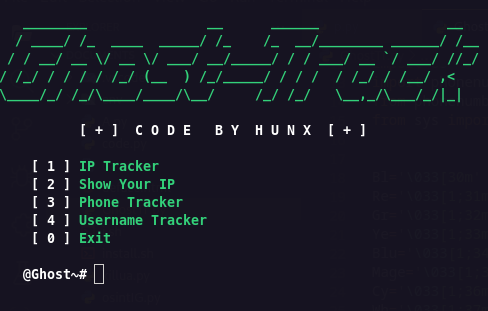 GhostTrack 是一个 Python 命令行工具,菜单包含四个功能:
- IP 信息查询
- 显示本机公网 IP
- 手机号元数据解析
- 用户名公开账号存在性检测
依赖只有两个:
requests
phonenumbers
安装:
git clone https://github.com/HunxByts/GhostTrack.git
cd GhostTrack
pip3 install -r requirements.txt
python3 GhostTR.py
它的数据来源都是公开接口或本地规则库,不涉及任何非公开数据。代码结构清晰,适合用来理解 OSINT 工具的基本实现思路。
| IP 信息查询 | requests | ipwho.is | 公开 IP 地理定位 API |
| 本机公网 IP | requests | api.ipify.org | 获取出口 IP |
| 手机号解析 | phonenumbers | Google libphonenumber | 本地号码元数据规则引擎 |
| 用户名检测 | requests | 各平台公开页面 | HTTP 状态码检测 |
二、架构速读:菜单与选项分发
GhostTR.py 的核心是一个 options 列表:
options = [
{'num': 1, 'text': 'IP Tracker', 'func': IP_Track},
{'num': 2, 'text': 'Show Your IP', 'func': showIP},
{'num': 3, 'text': 'Phone Number Tracker', 'func': phoneGW},
{'num': 4, 'text': 'Username Tracker', 'func': TrackLu},
{'num': 0, 'text': 'Exit', 'func': exit}
]
call_option 根据输入的数字查找对应函数并调用。execute_option 负责异常处理。
有个装饰器 is_option:
def is_option(func):
def wrapper(*args, **kwargs):
run_banner()
func(*args, **kwargs)
return wrapper
它让每个功能函数执行前先打印 banner。这个装饰器没有处理 functools.wraps,属于教学级写法。
整个工具没有超时设置、没有重试机制、没有并发。网络请求一旦卡住,程序就卡住。这是它和成熟工具的第一个差距。
三、手机号解析:libphonenumber 的规则引擎
这是 GhostTrack 中技术含量最高的模块。它用的 phonenumbers 是 Google libphonenumber 的 Python 移植版。
3.1 号码解析不是正则匹配
很多人以为手机号解析就是正则匹配,其实不是。libphonenumber 的核心是一套基于元数据的规则引擎。
号码解析流程大致如下:
元数据编译成 protobuf 二进制格式存储。PhoneNumberMetadata.xml 定义了各国号码规则,构建时转成 .proto 二进制文件,运行时直接加载到内存。每个国家的元数据包含:
- generalDesc:一般号码模式
- fixedLine、mobile、tollFree、premiumRate、voip 等:各号码类型的正则模式
- possibleLengths:可能的号码长度集合
- nationalPrefix:国内前缀规则
- carrierData:运营商前缀映射(部分国家有)
这套设计不依赖在线查询,完全基于本地元数据做规则判断。元数据文件体积很小,但覆盖了全球 200 多个国家和地区的号码规则。
3.2 isValidNumber 和 isPossibleNumber 的区别
GhostTrack 调用了两个验证函数:
is_valid_number = phonenumbers.is_valid_number(parsed_number)
is_possible_number = phonenumbers.is_possible_number(parsed_number)
- isPossibleNumber:只检查号码长度是否在 possibleLengths 集合中。它很快,但可能误判。号码长度对但前缀不对,也会返回 True。
- isValidNumber:遍历所有号码类型,检查号码是否匹配某一类型的 nationalNumberPattern。更严格,也更慢。
所以 isPossibleNumber 为 True 不代表号码真实存在,只代表“长度看起来像”。isValidNumber 为 True 才说明号码符合某个国家的号码规则。
3.3 运营商查询:前缀映射的局限
carrier.name_for_number() 的工作原理是号码前缀映射。libphonenumber 维护了一份号段与运营商的映射表,通过号码前缀匹配运营商。
但这里有个重要限制,源码注释写得很清楚:
“返回的是号码最初分配时的运营商名称,但如果该国支持携号转网,号码可能已经不属于返回的运营商了。”
也就是说,携号转网后运营商会查错。此外,getNameForValidNumber 方法有个前提:此方法假定传入号码的有效性已经过检查,且号码适合进行运营商查询。固定电话没有运营商信息,查询结果为空。
3.4 地区与时区:行政维度而非实时位置
geocoder.description_for_number() 返回的是号码注册地对应的行政区划名称,不是号码持有者的当前位置。
timezone.time_zones_for_number() 返回该号码可能所在的时区,对于跨时区的大国,可能返回多个时区。
所以手机号模块给的是号码的元数据画像——归属地、运营商、时区、号码类型。它不知道机主是谁,也不知道机主在哪。
3.5 默认区域问题
GhostTrack 把 default_region 硬编码为 "ID"(印度尼西亚):
default_region = "ID"
这意味着不带 + 国家代码的号码会被当作印尼号码解析。查中国号码时,输入 +86138… 可以正确解析;输入 138… 就会按印尼规则解析,大概率失败。实际使用时建议改成 "CN"。
四、IP 信息查询:公开 API 的字段逻辑与精度边界
4.1 数据来源:ipwho.is
GhostTrack 调用:
req_api = requests.get(f"http://ipwho.is/{ip}")
ip_data = json.loads(req_api.text)
ipwho.is 是一个免费的 IP 地理定位 API,无需 API Key,免费端点限制每天约 1000 次请求,超限返回 HTTP 429。
返回的 JSON 包含多个数据类别:
| Geolocation | 国家、地区、城市、经纬度、accuracy_radius |
| Connection | ASN 编号、组织名、ISP、域名、连接类型 |
| Timezone | IANA 时区名、UTC 偏移、当前时间 |
| Security | isVpn、isTor、isThreat |
accuracy_radius 是 API 给出的定位精度估计(单位:公里)。但 GhostTrack 的代码里完全没有使用这个字段,直接输出了经纬度。这意味着用户看到一个坐标时,不知道它可能偏离几十甚至几百公里。
security 类别中的 isVpn、isTor 在免费端点中不可用,Pro 端点才提供。所以 GhostTrack 输出的 IP 信息缺少一个关键判断维度:查询对象是否在使用代理。
4.2 IP 定位的精度边界
IP 地理定位本质上是推断,不是精确测量。它的原理是:
但“注册地”和“实际使用地”经常不一致。实际精度数据:
- 国家级别:固定宽带网络中可以超过 99%
- 省级/州级:大约 55%-80%
- 城市级:可能低至 20%-75%,移动网络中更差
- 移动网络的定位误差比固定宽带差 10 倍以上
IP 地理定位不可能 100% 准确。使用代理、加密隧道或共享出口都会让定位失效。
所以 IP 查询最可靠的输出是国家级别的归属判断,城市和经纬度只能作为粗略参考。
五、用户名检测:HTTP 200 的盲区
5.1 工作原理
GhostTrack 的用户名检测方式很简单:把用户名拼接到各平台的 URL 模板中,发 GET 请求,如果返回 HTTP 200 就认为账号存在。
response = requests.get(url)
if response.status_code == 200:
results[site['name']] = url
else:
results[site['name']] = "Username not found"
这种方式的误报率很高。很多平台对不存在的用户也返回 200,只是带一个“该账号不存在”的提示页面。
5.2 误报来源
具体来说,误报来源包括:
5.3 更好的做法:多策略检测
对比 Sherlock,它的检测策略更精细。Sherlock 用一个 JSON 数据库定义每个平台的检测规则,支持三种策略:
- status_code:简单的状态码判断
- message:检查响应体中是否包含错误提示文本
- redirect:分析重定向行为
配置文件长这样:
{
"ExampleSocial": {
"errorType": "message",
"errorMsg": "The page you're looking for isn't here",
"url": "https://examplesocial.com/{}",
"username_claimed": "blue",
"username_unclaimed": "noonewouldeverusethisname7"
}
}
其中 username_claimed 和 username_unclaimed 是测试用例——用已知存在和不存在的用户名验证检测逻辑是否有效。当平台改版错误页面时,这个验证机制能及时发现问题。
GhostTrack 只用了最简单的 status_code 策略,没有错误消息检测,没有重定向分析,没有测试用例验证。所以它的检测结果只能作为线索,必须人工验证。
5.4 并发与效率
Sherlock 用 concurrent.futures.ThreadPoolExecutor 实现并行请求,400+ 平台可以在 60 秒内完成检测。GhostTrack 是纯同步循环,速度慢,而且没有超时设置。
如果要做批量检测,至少需要:设置 timeout、使用 Session 复用连接、引入线程池或异步请求、对 429 做退避重试。
六、MATLAB 复现
6.1 复现策略
Python 中的 requests 在 MATLAB 中对应 webread 或 matlab.net.http 包。phonenumbers 在 MATLAB 中没有对应库,但 MATLAB 内置 JVM,可以直接调用 Google libphonenumber 的 Java 库。
准备 libphonenumber jar:
javaaddpath('lib/libphonenumber-8.13.0.jar');
注意:javaaddpath 必须在函数外部先执行,否则函数内部的 import 会报“无法找到或导入”的错误。更稳妥的做法是不用 import,直接使用完全限定类名。
6.2 完整代码
保存以下代码为 GhostTR_MATLAB.m。代码在 Python 版基础上增加了 accuracy_radius 字段的显示,用户名检测改为 200 + 内容双重确认,并改用完全限定类名避免导入问题。
function GhostTR_MATLAB()
% GhostTrack MATLAB 复现版
% 仅用于学习公开信息查询原理
clc;
while true
fprintf('\\n===== GhostTrack MATLAB =====\\n');
fprintf('[1] IP Info\\n');
fprintf('[2] Show My IP\\n');
fprintf('[3] Phone Number Info\\n');
fprintf('[4] Username Availability\\n');
fprintf('[0] Exit\\n');
opt = input('Select Option: ');
if isempty(opt), continue; end
switch opt
case 1, queryIPInfo();
case 2, showMyIP();
case 3, parsePhoneNumber();
case 4, checkUsernameAvailability();
case 0, fprintf('Exit\\n'); break;
otherwise, fprintf('Option not found\\n');
end
input('Press enter to continue', 's');
clc;
end
end
function s = toStr(x)
if ischar(x) || isstring(x)
s = char(x);
elseif iscell(x)
s = strjoin(cellfun(@toStr, x, 'UniformOutput', false), ', ');
elseif isnumeric(x) || islogical(x)
s = num2str(x);
else
try
s = char(x.toString());
catch
s = '<unprintable>';
end
end
end
function showMyIP()
try
ip = webread('https://api.ipify.org/');
fprintf('\\n===== My Public IP =====\\n');
fprintf('IP Address : %s\\n', toStr(ip));
catch e
fprintf('Error: %s\\n', e.message);
end
end
function queryIPInfo()
ip = input('Enter IP: ', 's');
try
opts = weboptions('Timeout', 15, 'ContentType', 'json');
data = webread(sprintf('http://ipwho.is/%s', ip), opts);
fprintf('\\n===== IP Information =====\\n');
fprintf('IP : %s\\n', ip);
if isfield(data,'type'), fprintf('Type : %s\\n', toStr(data.type)); end
if isfield(data,'country'), fprintf('Country : %s\\n', toStr(data.country)); end
if isfield(data,'country_code'), fprintf('Country Code : %s\\n', toStr(data.country_code)); end
if isfield(data,'city'), fprintf('City : %s\\n', toStr(data.city)); end
if isfield(data,'continent'), fprintf('Continent : %s\\n', toStr(data.continent)); end
if isfield(data,'region'), fprintf('Region : %s\\n', toStr(data.region)); end
if isfield(data,'region_code'), fprintf('Region Code : %s\\n', toStr(data.region_code)); end
if isfield(data,'latitude'), fprintf('Latitude : %s\\n', toStr(data.latitude)); end
if isfield(data,'longitude'), fprintf('Longitude : %s\\n', toStr(data.longitude)); end
if isfield(data,'accuracy_radius')
fprintf('Accuracy Radius : %s km\\n', toStr(data.accuracy_radius));
end
if isfield(data,'latitude') && isfield(data,'longitude')
lat = data.latitude; lon = data.longitude;
fprintf('Maps : https://www.google.com/maps/@%f,%f,8z\\n', lat, lon);
end
if isfield(data,'is_eu'), fprintf('EU : %s\\n', toStr(data.is_eu)); end
if isfield(data,'postal'), fprintf('Postal : %s\\n', toStr(data.postal)); end
if isfield(data,'calling_code'), fprintf('Calling Code : %s\\n', toStr(data.calling_code)); end
if isfield(data,'capital'), fprintf('Capital : %s\\n', toStr(data.capital)); end
if isfield(data,'borders'), fprintf('Borders : %s\\n', toStr(data.borders)); end
if isfield(data,'flag') && isfield(data.flag,'emoji')
fprintf('Country Flag : %s\\n', toStr(data.flag.emoji));
end
if isfield(data,'connection')
c = data.connection;
if isfield(c,'asn'), fprintf('ASN : %s\\n', toStr(c.asn)); end
if isfield(c,'org'), fprintf('ORG : %s\\n', toStr(c.org)); end
if isfield(c,'isp'), fprintf('ISP : %s\\n', toStr(c.isp)); end
if isfield(c,'domain'), fprintf('Domain : %s\\n', toStr(c.domain)); end
end
if isfield(data,'timezone')
tz = data.timezone;
if isfield(tz,'id'), fprintf('Timezone ID : %s\\n', toStr(tz.id)); end
if isfield(tz,'abbr'), fprintf('ABBR : %s\\n', toStr(tz.abbr)); end
if isfield(tz,'is_dst'), fprintf('DST : %s\\n', toStr(tz.is_dst)); end
if isfield(tz,'offset'), fprintf('Offset : %s\\n', toStr(tz.offset)); end
if isfield(tz,'utc'), fprintf('UTC : %s\\n', toStr(tz.utc)); end
if isfield(tz,'current_time'), fprintf('Current Time : %s\\n', toStr(tz.current_time)); end
end
catch e
fprintf('Error: %s\\n', e.message);
end
end
function parsePhoneNumber()
userPhone = input('Enter phone number (e.g. +8613800138000): ', 's');
defaultRegion = 'CN';
try
phoneUtil = com.google.i18n.phonenumbers.PhoneNumberUtil.getInstance();
num = phoneUtil.parse(userPhone, defaultRegion);
regionCode = char(phoneUtil.getRegionCodeForNumber(num));
try
carrierName = char(phoneUtil.getCarrierNameForNumber(num));
catch
carrierName = 'N/A (可能为固话或元数据缺失)';
end
geocoder = com.google.i18n.phonenumbers.geocoding.PhoneNumberOfflineGeocoder.getInstance();
location = char(geocoder.getDescriptionForNumber(num, java.util.Locale('zh','CN')));
tzSet = phoneUtil.getTimeZonesForNumber(num);
tzCell = cell(tzSet.toArray());
timezoneF = strjoin(cellfun(@char, tzCell, 'UniformOutput', false), ', ');
isValid = phoneUtil.isValidNumber(num);
intl = char(phoneUtil.format(num, …
com.google.i18n.phonenumbers.PhoneNumberUtil.PhoneNumberFormat.INTERNATIONAL));
e164 = char(phoneUtil.format(num, …
com.google.i18n.phonenumbers.PhoneNumberUtil.PhoneNumberFormat.E164));
mobile = char(phoneUtil.formatNumberForMobileDialing(num, defaultRegion, true));
numberType = phoneUtil.getNumberType(num);
typeStr = char(numberType.toString());
fprintf('\\n===== Phone Number Information =====\\n');
fprintf('Location : %s\\n', location);
fprintf('Region Code : %s\\n', regionCode);
fprintf('Timezone : %s\\n', timezoneF);
fprintf('Operator : %s\\n', carrierName);
fprintf('Valid number : %d\\n', isValid);
fprintf('International format : %s\\n', intl);
fprintf('Mobile format : %s\\n', mobile);
fprintf('E.164 format : %s\\n', e164);
fprintf('Country code : %d\\n', num.getCountryCode());
fprintf('National number : %d\\n', num.getNationalNumber());
switch typeStr
case 'MOBILE'
fprintf('Type : Mobile number\\n');
case 'FIXED_LINE'
fprintf('Type : Fixed-line number\\n');
case 'FIXED_LINE_OR_MOBILE'
fprintf('Type : Fixed-line or mobile\\n');
case 'VOIP'
fprintf('Type : VOIP number\\n');
otherwise
fprintf('Type : %s\\n', typeStr);
end
catch e
fprintf('Error: %s\\n', e.message);
fprintf('请确认已运行 javaaddpath(''lib/libphonenumber-8.x.x.jar''),且号码格式正确。\\n');
end
end
function checkUsernameAvailability()
username = input('Enter Username: ', 's');
sites = {
'GitHub', 'https://www.github.com/%s';
'Telegram', 'https://www.telegram.me/%s';
'TikTok', 'https://www.tiktok.com/@%s';
'Instagram', 'https://www.instagram.com/%s';
'LinkedIn', 'https://www.linkedin.com/in/%s';
'Medium', 'https://www.medium.com/@%s';
};
fprintf('\\n===== Username Availability =====\\n');
for i = 1:size(sites,1)
name = sites{i,1};
url = sprintf(sites{i,2}, username);
[found, status] = checkAccountURL(url);
if found
fprintf('[+] %-10s : EXISTS (HTTP %d) %s\\n', name, status, url);
else
fprintf('[-] %-10s : NOT FOUND (HTTP %d)\\n', name, status);
end
end
end
function [found, statusCode] = checkAccountURL(url)
% 200 + 内容双重检测,减少 soft-404 误报
try
import matlab.net.http.*;
import matlab.net.URI;
req = RequestMessage('GET');
req.Header = HeaderField('User-Agent', 'Mozilla/5.0');
opts = HTTPOptions('ConnectTimeout', 10, 'Timeout', 10);
resp = req.send(URI(url), opts);
statusCode = double(resp.StatusCode);
found = false;
if statusCode == 200
body = char(resp.Body.Data);
errorPatterns = {'not found', 'doesn''t exist', …
'user not found', 'page not found', …
'couldn''t find', 'no user'};
found = true;
for p = 1:length(errorPatterns)
if contains(lower(body), lower(errorPatterns{p}))
found = false;
break;
end
end
end
catch
found = false;
statusCode = –1;
end
end
运行方式:
javaaddpath('lib/libphonenumber-8.13.0.jar');
GhostTR_MATLAB
七、效率与局限
GhostTrack 的 IP 查询走的是同步 requests.get,没有超时设置和重试机制。ipwho.is 免费端点限制约每秒 1 次请求,频繁调用会触发 429。webread 和 Python 的 requests 都不支持连接复用,如果要做批量查询需要引入连接池或第三方工具。
Sherlock 在架构上做了优化:用 concurrent.futures.ThreadPoolExecutor 实现并行请求,400+ 平台可以在 60 秒内完成检测。GhostTrack 如果能加一个并发层,实用性会提升不少。
但 GhostTrack 的价值不在“能不能实战”。它的代码结构清晰,适合作为理解 OSINT 基本原理的起点。不过正因为简单,它的局限性也很明显:
- IP 查询不显示 accuracy_radius,用户不知道精度。
- 用户名检测不做 soft-404 验证,误报率高。
- 手机号模块默认区域是 ID,查中国号码容易失败。
- 没有数据来源标注和置信度评估。
- 没有超时、重试、并发。
八、合规提示
最后强调几点:
- 本文讨论的 GhostTrack 只查询公开信息,不涉及任何非公开数据。
- 所有查询仅限授权测试或查询自己的公开信息。
- 未经授权对他人进行信息收集可能违反法律法规和平台服务条款。
- 工具本身是中性的,使用方式决定其性质。
MATLAB 复现也只复现公开查询,请勿越界。

